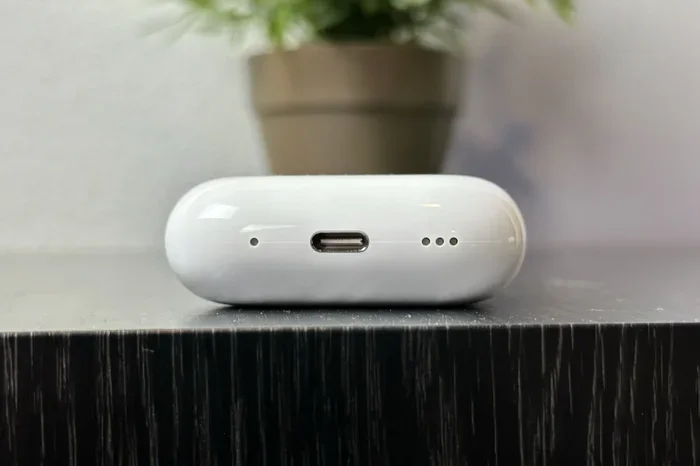
Featured image for AirPods USB-C charging case
Image source: digitaltrends.com
Yes, some AirPods now have USB-C charging. Apple transitioned select models from Lightning to USB-C in 2023 to comply with new regulations and improve universal compatibility. The AirPods Pro (2nd gen) USB-C, AirPods 4, and AirPods Max (USB-C) all feature this updated port. However, older AirPods models still use Apple’s Lightning connector.
If you’ve ever fumbled through a drawer full of tangled cables looking for the right charger, you’re not alone. The good news is that the world is slowly moving toward one universal cable, and Apple has finally joined that movement with its AirPods lineup. But the transition isn’t complete, and not every pair of AirPods you buy today will have the same port.
This is your complete guide to understanding USB-C charging on AirPods. We’ll break down which models have it, which ones don’t, why Apple made the switch, and what it means for your daily life. Think of it as a friendly roadmap through the world of tiny earbuds and even tinier charging ports.
Whether you’re shopping for new AirPods, trying to figure out if your current case will work with your new iPhone 15 charger, or just curious about the tech behind your favorite earbuds, you’ll find clear answers here. Let’s dive in.
Key Takeaways
- USB-C Adoption Timeline: Apple introduced USB-C AirPods starting September 2023 with the AirPods Pro (2nd generation) refresh.
- Models with USB-C: AirPods Pro 2 (2023), AirPods 4, AirPods 4 with Active Noise Cancellation, and AirPods Max (USB-C version).
- Models Still Using Lightning: AirPods (2nd and 3rd generation), original AirPods Pro, and original AirPods Max still rely on Lightning cables.
- Charging Speed Differences: USB-C doesn’t necessarily mean faster charging, but it offers better universal compatibility across devices.
- EU Regulation Impact: The European Union’s Common Charger Directive pushed Apple toward USB-C adoption across its product lineup.
- IP Rating Improvements: USB-C AirPods cases (like AirPods Pro 2) gained IP54 dust and sweat resistance.
- One Cable Solution: USB-C allows you to charge your iPhone 15, MacBook, iPad, and AirPods using the same cable.
📑 Table of Contents
- What AirPods Models Have USB-C Charging?
- Why Did Apple Switch AirPods to USB-C?
- How Does USB-C Charging on AirPods Actually Work?
- Practical Tips for Using USB-C AirPods
- Comparing USB-C AirPods to Alternatives
- Frequently Asked Questions About AirPods USB-C Charging
- The Bottom Line on AirPods USB-C Charging
What AirPods Models Have USB-C Charging?
The short answer: not all of them. Apple’s transition to USB-C has been gradual, starting in late 2023 and continuing with new releases. Here’s the full breakdown of where things stand today.
AirPods Pro (2nd Generation) USB-C Version — Released September 2023
This was Apple’s first major USB-C AirPods release. The refreshed AirPods Pro 2 came with a USB-C charging case instead of the Lightning version that launched in 2022. It’s visually nearly identical to its predecessor, but the port on the bottom of the case is now oval-shaped and accepts any standard USB-C cable.
Beyond the port change, this version also gained an IP54 rating for dust and sweat resistance. So if you’re working out or caught in light rain, your case has a bit more protection. It also supports Lossless Audio when paired with the upcoming Apple Vision Pro headset, thanks to the higher bandwidth that USB-C allows.
AirPods 4 — Released September 2024
Apple launched two versions of the AirPods 4 in September 2024. Both versions come with USB-C charging cases, which marked the end of Lightning for the standard AirPods line. The base AirPods 4 includes a USB-C case without wireless charging, while the AirPods 4 with Active Noise Cancellation includes a USB-C case that supports both wired and wireless charging.
This was a significant moment because it meant Apple’s most affordable AirPods model finally adopted the new standard. If you’re buying AirPods today as a gift or for yourself, you’re getting USB-C by default.
AirPods Max (USB-C Version) — Released September 2024
The original AirPods Max launched in 2020 with a Lightning port for charging. In September 2024, Apple released a refreshed version that swapped Lightning for USB-C. The change was minimal otherwise, though Apple also introduced new color options at the same time.
For over-ear headphone fans, this update was long overdue. The original AirPods Max’s Lightning port felt outdated even by 2024 standards, and many users had been waiting for the switch.
Which AirPods Models Still Use Lightning?
Several older AirPods models continue to use Lightning, and Apple still sells some of them:
- AirPods (2nd generation): Released 2019, still sold by some retailers with Lightning case.
- AirPods (3rd generation): Released 2021, uses Lightning for wired charging (MagSafe case version supports wireless too).
- AirPods Pro (1st generation): Released 2019, discontinued but still found in homes worldwide.
- AirPods Pro (2nd generation) Lightning version: Released 2022, the original version before the USB-C refresh.
- AirPods Max (original): Released 2020, uses Lightning and is still sold in some markets.
If you already own one of these models, you don’t need to replace them just to get USB-C. Your Lightning cables will still work. But if you’re shopping new, USB-C is the way to go.
Why Did Apple Switch AirPods to USB-C?
Apple didn’t make the switch just to be trendy. Three main forces drove the change: government regulations, user convenience, and future tech possibilities.
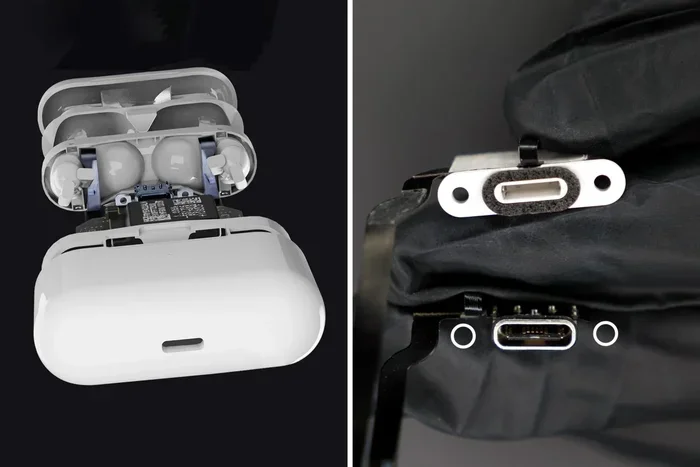
Visual guide about AirPods USB-C charging case
Image source: yankodesign.com
The EU Common Charger Directive
The biggest push came from Europe. In October 2022, the European Parliament passed a law requiring all smartphones, tablets, headphones, and many other electronics to use USB-C as a common charging port by the end of 2024. The rule aimed to reduce electronic waste and give consumers the freedom to use one charger across devices.
Apple historically used its proprietary Lightning connector, which it introduced in 2012. For over a decade, Apple argued that Lightning was the better standard. But the EU’s mandate left Apple with a choice: create a special European version with USB-C, or switch globally. Apple chose global conversion.
Did You Know? The EU estimates that common charging could save consumers around €250 million per year on unnecessary charger purchases. It could also reduce around 11,000 tonnes of charger-related electronic waste annually.
User Convenience and the “One Cable” Dream
Beyond regulations, the switch simply makes life easier. If you own a modern MacBook, iPad, or iPhone 15 (or newer), you already have USB-C cables everywhere. Being able to charge your iPhone, iPad, MacBook, and AirPods all with the same cable is a small luxury that adds up quickly.
Think of it like this: before USB-C, you needed different keys for different doors. Now you have a master key that opens them all. Travel becomes lighter, your bag becomes less cluttered, and borrowing a charger from a friend just got way easier.
Future-Proofing for New Technologies
USB-C isn’t just about convenience. It supports faster data transfer and higher power delivery. This opens the door to features Apple may roll out later, like Lossless Audio support, faster firmware updates, or new sensor integrations. The AirPods Pro 2 USB-C version already supports 20-bit/48 kHz Lossless Audio with Apple Vision Pro, a feature that wouldn’t have been possible with Lightning’s bandwidth limits.
How Does USB-C Charging on AirPods Actually Work?
You might think USB-C automatically means faster charging, but that’s not always true with AirPods. Let’s clear up some common misconceptions.
Charging Speeds: USB-C vs Lightning
In real-world testing, the charging speeds between Lightning and USB-C AirPods cases are nearly identical. Both can fully charge an AirPods Pro case in about an hour. The earbuds themselves charge from 0 to 100% in roughly the same time too, usually between 60 and 90 minutes depending on the model.
So if you’re upgrading for charging speed alone, you won’t notice a huge difference. The real win is convenience, not speed.
What Kind of USB-C Cable Do You Need?
Any standard USB-C cable will work. You don’t need an Apple-branded cable, and you don’t need a “special” USB-C cable for AirPods. The AirPods charging case draws very little power, so even basic cables will work just fine.
This is great news for travelers and minimalists. That spare USB-C cable from your Android phone? It works. The one that came with your Kindle? It works too.
Wireless Charging Still Works on Compatible Cases
If your USB-C AirPods case supports wireless charging (like the AirPods Pro 2 USB-C or AirPods 4 with ANC), you can still charge it on a Qi, MagSafe, or Apple Watch charger puck. The USB-C port is just one option, not a replacement for wireless charging on premium models.
Can You Use Any USB-C Power Brick?
Yes, but for the smallest and most portable option, a 5W or 10W USB power adapter is plenty. AirPods cases don’t need much juice, so your giant MacBook charger is overkill but won’t harm anything. Smartphones and laptop chargers will all work safely.
Practical Tips for Using USB-C AirPods
Now that you know the basics, here are some real-world tips to get the most out of your USB-C AirPods experience.
Tip 1: One Cable for Your Whole Travel Kit
When packing for trips, bring a single USB-C cable and a small multi-port charger. You can charge your iPhone 15, iPad, MacBook, Nintendo Switch, Kindle, and AirPods all from one cable. This setup is perfect for minimalist packers and digital nomads.
Tip 2: Buy a Few Extra USB-C Cables
USB-C cables wear out, especially the small ones you stuff in pockets. Consider buying a 3-pack of basic USB-C cables for under $15. Keep one at home, one at work, and one in your bag. You’ll never be caught without a charge.
Tip 3: Use AirPods Cases with Lanyards
AirPods 4 and AirPods Pro 2 cases both have built-in lanyard loops. Adding a small wrist strap helps prevent drops and makes it easier to find your case in a bag.
Tip 4: Check Your Charging Case’s Battery Status
To check battery life on your USB-C AirPods, open the case near your iPhone and look at the pop-up card. You can also ask Siri “What’s my AirPods battery?” or check the Batteries widget on your iPhone’s home screen.
Tip 5: Keep the Port Clean
USB-C ports can collect dust and pocket lint over time. Every few months, use a soft, dry toothbrush or a wooden toothpick to gently clean the inside of the port. A clean port ensures proper cable connection and reliable charging.
Tip 6: Pair AirPods with Non-Apple Devices
USB-C AirPods work with Android phones, Windows laptops, and other Bluetooth devices just like Lightning AirPods do. The port change doesn’t affect Bluetooth connectivity at all. Just open the case, press the pairing button on the back, and connect as normal.
Comparing USB-C AirPods to Alternatives
How do USB-C AirPods stack up against the competition? Here’s a quick look at where they stand.
AirPods vs Samsung Galaxy Buds
Samsung’s Galaxy Buds lineup has used USB-C for years, so they’re a familiar option for Android users. Galaxy Buds offer similar features like Active Noise Cancellation, transparency mode, and spatial audio. Battery life is comparable, with about 5 to 7 hours per charge depending on the model.
Where AirPods win is the deep integration with iPhones, iPads, and Macs. Features like automatic device switching, Find My precision tracking, and spatial audio with head tracking are smoother within the Apple ecosystem.
AirPods vs Sony, Bose, and Other Premium Brands
Premium headphone brands like Sony and Bose have used USB-C on their flagship models for years. These often deliver superior sound quality and noise cancellation, especially on over-ear models. AirPods Pro 2 hold their own in terms of ANC performance, but audiophiles may still prefer dedicated brands.
The advantage of AirPods remains Apple ecosystem harmony. If you live and breathe iPhone, iPad, and Mac, AirPods just work seamlessly.
USB-C AirPods in 2025 and Beyond
Apple is likely to continue moving all its products to USB-C. By 2026 or 2027, it’s expected that even the AirPods Max and AirPods SE lines will be fully USB-C. The Lightning connector’s days are numbered, and most analysts expect Apple to retire it completely in the next few years.
Did You Know? Apple made over $100 billion in revenue in 2023 alone. The shift to USB-C across its product lines represents one of the largest connector transitions in consumer electronics history.
Frequently Asked Questions About AirPods USB-C Charging
Let’s wrap up with answers to some of the most common questions people ask about AirPods and USB-C charging.
Will my old Lightning AirPods stop working?
Not at all. Your Lightning AirPods will continue to function normally. You’ll just need a Lightning cable to charge them. Apple will continue supporting these devices with software updates for years to come.
Can I use a USB-C to Lightning cable to charge new AirPods?
No, this won’t work. The new AirPods cases have USB-C ports, not Lightning ports. You need a USB-C to USB-C cable to charge them.
Are USB-C AirPods more expensive?
The prices are nearly identical to the Lightning versions they replaced. For example, the AirPods Pro 2 USB-C launched at the same $249 price tag as the original version.
Do USB-C AirPods support fast charging?
AirPods support what Apple calls “quick charge,” which gives you about an hour of listening time from a 5-minute charge. This feature works on both Lightning and USB-C models. There’s no significant speed boost from the USB-C port itself.
Is the sound quality different between Lightning and USB-C AirPods?
For most users, no. The drivers and audio components are the same. The only audio difference is Lossless Audio support on the AirPods Pro 2 USB-C version when used with Apple Vision Pro. For normal iPhone listening, the audio quality is identical.
Should I buy USB-C AirPods or wait?
If you’re shopping today, USB-C is the way to go. It’s the future-proof choice and ensures compatibility with newer iPhones, iPads, and MacBooks. There’s no reason to wait, since Apple’s USB-C AirPods are mature, well-reviewed products.
The Bottom Line on AirPods USB-C Charging
USB-C charging has officially arrived on AirPods, and the transition is great news for everyone tired of managing multiple cable types. Whether you choose the AirPods Pro 2, AirPods 4, or AirPods Max (USB-C), you’ll enjoy the simplicity of one cable for all your devices.
If you already own older Lightning AirPods, there’s no rush to replace them. They still work great, and Lightning cables aren’t going anywhere soon. But if you’re shopping new, going USB-C ensures your investment is ready for the next decade of Apple devices.
The future is wireless and universal, but until then, USB-C is the bridge that gets us there. Enjoy your AirPods, and enjoy the simplicity of a world with fewer cables.