Yes, AirPods noise cancellation works remarkably well for most everyday situations. Apple uses Active Noise Cancellation (ANC) technology that uses tiny microphones to detect outside sounds, then creates “anti-noise” sound waves to cancel them out before you hear them. While not perfect for every scenario (like very loud construction), AirPods Pro and AirPods Max provide impressive noise reduction that blocks an estimated 70-85% of ambient noise in typical environments like offices, cafes, and airplanes.
Picture this: you’re sitting on a crowded airplane, engines roaring, passengers chatting, and babies crying somewhere three rows back. You pop in your AirPods, tap a button, and suddenly… silence. Almost magical silence. But is that magic real, or are you just imagining things?
You’re not imagining it. AirPods noise cancellation genuinely works, and it’s one of the most impressive consumer audio technologies available today. But like any technology, understanding how it works helps you get the most out of it. Some folks expect AirPods to create a perfect cone of silence around their heads, and that’s just not how physics works.
In this guide, we’ll break down exactly how AirPods noise cancellation works, how well it performs in real life, what situations it’s best for, and how to maximize its effectiveness. Whether you’re a frequent flyer, remote worker, or just someone who wants peace on their morning commute, you’ll learn everything you need to know.
Key Takeaways
- Yes, They Work: AirPods Pro and AirPods Max feature active noise cancellation that effectively reduces ambient noise by 70-85% in most everyday environments.
- Two Technologies Combined: Noise cancellation uses both Active Noise Cancellation (ANC) and passive noise isolation from silicone ear tips working together.
- How ANC Works: Tiny microphones detect outside sounds, and the AirPods generate inverse sound waves that cancel unwanted noise before it reaches your ears.
- Best for Consistent Sounds: ANC excels at blocking steady, low-frequency noises like airplane engines, AC units, and traffic hum, but struggles with sudden sharp sounds.
- Transparency Mode Exists Too: AirPods also offer a Transparency Mode that lets outside sound in when you need to hear your surroundings.
- AirPods 4 Added It: As of 2024, even standard AirPods 4 now offer active noise cancellation, making the feature accessible at lower price points.
- Fit Matters a Lot: Proper ear tip fit is crucial; poor fit can reduce noise cancellation effectiveness by up to 50%.
📑 Table of Contents
- What Is Noise Cancellation and How Does It Work on AirPods?
- Which AirPods Have Noise Cancellation?
- How Well Do AirPods Noise Cancellation Actually Work?
- How to Maximize AirPods Noise Cancellation Performance
- Transparency Mode: The Flip Side of Noise Cancellation
- Common Misconceptions About AirPods Noise Cancellation
- Comparing AirPods Noise Cancellation to the Competition
- The Future of AirPods Noise Cancellation
- Final Verdict: Do AirPods Noise Cancellation Really Work?
What Is Noise Cancellation and How Does It Work on AirPods?
Let’s start with the basics. Noise cancellation on AirPods isn’t magic, it’s science. Specifically, it’s called Active Noise Cancellation (ANC), and it’s been around in some form since the 1930s. But Apple has refined it into something compact and incredibly effective.
The Simple Science Behind Noise Cancellation
Here’s the easiest way to understand it: imagine you’re pushing a swing forward. Now imagine someone else pushing it backward at the exact same time with the exact same force. The swing doesn’t move, right? That’s essentially how noise cancellation works.
Sound travels in waves, like ripples in a pond. Every noise has a wave pattern with peaks (loud moments) and valleys (quiet moments). AirPods contain tiny microphones that listen to the outside world and detect these wave patterns. Then, in real-time, the AirPods’ internal processor creates an “anti-sound” wave that’s the exact opposite: where the outside sound has a peak, the anti-sound has a valley, and vice versa.
When these two opposing waves meet in your ear canal, they cancel each other out. The result? Dramatically reduced noise. It’s like adding +5 and -5 together to get zero.
Did You Know?
The concept of noise cancellation was first patented by Dr. Paul Lueg in 1934. He proposed using phase-shifted sound waves to cancel noise in pipes. It took nearly 60 years before the technology became practical enough for consumer headphones!
Two Types of Noise Reduction Working Together
AirPods don’t rely on ANC alone. They use a combination of two technologies:
- Active Noise Cancellation (ANC): The electronic, microphone-driven system that actively cancels certain frequencies of sound.
- Passive Noise Isolation: The physical barrier created by the silicone ear tips that physically block sound waves from entering your ears.
Think of it like this: passive noise isolation is like closing your windows to keep out street noise, while active noise cancellation is like having an invisible force field that neutralizes any remaining sound. Together, they create a much more powerful effect than either could alone.
Which AirPods Have Noise Cancellation?
Not every AirPods model has noise cancellation. Apple has gradually expanded this feature across its product line, so it’s important to know what you’re buying.
Visual guide about AirPods noise cancellation closeup
Image source: lh3.googleusercontent.com
Current AirPods With Noise Cancellation
As of 2026, these AirPods models offer active noise cancellation:
- AirPods Pro (1st Generation): Released in 2019, the first AirPods to feature ANC with silicone ear tips.
- AirPods Pro (2nd Generation): Released in 2022, with improved ANC that’s reportedly twice as effective as the first generation.
- AirPods 4 (with Active Noise Cancellation): Released in 2024, bringing ANC to the open-ear AirPods design for the first time.
- AirPods Max: Released in 2020, Apple’s over-ear headphones with premium ANC performance.
AirPods Without Noise Cancellation
The standard AirPods (2nd and 3rd generation) and the base AirPods 4 model do not have active noise cancellation. They rely solely on passive noise isolation, which is minimal due to their hard plastic, non-sealing design. If noise cancellation is important to you, make sure you choose a model that explicitly includes it.
Important Distinction
AirPods Pro models come with silicone ear tips in three sizes (XS, S, M, L with the 2nd generation). This is crucial because proper fit dramatically affects noise cancellation performance. We’ll dive deeper into fit tips further down.
How Well Do AirPods Noise Cancellation Actually Work?
This is the million-dollar question, isn’t it? The honest answer is: really well, but with some important limitations you should understand.
Real-World Performance Numbers
Independent testing has shown that AirPods Pro (2nd generation) can reduce ambient noise by approximately 70-85% in typical environments. This isn’t marketing fluff; it’s measured performance. For context, premium over-ear headphones from brands like Bose and Sony might achieve 85-90% reduction, so AirPods Pro are remarkably competitive despite their tiny size.
The AirPods Max, being larger over-ear headphones with bigger drivers and more space for microphones, performs at the higher end, often matching or exceeding dedicated noise-cancelling headphones from other premium brands.
What AirPods Cancel Best
Active noise cancellation excels at blocking consistent, low-frequency sounds. Here’s where AirPods shine brightest:
- Airplane engine drone: The steady, low-frequency hum of jet engines is almost completely eliminated.
- Air conditioning and HVAC systems: That persistent office background hum vanishes.
- Traffic and road noise: The consistent rumble of cars and city traffic is dramatically reduced.
- Train sounds: Subway and train noise becomes much more manageable.
- Crowd murmur: The general background buzz of busy cafes and offices is significantly quieted.
What AirPods Struggle to Cancel
ANC technology has inherent limitations. Sounds that are sudden, sharp, or high-pitched are harder to cancel. This includes:
- Sudden loud noises: Car horns, alarms, and door slams.
- Human voices: Especially nearby conversations, though these are somewhat reduced.
- High-frequency sounds: Whistles, squeaky brakes, and certain machinery.
- Impacts and bangs: Anything with a very fast attack time.
Think of it this way: ANC is like a really good eraser for pencil marks (steady sounds) but doesn’t work as well on pen marks (sharp, sudden sounds). The technology needs time to detect and generate the anti-noise, so truly instantaneous sounds can slip through.
How to Maximize AirPods Noise Cancellation Performance
Here’s the thing: even the best noise cancellation technology performs poorly if your AirPods don’t fit right. Getting the most out of your AirPods requires some simple but often overlooked steps.
Get the Perfect Ear Tip Fit
This is probably the most important thing you can do. AirPods Pro comes with four sizes of silicone ear tips (XS, S, M, L with the 2nd generation). The right fit creates a seal in your ear canal that blocks physical sound waves from entering.
How do you know if you have a good fit? Apple actually built an Ear Tip Fit Test right into the AirPods Pro settings. Here’s how to use it:
- Connect your AirPods Pro to your iPhone or iPad.
- Go to Settings, then tap your AirPods Pro.
- Scroll down and tap “Ear Tip Fit Test.”
- Follow the on-screen prompts.
The test plays a brief sound and uses the AirPods’ microphones to determine if you have a good seal. If you don’t, try a different size tip. This alone can improve noise cancellation by up to 50%.
Did You Know?
A 2019 study published in the Journal of the Acoustical Society of America found that proper ear tip fit can be the difference between 10 decibels of noise reduction and 30+ decibels of reduction. That’s the difference between hearing a quiet conversation and not hearing it at all!
Keep Your AirPods Clean
It might sound obvious, but dirty AirPods don’t work as well. Earwax and debris can block the microphones and speakers, reducing both audio quality and noise cancellation effectiveness. Clean your AirPods regularly with a soft, dry, lint-free cloth. For stubborn debris, you can use a slightly damp cloth or a small, soft-bristled brush.
Update Your Software Regularly
Apple frequently releases firmware updates that can improve noise cancellation algorithms. Make sure your AirPods are running the latest firmware by keeping them in their case near your iPhone and connected to power periodically.
Use Them Correctly
To activate noise cancellation on AirPods Pro and AirPods 4 (with ANC):
- Press and hold the force sensor on the stem of your AirPods to switch between Noise Cancellation and Transparency Mode.
- Or use Control Center on your iPhone by pressing and holding the volume slider.
- Or ask Siri by saying “Hey Siri, turn on noise cancellation.”
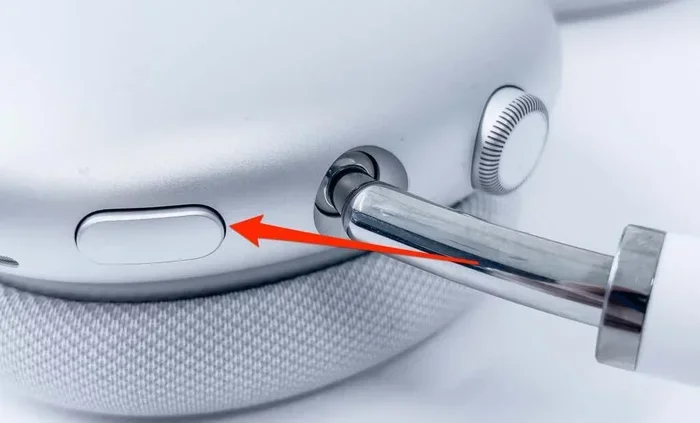
For AirPods Max, press the noise control button on the right ear cup.
Choose the Right Environment
While this sounds obvious, noise cancellation works best in environments with consistent, sustained noise. If you’re in a very quiet space, you might not notice much difference. Save the ANC for when you really need it: airplanes, trains, busy offices, and noisy commutes.
Transparency Mode: The Flip Side of Noise Cancellation
Sometimes you need to hear the world around you. Maybe you’re crossing a street, having a quick conversation, or listening for an announcement at the airport. That’s where Transparency Mode comes in.
What Transparency Mode Does
Transparency Mode uses the same external microphones that power noise cancellation, but instead of canceling outside sounds, it amplifies and pipes them through your AirPods naturally. It’s like you’re not wearing earbuds at all, but with the bonus of still hearing your music at a lower volume.
This is genuinely useful technology. Without Transparency Mode, you’d have to remove your AirPods every time someone talked to you, which is annoying and can wear out the ear tips over time.
Adaptive Audio (AirPods Pro 2nd Generation)
Starting with iOS 17 and AirPods Pro (2nd generation), Apple introduced Adaptive Audio. This smart feature automatically switches between Noise Cancellation and Transparency Mode based on your environment. If you’re walking and need to hear traffic, it engages Transparency. If you step into a loud cafe, it switches to ANC. It’s like having a smart assistant managing your listening experience.
Conversation Mode
Another feature exclusive to AirPods Pro (2nd generation) is Conversation Awareness. When you start talking to someone, your AirPods automatically lower your music volume and engage Transparency Mode. When you stop talking, everything returns to normal after a few seconds. It’s surprisingly seamless and feels almost magical when it works correctly.
Common Misconceptions About AirPods Noise Cancellation
Let’s clear up some confusion that often pops up about how AirPods noise cancellation works.
Myth 1: Noise Cancellation Blocks All Sound
This is the biggest misconception. No noise-cancelling technology creates complete silence. If you’re expecting to feel like you’re in an anechoic chamber, you’ll be disappointed. Noise cancellation dramatically reduces ambient noise, but you’ll still hear some sounds, especially high-frequency and sudden noises. Think of it as turning down the world’s volume, not muting it entirely.
Myth 2: Noise Cancellation Protects Your Hearing
This is partially true but misleading. By reducing ambient noise, you can listen to music at lower volumes, which does protect your hearing. However, if you crank your music up to maximum to drown out remaining noise, you’re doing more harm than good. The safe approach is to keep volume moderate and let the noise cancellation do its job.
According to the World Health Organization, approximately 1.1 billion young people worldwide are at risk of hearing loss due to unsafe listening practices. Noise cancellation is a powerful tool for protecting your hearing, but only when used responsibly.
Myth 3: All Wireless Earbuds With ANC Work the Same
Absolutely not. There are huge differences in ANC quality across brands and price points. Apple’s implementation is excellent, but some premium brands like Bose, Sony, and Sennheiser have comparable or slightly superior technology, especially in their over-ear headphones. Among earbuds specifically, AirPods Pro are at or near the top, but cheaper ANC earbuds often perform poorly by comparison.
Myth 4: Noise Cancellation Drains Battery Quickly
Yes, ANC does use more battery than when it’s off, but modern AirPods handle this efficiently. AirPods Pro (2nd generation) offers up to 6 hours of listening time with ANC on, which is plenty for most situations. AirPods Max offers about 20 hours. Just remember to charge them regularly, and consider turning ANC off in quiet environments to extend battery life.
Myth 5: You Can’t Use Noise Cancellation for Phone Calls
You absolutely can, and it works well. AirPods use noise cancellation during calls to help you hear the other person better in noisy environments. The microphones also work to reduce background noise for the person on the other end of the call, though this isn’t technically ANC, it’s noise reduction for call quality.
Comparing AirPods Noise Cancellation to the Competition
How do AirPods stack up against other premium noise-cancelling options? Let’s be honest about the competitive landscape.
AirPods vs. Bose
Bose has long been considered the gold standard for noise cancellation, particularly in aviation and professional audio. The Bose QuietComfort Ultra Earbuds are often compared directly to AirPods Pro. In head-to-head testing, both perform excellently, with Bose sometimes having a slight edge in overall noise reduction, while AirPods win on seamless Apple ecosystem integration and call quality.
AirPods vs. Sony
Sony’s WF-1000XM5 earbuds and WH-1000XM5 over-ear headphones are widely regarded as best-in-class for noise cancellation. They often match or slightly exceed AirPods in pure noise reduction numbers, particularly for low-frequency sounds. However, AirPods offer better integration with Apple devices and more intuitive controls.
Where AirPods Win
Despite strong competition, AirPods have some clear advantages:
- Apple ecosystem integration: Seamless pairing, switching between devices, and Siri integration.
- Call quality: AirPods consistently rank at the top for voice call clarity.
- Compact design: AirPods Pro are smaller and more comfortable for many users than competing earbuds.
- Smart features: Adaptive Audio and Conversation Awareness are genuinely useful innovations.
Where Competitors Win
Other brands edge ahead in certain areas:
- Pure noise reduction: Some competitors achieve marginally better raw noise cancellation.
- Battery life: Some competing earbuds offer longer listening times.
- Customization: Android-friendly apps from competitors offer more EQ and ANC adjustment options.
- Price-to-performance: Budget brands offer surprisingly good ANC at lower price points.
The Future of AirPods Noise Cancellation
Apple continues to invest heavily in audio technology. What might we see in coming years?
Better Algorithms
Machine learning and AI are being integrated into ANC systems. Future AirPods might be able to better distinguish between types of noise and cancel them more selectively. Imagine being able to cancel a baby’s crying but still hear your name being called. That’s not science fiction; it’s actively being researched.
Improved Adaptive Features
We’ve already seen Adaptive Audio and Conversation Awareness. The trend is toward AirPods that intelligently manage noise based on context, location, and even your schedule. Imagine AirPods that automatically engage ANC when you board your usual train.
Health Monitoring Integration
Apple has been exploring health features in AirPods, including hearing health monitoring and even posture tracking. Noise cancellation might be integrated into broader hearing protection features, with AirPods warning you when you’re in dangerously loud environments.
Did You Know?
According to market research firm Statista, the global noise-cancelling headphones market was valued at over $13 billion in 2023 and is projected to grow to more than $25 billion by 2028. Apple holds a significant portion of this market, especially in the premium segment.
Final Verdict: Do AirPods Noise Cancellation Really Work?
Let’s bring it all together with a clear answer.
The Bottom Line
Yes, AirPods noise cancellation absolutely works, and it works remarkably well. It’s not a gimmick or marketing hype. The science behind it is sound, the implementation by Apple is excellent, and the real-world results speak for themselves. Millions of people use AirPods Pro and AirPods Max every day specifically because the noise cancellation makes their lives better.
When AirPods ANC Works Best
You’ll be most impressed with AirPods noise cancellation in these scenarios:
- During flights (especially long-haul)
- On public transportation (trains, buses, subways)
- In open-plan offices
- While studying in cafes or libraries
- During your daily commute
- When trying to focus at home with noisy neighbors or family
When You Might Need Something Else
Consider alternatives or supplementary protection if you:
- Work with very loud industrial equipment (use proper ear protection)
- Need complete silence for meditation or specific audio work
- Have ears that don’t seal well with any ear tip size
- Want the absolute best raw noise reduction numbers
Tips for New AirPods Owners
If you’ve just bought AirPods with noise cancellation, here are the most important things to remember:
- Try all ear tip sizes and use the Ear Tip Fit Test to find your perfect fit.
- Keep them clean for consistent performance.
- Update firmware regularly for the latest improvements.
- Don’t crank the volume just because the world is quiet; moderate volume protects your hearing.
- Use Transparency Mode when you need to stay aware of your surroundings.
- Give yourself time to adjust; some people experience a slight pressure sensation with ANC that’s normal and goes away.
The Final Word
Noise cancellation on AirPods isn’t just a feature; it’s a quality-of-life improvement that can transform your daily experience. Whether you’re trying to focus on important work, enjoy music without distraction, or simply find a moment of peace in a chaotic world, AirPods noise cancellation delivers on its promise.
It won’t make the world completely silent, but it will make it significantly quieter and more pleasant. And in our increasingly noisy world, that’s genuinely valuable. So yes, AirPods noise cancellation works. It works really, really well. And once you experience it, you’ll wonder how you ever lived without it.
Frequently Asked Questions
Do AirPods noise cancellation actually work?
Yes, AirPods noise cancellation works effectively in real-world conditions. AirPods Pro and AirPods Max can reduce ambient noise by approximately 70-85% in typical environments, dramatically decreasing airplane engine noise, traffic hum, office chatter, and HVAC sounds. The technology combines active noise cancellation with passive noise isolation from silicone ear tips.
Is noise cancellation on AirPods worth it?
Absolutely, especially if you frequently encounter noisy environments. AirPods noise cancellation is particularly valuable for frequent travelers, commuters, office workers, and students. The technology reduces listening fatigue, helps you focus, and allows you to enjoy music at lower volumes, which protects your long-term hearing health.
How does AirPods noise cancellation differ from noise isolation?
Noise cancellation (ANC) uses microphones and electronic processing to create anti-sound waves that cancel ambient noise, particularly effective for low-frequency sounds. Noise isolation is purely physical, using ear tips to block sound waves from entering your ears. AirPods use both technologies together for maximum effectiveness.
Can AirPods noise cancellation damage your ears?
No, AirPods noise cancellation itself is safe and does not damage your hearing. In fact, it can protect your hearing by allowing you to listen at lower volumes. However, some users experience a slight “pressure” sensation when ANC is active, which is normal and not harmful. If you experience pain, discontinue use and consult a hearing specialist.
Do AirPods block out voices and conversations?
AirPods reduce voice and conversation noise but don’t eliminate it completely. Active noise cancellation works best on consistent, low-frequency sounds, making human voices somewhat harder to block. You’ll notice conversations become muffled and quieter, but you may still hear loud nearby conversations. This is actually a safety feature for situations like crossing streets.
What’s the difference between Noise Cancellation and Transparency Mode on AirPods?
Noise Cancellation actively blocks outside sounds using anti-noise technology, ideal for focus and immersion. Transparency Mode does the opposite, using external microphones to amplify and pipe outside sounds through your AirPods naturally, perfect for hearing announcements, having quick conversations, or staying aware of traffic without removing your AirPods.