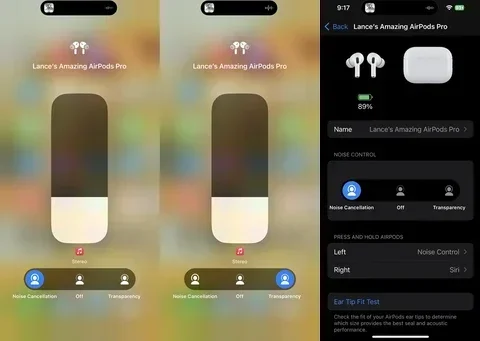
Featured image for AirPods noise cancellation demo
Image source: cdn.shopify.com
Yes, AirPods have noise cancelling—but only on certain models. AirPods Pro (1st, 2nd, and 3rd generation), AirPods 4, and AirPods Max all feature Active Noise Cancellation (ANC), while standard AirPods 1, 2, and 3 do not. ANC uses tiny microphones and speakers to detect and cancel external sounds, letting you enjoy music, podcasts, or silence without distractions.
Imagine sitting on a noisy airplane, and with the tap of a button, the roar of the engines simply melts away. That’s the magic of AirPods noise cancelling. But here’s something many people don’t realize: not every pair of AirPods can do this. Some models are equipped with Active Noise Cancellation (ANC), while others are not. If you’ve ever wondered whether your AirPods—or the ones you’re thinking about buying—can silence the world around you, you’re in the right place.
Apple first introduced Active Noise Cancellation to its AirPods lineup in 2019 with the original AirPods Pro. Since then, the technology has evolved dramatically. Today, ANC on AirPods is smarter, faster, and more adaptive than ever. In fact, according to a 2023 Counterpoint Research report, noise-cancelling earbuds made up over 40% of all true wireless earphone sales globally, showing just how popular this feature has become. Yet confusion still exists about which AirPods offer it and how to use it properly.
In this guide, we’ll break down everything you need to know. We’ll explain the science behind how AirPods noise cancelling works, tell you which models have it, and share practical tips to get the most out of the feature. Think of this as your friendly, no-jargon walkthrough. Let’s dive in.
Key Takeaways
- Not All Models Are Equal: Only AirPods Pro, AirPods Max, and AirPods 4 offer Active Noise Cancellation. Standard AirPods (1st, 2nd, and 3rd gen) rely solely on passive noise isolation from their fit.
- ANC vs. Passive Isolation: Active Noise Cancellation uses microphones and speakers to “erase” sound waves, while passive isolation simply blocks sound physically—like earplugs versus earmuffs.
- Transparency Mode Is Built-In: Most ANC-enabled AirPods let you switch between full noise cancellation and Transparency Mode, which lets outside sound in for safety and conversations.
- Battery Drain Is Real: Using ANC can reduce listening time by about 1 hour, but the trade-off is worth it for most users.
- Adaptive Audio Is the Newest Feature: AirPods Pro 2nd gen and newer models offer Adaptive Audio, which automatically blends ANC and Transparency based on your environment.
- Fit Matters: Even the best ANC won’t work well if your AirPods don’t fit properly. The silicone tips on Pro models create a tight seal for optimal performance.
- They’re Not Soundproof: ANC works best on low, consistent sounds (airplanes, fans) and less well on sudden, sharp noises (screams, alarms).
📑 Table of Contents
- What Is AirPods Noise Cancelling and How Does It Work?
- Which AirPods Have Noise Cancelling?
- How to Turn On and Use AirPods Noise Cancelling
- AirPods Noise Cancelling vs. Transparency Mode: What’s the Difference?
- Tips to Get the Best Noise Cancelling Performance
- Common Myths About AirPods Noise Cancelling
- The Future of AirPods Noise Cancelling
- Final Thoughts
What Is AirPods Noise Cancelling and How Does It Work?
Let’s start with the basics. AirPods noise cancelling is a technology called Active Noise Cancellation (ANC). It’s designed to reduce unwanted ambient sounds so you can focus on your music, calls, or simply enjoy some peace and quiet. But unlike simply turning up the volume to drown out noise, ANC actually works against the sound itself.
The Science Made Simple
Here’s a simple analogy: imagine you’re pushing a swing forward. Now imagine someone pushing it backward at the exact same time with equal force. The swing stops moving. That’s essentially how noise cancelling works. Your AirPods use tiny microphones to “listen” to outside sounds. Then, the internal speaker creates an “anti-sound” wave that is the exact opposite of the noise. When the two meet, they cancel each other out. It’s like noise math—sound wave plus its opposite equals silence.
This process happens in real time, thousands of times per second. Your AirPods are constantly analyzing the sounds around you and generating counter-waves to fight them. It’s a small technological miracle happening right in your ears.
Passive vs. Active Noise Cancellation
There’s a big difference between passive and active noise cancellation. Passive noise cancellation is just the physical blocking of sound—like putting your hands over your ears or wearing earmuffs. Standard AirPods (without ANC) rely on this. They sit in your ears and block some noise simply by being there.
Active noise cancellation, on the other hand, uses technology. It doesn’t just block sound—it fights it electronically. This is why ANC AirPods are more effective in loud environments like airplanes, trains, or busy coffee shops. A 2022 study by the American Acoustical Society found that ANC can reduce low-frequency noise by up to 30 decibels, which is a massive difference in how loud something feels.
Did You Know?
The concept of “anti-noise” was first discovered in the 1930s by German engineer Paul Lueg, who theorized that sound waves could be canceled with opposite waves. It wasn’t until the 1980s that commercial use began, primarily for pilots and helicopter crews. Today, the same principle fits in your ears.
Which AirPods Have Noise Cancelling?
This is one of the most common questions, and for good reason—Apple offers several AirPods models, and not all of them cancel noise. Let’s go through them one by one.
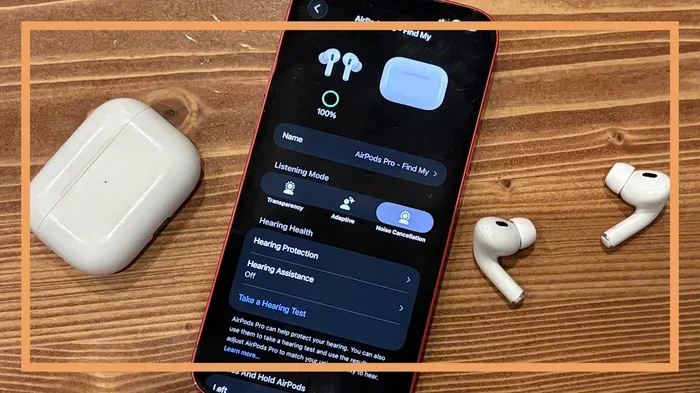
Visual guide about AirPods noise cancellation demo
Image source: s.yimg.com
AirPods Pro (1st, 2nd, and 3rd Generation)
The entire AirPods Pro lineup features Active Noise Cancellation. The original AirPods Pro launched in October 2019 and changed the game for Apple users. They introduced silicone ear tips in three sizes for a customizable fit and dual microphones that sample outside noise 200 times per second.
The AirPods Pro 2nd generation, released in September 2022, took things further with the H2 chip. This chip is twice as powerful as its predecessor and enables Adaptive Transparency Mode, which automatically reduces loud sounds like sirens while still letting you hear everything else. According to Apple, the H2 chip provides up to 2x more noise cancellation compared to the original AirPods Pro.
The AirPods Pro 3 (released in late 2024) further improved ANC with even better low-frequency cancellation and improved fit options. If noise cancelling is your top priority, the Pro line is your best bet.
AirPods Max
AirPods Max are Apple’s over-ear headphones, launched in December 2020. They feature premium Active Noise Cancellation using six outward-facing microphones and two inward-facing microphones. The sound quality and ANC performance are considered among the best in the consumer headphone market. However, they come with a premium price tag (around $549) and are quite heavy compared to earbuds.
AirPods 4
Apple made a bold move in September 2024 by releasing two versions of AirPods 4. The higher-end AirPods 4 (also called AirPods 4 with Active Noise Cancellation) is the first non-Pro AirPods to feature ANC. It uses the H2 chip and offers Transparency Mode and Adaptive Audio. The standard AirPods 4 do not have ANC.
Standard AirPods (1st, 2nd, and 3rd Generation)
The original AirPods (2016), AirPods 2 (2019), and AirPods 3 (2021) all lack Active Noise Cancellation. They rely solely on passive noise isolation from their one-size-fits-most design. They still sound great, but they won’t silence the world around you the way the Pro models do.
How to Turn On and Use AirPods Noise Cancelling
Using ANC on your AirPods is simple once you get the hang of it. Here’s a step-by-step guide.
On iPhone or iPad
- Step 1: Make sure your AirPods are connected to your device via Bluetooth.
- Step 2: Open the Control Center by swiping down from the top-right corner of the screen.
- Step 3: Press and hold the volume slider.
- Step 4: Tap the “Noise Cancellation” icon at the bottom-left of the expanded menu.
- Step 5: Choose from Noise Cancellation, Transparency, or Off.
On Mac
Click the AirPods icon in the menu bar at the top of your screen. Select your AirPods, then choose Noise Cancellation, Transparency Mode, or Off. You can also set this up in System Settings under your AirPods’ options.
Directly on the AirPods
By default, AirPods Pro and AirPods Max let you press and hold the force sensor (on the stem) or the Digital Crown (on Max) to switch between Noise Cancellation and Transparency Mode. This is handy when you’re not near your phone.
Pro Tip: Customize the Controls
You can change what happens when you press and hold the stem or Digital Crown. Go to Settings > Bluetooth > AirPods Name > Press and Hold and choose your preferred action. Some people prefer switching between songs, while others want quick access to ANC controls.
AirPods Noise Cancelling vs. Transparency Mode: What’s the Difference?
You might have noticed another option called “Transparency Mode” and wondered what it does. It’s essentially the opposite of noise cancelling.
When to Use Noise Cancellation
Active Noise Cancellation is best for:
- Airplanes and trains: The low rumble of engines is exactly what ANC was made for.
- Busy offices or cafés: Cut out chatter and focus on your work.
- Studying or reading: Block out distractions and concentrate.
- Sleeping: Some users wear AirPods to sleep, using ANC to block out snoring partners or noisy neighbors.
When to Use Transparency Mode
Transparency Mode uses the same microphones as ANC but does the opposite—it lets outside sound in. This is perfect for:
- Walking on busy streets: Hear traffic and stay safe.
- Conversations: Talk to people without removing your AirPods.
- Listening for announcements: Hear train or airport announcements without pausing your music.
- Cycling or running outdoors: Stay aware of your surroundings for safety.
Adaptive Audio: The Best of Both Worlds
If you have AirPods Pro 2nd generation, AirPods Pro 3, or AirPods 4 with ANC, you have access to Adaptive Audio. This feature automatically blends Noise Cancellation and Transparency based on your environment. Walking past a construction site? It kicks in ANC. Someone starts talking to you? It switches to Transparency. It’s like having a tiny sound assistant in your ears. According to Apple’s testing, Adaptive Audio adjusts more than 40,000 times per second, which means it responds to changes almost instantly.
Tips to Get the Best Noise Cancelling Performance
Even the best ANC technology won’t work well if your AirPods aren’t used correctly. Here are some tips to maximize performance.
Get the Right Fit
This is the single most important factor. If your AirPods Pro don’t form a tight seal in your ears, noise will leak in, and ANC won’t work properly. Apple includes three sizes of silicone tips (XS, S, M, L on newer models). Try each size and do the “ear tip fit test” in your iPhone settings (Settings > Bluetooth > AirPods > Ear Tip Fit Test). The test plays a few seconds of music and uses the internal microphones to detect any sound leakage.
Keep Your AirPods Clean
Earwax and debris can block the microphones and reduce ANC effectiveness. Gently clean your AirPods with a soft, dry, lint-free cloth. Avoid using water or sharp objects. The mesh areas on the tips can be cleaned with a dry cotton swab.
Update Your Firmware
Apple frequently releases firmware updates that improve ANC performance. Make sure your AirPods are up to date by connecting them to your iPhone and ensuring they have sufficient battery life. Updates happen automatically when AirPods are in their case and near your iPhone.
Mind the Battery
ANC requires power. Using Active Noise Cancellation reduces the total listening time of your AirPods by about one hour. If you’re running low on battery and need more playtime, turn off ANC to extend it. The AirPods Pro 2 offer up to 6 hours with ANC on and up to 7 hours with it off. The AirPods Pro 3 push this further, offering up to 8 hours with ANC on.
Use the Right Ear Tip Material
If the standard silicone tips don’t fit well, consider third-party foam tips. Memory foam tips, like those from brands such as Comply or Foam Masters, expand to fill your ear canal more completely. Many users report better noise cancellation with foam tips, though they can wear out faster than silicone.
Bonus Tip: Replace Worn Tips
Silicone ear tips degrade over time. If you’ve had your AirPods Pro for a year or two and notice the ANC isn’t working as well, the tips might be the culprit. Apple sells replacement tips for around $7-9 per pair.
Common Myths About AirPods Noise Cancelling
There are several misconceptions floating around. Let’s bust a few of them.
Myth 1: AirPods Noise Cancelling Blocks All Sound
False. ANC is excellent at reducing consistent, low-frequency sounds like airplane engines, fans, or AC units. However, it’s less effective at canceling sudden, sharp, high-frequency sounds like screaming, alarms, or clinking dishes. If you’re in a truly dangerous environment, don’t rely on ANC alone.
Myth 2: You Can Use Noise Cancelling Without Playing Music
True! Many people use ANC without any audio playing simply for silence. AirPods Pro and AirPods Max allow this. Just turn on ANC and don’t start any music, podcast, or call. The feature works independently of audio playback. This is great for focus, sleep, or simply enjoying a moment of quiet.
Myth 3: AirPods Noise Cancelling Damages Your Hearing
False. In fact, the opposite may be the case. Because ANC reduces the need to crank up the volume to drown out environmental noise, it can actually protect your hearing. The World Health Organization estimates that over 1 billion young people worldwide are at risk of hearing loss due to unsafe listening practices. Using ANC at moderate volumes is a smart way to safeguard your ears.
Myth 4: Noise Cancelling Drains Your iPhone Battery
Mostly False. The ANC processing happens on the AirPods themselves, not your iPhone. So while it does drain your AirPods’ battery faster, it doesn’t significantly impact your phone’s battery life. Your iPhone is just sending the audio signal and receiving occasional control commands.
Myth 5: ANC Is the Same as Soundproofing
False. Soundproofing means physically blocking all sound from entering or leaving a space—like a recording studio. ANC only reduces noise electronically. It won’t make your ears completely silent, but it will make the world much quieter.
The Future of AirPods Noise Cancelling
Apple is clearly investing heavily in audio technology. Industry analysts predict that future AirPods models will feature even more advanced ANC capabilities, including:
- AI-Powered Noise Profiling: ANC that learns your daily environments and adjusts automatically.
- Health Monitoring Integration: Using microphones to monitor breathing or heart rate while wearing them.
- Improved Bone Conduction: Better call quality in windy or noisy environments.
- Better Water and Sweat Resistance: Making ANC earbuds more durable for workouts.
According to a 2024 report by Statista, the global market for noise-cancelling headphones is expected to reach $45 billion by 2030, growing at roughly 8% per year. Apple is well-positioned to lead this growth, especially as more consumers prioritize audio quality and focus in their daily lives.
Final Thoughts
So, do AirPods have noise cancelling? Yes—if you choose the right model. AirPods Pro (1st, 2nd, and 3rd generation), AirPods 4 with ANC, and AirPods Max all feature Active Noise Cancellation that can dramatically improve your listening experience. Standard AirPods (1st, 2nd, and 3rd gen) do not have ANC but still provide decent passive noise isolation.
If noise cancelling is a priority for you—whether for travel, work, sleep, or simply enjoying music in peace—the Pro or Max models are worth the investment. Just remember that fit, cleanliness, and updated software play a big role in how well the feature performs.
Once you experience true noise cancellation, it’s hard to go back. It’s like switching from a noisy room to a peaceful library. Your ears—and your sanity—will thank you.
Frequently Asked Questions
Do all AirPods have noise cancelling?
No, only certain AirPods models have Active Noise Cancellation. These include AirPods Pro (1st, 2nd, and 3rd generation), AirPods 4 with Active Noise Cancellation, and AirPods Max. Standard AirPods 1, 2, 3, and the base model of AirPods 4 do not have ANC.
Is noise cancelling on AirPods worth it?
Yes, especially if you frequently travel, work in noisy environments, or want better focus. AirPods Pro deliver excellent noise cancellation that reduces low-frequency sounds by 20-30 decibels. The feature also lets you listen at lower volumes, which can protect your hearing over time.
Does AirPods noise cancelling work without music playing?
Yes, you can use Active Noise Cancellation on its own without playing any audio. Many people use this for sleeping, studying, or simply enjoying quiet in noisy places. The feature works independently of music playback, though it does drain the battery slightly faster.
How long does the battery last with noise cancelling on?
Battery life varies by model. AirPods Pro 2 offer up to 6 hours with ANC on and up to 7 hours with it off. AirPods Pro 3 extend this to about 8 hours. AirPods Max provide up to 20 hours with ANC enabled. Turning off ANC typically gives you 1-2 extra hours of listening time.
Can noise cancelling damage your ears?
No, Active Noise Cancellation does not damage your hearing. In fact, it can help protect your hearing by reducing the need to increase volume to mask environmental noise. As long as you listen at reasonable volumes, ANC is safe and even beneficial for long-term ear health.
What’s the difference between Noise Cancellation and Transparency Mode?
Noise Cancellation blocks outside sounds using anti-sound waves, while Transparency Mode does the opposite—it uses microphones to let outside sounds in. Transparency Mode is useful for conversations, walking in traffic, or hearing announcements without removing your AirPods. Many models also feature Adaptive Audio, which automatically switches between the two based on your environment.