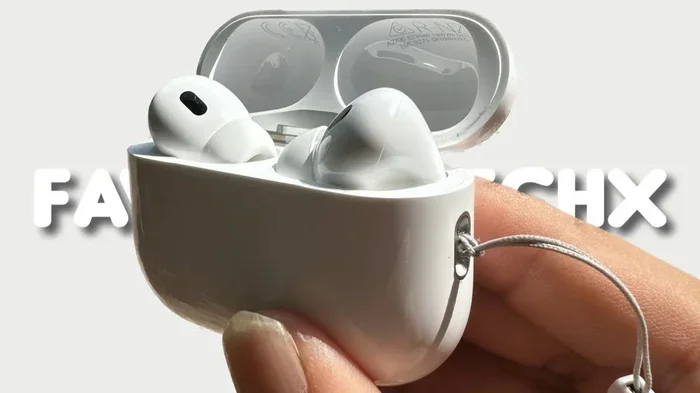
Featured image for AirPods Pro 2 earbuds close-up
Image source: i.ytimg.com
Identifying whether you have AirPods Pro (1st generation) or AirPods Pro (2nd generation) is easier than you think. The fastest methods include checking the model number on your earbuds and case, looking at the charging case design, and using your iPhone’s settings. In under two minutes, you can know exactly which model you own and what features are available to you.
Picture this: you reach for your AirPods, pop one in your ear, and suddenly wonder, “Wait… do I have AirPods Pro or Pro 2?” It happens to thousands of people every single day. Maybe you bought them secondhand, received them as a gift, or simply forgot which generation you purchased two years ago. Don’t worry, you’re not alone, and you’re definitely not stuck guessing.
The good news? Telling the difference between AirPods Pro (1st generation) and AirPods Pro (2nd generation) takes less time than brewing a cup of coffee. Whether you want to know which firmware to download, which ear tips to buy, or whether your case supports MagSafe or USB-C charging, identifying your model is the first step. Think of it like finding out the exact year your car was made; once you know, everything else (parts, features, compatibility) falls into place.
In this guide, we’ll walk you through every reliable method to answer the question “do I have AirPods Pro or Pro 2?” for good. From checking the tiny printed model numbers to using your iPhone’s built-in tools, you’ll have a definitive answer by the end of this article. Let’s dive in!
Key Takeaways
- Model Number is King: The model number printed on your AirPods and case is the most reliable way to identify your exact generation (A2083/A2084 for Pro 1 vs. A2931/A2968 for Pro 2).
- Case Design Differences: AirPods Pro 2 cases include a built-in speaker grille and a lanyard loop that the original Pro case lacks entirely.
- Chip Identification: The Pro 1 uses the H1 chip, while the Pro 2 uses the upgraded H2 chip, which enables advanced features like Adaptive Audio.
- Settings App Check: Your iPhone’s Settings → Bluetooth → AirPods info section displays the model name and generation clearly.
- Charging Port Changes: AirPods Pro 2 switched to USB-C on the case (released September 2023), while the original uses Lightning exclusively.
- Price and Packaging Clues: Original retail pricing of $249 vs. $239 (USB-C version) and packaging details can hint at the generation.
- Sound and ANC Quality: Pro 2 offers 2x more active noise cancellation, but this requires listening tests rather than visual confirmation.
📑 Table of Contents
- Why Identifying Your AirPods Pro Model Actually Matters
- Method 1: Check the Model Number (The Most Reliable Method)
- Method 2: Use Your iPhone or iPad Settings (The Easiest Method)
- Method 3: Physical Design Differences (The Visual Method)
- Method 4: The Chip Inside (The Tech-Savvy Method)
- Method 5: Check the Packaging, Receipt, or Apple’s Website
- Common Scenarios and Edge Cases
- Quick Reference Comparison Chart
- What to Do Once You Know Which Model You Have
- Final Thoughts: You’ve Got This!
Why Identifying Your AirPods Pro Model Actually Matters
Before we jump into the “how,” let’s quickly cover the “why.” You might think it doesn’t matter which generation you own as long as music plays in your ears, but the truth is that the two AirPods Pro models are worlds apart in terms of features, compatibility, and price.
Feature Differences That Affect Daily Use
The AirPods Pro 2 introduced several major upgrades that simply don’t exist on the original Pro. These include Adaptive Audio (which automatically blends noise cancellation and transparency mode), Conversation Awareness (which lowers music when you start talking), and Personalized Spatial Audio. If you own the original Pro, none of these features will work, no matter how many times you update your iPhone.
Additionally, the Pro 2 case includes Find My precision tracking with a built-in speaker that chirps when you’re searching for it. The original Pro case can be located via Find My, but it doesn’t make a sound, making it trickier to find under couch cushions.
Compatibility and Software Updates
Apple frequently releases firmware updates that add new features or fix bugs. Knowing your exact model helps you understand which updates apply to you and what new capabilities you might unlock. According to Apple’s support documentation, firmware versions are model-specific, so a feature designed for Pro 2 won’t appear on your original Pro regardless of how new your iPhone is.
Resale Value and Warranty
If you ever plan to sell, trade in, or get service for your AirPods, knowing the exact model is essential. AirPods Pro 2 currently command higher resale prices, and Apple’s warranty service requires precise model identification. A mix-up could mean sending in the wrong product and waiting weeks for a correction.
Method 1: Check the Model Number (The Most Reliable Method)
The single most foolproof way to answer “do I have AirPods Pro or Pro 2?” is by checking the model number. This is a tiny alphanumeric code printed directly on your AirPods and case. It’s like a fingerprint; no two models share the same number.
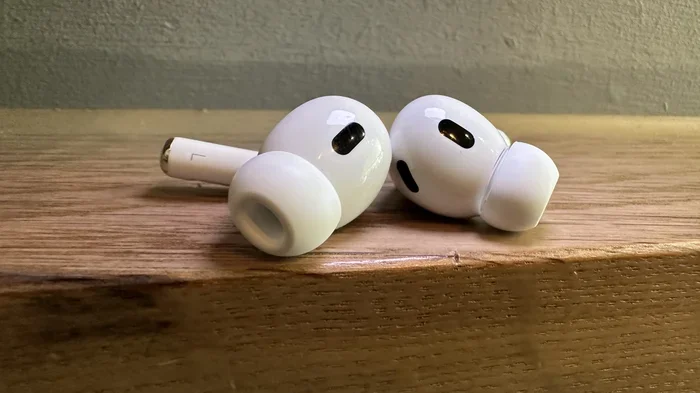
Visual guide about AirPods Pro 2 earbuds close-up
Image source: cdn.mos.cms.futurecdn.net
Where to Find the Model Number on Your AirPods
Look on the underside of each AirPod, near where the stem meets the earbud. You’ll need good lighting (and maybe a magnifying glass) because the text is small. The model number starts with the letter “A” followed by four digits.
Here’s what to look for:
- AirPods Pro (1st Generation): A2083 (left earbud) and A2084 (right earbud)
- AirPods Pro (2nd Generation): A2931 (left earbud), A2932 (right earbud), or A2968 (USB-C version)
Where to Find the Model Number on the Charging Case
Flip open your charging case and look at the inside of the lid, or check the bottom of the case near the charging port. The number is printed in tiny gray text. The case model numbers are:
- AirPods Pro 1 Case: A2190 (Lightning case) or A2190 (MagSafe case)
- AirPods Pro 2 Case: A2700 (Lightning/MagSafe case) or A2968 (USB-C case)
Pro tip: The model number is different from the serial number. The model number is shorter (just “A” plus four digits) and identifies the product type, while the serial number is longer and unique to your specific unit.
Method 2: Use Your iPhone or iPad Settings (The Easiest Method)
If squinting at tiny printed text isn’t your style, your Apple device can do the detective work for you. This method is especially helpful if you’re visually impaired or just prefer a digital answer.
Step-by-Step Instructions
1. Make sure your AirPods are connected to your iPhone or iPad via Bluetooth.
2. Open the Settings app.
3. Tap on Bluetooth.
4. Find your AirPods in the list of connected devices.
5. Tap the “i” (information) icon next to your AirPods name.
6. Scroll down until you see the Model Number section.
Your screen will display the model name (e.g., “AirPods Pro” or “AirPods Pro (2nd generation)”) and the model number. This is the same information as the printed version, just conveniently displayed on a bigger screen.
What If Your AirPods Aren’t Connected?
No problem. You can still find the information through the About section:
1. Open Settings → General → About
2. Scroll down and tap on “AirPods” (even if they’re not currently connected, this may appear if they’ve been previously paired)
3. View the model name and number
Alternatively, if you have an iPhone running iOS 16 or later, you can also check the model by opening the AirPods case near your phone and waiting for the connection animation to appear. The animation displays the generation automatically.
Method 3: Physical Design Differences (The Visual Method)
Sometimes you don’t have your iPhone handy, or you just want a quick visual confirmation. The two AirPods Pro generations have several subtle but distinct design differences that you can spot in seconds.
The Charging Case: Where Most Differences Hide
The charging case is the easiest place to spot differences. Hold the two cases side by side (if you can), and you’ll notice:
- Speaker Grille: The AirPods Pro 2 case has a small, visible speaker grille on the bottom (next to the charging port). This is for the Find My chirping sound. The original Pro case has no such grille; it’s completely smooth.
- Lanyard Loop: Pro 2 cases include a small lanyard loop on the side, perfect for attaching a wrist strap. The original Pro case doesn’t have this loop at all.
- Charging Port: The original Pro case uses a Lightning port only. The Pro 2 case comes in two versions: one with Lightning (released September 2022) and one with USB-C (released September 2023). If your case has a USB-C port, you definitely have the Pro 2.
The Earbuds Themselves
Surprisingly, the actual earbuds look almost identical between the two generations. The stems, ear tips, and overall shape are virtually the same. However, if you look very closely at the skin detection sensor (the small window on each earbud), you might notice the Pro 2 uses a slightly different sensor technology, but this requires magnification to see.
The ear tips are interchangeable between the two models, so if someone gave you “spare tips,” they’ll work on either version.
Method 4: The Chip Inside (The Tech-Savvy Method)
For those who love digging into specs, the chip inside your AirPods is another dead giveaway. Think of it like the engine in a car; the two models use different “engines” that power different capabilities.
H1 vs. H2 Chip
The AirPods Pro (1st generation) uses Apple’s H1 chip, which was also found in the AirPods 3 and AirPods Pro. The H1 chip enables basic features like “Hey Siri,” easy device switching, and decent active noise cancellation.
The AirPods Pro (2nd generation) uses the newer H2 chip, which is significantly more powerful. According to Apple, the H2 chip enables “2x more Active Noise Cancellation” compared to the previous generation, plus all the advanced features we mentioned earlier (Adaptive Audio, Conversation Awareness, Personalized Volume).
How to Tell Which Chip You Have Without Disassembly
You can’t physically see the chip without taking apart your AirPods (which we don’t recommend). However, you can infer which chip you have by testing features:
- Try enabling Adaptive Audio in Settings → AirPods → Adaptive Audio. If the toggle exists and works, you have the H2 chip (Pro 2). If the option doesn’t appear at all, you have the H1 chip (Pro 1).
- Test the noise cancellation strength. The Pro 2 is noticeably better at blocking low-frequency sounds like airplane engines or air conditioners.
Method 5: Check the Packaging, Receipt, or Apple’s Website
Sometimes the easiest answer is sitting in your email inbox or buried in a drawer. If you still have the original packaging, receipt, or Apple ID purchase history, you can find your model information in seconds.
On the Original Box
Flip your AirPods box over and look at the back or bottom. You’ll see a label with the product name printed in clear text. It’ll either say “AirPods Pro” (1st generation) or “AirPods Pro (2nd generation).” The label also includes the model number, UPC, and a small image of the product.
Pro tip: The box art itself has subtle differences. The Pro 2 box features a slightly different earbud illustration that reflects the updated design, though the difference is minimal.
In Your Apple ID Purchase History
If you bought your AirPods from Apple directly (online or in-store), you can find the exact model in your purchase history:
1. Go to reportaproblem.apple.com
2. Sign in with your Apple ID
3. Look at your purchase history
4. Find the AirPods order and click for details
5. The product description will specify the generation
This is especially useful if you have multiple Apple devices or have given AirPods as gifts, as it provides a digital paper trail.
On Your Receipt or Invoice
Retail receipts often abbreviate the product name, but Apple’s official receipts from the Apple Store or apple.com always include the full product name. Check for a line item that says either “AirPods Pro” or “AirPods Pro (2nd generation).”
Common Scenarios and Edge Cases
Sometimes the answer to “do I have AirPods Pro or Pro 2?” isn’t straightforward. Here are some tricky situations and how to handle them.
What If You Bought Them Used or Received Them as a Gift?
If you didn’t buy them yourself, you might not have packaging or receipts. In this case, the model number method or the Settings app method are your best bets. Both work regardless of how you acquired the AirPods.
What About Counterfeit AirPods?
Unfortunately, counterfeit AirPods are everywhere, especially on online marketplaces. The cheapest way to verify authenticity is to check the model number on Apple’s website. Genuine AirPods have model numbers that match Apple’s official database. If the model number doesn’t exist in Apple’s system, or if the AirPods have features that don’t match what Apple advertises, they’re likely fake.
Another red flag: genuine AirPods have seamless integration with iOS features like automatic ear detection and “Hey Siri.” If these features don’t work despite having a real iPhone, the AirPods might be counterfeit.
The USB-C vs. Lightning Confusion
Here’s a common point of confusion: just because your case has a Lightning port doesn’t mean you have the original Pro. The Pro 2 case originally shipped with Lightning (in 2022), and Apple later released a USB-C version in 2023. So both Pro 2 versions exist.
However, if your case has USB-C, you definitely have the Pro 2 (specifically, the version released after September 2023). USB-C is exclusive to the Pro 2 line.
What About AirPods Pro 3?
As of 2024, Apple has not yet released AirPods Pro 3. So if someone tells you they sold you “Pro 3,” they’re either confused or trying to scam you. Only two generations exist: the original Pro and Pro 2.
Quick Reference Comparison Chart
To make things even easier, here’s a side-by-side comparison of the key identifiers. Think of this as a cheat sheet you can save and reference later.
AirPods Pro (1st Generation) Identifiers
- Earbud Model Numbers: A2083, A2084
- Case Model Number: A2190
- Chip: H1
- Charging Port: Lightning only
- Case Speaker Grille: No
- Lanyard Loop: No
- Original Release: October 2019
- Active Noise Cancellation: Yes (standard)
- Adaptive Audio: No
- Find My with Sound: No
AirPods Pro (2nd Generation) Identifiers
- Earbud Model Numbers: A2931, A2932, A2968 (USB-C version)
- Case Model Number: A2700 (Lightning) or A2968 (USB-C)
- Chip: H2
- Charging Port: Lightning or USB-C (depending on version)
- Case Speaker Grille: Yes (on the bottom)
- Lanyard Loop: Yes (on the side)
- Original Release: September 2022 (Lightning) / September 2023 (USB-C)
- Active Noise Cancellation: Yes (2x stronger than Pro 1)
- Adaptive Audio: Yes
- Find My with Sound: Yes (case chirps)
Did you know? Apple sold over 80 million AirPods in 2023 alone, making it one of the most popular wireless earbuds worldwide. With that many units in circulation, it’s no wonder so many people are asking which model they have!
What to Do Once You Know Which Model You Have
Now that you’ve answered the question “do I have AirPods Pro or Pro 2?”, here’s what to do with that information.
If You Have AirPods Pro 1
Don’t feel bad! The original Pro is still an excellent pair of earbuds with active noise cancellation, transparency mode, and great sound quality. However, you’ll want to:
- Manage expectations regarding new features (you won’t get Adaptive Audio or Personalized Volume)
- Check if your ear tips are still in good condition (replacement tips are cheap and easy to find)
- Update to the latest firmware for bug fixes and security improvements
- Consider upgrading if the H2 chip’s features are important to you
If You Have AirPods Pro 2
Lucky you! You have Apple’s most advanced earbuds (as of 2024). Make sure you’re taking advantage of all the features:
- Enable Personalized Spatial Audio for an immersive listening experience
- Try Adaptive Audio and let your AirPods intelligently manage noise control
- Use the Find My speaker feature by saying “Hey Siri, find my case”
- Experiment with the lanyard loop if you often misplace your case
- Update firmware regularly through the Settings app
Troubleshooting Common Issues
Sometimes, knowing your model helps with troubleshooting. For example, if your Pro 1 case isn’t holding a charge, you might need a new case, but you’ll want to make sure you buy the right model (A2190). Similarly, if your Pro 2 USB-C case has a broken port, you’ll need the A2968 replacement specifically.
Apple’s support website has model-specific troubleshooting guides, so having your model number ready speeds up any support interactions significantly.
Final Thoughts: You’ve Got This!
So, do you have AirPods Pro or Pro 2? By now, you should have a definitive answer, and you didn’t even need to be an Apple genius to figure it out. Whether you used the model number method, the Settings app shortcut, or spotted the design differences on the case, you’re now equipped with all the knowledge you need.
The key takeaway is this: the model number is your most reliable identifier. The AirPods Pro 1 uses A2083/A2084 earbuds with an A2190 case, while the Pro 2 uses A2931/A2932 earbuds with either an A2700 (Lightning) or A2968 (USB-C) case. Write this down, screenshot it, or bookmark this page for future reference.
Remember, both models are excellent in their own right. The original Pro revolutionized the earbud market in 2019, and the Pro 2 raised the bar even higher in 2022. Whichever generation you own, you’re getting premium audio quality, seamless Apple integration, and the kind of polish that made AirPods a household name.
If you ever upgrade or buy another pair, you’ll now know exactly what to look for. And if a friend asks you the same question, you can confidently show them the ropes. Knowledge is power, especially in the world of tech!
Still have questions? Drop them in the comments below, and we’ll help you figure out exactly what you’re working with. Happy listening!
Frequently Asked Questions
How can I tell if I have AirPods Pro 1 or 2 without the box?
Check the model number on the inside of the charging case lid. AirPods Pro 1 has model number A2190, while Pro 2 has A2700 (Lightning) or A2968 (USB-C). You can also check the Settings app on your iPhone by going to Bluetooth, tapping the “i” next to your AirPods, and scrolling down to find the model name.
Do AirPods Pro 1 and Pro 2 look the same?
The earbuds look almost identical, but the cases have noticeable differences. The Pro 2 case has a built-in speaker grille on the bottom and a lanyard loop on the side, while the Pro 1 case has neither. The Pro 2 case also comes in a USB-C version, which the Pro 1 never had.
Can I use AirPods Pro 1 ear tips on Pro 2?
Yes! The ear tips are interchangeable between both generations because they use the same design and size. Apple sells replacement tips in XS, S, M, and L, and they fit both models perfectly.
Is the noise cancellation better on AirPods Pro 2?
Yes, significantly. According to Apple, the AirPods Pro 2 offers up to 2x more active noise cancellation than the original Pro, thanks to the newer H2 chip. In practice, the Pro 2 does a much better job blocking low-frequency sounds like airplane engines and HVAC systems.
What if my AirPods model number doesn’t match anything online?
If the model number doesn’t match any official Apple product, you might have counterfeit AirPods. Genuine AirPods always have model numbers starting with “A” followed by four digits, and you can verify them on Apple’s support website. Counterfeit AirPods often have issues with iOS integration and build quality.
Do I need to know my model to update AirPods firmware?
You don’t need to know your model to install firmware updates, as your iPhone automatically detects and updates both models. However, knowing your model helps you understand which new features are available, as firmware updates often add generation-specific capabilities like Adaptive Audio (Pro 2 only).