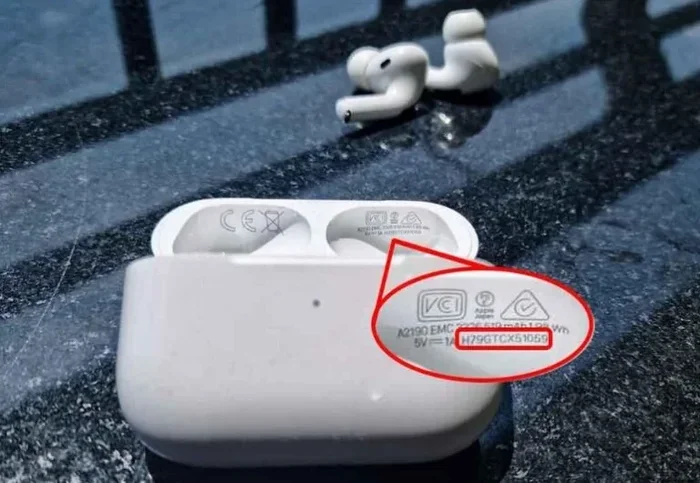
Featured image for Apple AirPods Pro registration
Image source: devicemag.com
You do not need to register your Apple AirPods Pro to use them. Registration is entirely optional and not required for basic functionality. However, registering your AirPods Pro with Apple can simplify warranty claims, improve customer support experiences, and help you keep track of your device. Think of registration as a helpful bonus rather than a necessity.
Imagine buying a brand-new pair of Apple AirPods Pro, tearing open the packaging, and then wondering whether you need to complete some sort of registration before you can start using them. It is a common question, and the answer is refreshingly simple. Let us walk through everything you need to know about AirPods Pro registration, why it matters, and when you should consider doing it.
The short answer is no. You do not need to register your Apple AirPods Pro to use them. They work right out of the box the moment you pair them with your iPhone, iPad, Mac, or any other Bluetooth-enabled device. Registration is an optional step that provides some extra benefits, but skipping it will not affect the core functionality of your wireless earbuds in any way.
Think of registration like signing up for a loyalty card at your favorite coffee shop. You can still buy coffee without it, but having the card means you get rewards, easier reorders, and a smoother experience overall. Similarly, registering your AirPods Pro with Apple gives you convenience perks without being mandatory.
Key Takeaways
- Registration is Optional: Apple does not require you to register AirPods Pro before using them, and they work perfectly fine without any registration process.
- Warranty Benefits: Registering your AirPods Pro with your Apple ID can streamline warranty claims and service requests if something goes wrong.
- Simplified Support: Registered devices allow Apple Support to quickly identify your product, saving you time during troubleshooting.
- Purchase Records: Registration keeps a digital record of your purchase, which can be useful for insurance purposes or if you lose your proof of purchase.
- Automatic Pairing: Once your AirPods Pro are linked to your Apple ID, they automatically sync across all your Apple devices without repeated setup.
- No Cost Involved: Registration is completely free and does not require any additional fees or subscriptions.
- Privacy Considerations: Apple registration involves linking the device to your Apple ID, which ties your personal data to the device, so consider your comfort level with this.
📑 Table of Contents
- What Does It Mean to Register AirPods Pro?
- Why Apple Suggests Linking Your AirPods Pro to Your Apple ID
- How to Register Your AirPods Pro with Your Apple ID
- What Happens If You Do Not Register Your AirPods Pro?
- Common Misconceptions About AirPods Pro Registration
- Should You Register Your AirPods Pro? A Practical Recommendation
- Troubleshooting Registration Issues
- The Bottom Line on AirPods Pro Registration
What Does It Mean to Register AirPods Pro?
When we talk about “registering” AirPods Pro, we are usually referring to linking the device to your Apple ID. This is a process that happens automatically in many cases, especially when you pair your AirPods Pro with an iPhone or iPad running the latest version of iOS or iPadOS.
How Apple Device Registration Works
Apple uses your Apple ID as a digital identity that ties all your Apple products together. When you sign into your iPhone with your Apple ID and pair your AirPods Pro, the earbuds become associated with that Apple ID automatically. This is what most people mean when they say “registering” their AirPods Pro.
Here is a simple analogy. Think of your Apple ID as a digital filing cabinet. Every time you buy a new Apple product and connect it to your account, Apple places a folder with that product’s information into your cabinet. The folder contains details like when you bought it, what model it is, and its serial number. This makes it easy for you and Apple to find information later.
Manual Registration Versus Automatic Pairing
There is no separate “registration” form or process for AirPods Pro the way there might be for other electronics. Instead, the process is built into the pairing experience. When you open the AirPods Pro case near your iPhone, a setup animation appears on your screen. Tapping “Connect” links the AirPods Pro to your Apple ID, completing what is essentially the registration process.
If you are using a non-Apple device like an Android phone or a Windows PC, the registration process does not apply in the same way. You would simply pair the AirPods Pro via Bluetooth, and they would work as standard Bluetooth earbuds.
Why Apple Suggests Linking Your AirPods Pro to Your Apple ID
Apple encourages users to link their AirPods Pro to their Apple ID for several practical reasons, all of which revolve around making your life easier and protecting your investment.
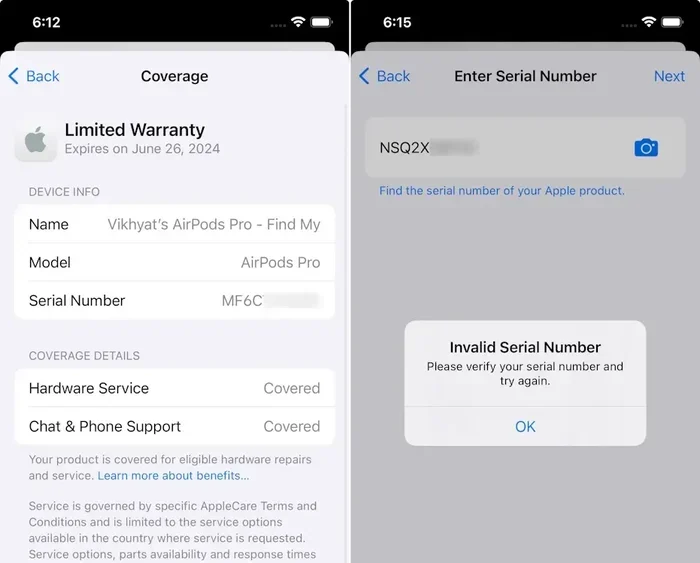
Visual guide about Apple AirPods Pro registration
Image source: beebom.com
Warranty and Service Requests
One of the biggest reasons to register your AirPods Pro is to simplify warranty claims. AirPods Pro come with a one-year limited warranty that covers manufacturing defects and hardware failures. If something goes wrong with your earbuds during this period, Apple Support can quickly verify your purchase date and warranty status if the device is linked to your Apple ID.
Without registration, you would need to provide proof of purchase, such as a receipt or order confirmation email, every time you request service. With registration, this information is already on file, saving you time and hassle.
Did You Know? According to Apple’s warranty policy, AirPods Pro also come with 90 days of complimentary technical support. Registered devices make it easier to access this support without having to dig through old emails.
Find My Network Integration
When you register your AirPods Pro with your Apple ID, they automatically appear in the Find My app. This is incredibly useful if you misplace your earbuds. The Find My network uses Bluetooth signals from millions of Apple devices worldwide to help you locate lost items, even when they are not connected to your phone.
Think of it like a digital neighborhood watch. If you lose your AirPods Pro at a park, and another iPhone user walks by, their phone can anonymously detect your AirPods Pro and relay the location to you through iCloud. This feature is only available for registered devices.
Automatic Device Switching
Registered AirPods Pro can seamlessly switch between your Apple devices. For example, if you are listening to music on your iPhone and then start playing a video on your Mac, your AirPods Pro automatically switch to the Mac without you having to dig into Bluetooth settings. This magic only works when your AirPods Pro are linked to your Apple ID.
How to Register Your AirPods Pro with Your Apple ID
If you decide that registration makes sense for you, the good news is that it is incredibly easy. In most cases, it happens automatically. Here is how the process works step by step.
Step 1: Ensure Your iPhone or iPad is Signed into iCloud
Before you pair your AirPods Pro, make sure your iPhone or iPad is signed into your Apple ID. You can check this by going to Settings, tapping your name at the top, and verifying that you are signed in. If you are not signed in, you will need to enter your Apple ID and password.
Step 2: Enable Bluetooth
Make sure Bluetooth is turned on by going to Settings and tapping Bluetooth. Toggle the switch to the on position if it is not already enabled.
Step 3: Open the AirPods Pro Case Near Your Device
With your AirPods Pro in the charging case, open the lid and hold the case near your iPhone or iPad. A setup animation should appear on your screen within a few seconds.
Step 4: Tap “Connect”
Tap the “Connect” button on the setup screen. Your device will pair with the AirPods Pro and automatically link them to your Apple ID.
Step 5: Follow the Remaining Prompts
You may be asked if you want to enable Siri, spatial audio, or other features. Make your selections, and you are done. Your AirPods Pro are now registered and ready to use.
The entire process takes less than a minute, and there is no separate registration form to fill out or website to visit.
What Happens If You Do Not Register Your AirPods Pro?
If you choose not to register your AirPods Pro, or if you are using them with a non-Apple device, they will still work perfectly fine. You will miss out on some Apple-specific features, but the core listening experience remains intact.
Features You Will Lose Without Registration
Without linking your AirPods Pro to your Apple ID, you will not be able to use the following features:
- Find My: You will not be able to locate your AirPods Pro if they are lost.
- Automatic Device Switching: Manual Bluetooth pairing is required every time you want to switch devices.
- Personalized Spatial Audio: This feature requires registration to create a custom audio profile based on your ear shape.
- Easy Firmware Updates: Firmware updates happen automatically for registered devices but may require manual installation otherwise.
Features That Still Work Without Registration
Do not worry, most of the core AirPods Pro features still work even without registration. These include:
- Active Noise Cancellation: Block out the world around you with industry-leading noise cancellation.
- Transparency Mode: Hear your surroundings without removing your earbuds.
- High-Quality Audio Playback: Enjoy rich, immersive sound for music, podcasts, and calls.
- Touch Controls: Use the force sensor on the stem to control playback and calls.
- Siri Functionality: Access Siri with a simple “Hey Siri” command.
Common Misconceptions About AirPods Pro Registration
There are several myths and misunderstandings floating around about AirPods Pro registration. Let us clear up the most common ones.
Myth 1: AirPods Pro Will Not Work Without Registration
This is simply not true. AirPods Pro work with any Bluetooth-enabled device, regardless of whether they are registered to an Apple ID. You can pair them with Android phones, Windows PCs, smart TVs, and more.
Myth 2: Registration Costs Money
Registration is completely free. There are no fees, subscriptions, or hidden charges associated with linking your AirPods Pro to your Apple ID.
Myth 3: Registration Voids Your Warranty
The opposite is true. Registration actually helps protect your warranty by creating a digital record of your purchase. Skipping registration does not void your warranty, but having it on file makes the claims process easier.
Myth 4: You Need to Register on Apple’s Website
There is no separate website or registration portal for AirPods Pro. The process is integrated into the pairing experience on your iPhone or iPad.
Should You Register Your AirPods Pro? A Practical Recommendation
Now that you know what registration does and does not do, let us talk about whether it makes sense for you. The answer depends on your personal situation and how you plan to use your AirPods Pro.
If You Are an Apple Ecosystem User, Register
If you own multiple Apple devices like an iPhone, iPad, Mac, and Apple Watch, registering your AirPods Pro is a no-brainer. You will get seamless device switching, easy access to Find My, and a more integrated experience overall. The setup takes less than a minute, and the benefits are substantial.
If You Use Android or Windows, Consider Your Needs
If your primary devices are not Apple products, registration is not possible in the traditional sense. However, you can still pair your AirPods Pro via Bluetooth and enjoy excellent sound quality and noise cancellation. Just keep your proof of purchase handy in case you ever need warranty service.
If You Value Security and Tracking, Definitely Register
AirPods Pro are not cheap, and losing them can be a painful experience. If you travel frequently or use your earbuds in busy environments, the Find My feature alone is worth registering. It is like having insurance for your earbuds.
If Privacy Is a Concern, Think Twice
Registering your AirPods Pro ties them to your Apple ID, which means Apple has a record of the device being associated with your account. Apple’s privacy policy is generally considered strong, and you can control what data is shared, but if you are particularly privacy-conscious, you may prefer to use AirPods Pro without registration.
Troubleshooting Registration Issues
Sometimes, the registration process does not go as smoothly as planned. Here are some common issues and how to fix them.
The Setup Animation Does Not Appear
If the setup animation does not show up when you open the AirPods Pro case near your device, try the following:
- Make sure your iPhone or iPad is running the latest version of iOS or iPadOS.
- Ensure Bluetooth is enabled.
- Close the lid, wait 15 seconds, and try again.
- Restart your device.
AirPods Pro Will Not Pair
If your AirPods Pro refuse to pair, reset them by pressing and holding the button on the back of the case until the LED light flashes amber and then white. Then try the setup process again.
Registration Appears Incomplete
If you suspect that your AirPods Pro are not fully linked to your Apple ID, go to Settings, tap Bluetooth, find your AirPods Pro, and check the details. You can also verify by opening the Find My app and seeing if your AirPods Pro appear in your devices list.
The Bottom Line on AirPods Pro Registration
So, do you need to register your Apple AirPods Pro? No, you do not. Registration is not required for your earbuds to function, and they will deliver excellent sound quality, noise cancellation, and comfort whether they are registered or not.
That said, registering your AirPods Pro with your Apple ID provides meaningful benefits that enhance your overall experience. From simplified warranty claims to the peace of mind that comes with Find My, registration is a small step that pays off in big ways.
If you are already invested in the Apple ecosystem, take the extra minute to register. If you are using AirPods Pro with non-Apple devices, keep your purchase receipt in a safe place and enjoy your earbuds without worry. Either way, you have a fantastic pair of headphones that will serve you well for years to come.
Frequently Asked Questions
Do I need to register my AirPods Pro to use them?
No, registration is not required to use your AirPods Pro. They work right out of the box with any Bluetooth-enabled device. Registration simply links them to your Apple ID for additional features and benefits.
How do I register my AirPods Pro with my Apple ID?
Registration happens automatically when you pair your AirPods Pro with your iPhone or iPad while signed into your Apple ID. Open the case near your device, tap “Connect” on the setup animation, and your AirPods Pro will be linked.
What happens if I do not register my AirPods Pro?
Your AirPods Pro will still work perfectly fine. You will simply miss out on features like Find My, automatic device switching, and easier warranty service. The core listening experience remains unchanged.
Can I register AirPods Pro bought from someone else?
Yes, but you will need to reset them first. Press and hold the setup button on the case until the light flashes white, then pair them with your device. Once paired, they will be linked to your Apple ID.
Does registering AirPods Pro extend the warranty?
No, registration does not extend the standard one-year warranty. However, AppleCare+ for Headphones can be purchased separately to extend coverage. Registration just makes it easier to file claims under the existing warranty.
Can I use AirPods Pro with Android after registering them with Apple?
Yes, you can pair AirPods Pro with Android devices via Bluetooth even if they are registered to an Apple ID. However, some Apple-specific features like automatic switching and Find My will only function on Apple devices.