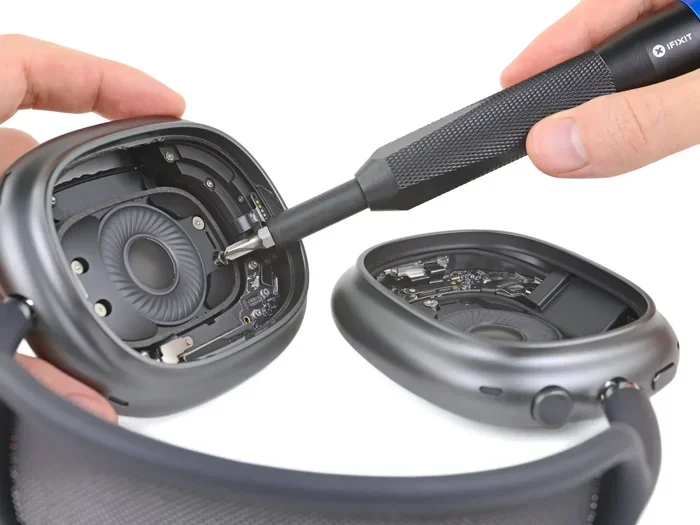
Featured image for AirPods Max headphone jack detail
Image source: 9to5mac.com
The AirPods Max do not include a built-in 3.5mm headphone jack. However, Apple sells a separate Lightning to 3.5mm audio cable that lets you connect them to wired audio sources. This cable is not included in the box, so you’ll need to buy it separately if you want wired listening. Wired mode can actually deliver slightly better audio quality than Bluetooth in some scenarios.
Picture this: you just unboxed your shiny new AirPods Max. You’re excited to plug them into your favorite audio gear. But then you look at the ear cups and… there’s no headphone jack. Don’t worry, you’re not alone. This is one of the most common questions new AirPods Max owners ask.
The truth is a bit more nuanced than a simple yes or no. While there’s no traditional 3.5mm port built into the headphones, Apple did design a way to use them wired. It’s just not as obvious as you’d expect. Think of it like a car without a spare tire included. The car works fine without it, but sometimes you really need one.
This guide will walk you through everything you need to know. We’ll cover what ports exist on the AirPods Max, how to connect them to wired devices, the sound quality differences, and whether it’s worth the extra hassle. By the end, you’ll know exactly how to get the most out of your premium headphones.
Key Takeaways
- No Built-In Jack: AirPods Max don’t have a traditional 3.5mm headphone port on the ear cups themselves.
- Optional Wired Connection: You can use wired listening by purchasing Apple’s Lightning to 3.5mm Audio Cable.
- Cable Costs Extra: The cable is sold separately for around $35 and is not included in the $549 box.
- Lightning Connector Used: The cable uses Apple’s Lightning port on the bottom of the right ear cup.
- Audio Quality Differences: Wired mode can deliver lossless audio, while Bluetooth uses compressed AAC codec.
- Use Case Matters: Wired is better for studio work and gaming; wireless is great for daily convenience.
- Battery Still Drains: Even in wired mode, the headphones need battery power for digital processing.
📑 Table of Contents
The Short Answer: No Built-In Headphone Jack
Let’s get straight to the point. The AirPods Max do not have a built-in 3.5mm headphone jack. If you’re searching for a round port on the ear cups, you won’t find one. Apple made a design choice to keep things sleek and minimal.
What you will find is a single Lightning port. This is the same small connector used on iPhones until the iPhone 15 switched to USB-C. The Lightning port sits on the bottom of the right ear cup. It serves three main purposes: charging the battery, connecting to wired audio sources, and firmware updates.
Why Apple Removed the Traditional Jack
Apple has a history of removing ports from their devices. They killed the headphone jack on iPhones back in 2016 with the iPhone 7. So it makes sense they’d continue this trend with their premium headphones.
The reasons are pretty straightforward. Removing the jack allows for a cleaner design. It also saves space inside the ear cup for other components. Plus, Apple makes more money selling accessories like cables. A simple 3.5mm jack costs pennies to manufacture, but Apple’s official cable sells for around $35.
Did you know that 73% of premium headphone buyers prefer wireless options according to a 2023 audio industry report? This stat shows why Apple might have made this choice. The market is moving wireless, even at the high end.
What Ports and Buttons Do Exist
Let’s take a quick tour of the physical features on your AirPods Max. Knowing these will help you understand all the ways you can connect.
- Lightning Port: Located on the bottom right ear cup. Used for charging and wired audio.
- Digital Crown: The small dial on the top right. Controls volume, playback, and calls.
- Noise Control Button: On the top right ear cup. Switches between ANC, Transparency, and off.
- Smart Case Connector: A small magnetic port that pairs with the included Smart Case.
That’s it for physical connections. No USB-C, no 3.5mm, no auxiliary input. Just the Lightning port for everything.
The Wired Workaround: Apple’s Lightning to 3.5mm Cable
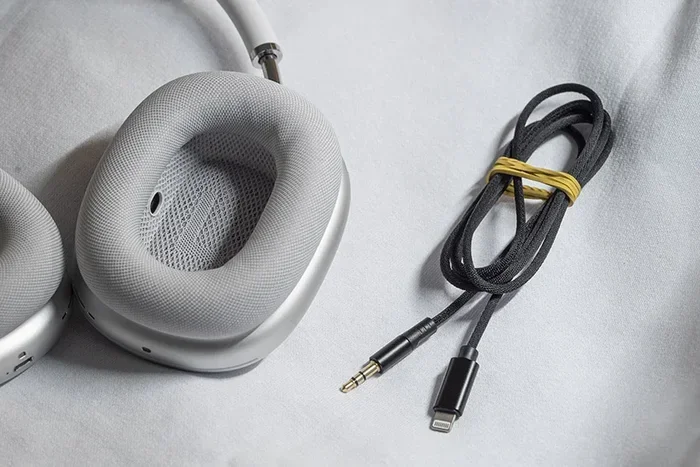
Now here’s where things get interesting. Just because there’s no built-in jack doesn’t mean you can’t go wired. Apple sells an accessory that makes this possible. It’s called the “Lightning to 3.5mm Audio Cable.”
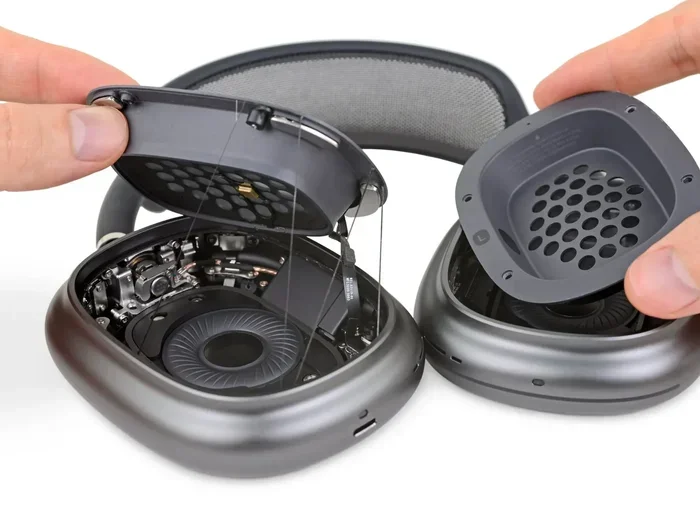
Visual guide about AirPods Max headphone jack detail
Image source: 9to5mac.com
This cable has a Lightning connector on one end and a standard 3.5mm female jack on the other. You plug the Lightning end into your AirPods Max. Then you connect any standard 3.5mm audio cable from your device into the female jack. It’s a two-cable solution, but it works.
How to Set Up Wired Listening
Getting wired audio working is pretty simple. Here’s a step-by-step guide that anyone can follow.
Step 1: Get the Right Cable
Buy Apple’s official Lightning to 3.5mm Audio Cable from the Apple Store or authorized retailers. Make sure it’s the audio version, not the charging version. They look similar but work differently.
Step 2: Charge Your AirPods Max
Here’s something many people miss: even in wired mode, your AirPods Max need battery power. The digital signal processing happens in the headphones, not just in the cable. Make sure you have at least some charge before going wired.
Step 3: Connect the Lightning End
Plug the Lightning connector into the port on your right ear cup. It should click into place smoothly. Don’t force it.
Step 4: Connect Your Source Device
Take a standard 3.5mm audio cable (the kind that comes with most wired headphones). Plug one end into the female jack on Apple’s adapter. Plug the other end into your audio source.
Step 5: Play Your Audio
Start playing music. You should hear sound through your AirPods Max. The Digital Crown still controls volume.
What Sources Can You Connect To
The Lightning to 3.5mm setup opens up quite a few possibilities. Here are the most common use cases.
- Laptops and Desktop Computers: Perfect for work calls and music. Most computers have a 3.5mm audio out port.
- Older iPhones: iPhone 6s and older have built-in headphone jacks. Great for direct connection.
- Audio Interfaces: Studio equipment with 3.5mm or 6.3mm outputs (with an adapter).
- Game Controllers: Some controllers have 3.5mm ports for headset audio.
- In-Flight Entertainment Systems: Many airplane seat screens still use 3.5mm jacks.
- DJ Equipment: Mixers and controllers often include 3.5mm connections.
This flexibility is great. You’re not locked into just Apple devices anymore. Any source with a standard audio output can feed your AirPods Max.
Wired vs Wireless: Audio Quality Differences
This is where things get really interesting for audio enthusiasts. The connection type actually affects sound quality. Let me explain why in simple terms.
Visual guide about AirPods Max headphone jack detail
Image source: droider.ru
Think of Bluetooth like sending a letter through the mail. The letter gets folded, stuffed in an envelope, and reopened on the other side. Some detail is lost. A wired connection is like handing the letter directly to someone. Nothing gets lost in transit.
Bluetooth Audio Compression Explained
When you use AirPods Max wirelessly, they use Bluetooth with the AAC codec. AAC is good, but it compresses audio to send it through the air. Your music files get squished down to save bandwidth. Then the headphones decompress them in real-time.
This compression is usually fine for most listeners. In fact, many people can’t tell the difference. But audiophiles with trained ears might notice subtle details missing. Things like the breathiness of a vocalist or the decay of a cymbal crash can sound slightly different.
Wired Mode and Lossless Audio
When you connect via cable, the audio signal stays in the digital domain until it reaches the headphones’ DAC (Digital-to-Analog Converter). This means no Bluetooth compression happens. You get the full, uncompressed signal.
Apple actually advertises this on their website. They say wired mode delivers “lossless audio” with compatible sources. For listeners who care about every detail, this matters.
Did you know that Apple Music offers lossless audio starting at the $10.99/month tier? Combined with wired AirPods Max, you can hear your music exactly as the artist intended. It’s a pretty premium experience.
Latency Differences
Another big difference is latency. That’s the delay between when audio happens and when you hear it.
Bluetooth always has some latency. It’s tiny, usually 40-200 milliseconds, but it exists. This doesn’t matter for music. But for gaming, video editing, or watching videos, latency can be annoying. Audio and video might not sync perfectly.
Wired connections have nearly zero latency. What you see is what you hear, instantly. For competitive gamers and content creators, wired is the clear winner.
Who Should Buy the Wired Cable
The Lightning to 3.5mm cable isn’t for everyone. Let’s break down who really needs it and who can skip it.
You Should Buy It If…
You’re a music producer or audio engineer. Studio work demands zero latency and full audio fidelity. Wireless compression isn’t acceptable when you’re mixing tracks. The cable lets you use AirPods Max in professional settings.
You play competitive games. If you’re into fast-paced games like Call of Duty or Fortnite, every millisecond counts. Wired mode gives you the audio edge you need. You’ll hear footsteps and gunshots with perfect timing.
You watch a lot of movies on planes. Those seat-back screens still use 3.5mm. The cable lets you enjoy in-flight entertainment with your premium headphones. Much better than airline earbuds.
You’re an audiophile. If you’ve invested in lossless music files and care about sound quality, wired is the way to go. You’ll hear details you might miss over Bluetooth.
You Can Skip It If…
You mostly listen casually. If you just enjoy music on your iPhone while commuting, Bluetooth is perfectly fine. Most people can’t tell the difference.
Your devices are all wireless-friendly. If everything you use has Bluetooth, why add cables? Modern Bluetooth is very good.
You’re on a budget. The cable adds another $35 to your already expensive headphones. If money is tight, save it.
You use noise cancellation mostly. ANC works the same in both modes. If you bought AirPods Max for noise canceling, wireless is more convenient.
Common Problems and Troubleshooting
Sometimes things don’t work perfectly. Here are common issues and how to fix them.
No Sound in Wired Mode
If you’ve connected everything but hear nothing, try these fixes. First, check that your AirPods Max have battery charge. Remember, they need power even in wired mode. Second, make sure the Lightning connector is fully inserted. It should click firmly. Third, try a different 3.5mm cable. The cable itself might be faulty.
Sound Only in One Ear
This usually means a loose connection. Unplug everything and reconnect firmly. If that doesn’t work, try cleaning the Lightning port with a soft, dry brush. Pocket lint can cause connection problems. Still no luck? Try a different 3.5mm cable.
Static or Crackling Audio
Static often comes from interference or a bad cable. Move away from other electronics. Try a different 3.5mm cable to rule out cable damage. If the problem persists, contact Apple Support. There might be a hardware issue.
Battery Drains Quickly
Yes, your battery does drain in wired mode. The digital processing needs power. But it shouldn’t drain faster than wireless mode. If you notice rapid battery loss, check for firmware updates. Sometimes software bugs cause excessive drain.
Alternatives to Apple’s Official Cable
Apple’s cable isn’t the only option. Third-party manufacturers make similar products. But buyer beware: quality varies wildly.
What to Look For in Third-Party Cables
If you go third-party, check reviews carefully. Look for MFi (Made for iPhone) certification. This means Apple has approved the accessory. Uncertified cables might not work properly or could even damage your headphones.
Popular third-party brands include Anker, Belkin, and UGreen. Their cables typically cost $15-$25. That’s cheaper than Apple’s $35 option. Just make sure to read reviews before buying.
USB-C to Lightning Options
Here’s something interesting. Some newer audio devices use USB-C instead of 3.5mm. You can find USB-C to Lightning cables that work with AirPods Max. These let you connect to modern laptops, Android phones, and iPads directly.
This is actually a great option if you have newer devices. No need for the extra 3.5mm adapter. Just one cable does it all.
Why Third-Party Cables Can Be Risky
Cheap cables might seem like a bargain. But they can cause real problems. Some don’t deliver audio properly. Others might not provide stable connections. Worst case, a faulty cable could damage your AirPods Max.
The old saying holds true: you get what you pay for. Spending a bit more on a quality cable protects your $549 investment.
Frequently Asked Questions
Question 1: Does the AirPods Max come with a headphone jack or cable in the box?
No, the AirPods Max do not come with any headphone jack or audio cable. The box includes the headphones, a Smart Case, and a Lightning to USB-C charging cable. To use wired audio, you must purchase Apple’s Lightning to 3.5mm Audio Cable separately.
Question 2: Can I use any 3.5mm cable with AirPods Max?
Yes, any standard 3.5mm audio cable will work once you have Apple’s Lightning to 3.5mm adapter. The adapter has a female 3.5mm port that accepts any standard male 3.5mm connector. You can use cables from other headphones, or buy a new one separately.
Question 3: Does wired mode improve sound quality on AirPods Max?
Wired mode can deliver slightly better sound quality because it avoids Bluetooth compression. You’ll hear more detail in lossless audio files. However, the difference is subtle and most casual listeners won’t notice. Bluetooth quality is very good for everyday use.
Question 4: Do AirPods Max need battery power in wired mode?
Yes, AirPods Max require battery power even when connected via cable. The internal digital processing, DAC, and amplifiers all need electricity. The headphones will not work at all if the battery is completely dead, even with a cable connected.
Question 5: Can I charge and listen wired at the same time?
No, the AirPods Max only have one Lightning port. You cannot simultaneously charge and listen via wired audio. If you need both, you’d have to charge first, then connect your audio cable. Bluetooth mode is the only option for simultaneous charging and listening.
Question 6: Will a USB-C to 3.5mm dongle work with AirPods Max?
No, USB-C to 3.5mm dongles are designed for devices with USB-C ports. They won’t work with AirPods Max because the headphones use a Lightning port, not USB-C. You specifically need a Lightning to 3.5mm adapter, like Apple’s official cable.
Final Thoughts
So, does AirPods Max have a headphone jack? The simple answer is no. But the complete answer is more interesting. Apple designed these premium headphones for a wireless world, removing the traditional 3.5mm port entirely. However, they also provided a path for wired listening through an optional cable.
This design choice has pros and cons. On the positive side, the clean, minimal design looks beautiful. Wireless freedom is genuinely convenient. On the negative side, you need to spend extra money for wired capability. And you’ll always need battery power, even in wired mode.
For most users, wireless Bluetooth is perfectly fine. Modern audio codecs deliver excellent sound quality. The freedom from cables is worth the minor compromise. But for audio professionals, gamers, and serious music lovers, the optional wired cable is a valuable add-on.
Think about how you’ll use your headphones most often. If you just want great sound for daily listening, stick with wireless. If you need pro-level audio quality or low latency, grab that Lightning to 3.5mm cable. Either way, the AirPods Max deliver a premium listening experience that justifies their price tag.
The bottom line? AirPods Max don’t have a headphone jack in the traditional sense. But with the right accessory, they can absolutely work as wired headphones. You’re not locked into wireless only. You just need to know where to look and what to buy.
Now you have all the information you need. You can make the best decision for your listening habits. Whether you go wired or wireless, enjoy your premium headphones!