The AirPods Max do not have a traditional built-in 3.5mm headphone jack. However, Apple designed them with wired audio capability through a Lightning to 3.5mm audio cable, sold separately. This cable allows you to connect your AirPods Max to any device with a standard headphone port, including in-flight entertainment systems, gaming consoles, and older audio equipment.

Featured image for AirPods Max headphone jack detail
Image source: 9to5mac.com
If you’ve been eyeing the AirPods Max and wondering whether you can plug them into your devices with a regular headphone cable, you’re not alone. This is one of the most common questions Apple fans ask before buying these premium over-ear headphones. The short answer might surprise you, and the longer answer opens up some interesting possibilities you might not have considered.
Apple took a bold approach when designing the AirPods Max. Unlike most premium headphones on the market, they don’t have a visible headphone jack anywhere on the device. There’s no port on the ear cups, no cable input on the headband, and no hidden compartment. At first glance, it might seem like these headphones are wireless-only, period. But Apple had a different plan in mind, one that involves a special cable and a little bit of know-how.
This guide will walk you through everything you need to know about wired listening on the AirPods Max. We’ll explore the official Apple solution, discuss why Apple made this choice, and help you figure out if the AirPods Max fit your listening style. Whether you’re a music lover, a gamer, a frequent flyer, or just someone who wants to understand their expensive new headphones, we’ve got you covered.
Key Takeaways
- No Traditional 3.5mm Jack: AirPods Max rely entirely on Bluetooth for wireless audio, with no built-in headphone port on the ear cups themselves.
- Wired Listening Is Possible: Apple sells a Lightning to 3.5mm audio cable that connects to the Lightning port on the AirPods Max for wired use.
- Cable Sold Separately: The $35 Lightning to 3.5mm cable is not included in the box and must be purchased separately.
- Wired Mode Advantages: Using a wired connection can reduce latency, preserve battery life, and improve compatibility with non-Bluetooth devices.
- Lightning, Not USB-C: The AirPods Max use Apple’s proprietary Lightning port for wired audio, not the newer USB-C standard.
- Latency-Free Gaming and Movies: Wired mode eliminates audio delay, making it ideal for gaming, video editing, and watching content.
- Hi-Fi Audio Potential: When wired to a high-quality DAC, AirPods Max can deliver sound quality that rivals many dedicated audiophile headphones.
📑 Table of Contents
- The Direct Answer: Do AirPods Max Have a Headphone Jack?
- How to Use AirPods Max with Wired Audio
- Benefits of Using Wired Mode with AirPods Max
- Common Issues and Troubleshooting
- Alternatives to Apple’s Official Cable
- Who Should Use Wired Mode and Why
- Future of AirPods Max: What’s Coming Next
- Final Thoughts
The Direct Answer: Do AirPods Max Have a Headphone Jack?
Let’s get straight to the point. The AirPods Max do not have a built-in 3.5mm headphone jack. If you flip them over, inspect every angle, and search for a port to plug a standard audio cable into, you won’t find one. This is unusual for headphones in this price range, where competitors like the Sony WH-1000XM5 and Bose QuietComfort Ultra both include traditional headphone ports.
What You’ll Actually Find on the AirPods Max
When you examine the AirPods Max, the only port you’ll discover is a Lightning connector located on the bottom of the right ear cup. This small port serves two purposes:
- Charging the battery using a Lightning cable
- Connecting to wired audio sources when paired with the right adapter
Think of it like this: imagine you bought a beautiful new car that didn’t come with a keyhole on the door. Instead, there’s only one slot on the dashboard that works for both starting the car and playing your favorite playlist. That’s essentially what Apple did with the AirPods Max. One port, two functions.
Why No Traditional Headphone Jack?
Apple’s decision to skip the headphone jack aligns with their long-standing philosophy of pushing the industry toward wireless technology. The company famously removed the headphone jack from iPhones starting in 2016, and the AirPods Max continue that trend. By eliminating the analog port, Apple was able to:
- Create a cleaner, more minimalist design
- Improve water and dust resistance
- Push users toward their wireless ecosystem
- Maintain tighter control over audio quality standards
Did You Know? According to a 2023 report by Statista, Apple sold over 100 million pairs of AirPods worldwide, making them one of the most popular headphone brands ever. The AirPods Max represent Apple’s premium tier in this wildly successful product line.
How to Use AirPods Max with Wired Audio
Even though there’s no traditional headphone jack, you absolutely can use your AirPods Max with wired audio. You just need the right accessory and a basic understanding of how it works. Let’s break it down step by step.
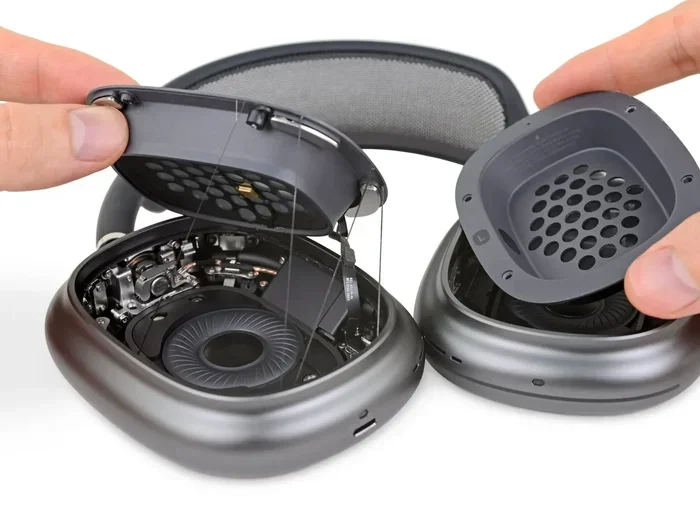
Visual guide about AirPods Max headphone jack detail
Image source: 9to5mac.com
Apple’s Official Solution: The Lightning to 3.5mm Cable
Apple sells an official cable called the Lightning to 3.5mm Audio Cable. This cable looks simple, but it’s specifically engineered to work with the AirPods Max. Here’s what makes it special:
- One end: A Lightning connector that plugs into the port on your AirPods Max
- Other end: A standard 3.5mm headphone plug that fits any traditional audio jack
- Length: Approximately 1.2 meters (about 4 feet)
- Price: Around $35 in the United States
To use it, you simply plug the Lightning end into your AirPods Max and the 3.5mm end into whatever device you want to listen to. The headphones automatically detect the wired connection and switch from Bluetooth mode to wired mode. It’s almost magical how seamlessly it works.
Devices You Can Connect To
The beauty of a 3.5mm connection is its universal compatibility. With the Lightning cable, you can plug your AirPods Max into virtually any device with a headphone port:
- In-flight entertainment systems on airplanes (a game-changer for frequent travelers)
- Gaming consoles like the Nintendo Switch, PlayStation, and Xbox controllers
- Laptop and desktop computers that still have headphone ports
- Audio interfaces and DACs for music production
- Older iPhones and iPads with headphone jacks
- TVs and home stereo systems with analog audio outputs
Pro tip: if you fly frequently, this cable essentially turns your AirPods Max into the best travel companion you can buy. You get wireless freedom at the gate and wired reliability at 30,000 feet.
Step-by-Step Setup Guide
Getting started with wired audio on your AirPods Max takes less than a minute:
- Locate your Lightning to 3.5mm cable. If you don’t have one, you’ll need to purchase it separately from Apple or an authorized retailer.
- Find the Lightning port on the bottom of the right ear cup.
- Plug the Lightning end firmly into the port until it clicks into place.
- Plug the 3.5mm end into the audio source of your choice.
- Put on your headphones and enjoy your music with zero latency.
One important note: when you connect a cable, your AirPods Max will power on automatically if they’re not already running. If you’re not getting any sound, check that the cable is fully inserted on both ends and that the audio source is playing.
Benefits of Using Wired Mode with AirPods Max
You might be wondering why anyone would bother with a wired connection when Bluetooth is so convenient. The truth is, wired listening offers several advantages that even Apple’s marketing team sometimes overlooks. Let’s explore why plugging in might be worth the effort.
Zero Audio Latency
Bluetooth audio, no matter how advanced, always involves a tiny delay as the signal travels from your device to your headphones. For most music listening, this delay is completely unnoticeable. But for certain activities, even a few milliseconds can matter.
Think of latency like a slight echo when you’re having a conversation. For casual chatting, you don’t notice it. But if you’re trying to play a musical instrument in sync with others, that tiny delay becomes a big problem. The same principle applies to:
- Gaming: Competitive gamers need instant audio feedback to react quickly
- Video editing: Editors need perfect sync between audio and visuals
- Music production: Musicians recording tracks cannot tolerate any delay
- Watching videos: Sometimes Bluetooth causes lip-sync issues
Wired mode eliminates this problem entirely. The audio travels through the cable at the speed of electricity, giving you perfectly synchronized sound.
Battery Life Preservation
The AirPods Max deliver up to 20 hours of battery life on a single charge. That’s impressive, but if you’re using them for extended sessions, every percentage point matters. When you use wired mode, the headphones still need some power to operate, but they consume significantly less energy than during active Bluetooth streaming.
Imagine your phone battery: streaming music over Bluetooth is like running multiple apps at once, while using a wired connection is more like having just one app open. The drain is real, and over long periods, it adds up.
Compatibility with Non-Bluetooth Devices
Not every device you own supports Bluetooth audio. Many older TVs, vintage stereo equipment, gym machines, and airplane entertainment systems only output audio through a 3.5mm jack. The Lightning cable transforms your AirPods Max into a universal listening tool that works with practically anything.
This compatibility is especially valuable for:
- Frequent flyers who want premium sound on long flights
- Gym-goers using older cardio equipment with headphone jacks
- Musicians connecting to traditional audio gear
- Office workers using conference systems with wired connections
Potential Audio Quality Improvements
Here’s something audiophiles have discovered: when you connect your AirPods Max to a high-quality external DAC (Digital-to-Analog Converter) using the Lightning cable, you can actually get better sound quality than the built-in Bluetooth pipeline allows.
The AirPods Max support 24-bit audio at 48 kHz through their Lightning port, which is higher than what standard Bluetooth can transmit. This means that with the right source, you’re getting technically superior audio. It’s like the difference between watching a standard DVD and a Blu-ray disc. The basic story is the same, but the Blu-ray has way more detail.
Did You Know? Apple’s AirPods Max use custom-built 40mm dynamic drivers. When wired to a quality DAC, these drivers can reveal subtle details in music that even some dedicated audiophile headphones might miss.
Common Issues and Troubleshooting
Even with Apple’s reputation for quality, things don’t always work perfectly. Here are some common problems people encounter with wired AirPods Max and how to fix them.
No Sound When Connected via Cable
If you’ve plugged in the Lightning to 3.5mm cable but hear nothing, try these troubleshooting steps:
- Check both connections: Make sure the Lightning plug is fully inserted into the AirPods Max and the 3.5mm plug is fully inserted into your audio source.
- Test with another device: Try plugging the cable into a different audio source to determine if the problem is with the cable or the original device.
- Restart your AirPods Max: Hold the Digital Crown and noise control button simultaneously for about 10 seconds until the LED flashes amber.
- Update firmware: Make sure your AirPods Max are running the latest firmware version.
- Try a different cable: If possible, test with another Lightning to 3.5mm cable to rule out a defective cable.
One Side Not Working
If audio only comes through one ear cup, the issue is usually a loose connection. Unplug both ends, inspect for any debris or damage, and reconnect firmly. If the problem persists, the cable itself might be damaged and need replacement.
Static or Crackling Sounds
Static usually indicates either a poor connection or interference. Try the following:
- Clean the Lightning port gently with a soft, dry brush
- Ensure the cable isn’t bent or strained at sharp angles
- Move away from other electronic devices that might cause interference
- Test the cable on a different audio source
Microphone Doesn’t Work in Wired Mode
This is an important limitation to know about. The Lightning to 3.5mm cable does not support microphone functionality. If you need a microphone for calls or gaming, you’ll need to use Bluetooth mode or a different cable setup.
Think of the Lightning to 3.5mm cable as a one-way street for audio. It carries sound from your device to your headphones, but it doesn’t carry your voice back. If you need two-way communication, Bluetooth is your only option with the AirPods Max.
Alternatives to Apple’s Official Cable
While Apple’s Lightning to 3.5mm cable works great, it’s not the only option. Several third-party manufacturers make compatible cables, often at lower prices or with different features.
Third-Party Lightning to 3.5mm Cables
Several reputable brands sell MFi-certified (Made for iPhone) Lightning to 3.5mm cables that work with AirPods Max:
- Anker: Known for reliable charging accessories, they make a compatible audio cable
- Belkin: Another trusted name in Apple accessories
- UGREEN: Offers budget-friendly options that work well
These cables typically cost between $15 and $30, making them a more affordable alternative to Apple’s $35 official cable. Just make sure any third-party cable you buy is MFi-certified to ensure compatibility and safety.
Lightning Splitter Options
If you need to share audio between two sets of AirPods Max or connect to both audio and charging simultaneously, you’ll need a splitter. These small adapters plug into the Lightning port and offer multiple connections.
For example, a Lightning audio + charging splitter lets you listen to music while charging your headphones. This can be useful on long flights where you might want to top off the battery during use.
Why Apple Should Have Included the Cable
Here’s an interesting point of contention among Apple customers: the $549 AirPods Max do not include the Lightning to 3.5mm cable in the box. Considering the premium price point, many users expected this essential accessory to be included.
To put this in perspective, the AirPods Max cost more than many competitors that include every cable you’d ever need. The Sony WH-1000XM5, for instance, includes a 3.5mm cable and a USB-C charging cable right out of the box. Apple’s decision to make the cable a separate purchase feels inconsistent with the premium experience they’re selling.
If you’re planning to buy AirPods Max and want wired capability, budget an extra $35 for the cable when making your purchase decision. Otherwise, you’ll find yourself unable to use wired audio until you make that additional investment.
Who Should Use Wired Mode and Why
Now that you understand the technical details, let’s talk about who actually benefits from wired listening on the AirPods Max. This isn’t for every user, but for certain people, it’s an absolute game-changer.
The Frequent Flyer
If you travel regularly, you know the frustration of in-flight entertainment systems that require a wired connection. Bluetooth headphones simply don’t work with most airplane systems. With the Lightning to 3.5mm cable, your AirPods Max become the ultimate travel accessory, offering both wireless freedom at the airport and premium wired sound in the air.
The Competitive Gamer
Gamers who play competitive titles need every advantage they can get. Audio latency can mean the difference between hearing an opponent’s footsteps in time or dying before you know they’re there. Wired mode gives you that critical edge.
The Audiophile on a Practical Budget
True audiophile headphones can cost thousands of dollars. The AirPods Max, while expensive, offer audiophile-grade sound quality when paired with a quality DAC. If you already own a good DAC, adding the AirPods Max with a Lightning cable gives you exceptional sound without needing a completely separate audiophile setup.
The Professional Content Creator
Musicians, podcasters, and video editors need reliable, low-latency audio. The AirPods Max in wired mode can serve as excellent monitoring headphones, letting you hear exactly what you’re recording or editing with perfect timing.
When Bluetooth Is Not an Option
Some situations simply don’t allow Bluetooth use:
- Hospitals and medical facilities often restrict wireless signals
- Some workplaces have Bluetooth restrictions for security
- Certain countries have regulations on wireless device usage
- Older equipment lacks Bluetooth support entirely
In these scenarios, the Lightning cable keeps your AirPods Max useful when wireless isn’t possible.
Future of AirPods Max: What’s Coming Next
Technology moves fast, and Apple’s product lineup is constantly evolving. While the current AirPods Max use a Lightning port, rumors suggest that future versions might adopt USB-C, following Apple’s broader transition away from Lightning connectors.
The European Union’s mandate requiring USB-C on all portable electronic devices by 2024 has pushed Apple toward this transition. While the current AirPods Max still use Lightning, a second-generation model released after this deadline would likely include USB-C instead.
This shift could actually improve the wired audio experience. USB-C supports higher data transfer rates and more flexible audio routing, potentially enabling features like:
- Higher resolution audio playback
- Digital audio input for cleaner signal paths
- Improved microphone support in wired mode
- Better compatibility with modern devices
For now, though, Lightning remains the standard for AirPods Max, and the Lightning to 3.5mm cable is your gateway to wired listening.
Final Thoughts
So, do AirPods Max have a headphone jack? Not in the traditional sense, but that doesn’t mean you’re stuck with wireless-only audio. Apple’s Lightning to 3.5mm cable provides a simple, elegant solution that opens up your headphones to countless wired applications. Whether you’re flying across the country, gaming competitively, or just want to preserve battery life, that $35 cable might be one of the best accessories you ever buy.
The AirPods Max represent Apple’s vision for the future of personal audio, a future that’s increasingly wireless but not exclusively so. By understanding your options and investing in the right accessories, you can enjoy the best of both worlds: the freedom of Bluetooth and the reliability of a wired connection.
If you’re considering buying AirPods Max, factor the cost of the cable into your budget. If you already own them, consider whether wired listening might enhance your experience. Either way, you now have all the information you need to make the most of these remarkable headphones.
Frequently Asked Questions
Do AirPods Max come with a headphone jack cable in the box?
No, the AirPods Max do not include a Lightning to 3.5mm audio cable in the box. You must purchase this cable separately from Apple for around $35 or from third-party retailers for less.
Can I use any 3.5mm cable with AirPods Max?
No, you cannot use a standard 3.5mm to 3.5mm cable. AirPods Max require a specific Lightning to 3.5mm cable because the connection point is a Lightning port, not a standard headphone jack.
Does the wired connection improve AirPods Max sound quality?
Yes, wired mode can deliver slightly better audio quality because it bypasses Bluetooth compression. When paired with a high-quality DAC, you can unlock the full 24-bit/48kHz capability of the AirPods Max drivers.
Can I use AirPods Max for gaming in wired mode?
Absolutely. Wired mode eliminates audio latency, making the AirPods Max excellent for gaming on consoles like PlayStation, Xbox, and Nintendo Switch, as well as PC gaming.
Does the microphone work when AirPods Max are connected via cable?
No, the Lightning to 3.5mm cable does not support microphone functionality. You will need to use Bluetooth mode for voice calls, voice chat, or any feature that requires the microphone.
Will future AirPods Max models have USB-C instead of Lightning?
Most likely, yes. Following EU regulations and Apple’s broader transition to USB-C, future versions of the AirPods Max are expected to include a USB-C port instead of Lightning, potentially offering improved wired audio capabilities.