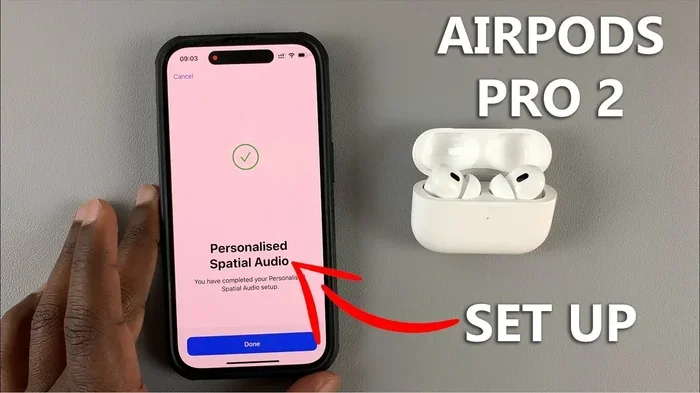
Featured image for AirPods Pro 2 spatial audio
Image source: i.ytimg.com
Yes, AirPods Pro 2 absolutely support spatial audio. This feature creates a theater-like, immersive sound experience by placing audio in a 3D space around you. With dynamic head tracking, the sound stays anchored to your device, making movies, music, and calls feel incredibly lifelike. Both the original AirPods Pro 2 (2022) and the updated USB-C version (2023) come equipped with this technology.
Imagine sitting in a movie theater. A helicopter flies overhead, and you instinctively look up. Rain patters behind you, and you turn your head slightly. The world of sound surrounds you, not just from the left and right speakers but from every direction. Now imagine shrinking that entire theater experience into two tiny earbuds that fit in your pockets. That’s exactly what spatial audio on AirPods Pro 2 promises to deliver, and yes, it actually works pretty well.
Since Apple introduced spatial audio in 2020, the feature has become a major selling point for AirPods. But with multiple AirPods models on the market, many people wonder whether the AirPods Pro 2 specifically support this immersive technology. The short answer is a resounding yes. The longer answer involves a fascinating mix of gyroscopes, accelerometers, and clever audio engineering that tricks your brain into thinking sound is coming from all around you.
In this guide, we’ll break down everything you need to know about spatial audio on AirPods Pro 2. You’ll learn what it is, how it works, how to set it up, and whether it’s truly worth the hype. Whether you’re a casual listener or an audiophile, there’s something here for you.
Key Takeaways
- Full Spatial Audio Support: AirPods Pro 2 support spatial audio with dynamic head tracking across Apple Music, Apple TV+, Netflix, and more.
- Personalized Spatial Audio: Using your iPhone’s TrueDepth camera, you can create a custom listening profile based on your unique ear shape.
- Two Generations, Same Feature: Both the 2022 Lightning version and 2023 USB-C version of AirPods Pro 2 offer spatial audio capabilities.
- Compatible Devices: Spatial audio works with iPhone 7 and later, iPad Pro, iPad Air (3rd gen+), iPad mini (5th gen+), and select Mac models.
- Easy Activation: You can turn it on in just a few taps under Bluetooth settings or directly from the Control Center.
- Not Just for Music: Spatial audio enhances movies, TV shows, FaceTime calls, and even select games for a surround-sound feel.
- Worth the Hype: According to Apple, spatial audio can make listeners feel up to 80% more immersed in their content.
📑 Table of Contents
- What Exactly Is Spatial Audio and How Does It Work on AirPods Pro 2?
- Which AirPods Pro 2 Models Support Spatial Audio?
- How to Turn On and Set Up Spatial Audio on AirPods Pro 2
- What Devices Are Compatible With Spatial Audio on AirPods Pro 2?
- Where Can You Actually Use Spatial Audio?
- Tips and Tricks to Get the Most Out of Spatial Audio on AirPods Pro 2
- Common Misconceptions About Spatial Audio on AirPods Pro 2
- Conclusion: Is Spatial Audio on AirPods Pro 2 Worth It?
What Exactly Is Spatial Audio and How Does It Work on AirPods Pro 2?
Spatial audio is Apple’s name for a surround-sound technology that creates a three-dimensional listening experience. Think of it like upgrading from a regular TV to a full home theater system, except the “speakers” are virtually placed around your head inside tiny earbuds.
The Science Behind the Magic
Your brain is incredibly good at figuring out where sounds come from. It uses tiny clues like the time it takes sound to reach each ear and the slight differences in volume and pitch. Engineers have known about this for decades, and spatial audio is essentially a way to “hack” this natural system.
AirPods Pro 2 contain tiny motion sensors called gyroscopes and accelerometers. These sensors track the position of your head in real time, even detecting tiny movements like nodding or turning. When you turn your head to the left, the audio adjusts so it feels like the sound is coming from the device in front of you, not from your ears. This is what Apple calls “dynamic head tracking.”
Two Flavors of Spatial Audio
Apple offers spatial audio in two main forms on AirPods Pro 2:
- Standard Spatial Audio: Works with any supported content and gives you a general sense of surround sound.
- Personalized Spatial Audio: Uses the TrueDepth camera on your iPhone to scan your face and ears, creating a custom audio profile tailored to your unique head and ear shape.
Think of it like getting a bespoke suit versus buying one off the rack. The personalized version fits your specific “audio anatomy” better, making the experience feel even more natural.
Did You Know?
Apple first introduced spatial audio in iOS 14 back in 2020. By 2024, the feature had expanded to over 70 apps and services, including major streaming platforms like Netflix, Disney+, and Apple Music.
Which AirPods Pro 2 Models Support Spatial Audio?
Here’s where things can get a little confusing. Apple released the AirPods Pro 2 in two versions, and both support spatial audio.
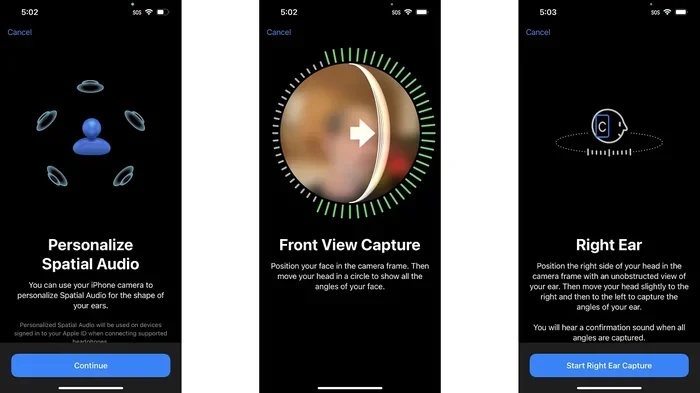
Visual guide about AirPods Pro 2 spatial audio
Image source: i.pcmag.com
The Original AirPods Pro 2 (2022)
This was the first version of the AirPods Pro 2, launched in September 2022. It came with a Lightning charging case and was the first AirPods model to ship with spatial audio fully integrated into the hardware. It features the H2 chip, which is the brain that processes spatial audio in real time.
The USB-C AirPods Pro 2 (2023)
In September 2023, Apple quietly updated the AirPods Pro 2 with a USB-C charging case instead of Lightning. While the case was the main visible change, there were a few internal upgrades too. Most importantly, this model supports lossless audio when used with the Apple Vision Pro headset, which is a fancy way of saying the sound quality gets even better.
Both versions support the exact same spatial audio features. So no matter which one you have, you’re getting the full experience.
Quick Comparison Table
- 2022 Model: Lightning case, H2 chip, full spatial audio support.
- 2023 Model: USB-C case, H2 chip, full spatial audio support plus lossless audio with Vision Pro.
- What They Share: Personalized spatial audio, dynamic head tracking, Dolby Atmos support.
How to Turn On and Set Up Spatial Audio on AirPods Pro 2
One of the best things about spatial audio on AirPods Pro 2 is how easy it is to set up. You don’t need to be a tech wizard or fiddle with complicated settings. Apple designed it to be practically plug-and-play.
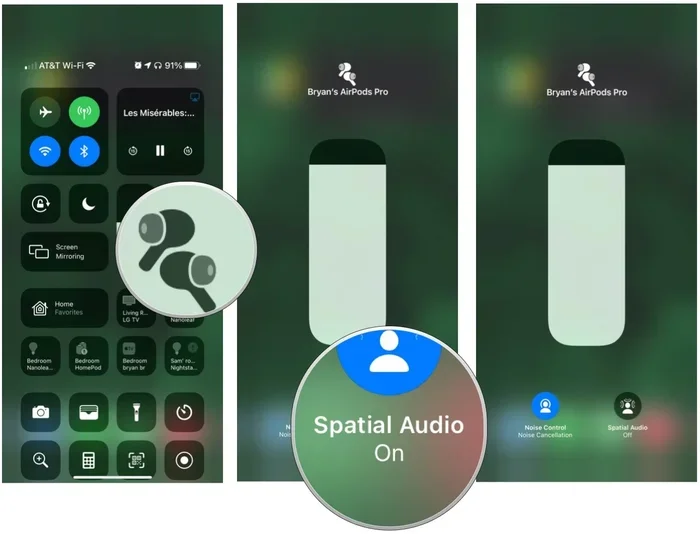
Visual guide about AirPods Pro 2 spatial audio
Image source: imore.com
Step-by-Step Setup Guide
First, make sure your AirPods Pro 2 are connected to your iPhone or iPad. Then, follow these simple steps:
- Open Settings: Go to the Settings app on your iPhone or iPad.
- Tap Bluetooth: Find your AirPods Pro 2 in the list of connected devices.
- Tap the “i” Icon: Next to your AirPods name, you’ll see a small information button.
- Find Spatial Audio: Scroll down until you see the “Spatial Audio” option.
- Toggle It On: Switch the toggle to enable spatial audio.
You can also control spatial audio from the Control Center. Just swipe down from the top-right corner of your screen, long-press the volume slider, and tap the “Spatial Audio” button at the bottom.
Setting Up Personalized Spatial Audio
For the personalized version, the process is a bit more involved but still very simple:
- Connect Your AirPods: Make sure they’re paired and in your ears.
- Open Settings: Go to Settings, then tap your AirPods name.
- Tap “Personalized Spatial Audio”: You’ll see this option in the menu.
- Follow the Prompts: Your iPhone will use its TrueDepth camera to scan your face from different angles.
- Done: The profile saves automatically and syncs across all your Apple devices.
Think of it like taking a quick photo of your ears. The whole process takes less than a minute, and you only have to do it once.
What Devices Are Compatible With Spatial Audio on AirPods Pro 2?
Spatial audio is impressive on its own, but it’s even better when paired with the right device. The good news is that AirPods Pro 2 work with a wide range of Apple products.
iPhone Compatibility
Spatial audio works with iPhone 7 and later models. This includes:
- iPhone 15 series (all models)
- iPhone 14 series (all models)
- iPhone 13 series (all models)
- iPhone 12 series (all models)
- iPhone 11 series (all models)
- iPhone XS and XS Max
- iPhone XR
- iPhone X
- iPhone 8 and 8 Plus
- iPhone 7 and 7 Plus
You’ll also need to make sure your iPhone is running iOS 14 or later. If you’re using an older iPhone or haven’t updated in a while, spatial audio won’t be available.
iPad Compatibility
For iPad users, you’ll need one of the following models:
- iPad Pro (all models from 2018 onward)
- iPad Air (3rd generation and later)
- iPad mini (5th generation and later)
- iPad (6th generation and later)
Mac Compatibility
On Mac, spatial audio works with models running macOS Monterey or later. Compatible Macs include:
- MacBook Pro (2018 and later)
- MacBook Air (2018 and later)
- iMac (2019 and later)
- Mac mini (2020 and later)
- Mac Studio (all models)
- Mac Pro (2019 and later)
What About Apple TV?
Yes, spatial audio works with Apple TV 4K. It’s one of the best ways to experience the feature, especially when watching movies with Dolby Atmos soundtracks. The audio feels like it’s coming from your TV screen, even when you’re wearing your AirPods.
For more details on compatible products, you can check Apple’s official AirPods Pro specifications page.
Where Can You Actually Use Spatial Audio?
Spatial audio isn’t just a one-trick pony. It works across many different types of content and apps, making it useful for much more than just music.
Music Streaming Services
Apple Music is the big one here. Apple has thousands of songs mixed in Dolby Atmos, which is the technology behind spatial audio. You can find these tracks by looking for the “Dolby Atmos” badge in the Apple Music app. Other services like Tidal and Amazon Music also offer spatial audio content, though the selection isn’t quite as extensive.
Movies and TV Shows
This is where spatial audio really shines. Services like Apple TV+, Netflix, Disney+, HBO Max, and Amazon Prime Video all support spatial audio on supported content. When watching with AirPods Pro 2, the sound feels like it’s coming from your screen rather than from your ears. It’s the next best thing to having a full home theater system.
FaceTime Calls
Did you know spatial audio can make your phone calls sound better too? During FaceTime calls, the audio from each person appears to come from their position on the screen. If someone is in the top-left corner of your grid, their voice will sound like it’s coming from the top-left. It’s a small touch but makes group calls feel more natural.
Gaming
Several games on Apple Arcade support spatial audio. Racing games, first-person shooters, and adventure games all benefit from the immersive sound. Hearing footsteps behind you or engines roaring past adds a whole new layer of realism.
Did You Know?
According to a 2023 report by Statista, over 60% of Apple Music subscribers had tried listening to at least one Dolby Atmos track. The feature is growing in adoption year over year.
Tips and Tricks to Get the Most Out of Spatial Audio on AirPods Pro 2
Now that you know spatial audio is available and works across many apps, here are some practical tips to make your experience even better.
Tip 1: Always Use the Right Fit
Spatial audio relies heavily on how well your AirPods sit in your ears. If they’re loose or the wrong size, the sound won’t feel as immersive. AirPods Pro 2 come with four silicone tip sizes (XS, S, M, L). Use the Ear Tip Fit Test in Settings to find the perfect size for your ears.
Tip 2: Try Personalized Spatial Audio
If you haven’t set up personalized spatial audio yet, do it. The difference between standard and personalized spatial audio can be subtle but noticeable. It’s like the difference between listening to a song on cheap headphones versus a high-quality studio setup.
Tip 3: Test With the Right Content
Not all content takes full advantage of spatial audio. Movies with Dolby Atmos soundtracks and music tracks specifically mixed in Atmos will give you the best experience. Look for the Dolby Atmos or spatial audio badges when browsing content.
Tip 4: Use Noise Cancellation
Spatial audio works best when you’re not distracted by outside noise. Make sure your AirPods Pro 2 are using active noise cancellation to block out the world around you. This way, you can fully immerse yourself in the sound.
Tip 5: Calibrate With Your Device
The first time you use spatial audio, take a few minutes to move your head around and listen. The dynamic head tracking feature works best when it has time to calibrate to your movements. Once calibrated, the experience feels natural and seamless.
Tip 6: Keep Your Firmware Updated
Apple regularly releases firmware updates for AirPods Pro 2 that improve performance and sometimes add new features. Make sure your AirPods are running the latest firmware by checking the Settings app on your iPhone.
Common Misconceptions About Spatial Audio on AirPods Pro 2
Even though it’s been around for a few years, there are still some myths floating around about spatial audio. Let’s clear up the most common ones.
Myth 1: “Spatial Audio Only Works With Apple Music”
This is one of the biggest misconceptions. While Apple Music does support spatial audio, so do many other apps and services. Netflix, Disney+, HBO Max, Amazon Prime Video, FaceTime, and even some games all support spatial audio. You’re not limited to just one service.
Myth 2: “You Need Expensive Audio Equipment to Hear the Difference”
Spatial audio works with just your AirPods Pro 2 and your iPhone. You don’t need a fancy home theater system or expensive speakers. The H2 chip inside the AirPods handles all the heavy lifting, and it does an impressive job.
Myth 3: “Spatial Audio Drains Your Battery”
While spatial audio does use a tiny bit more battery than regular audio, the difference is minimal. You can listen to several hours of spatial audio content without significantly impacting your AirPods’ battery life.
Myth 4: “All Music Sounds Better With Spatial Audio”
This is a tricky one. Spatial audio sounds amazing on tracks specifically mixed for Dolby Atmos, but not every song is mixed that way. If a song wasn’t designed for spatial audio, turning it on might not make a huge difference. Apple Music does a good job of automatically applying spatial audio when appropriate.
Myth 5: “Spatial Audio Is the Same as Regular Stereo”
They might both come through the same earbuds, but they’re very different. Regular stereo audio is flat, with sound coming from the left and right channels only. Spatial audio creates a three-dimensional experience that mimics how you hear sounds in the real world. It’s like comparing a flat painting to a 3D sculpture.
Conclusion: Is Spatial Audio on AirPods Pro 2 Worth It?
So, we’ve answered the big question: yes, AirPods Pro 2 absolutely have spatial audio. But is it actually worth using? After exploring all the features, supported devices, and use cases, the answer is a clear yes for most people.
Spatial audio transforms the way you experience content. Whether you’re watching a movie, listening to music, or chatting with friends on FaceTime, the technology adds a layer of immersion that regular audio simply can’t match. It’s one of those features that you have to experience to truly appreciate. Once you turn it on, going back to standard audio feels flat and boring.
The best part is that it’s already included with your AirPods Pro 2. There’s no extra subscription, no additional hardware, and no complicated setup process. Just turn it on and enjoy a richer sound experience.
For music lovers, movie buffs, and casual listeners alike, spatial audio on AirPods Pro 2 is one of the standout features that makes these earbuds special. So go ahead, try it out, and prepare to hear your favorite content in a whole new way.
Did You Know? Apple’s spatial audio technology was inspired by the way sound works in real life. The company’s audio engineers studied how the human brain processes sound direction and designed the H2 chip to mimic this natural process.
For more information about how spatial audio compares to other audio technologies, check out this comprehensive guide to Dolby Atmos from Dolby’s official website.
Frequently Asked Questions
Does AirPods Pro 2 have spatial audio with head tracking?
Yes, AirPods Pro 2 support spatial audio with dynamic head tracking. This feature anchors the sound to your device, so when you turn your head, the audio stays in place, creating a realistic, theater-like experience.
Do I need an iPhone to use spatial audio on AirPods Pro 2?
While you can use AirPods Pro 2 with non-Apple devices, spatial audio is only fully supported on Apple devices like iPhone, iPad, Mac, and Apple TV. For the best experience, use them with an iPhone 7 or later running iOS 14 or newer.
Is there a difference between spatial audio on the 2022 and 2023 AirPods Pro 2 models?
Both the 2022 Lightning version and the 2023 USB-C version of AirPods Pro 2 support spatial audio. The main difference between them is the charging port, but both deliver the same immersive audio experience.
Can I use spatial audio with Android phones?
When paired with an Android device, AirPods Pro 2 act like regular Bluetooth earbuds. Spatial audio is an Apple-specific feature and requires an iPhone, iPad, Mac, or Apple TV to work properly.
Does spatial audio work with all music and movies?
Spatial audio works best with content specifically mixed in Dolby Atmos. Apple Music, Apple TV+, Netflix, Disney+, and many other services offer a growing library of spatial audio content. Regular stereo audio will still play, but won’t take full advantage of the feature.
How do I know if spatial audio is turned on?
You can check by opening the Control Center on your iPhone, long-pressing the volume slider, and looking for the spatial audio icon. It will be highlighted or animated when the feature is active.