Featured image for iPhone Air USB-C port
Image source: cultofmac.com
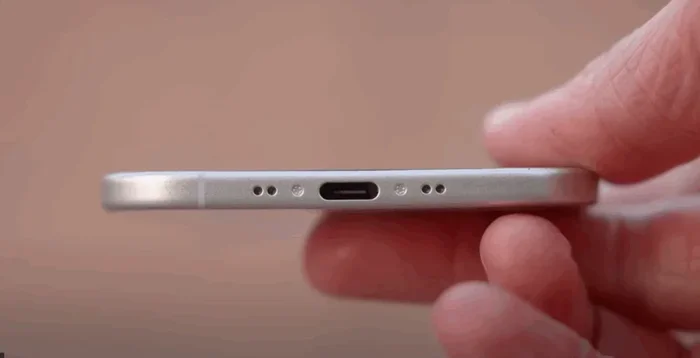
The iPhone Air does use USB-C, marking Apple’s complete transition away from the Lightning connector across its smartphone lineup. This change, driven by EU regulations and a push for universal charging standards, means iPhone Air users get faster data transfer speeds, broader accessory compatibility, and a single cable for multiple devices. Owners can now charge their iPhone, iPad, Mac, and AirPods using the same USB-C cable.
Picture this: you’re packing for a trip, and you grab one cable to charge your phone, tablet, laptop, and earbuds. Sounds like a dream, right? Well, if you’re eyeing the iPhone Air, that dream just became reality. After more than a decade of using its own proprietary connector, Apple has finally embraced the universal standard, and the iPhone Air proudly features a USB-C port.
But the switch wasn’t just about convenience. It was pushed along by regulators in Europe, demanded by frustrated travelers, and accelerated by the simple fact that the rest of the tech world had already moved on. Now, Apple users finally get to enjoy the same cable their Android-toting friends have been using for years.
In this guide, we’ll break down everything you need to know about the iPhone Air’s USB-C port. You’ll learn why Apple made the change, what it means for your daily charging routine, how it affects your existing accessories, and what the future holds for iPhone connectivity. Whether you’re a longtime Apple fan or considering your first iPhone, this article will answer every question you have about the iPhone Air and USB-C.
Key Takeaways
- Yes, the iPhone Air uses USB-C: Apple has fully transitioned its iPhone lineup to USB-C, replacing the proprietary Lightning connector that debuted in 2012.
- EU Regulation Drove the Change: The European Union’s Common Charger Directive (effective December 2024) required all smartphones to adopt USB-C as the standard charging port.
- Faster Charging and Data Speeds: USB-C on iPhone Air supports faster charging when paired with compatible 20W or higher power adapters and enables quicker file transfers.
- Universal Cable Convenience: One USB-C cable now charges your iPhone Air, iPad, MacBook, AirPods, and many other gadgets, reducing cable clutter.
- Accessory Compatibility Expanded: USB-C opens the door to a vast ecosystem of third-party accessories, from external monitors to SD card readers and professional audio gear.
- Older iPhones Still Use Lightning: iPhone models before the iPhone 15 series (released September 2023) continue to use the Lightning connector.
- Adapters Bridge the Gap: Apple’s official USB-C to Lightning adapter lets you use older Lightning accessories with your new iPhone Air.
📑 Table of Contents
- What Is USB-C and Why Does It Matter for the iPhone Air?
- Does the iPhone Air Specifically Use USB-C?
- Why Did Apple Switch from Lightning to USB-C on the iPhone Air?
- What Are the Benefits of USB-C on the iPhone Air?
- What About Older Lightning Accessories? Compatibility Explained
- Which iPhones Use USB-C vs. Lightning? A Complete Breakdown
- What Does the Future Hold for iPhone Connectivity?
- Tips for Getting the Most Out of USB-C on Your iPhone Air
- Final Thoughts: Embracing the USB-C Future with the iPhone Air
What Is USB-C and Why Does It Matter for the iPhone Air?
USB-C (formally known as USB Type-C) is a 24-pin connector system that has become the universal standard for charging and data transfer across the tech industry. Think of it like the international language of cables. Instead of every device speaking its own dialect, they all speak USB-C.
The connector itself is small, oval-shaped, and reversible, meaning there’s no “wrong way” to plug it in. If you’ve ever fumbled in the dark trying to plug in a cable, you’ll appreciate this feature immediately.
The Technical Advantages of USB-C
USB-C isn’t just a different shape than older connectors. It’s a fundamentally better technology in several ways:
- Faster Data Transfer: USB-C supports USB 3.1, USB 3.2, and even USB 4 standards, allowing data transfer speeds of up to 40 Gbps (gigabits per second) in the most advanced versions. Even basic USB-C implementations are significantly faster than older USB-A connections.
- Higher Power Delivery: USB-C can deliver up to 100 watts of power (and even more with USB Power Delivery 3.1), enough to charge laptops, monitors, and other high-demand devices, not just phones.
- Audio and Video Support: USB-C can carry audio and video signals, which is why you can connect your iPhone directly to an external display or use USB-C headphones.
- Reversible Design: Unlike the older USB-A (the rectangular connector everyone struggled with), USB-C plugs in either way. No more flipping the cable three times before it works.
How USB-C Compares to Apple’s Lightning Connector
Apple introduced the Lightning connector in September 2012 with the iPhone 5. At the time, it was revolutionary, smaller, reversible, and more durable than the old 30-pin connector it replaced. But by today’s standards, Lightning shows its age.
Here’s a simple comparison:
- Speed: Lightning supports USB 2.0 speeds (up to 480 Mbps). USB-C on iPhone Air supports USB 2.0 speeds by default but can support faster speeds depending on the model.
- Power: Lightning can deliver up to about 20W for fast charging. USB-C can deliver up to 100W or more.
- Versatility: Lightning is proprietary (Apple-only). USB-C works across thousands of devices from countless manufacturers.
Think of Lightning as a key that only works on Apple doors, while USB-C is a master key that works on almost every door in the building.
Does the iPhone Air Specifically Use USB-C?
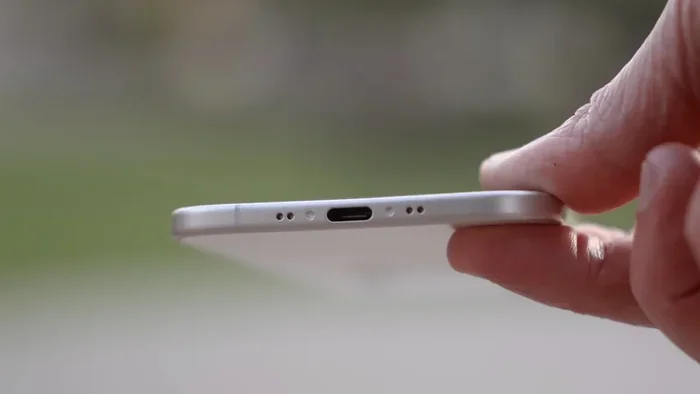
Yes, absolutely. The iPhone Air uses USB-C. This applies to every iPhone Air model in Apple’s current lineup. Whether you’re buying the standard iPhone Air or any storage configuration, you’ll find a USB-C port at the bottom of the device instead of the old Lightning connector.
Visual guide about iPhone Air USB-C port
Image source: gori.me
When Apple announced the iPhone Air, the company confirmed that all models in this generation ship with USB-C ports. This continues the transition that began with the iPhone 15 series in September 2023.
How to Identify the USB-C Port on Your iPhone Air
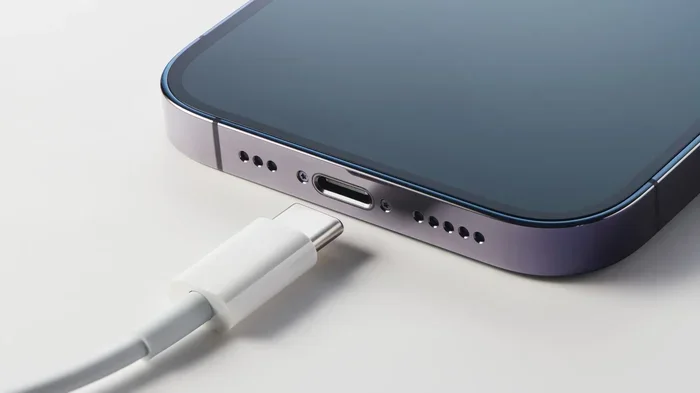
The USB-C port on the iPhone Air looks like a small, rounded oval at the bottom edge of the phone. If you’re upgrading from an older iPhone with Lightning, you’ll immediately notice the different shape. Lightning ports are smaller and have a visible “tab” inside, while USB-C ports are wider and symmetrical.
You can also check by looking at your charging cable. If it has a flat, rounded end (like the cable that comes with modern MacBooks, iPads, and Android phones), it’s USB-C. If it has a small, narrow connector with metal contacts visible, it’s Lightning.
What Comes in the iPhone Air Box?
Apple’s environmental policy means iPhone Air typically ships with just the device and a USB-C cable in the box. You won’t find a power adapter or EarPods included. If you need a wall charger, you’ll need to purchase one separately or use one you already own.
Did You Know? Since the iPhone 12, Apple has stopped including power adapters in iPhone boxes, a move the company says reduces electronic waste. By 2023, this practice had reportedly kept over 1 million metric tons of packaging material out of landfills, according to Apple’s environmental reports.
Why Did Apple Switch from Lightning to USB-C on the iPhone Air?
The switch from Lightning to USB-C wasn’t a decision Apple made purely out of goodwill. It resulted from a combination of regulatory pressure, consumer demand, and practical necessity. Let’s break down each factor.
Visual guide about iPhone Air USB-C port
Image source: slashgear.com
The EU Common Charger Directive
The biggest catalyst for Apple’s USB-C transition was the European Union’s Common Charger Directive. This regulation, formally adopted in 2022, required all smartphones sold in the EU to use USB-C as the standard charging port by December 28, 2024.
The reasoning behind the law was straightforward: reduce electronic waste, save consumers money on replacement cables, and create a universal standard. The EU estimated that the directive would save consumers approximately €250 million per year and reduce 11,000 tons of annual e-waste.
Apple initially resisted the change, arguing that regulation would “stifle innovation.” However, once the law passed with overwhelming support, Apple decided to transition its entire global iPhone lineup to USB-C rather than create a separate USB-C version for Europe only.
Consumer Demand for Universal Charging
Long before the EU stepped in, iPhone users were asking Apple to adopt USB-C. The frustration was real: you couldn’t borrow a friend’s charger, your MacBook and iPhone needed different cables, and accessories were increasingly hard to find.
A 2022 survey by the Consumer Technology Association found that 72% of consumers preferred a universal charging standard for all their devices. This sentiment was particularly strong among users who owned multiple device types (phones, tablets, laptops, earbuds) and wanted to simplify their cable collection.
The Practical Benefits Apple Recognized
Beyond pressure from regulators and consumers, USB-C offered Apple some genuine advantages:
- Pro-Grade Features: USB-C enables features that professionals demand, such as direct connection to external displays, faster data transfer for large files, and compatibility with pro accessories like SD card readers and microphones.
- iPad and Mac Alignment: Apple’s iPad Pro had already adopted USB-C in 2018, followed by other iPad models. The MacBook lineup transitioned to USB-C even earlier. Making the iPhone USB-C created a cohesive ecosystem across all Apple devices.
- Future-Proofing: USB-C is designed to evolve. New versions like USB4 and Thunderbolt offer ever-faster speeds, ensuring iPhones can grow with technology rather than being locked into an aging connector.
What Are the Benefits of USB-C on the iPhone Air?
The shift to USB-C brings real, tangible benefits to everyday iPhone Air users. Some you’ll notice immediately, while others will become apparent as you explore the accessory ecosystem.
One Cable for All Your Devices
This is the most immediate benefit for most people. With USB-C, your charging cable now works across a massive range of devices:
- iPhone Air (yes, this one!)
- iPad Air and iPad Pro
- MacBook Air and MacBook Pro
- AirPods Pro (2nd generation) and AirPods Max
- Apple TV Siri Remote
- Most modern Android phones
- Many wireless headphones, speakers, and game controllers
- Laptops from Dell, HP, Lenovo, and others
- Power banks and portable chargers
- Many cameras, e-readers, and handheld gaming devices
Imagine traveling with just one USB-C cable and being able to charge virtually every device in your bag. That’s the convenience USB-C delivers.
Faster Charging Capabilities
The iPhone Air supports fast charging via USB-C. When you connect your phone to a compatible 20W or higher USB-C power adapter, you can charge from 0% to 50% in roughly 30 minutes, according to Apple’s specifications.
Previously, achieving this speed required a USB-C to Lightning cable paired with a USB-C power adapter. Now, with native USB-C on the iPhone Air, you can use any standard USB-C cable and charger combination.
Tip: For the fastest charging speeds, look for a USB-C power adapter that supports USB Power Delivery (USB-PD) at 20W or higher. Apple’s own 20W USB-C adapter is a safe choice, but quality third-party options from Anker, Belkin, and others work just as well.
Expanded Accessory Ecosystem
USB-C opens the iPhone Air to a world of accessories that were previously either impossible or required clunky adapters. Some popular options include:
- External Storage: Connect USB-C flash drives or SSDs directly to your iPhone Air to transfer photos, videos, and files without needing a computer.
- External Displays: Connect your iPhone Air to a USB-C monitor or TV to mirror your screen or, with supported apps, use an extended display.
- Pro Audio Gear: Use professional USB-C microphones for podcasting, music recording, or video production.
- SD Card Readers: Photographers can transfer images directly from camera SD cards to their iPhone Air for editing on the go.
- Wired Headphones: Any USB-C headphones (including many Android earbuds) will work directly with the iPhone Air.
- Game Controllers: Most modern USB-C game controllers work seamlessly with iPhone Air.
Improved Data Transfer for Large Files
For users who transfer large files like 4K videos, RAW photos, or extensive music libraries, USB-C can offer noticeably faster transfer speeds compared to Lightning. While the iPhone Air’s specific USB-C implementation may vary, the technology itself supports much higher throughput than Lightning ever could.
What About Older Lightning Accessories? Compatibility Explained
If you’ve been an iPhone user for years, you probably have Lightning cables, chargers, and accessories. The good news is you don’t have to throw everything away. The bad news is that direct compatibility isn’t automatic.
Lightning to USB-C Cables
The Lightning to USB-C cable, the same type Apple used for fast charging on older iPhones, does not work in reverse. That is, you cannot plug a Lightning cable into your iPhone Air’s USB-C port. The Lightning connector simply doesn’t fit.
However, if you have a Lightning accessory with a USB-C cable attached (like some external microphones or cameras), check the specific connector. You may need an adapter.
Apple’s Official USB-C to Lightning Adapter
Apple sells an official adapter that allows you to connect Lightning accessories to USB-C iPhones. This small dongle has a USB-C connector on one end and a Lightning female port on the other. Plug your Lightning cable into the adapter, then plug the adapter into your iPhone Air.
This adapter is particularly useful for:
- Users with expensive Lightning-based accessories (like professional microphones or charging docks)
- People who own AirPods with wireless charging cases that use Lightning cables
- Anyone with a Lightning-based car charger or bedside dock
Wireless Charging Still Works
Here’s some good news: wireless charging is unaffected by the port change. If you have a Qi or MagSafe wireless charger, it will work exactly the same with the iPhone Air as it did with previous iPhones. No adapters, no cables, no fuss.
AirPods and Charging Cases
This is where things can get a bit confusing:
- AirPods Pro (2nd generation): The charging case uses USB-C. Compatible with iPhone Air out of the box.
- AirPods (4th generation): Also use USB-C on the charging case.
- AirPods Max: Use a Lightning connector for charging (though this is rumored to change in future updates).
- Older AirPods: Models released before 2023 typically have Lightning charging cases.
Which iPhones Use USB-C vs. Lightning? A Complete Breakdown
Not all iPhones have made the switch. If you’re shopping for a used or refurbished iPhone, or just curious about the transition timeline, here’s a clear breakdown.
iPhones with USB-C (iPhone Air and Newer)
All iPhone models from the iPhone 15 series onward (released September 2023) and later, including the iPhone Air, use USB-C. This includes:
- iPhone Air (current lineup)
- iPhone 17, iPhone 17 Plus, iPhone 17 Pro, iPhone 17 Pro Max
- iPhone 16, iPhone 16 Plus, iPhone 16 Pro, iPhone 16 Pro Max
- iPhone 15, iPhone 15 Plus, iPhone 15 Pro, iPhone 15 Pro Max
iPhones Still Using Lightning
All iPhones released before September 2023 use the Lightning connector. This includes:
- iPhone 14 series (iPhone 14, 14 Plus, 14 Pro, 14 Pro Max)
- iPhone 13 series
- iPhone 12 series
- iPhone 11 series
- iPhone SE (2nd generation, 2020) and iPhone SE (3rd generation, 2022)
- iPhone XS, XS Max, XR
- And all earlier iPhone models going back to the iPhone 5 (2012)
What About the iPhone SE?
This is worth noting separately because Apple kept the iPhone SE (3rd generation) in its lineup with a Lightning port even after switching to USB-C on flagship models. The iPhone SE was positioned as a budget-friendly option, and Apple maintained the Lightning port to keep costs down. However, future iPhone SE models are expected to adopt USB-C.
What Does the Future Hold for iPhone Connectivity?
USB-C is the current standard, but technology never stands still. Let’s look at what’s next for iPhone Air connectivity.
USB-C Is Here to Stay (For Now)
Unlike the frequent port changes of the past (30-pin to Lightning, then Lightning to USB-C), the industry consensus is that USB-C will remain the standard for many years. The EU’s directive was designed for longevity, and major tech companies have invested heavily in USB-C infrastructure.
Expect the iPhone Air and its successors to feature USB-C for the foreseeable future.
Could Apple Go Portless?
There has been ongoing speculation that Apple might eventually remove all ports from the iPhone, relying entirely on wireless charging (MagSafe) and wireless data transfer. Apple has not confirmed any plans for a portless iPhone, but it’s a possibility worth considering.
Arguments for a portless iPhone:
- Improved water and dust resistance (fewer openings in the chassis)
- Sleeker industrial design
- Forces adoption of wireless accessories (which Apple sells)
Arguments against a portless iPhone:
- Wireless charging is still slower than wired
- Some professional use cases (like connecting to pro accessories) require wired connections
- Wireless charging generates more heat, which can affect battery longevity
- Many countries still rely on wired charging infrastructure
For now, USB-C is firmly in place on the iPhone Air.
USB4 and Thunderbolt: Faster Speeds Coming
As USB technology evolves, newer versions like USB4 and Thunderbolt 4 offer speeds of up to 40 Gbps, fast enough to transfer a full 4K movie in seconds. While the current iPhone Air may not take full advantage of these speeds, future models likely will, especially “Pro” variants designed for content creators and professionals.
Wireless Charging Improvements
While USB-C is the wired standard, wireless charging continues to improve. The Qi2 standard (which Apple helped develop) and MagSafe technology offer more efficient and faster wireless charging. The iPhone Air supports these standards, so you can charge wirelessly at up to 15W with compatible chargers, and up to 25W with MagSafe-compatible chargers on supported models.
Tips for Getting the Most Out of USB-C on Your iPhone Air
Now that you know the iPhone Air uses USB-C, here are some practical tips to maximize your experience with this versatile connector.
Invest in Quality Cables and Chargers
Not all USB-C cables are created equal. Cheap, uncertified cables can charge slowly, transfer data unreliably, or even damage your devices. Look for cables certified by the USB Implementers Forum (USB-IF) or marked “MFi” (Made for iPhone) for guaranteed compatibility and safety.
Recommended brands: Anker, Belkin, Apple, UGreen, and Cable Matters are all reputable options.
Build Your Universal Charging Kit
Consider putting together a small charging kit that works across all your devices:
- One 30W or 65W USB-C charger: Powerful enough to charge your iPhone Air, iPad, and even a MacBook Air.
- Two or three quality USB-C cables: Keep one at home, one at the office, and one in your bag.
- A USB-C to Lightning adapter: For older accessories you can’t replace yet.
Explore New Accessories
With USB-C, you can now use accessories that were previously unavailable to iPhone users without adapters. Consider picking up:
- A USB-C flash drive for backing up photos on the go
- A USB-C to HDMI adapter for connecting to TVs and monitors
- USB-C earbuds for high-quality wired audio
- A USB-C hub for connecting multiple devices simultaneously
Use USB-C for Faster iPhone-to-Computer Transfers
When transferring large files between your iPhone Air and a computer, use a USB-C to USB-C cable (or USB-C to USB-A if your computer is older). You’ll get faster transfer speeds compared to older methods, and you can move everything from photos and videos to documents and backups more efficiently.
Final Thoughts: Embracing the USB-C Future with the iPhone Air
The iPhone Air’s adoption of USB-C represents more than just a port change. It signals Apple’s full commitment to a universal standard that benefits consumers, reduces waste, and opens up new possibilities for what an iPhone can do.
Whether you’re excited about packing fewer cables on your next trip, looking forward to faster charging, or eager to explore a vast ecosystem of new accessories, the iPhone Air’s USB-C port delivers. Yes, the transition means some short-term inconvenience if you have many Lightning accessories, but adapters and the continued availability of wireless charging help bridge the gap.
If you’ve been waiting for Apple to embrace USB-C before upgrading your iPhone, the iPhone Air is your moment. You get all the benefits of a modern smartphone with the universal connectivity that the rest of the tech world has enjoyed for years. One cable, countless devices, endless possibilities.
Welcome to the USB-C era of iPhone. It’s been worth the wait.
Frequently Asked Questions
Does the iPhone Air have a USB-C port?
Yes, the iPhone Air features a USB-C port at the bottom of the device, replacing the older Lightning connector. This is consistent across all iPhone Air models and configurations, allowing you to use any standard USB-C cable for charging and data transfer.
Why did Apple switch from Lightning to USB-C on the iPhone Air?
Apple switched to USB-C primarily due to the European Union’s Common Charger Directive, which required all smartphones to use USB-C by December 2024. Consumer demand for universal charging standards and the practical benefits of USB-C technology also influenced the decision.
Can I use my old Lightning cables with the iPhone Air?
No, Lightning cables will not directly connect to the iPhone Air’s USB-C port due to the different connector shapes. However, you can use Apple’s official USB-C to Lightning adapter to connect Lightning accessories to your iPhone Air, and wireless charging options remain fully compatible.
Does the iPhone Air charge faster with USB-C?
Yes, the iPhone Air supports fast charging via USB-C. When paired with a compatible 20W or higher USB-C power adapter, you can charge your iPhone Air from 0% to approximately 50% in about 30 minutes, which is comparable to fast charging speeds on previous Lightning-equipped iPhones but with greater cable flexibility.
Which iPhones use USB-C instead of Lightning?
All iPhones from the iPhone 15 series (released September 2023) onward, including the iPhone Air, iPhone 16 series, and iPhone 17 series, use USB-C. iPhones released before September 2023, including the iPhone 14 series and earlier, continue to use the Lightning connector.
Will future iPhones still have USB-C?
Yes, USB-C is expected to remain the standard on iPhones for the foreseeable future. The EU directive ensures long-term compatibility, and Apple’s ecosystem across iPhone, iPad, and Mac is now aligned around USB-C. While there is speculation about a possible portless iPhone in the distant future, USB-C will remain in place for many years.