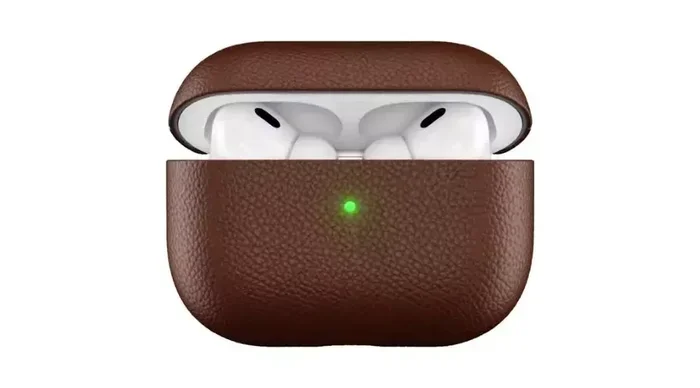
Featured image for AirPods USB-C charging case
Image source: nowandlive.com
Yes, you can charge AirPods with a USB cable, but it depends on your AirPods model and case type. Newer AirPods Pro 2 and AirPods 4 come with USB-C charging cases, while older models use Lightning cables. Using the correct cable and a quality power source keeps your AirPods safe and your battery healthy.
Key Takeaways
- USB-C Compatibility: AirPods Pro 2 (USB-C version), AirPods 4, and AirPods 4 with Active Noise Cancellation feature USB-C charging cases.
- Lightning Models Still Exist: AirPods 1, 2, 3, original AirPods Pro, and AirPods Pro 2 (Lightning version) charge via Lightning cables.
- Wireless Charging Works Too: Most newer AirPods cases support Qi, MagSafe, or Apple Watch chargers in addition to USB.
- Cable Quality Matters: Always use certified cables to prevent damage and ensure fast, safe charging.
- Charging Times Vary: A full charge takes about 30 minutes for AirPods and around 1 hour for the case.
- Battery Health Tips: Avoid extreme temperatures and don’t let the battery drain to 0% regularly to extend lifespan.
📑 Table of Contents
- Introduction
- Can I Charge AirPods with USB? The Short Answer
- How to Charge AirPods with USB-C
- How to Charge AirPods with Lightning
- Charging AirPods Wirelessly: Does It Work?
- Tips to Extend Your AirPods Battery Life
- Common Charging Problems and Fixes
- USB Charging Safety: What You Need to Know
- Conclusion
Introduction
Picture this: you’re about to head out for a jog, but your AirPods are dead. You grab a USB-C cable from your phone charger and wonder, “Wait, can I charge AirPods with USB?” Good news — the answer is usually yes, but only if you have the right model.
Apple has slowly switched its products to USB-C, following new rules in Europe that require a common charging port. AirPods have joined the party, but not all of them made the switch yet. Some still use Apple’s old Lightning connector. Knowing which one you own saves you frustration at the worst possible moment.
This guide breaks down everything you need to know about charging AirPods with USB. You’ll learn which models work, which cables to use, how long charging takes, and how to keep your battery healthy for years. Let’s dive in.
Can I Charge AirPods with USB? The Short Answer
Yes, you can charge AirPods with a USB cable — but only if your AirPods case has a USB-C or Lightning port. Think of it like trying to fill a gas tank: you need the right nozzle for your car. USB-C is like the new universal pump. Lightning is like an older, Apple-only pump.

Visual guide about AirPods USB-C charging case
Image source: 9to5mac.com
If your AirPods case has a small oval port, it’s Lightning. If it has a small rounded rectangle port, it’s USB-C. Both ports sit on the bottom of the charging case.
Which AirPods Models Support USB-C Charging?
- AirPods Pro 2 (USB-C version): Released in September 2023, this model fully supports USB-C charging.
- AirPods 4: Released in late 2024, comes in two versions — both with USB-C cases.
- AirPods 4 with Active Noise Cancellation: Also uses USB-C and adds wireless charging.
Which AirPods Models Use Lightning?
- AirPods 1st generation: Original Lightning case.
- AirPods 2nd generation: Lightning or wireless charging case options.
- AirPods 3rd generation: Lightning or MagSafe case options.
- AirPods Pro 1st generation: Lightning case only.
- AirPods Pro 2 (Lightning version): Released in 2022 before the USB-C switch.
Did You Know? Apple started the USB-C transition in 2023, mainly because the European Union passed a law in 2022 requiring all phones, tablets, and headphones to use USB-C by the end of 2024. This affects over 450 million people in the EU alone.
How to Charge AirPods with USB-C
Charging AirPods with USB-C is as easy as plugging in your phone. Here’s the step-by-step process.
Step 1: Locate the USB-C Port
Flip your AirPods case over. Look at the bottom. You’ll see a small, rounded rectangular port. That’s your USB-C input.
Step 2: Grab a USB-C Cable
Use any USB-C to USB-C or USB-C to USB-A cable. The one that came with your iPhone 15 or newer iPads works perfectly. Android phone chargers also work since most use USB-C.
Step 3: Plug It In
Connect one end to the AirPods case. Connect the other end to a power source. This can be:
- A wall adapter
- A laptop or computer
- A portable power bank
- A car charger
Step 4: Check the Light
Look at the LED indicator on the front of the case. An amber light means charging. A green light means fully charged.
Tip: Charging from a wall outlet is faster than from a computer. Wall outlets deliver more power. Think of it like filling a pool with a garden hose (wall) versus a drinking straw (computer).
Charging Time Estimates
- 5 minutes in the case = about 1 hour of listening time
- Full AirPods charge = about 30 minutes
- Full case charge = about 1 hour
Did You Know? AirPods Pro 2 with USB-C can also be charged using an iPhone 15, 16, or newer iPad’s USB-C port. Apple’s website confirms this feature works since iOS 17.
How to Charge AirPods with Lightning
Got an older AirPods model? You’ll need a Lightning cable instead. Don’t worry — the process is identical.
What You Need
- A Lightning to USB cable (the kind that came with older iPhones)
- A power source (wall adapter, computer, or power bank)
Charging Steps
Plug the Lightning end into the port at the bottom of the AirPods case. Plug the USB end into your power source. The LED light will turn amber while charging.
Heads Up: Apple stopped including Lightning cables with new iPhones starting in 2023. If you lost yours, you’ll need to buy a new one. Certified third-party options from brands like Anker or Belkin work great and cost less.
Lightning Charging Time
- 15 minutes in the case = up to 3 hours of listening time
- Full AirPods charge = about 20-30 minutes
- Full case charge = about 1-2 hours
Charging AirPods Wirelessly: Does It Work?
Yes! Most newer AirPods cases support wireless charging. It’s like using a charging mat for your phone — just set it down and walk away.
AirPods Models with Wireless Charging
- AirPods 2: Wireless charging case (sold separately or as a bundle)
- AirPods 3: MagSafe case supports wireless charging
- AirPods 4 with ANC: Works with Qi, MagSafe, and Apple Watch chargers
- AirPods Pro: All versions support wireless charging
- AirPods Pro 2 (both versions): Support MagSafe and Qi
How to Wirelessly Charge AirPods
Place the case on a Qi-certified charging mat or MagSafe charger. Make sure the LED faces up. The light will glow amber while charging.
Did You Know? The AirPods Pro 2 USB-C version can also charge on an Apple Watch charger. Apple confirmed this in a 2023 support document. This feature is rare and unique to this model.
Wireless Charging Pros and Cons
Pros:
- No cables needed
- Less wear on the charging port
- Convenient on a nightstand or desk
Cons:
- Slower than wired charging
- Less efficient (more energy lost as heat)
- Charging mat sold separately (costs $30-$80)
Tips to Extend Your AirPods Battery Life
AirPods batteries are like phone batteries — they wear out over time. But you can slow the process with smart habits.
Tip 1: Avoid Extreme Temperatures
Don’t leave your AirPods in a hot car or freezing outdoors. Apple recommends using AirPods between 0°C and 35°C (32°F to 95°F). Heat damages batteries faster than cold.
Tip 2: Don’t Regularly Drain to 0%
Letting the battery fully die stresses the cells. Try to charge when it drops below 20%. Think of it like a workout — short, frequent sessions are better than one exhausting marathon.
Tip 3: Use Optimized Battery Charging
iPhones and iPads have a feature called Optimized Battery Charging. It learns your routine and waits to finish charging past 80% until you need it. AirPods get the same treatment when paired with your iPhone.
To enable: Go to Settings > Bluetooth > tap the “i” next to your AirPods. Toggle on “Optimized Battery Charging.”
Tip 4: Store Them Properly
If you won’t use your AirPods for a long time, store them at about 50% charge in a cool, dry place. Avoid leaving them in the case at 0% or 100% for weeks.
Tip 5: Update the Firmware
Apple releases firmware updates that can improve battery efficiency. Keep your AirPods updated by leaving them connected to your iPhone overnight occasionally.
Tip 6: Clean the Charging Contacts
Dust and debris on the metal contacts inside the case can block charging. Use a dry, soft-bristled brush (like a clean toothbrush) to gently clean the contacts once a month.
Common Charging Problems and Fixes
Sometimes charging doesn’t work as expected. Here’s how to troubleshoot.
Problem 1: AirPods Won’t Charge
Fix:
- Make sure the cable is fully plugged in
- Try a different cable
- Try a different power source
- Clean the charging port with a dry toothbrush
- Reset your AirPods (hold the setup button for 15 seconds)
Problem 2: Case Not Charging AirPods
Fix:
- Make sure the AirPods are seated properly in the case
- Clean the metal contacts on the AirPods and inside the case
- Charge the case to 100% and try again
Problem 3: One AirPod Charges Faster Than the Other
Fix:
- Clean the contact points
- Reset the AirPods
- Check for firmware updates
Problem 4: LED Light Doesn’t Turn On
Fix:
- The case battery may be fully dead — leave it plugged in for 30 minutes
- Try a different cable
- Contact Apple Support if it still doesn’t work
Did You Know? Apple offers battery service for AirPods. If your battery holds less than 80% of its original capacity, you can get it replaced for a fee. The cost is around $49 per AirPod and $49-$59 per case, depending on the model.
USB Charging Safety: What You Need to Know
Charging AirPods with USB is generally safe. But a few safety rules will keep your devices — and you — protected.
Always Use Certified Cables
Look for “Made for iPhone” (MFi) certification on Lightning cables or USB-IF certification on USB-C cables. Cheap knockoff cables can overheat, short-circuit, or damage your AirPods.
Avoid Charging in Hot Environments
Charging generates heat. Adding more heat from the sun or a hot room can push temperatures to dangerous levels. Charge in a cool, ventilated spot.
Don’t Charge Near Water
Water and electronics don’t mix. Keep your AirPods and charging cable away from sinks, tubs, pools, and rainy windowsills.
Inspect Cables Regularly
Frayed or bent cables can spark or overheat. Replace damaged cables immediately.
Use the Right Wattage
AirPods don’t need high-wattage chargers. A standard 5W or 20W adapter works perfectly. Using a 100W laptop charger won’t charge them faster — the AirPods will only draw what they need.
Think of it like watering a plant. You can use a big watering can, but the plant only drinks what it needs. The rest spills out.
Conclusion
So, can you charge AirPods with USB? Absolutely — as long as you have the right cable for your model. Newer AirPods use USB-C, while older ones use Lightning. Both methods are safe, fast, and convenient when done correctly.
The shift to USB-C is a positive change for everyone. You can finally use one cable for your iPhone, iPad, Mac, and AirPods. Fewer cables mean less clutter and less e-waste. That’s good for your bag and the planet.
Remember to use certified cables, avoid extreme temperatures, and clean the contacts regularly. With proper care, your AirPods battery can last 2-3 years before showing significant wear.
Got questions about charging or battery life? Drop them in the comments below. Happy listening!
Frequently Asked Questions
Can I charge AirPods with a USB-C phone charger?
Yes, any USB-C cable and charger will work with AirPods that have a USB-C case, including AirPods Pro 2 (USB-C) and AirPods 4. The AirPods will only draw the power they need, so using a higher-wattage charger is perfectly safe.
Do all AirPods charge with USB-C?
No, only AirPods Pro 2 (USB-C version) released in 2023 and AirPods 4 models support USB-C charging. Older models like AirPods 1, 2, 3, and the original AirPods Pro use Lightning cables.
Can I charge AirPods with an Android USB-C cable?
Yes, USB-C cables are universal. Any USB-C to USB-C or USB-C to USB-A cable will charge AirPods with a USB-C case. Just make sure the cable is from a trusted brand and in good condition.
How long does it take to charge AirPods with USB?
A full charge takes about 30 minutes for the AirPods themselves and about 1 hour for the case. Even 5 minutes in the case provides around 1 hour of listening time, so quick top-ups work great.
Can I charge AirPods without the case?
No, AirPods can only be charged inside their case. The case acts as a portable charger and is the only way to deliver power to the earbuds. Without the case, there’s no way to charge them directly.
Is it safe to charge AirPods overnight?
Yes, it’s completely safe. AirPods and their cases have built-in circuitry that stops charging when the battery reaches 100%. The Optimized Battery Charging feature also helps protect long-term battery health by delaying a full charge until you need it.