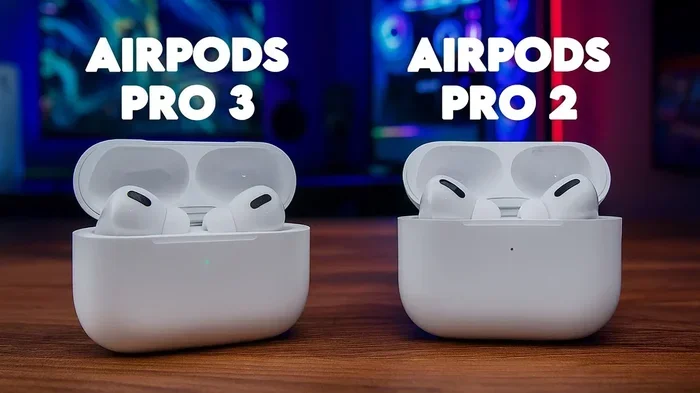
Featured image for AirPods Pro upgrade comparison
Image source: pricekeeda.com
You cannot directly upgrade AirPods to AirPods Pro, because they are separate products with different hardware. However, Apple offers trade-in programs that let you exchange your old AirPods for credit toward a new pair. You can also sell your current AirPods independently and use the money to buy AirPods Pro at a discount during seasonal sales. This guide covers all your options, including how trade-in works, what your AirPods are worth, and tips for getting the best deal on AirPods Pro.
So, you’ve been enjoying your regular AirPods for a while, and now you’re curious about AirPods Pro. Maybe a friend showed off their noise cancellation feature, or you saw an ad for the new AirPods Pro 2. The big question on your mind is simple: can I upgrade AirPods to AirPods Pro?
Here’s the straight answer: no, you cannot directly upgrade AirPods to AirPods Pro. They are two separate products, and Apple doesn’t offer a swap program that transforms one into the other. Think of it like trying to trade a bicycle for a motorcycle, even though both are two-wheeled vehicles. They serve similar purposes, but the engineering inside is completely different.
But don’t close this tab just yet. While you can’t upgrade in the traditional sense, you absolutely have options. Apple has a trade-in program that gives you credit for your old AirPods. You can sell them yourself and pocket more cash. You can even combine both strategies to make AirPods Pro more affordable. This guide walks you through every option, so you can decide which path makes the most sense for your wallet and your ears.
Key Takeaways
- No Direct Upgrade Path: Apple does not offer an official “upgrade” program from AirPods to AirPods Pro because they are completely different products with different internal components.
- Apple Trade-In Program: You can trade in eligible AirPods for credit toward new AirPods Pro, with values ranging from $0 to $75 depending on the model and condition.
- Selling Independently Earns More: Selling your AirPods on marketplaces like eBay or Swappa often yields more money than Apple’s trade-in program.
- AirPods Pro Add Real Features: Active Noise Cancellation, Transparency Mode, and silicone ear tips are hardware features that cannot be added to standard AirPods.
- Generation Matters for Value: AirPods Pro 2 (USB-C) are the current generation, while older Pro models may still be available at lower prices.
- Refurbished Options Save Money: Apple’s Certified Refurbished store offers AirPods Pro at significant discounts with full warranties.
- Best Deals Come From Timing: Black Friday, Prime Day, and back-to-school sales offer the deepest discounts on AirPods Pro.
📑 Table of Contents
- Why You Can’t Directly Upgrade AirPods to AirPods Pro
- How Apple’s AirPods Trade-In Program Works
- Selling Your AirPods Independently for More Money
- What Makes AirPods Pro Worth the Upgrade
- The Best Ways to Save Money on AirPods Pro
- AirPods Pro vs. AirPods: Which Should You Choose?
- Common Mistakes to Avoid When Switching to AirPods Pro
- Frequently Asked Questions
Why You Can’t Directly Upgrade AirPods to AirPods Pro
Let’s start with the basics. Understanding why a direct upgrade isn’t possible helps you make smarter decisions about your next move.
The Hardware Is Fundamentally Different
Standard AirPods and AirPods Pro share the same brand and basic function, but their internal components are very different. AirPods Pro include:
- Active Noise Cancellation (ANC) chips that don’t exist in regular AirPods
- Silicone ear tips in multiple sizes for a custom fit
- Pressure-equalizing vents for comfort during long listening sessions
- A different driver design tuned for the ear tip seal
It’s like asking if you can upgrade a regular car into a sports car by just changing the seats. The engine, suspension, and frame are all different. Apple would essentially need to give you brand-new hardware to make that “upgrade” happen, and that defeats the purpose of upgrading.
Apple Doesn’t Sell Upgrades
Unlike software updates that arrive on your iPhone overnight, hardware upgrades require you to buy new hardware. Apple has never announced an upgrade program that lets AirPods owners swap to AirPods Pro at a reduced price. The only official money-saving path is the AirPods Trade-In program, which we’ll cover in detail shortly.
The Good News: Your AirPods Have Real Value
Here’s something many people miss: even though you can’t upgrade directly, your current AirPods are worth something. Depending on the generation and condition, you might pocket anywhere from $30 to $100. That’s not chump change, especially when AirPods Pro start at $249.
Did You Know? Over 100 million AirPods were sold in 2022 alone, making them the best-selling earbuds worldwide. With so many units in circulation, there’s a healthy resale market for used AirPods.
How Apple’s AirPods Trade-In Program Works
Apple’s trade-in program is the most straightforward way to move from regular AirPods to AirPods Pro. It works similarly to trading in your old phone when buying a new one.
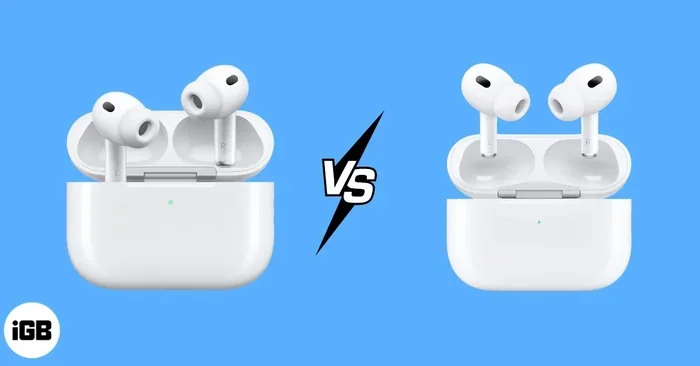
Visual guide about AirPods Pro upgrade comparison
Image source: igeeksblog.com
Step-by-Step Trade-In Process
The trade-in process is designed to be simple, even if you’ve never done it before:
- Visit Apple’s Trade-In page on their website or go to an Apple Store
- Select your AirPods model from the dropdown menu
- Answer a few condition questions (Do they charge? Are there cracks? Do they work properly?)
- Receive an instant quote based on your answers
- Choose your reward: either credit toward your new AirPods Pro purchase or an Apple Gift Card
- Send in your AirPods by mail or drop them off at an Apple Store
- Receive your credit within a few days after Apple inspects your trade-in
What AirPods Models Qualify?
Apple accepts most generations of AirPods, including:
- AirPods (1st generation)
- AirPods (2nd generation)
- AirPods (3rd generation)
- AirPods Pro (1st generation)
- AirPods Pro (2nd generation)
- AirPods Max
Even damaged or non-working AirPods may qualify for some credit, though the amount will be lower. Apple typically recycles non-functional units or refurbishes working ones for resale.
How Much Credit Will You Get?
Apple’s trade-in values change periodically, but here’s a general idea based on current estimates:
- AirPods (1st gen): $0 to $25
- AirPods (2nd gen): $20 to $35
- AirPods (3rd gen): $35 to $50
- AirPods Pro (1st gen): $45 to $60
- AirPods Pro (2nd gen): $55 to $75
Your exact quote depends on condition, and Apple reserves the right to revise the amount after physical inspection. If they find more wear than you described, they’ll send you a revised offer and let you decline.
Pro Tip: Clean your AirPods before trading them in. A quick wipe-down with a soft, dry cloth can make them look better and potentially earn you a higher quote.
Selling Your AirPods Independently for More Money
If you want maximum cash in your pocket, selling your AirPods yourself is usually the better route. Apple’s trade-in program is convenient, but it doesn’t always offer the best value.
Best Platforms to Sell AirPods
Several online marketplaces make selling used AirPods relatively painless:
- eBay: The largest audience, but you’ll pay seller fees around 13%
- Swappa: Specifically for tech, with lower fees and buyer verification
- Facebook Marketplace: No fees, but you’ll meet local buyers in person
- OfferUp: Similar to Facebook Marketplace with a mobile-friendly interface
- Craigslist: Classic option, though it requires more caution
What AirPods Sell For Used
Used AirPods typically sell for more than Apple’s trade-in values. Here are realistic price ranges based on recent market data:
- AirPods (1st gen): $30 to $45
- AirPods (2nd gen): $40 to $60
- AirPods (3rd gen): $60 to $85
- AirPods Pro (1st gen): $80 to $110
- AirPods Pro (2nd gen): $120 to $160
Keep in mind that pricing depends on condition, whether you have the original charging case, and whether you include accessories like extra ear tips.
How to Get the Best Price When Selling
A few simple steps can help you maximize your sale price:
- Clean them thoroughly before taking photos
- Include the original charging cable if you still have it
- Take clear photos in good lighting showing all angles
- Write an honest description mentioning any cosmetic flaws
- Price slightly above your minimum to leave room for negotiation
- Respond to questions quickly to maintain buyer interest
Safety Tips for In-Person Sales
If you decide to meet a local buyer, take some basic precautions:
- Meet in a public place during daylight hours
- Bring a friend along when possible
- Accept cash or use payment apps with buyer protection
- Test the AirPods before completing the sale
- Have a charger ready to prove they work
Did You Know? The secondhand electronics market is expected to reach $144 billion by 2026. Your used AirPods are part of a growing circular economy that reduces e-waste.
What Makes AirPods Pro Worth the Upgrade
Now that you know how to make the switch financially, let’s talk about what you’ll gain. AirPods Pro offer features that genuinely improve the listening experience.
Active Noise Cancellation
The headline feature of AirPods Pro is Active Noise Cancellation (ANC). Tiny microphones listen to the world around you, and the AirPods Pro create an “anti-noise” signal that cancels out background sound before it reaches your ears.
Think of it like this: imagine you’re trying to hear someone whisper in a noisy café. ANC is like someone turning down the volume on everything except that whisper. It’s not magic, but it’s remarkably effective for low and mid-frequency sounds like airplane engines, traffic, and office chatter.
Apple claims AirPods Pro block up to 2x more noise than previous generations, making them ideal for commuters, frequent flyers, and anyone who works in loud environments.
Transparency Mode
Transparency Mode is the opposite of noise cancellation. It uses those same microphones to pipe outside sounds into your ears, so you can hear announcements, conversations, or traffic without removing your AirPods. It’s like having superhuman hearing on demand.
This feature is genuinely useful for:
- Hearing train or airport announcements
- Quick conversations without removing earbuds
- Staying aware of traffic while walking
- Listening for doorbells or important sounds at home
Customizable Fit with Silicone Tips
Regular AirPods use a one-size-fits-most hard plastic design. AirPods Pro come with four sizes of silicone ear tips (XS, S, M, L), letting you find a snug fit. A better seal means better bass response, more effective noise cancellation, and a more secure fit during workouts.
Apple includes an Ear Tip Fit Test in the settings that uses the internal microphones to check whether your chosen tips create a proper seal. It’s a small touch, but it ensures you get the best audio experience possible.
Adaptive Audio (AirPods Pro 2 Only)
The latest AirPods Pro 2 introduced Adaptive Audio, which automatically blends Active Noise Cancellation and Transparency Mode based on your environment. Walking into a noisy café? It cranks up the ANC. Starting a conversation? It shifts to Transparency Mode. You don’t have to think about it.
Conversation Awareness
Another AirPods Pro 2 feature, Conversation Awareness, detects when you start talking and automatically lowers your audio volume while boosting the voices in front of you. Once you stop talking, your music returns to normal. It’s surprisingly natural and great for ordering coffee or chatting with coworkers.
Better Battery Life with the Case
The AirPods Pro 2 charging case extends total listening time to up to 30 hours, compared to 24 hours for standard AirPods (3rd gen). The case also supports:
- MagSafe wireless charging
- Apple Watch charger compatibility
- USB-C or Lightning charging (depending on model)
- Built-in speaker for Find My alerts
- Precision Finding with U1 chip
The Best Ways to Save Money on AirPods Pro
Once you’ve decided to make the switch, here are proven strategies to pay less than full price.
Shop During Major Sale Events
AirPods Pro regularly go on sale during specific times of the year:
- Black Friday (late November): Often $50 to $70 off at major retailers
- Prime Day (July): Amazon typically drops prices by $40 to $60
- Back-to-School (August-September): Apple offers education pricing and sometimes bundles
- Holiday Season (December): Competing sales often beat Black Friday deals
- New Product Launches: When Apple announces new AirPods, older models get discounted
Pro Tip: Set price alerts on websites like CamelCamelCamel (for Amazon) to know when AirPods Pro hit their lowest price.
Buy Refurbished from Apple
Apple’s Certified Refurbished store offers genuine Apple products that have been tested, cleaned, and repackaged with new batteries and cases. You get:
- The same one-year warranty as new products
- Savings of 15% to 25% off retail price
- Full functionality with no signs of prior use
- The option to add AppleCare+
Inventory changes frequently, so check back often if your preferred model isn’t available right now.
Check Carrier and Retailer Promotions
Major carriers and electronics retailers frequently run promotions that bundle AirPods Pro with other purchases:
- Mobile carriers: Sometimes offer AirPods Pro as a free add-on with new phone activations
- Best Buy: Regularly matches or beats Amazon’s prices, especially for members
- Target Circle: Offers 5% off and stackable deals for members
- Costco: Occasionally sells bundles at significant discounts
- Walmart: Runs competitive sales during holidays
Consider the AirPods Pro (2nd Gen) USB-C Version
Apple released two versions of AirPods Pro 2. The newer USB-C version (released September 2023) charges via USB-C instead of Lightning, matching the new iPhone 15 and later. If you already own USB-C devices, this version offers better cable compatibility.
Price-wise, both versions typically retail for the same amount, though the older Lightning version sometimes sees deeper discounts as retailers clear inventory.
Use Your Tax Refund or Bonus
If you receive an annual tax refund, work bonus, or other lump sum, it can offset the cost of upgrading. Many people treat AirPods Pro as a reward for a financial milestone, which makes the purchase feel more justified.
AirPods Pro vs. AirPods: Which Should You Choose?
Sometimes the “upgrade” question isn’t so clear-cut. Maybe you don’t need noise cancellation, or you prefer the open design of standard AirPods. Let’s break down who should choose which.
Choose AirPods Pro If You:
- Commute on public transit or fly frequently
- Work in noisy offices or coffee shops
- Want a more secure fit during workouts
- Prefer deep bass and immersive audio
- Need Transparency Mode for situational awareness
- Travel often and want peace and quiet
Stick with Standard AirPods If You:
- Don’t like the feeling of ear tips in your ears
- Primarily listen in quiet environments
- Want a lower price point
- Prefer the loose, open fit that some users find more comfortable
- Mostly use them for calls rather than music
The Hybrid Approach: Keep Both
Some users keep standard AirPods for casual listening and AirPods Pro for travel and focus time. While this costs more upfront, it gives you flexibility for different situations. Think of standard AirPods as your everyday driver and AirPods Pro as your focus-mode sports car.
Consider Your Hearing Health
This is something most guides skip, but it’s worth mentioning: AirPods Pro may actually be better for your hearing in noisy environments. When regular AirPods can’t block out background noise, people tend to crank up the volume to unsafe levels. AirPods Pro’s noise cancellation means you can listen at lower, safer volumes while still enjoying clear audio.
According to the World Health Organization, over 1 billion young adults are at risk of hearing loss from loud recreational activities. Choosing earbuds that let you listen at lower volumes is a small step toward protecting your long-term hearing.
Common Mistakes to Avoid When Switching to AirPods Pro
Before you pull the trigger, here are pitfalls that trip up many first-time buyers.
Mistake 1: Forgetting About Fit
AirPods Pro fit differently than standard AirPods. Some people love the silicone tips, while others find them uncomfortable. If possible, try them on at an Apple Store before committing. Your comfort during long listening sessions depends heavily on finding the right tip size.
Mistake 2: Ignoring the Charging Case Type
There are multiple versions of the AirPods Pro case. The latest supports MagSafe, USB-C, and Apple Watch charging. Older versions only support Lightning or standard wireless charging. Make sure you’re getting the case you want, especially if you already own wireless chargers.
Mistake 3: Overlooking Ear Tip Replacements
Ear tips wear out over time. Apple sells replacement tips for around $8 to $10, but if you lose them, replacements aren’t free. Budget a few extra dollars for spare tips, especially if you’re rough on gear.
Mistake 4: Not Checking Compatibility
AirPods Pro work best with Apple devices, but they also pair with Android phones, Windows PCs, and other Bluetooth devices. However, some features like Spatial Audio, Adaptive EQ, and seamless device switching only work within the Apple ecosystem.
Mistake 5: Skipping AppleCare+
AirPods Pro are small and easy to lose. AppleCare+ for Headphones costs $29 for two years and covers up to two incidents of loss, theft, or damage with a small deductible. For $249 earbuds, that protection can pay for itself quickly.
Frequently Asked Questions
Can I trade in AirPods for AirPods Pro at the Apple Store?
Yes, you can trade in your AirPods at any Apple Store or through Apple’s website. The credit applies directly to your AirPods Pro purchase, reducing the out-of-pocket cost. Bring your AirPods in their charging case, and an Apple employee will inspect them on the spot.
Do I need to factory reset my AirPods before trading them in?
Yes, you should unpair your AirPods from all your devices before trading them in. Go to Settings, tap your AirPods name, and select “Forget This Device.” This protects your privacy and ensures the next owner gets a clean slate.
Will AirPods Pro work with my iPhone?
AirPods Pro work with any iPhone running iOS 9 or later. However, the latest features like Adaptive Audio require iOS 17 and an iPhone 11 or newer. If you have an older iPhone, you’ll still get great audio quality, but some advanced features may be unavailable.
How long do AirPods Pro batteries last?
AirPods Pro 2 offer up to 6 hours of listening time on a single charge with Active Noise Cancellation enabled, and up to 30 hours total with the charging case. The original AirPods Pro offered 4.5 hours per charge. Battery life varies based on volume, features used, and environmental conditions.
Can I use AirPods Pro with Android phones?
Yes, AirPods Pro work as standard Bluetooth earbuds with Android phones. You’ll get great audio quality and basic controls, but you won’t have access to features like Spatial Audio, Find My integration, or automatic ear detection. The Apple ecosystem unlocks the full experience.
What’s the difference between AirPods Pro and AirPods Pro 2?
AirPods Pro 2 (2022 release) offer significantly better noise cancellation, longer battery life, and the H2 chip for advanced features like Adaptive Audio and Conversation Awareness. The 2023 refresh added USB-C charging instead of Lightning. If you’re buying new, the H2 chip makes the upgrade worthwhile.
Final Thoughts
So, can you upgrade AirPods to AirPods Pro? Not directly, but you’ve got more paths forward than you might have realized. Whether you choose Apple’s trade-in program for convenience, sell your AirPods independently for maximum cash, or combine both strategies, AirPods Pro are within reach for most budgets.
The features you’ll gain, especially Active Noise Cancellation, Transparency Mode, and the customizable fit, make AirPods Pro a meaningful step up. For commuters, frequent travelers, and anyone who values focus in noisy environments, that upgrade is well worth the investment.
Take your time, compare your options, and wait for the right sale. With a little patience, you’ll be enjoying noise-canceled bliss without emptying your wallet. And remember: the best upgrade is the one that fits both your ears and your budget.