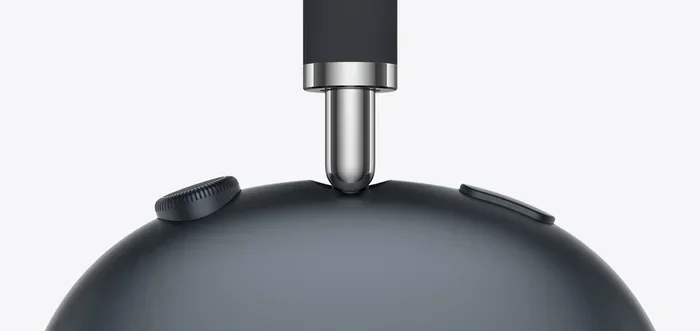
Featured image for AirPods Max close-up
Image source: apple.com
AirPods Max do not have a traditional extendable headband like many over-ear headphones. Instead, they feature a unique telescoping headband frame with sliding arms that allow you to adjust the fit. This design moves outward from the ear cups rather than extending from the top, providing a customizable fit for different head sizes. While you can’t replace or add third-party extensions, the built-in sliding mechanism offers enough flexibility for most users to find a comfortable fit.
Have you ever slipped on a pair of headphones and immediately felt that uncomfortable squeezing sensation around your temples? Or maybe the opposite problem—where they slide around like they’re trying to escape your head? Finding the right fit with over-ear headphones is one of those things that can make or break your listening experience.
If you’ve been eyeing the AirPods Max or recently got a pair, you might be wondering: can you extend AirPod Max to get that perfect fit? It’s a totally reasonable question, especially since Apple took a different approach to headphone design compared to most brands. The answer isn’t as straightforward as a simple yes or no, so let’s break it all down.
In this guide, we’ll explore exactly how the AirPods Max adjustment system works, what options you have (and don’t have) for customizing the fit, and some practical tips for getting the most comfortable experience. Whether you’re a new owner or considering a purchase, this article will help you understand everything about AirPods Max fit and adjustability.
Key Takeaways
- Built-In Sliding Arms: AirPods Max use telescoping arms that slide out from each ear cup for size adjustment.
- No Traditional Extension: Unlike many headphones, there’s no extra headband extender available for purchase.
- Premium Build: The stainless steel frame is designed for durability and smooth extension movement.
- Fits Most Head Sizes: The adjustment range accommodates heads from approximately 16cm to 22cm in width.
- Proper Adjustment Matters: Correct positioning improves sound quality, noise cancellation, and comfort.
- No Third-Party Solutions: Apple doesn’t sell extensions, and DIY modifications aren’t recommended.
- Weight Distribution: The canopy design spreads weight evenly to prevent pressure on any single point.
📑 Table of Contents
- Understanding the AirPods Max Design and Adjustment System
- Can You Actually Extend AirPods Max?
- Finding the Perfect Fit: Step-by-Step Adjustment Guide
- AirPods Max Fit for Different Head Sizes
- Common Fit Problems and Solutions
- Tips for Long-Term Comfort and Durability
- Comparing AirPods Max to Other Headphones’ Adjustability
- The Bottom Line on Extending AirPods Max
Understanding the AirPods Max Design and Adjustment System
Before we answer the main question, it helps to understand how Apple designed the AirPods Max to fit different head sizes. Unlike most headphones you’ve probably used, Apple took a unique approach with their premium over-ear cans.
The Telescoping Headband Frame
The AirPods Max feature what Apple calls a “telescoping headband frame.” Think of it like a tiny telescope—each side of the headband can slide outward smoothly, extending the overall width of the headphones. This mechanism allows the ear cups to move away from the headband, giving you extra room if your head is on the larger side.
Here’s a simple analogy: imagine a window blind that pulls down to cover more area. The AirPods Max work similarly—each arm pulls out from the headband to increase the size. When you want them smaller, you simply push the arms back in. It’s a clean, minimalist design that matches Apple’s aesthetic philosophy.
How the Sliding Mechanism Works
Each side of the AirPods Max has a precision-machined stainless steel arm that slides into the headband canopy. The arms move with just the right amount of resistance—enough to stay where you set them, but smooth enough to adjust easily. You can extend them independently on each side, which is helpful if your head is slightly asymmetrical (and most people’s heads are, by the way).
Did You Know? The stainless steel used in AirPods Max is the same grade of material used in some surgical instruments. This isn’t just for looks—it’s specifically chosen for its durability and smooth movement over thousands of adjustments.
The Canopy and Ear Cup Connection
The “canopy” is the mesh-covered band that sits on top of your head. It connects to the sliding arms through a pivot point that allows the ear cups to rotate and tilt. This three-axis movement (up/down, forward/back, and rotation) means the ear cups can conform to just about any head shape.
Think of it like a satellite dish that can tilt and swivel to find the best signal. The ear cups do something similar—they position themselves perfectly against your ears, regardless of your head shape or size.
Can You Actually Extend AirPods Max?
Now for the main question you’ve been waiting for: yes, you can extend AirPods Max, but not in the traditional way you might expect.
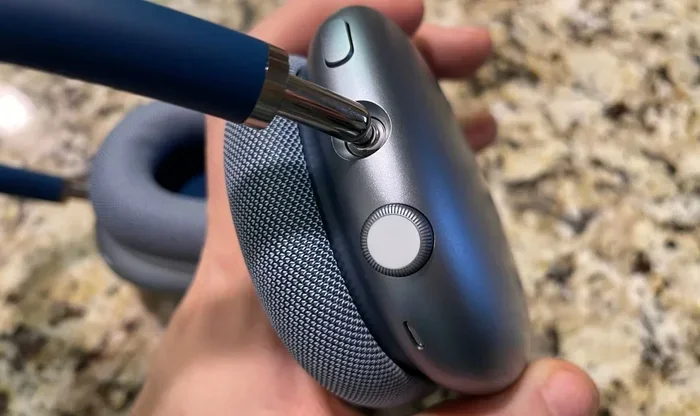
Visual guide about AirPods Max close-up
Image source: media.cnn.com
The Built-In Extension System
The AirPods Max come with a built-in extension system through those telescoping arms we just discussed. You don’t need to buy anything extra or attach any accessories. Here’s how to use it:
- Place the headphones on your head as you normally would
- Notice how the ear cups feel—are they too tight? Too loose?
- Gently pull each ear cup downward to extend the arm
- Adjust each side independently until you find the sweet spot
- The arms will hold their position once you let go
The extension range is approximately 2-3 centimeters on each side, which might not sound like much, but it’s enough to make a significant difference in comfort. Apple designed this range based on extensive head measurement studies across diverse populations.
What About Third-Party Extensions?
Here’s where things get tricky. If you’re searching for an “AirPods Max headband extender” or “AirPods Max extension strap,” you’ll likely come up empty-handed—or find very few legitimate options. Unlike many headphones that have a thriving aftermarket for accessories, the AirPods Max don’t have official extension accessories.
Why? Several reasons:
- Design Integration: The telescoping arms are built directly into the frame. Adding an external extender would interfere with the clean design.
- Structural Concerns: Extra attachments could compromise the structural integrity and weight distribution.
- Aesthetic Philosophy: Apple rarely encourages third-party modifications to their products.
- Warranty Issues: Any modifications typically void your warranty.
Some third-party sellers on platforms like Amazon or eBay might claim to offer AirPods Max extenders, but buyer beware. These are often generic headphone extenders that don’t actually fit the AirPods Max properly, and using them could damage your expensive headphones.
Why Apple Didn’t Design Traditional Extensions
Apple’s design philosophy prioritizes minimalism and integration. Instead of a bulky, adjustable headband like you see on most headphones (with visible notches and sliders), they integrated the adjustment mechanism directly into the frame. It’s a sleeker look, but it does mean less flexibility for extreme sizing needs.
Finding the Perfect Fit: Step-by-Step Adjustment Guide
Getting the right fit with your AirPods Max isn’t complicated, but there is a technique to it. Follow these steps for optimal comfort and sound quality.
Step 1: Initial Positioning
Start by placing the AirPods Max on your head with the arms fully retracted (pushed all the way in). This gives you the smallest possible size to work from. The ear cups should sit comfortably over your ears without too much pressure.
Step 2: Extend Gradually
Now, slowly extend each arm one at a time. Think of it like inflating a balloon—you want to add just enough to remove pressure, not so much that the headphones become loose. A good rule of thumb is to extend until you feel the clamping force reduce to a comfortable level.
The clamping force is the pressure the ear cups exert on your head. Too much, and you’ll get headaches. Too little, and the headphones won’t seal properly, which hurts noise cancellation and bass response.
Step 3: Fine-Tune Each Side Independently
Here’s a tip most people miss: your head probably isn’t perfectly symmetrical. Maybe one ear is slightly higher than the other, or your head tilts a tiny bit to one side. By adjusting each arm independently, you can compensate for these natural variations.
Did You Know? Studies have shown that approximately 78% of people have some degree of facial asymmetry. Adjusting each side of your headphones independently accounts for this natural variation.
Step 4: Check the Ear Cup Seal
Once you’ve found a comfortable size, check the seal. The memory foam ear cushions should make full contact around your ears without gaps. A proper seal is crucial for:
- Active Noise Cancellation performance
- Sound quality, especially bass response
- Comfort during long listening sessions
If you notice sound leaking or reduced noise cancellation, you might need to readjust. The ear cups should feel snug but not tight.
Step 5: The Movement Test
Put on some music and move your head around—shake it, nod, look up and down. The AirPods Max should stay securely in place without sliding. If they move too much, you might need to extend the arms slightly less. If they feel too tight during movement, you might need to extend more.
AirPods Max Fit for Different Head Sizes
One of the biggest concerns potential buyers have is whether the AirPods Max will fit their head. Let’s address this directly.
Small Heads and Children’s Heads
If you have a smaller head, you might worry that even the smallest AirPods Max setting will be too big. The good news is the telescoping arms retract quite far, making the headphones work for smaller head sizes too.
However, for children or anyone with a very small head circumference, the AirPods Max might still be too large. The minimum size is roughly equivalent to a medium-sized adult head. For younger users, the AirPods (regular) or AirPods Pro might be a better fit.
Average Adult Head Sizes
For most adults, the AirPods Max fit beautifully right out of the box. The standard size works for roughly 70% of adult head sizes without any adjustment needed. A small amount of adjustment will handle most of the remaining 30%.
According to ergonomic studies, the average adult head circumference is about 57cm (men) and 55cm (women), with a width of approximately 15-17cm. The AirPods Max are designed to accommodate this range comfortably.
Larger Heads
If you have a larger head, you might be concerned about whether the AirPods Max can extend enough. The maximum extension provides enough room for heads up to about 22cm in width. For most larger adults, this should be sufficient.
For very large heads, however, the fit might be snug even at maximum extension. In these cases, some users report slight discomfort after extended wear, though this varies by individual.
Hat and Hairstyle Considerations
Here’s something people don’t often think about: your hair and what you’re wearing on your head affects fit. If you have thick, curly hair or wear hats frequently, you might need to extend the arms more than usual.
The mesh canopy is designed to sit comfortably on hair, but very thick hairstyles (like large afros or voluminous curls) might require extra extension. Conversely, if you have very short hair or are bald, you might need less extension to achieve a secure fit.
Common Fit Problems and Solutions
Even with the adjustment system, some users experience fit issues. Here are the most common problems and how to solve them.
Problem: Too Much Clamping Force
Many users report that the AirPods Max feel tighter than expected, especially compared to other premium headphones. This is by design—Apple engineered them with a firmer clamp to ensure good noise cancellation and bass response.
Solutions:
- Extend the arms to maximum length to reduce clamp force
- Take breaks every 30-60 minutes during long listening sessions
- Adjust the ear cup angle using the pivot points
- Consider wearing them slightly forward or back on your head to distribute pressure differently
Problem: Headphones Feel Too Heavy
The AirPods Max weigh 384 grams, which is heavier than most competitors. While the weight is distributed well through the canopy, some users feel the heft during long sessions.
Solutions:
- Position the headband slightly forward of your natural head center
- Use the headphones for shorter sessions and take breaks
- Adjust the ear cup tilt so more weight rests on the ear cushions
Problem: Ear Cups Not Sealing Properly
If the seal isn’t right, you’ll notice reduced noise cancellation and weaker bass. This usually means the ear cups are positioned incorrectly or the fit is too loose.
Solutions:
- Retract the arms slightly to increase clamping force
- Rotate the ear cups to match your head’s natural angle
- Make sure hair or jewelry isn’t interfering with the seal
- Check that the ear cushions are properly attached
Problem: Headphones Slide Forward or Back
If your AirPods Max won’t stay in place, the fit is probably too loose. This is more common with smaller head sizes or when wearing hats.
Solutions:
- Retract the arms to create a tighter fit
- Adjust the ear cup angle so they cup your ears naturally
- Consider whether you have hair or accessories affecting the fit
Tips for Long-Term Comfort and Durability
To keep your AirPods Max feeling great for years to come, follow these practical tips.
Adjust Slowly and Smoothly
When extending or retracting the arms, do it gently and slowly. The mechanism is precision-engineered, but forcing it can cause wear over time. Think of it like adjusting a watch bracelet—you want smooth, deliberate movements.
Clean the Sliding Mechanism
Dust and debris can accumulate in the sliding tracks over time. Once a month, use a soft, dry brush (like a clean makeup brush) to gently clean the telescoping arms. This keeps the mechanism moving smoothly.
Store Them Properly
The AirPods Max come with a Smart Case, but it only protects part of the headphones. When storing, make sure the arms are retracted to the smallest size. This takes pressure off the mechanism and keeps everything compact.
Watch for Wear Patterns
After about 6-12 months of regular use, pay attention to how the headphones feel. If the mechanism becomes loose (sliding too easily) or stiff (hard to adjust), it might be time for service. Apple offers repair services for mechanisms that wear out prematurely.
Mind the Temperature
Extreme temperatures can affect the sliding mechanism. Don’t leave your AirPods Max in a hot car or freezing environment for extended periods. The stainless steel and internal components expand and contract with temperature, which can affect fit temporarily.
Comparing AirPods Max to Other Headphones’ Adjustability
To put AirPods Max adjustment in perspective, let’s compare them to popular alternatives.
AirPods Max vs. Sony WH-1000XM5
The Sony WH-1000XM5 uses a traditional sliding headband with visible notches. You can extend it significantly more than the AirPods Max, making it better for very large heads. However, the notches mean there are discrete size settings rather than infinite adjustment like AirPods Max.
The AirPods Max feel more premium and offer smoother adjustment, but the Sony has more total range.
AirPods Max vs. Bose QuietComfort Ultra
Bose uses a similar notched slider system. The adjustment range is comparable to Sony, and both offer more extension than AirPods Max. However, Bose’s lighter weight (250g vs 384g) means less clamping force is needed, which some users find more comfortable.
AirPods Max vs. Sennheiser Momentum 4
Sennheiser uses a unique folding mechanism with a wide adjustment range. It accommodates even very large heads well. However, the plastic construction feels less premium than the AirPods Max’s stainless steel.
In general, AirPods Max offers a more refined adjustment experience with infinite positioning, but other brands often provide more total extension range. It’s a trade-off between premium feel and maximum flexibility.
The Bottom Line on Extending AirPods Max
So, can you extend AirPods Max? Absolutely—but through their built-in telescoping arm system rather than aftermarket accessories. The design offers smooth, infinite adjustment within a reasonable range that works for most head sizes.
While the lack of third-party extension options might frustrate some users, this design choice reflects Apple’s commitment to integrated, minimalist products. For the vast majority of users, the built-in adjustment provides plenty of flexibility to find a comfortable fit.
If you’re considering buying AirPods Max and worried about fit, here’s what to remember:
- The built-in sliding mechanism accommodates most head sizes
- Independent left/right adjustment allows for fine-tuning
- Proper adjustment is crucial for sound quality and noise cancellation
- Take time to find your perfect fit—you’ll be rewarded with better comfort and audio
For those with very small or very large heads, trying on AirPods Max before purchasing (when possible) is always a good idea. Apple Stores typically have display models you can test. This firsthand experience will tell you more about fit than any specifications sheet.
Remember, a great pair of headphones should feel like they’re barely there. Take the time to adjust your AirPods Max properly, and you’ll enjoy the premium sound quality and comfort they’re designed to deliver. Happy listening!
Frequently Asked Questions
Do AirPods Max have an extendable headband?
AirPods Max feature telescoping sliding arms rather than a traditional extendable headband. Each ear cup connects to the headband via stainless steel arms that smoothly slide outward to accommodate different head sizes.
Can you buy an extension for AirPods Max?
Apple does not sell official extensions for AirPods Max, and there are no legitimate third-party extensions available. The built-in telescoping mechanism is designed to provide sufficient adjustment for most users without needing additional accessories.
How do I make my AirPods Max fit better?
To improve fit, gently extend each telescoping arm until the clamping pressure feels comfortable. Adjust each side independently to account for natural head asymmetry. The ear cups should seal completely around your ears without excessive pressure or gaps.
Will AirPods Max fit a large head?
Yes, AirPods Max can fit larger heads by extending the telescoping arms to their maximum position. The adjustment range accommodates head widths up to approximately 22cm, which covers most adult head sizes comfortably.
Why do my AirPods Max feel tight?
AirPods Max are designed with a firmer clamping force than many competitors to ensure optimal noise cancellation and bass response. If they feel too tight, extend the telescoping arms further or take breaks during long listening sessions.
Can I wear AirPods Max with glasses?
Yes, AirPods Max work well with glasses. The memory foam ear cushions conform around glasses frames. You might need to extend the arms slightly more than usual to reduce clamping pressure on the arms of your glasses.