Featured image for iPhone wireless headphones pairing
Image source: lifewire.com
Yes, you can use virtually any wireless headphones with your iPhone, not just AirPods. iPhones support Bluetooth, which is the universal standard for wireless audio. Whether you have Sony, Bose, Samsung, or budget brands, your iPhone can connect to them in seconds. The main difference is how easy the pairing process is and what extra features you get.
Picture this: you just got a new pair of wireless headphones as a gift. They’re not AirPods. They’re Sony, Bose, or maybe a pair you found on sale. The first thought that pops into your head? “Wait, will these even work with my iPhone?”
Here’s the good news: your iPhone works with almost every wireless headphone on the planet. Think of your iPhone like a friendly host at a party. It doesn’t care if guests wear name tags from Apple, Samsung, or any other brand. As long as they speak the same “language,” they’re welcome. That language is called Bluetooth.
Bluetooth is like a universal translator for electronics. It was created back in 1994 by a company called Ericsson, and today it’s built into billions of devices worldwide. According to the Bluetooth Special Interest Group, over 5 billion Bluetooth-enabled devices ship every single year. Your iPhone is one of them, and so are most wireless headphones. So let’s dig into how this all works and what you need to know.
Key Takeaways
- Universal Bluetooth Compatibility: Every iPhone since the iPhone 5 supports Bluetooth, meaning any Bluetooth headphones will work with it.
- AirPods Offer Seamless Pairing: Apple AirPods use special chips that connect instantly, but other brands work almost as easily through standard Bluetooth.
- No App Required: Most wireless headphones pair directly through your iPhone Settings without needing extra apps or software.
- Sound Quality Varies: The audio codec your headphones use (like AAC or aptX) affects sound quality, and iPhones work best with AAC-compatible devices.
- Special Features May Be Limited: Features like spatial audio and automatic device switching may only work with AirPods or Beats products.
- Bluetooth Versions Matter: Newer Bluetooth versions (5.0 and above) give you better range, battery life, and connection stability.
- Pairing Is Simple: The process takes about 30 seconds and only needs to be done once for each device.
📑 Table of Contents
- How Wireless Headphones Connect to Your iPhone
- Can You Use Any Brand of Wireless Headphones with iPhone?
- How to Pair Wireless Headphones with Your iPhone
- Features You Might Miss Without AirPods
- Tips for Getting the Best Experience with Third-Party Wireless Headphones
- The Future of Wireless Headphones and iPhone Compatibility
- Common Myths About Wireless Headphones and iPhones
- Final Thoughts: Your iPhone, Your Choice
How Wireless Headphones Connect to Your iPhone
Before we answer the big question, let’s understand the technology that makes it all possible. Wireless headphones connect to your iPhone using Bluetooth. It’s that simple on the surface, but there’s a bit more going on underneath.
What Is Bluetooth and Why Does It Matter?
Bluetooth is a wireless technology that lets devices talk to each other over short distances. Think of it like whispering across a table in a library. The “whisper” is your music, and the table is the air between your iPhone and your headphones. Bluetooth works up to about 30 feet (10 meters) in most cases, though newer versions can reach even farther.
Every iPhone since the iPhone 5 (released in 2012) has Bluetooth built in. The latest iPhones use Bluetooth 5.3, which is fast, reliable, and energy-efficient. This means your headphones won’t drain your phone battery quickly, and you’ll get a stable connection without annoying dropouts.
The Different Bluetooth Versions Explained
You might see numbers like “Bluetooth 5.0” or “Bluetooth 5.2” on headphone boxes. Higher numbers generally mean better performance. Here’s a quick breakdown:
- Bluetooth 4.0 to 4.2: Found in older devices. Works fine but uses more battery.
- Bluetooth 5.0: Twice as fast and four times the range of 4.2. This became common around 2019.
- Bluetooth 5.1 and 5.2: Adds better location tracking and lower latency (less delay between video and sound).
- Bluetooth 5.3: The latest version in many 2024-2025 devices. Offers the best efficiency and connection stability.
Fun fact: Even if your headphones use an older Bluetooth version, they’ll still work with your new iPhone. It’s like speaking two slightly different dialects of the same language. You’ll understand each other just fine.
Audio Codecs: The Secret Sauce for Sound Quality
Here’s something most people don’t think about. When your iPhone sends music to your headphones wirelessly, it has to compress the audio file. The “codec” is the method used for this compression. Different codecs offer different sound quality.
The main codec iPhones use is called AAC (Advanced Audio Coding). It’s really good at maintaining quality while keeping file sizes small. Most wireless headphones support AAC, which is why they sound great with iPhones.
Other codecs you might see mentioned include:
- SBC: The basic codec everyone supports. Sounds okay but not amazing.
- aptX and aptX HD: Created by Qualcomm. Offers better quality but iPhones don’t natively support it (though some headphones convert it automatically).
- LDAC: Sony’s high-quality codec. Again, iPhones don’t use this natively.
The bottom line? If your headphones support AAC, you’ll get excellent sound with your iPhone. If not, you’ll still get good sound through SBC.
Can You Use Any Brand of Wireless Headphones with iPhone?
The short answer is a resounding yes. But let me break down the specifics so you know exactly what to expect with different brands.
Visual guide about iPhone wireless headphones pairing
Image source: i.ytimg.com
AirPods and Beats: The Apple Family
AirPods and Beats headphones (which Apple owns) get special treatment from your iPhone. They use a custom chip called the H1 or H2 chip. This chip does some magic tricks:
- Instant pairing: Open the case near your iPhone, and a popup appears asking if you want to connect.
- Automatic device switching: Start playing music on your iPhone, then pick up your iPad, and the headphones switch over automatically.
- Spatial Audio: This feature makes sound seem like it’s coming from all around you, like in a movie theater.
- “Hey Siri” support: You can talk to Siri without taking out your phone.
But here’s the thing: you can get many of these features with other brands too. It just might take an extra step or two.
Premium Brands Like Sony, Bose, and Sennheiser
Big audio brands make excellent wireless headphones that work beautifully with iPhones. Sony’s WH-1000XM5 and WF-1000XM5, Bose QuietComfort series, and Sennheiser Momentum models are all top sellers. Why? Because they use standard Bluetooth that any iPhone can connect to.
Some premium brands offer their own apps (like Sony’s Headphones Connect app) that unlock extra features such as equalizer settings or noise cancellation levels. These apps work fine on iPhones and are usually free to download.
Budget and Mid-Range Brands
Brands like Anker (Soundcore), JBL, Jabra, and countless others make affordable wireless headphones that pair easily with iPhones. In fact, according to a 2024 report by Counterpoint Research, the budget wireless earbuds market grew by 25% year-over-year. More options mean better prices for everyone.
Did you know? The global wireless headphones market was valued at over $70 billion in 2024, and it’s expected to keep growing. That’s a lot of headphones, and almost all of them work with iPhones.
Gaming Headsets and Specialty Headphones
Most gaming headsets use Bluetooth too, but they often prioritize low latency for video games. If you’re buying headphones mainly for gaming on your iPhone, look for ones with low latency modes. Some gaming headsets use a separate USB dongle that doesn’t work with iPhones (since iPhones don’t have USB ports for these), so stick to standard Bluetooth models.
How to Pair Wireless Headphones with Your iPhone
Now for the practical part. Connecting wireless headphones to your iPhone takes about 30 seconds. Here’s the step-by-step process.
Step 1: Put Your Headphones in Pairing Mode
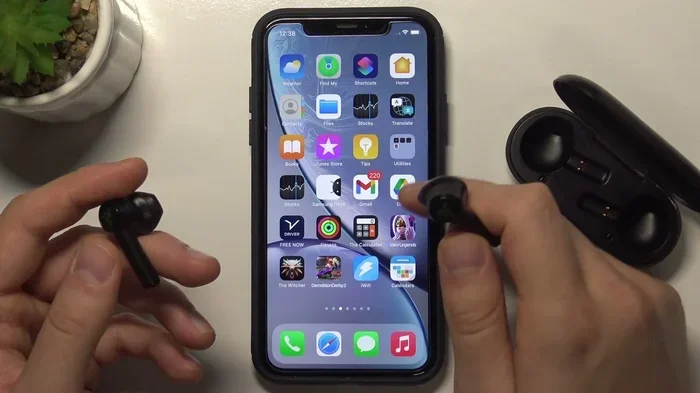
Every pair of wireless headphones has a way to enter “pairing mode.” This is when the headphones make themselves visible to other devices. Usually, you do this by:
- Holding down the power button for 5-10 seconds until a light flashes (usually blue or red)
- For earbuds with a case, opening the case and pressing a button on the back
- Some headphones automatically enter pairing mode the first time you turn them on
Check your headphone manual if you’re not sure. The instructions vary by brand.
Step 2: Open Your iPhone’s Bluetooth Settings
There are two ways to do this:
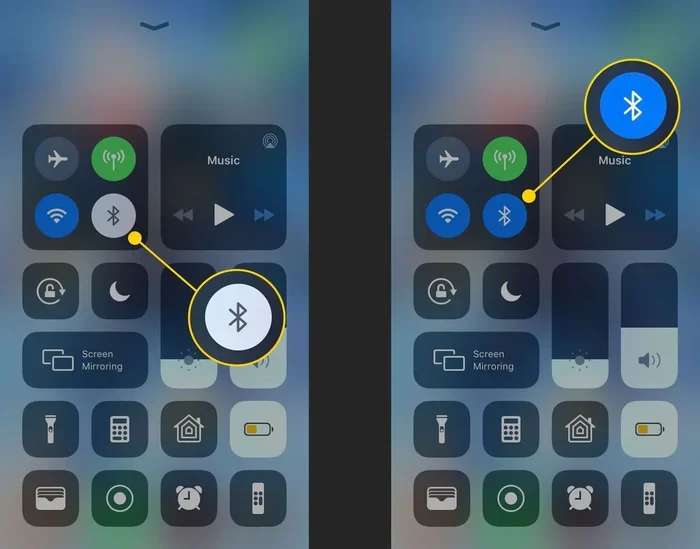
- Quick method: Swipe down from the top-right corner of your iPhone (or up from the bottom on older models) to open Control Center. Tap and hold the Bluetooth icon.
- Full method: Open the Settings app, then tap “Bluetooth.” Make sure the toggle is turned on (it should be green).
Step 3: Select Your Headphones
Your iPhone will start scanning for nearby Bluetooth devices. After a few seconds, you’ll see your headphones appear in a list called “Other Devices.” Simply tap on the name of your headphones, and within a second or two, they’ll be connected.
You’ll see the word “Connected” appear next to your headphone name. That’s it! You’re done. Your headphones will now automatically connect to your iPhone whenever they’re turned on and nearby.
Troubleshooting Common Pairing Issues
Sometimes things don’t work on the first try. Here are some quick fixes:
- Headphones not showing up? Make sure they’re actually in pairing mode. The light should be flashing, not solid.
- Connection keeps dropping? Move closer to your iPhone. Walls and other electronics can interfere with Bluetooth.
- Can’t hear anything? Check that your iPhone’s volume is up and that the headphones are selected as the audio output.
- Headphones connected but no sound? Try forgetting the device in Settings and pairing again from scratch.
Features You Might Miss Without AirPods
While any wireless headphones work with iPhone, some special features are limited to Apple-made products. Let’s be transparent about what you might miss.
Spatial Audio and Dolby Atmos
Spatial Audio is one of the coolest features in modern iPhones. It tracks your head movement and makes sound feel three-dimensional. Movies on Apple TV+ and many songs on Apple Music support this feature. Unfortunately, it only works with AirPods (3rd generation and later), AirPods Pro, AirPods Max, and Beats Fit Pro.
Automatic Device Switching
If you own multiple Apple devices (iPhone, iPad, Mac, Apple Watch), AirPods can automatically switch between them. Pick up your iPad and start a video, and your AirPods switch over without you touching anything. Other brands usually require you to manually disconnect from one device and connect to another.
Find My Integration
Lost your AirPods? You can use the Find My app on your iPhone to locate them, even down to a specific room. Some other brands offer similar features through their own apps, but AirPods integrate seamlessly with the system Apple already built.
Audio Sharing
Want to share music with a friend? With AirPods and some Beats headphones, you can pair two sets to one iPhone and listen together. This works with any two compatible Apple headphones but not with non-Apple brands.
Tips for Getting the Best Experience with Third-Party Wireless Headphones
Using non-Apple wireless headphones with your iPhone doesn’t mean you’re missing out completely. Here are tips to maximize your experience.
Check for AAC Support
Before buying wireless headphones, check if they support the AAC Bluetooth codec. This ensures the best sound quality with iPhones. Most modern headphones do, but it’s worth confirming. The product listing or specifications sheet will mention “AAC support.”
Download the Brand’s Companion App
Many headphone brands offer free iPhone apps. Sony, Bose, Sennheiser, Jabra, and others all have apps in the App Store. These apps let you:
- Adjust equalizer settings (bass, treble, etc.)
- Update headphone firmware for bug fixes and new features
- Customize touch controls
- Set noise cancellation levels
- Check battery levels precisely
Take Care of Battery Life
Battery life varies wildly across brands. Some budget earbuds last only 4-5 hours, while premium ones can hit 12 hours or more. Keep your headphones charged, and remember that Bluetooth 5.0+ uses less power than older versions.
Keep Your iPhone Updated
Apple regularly improves Bluetooth performance through iOS updates. Make sure your iPhone is running the latest version of iOS. Go to Settings > General > Software Update to check. These updates often fix connection issues and improve compatibility with various headphones.
Manage Multiple Devices Wisely
If you use your wireless headphones with multiple devices (like an iPhone and a laptop), keep in mind that most non-Apple headphones can remember multiple devices but only connect to one at a time. You might need to manually switch, or your headphones might automatically connect to the last device you used.
The Future of Wireless Headphones and iPhone Compatibility
Looking ahead, the relationship between iPhones and wireless headphones is only getting better. Here’s what’s on the horizon.
The EU and the USB-C Mandate
Did you know that the European Union passed a law requiring all phones, including iPhones, to use USB-C charging ports? This took effect in late 2024. While this doesn’t directly affect Bluetooth headphones, it means more universal charging standards are coming. Some wireless headphones now charge via USB-C, making it easier to use one cable for everything.
Bluetooth LE Audio
A new technology called Bluetooth LE Audio is rolling out. It promises better sound quality, lower power usage, and a new feature called Auracast that lets you share audio with multiple people in public spaces (like airports or gyms). The iPhone 15 and newer support Bluetooth LE Audio, and more headphones are adopting this standard every month.
Lossless Audio Over Wireless
For years, wireless audio was compressed. But Apple has been working on ways to deliver lossless (CD-quality) audio wirelessly. This is still emerging technology, but expect more options in the coming years that combine the convenience of wireless with the sound quality of wired headphones.
According to Apple, AirPods Pro 2 (with the latest firmware) and Beats Fit Pro can now deliver lossless audio when paired with the Apple Vision Pro headset. This technology may eventually come to iPhones too.
Common Myths About Wireless Headphones and iPhones
Let’s bust some myths that might be confusing you.
Myth 1: “Only AirPods work with iPhones”
False. This is completely untrue. iPhones use standard Bluetooth, which is universal. AirPods are great, but they’re far from your only option.
Myth 2: “Non-Apple headphones will damage your iPhone”
False. Bluetooth is a safe, regulated technology. No brand of wireless headphones can damage your iPhone.
Myth 3: “iPhones only support certain Bluetooth codecs”
Partly true. iPhones natively support SBC and AAC codecs. They don’t natively support aptX or LDAC, but most headphones automatically fall back to AAC or SBC, which still sounds great.
Myth 4: “Wireless headphones always have audio delay”
Mostly false. Older Bluetooth had noticeable delay. But modern Bluetooth 5.0+ has latency so low (under 40 milliseconds) that most people can’t tell the difference. This is fast enough for video watching and even casual gaming.
Myth 5: “You can’t use wireless headphones during phone calls on iPhone”
False. All Bluetooth headphones work for phone calls. The microphone quality varies by brand, but the connection works universally.
Final Thoughts: Your iPhone, Your Choice
So, can you use any wireless headphones with iPhone? Absolutely. Your iPhone is like a friendly door that opens for any Bluetooth device. Apple would love for you to buy AirPods (and they are excellent products), but they haven’t locked out other brands. The company has actually maintained one of the most open ecosystems in the industry.
When shopping for wireless headphones, think about what matters most to you: sound quality, battery life, noise cancellation, comfort, or price. There’s a pair out there for every budget and every need. Don’t feel pressured to buy AirPods just because you have an iPhone.
That said, if you’re deeply invested in the Apple ecosystem (Apple Watch, iPad, Mac, Apple TV), AirPods do offer conveniences that other brands can’t match. It’s a personal choice, not a technical limitation.
Now that you know the truth, go ahead and pick the wireless headphones that make you happy. Your iPhone will welcome them with open arms.
Frequently Asked Questions
Do all wireless headphones work with iPhone?
Yes, almost all wireless headphones use Bluetooth, which is supported by every iPhone made since 2012. As long as your headphones have Bluetooth, they will connect to your iPhone without any issues.
Can I use Samsung Galaxy Buds with an iPhone?
Yes, Samsung Galaxy Buds work perfectly with iPhones through standard Bluetooth pairing. However, you won’t get all the special features that Samsung offers on Galaxy phones, like automatic codec switching. Basic functions like music playback and calls will work flawlessly.
Do non-Apple wireless headphones have microphones that work with iPhones?
Absolutely. All Bluetooth headphones with built-in microphones work for phone calls, FaceTime, and voice memos on iPhone. The microphone quality varies by brand and price, but the connection itself is universal.
Will wireless headphones drain my iPhone battery faster?
Using Bluetooth does use some battery, but the impact is minimal with modern iPhones and Bluetooth 5.0+. You might lose about 5-10% of battery life during several hours of music listening, which is generally negligible.
Can I connect multiple wireless headphones to one iPhone?
Standard Bluetooth only allows one audio connection at a time to most headphones. However, iPhones have an “Audio Sharing” feature that lets you connect two Apple or Beats headphones simultaneously. Some third-party apps also enable shared listening.
Why do AirPods connect faster than other wireless headphones to iPhone?
AirPods contain Apple’s custom H1 or H2 chip, which allows them to communicate with iPhones using additional protocols beyond standard Bluetooth. This enables the instant pairing popup and faster connection times. Other headphones use standard Bluetooth, which takes an extra few seconds but still works reliably.