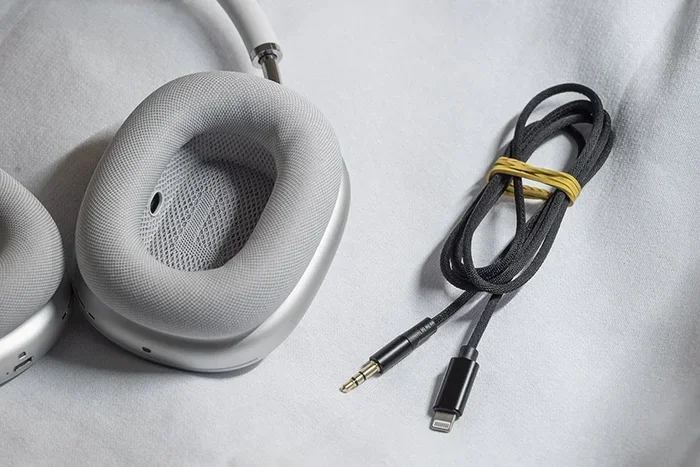
Featured image for AirPods Max with aux cable
Image source: droider.ru
Yes, you can use an aux cable with AirPod Max, but it requires Apple’s Lightning to 3.5mm audio cable, which costs around $35. The AirPod Max does not have a standard 3.5mm headphone jack built in. You plug the cable into the bottom of the right ear cup where the Lightning port sits. Wired mode can actually boost sound quality, but you still need battery power for the headphones to work at all.
Picture this. You are on a long flight, settling into your seat. The in-flight entertainment screen in front of you has a headphone jack waiting for your own cord. You reach up to plug into your fancy AirPod Max headphones, and… wait. There is no hole to plug into. That moment of frustration is super common. Many people buy these premium headphones and then realize there is a missing piece to the puzzle.
AirPod Max are amazing wireless headphones, but the question of using an aux cable comes up all the time. Maybe your battery died. Maybe you want better sound quality. Maybe you need to plug into something that does not have Bluetooth. Whatever the reason, the answer is yes, you absolutely can use an aux cable. You just need the right one.
This guide will walk you through everything you need to know. We will cover what cable you need, how to set it up, when it makes sense to use a wired connection, and what to expect from the sound quality. Think of this as your friendly handbook to getting the most out of your AirPod Max in every situation.
Key Takeaways
- Special Cable Required: AirPod Max uses a Lightning to 3.5mm cable from Apple, not a standard aux cord.
- No Standard Jack: There is no built-in 3.5mm port on the headphones themselves.
- Battery Still Needed: Even in wired mode, AirPod Max requires battery power to function.
- Better Sound Possible: Wired mode can deliver lossless audio quality that Bluetooth cannot match.
- Works with Any Device: The aux cable works with laptops, controllers, in-flight systems, and more.
- Costs About $35: Apple’s official cable is priced around $35, but third-party options exist.
- Charging While Wired: You cannot charge and listen with a wired connection at the same time.
📑 Table of Contents
- Understanding the AirPod Max Connection Setup
- How to Connect AirPod Max Using an Aux Cable
- Sound Quality: Wired vs Wireless on AirPod Max
- Battery Life and Power Considerations
- Charging and Listening at the Same Time
- Common Issues and Troubleshooting
- Alternatives to Using an Aux Cable
- Frequently Asked Questions
- The Bottom Line on Aux and AirPod Max
Understanding the AirPod Max Connection Setup
Let us start with the basics. The AirPod Max headphones were released by Apple in December 2020. They quickly became known as some of the best noise-canceling headphones on the market. But they also became known for something else. Apple made a very unusual choice with how you connect them to things using a wire.
Why Apple Skipped the Standard Headphone Jack
Most headphones have a small round hole called a 3.5mm jack. You have probably seen it a million times. It is the same size hole you find on old iPhones, laptops, MP3 players, and basically every audio device made before Bluetooth took over. The AirPod Max does not have this hole.
Instead, the only port on the entire headphone is a Lightning connector on the bottom of the right ear cup. This is the same small port that older iPhones used for charging. Apple decided to use this single port for both charging the headphones and connecting to wired audio sources.
Think of it like a car that only has one door. Everyone and everything has to go through that one door. The Lightning port is your only way in or out for cables.
What You Need to Make It Work
To connect AirPod Max to any device with a headphone jack, you need a special cable. The official option is called the Lightning to 3.5mm audio cable. Apple sells this for around $35 on their website and in stores. One end has a Lightning connector that plugs into your headphones. The other end has a standard 3.5mm plug that goes into your audio source.
You can also find third-party versions of this cable on Amazon and other retailers. These usually cost between $10 and $25. They work with AirPod Max, but some users report mixed results with sound quality and durability. The official Apple cable is the safest bet if you want guaranteed performance.
How to Connect AirPod Max Using an Aux Cable
Now let us talk about the actual process. It is pretty simple once you have the right cable in hand.
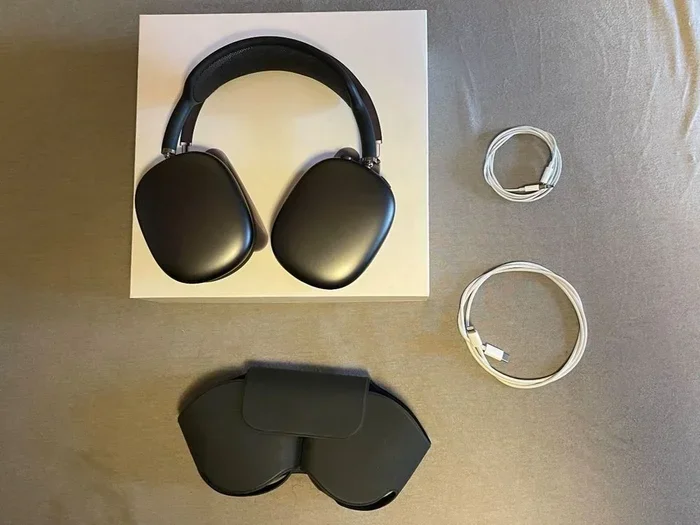
Visual guide about AirPods Max with aux cable
Image source: img.ricardostatic.ch
Step-by-Step Setup Guide
Step 1: Locate the Lightning port. Look at the bottom of the right ear cup. You will see a small oval-shaped port. That is where the cable goes.
Step 2: Plug in the Lightning end. Take your Lightning to 3.5mm cable and insert the Lightning connector into the port. It should click into place smoothly.
Step 3: Connect to your audio source. Take the other end of the cable and plug it into the headphone jack of your device. This could be a laptop, a gaming controller, an airplane seat, or any other audio source.
Step 4: Power on the AirPod Max. Here is the tricky part. Even when you are using a wired connection, the headphones still need to be turned on. Press the noise control button on the top of the right ear cup to power them up.
Step 5: Check your connection. You should hear audio playing through the headphones. If you do not, make sure your cable is fully plugged in on both ends and that your AirPod Max has enough battery power.
Devices That Work with AirPod Max Wired Mode
The beauty of using an aux cable is that you can connect to pretty much anything with a headphone jack. Here are some common scenarios:
- Airplane entertainment systems: Most in-flight screens have a 3.5mm jack. This is great for long flights.
- Gaming consoles: PlayStation and Xbox controllers have headphone jacks that work perfectly.
- Laptops and computers: Any device with a traditional headphone port will work fine.
- Older iPhones: If you have an iPhone 6s or older, you can plug directly in.
- Musical equipment: Some instruments and mixers have 3.5mm outputs.
- TVs and monitors: Many still include headphone jacks for private listening.
Did you know that the global market for wired headphones still brings in over $10 billion every year? Even in our wireless world, there are tons of situations where a cable comes in handy.
Sound Quality: Wired vs Wireless on AirPod Max
This is where things get really interesting. You might be wondering if there is actually a difference in sound quality between wired and wireless modes. The short answer is yes, but it depends on what you are listening to.
The Bluetooth Limitation
When you use AirPod Max wirelessly, the audio goes through Bluetooth. Bluetooth is a wireless technology that sends sound using radio waves. Here is the problem. Bluetooth cannot send huge amounts of data at once. So it has to compress the audio to make it fit.
Think of it like squeezing a big fluffy pillow into a small bag. The pillow still works, but you lose some of its fluff. Audio compression works the same way. You lose some of the tiny details in your music.
Apple uses a special Bluetooth codec called AAC. It does a good job of keeping audio quality high. But it is still compressed compared to the original recording.
The Wired Advantage
When you use a wired connection, the audio does not need to be compressed as much. The cable can carry the full original audio file from your source to your headphones. This means you hear more detail, more clarity, and more of what the artist intended.
Apple actually advertised this when they launched AirPod Max. They claimed that wired mode supports “lossless” audio. Lossless means no quality is lost between the source and your ears. It is like getting the full fluffy pillow without squeezing it into a bag.
When You Will Notice the Difference
Here is the honest truth. Most people will not notice a huge difference between wired and wireless modes. The human ear is not that sensitive, and modern Bluetooth is pretty good. But if you are an audiophile or a music producer, you might hear subtle improvements in:
- Vocal clarity in complex songs
- High-frequency details like cymbals and strings
- Soundstage and instrument separation
- Bass tightness and accuracy
For everyday listening, wireless mode sounds fantastic. But for critical listening sessions, wired mode has the edge.
Battery Life and Power Considerations
One thing that surprises many people is that AirPod Max still needs battery power even when used with a cable. Let us explain why this matters.
Why Battery Is Still Required
AirPod Max is not like traditional wired headphones. Traditional headphones are simple. Audio goes in through the cable, passes through some small drivers, and comes out as sound. No power needed.
AirPod Max is much more complex. It has digital signal processing, active noise cancellation, and a built-in amplifier. All of these features require electricity to work. The cable only carries the audio signal. It does not power the headphones themselves.
Think of it like a modern TV. Even if you plug in an HDMI cable from an old DVD player, the TV still needs to be plugged into the wall to turn on. The cable only carries the picture. The TV needs its own power.
Battery Life in Wired Mode
Good news here. Using AirPod Max in wired mode does not drain the battery much faster than wireless mode. Apple rates the battery for about 20 hours of listening with active noise cancellation on. This holds true whether you are using Bluetooth or a cable.
In fact, some users report that wired mode uses slightly less battery because the Bluetooth radio is not active. The difference is tiny, but it exists.
What Happens When the Battery Dies
This is the frustrating part. If your AirPod Max runs out of battery, the headphones will not work at all. Not in wireless mode. Not in wired mode. Nothing. You will need to charge them before you can listen to anything.
Apple includes a Lightning to USB-C cable in the box for charging. You can plug this into any USB power source. A full charge takes about 2 hours. A quick 5-minute charge gives you around 1.5 hours of listening time.
Pro tip: If you know you will be away from a charger for a while, turn off the active noise cancellation. This can extend your battery life significantly.
Charging and Listening at the Same Time
Here is another quirk that catches people off guard. You cannot charge your AirPod Max while using them in wired mode.
The Single Port Problem
Remember that single Lightning port we talked about earlier? This is where it becomes a real limitation. The port is doing double duty. It handles either charging OR audio, but not both at the same time.
Imagine you are on a flight. Your battery is at 20%. You want to use the in-flight entertainment with a wired connection. But you also want to charge your headphones. You cannot do both. You have to choose.
Workarounds and Solutions
There are some clever workarounds for this limitation:
Charge before you go. The simplest solution. Make sure your AirPod Max is fully charged before you head out.
Use a power bank. While you cannot charge while listening with a cable, you can charge between listening sessions.
Switch to wireless. If you need to charge, disconnect the audio cable and use Bluetooth. The Lightning port is now free for charging.
Carry a second Lightning cable. Keep one cable for audio and one for charging. Swap them as needed.
The AirPod Max Smart Case
Apple includes a special case with AirPod Max that puts the headphones into an ultra-low power mode. When you put them in the case, they use almost no battery. This is great for preserving charge between listening sessions.
However, the case does not charge the headphones. You still need to plug them in for that.
Common Issues and Troubleshooting
Sometimes things do not work perfectly on the first try. Here are some common problems and how to fix them.
No Sound After Connecting
If you plug in the cable and hear nothing, try these steps:
- Make sure both ends of the cable are fully inserted
- Check that your AirPod Max has battery power remaining
- Try a different audio source to rule out device issues
- Restart your AirPod Max by holding the noise control button and Digital Crown
- Test with a different Lightning to 3.5mm cable if you have one
Sound Only Coming Through One Side
This usually means the cable is not fully plugged in or is damaged. Try unplugging and reconnecting firmly. If the problem continues, you may need a new cable.
Static or Crackling Sounds
Electrical interference can cause static. Try moving away from other electronics. If the problem persists, your cable might be damaged.
Microphone Not Working
Here is something important to know. When you use AirPod Max in wired mode with the official Apple cable, the microphone does not work. The cable only carries audio out, not audio in. This means no phone calls and no voice chat while wired.
Some third-party cables include microphone support, but compatibility can be hit or miss.
Third-Party Cable Concerns
While cheaper third-party cables can save you money, they come with risks:
- Some do not support all audio formats properly
- Build quality can be lower, leading to early failure
- MFi certification (Made for iPhone) is not always guaranteed
- Some may not work with future iOS updates
If you do go with a third-party option, look for cables that explicitly mention AirPod Max compatibility and MFi certification.
Alternatives to Using an Aux Cable
Maybe the wired route is not for you. Here are some alternatives that might work better for your situation.
Bluetooth Adapters
A Bluetooth adapter is a small device that plugs into a 3.5mm jack and adds Bluetooth capability. You pair your AirPod Max to the adapter instead of the audio source directly. This lets you use wireless headphones with devices that do not have Bluetooth.
Popular options include the AirFly Pro and the Twelve South AirFly. These are especially useful for airplane entertainment systems and gym equipment.
DAC and Amp Combinations
For serious audio enthusiasts, a DAC (Digital to Analog Converter) can improve sound quality even further. A DAC takes digital audio and converts it to analog with higher precision than your device’s built-in hardware. Combined with the wired connection, this setup can deliver truly stunning sound.
Apple’s USB-C to 3.5mm Adapter
If you have a newer iPhone with USB-C, you might think the Apple USB-C to 3.5mm adapter would work. Unfortunately, it does not. AirPod Max specifically requires a Lightning connection, not USB-C. Apple has not released a USB-C version of the audio cable for AirPod Max.
Frequently Asked Questions
Question?
Answer (2-3 sentences)…
The Bottom Line on Aux and AirPod Max
So can you use aux with AirPod Max? Absolutely yes. You just need to grab that Lightning to 3.5mm cable from Apple or a compatible third-party option. It is not as convenient as headphones with a built-in jack, but it works great once you have the right setup.
The wired mode offers real benefits, especially for sound quality. You get lossless audio support, compatibility with any device that has a headphone jack, and reliable connection without Bluetooth hiccups. The trade-offs are the need for a special cable, the inability to charge while listening, and the requirement for battery power even when wired.
For most people, AirPod Max shines as a wireless headphone. The noise cancellation is industry-leading, the sound quality is excellent, and the build quality is premium. But when you need a wired connection, the option is there. Whether you are on a plane, playing games, or doing critical music listening, the aux cable solution has you covered.
Invest in the official Apple cable for the best experience. Keep it in your bag so it is always ready when you need it. And remember to charge those headphones regularly. With the right setup, AirPod Max can handle just about any listening situation you throw at them.