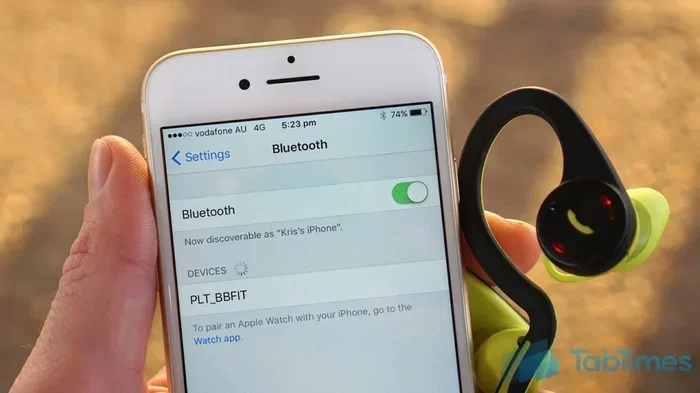
Featured image for wireless earbuds iPhone setup
Image source: i.ytimg.com
Yes, you can absolutely use non-Apple wireless earbuds with your iPhone. Any Bluetooth-enabled earbuds will connect to your iPhone, including popular brands like Samsung, Sony, Bose, and Jabra. While you’ll miss some Apple-exclusive features like automatic ear detection and spatial audio with head tracking, you can still enjoy great sound quality, calls, and music at a fraction of the price.
If you’re an iPhone owner thinking about buying wireless earbuds, you’ve probably wondered whether you need to shell out for AirPods. The good news? You absolutely don’t. Your iPhone works with virtually any wireless earbuds on the market, and you might even get better sound for less money.
Think of it like buying a TV. Your cable box works with any brand of television, right? The same logic applies here. Bluetooth is a universal language that all modern devices speak, and your iPhone is fluent in it. Whether you’re eyeing Samsung Galaxy Buds, Sony WF-1000XM5, or budget options from Anker, they’ll all connect to your iPhone without any special tricks.
But before you rush to buy the cheapest pair you can find, there are a few things worth knowing. Some features work better with certain earbuds, and some Apple-exclusive tricks only work with AirPods. This guide will walk you through everything you need to know to make a smart choice.
Key Takeaways
- Universal Bluetooth Compatibility: Any Bluetooth earbuds work with iPhones, regardless of brand, making Apple-exclusive purchases unnecessary.
- Easy Pairing Process: Connecting third-party earbuds takes only 30-60 seconds through your iPhone’s Settings app.
- Some Features Are Apple-Only: Features like automatic switching between Apple devices and Find My integration require AirPods or Beats.
- Audio Quality Varies: Premium brands like Sony, Bose, and Sennheiser often match or exceed AirPods sound quality.
- Price Savings Are Significant: Non-Apple options range from $20-$300, offering excellent alternatives at every budget level.
- App Support Differs: Many third-party brands offer companion apps for customization, though they won’t integrate as deeply with iOS.
- Future-Proof Choice: Bluetooth 5.0+ ensures your non-Apple earbuds will work with future iPhone models for years to come.
📑 Table of Contents
- How Bluetooth Connectivity Works Between iPhones and Non-Apple Earbuds
- Which Non-Apple Earbuds Work Best with iPhone?
- Features You Get (and Don’t Get) with Non-Apple Earbuds
- Step-by-Step Guide to Pairing Non-Apple Earbuds with Your iPhone
- Maximizing Your Non-Apple Earbuds Experience on iPhone
- Common Myths About Using Non-Apple Earbuds with iPhone
- Making Your Final Decision
How Bluetooth Connectivity Works Between iPhones and Non-Apple Earbuds
At its core, connecting non-Apple earbuds to your iPhone is incredibly simple because of something called Bluetooth technology. Bluetooth is like a common language that devices use to talk to each other wirelessly. Your iPhone has had Bluetooth built in since 2007, and virtually every wireless earbud made today uses the same standard.
The Universal Language of Bluetooth
Bluetooth works on a frequency band between 2.402 GHz and 2.480 GHz, which is a reserved slice of the airwaves specifically for short-range wireless communication. When you pair your earbuds with your iPhone, the two devices essentially shake hands and agree to speak in this common language. The iPhone doesn’t care if the earbuds are made by Apple, Samsung, or your cousin in their garage—as long as they speak Bluetooth, they’ll work together.
Did You Know? The Bluetooth technology we use today is named after Harald Bluetooth, a 10th-century Danish king who united different tribes—just like Bluetooth technology unites different devices!
Bluetooth Versions and Why They Matter
Not all Bluetooth is created equal, though. Modern iPhones support Bluetooth 5.0 and above, which means faster connections, longer range, and better battery efficiency. When shopping for earbuds, look for these versions:
- Bluetooth 5.0: Released in 2016, offers twice the speed and four times the range of older versions
- Bluetooth 5.2: Introduced LE Audio for better sound quality and lower power consumption
- Bluetooth 5.3: The latest standard, providing even more stable connections
If your earbuds use an older Bluetooth version (like 4.2 or earlier), they’ll still work with your iPhone, but you might experience occasional dropouts or shorter battery life. Think of it like using an older USB cable—it still works, but it’s not as fast as the newest one.
The Pairing Process Demystified
Here’s exactly how pairing works, step by step. First, your earbuds broadcast a tiny “here I am” signal called an advertising packet. When you open your iPhone’s Bluetooth settings, your phone scans for these signals, much like tuning a radio to find different stations. Once you select your earbuds, the two devices exchange security keys and establish a trusted connection.
This whole dance takes about 30-60 seconds the first time. After that, your iPhone remembers your earbuds and connects automatically whenever they’re nearby and turned on. It’s like how your car automatically unlocks when you approach with the key fob in your pocket.
Which Non-Apple Earbuds Work Best with iPhone?
Pretty much any wireless earbud with Bluetooth will connect to your iPhone, but some brands and models offer a noticeably better experience than others. The key factors to consider are sound quality, comfort, battery life, and how well the earbuds’ companion app works with iOS.
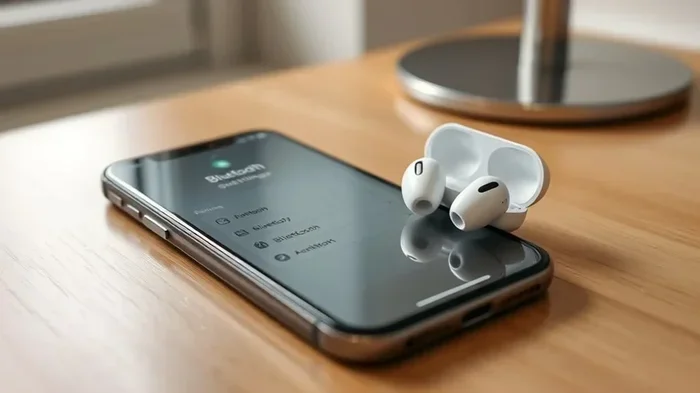
Visual guide about wireless earbuds iPhone setup
Image source: techyconcepts.com
Top-Tier Premium Options
If sound quality is your top priority, several non-Apple brands actually outperform AirPods Pro in independent testing. The Sony WF-1000XM5 consistently ranks at the top of “best earbuds” lists thanks to its exceptional noise cancellation and rich, detailed audio. Bose QuietComfort Earbuds II are another standout choice, particularly if you fly frequently or work in noisy environments.
Sennheiser Momentum True Wireless 3 offers audiophile-grade sound that reveals details in music you never noticed before. Jabra Elite 10 provides excellent call quality, making them perfect for professionals who spend hours on Zoom calls. All of these work flawlessly with iPhones despite being non-Apple products.
Did You Know? According to a 2023 survey by Statista, 42% of wireless earbud users owned non-Apple brands, proving that AirPods aren’t the only game in town!
Mid-Range Sweet Spots
You don’t need to spend $300 to get great sound. The Samsung Galaxy Buds Pro 2 offer premium features like active noise cancellation and spatial audio at around $150. Google Pixel Buds Pro integrate nicely with iPhones for around $200, delivering clear calls and comfortable fit. The Beats Studio Buds (yes, Beats is owned by Apple!) work perfectly with iPhones while offering a bass-heavy sound profile that some users prefer.
The Nothing Ear (2) has gained a cult following for its unique transparent design and surprisingly good audio quality at around $150. These represent the sweet spot where you get 80% of premium performance for 50% of the cost.
Budget-Friendly Champions
For those watching their wallet, options abound. Anker Soundcore Liberty 4 NC offers noise cancellation and decent sound for around $70. JLab Go Air Pop delivers surprisingly good audio for just $20-30. Edifier NeoBuds Pro 2 provides premium features at mid-range prices.
Here’s a quick comparison to help you decide:
- Under $50: JLab, Soundcore, QCY—basic features, good sound
- $50-$150: Samsung, Nothing, EarFun—active noise cancellation begins here
- $150-$250: Google, Jabra, Sony mid-range—premium features without premium prices
- $250+: Sony flagship, Bose, Sennheiser—audiophile territory
Features You Get (and Don’t Get) with Non-Apple Earbuds
Here’s where things get interesting. While non-Apple earbuds work perfectly with iPhones for basic functions, some of those fancy Apple-exclusive features won’t be available. Let’s break down what works and what doesn’t.
What Works Perfectly
The core experience is essentially identical regardless of brand. You’ll get excellent music playback, clear phone calls, podcast streaming, video audio, and voice assistant access (both Siri and Google Assistant, depending on the earbuds). Volume control, play/pause, and track skipping all work through standard Bluetooth controls.
Most modern earbuds also support:
- Stereo audio for music and calls
- Microphone input for phone calls and Siri
- Basic touch controls (tap to pause, swipe to skip tracks)
- Battery level indicators in your iPhone’s widget screen
- Auto-reconnection when you take them out of the case
What You’ll Miss
Apple has created several features that only work with AirPods or Beats products (which Apple owns). The big ones include:
Automatic Device Switching: AirPods can seamlessly switch between your iPhone, iPad, and Mac without you touching anything. Start a video on your Mac, take a call on your iPhone—the AirPods just know what to do. Third-party earbuds require manual reconnection.
Spatial Audio with Head Tracking: This creates a 3D sound experience where audio seems to come from a fixed point, even as you move your head. It’s amazing for movies but only works with AirPods Pro, AirPods Max, and newer Beats models.
Find My Integration: Lose your AirPods? You can see their last location in Apple’s Find My app, even get directions to them. Non-Apple earbuds either don’t have this feature or use a separate app with limited functionality.
Audio Sharing: Two people can listen to the same audio from one iPhone with two pairs of AirPods. It’s a neat feature for watching movies together on a plane, but non-Apple earbuds can’t participate.
Live Listen: This turns your iPhone into a directional microphone that streams to your AirPods. Great for hearing conversations in noisy restaurants, but again, Apple-only.
Workarounds and Third-Party Apps
The good news? Many non-Apple brands have developed clever workarounds. Sony’s Headphones Connect app lets you customize EQ settings and noise cancellation levels on iOS. Bose Music app provides similar functionality. Jabra Sound+ offers hearing tests and personalized sound profiles. These companion apps can’t replace Apple’s deep integration, but they add value in their own ways.
Step-by-Step Guide to Pairing Non-Apple Earbuds with Your iPhone
Connecting your new earbuds to your iPhone is refreshingly simple. Here’s exactly what to do, whether you’ve got brand new earbuds or are reconnecting an old pair.
Pairing Brand New Earbuds
Step 1: Charge your earbuds. Make sure they have at least 20% battery before pairing. Low battery can sometimes cause pairing issues.
Step 2: Enable pairing mode. Most earbuds enter pairing mode when you take them out of the case for the first time. If not, press and hold the button on the case or earbuds until you see a flashing light (usually blue or white).
Step 3: Open iPhone Settings. Tap the Settings app (the gear icon), then tap “Bluetooth.” Make sure the toggle is switched on—it should be green.
Step 4: Find your earbuds. Wait a few seconds for your iPhone to scan. Your earbuds should appear under “Other Devices” with their brand name (like “Sony WF-1000XM5” or “Jabra Elite 10”).
Step 5: Tap to connect. Once you tap your earbuds’ name, you’ll see “Connected” appear next to them within a few seconds. That’s it—you’re done!
Troubleshooting Common Pairing Problems
Sometimes things don’t work perfectly on the first try. Here are solutions to common issues:
Earbuds won’t appear in the list? Make sure they’re actually in pairing mode. Some earbuds need you to hold the button for 5-10 seconds, not just tap it. Also, check that no other device is currently connected to the earbuds—they can only pair with one device at a time during initial setup.
Connection keeps dropping? This usually means interference or distance. Keep your iPhone within 30 feet (10 meters) of your earbuds. Walls, microwaves, and other Bluetooth devices can cause interference. If problems persist, try “forgetting” the device in Settings and re-pairing from scratch.
Only one earbud works? Most earbuds need to be paired as a pair, not individually. Place both earbuds in the case, then take them out together. If one still doesn’t work, the earbud might need resetting—check your model’s manual for specific instructions.
Audio sounds choppy or distorted? This often indicates Bluetooth version mismatch or low battery. Charge your earbuds fully, and if the problem continues, check if your earbuds need a firmware update through their companion app.
Maximizing Your Non-Apple Earbuds Experience on iPhone
Once you’re connected, there are several ways to get the most out of your non-Apple earbuds with your iPhone. These tips will help you unlock features and settings you might not know exist.
Essential Settings to Configure
Enable Bluetooth Audio Codecs: iPhones default to the AAC codec, which works well with most earbuds. However, if your earbuds support aptX or LDAC (check the specs), you might get even better audio quality. Go to Settings > Bluetooth, tap the “i” next to your earbuds, and look for codec options. Note that iPhones primarily support AAC, so this setting is limited.
Customize Controls: Most companion apps let you reprogram what the touch controls do. Maybe you want a double-tap to activate Siri instead of skipping tracks, or you want long-press to toggle noise cancellation. Spend 10 minutes customizing these and your daily experience improves dramatically.
Set Up the Battery Widget: Swipe right on your home screen to access widgets. Add the Batteries widget to see your earbuds’ charge level at a glance. This works with any Bluetooth earbuds, not just AirPods.
Using Your Earbuds with Multiple Apple Devices
While you won’t get automatic switching, you can still use your non-Apple earbuds with multiple Apple devices. You’ll just need to manually switch connections. Here’s a tip: if you’re signed into the same Apple ID on your iPhone, iPad, and Mac, your earbuds will appear in the Bluetooth menu of each device. Just click to switch when needed.
Some earbuds support multipoint connection, meaning they can connect to two devices simultaneously. This is great if you want your earbuds connected to both your iPhone and your laptop at the same time. Look for “multipoint” or “dual connection” in the specs when shopping.
Battery Management Tips
To extend your earbuds’ battery life, follow these practices:
- Store them in their case when not in use
- Avoid extreme temperatures (don’t leave them in your car)
- Don’t let them drain to 0% regularly
- Keep the case charged too—earbuds charge from the case
- Turn off features you don’t use, like active noise cancellation when you don’t need it
Did You Know? Lithium-ion batteries (which power wireless earbuds) last longest when kept between 20% and 80% charge. Constantly charging to 100% can actually reduce their overall lifespan.
Common Myths About Using Non-Apple Earbuds with iPhone
Let’s clear up some misconceptions that keep people buying AirPods when they might be happier with alternatives.
Myth 1: “Non-Apple Earbuds Won’t Work Properly with iPhones”
This is simply false. Bluetooth is a universal standard, and iPhones work with any Bluetooth audio device. Some Apple-exclusive features won’t work, but basic functionality—music, calls, podcasts, videos—works identically regardless of brand. Millions of people use non-Apple earbuds with their iPhones every day without issues.
Myth 2: “Sound Quality Is Always Worse Than AirPods”
Not true at all. While AirPods offer good sound quality, they’re not the best in any price category. Sony, Bose, and Sennheiser consistently receive higher marks from audio reviewers. The “best” earbuds for you depend on your preferences—some people prefer AirPods’ balanced sound, while others prefer the bass-heavy signature of Beats or the detailed sound of audiophile brands.
Myth 3: “You Need AirPods for Noise Cancellation”
Wrong again. Active noise cancellation (ANC) is a technology that’s available in earbuds from many manufacturers. Sony WF-1000XM5, Bose QuietComfort, and even budget options like Anker Soundcore Liberty 4 NC offer excellent noise cancellation. In some independent tests, these non-Apple options actually outperform AirPods Pro.
Myth 4: “It’s Hard to Switch from AirPods”
Switching brands is actually easier than you might think. Your iPhone can remember multiple Bluetooth devices, so you can keep your old AirPods paired and add new ones. If you decide you prefer the new earbuds later, you can simply remove the AirPods from your devices. There’s no commitment or complicated process.
Making Your Final Decision
So, should you stick with AirPods or explore other options? The answer depends on what matters most to you.
Choose AirPods if: You own multiple Apple devices and value seamless switching. You want Find My integration. You’re deeply invested in the Apple ecosystem and prefer staying within it. You don’t mind paying a premium for convenience.
Choose non-Apple earbuds if: Sound quality is your top priority. You want to save money. You prefer specific features like longer battery life or better noise cancellation. You’re not married to the Apple ecosystem. You want something unique, like the transparent design of Nothing Ear (2).
Here’s a practical approach: Try to test before you buy. Many electronics stores have demo units you can try. Or buy from a retailer with a good return policy so you can test the earbuds with your iPhone at home.
Remember, the “best” earbuds are the ones that sound good to your ears, fit comfortably in your ears, and work well with your daily routine. Whether that’s AirPods or Sony or a $30 pair from JLab, the choice is entirely yours—and your iPhone will work with any of them.
The wireless earbud market has exploded in recent years, and competition has driven innovation and lowered prices across the board. This is great news for consumers. You’re no longer locked into buying AirPods just because you own an iPhone. Take advantage of the variety, do your research, read reviews from trusted sources like RTINGS.com or What Hi-Fi, and pick the pair that makes the most sense for your needs and budget.
Your iPhone is ready to connect to whatever wireless earbuds you choose. The Bluetooth icon in your settings is waiting. Go forth and enjoy your music, podcasts, and calls—AirPods or otherwise!
Frequently Asked Questions
Will any wireless earbuds connect to an iPhone?
Yes, any wireless earbuds with Bluetooth will connect to an iPhone. The iPhone supports universal Bluetooth standards, so brand doesn’t matter for basic functionality. Whether you buy Samsung, Sony, Bose, or any other brand, they’ll pair with your iPhone in seconds.
Do non-Apple earbuds have noise cancellation like AirPods Pro?
Absolutely! Many non-Apple earbuds offer active noise cancellation (ANC). Sony WF-1000XM5, Bose QuietComfort Earbuds II, and even budget options like Anker Soundcore Liberty 4 NC provide excellent noise cancellation that often matches or exceeds AirPods Pro performance.
Can I use Siri with non-Apple wireless earbuds?
Yes, Siri works with any Bluetooth earbuds that have a microphone. You can activate Siri by saying “Hey Siri” or through your earbuds’ touch controls (depending on the model). Voice commands, calls, and music control all work through Siri regardless of which earbuds you use.
Why do some people say AirPods work better with iPhone?
AirPods offer exclusive features like automatic device switching between Apple products, Find My integration, and spatial audio with head tracking. These conveniences create a more seamless experience within the Apple ecosystem, though core audio functions work equally well with other brands.
Are expensive non-Apple earbuds worth it compared to AirPods?
It depends on your priorities. Premium non-Apple earbuds often deliver superior sound quality and noise cancellation for the same price as AirPods. However, you lose Apple-specific features. For pure audio performance, brands like Sony and Bose frequently outperform AirPods in blind listening tests.
How do I check battery level of non-Apple earbuds on iPhone?
Add the Batteries widget to your iPhone’s Today View (swipe right on your home screen). Your non-Apple earbuds will appear there when connected. Many earbud brands also offer companion apps that show detailed battery information for each earbud and the charging case.