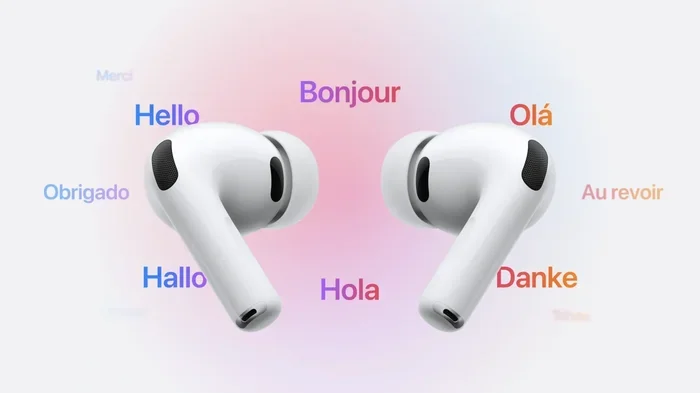
Featured image for AirPods Pro 3 translation feature
Image source: iphonelife.com
Yes, AirPods Pro 3 can translate languages in real time using Apple’s Live Translation feature powered by Apple Intelligence. When paired with a compatible iPhone, the earbuds deliver translated speech directly into your ears during conversations. The feature supports several major languages at launch, including English, French, German, Spanish, and Portuguese, with more expected over time. While AirPods Pro 3 serve as the audio output device, the actual translation work happens on your iPhone and through Apple’s intelligence platform.
Imagine walking through a busy market in Paris, ordering food in perfect French, and understanding every reply without ever looking at a screen. That is the promise of AirPods Pro 3 translation. Apple has built real-time language translation directly into its newest earbuds, turning your ears into a universal translator.
But how does it actually work? Can you really use AirPods Pro 3 to translate a conversation with someone who speaks another language? The short answer is yes, with a few important caveats. The feature relies on your iPhone, requires Apple Intelligence, and works only with certain languages so far.
This guide breaks down everything you need to know about AirPods Pro 3 translation. You will learn how the feature works, which languages are supported, what you need to use it, and how it compares to other translation tools. By the end, you will know exactly what to expect and how to get the most out of this exciting new capability.
Key Takeaways
- Live Translation Is Real: AirPods Pro 3 can translate foreign languages in real time when used with a compatible iPhone running Apple Intelligence.
- iPhone Does the Heavy Lifting: The earbuds act as the audio receiver, while the iPhone handles speech recognition, translation, and processing.
- Limited Language Support at Launch: Initial languages include English, French, German, Spanish, and Portuguese, with Italian, Japanese, Korean, and Chinese coming soon.
- Requires Apple Intelligence: The translation feature depends on Apple’s AI system, which requires an iPhone 15 Pro or newer with sufficient processing power.
- Not a Standalone Feature: AirPods Pro 3 cannot translate without an iPhone nearby, unlike dedicated translation devices.
- Offline Translation Is Limited: Most translation functions require an internet connection to access Apple’s cloud-based translation servers.
- Best for Casual Conversations: The feature works well for travel, dining, and shopping, but may struggle with highly technical or specialized vocabulary.
📑 Table of Contents
- How Does AirPods Pro 3 Translation Work?
- What Languages Can AirPods Pro 3 Translate?
- What Do You Need to Use AirPods Pro 3 Translation?
- How to Use AirPods Pro 3 for Live Translation
- Limitations and Drawbacks of AirPods Pro 3 Translation
- Comparing AirPods Pro 3 Translation to Other Translation Tools
- Real-World Use Cases for AirPods Pro 3 Translation
- The Future of AirPods Pro 3 Translation
- Final Thoughts on AirPods Pro 3 Translation
How Does AirPods Pro 3 Translation Work?
AirPods Pro 3 translation sounds like magic, but it is really a team effort between your earbuds and your iPhone. Think of it like a relay race. Your AirPods are the runner who brings the message to you, but the actual work of understanding and translating happens on the iPhone and Apple’s servers.
The Role of AirPods Pro 3 in Translation
AirPods Pro 3 do not translate languages on their own. Instead, they act as a high-quality audio receiver. Here is what they handle:
- Microphone capture: The earbuds pick up the other person’s speech using built-in microphones.
- Audio delivery: They play the translated version directly into your ears.
- Noise filtering: Active Noise Cancellation helps you hear the translation clearly, even in loud environments.
In simple terms, the AirPods Pro 3 are your personal audio assistant. They listen, send the audio to your iPhone, and then play back the result. The actual language smarts live in your phone and in the cloud.
The Role of Your iPhone and Apple Intelligence
Your iPhone is the brain of the operation. When you speak or when someone else speaks, the iPhone captures that audio, converts it into text, translates it, and sends the translated audio back to your AirPods. This whole process happens in just a few seconds.
Apple Intelligence is the engine that powers translation. It uses advanced machine learning models trained on millions of language samples. These models can understand context, tone, and even common phrases that older translation systems would miss. According to Apple, Apple Intelligence processes requests on-device when possible and uses Private Cloud Compute for more complex tasks, keeping your conversations secure.
Step-by-Step Process of a Real-Time Translation
Let us walk through what happens when you use AirPods Pro 3 to translate a conversation:
- You activate the feature by squeezing the stem of your AirPods or using a voice command.
- The earbuds capture the other person’s speech through their microphones.
- Your iPhone receives the audio and uses speech recognition to convert speech into text.
- Apple Intelligence translates the text into your preferred language.
- The translation is converted back into spoken audio.
- Your AirPods Pro 3 play the translated audio directly into your ears.
The whole process typically takes one to three seconds. That is fast enough to feel like a natural conversation, though not quite as seamless as chatting with someone who speaks your language.
What Languages Can AirPods Pro 3 Translate?
Language support is one of the most important questions for anyone considering AirPods Pro 3 translation. After all, the feature is only useful if it works with the languages you actually need.
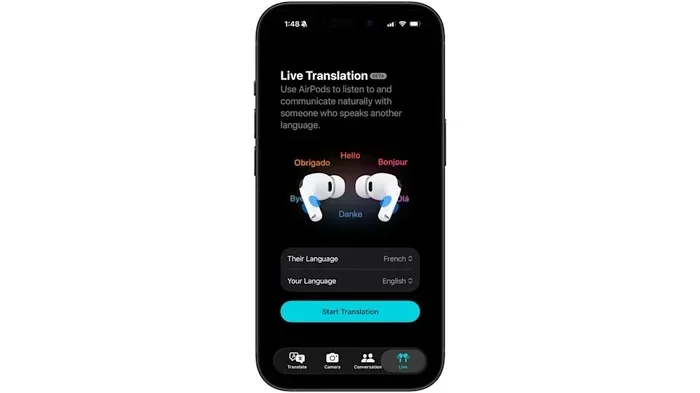
Visual guide about AirPods Pro 3 translation feature
Image source: s.yimg.com
Languages Available at Launch
When AirPods Pro 3 launched, Apple included support for several major languages. As of the initial release, you can translate to and from these languages:
- English (US, UK, and Australian variants)
- French
- German
- Spanish
- Portuguese (Brazilian)
These languages cover a large portion of global travelers and business users. Did You Know? English and Spanish are the two most spoken languages in the world, with over 1.5 billion combined native and second-language speakers.
Languages Coming Soon
Apple has announced plans to expand language support in future updates. Expected additions include:
- Italian
- Japanese
- Korean
- Chinese (Mandarin, Simplified and Traditional)
Apple typically adds new languages through iOS updates, so these could roll out within the first year of release. The company has a track record of expanding language support steadily, much like it did with Siri and dictation features.
What About Regional Dialects?
AirPods Pro 3 translation works best with standard dialects. Regional slang, heavy accents, or mixed languages can confuse the system. For example, if someone speaks a thick Scottish accent or uses lots of local slang, the translation accuracy may drop. The feature is optimized for clear, conversational speech in everyday settings.
What Do You Need to Use AirPods Pro 3 Translation?
AirPods Pro 3 translation does not work out of the box for everyone. You need the right hardware, the right software, and the right settings. Think of it like baking a cake. You need all the ingredients, or it will not turn out right.
Required iPhone Models
Not every iPhone can power AirPods Pro 3 translation. Because the feature relies on Apple Intelligence, you need an iPhone with enough processing power to run AI models. Compatible devices include:
- iPhone 15 Pro and iPhone 15 Pro Max
- iPhone 16, iPhone 16 Plus, iPhone 16 Pro, and iPhone 16 Pro Max
- iPhone 17 series (when available)
If you have an older iPhone, like an iPhone 14 or earlier, you will not be able to use the translation feature, even with AirPods Pro 3. The iPhone is the limiting factor.
Required iOS Version
You will need to run the latest version of iOS that supports Apple Intelligence. As of the AirPods Pro 3 launch, this means iOS 18 or later, with specific updates that enable translation features. Always check that your iPhone is running the most current software version before trying to use translation.
Apple Intelligence Activation
Apple Intelligence is opt-in in many regions. You may need to manually enable it in your iPhone settings:
- Open the Settings app.
- Tap Apple Intelligence & Siri.
- Toggle on Apple Intelligence.
- Follow any prompts to download necessary language models.
In some countries, Apple Intelligence may not be available yet due to regulatory requirements. As of now, the feature works in the United States, United Kingdom, Australia, Canada, and several other regions, with expansion planned.
Internet Connection
Most translation tasks require an active internet connection. While some basic processing happens on-device, complex translations and language model updates use Apple’s servers. If you are traveling abroad, consider getting a local SIM card or international data plan to avoid roaming charges.
How to Use AirPods Pro 3 for Live Translation
Using AirPods Pro 3 translation is straightforward once everything is set up. Here is a practical guide to get you started.
Setting Up the Feature
Before you can translate, make sure everything is configured correctly:
- Pair your AirPods Pro 3 with your compatible iPhone.
- Update your iPhone to the latest iOS version.
- Enable Apple Intelligence in Settings.
- Set your preferred language under Settings > Translate or Accessibility > Live Translation.
- Test the feature with a friend or a video in another language before relying on it in a real situation.
Starting a Translated Conversation
There are two main ways to use AirPods Pro 3 translation: phone-based conversations and in-person conversations.
For phone or FaceTime calls:
- Start a call as usual.
- Tap the Live Translation button on the call screen.
- Select the other person’s language.
- You will hear their words translated in your AirPods, and they will see your words translated on their screen or hear them in their own earbuds.
For in-person conversations:
- Open the Translate app on your iPhone.
- Tap the Conversation mode.
- Set your languages.
- Hold your iPhone between you and the other person, or simply speak naturally. Your AirPods Pro 3 will play the translations privately to you.
Tips for Best Results
Like any technology, AirPods Pro 3 translation works better with the right approach. Here are some practical tips:
- Speak clearly and at a moderate pace. Mumbling or rushing reduces accuracy.
- Reduce background noise when possible. Use Active Noise Cancellation to focus on the speaker.
- Avoid technical jargon unless you know the translation system handles it well.
- Use simple sentences when possible. Complex grammar is harder to translate in real time.
- Keep your iPhone charged and connected to power for long translation sessions.
- Update regularly to get the latest language improvements and bug fixes.
Did You Know? Studies show that people retain information better when they hear it rather than read it. AirPods Pro 3 translation leverages this by delivering audio directly to your ears, making conversations feel more natural than reading text on a screen.
Limitations and Drawbacks of AirPods Pro 3 Translation
While AirPods Pro 3 translation is impressive, it is not perfect. Knowing the limitations helps you use the feature wisely and avoid awkward situations.
Accuracy Concerns
No translation system is 100% accurate. AirPods Pro 3 translation can struggle with:
- Idioms and slang: Phrases like “break a leg” or “it’s raining cats and dogs” may translate literally and confusingly.
- Technical terms: Medical, legal, or scientific vocabulary may not translate correctly.
- Cultural context: Humor, sarcasm, and cultural references often get lost.
- Background noise: Crowded restaurants or windy streets can reduce accuracy.
A 2023 study by CSA Research found that even the best AI translation systems achieve around 85 to 90 percent accuracy for common language pairs, dropping significantly for rare languages or specialized topics.
Battery Drain
Real-time translation uses significant processing power. Both your iPhone and your AirPods Pro 3 will drain battery faster during extended translation sessions. Expect to lose about 20 to 30 percent more battery than during normal use. Carry a charger or power bank if you plan to use translation for several hours.
Privacy Considerations
Translation involves sending audio and text to Apple’s servers for processing. While Apple uses strong encryption and promises not to keep your data, some users may feel uncomfortable. If privacy is a top concern, review Apple’s privacy policy and consider what kinds of conversations you use the feature for.
Dependency on iPhone
Unlike dedicated translation devices like the Pocketalk or Timekettle, AirPods Pro 3 cannot translate without an iPhone nearby. If your phone dies, gets lost, or is out of range, the feature stops working. For travelers who want a backup, carrying a dedicated device may be wise.
Language Limitations
Only five languages are supported at launch. If you need to translate to or from languages like Arabic, Russian, Hindi, or Vietnamese, you will need to wait for future updates or use a different solution.
Comparing AirPods Pro 3 Translation to Other Translation Tools
How does AirPods Pro 3 translation stack up against the competition? Let us look at some alternatives.
Google Translate
Google Translate is the most widely used translation app, supporting over 130 languages. It is free and works on any smartphone. However, it requires you to look at your screen, making in-person conversations awkward. AirPods Pro 3 translation is more discreet and natural for face-to-face chats.
Apple’s Built-In Translate App
Apple’s Translate app has offered conversation mode since iOS 14. AirPods Pro 3 build on this by adding private audio playback in your earbuds. If you already use an iPhone, the experience is smoother with AirPods Pro 3 than with the phone alone.
Dedicated Translation Devices
Devices like the Pocketalk S or Timekettle WT2 are built specifically for translation. They often support more languages, work offline, and do not require a smartphone. However, they cost extra, and you have to carry another device. AirPods Pro 3 are more versatile because they also play music, take calls, and cancel noise.
Other Earbuds with Translation
Some earbuds, like the Google Pixel Buds, offer translation features. Pixel Buds rely on Google Translate and work best with Pixel phones. AirPods Pro 3 translation is unique because of its tight integration with Apple Intelligence and the iPhone ecosystem.
Did You Know? The global translation technology market is expected to reach $45 billion by 2027, driven by demand for real-time tools in business and travel.
Real-World Use Cases for AirPods Pro 3 Translation
The true test of any technology is how it performs in everyday life. Here are some common scenarios where AirPods Pro 3 translation shines.
Travel and Tourism
Tourists can use AirPods Pro 3 translation to navigate foreign countries with confidence. Imagine checking into a hotel, asking for directions, or ordering food at a local restaurant without struggling with phrasebooks. The feature makes travel smoother and more enjoyable.
Business Meetings
International business professionals can use AirPods Pro 3 translation during calls with overseas clients or partners. While not a replacement for professional interpreters in high-stakes negotiations, it is helpful for casual calls and quick updates.
Language Learning
Students learning a new language can use AirPods Pro 3 translation as a learning aid. Hearing real-time translations helps with pronunciation, comprehension, and vocabulary. Pair it with a language learning app for a powerful study tool.
Family Connections
People with relatives who speak different languages can use AirPods Pro 3 translation to stay connected. Whether it is a grandparent who speaks only their native tongue or a cousin living abroad, the feature bridges communication gaps.
Healthcare and Emergencies
In medical or emergency situations where clear communication is critical, AirPods Pro 3 translation can be a lifesaver. While professional interpreters should still be used for complex medical issues, the feature can help in urgent, time-sensitive situations.
The Future of AirPods Pro 3 Translation
AirPods Pro 3 translation is just the beginning. Apple is likely to expand and improve this feature in the coming years. Here is what we might expect.
More Languages
Apple will almost certainly add more languages over time. Given the company’s history with Siri and dictation, expect steady expansion to cover most major world languages within a few years.
Better Accuracy
As Apple Intelligence improves, translation accuracy will get better. Future updates may include better handling of idioms, slang, and technical terms. On-device processing may also improve, reducing reliance on the cloud.
Offline Translation
Future versions of AirPods Pro 3 may support offline translation for common languages. This would be a game-changer for travelers in areas with poor internet connectivity.
Deeper Integration
Expect tighter integration with other Apple services. Translation could become a standard feature in FaceTime, Messages, and even third-party apps through APIs. Imagine translating a WhatsApp voice note automatically or getting real-time captions during a Zoom call.
Did You Know? Apple has filed patents for advanced earbud features, including real-time emotion detection and language coaching. The future of AirPods Pro 3 translation could go far beyond simple language conversion.
Final Thoughts on AirPods Pro 3 Translation
AirPods Pro 3 translation is one of the most exciting features Apple has introduced in recent years. It transforms your earbuds into a real-time language assistant, breaking down barriers that once required expensive interpreters or clunky translation devices.
While the feature has limitations, including limited language support, accuracy concerns, and iPhone dependency, it is a powerful tool for travelers, business professionals, and anyone who communicates across languages. As Apple continues to expand language support and improve Apple Intelligence, the experience will only get better.
If you already own an iPhone 15 Pro or newer and are considering AirPods Pro 3, the translation feature is a compelling reason to upgrade. Even if you do not need it every day, having the ability to understand and be understood in another language is a remarkable thing.
Try AirPods Pro 3 translation on your next trip, your next international call, or your next language lesson. You may be surprised at how natural and helpful it feels. The world is a little smaller when you can understand what everyone is saying.
Frequently Asked Questions
Can AirPods Pro 3 translate languages in real time?
Yes, AirPods Pro 3 can translate languages in real time using Apple’s Live Translation feature. The feature relies on Apple Intelligence and a compatible iPhone to process speech and deliver translated audio directly to your ears. It works best for clear, conversational speech in supported languages.
What iPhone do I need for AirPods Pro 3 translation?
You need an iPhone 15 Pro, iPhone 15 Pro Max, or any iPhone 16 model (or newer) to use AirPods Pro 3 translation. The feature requires Apple Intelligence, which only runs on these devices. Older iPhones do not have the processing power needed for real-time translation.
How many languages can AirPods Pro 3 translate?
At launch, AirPods Pro 3 translation supports English, French, German, Spanish, and Portuguese. Apple has announced plans to add Italian, Japanese, Korean, and Chinese in future updates. The list of supported languages is expected to grow over time through software updates.
Do AirPods Pro 3 translation work without internet?
Most AirPods Pro 3 translation features require an internet connection to access Apple’s translation servers. While some basic processing happens on-device, full functionality depends on the cloud. Offline translation is not currently supported for most languages.
Can I use AirPods Pro 3 translation for phone calls?
Yes, AirPods Pro 3 translation works during phone calls and FaceTime calls. You can enable Live Translation from the call screen, and both parties will hear translations in their preferred language. This is useful for international business calls or chatting with family abroad.
Is AirPods Pro 3 translation private and secure?
Apple uses strong encryption and processes translation requests through Private Cloud Compute. Apple states it does not store your translation data. However, audio is sent to Apple servers for processing, so avoid using the feature for highly sensitive conversations if privacy is a concern.