
Featured image for AirPods Pro USB-C charging
Image source: static.iphoneaddict.fr
Yes, you can charge AirPods Pro with a USB connection, but the type of USB cable matters. AirPods Pro cases use Apple’s Lightning port, so you’ll need either a Lightning cable or a USB-C to Lightning cable for newer models. Using the wrong cable or a low-quality charger can slow down charging or potentially damage your device. This guide covers everything you need to know about safely charging your AirPods Pro via USB.
If you’ve ever found yourself with a dead AirPods Pro case and only a USB cable nearby, you’ve probably asked the same question millions of Apple users ask every year: can you charge AirPod Pro with USB? The short answer is yes, but there’s more to it than just plugging in any old cable.
AirPods Pro are one of the most popular wireless earbuds in the world. Apple sold over 100 million pairs of AirPods in 2023 alone, according to Counterpoint Research. With that many devices in circulation, charging confusion is bound to happen. After all, Apple has been slowly shifting its products from Lightning to USB-C since 2023, leaving many users wondering what works with what.
This guide will clear up all the confusion. You’ll learn exactly which USB cables work with AirPods Pro, how long charging takes, what to avoid, and some handy tips to keep your battery healthy for years to come. Think of it as your one-stop shop for everything USB and AirPods Pro charging.
Key Takeaways
- AirPods Pro Charging Port: All AirPods Pro models (1st and 2nd generation) use a Lightning port, not USB-C, on the charging case.
- Compatible USB Cables: You can charge AirPods Pro with any standard USB-A to Lightning or USB-C to Lightning cable.
- Charging Speed: A full charge takes about an hour, but a quick 5-minute charge provides roughly 1 hour of listening time.
- Wireless Alternative: AirPods Pro cases also support Qi, MagSafe, and Qi2 wireless charging pads.
- Safety First: Only use MFi-certified (Made for iPhone) cables to avoid damage or overheating.
- Power Source Matters: Any USB power source works, including wall adapters, laptops, power banks, and car chargers.
- Battery Health: Avoid letting your AirPods Pro battery fully drain to 0% regularly to extend its lifespan.
📑 Table of Contents
- The AirPods Pro Charging Port: What You Need to Know
- Which USB Cables Can You Use to Charge AirPods Pro?
- How Long Does It Take to Charge AirPods Pro with USB?
- What USB Power Sources Work with AirPods Pro?
- Charging AirPods Pro Wirelessly Instead
- Common Charging Mistakes to Avoid
- Troubleshooting: When Your AirPods Pro Won’t Charge
- Battery Health Tips for Long-Term Use
- The Future of AirPods Pro Charging
- Final Thoughts
The AirPods Pro Charging Port: What You Need to Know
The first step to charging your AirPods Pro with USB is understanding what kind of port your charging case actually has. This is where most people get confused, especially since Apple has been switching things up recently.
Lightning Port: The Original Standard
Both the 1st generation AirPods Pro (released in 2019) and the 2nd generation AirPods Pro (released in 2022) use a Lightning port on the bottom of the charging case. This is the same small, narrow connector that iPhones used for over a decade before Apple switched to USB-C.
Think of the Lightning port like a keyhole. Only the right “key” (cable) will fit. If you try to stick a regular USB-C cable directly into your AirPods Pro case, it simply won’t go in. The shape is completely different.
The USB-C Shift for AirPods Pro 2 (USB-C Version)
In September 2023, Apple released a new version of the AirPods Pro 2 that switched from a Lightning port to a USB-C port. This was likely due to European Union regulations requiring all small electronic devices to use USB-C by the end of 2024.
So here’s the breakdown:
- AirPods Pro 1st gen (2019): Lightning port only
- AirPods Pro 2nd gen, Lightning version (2022): Lightning port only
- AirPods Pro 2nd gen, USB-C version (2023): USB-C port
Check the bottom of your case to see which version you have. If you see a small oval slot, it’s Lightning. If you see a smaller, rounded rectangular slot, it’s USB-C.
Which USB Cables Can You Use to Charge AirPods Pro?
Now that you know which port your case has, let’s talk about cables. The good news is that any USB cable can power your AirPods Pro case. The trick is matching the right cable end to your case’s port.
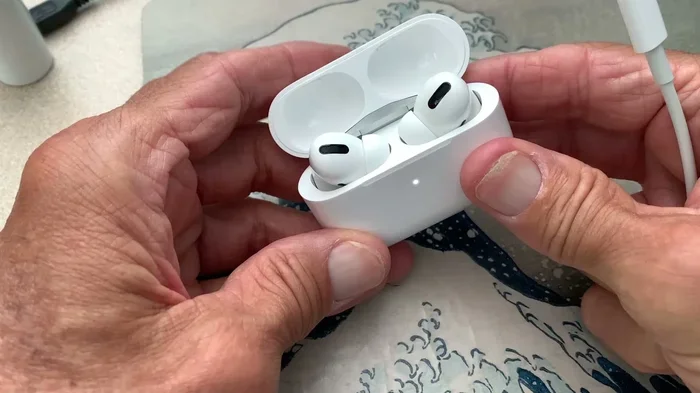
Visual guide about AirPods Pro USB-C charging
Image source: i.ytimg.com
For AirPods Pro with Lightning Port
You have two main options:
- USB-A to Lightning cable: This is the classic cable that came with iPhones for years. One end is a flat, rectangular USB-A plug (the kind that fits into older wall adapters and computers). The other end is the small Lightning connector.
- USB-C to Lightning cable: This newer cable has a small, rounded USB-C plug on one end and a Lightning connector on the other. It charges faster when paired with a higher-wattage power adapter.
Apple started including USB-C to Lightning cables with iPhones around 2019, so you probably have at least one of these lying around. In fact, a 2022 survey by Statista found that the average American household owns 3.4 charging cables, so chances are you have a compatible one nearby.
For AirPods Pro with USB-C Port
If you have the USB-C version of AirPods Pro 2, you’ll need a USB-C to USB-C cable. This is the same cable that charges modern MacBooks, iPads, and Android phones. It’s basically a universal cable at this point.
One cable to charge them all, like a tech version of “The Lord of the Rings,” except without the walking.
What About Third-Party Cables?
Yes, third-party cables work too, but you need to be careful. Look for the “MFi” logo, which stands for “Made for iPhone.” This certification means Apple has tested the cable and confirmed it meets safety standards.
Cheap, knockoff cables from dollar stores or sketchy online sellers might save you a few bucks, but they can cause problems. They might overheat, charge slowly, or even damage your AirPods Pro battery over time. A good MFi cable costs around $10 to $15, which is a small price to pay to protect earbuds that start at $249.
How Long Does It Take to Charge AirPods Pro with USB?
Charging speed matters, especially when you’re rushing out the door and realize your AirPods are dead. Here’s what you can expect.
Full Charging Times
According to Apple’s official specifications:
- AirPods Pro in the case: A full charge takes about 1 hour
- Charging case itself: A full charge takes about 1.5 to 2 hours when empty
- Combined full system charge: About 2 to 2.5 hours from completely dead
Quick Charge Capabilities
Here’s the really cool part. Apple designed AirPods Pro for fast charging. If you’re in a hurry, just 5 minutes in the case gives you around 1 hour of listening time or about 1 hour of talk time. It’s like a coffee break for your earbuds.
This quick-charge feature works with any USB power source, so even a 5W charger will give you the same fast-charge speed. The wattage mainly affects how fast the case itself refills, not the earbuds inside.
Does Wattage Matter?
AirPods Pro charging cases only draw about 5W of power maximum, so using a higher-wattage charger (like a 20W iPhone charger) won’t damage them. The case simply takes what it needs. It’s like filling a small cup with water from a fire hose. The hose has way more pressure, but only a little water ends up in the cup.
That said, charging from a low-power source like a computer’s USB port will be slower than charging from a wall adapter. A computer USB-A port provides only 2.5W, so expect nearly double the charging time if you’re juicing up from your laptop.
What USB Power Sources Work with AirPods Pro?
Here’s the fun part. Pretty much any USB power source on the planet will charge your AirPods Pro case. You have options.
Wall Adapters
The most common way to charge AirPods Pro is with a USB wall adapter. Apple’s official 5W adapter used to come in the box, though newer iPhones ship without chargers at all. You can use any USB wall adapter you have, including:
- The old 5W iPhone cube
- Modern 20W USB-C adapters
- iPad chargers (10W or higher)
- Third-party USB adapters from brands like Anker or Belkin
Computers and Laptops
You can charge AirPods Pro by plugging them into any computer’s USB port. This is handy when you’re working at a desk and don’t want to hog an outlet. Just plug in and let them charge while you type.
MacBooks with USB-C ports will work with a USB-C to Lightning cable (or USB-C to USB-C cable, depending on your AirPods Pro version).
Power Banks
Portable battery packs are lifesavers for travel. Any power bank with a USB-A or USB-C output will charge your AirPods Pro case. The case is so small that even a tiny 5,000mAh power bank could charge it 10 or more times before needing a recharge itself.
Car Chargers
USB car chargers work perfectly for topping off your AirPods Pro during a road trip. Just plug in and let them charge while you drive.
Airplane USB Ports
Many airplane seats now have built-in USB ports. While the power output is usually low, it’s enough to give your AirPods Pro a decent charge during a long flight.
Charging AirPods Pro Wirelessly Instead
USB charging isn’t your only option. All AirPods Pro cases support wireless charging too, which can be super convenient.
Qi Wireless Charging
Qi (pronounced “chee”) is the universal wireless charging standard. Any Qi-certified charging pad will work with AirPods Pro cases that support wireless charging. Just place the case on the pad and watch the light come on.
MagSafe Charging
The 2nd generation AirPods Pro (both Lightning and USB-C versions) support MagSafe charging. MagSafe is Apple’s magnetic system that snaps accessories into perfect alignment. Think of it like a fridge magnet for your earbuds case. It clicks into place and starts charging immediately.
Qi2 Wireless Charging
The USB-C version of AirPods Pro 2 supports the newer Qi2 standard, which uses magnetic alignment similar to MagSafe but isn’t Apple-specific. This is great news because more third-party accessories will work seamlessly with your AirPods.
Apple Watch Charger Surprise
Here’s a fun fact most people don’t know. The USB-C version of AirPods Pro 2 can also be charged using an Apple Watch charging puck. It’s a hidden feature that Apple doesn’t advertise much, but it’s super handy if you’re traveling light.
Common Charging Mistakes to Avoid
Charging AirPods Pro with USB is simple, but a few bad habits can shorten your battery’s life or even damage your device. Avoid these common mistakes.
Using Damaged Cables
Frayed, bent, or exposed cables are dangerous. They can short-circuit, overheat, or stop working mid-charge. If your cable looks worn out, replace it. A new MFi-certified cable costs around $12 and could save you a $249 replacement pair of AirPods.
Charging in Extreme Temperatures
Lithium-ion batteries (which AirPods use) hate extreme temperatures. Apple recommends charging your AirPods Pro in environments between 32°F and 95°F (0°C to 35°C). Charging in a hot car or freezing outside can permanently damage the battery.
Did you know that leaving your AirPods in a hot car can cause the battery to swell? This is a real safety hazard. If your AirPods case starts to look puffy, stop using it immediately.
Letting the Battery Die Completely
While occasional full drains won’t kill your battery, making it a habit will reduce the battery’s overall capacity over time. Try to charge your AirPods when they drop below 20%, just like Apple recommends for iPhones.
Using Cheap Knockoff Cables
We mentioned this earlier, but it’s worth repeating. Cheap cables without MFi certification can cause all sorts of problems. They might charge slower, overheat, or even fry your AirPods’ charging circuitry. It’s just not worth the risk.
Ignoring Software Updates
Apple sometimes releases firmware updates for AirPods that improve battery management and charging efficiency. Make sure your AirPods are connected to your iPhone regularly so they can receive these updates automatically.
Troubleshooting: When Your AirPods Pro Won’t Charge
Sometimes things go wrong. If your AirPods Pro case isn’t charging via USB, try these steps before giving up.
Check the Basics
- Make sure the cable is firmly plugged into both the case and the power source
- Try a different cable to rule out a faulty wire
- Try a different power source to rule out a dead outlet
- Clean the Lightning or USB-C port on the case with a dry, soft-bristled brush
Reset Your AirPods Pro
If the case charges but your earbuds don’t, try resetting them:
- Put both AirPods in the case and close the lid
- Wait 30 seconds, then open the lid
- On your iPhone, go to Settings > Bluetooth and tap the “i” next to your AirPods
- Tap “Forget This Device” and confirm
- With the lid open, press and hold the setup button on the back of the case for about 15 seconds until the light flashes amber, then white
- Reconnect your AirPods to your iPhone
Look for the Status Light
The little LED on the front of your AirPods Pro case tells you a lot:
- Green light: Fully charged or has more than one full charge remaining
- Amber/orange light: Currently charging or has less than one full charge remaining
- Flashing amber: Something’s wrong. Try resetting or contact Apple Support
- No light: Either fully discharged or not connected to power
When to Contact Apple
If none of the above steps work, your AirPods Pro case might have a hardware issue. Apple offers battery service for $49 to $79 (depending on the model) and a one-year warranty covers manufacturing problems. If you have AppleCare+, you’re covered for up to two years.
Battery Health Tips for Long-Term Use
AirPods Pro batteries are designed to retain up to 80% of their original capacity after 500 complete charge cycles. With proper care, they should last 2 to 3 years before you notice significant degradation. Here’s how to maximize their lifespan.
Avoid Overnight Charging
While AirPods Pro cases have built-in protection to prevent overcharging, keeping them plugged in for days on end generates heat that can degrade the battery over time. Unplug once they’re fully charged.
Store at 50% Charge for Long Periods
If you won’t’t use your AirPods for a while (like a month-long vacation), store them at around 50% charge. Storing at 0% can cause the battery to fall into a deep discharge state and become unusable. Storing at 100% stresses the battery over time.
Use Them Regularly
Lithium-ion batteries like being used. Leaving your AirPods in a drawer unused for months can actually harm the battery. Try to use them at least once every few weeks.
Keep the Case Clean
Dust and debris in the case can interfere with the charging contacts. Wipe the inside of the case with a soft, dry cloth regularly. For the small metal contacts where the earbuds sit, a dry cotton swab works wonders.
Avoid Wireless Charging in Hot Environments
Wireless charging generates more heat than wired charging. If you’re charging wirelessly on a hot day, remove any case cover to help dissipate heat.
The Future of AirPods Pro Charging
Apple continues to evolve its charging standards. With the EU’s USB-C mandate and the broader tech industry moving toward universal standards, we can expect future AirPods Pro models to embrace even more convenient charging options.
Potential Future Innovations
- Reverse charging from iPhones: Future iPhones might be able to charge AirPods cases directly, similar to how some Android phones already work
- Faster wireless charging: New Qi2 standards could cut wireless charging times significantly
- Solar charging cases: Companies are experimenting with solar-powered cases for true on-the-go charging
- Improved battery technology: Solid-state batteries could arrive in the next few years, offering longer life and faster charging
For now, USB charging remains the most reliable, fastest, and universal way to power up your AirPods Pro. Whether you’re using an old Lightning cable, a modern USB-C cable, or a wireless pad, you have plenty of options to keep your music playing.
Final Thoughts
So, can you charge AirPod Pro with USB? Absolutely. Whether you have the original Lightning version or the newer USB-C version, you’ve got multiple ways to keep your earbuds powered up. Just match the right cable to your case’s port, use a quality power source, and avoid the common mistakes we covered.
Remember these key points: Lightning models need a Lightning cable, USB-C models need a USB-C cable, MFi-certified cables are safer, and any USB power source works. With proper care, your AirPods Pro battery should deliver great performance for years to come.
The world of wireless earbuds keeps evolving, but one thing stays constant: a dead battery is a buzzkill. Now you know exactly how to prevent that. Go forth and charge with confidence.
Frequently Asked Questions
Can I charge AirPods Pro with a regular USB cable?
Yes, but only if the cable has a Lightning connector on one end (for older AirPods Pro models) or a USB-C connector (for the 2023 version). A standard USB-A or USB-C cable alone won’t fit your AirPods Pro case because the ports are different shapes. You need a USB-A to Lightning, USB-C to Lightning, or USB-C to USB-C cable depending on your model.
How long does it take to fully charge AirPods Pro with USB?
A full charge of your AirPods Pro earbuds takes about 1 hour when placed in the case. The empty case itself takes around 1.5 to 2 hours to fully charge via USB. If both the earbuds and case are completely dead, expect about 2 to 2.5 hours for a complete top-up from a standard wall adapter.
Can I charge AirPods Pro with an Android phone charger?
Yes, you can charge AirPods Pro with an Android phone charger as long as it has a USB-A or USB-C port and you have the correct cable. The AirPods Pro charging case only draws about 5W of power, so even a high-wattage Android charger won’t damage it. The case simply takes the power it needs.
Is it safe to charge AirPods Pro overnight with USB?
AirPods Pro cases have built-in overcharge protection that stops the battery from receiving power once it’s full. However, keeping them plugged in for extended periods generates small amounts of heat that can degrade battery health over time. For best results, unplug them once they’re fully charged or use a smart plug with a timer.
Why won’t my AirPods Pro charge with USB?
The most common reasons include a damaged cable, dirty charging port, completely drained battery, or a software glitch. Try a different cable, clean the port gently with a dry brush, make sure the power source works, and reset your AirPods by holding the setup button for 15 seconds. If nothing works, contact Apple Support.
Do AirPods Pro come with a charging cable in the box?
Yes, all AirPods Pro models include a charging cable in the box. The 1st generation and Lightning version of the 2nd generation come with a USB-C to Lightning cable. The USB-C version of the 2nd generation comes with a USB-C to USB-C cable. However, Apple does not include a wall adapter, so you’ll need to use your own.