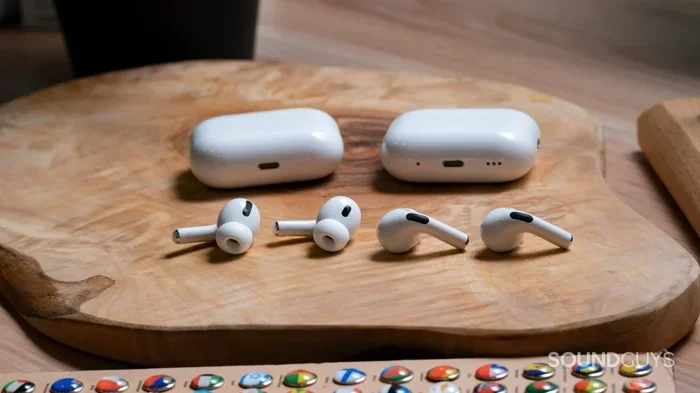
Featured image for AirPods Pro 1 and 2 comparison
Image source: soundguys.com
Yes, you can technically pair AirPods Pro 1 and AirPods Pro 2 with the same device, but they won’t work as a matched set. Each generation uses different chips and drivers, which causes audio lag, uneven volume, and disabled features like Active Noise Cancellation and Spatial Audio. The earbuds will function independently, not as a unified pair. For the best experience, use matching generations together.
Picture this: you lost one of your AirPods Pro and you’re wondering if you can just grab a friend’s spare AirPods Pro to complete your set. Or maybe you upgraded one earbud but not the other. Before you start mixing and matching, there’s something important you need to know about how Apple’s earbuds actually work together.
The AirPods Pro line has gone through two major generations since its launch in 2019, with each version bringing better sound, smarter features, and improved noise cancellation. But here’s the thing about technology: newer doesn’t always mean compatible with older. Think of it like trying to mix regular and premium gasoline in your car. Technically, it might run, but it’s not what the manufacturer recommends.
In this guide, we’ll break down exactly what happens when you try to mix AirPods Pro 1 and 2 earbuds together. We’ll explore the technical reasons behind any issues, look at real-world consequences, and help you decide whether mixing is worth the trouble. By the end, you’ll know precisely when mixing makes sense and when you should stick with matched pairs.
Key Takeaways
- Different Chips Mean Different Performance: AirPods Pro 1 use the H1 chip while AirPods Pro 2 use the H2 chip, causing processing differences that affect audio sync.
- Audio Lag Is Noticeable: Mixing generations creates a delay between the older and newer earbuds, making them feel “off” during music or calls.
- Premium Features Get Disabled: Active Noise Cancellation, Transparency mode, and Spatial Audio may not work properly when generations are mixed.
- Battery Drain Becomes Uneven: Each earbud drains power at different rates, leading to one dying much sooner than the other.
- Automatic Switching Fails: Your device struggles to intelligently route audio between mismatched AirPods, causing connection confusion.
- Best Practice Is Matching Pairs: For consistent sound quality and full feature access, use two AirPods from the same generation.
- Independent Use Still Works: You can absolutely use one AirPods Pro 1 and one AirPods Pro 2 separately with different devices.
📑 Table of Contents
- What Happens When You Mix AirPods Pro 1 and 2?
- The Six Major Problems You’ll Notice When Mixing Generations
- When Mixing AirPods Pro Generations Actually Makes Sense
- How to Identify Your AirPods Pro Generation
- Better Alternatives to Mixing AirPods Pro 1 and 2
- Final Verdict: Should You Mix AirPods Pro 1 and 2?
What Happens When You Mix AirPods Pro 1 and 2?
Let’s start with the most direct answer: yes, your iPhone, iPad, or Mac will recognize both AirPods Pro 1 and AirPods Pro 2 individually. You can pair each one separately to your device. But when you try to use them together as a pair, things get complicated fast.
The Technical Reality Behind Mixed AirPods
Apple designed each AirPods generation to work as a matched pair. The left and right earbuds in your charging case were calibrated together during manufacturing. They share specific firmware, tuned drivers, and synchronized sensors. When you introduce a mismatch, you’re essentially asking two different products to pretend they’re the same product.
Here’s a simple analogy. Imagine a tandem bicycle built for two riders of equal height and strength. Now imagine one rider is much taller or stronger than the other. The bike still rolls, but the pedaling rhythm falls apart, and neither rider has a smooth experience. That’s what happens with mismatched AirPods.
Your device will technically let you pair both earbuds, but it treats them as two separate audio devices rather than one unified pair. This means:
- Audio routing gets confused: Your phone doesn’t know which earbud should handle the “main” audio signal.
- Volume levels become uneven: The two generations have different driver sensitivities, so one side sounds louder than the other.
- Microphone input suffers: Calls and voice assistants may pick up sound from only one earbud, or switch unpredictably between them.
- Touch controls behave inconsistently: The H1 and H2 chips interpret squeeze gestures differently, leading to missed or wrong commands.
Why the Chips Matter So Much
The biggest technical difference between AirPods Pro 1 and 2 lies in their processing brains. The first generation runs on Apple’s H1 chip, while the second generation uses the upgraded H2 chip. That single letter difference represents years of engineering improvements.
Did you know that the H2 chip processes audio up to twice as fast as the H1? This means AirPods Pro 2 can handle more sophisticated noise cancellation algorithms and spatial audio processing in real-time. When you mix generations, your device can’t leverage these improvements on both sides equally.
Think of the H1 and H2 chips like two translators working at different speeds. One speaks every language fluently but takes a moment longer to respond. The other is faster and handles more dialects. Put them in the same conversation, and you’ll get timing issues and misinterpretations. That’s essentially what’s happening inside your mismatched AirPods.
The Six Major Problems You’ll Notice When Mixing Generations
Mixing AirPods Pro 1 and 2 isn’t just a minor inconvenience. It creates several noticeable problems that can ruin your listening experience. Let’s walk through each one so you know exactly what to expect.
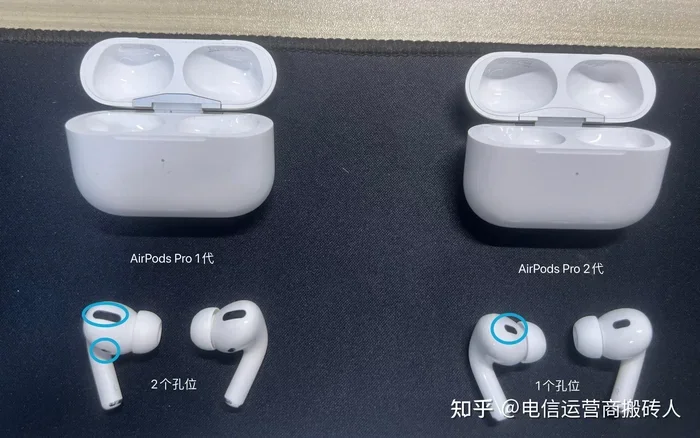
Visual guide about AirPods Pro 1 and 2 comparison
Image source: picx.zhimg.com
1. Noticeable Audio Lag Between Earbuds
This is the dealbreaker for most people. When you play music or video with mismatched AirPods, the sound arrives at your ears at slightly different times. We’re talking about milliseconds of delay, but your brain is incredibly sensitive to timing differences in audio.
Professional musicians can detect timing differences as small as 10 milliseconds. You don’t need to be a musician to feel “off” about audio that’s not synchronized. The effect is similar to watching a movie where the audio is just barely out of sync with the actor’s lips. It’s distracting and unpleasant.
This lag becomes even more obvious during video calls, gaming, or watching movies. The newer AirPods Pro 2 process audio faster, so they stay slightly ahead of the older AirPods Pro 1. Your brain tries to reconcile these signals and ends up making you feel mildly dizzy or uncomfortable after extended use.
2. Uneven Volume Levels
The AirPods Pro 2 feature redesigned speaker drivers that produce slightly louder and clearer sound than the first generation. When you mix them, your left ear might receive a noticeably different volume than your right ear.
Apple’s automatic volume leveling can’t fully compensate for this difference because each earbud reports its own volume characteristics to your device. You might find yourself constantly adjusting the volume, turning it up to hear the quieter earbud, only to have the louder one blast your other ear.
3. Broken or Limited Active Noise Cancellation
One of the headline features of AirPods Pro is Active Noise Cancellation, or ANC. This technology uses microphones to detect outside noise and then creates “anti-noise” to cancel it out. The AirPods Pro 2 improved this feature dramatically, offering up to twice as much noise cancellation as the first generation.
When you mix earbuds, the ANC performance becomes inconsistent. Your left and right ears experience different levels of noise cancellation, which feels disorienting. The world doesn’t sound uniformly quieter. Instead, it sounds like one ear is in a quiet library while the other is in a busy café.
Transparency mode, which lets outside sound in, suffers from the same problem. The two generations process ambient sound differently, creating an unbalanced listening experience.
4. Spatial Audio Stops Working Properly
Spatial Audio is Apple’s fancy name for surround sound that moves with your head. It makes music and movies feel three-dimensional, as if sound is coming from all around you. This feature relies on motion sensors in each earbud, plus significant processing power from the H2 chip.
The AirPods Pro 1 handle Spatial Audio through the H1 chip with software workarounds. The AirPods Pro 2 handle it natively with hardware acceleration. Mixing the two creates a confusing spatial experience where sound sources seem to drift or move unexpectedly.
If you watch movies with Dolby Atmos or Apple Music’s spatial tracks, you’ll notice the effect breaks down almost immediately with mismatched AirPods. The immersive bubble of sound collapses into something flat and strange.
5. Battery Drain Happens at Different Rates
Each AirPods generation has slightly different battery life. AirPods Pro 1 offer about 4.5 hours of listening time per charge, while AirPods Pro 2 push that to 6 hours. The charging cases also hold different amounts of extra charge.
When you mix generations, one earbud will die well before the other. Imagine this scenario: you’re 45 minutes into a podcast, and suddenly one AirPod goes silent. Now you have a single earbud and the inconvenience of an interrupted listening session.
This uneven drain also affects the case. Mismatched AirPods may not charge at the same rate, leaving one fully charged while the other is still topping up. You lose the convenience of grabbing both earbuds and knowing they’re equally ready to go.
6. Automatic Device Switching Fails
One of the AirPods’ most-loved features is seamless switching between your iPhone, iPad, and Mac. When you start playing audio on a different device, your AirPods automatically follow. This magic relies on tight integration between the earbuds and your Apple devices.
Mismatched AirPods confuse this system. Your devices may struggle to identify which earbud should receive the audio signal. You might find that only one earbud switches while the other stays connected to your old device. Or both might disconnect entirely, requiring manual reconnection.
This problem becomes particularly annoying if you use AirPods for work, switching between a Mac for calls and an iPhone for music throughout the day. The seamless experience breaks down into a frustrating game of Bluetooth troubleshooting.
When Mixing AirPods Pro Generations Actually Makes Sense
We’ve painted a pretty grim picture of mixing AirPods Pro 1 and 2. But there are legitimate situations where mixing makes perfect sense, even if it’s not as a matched pair.
Using Each Earbud with Different Devices
This is the most practical mixed-use scenario. You can absolutely pair your AirPods Pro 1 with your iPad and your AirPods Pro 2 with your iPhone simultaneously. Each earbud or pair functions as an independent audio device.
For example, maybe you want to take a video call on your Mac using one AirPod while keeping the other ear free to hear your surroundings. Or perhaps you’re sharing audio with a friend, and you each use one generation of AirPods with your own phone.
The key insight here is that AirPods work independently when paired with different sources. The problems only arise when you try to force them to work together on the same device as a stereo pair.
Backup Earbuds for Different Purposes
Some users keep older AirPods as dedicated workout earbuds while using newer ones for everyday listening. This works great because you’re not mixing generations on the same device. Your gym AirPods Pro 1 handle sweat and rougher use, while your daily AirPods Pro 2 stay clean and protected.
This setup extends the life of your older AirPods while letting you enjoy the latest features when you want them. It’s a practical approach that many Apple enthusiasts adopt intentionally.
As Speaker or Microphone for Accessibility
People with hearing differences in each ear sometimes use a single AirPod as their primary listening device. If you have one ear that benefits more from the H2 chip’s processing and another that works fine with the H1 chip, you might intentionally use mismatched AirPods for personalized audio.
This use case is rare but valid. Just remember that you’ll lose stereo separation since you’re only using one earbud at a time anyway.
How to Identify Your AirPods Pro Generation
Before you even think about mixing, you need to know which generation you’re holding. The two AirPods Pro models look similar at first glance, but there are some reliable ways to tell them apart.
Check the Model Number
Every Apple product has a model number printed in tiny text on the device itself. For AirPods Pro, you’ll find this number inside the charging case lid and on the bottom of each earbud. The model numbers break down as follows:
- AirPods Pro 1: A2083 (left earbud), A2084 (right earbud), A2190 (case)
- AirPods Pro 2: A2700 (left earbud), A2701 (right earbud), A2702 (case for Lightning version), A2968 (case for USB-C version)
If you can’t find the physical model number, you can also look it up in your device settings. Go to Settings, then Bluetooth, tap the “i” icon next to your AirPods, and scroll down to see the model number.
Look for the Charging Case Differences
The AirPods Pro 2 charging case includes a built-in speaker on the bottom for Find My alerts. The first-generation case has no speaker. Additionally, the second-generation case has a lanyard loop on the side, which the first generation lacks.
Did you know that the AirPods Pro 2 USB-C version introduced in 2023 also added dust resistance? The case carries an IP54 rating, meaning it can handle some exposure to dust and water spray. The first-generation case offers no official dust or water resistance.
Check Your Purchase Records
If you still have your original receipt or order confirmation, you can verify which generation you bought. Apple released AirPods Pro 1 in October 2019 and AirPods Pro 2 in September 2022, with a USB-C refresh in September 2023.
Better Alternatives to Mixing AirPods Pro 1 and 2
If you’ve lost an earbud and are considering buying a mismatched replacement, let’s explore some better options first. These alternatives will save you money and frustration in the long run.
Buy a Single Replacement from Apple
Apple offers replacement AirPods for out-of-warranty situations. You can purchase a single left or right earbud at a reduced price compared to a full set. This is the most reliable way to replace a lost or damaged earbud while maintaining a matched pair.
The pricing varies by generation, but it’s typically much cheaper than buying a whole new set. Contact Apple Support or visit an Apple Store to get an exact quote for your situation.
Consider AirPods Pro 2 Refurbished or Used
If budget is a concern, look for refurbished AirPods Pro 2 from Apple’s certified refurbishment program. These come with the same warranty as new products but cost significantly less. You can also find used sets in excellent condition from reputable sellers.
Buying a full used set often costs less than buying two individual replacement earbuds separately. Plus, you’ll have a perfectly matched pair with no compatibility concerns.
Upgrade Your Whole Set
If you’re currently using AirPods Pro 1 and considering AirPods Pro 2 anyway, sometimes the cleanest solution is to trade in or sell your old set and buy a new pair. Apple offers trade-in credit for working AirPods, and many retailers run promotions that make upgrading affordable.
This approach gives you the latest features, a matched pair, and a fresh warranty. The upgrade in sound quality, noise cancellation, and battery life often justifies the cost for daily users.
Explore AirPods Pro 3 or Other Apple Options
Since this article is evergreen, it’s worth noting that Apple may release future AirPods Pro generations. When considering upgrades, weigh the price difference between generations. Sometimes buying one generation older offers the best balance of features and cost.
Also consider whether AirPods 4 or other Apple earbuds might suit your needs better if you don’t need all the Pro features. The standard AirPods line offers excellent sound quality at a lower price point.
Final Verdict: Should You Mix AirPods Pro 1 and 2?
Let’s bring this all together with a clear recommendation. Mixing AirPods Pro 1 and 2 as a matched pair is technically possible but practically inadvisable. The audio lag, volume imbalance, broken features, and battery inconsistencies create a frustrating experience that defeats the purpose of owning premium earbuds.
However, using mismatched AirPods as independent devices paired with different sources works perfectly fine. If you have both generations, enjoy them separately rather than forcing them to work as a pair.
If you’ve lost an earbud, resist the temptation to grab a mismatched replacement. Instead, buy an official Apple replacement, invest in a matched used pair, or upgrade to a complete new set. Your ears will thank you for the consistent sound quality and reliable features.
Remember, AirPods Pro are precision instruments designed to work as calibrated pairs. Treat them that way, and they’ll deliver the immersive audio experience Apple intended. Mix and match them across different devices, but keep each pair matched for the best results.
The bottom line? Use matched pairs for listening, use mismatched AirPods independently for different scenarios. This simple rule keeps your audio experience smooth and your features fully functional.
Frequently Asked Questions
Can I use AirPods Pro 1 and AirPods Pro 2 with the same iPhone?
Yes, your iPhone will recognize both AirPods Pro generations, but only if you pair them separately as individual devices. You cannot use them together as a stereo pair because they use different chips and drivers, which causes audio lag and feature limitations.
Will Active Noise Cancellation work if I mix AirPods Pro generations?
Active Noise Cancellation becomes inconsistent when you mix generations because the H1 and H2 chips process noise cancellation differently. You’ll experience uneven noise reduction between ears, making the feature less effective and potentially uncomfortable during extended use.
Can I replace a lost AirPods Pro 1 earbud with an AirPods Pro 2 earbud?
Technically, your device will pair both earbuds, but they won’t work as a matched stereo pair. You’ll experience audio sync issues, volume imbalances, and broken premium features. Apple recommends replacing lost earbuds with the same generation for optimal performance.
Do mixed AirPods Pro drain battery at different rates?
Yes, AirPods Pro 2 have approximately 6 hours of battery life while AirPods Pro 1 offer about 4.5 hours. When used together, one earbud will die significantly sooner than the other, interrupting your listening sessions and creating an unreliable experience.
Will Spatial Audio work with mixed AirPods Pro generations?
Spatial Audio performance degrades significantly when mixing generations. The H1 and H2 chips handle spatial processing differently, causing sound sources to drift and breaking the immersive three-dimensional effect that makes Spatial Audio worthwhile for movies and music.
Can I use AirPods Pro 1 with my Mac and AirPods Pro 2 with my iPhone at the same time?
Absolutely. This is the best way to use mismatched AirPods generations. Each pair functions independently with its own device, delivering full features and synchronized audio. The problems only occur when you try to use mismatched earbuds together on the same device.