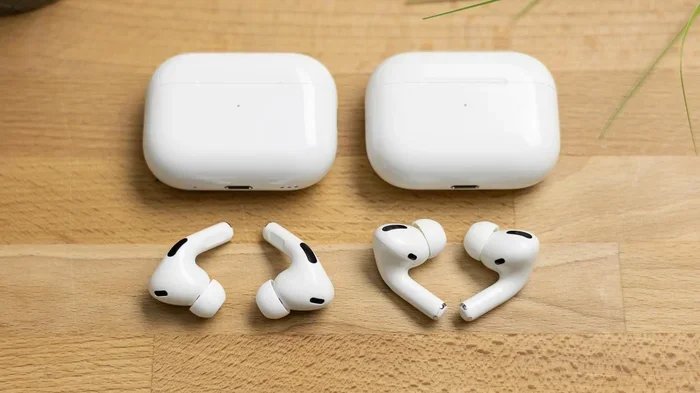
Featured image for AirPods Pro 2 comparison
Image source: m-cdn.phonearena.com
You cannot upgrade AirPods Pro to AirPods Pro 2 through any software or firmware update. They are completely different hardware products, meaning the only way to get AirPods Pro 2 features is to purchase them separately. Apple does not offer any trade-in, swap, or in-place upgrade path between these two generations. While firmware updates can add minor features or bug fixes to existing AirPods Pro, the hardware components (like the H2 chip) cannot be added to the original AirPods Pro after purchase.
If you’ve been happily using your AirPods Pro for a while and wondering whether you can simply “upgrade” them to the newer AirPods Pro 2, you’re definitely not alone. It’s one of the most common questions Apple users have, especially since the company rolls out frequent firmware updates that sometimes add small features. The short answer is simple: no, you cannot upgrade AirPods Pro to AirPods Pro 2. But the longer answer is more interesting and worth understanding, especially if you’re trying to decide whether to buy new ones.
Think of it like this: your AirPods Pro are like a smartphone from 2019, and AirPods Pro 2 are like a brand-new phone from 2022. Software updates can make your older phone better, but they can’t give it a new processor, a new camera system, or new hardware sensors. AirPods work the same way. The “brain” inside your AirPods (the chip) determines what features are possible, and that chip cannot be swapped out or upgraded remotely.
That said, there’s still plenty to know about firmware updates, what features you might be missing, and how to make the smartest decision if you’re considering AirPods Pro 2. Let’s break it all down.
Key Takeaways
- No Hardware Upgrade Path Exists: AirPods Pro and AirPods Pro 2 are entirely separate hardware products with different chips (H1 vs H2), so one cannot be upgraded to the other.
- Firmware Updates Are Not Upgrades: Apple can push firmware updates to AirPods Pro that fix bugs or add small features, but these are software tweaks, not generational upgrades.
- The H2 Chip Is the Key Difference: AirPods Pro 2’s biggest advantage is the H2 chip, which cannot be added to first-generation AirPods Pro.
- Buying New Is the Only Option: If you want AirPods Pro 2 features like Adaptive Transparency, touch controls, and improved noise cancellation, you must buy them.
- Apple Trade-In Offers Some Value: You can trade in your old AirPods Pro for credit toward a new pair, but this is a purchase, not an upgrade.
- Some Features Require Specific Hardware: Features like Personalized Spatial Audio and the U1 chip in the case require AirPods Pro 2 hardware to function.
- Future Updates Will Not Change This: No upcoming iOS or firmware update will transform AirPods Pro into AirPods Pro 2, because the hardware gap is permanent.
📑 Table of Contents
Why You Can’t Upgrade AirPods Pro to AirPods Pro 2
The reason this question comes up so often is that Apple occasionally releases firmware updates that seem to add new tricks to older AirPods. In 2021, for example, Apple added Conversation Boost and a few other features to original AirPods Pro through a firmware update. This made people wonder: could Apple do something similar and essentially “upgrade” AirPods Pro to AirPods Pro 2?
Unfortunately, that’s not how it works. Here’s why:
The Hardware Gap Is Too Big
AirPods Pro 2 introduced the H2 chip, which is a massive leap from the H1 chip in the original AirPods Pro. The H2 chip handles everything from active noise cancellation to spatial audio processing. It’s like comparing the engine of a sedan to the engine of a sports car. Both move you forward, but one is dramatically more powerful and capable.
Some key hardware differences include:
- H1 chip (AirPods Pro) vs H2 chip (AirPods Pro 2): The H2 chip is what enables features like Adaptive Transparency and better noise cancellation.
- Touch controls on the stem: AirPods Pro 2 added swipe-based volume controls, which require new sensors on the stem.
- Improved microphones and speakers: Better audio quality and call clarity require physical hardware changes.
- U1 chip in the charging case: AirPods Pro 2’s MagSafe Case has a U1 chip for Precision Finding, which first-gen cases lack.
- Battery life improvements: The new model gets up to 6 hours of listening time versus 4.5 hours on the original.
No software update can add a physical chip, a new sensor, or a better microphone. These things have to be built into the product from day one.
What Firmware Updates Actually Do
Firmware updates are like giving your AirPods a small software tune-up. They can:
- Fix bugs and glitches
- Improve connection stability
- Slightly refine noise cancellation algorithms
- Add minor features that are compatible with the existing hardware
But firmware updates cannot add new hardware-dependent features. If a feature requires the H2 chip, your H1-equipped AirPods Pro will never get it. It’s that simple.
What’s New in AirPods Pro 2 That You Can’t Get on AirPods Pro
Now that you know an upgrade isn’t possible, you might be curious about what you’d actually gain by buying AirPods Pro 2. The list is actually pretty long, and some features are genuinely impressive.
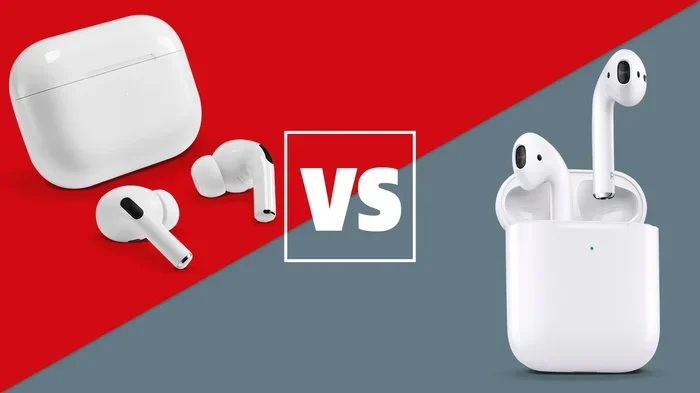
Visual guide about AirPods Pro 2 comparison
Image source: cdn.mos.cms.futurecdn.net
Adaptive Transparency Mode
One of the headline features of AirPods Pro 2 is Adaptive Transparency. While the original AirPods Pro also has Transparency Mode (which lets outside sound in), the new version is smarter. It dynamically reduces loud environmental noises like sirens or construction equipment while still letting you hear conversations clearly. It’s like having a smart volume knob for the world around you, but only for sudden loud sounds.
2x Better Active Noise Cancellation
Apple claims AirPods Pro 2 offer up to 2x more effective active noise cancellation compared to the first generation. In real-world testing, reviewers and users have confirmed that the difference is noticeable, especially on airplanes and in noisy cafés. This is largely thanks to the H2 chip’s faster processing.
Touch Controls for Volume
On AirPods Pro 2, you can swipe up or down on the stem to adjust volume. The original AirPods Pro requires you to use Siri or your iPhone to change volume, which isn’t always convenient. This small change makes a big difference in everyday use.
Personalized Spatial Audio
AirPods Pro 2 supports Personalized Spatial Audio, which uses the TrueDepth camera on your iPhone to map your ear shape. This creates a custom spatial audio profile just for you, making music and movies sound more immersive. While iOS 16 brought Personalized Spatial Audio to original AirPods Pro as well, the implementation on AirPods Pro 2 is smoother thanks to the H2 chip.
Better Battery Life
You get up to 6 hours of listening time on a single charge with AirPods Pro 2, compared to 4.5 hours on the original. That’s about a 33% increase, which adds up over weeks and months of use.
Find My Improvements
AirPods Pro 2’s charging case has a built-in speaker and a U1 chip, which allows Precision Finding in the Find My app. If you misplace your case, you can literally get on-screen directions to it, similar to how AirTags work. The original AirPods Pro case can only play a sound when pinged.
Did You Know?
Did you know? AirPods Pro 2’s case also has a lanyard loop, which Apple has never offered on any previous AirPods case. It’s a small addition, but it’s a sign that Apple is listening to user requests for more practical accessories.
Can You Trade In AirPods Pro for AirPods Pro 2?
While you can’t upgrade directly, Apple does offer a trade-in program that can reduce the cost of new AirPods Pro 2. Here’s how it works:
Apple’s Trade-In Program
You can trade in your original AirPods Pro through Apple’s GiveBack program and receive credit toward a new purchase. The trade-in value depends on the condition of your AirPods and the case, but typically you can expect a modest credit (often around $50–$75 depending on current promotions). It’s not a fortune, but it’s something.
Steps to trade in:
- Visit Apple’s trade-in page
- Select your AirPods model
- Answer a few questions about condition
- Receive an estimated trade-in value
- Ship your AirPods to Apple (they send you a prepaid label)
- Receive credit once your AirPods are evaluated
Third-Party Trade-In Options
You can also sell your AirPods Pro through third-party services like Gazelle, Swappa, or Decluttr. These often pay more than Apple’s trade-in, especially if your AirPods are in great condition. Just make sure to reset them before selling to protect your personal data.
What About AirPods Pro 2 USB-C?
In September 2023, Apple released a new version of AirPods Pro 2 with a USB-C charging case instead of Lightning. If you buy AirPods Pro 2 now, you’ll get the USB-C version, which is more future-proof and aligns with Apple’s broader move toward USB-C across its product lineup.
What About AirPods Pro 3?
You might be wondering: if I can’t upgrade AirPods Pro to AirPods Pro 2, maybe I should just wait for AirPods Pro 3. That’s a reasonable question, but here’s the reality.
Should You Wait?
As of early 2026, AirPods Pro 3 have not been officially announced, though rumors suggest a potential release later this year or in 2027. If you’re happy with your current AirPods Pro and they’re working well, waiting could make sense. But if your AirPods are aging, the battery is degrading, or you really want features like better noise cancellation, there’s no harm in upgrading now.
Remember: technology always improves, but waiting indefinitely means you’ll never enjoy the latest features. AirPods Pro 2 are excellent right now and will continue to be supported with firmware updates for years to come.
How Often Does Apple Release New AirPods?
Apple’s AirPods release cycle isn’t as predictable as the iPhone’s. Original AirPods Pro launched in October 2019, and AirPods Pro 2 launched in September 2022. That’s a 3-year gap. AirPods Pro 3, if released in 2025 or 2026, would follow a similar cycle. So waiting might mean another 3+ years with your current model.
How to Get the Most Out of Your Current AirPods Pro
Even though you can’t upgrade your AirPods Pro to AirPods Pro 2, there are some things you can do to maximize what you have. Let’s make sure you’re getting the best possible experience from your current earbuds.
Keep Your Firmware Updated
Apple regularly releases firmware updates for AirPods Pro that fix bugs and occasionally add small features. To check your firmware version:
- Connect your AirPods Pro to your iPhone
- Open the Settings app
- Tap Bluetooth
- Find your AirPods Pro in the list and tap the “i” icon
- Look at the “Firmware Version” line
Updates usually happen automatically when your AirPods are connected to power and near your iPhone. However, if you want to force an update, you can leave your AirPods in their case, connected to a charger, near your iPhone for a while. Sometimes resetting your AirPods can also trigger an update.
Reset Your AirPods If They’re Acting Up
If you’re experiencing connectivity issues, audio glitches, or battery drain, a reset can often help. Here’s how:
- Put your AirPods Pro in their case
- Close the lid and wait 30 seconds
- Open the lid
- Press and hold the setup button on the back of the case until the light flashes amber, then white
- Reconnect your AirPods to your iPhone
Clean Your AirPods Regularly
Did you know that dirty AirPods can affect sound quality and noise cancellation? Earwax and debris can build up on the mesh and speaker grilles. Use a soft, dry, lint-free cloth to clean the exterior, and a dry cotton swab to gently clean the mesh. Avoid using water or sharp objects.
Did You Know?
Did you know? Apple recommends replacing the ear tips every 6–12 months for optimal hygiene and sound quality. If your ear tips are worn out, you can buy replacements directly from Apple.
Optimize Battery Health
AirPods batteries are small and degrade over time. To extend their lifespan:
- Avoid letting them die completely before charging
- Don’t leave them in extreme temperatures (hot or cold)
- Use the case to store them when not in use
- Avoid charging them with a high-wattage charger designed for iPads or MacBooks
The Bottom Line: Upgrade Means Buy New
Let’s bring it all together with a clear answer and a few final thoughts.
The Direct Answer
No, you cannot upgrade AirPods Pro to AirPods Pro 2. There is no software path, no firmware trick, and no Apple program that transforms one into the other. They are distinct products with different hardware, and that hardware gap is permanent. If you want AirPods Pro 2, you have to buy AirPods Pro 2.
But Is It Worth Upgrading?
Whether the upgrade is worth it depends on your situation. If your AirPods Pro are working fine and you’re not bothered by missing features, you can absolutely keep using them. They’re still great earbuds with excellent noise cancellation, transparency mode, and sound quality.
However, if you travel frequently, take lots of calls in noisy environments, or simply want the best audio experience Apple offers, AirPods Pro 2 are a meaningful upgrade. The improved noise cancellation alone is worth it for many people, especially if you fly often or work in a noisy office.
Final Tips for Anyone Considering the Jump
- Trade in your old pair through Apple or sell them yourself to offset the cost.
- Look for sales during holiday seasons or events like Black Friday, Prime Day, or back-to-school.
- Consider refurbished options from Apple’s Refurbished Store for savings.
- Check if your AirPods Pro are still under warranty if they’re experiencing issues—Apple might replace them.
- Pair AirPods Pro 2 with an Apple device to unlock the full feature set, including Personalized Spatial Audio and seamless switching.
In the end, the word “upgrade” in the tech world usually means “buy the new thing.” That’s exactly the case here. Your AirPods Pro will continue to serve you well, but AirPods Pro 2 represent a real leap forward in capability. Whether that leap is worth your hard-earned money is a decision only you can make.
Frequently Asked Questions
Can you upgrade AirPods Pro to AirPods Pro 2 with a software update?
No, you cannot upgrade AirPods Pro to AirPods Pro 2 through any software update. The two models have different hardware, including the H1 chip in the original versus the H2 chip in AirPods Pro 2. Software updates can add small features or fix bugs, but they cannot add new hardware-dependent capabilities like Adaptive Transparency or improved noise cancellation.
Will future iOS updates add AirPods Pro 2 features to AirPods Pro?
No, future iOS updates will not add AirPods Pro 2 features to the original AirPods Pro. Features that require the H2 chip, new sensors, or updated hardware cannot be added through software alone. AirPods Pro 2-specific features like touch volume controls, Precision Finding with the U1 chip, and Adaptive Transparency require physical hardware that the original AirPods Pro simply doesn’t have.
How much does Apple pay for AirPods Pro trade-in?
Apple’s trade-in value for AirPods Pro varies based on condition and current promotions, but typically ranges from $50 to $75 in credit toward a new purchase. The exact amount depends on factors like whether the case is included, the charging cable is present, and the overall condition. Third-party services sometimes offer more, especially if your AirPods are in excellent condition.
Is there a difference between AirPods Pro 2 Lightning and USB-C?
Yes, the main difference is the charging port. AirPods Pro 2 with USB-C (released in September 2023) align with Apple’s broader move to USB-C across its product lineup, while the earlier version uses a Lightning connector. The USB-C version also supports lossless audio when paired with the Apple Vision Pro. Otherwise, the audio features and performance are identical.
Can I use AirPods Pro 2 features on my AirPods Pro with iOS 17?
Some features available on AirPods Pro 2 may also appear on AirPods Pro with iOS 17 updates, such as Adaptive Audio or improved Siri interactions. However, hardware-dependent features like the H2 chip’s processing power, touch controls on the stem, and the U1 chip in the case will only work on AirPods Pro 2. Always check Apple’s official feature compatibility list for accurate details.
How do I know if I have AirPods Pro or AirPods Pro 2?
You can check your AirPods model by going to Settings > Bluetooth on your iPhone, tapping the “i” icon next to your AirPods, and looking at the Model Number. Alternatively, the model number is printed on the inside of each AirPod and on the bottom of the charging case. AirPods Pro (1st generation) typically start with A2083 or A2084, while AirPods Pro 2 models start with A2931, A2699, or A2700.