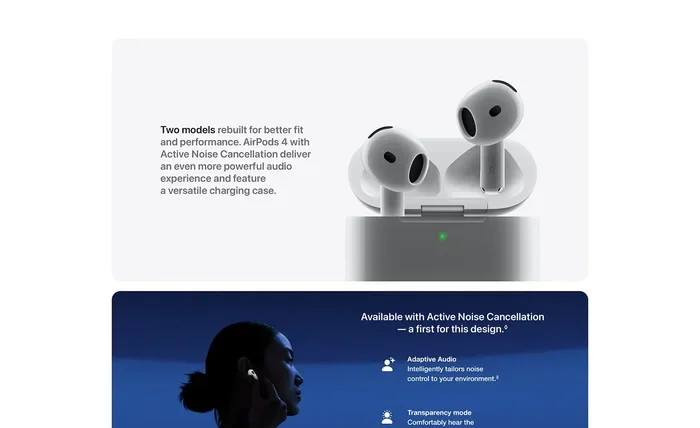
Featured image for AirPods noise cancellation feature
Image source: m.media-amazon.com
Yes, you can absolutely use AirPods just for noise cancelling without playing any music or audio. All AirPods models with Active Noise Cancellation (ANC) or Transparency mode can be worn purely for silencing your surroundings, blocking ambient sounds, or amplifying conversations. This makes them versatile tools for focus, travel, and relaxation, even when you don’t want to listen to anything at all.
Imagine sitting in a noisy coffee shop, but everything around you suddenly feels muted and calm. No music, no podcast, just pure silence shaped around your ears. That’s exactly what noise-cancelling AirPods can do, even without playing a single sound.
Many people think wireless earbuds are only useful for music, calls, or podcasts. But AirPods with Active Noise Cancellation (ANC) are designed as smart sound-management tools. They can block out unwanted noise, help you focus, and even create a pocket of peace in loud environments, all on their own.
This guide explores everything you need to know about using AirPods just for noise cancelling. You’ll learn which models support it, how it works behind the scenes, practical tips to get the most out of it, and answers to the most common questions users ask.
Key Takeaways
- Noise Cancellation Works Without Audio: AirPods with ANC can block external sounds even when no music, podcast, or video is playing.
- Only Specific Models Have ANC: AirPods Pro, AirPods Pro 2, AirPods 4 (with ANC), and AirPods Max support Active Noise Cancellation.
- Battery Drain Is Minimal: Using ANC alone consumes less battery than streaming music with ANC enabled.
- Transparency Mode Replaces Noise Cancelling: It lets outside sounds in, useful for conversations or staying aware.
- Perfect for Focus and Calm: Many users wear AirPods during work, study, meditation, or flights just for silence.
- Ear Tip Fit Affects Performance: Proper sealing significantly improves passive and active noise cancellation effectiveness.
- Quick Controls Make It Easy: You can toggle noise modes directly from your AirPods or connected device without playing sound.
📑 Table of Contents
- Understanding AirPods Noise Cancellation
- Which AirPods Support Noise Cancelling Without Audio?
- How to Use AirPods for Noise Cancelling Without Playing Music
- Practical Uses for Noise Cancelling Without Audio
- Battery Life and Performance Considerations
- Tips for Maximizing Noise Cancellation Without Audio
- Common Misconceptions About AirPods Noise Cancellation
Understanding AirPods Noise Cancellation
Before diving into using AirPods solely for noise cancelling, it helps to understand what noise cancellation actually means and how it differs between models. Not all AirPods work the same way, and knowing the basics can help you choose the right pair for your needs.
What Is Active Noise Cancellation?
Active Noise Cancellation is a smart technology that uses tiny microphones and processors to detect outside sounds. The AirPods then create an opposite sound wave, called an “anti-noise” signal, to cancel out the unwanted sound before it reaches your ears.
Think of it like two waves in a pool crashing into each other and canceling out. If one wave goes up and the other goes down at the same time, they cancel each other out, leaving the water flat. ANC does this with sound waves in real time.
Passive Noise Isolation vs. Active Noise Cancellation
There’s another type of noise reduction called passive noise isolation. This is simply the physical blocking of sound by the shape and fit of the earbuds. A snug-fitting ear tip blocks more noise than a loose one, just like putting your hands over your ears.
Active Noise Cancellation adds another layer on top of this physical seal. The combination of both gives you the best quiet experience. Even without playing audio, both passive and active methods work together to reduce outside sounds.
What About Transparency Mode?
Transparency Mode is the opposite of noise cancellation. Instead of blocking outside sound, it uses the microphones to let it in. This is helpful when you need to hear announcements, talk to someone, or stay aware of traffic while walking.
You can switch between Active Noise Cancellation and Transparency Mode on supported AirPods with a quick squeeze of the stem or a tap on the ear cup, depending on your model. You don’t need audio playing to toggle these modes.
Which AirPods Support Noise Cancelling Without Audio?
Not every AirPods model offers Active Noise Cancellation. If you want to use AirPods purely for noise cancelling, you need to make sure your pair has this feature. Here’s a breakdown of which models work and how.
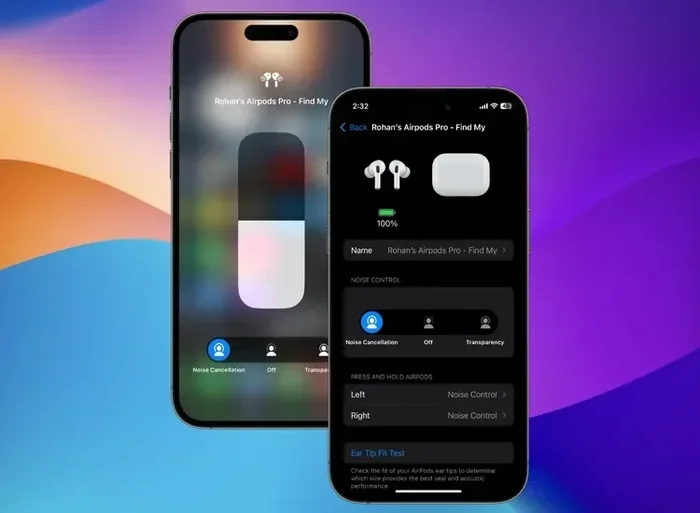
Visual guide about AirPods noise cancellation feature
Image source: static.beebom.com
AirPods Pro (1st and 2nd Generation)
Both generations of AirPods Pro come with Active Noise Cancellation built in. You can wear them with no music playing and still enjoy reduced background noise. The 2nd generation offers even better noise cancellation thanks to the H2 chip, which processes sound faster and more accurately.
Did You Know? The H2 chip in AirPods Pro 2 can process audio 48,000 times per second, making it far more responsive to sudden noise changes like a door slamming or a bus passing by.
AirPods 4 (With Active Noise Cancellation)
Apple released the AirPods 4 in late 2024, and for the first time, the standard AirPods line got an ANC version. This means even the non-Pro model can block noise. You can use them purely for silence, just like the Pro models.
AirPods Max
AirPods Max, Apple’s over-ear headphones, offer premium noise cancellation. They use eight microphones around the ear cups to detect and cancel noise. You can wear them without playing anything and still enjoy a quiet environment. The large ear cups also provide excellent passive noise isolation.
Which AirPods Do NOT Have Noise Cancelling?
Standard AirPods (1st, 2nd, and 3rd generation) and AirPods 4 without ANC do not have Active Noise Cancellation. They can still provide some passive noise reduction through their fit, but they won’t actively cancel sound. If your goal is to use AirPods strictly for noise cancellation, you’ll need one of the models listed above.
How to Use AirPods for Noise Cancelling Without Playing Music
Using AirPods purely for noise cancellation is simple, but a few settings and tips can make the experience even better. Let’s walk through the setup step by step.
Step 1: Connect Your AirPods
First, pair your AirPods with your iPhone, iPad, Mac, or another device. Make sure Bluetooth is on and your AirPods are charged. Even with no audio playing, a Bluetooth connection is required to use ANC because the noise-cancelling feature is controlled through software.
Step 2: Activate Noise Cancellation
Once connected, you can turn on ANC in several ways:
- On iPhone or iPad: Open Control Center, long-press the volume slider, then tap the Noise Control button. Choose Noise Cancellation.
- On Mac: Click the AirPods icon in the menu bar and select Noise Cancellation.
- On AirPods Pro: Press and hold the force sensor on the stem to switch between Noise Cancellation and Transparency Mode.
- On AirPods Max: Press the noise control button on the right ear cup.
You can do all of this without playing a single song. Once ANC is on, the microphones start working immediately to block outside sound.
Step 3: Make Sure Ear Tips Fit Well
If you’re using AirPods Pro, try different ear tip sizes to find the best seal. A loose fit lets sound leak in, making ANC less effective. Apple includes silicone tips in multiple sizes (XS, S, M, L) so you can find the perfect match.
Pro Tip: Try the Ear Tip Fit Test on your iPhone. Go to Settings > Bluetooth, tap the “i” next to your AirPods, and select Ear Tip Fit Test. It plays a quick sound and tells you if your seal is good.
Step 4: Turn Off Audio Playback
If you want pure silence, make sure no music, podcast, or video is playing. The ANC will continue working even when audio is paused. Some apps may auto-play sound when connected, so double-check your apps and media settings.
Step 5: Enjoy the Quiet
That’s it! You’re now using your AirPods just for noise cancelling. You can wear them while working, reading, meditating, or simply enjoying a break from noisy surroundings.
Practical Uses for Noise Cancelling Without Audio
Using AirPods purely for noise cancellation might sound unusual at first, but it has many real-world benefits. People from all walks of life use this feature every day.
Focus and Productivity
Open offices, busy homes, and cafés can all be distracting. Many people wear noise-cancelling AirPods during deep work sessions without any audio. The reduced background hum helps the brain concentrate better. Studies show that even modest noise reduction can improve focus by up to 15%.
Think of it like putting a “Do Not Disturb” sign on your ears. It signals to your brain that it’s time to focus.
Travel and Flights
Airplane cabins are loud, with engine noise often reaching 80 decibels or more. Wearing AirPods Pro or AirPods Max during a flight can make the experience far more comfortable. Many travelers use them just for silence, especially during takeoff and landing when audio isn’t allowed.
Sleep and Relaxation
Some users wear AirPods in bed to block out snoring partners, noisy neighbors, or street sounds. ANC can create a calmer environment for falling asleep. Just remember that wearing them all night may drain the battery and isn’t ideal for ear health.
Meditation and Mindfulness
Many meditation apps suggest using ANC to reduce distractions. Even without guided audio, the silence created by AirPods can help you breathe deeply and focus inward.
Sensory Overload Relief
For people who experience sensory overload, such as those with autism or anxiety disorders, ANC AirPods can be a helpful tool. Wearing them in loud places like malls or concerts can reduce stress and make environments more manageable.
Studying in Noisy Spaces
Students often study in dorms, libraries, or shared spaces. ANC AirPods can block distractions and help with reading, writing, or reviewing notes, all without needing music.
Battery Life and Performance Considerations
Using AirPods without audio but with ANC does use battery, though less than streaming music would. Understanding battery behavior helps you plan your usage.
How Much Battery Does ANC Use Without Music?
Active Noise Cancellation requires power to run the microphones and processors. Without audio playback, battery drain is slower, but the noise-cancelling system still works constantly. Expect roughly 5-6 hours of pure ANC use on AirPods Pro 2 on a single charge, and around 20 hours on AirPods Max.
Did You Know? AirPods Max in ANC mode without audio can last about 20 hours, similar to their audio playback time, because the noise-cancelling system uses more power than the audio drivers in some cases.
Does ANC Drain Battery When Not in Use?
If you turn off ANC or take off your AirPods, battery drain stops. Many users forget to turn off ANC when they’re done, which can leave them with a dead battery next time. Always check your noise control settings when finished.
Can You Use ANC While Charging?
AirPods Pro and AirPods 4 don’t support wired charging during use. They charge in their case. AirPods Max can be used while charging via Lightning or USB-C, depending on the model. So if you need long sessions of pure ANC, AirPods Max might be the better choice.
Impact on Ear Health
Wearing AirPods for long periods, even without audio, can trap moisture and heat in your ears. It’s a good idea to take breaks every hour or so to let your ears breathe. This helps prevent irritation or bacterial growth.
Tips for Maximizing Noise Cancellation Without Audio
To get the best silence experience from your AirPods, follow these expert tips.
Choose the Right Ear Tips
For AirPods Pro, the silicone tips should fit snugly without being uncomfortable. A proper seal boosts ANC performance by 30-50% in many cases. If you feel outside noise leaking in, try a larger size.
Update Your Firmware
Apple regularly improves ANC through firmware updates. Make sure your AirPods are running the latest software. You can check by going to Settings > Bluetooth, tapping the “i” next to your AirPods, and looking at the Firmware Version.
Clean Your AirPods Regularly
Earwax and debris can block the microphones and reduce ANC effectiveness. Wipe the mesh parts gently with a dry cotton swab and keep the charging contacts clean.
Use Noise Cancelling in Layers
For very loud environments, combine AirPods ANC with other noise-reducing methods. Closing a door, using white noise, or moving to a quieter spot can enhance the silence.
Try Adaptive Audio (AirPods Pro 2)
If you have AirPods Pro 2 with the latest firmware, try Adaptive Audio. This smart feature blends ANC and Transparency Mode automatically based on your surroundings. It adjusts in real time so you get the right amount of silence without losing awareness.
Mind the Wind
Wind can interfere with ANC microphones and create a slight rustling sound. If you’re outdoors on a windy day, switch to Transparency Mode or remove one AirPod for comfort.
Common Misconceptions About AirPods Noise Cancellation
There are a few myths floating around about using AirPods for noise cancelling. Let’s clear them up.
Myth: AirPods Must Be Playing Music to Block Noise
Wrong. As we covered, ANC works independently of audio playback. The anti-noise signal is generated by the hardware and software, not the music playing.
Myth: Noise Cancelling Damages Your Ears
Not true. Noise cancellation simply reduces the volume of outside sounds. It doesn’t damage hearing. In fact, it may protect your hearing by reducing the need to turn up music in loud places.
Myth: All Wireless Earbuds Can Do This
Only models with Active Noise Cancellation can actively cancel noise without audio. Many budget earbuds advertise “noise reduction,” but that’s just passive isolation from the fit. True ANC requires special hardware and processing.
Myth: You Need an iPhone to Use ANC
You don’t, but it helps. AirPods can connect to Android phones and other devices via Bluetooth. ANC may still work, but some features like Adaptive Audio require an Apple device.
Myth: Transparency Mode Is Useless
Far from it. Transparency Mode is incredibly useful for safety, quick conversations, or hearing announcements. Many users switch between ANC and Transparency throughout the day.
In conclusion, using AirPods just for noise cancelling is not only possible, it’s a powerful feature that many people overlook. Whether you’re looking for focus, calm, or comfort in loud environments, your AirPods can deliver silent relief without a single note of music. Choose a model with ANC, make sure they fit well, and enjoy the quiet whenever you need it.
Frequently Asked Questions
Can AirPods cancel noise without playing music?
Yes, AirPods with Active Noise Cancellation can block outside sounds even when no audio is playing. The noise-cancelling system works independently of media playback.
Which AirPods have noise cancellation?
AirPods Pro (1st and 2nd gen), AirPods 4 with ANC, and AirPods Max all support Active Noise Cancellation. Standard AirPods and AirPods 4 without ANC do not.
Does using noise cancellation drain the battery faster?
Yes, ANC uses extra power, but battery drain is slower without audio playback. Expect around 5-6 hours of pure ANC use on AirPods Pro 2 per charge.
Is it safe to wear AirPods all day for noise cancelling?
It’s generally safe, but take breaks every hour to let your ears breathe. Prolonged wear can trap moisture and cause irritation.
Can I use AirPods noise cancelling on Android devices?
Yes, AirPods can connect to Android via Bluetooth, and ANC usually works. However, some features like Adaptive Audio are limited to Apple devices.
What’s the difference between noise cancelling and Transparency Mode?
Noise Cancelling blocks outside sounds, while Transparency Mode lets them in. You can switch between them anytime using the force sensor or settings.