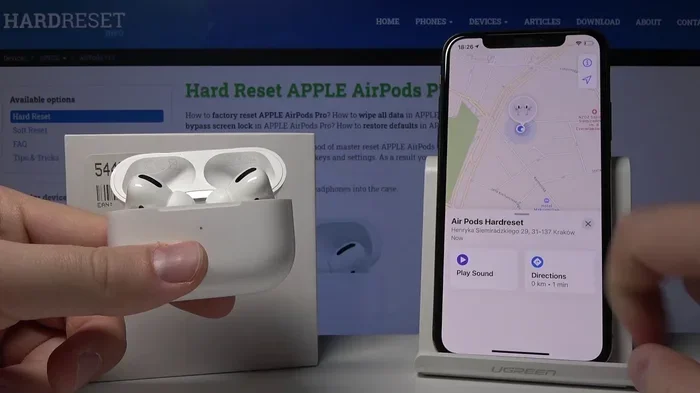
Featured image for AirPods Pro tracking location
Image source: i.ytimg.com
Yes, AirPods Pro 2 have robust tracking capabilities built directly into Apple’s Find My network. Whether you misplaced them in your home or left them at a coffee shop, you can locate them using the Find My app on your iPhone, iPad, or Mac. The second-generation model even features Precision Finding with Apple’s U1 chip, a built-in speaker in the case, and separation alerts to prevent loss in the first place.
Have you ever set your AirPods down on a counter, walked out the door, and instantly felt that sinking feeling in your stomach? You’re not alone. In fact, AppleInsider reporting from 2023 suggested that one in five AirPods owners has lost at least one earbud. That’s a lot of missing earbuds floating around couch cushions, gym bags, and taxi seats.
Apple heard the collective panic of millions of users and answered with a feature set that turns your tiny earbuds into trackable tech. AirPods Pro 2, released in September 2022 and refreshed with a USB‑C version in September 2023, come packed with some of the most sophisticated tracking features Apple has ever put in an audio product. But how does the tracking actually work? What can it do, and just as importantly, what can’t it do?
In this guide, we’ll walk through every angle of AirPods Pro 2 tracking in plain, friendly language. Think of it like a chat with a tech-savvy friend who happens to know every nook and cranny of Apple’s Find My system. By the end, you’ll know exactly how to find lost AirPods, how to prevent losing them in the first place, and the surprising privacy tricks Apple uses to keep your location data safe.
Key Takeaways
- Built-In Find My Integration: AirPods Pro 2 automatically connect to Apple’s Find My network the moment you pair them with your Apple ID.
- Precision Finding Available: Unlike the first generation, AirPods Pro 2 (USB‑C and Lightning versions) support Precision Finding using the U1 chip for directional, step-by-step directions to your case.
- The Case Plays a Sound: The charging case has its own speaker that can emit a loud chime, helping you locate it even when the earbuds are inside.
- Separation Alerts Help Prevent Loss: Your iPhone can notify you the moment you walk away from your AirPods, stopping most losses before they happen.
- Offline Finding Extends Reach: Even if your AirPods are offline, hundreds of millions of Apple devices worldwide can anonymously detect their Bluetooth signal and relay the location to you.
- Limitations Exist: Tracking requires iOS 16 or later, works best within Apple’s ecosystem, and does not work when the battery is completely dead or the case is discarded separately.
- Privacy Is Central: Apple uses end-to-end encryption and anonymous relay points, meaning no one, not even Apple, can see where your AirPods are.
📑 Table of Contents
- What Tracking Features Do AirPods Pro 2 Have?
- How Do You Set Up Tracking on AirPods Pro 2?
- How to Find Lost AirPods Pro 2 Step by Step
- Where Can AirPods Pro 2 Be Tracked?
- What Are the Limitations of AirPods Pro 2 Tracking?
- How Does AirPods Pro 2 Tracking Compare to AirTags?
- Privacy and Security: Is AirPods Tracking a Privacy Risk?
- Tips to Get the Most Out of AirPods Pro 2 Tracking
- Conclusion
What Tracking Features Do AirPods Pro 2 Have?
The short answer is: a lot. AirPods Pro 2 are among the most trackable earbuds ever made. They layer multiple technologies on top of each other, almost like nesting Russian dolls. Each layer adds more precision and a longer reach.
The Find My Network
At the heart of it all is Apple’s Find My network, a massive crowdsourced tracking system that uses hundreds of millions of Apple devices around the world. When your AirPods Pro 2 are paired to your Apple ID, they’re automatically registered with Find My. You don’t need to turn anything on. It just happens.
Here’s a simple way to think about it: imagine you’re playing a giant game of “hot and cold” with a friend. If you lose something at the mall, your friend’s phone might “sense” the missing item’s Bluetooth signal and quietly tell your phone, “Hey, I saw it near the food court.” That’s essentially what’s happening, except the “friends” are random iPhones, iPads, and Macs belonging to strangers who have no idea they’re helping you.
Precision Finding with the U1 Chip
One of the biggest upgrades over the original AirPods Pro is Precision Finding, made possible by Apple’s U1 ultra-wideband chip embedded in the charging case. This is the same technology Apple uses in AirTags.
Precision Finding is like turning on a flashlight in a dark room. Instead of just knowing that your AirPods are “somewhere in your house,” you can see exactly how many feet away they are and which direction to walk. Your iPhone screen will show arrows pointing toward the case, distance numbers counting down, and even haptic feedback that buzzes stronger as you get closer. It’s a tiny detail, but in practice, it feels almost magical.
The Built-In Case Speaker
Here’s something many people don’t realize: the AirPods Pro 2 charging case has its own speaker. Not the speaker that plays music, but a small chirping speaker on the bottom of the case. When you tap “Play Sound” in Find My, the case emits a loud, distinct chime. This is incredibly helpful because the case is often the hardest thing to find. The earbuds themselves are small and shiny, but the case is usually hiding in a coat pocket or wedged between couch cushions.
Did You Know? The AirPods Pro 2 case speaker is loud enough to be heard from another room, and Apple’s engineers tuned it specifically to be recognizable but not annoying. According to Apple’s own support documentation, the sound reaches about 80 decibels at close range, roughly the loudness of a garbage disposal.
Separation Alerts
Prevention is just as important as recovery. That’s where Separation Alerts come in. If you enable this setting, your iPhone will send you a notification the moment it senses you’ve left your AirPods behind. Picture this: you’re rushing to catch a train, and your iPhone buzzes with a message that says, “You’ve left your AirPods at home.” Crisis averted before it even started.
Separation Alerts work using a combination of Bluetooth proximity and your iPhone’s awareness of your location. They can tell the difference between you walking away from your AirPods and just briefly stepping into another room.
How Do You Set Up Tracking on AirPods Pro 2?
The good news is that most of the setup happens automatically. There’s no separate app to download or setting to toggle to get basic Find My functionality. But there are a few steps you should take to unlock the full suite of tracking features.
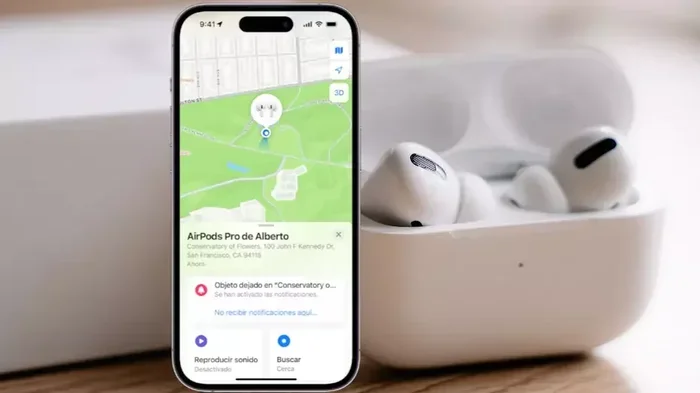
Visual guide about AirPods Pro tracking location
Image source: itigic.com
Step 1: Pair Your AirPods Pro 2
The very first time you unbox your AirPods Pro 2 and bring them near your iPhone, you’ll see the classic Apple pairing animation. Tap “Connect,” and they’ll automatically be added to your iCloud account and the Find My network.
Step 2: Confirm Find My Is Enabled
Open the Find My app on your iPhone, tap the “Devices” tab at the bottom, and scroll down to see your AirPods listed. If they’re there, you’re good to go. If not, go to Settings, tap your Apple ID at the top, then tap Find My, then Find My iPhone, and make sure it’s toggled on. There will also be an option specifically for Find My network, which should also be enabled.
Step 3: Turn On Precision Finding
Precision Finding should work out of the box, but if it doesn’t show up, make sure your iPhone is updated to iOS 16 or later. The feature requires the iPhone 11 or newer because older iPhones don’t have the U1 chip needed to communicate with the AirPods case.
Step 4: Enable Separation Alerts
To turn on Separation Alerts, open the Find My app, select your AirPods Pro 2, scroll down, and toggle “Notify When Left Behind.” You can also set a “Trusted Location,” like your house, where alerts won’t bug you. Otherwise, you’d get a notification every time you walked into the kitchen without them.
How to Find Lost AirPods Pro 2 Step by Step
Okay, so you’ve misplaced your AirPods. Don’t panic. Follow this simple workflow and you’ll have a great shot at getting them back.
Open the Find My App
Launch Find My on your iPhone, iPad, or Mac. Tap the “Devices” tab at the bottom of the screen on iPhone, or open the Devices list on Mac. Find your AirPods Pro 2 in the list.
Check the Map Location
If your AirPods are connected to a nearby iPhone or have recently pinged a stranger’s device, you’ll see a location pin on the map. Tap this pin to see the address where they were last detected. If you see this, it’s like getting a treasure map. Head to that location and look around.
Use Precision Finding Indoors
If your AirPods are nearby, you’ll see a “Find” button or “Directions” button next to the map. Tapping this activates Precision Finding. Your iPhone screen will turn into a directional interface with arrows, distance markers, and haptic vibrations. Walk slowly and follow the prompts.
Play a Sound
Still can’t see them? Tap “Play Sound.” Both earbuds and the case will emit a distinct chirping noise. The sound plays for about two minutes at a time, getting louder gradually. If you only have one earbud, the lost one will play the sound while the other stays quiet.
Mark as Lost
If you believe your AirPods were stolen or left somewhere far away, tap “Mark As Lost.” This locks them to your Apple ID, prevents anyone else from using them, and prompts you to enter a contact phone number. If someone finds them and tries to pair them, your phone number will appear on their device’s display.
Did You Know? According to Apple’s 2023 Environmental Progress Report, the company has a goal to use only recycled materials in its products by 2030. Knowing that your lost AirPods are essentially “locked” to your Apple ID makes them far less attractive to thieves, which is great for you and discourages black-market resale.
Where Can AirPods Pro 2 Be Tracked?
Understanding the range of AirPods tracking can save you a lot of frustration. Not every location plays by the same rules.
At Home or the Office
This is where AirPods Pro 2 tracking truly shines. Precision Finding works best within about 30 to 50 feet of your AirPods. So if you lost them in your house, your car, or your office, you’ll likely find them within minutes using the directional arrows and sound playback.
Out in Public
Here’s where the Find My network becomes your best friend. As long as another Apple device passes within Bluetooth range of your lost AirPods, you’ll get a location update. This means the AirPods could be left on a park bench in Chicago and ping off someone’s iPhone in New York if they happen to walk by. Of course, in a busy city, that’s much more likely to happen than in a rural area.
Abroad or Far Away
The Find My network is global. Apple announced in 2023 that there are over two billion active Apple devices worldwide, and a significant portion of those participate in the Find My network. So even if your AirPods end up on a beach in Bali, there’s a chance they’ll be detected by a passing tourist’s iPhone.
Inside the Case
This is a really common question: “If my AirPods are inside the closed case, can I still find the case?” Yes! The case itself has its own tracking capabilities. So even if the earbuds are dead, the case can still be tracked as long as it has battery power remaining. The AirPods Pro 2 case holds about 30 hours of total listening time when fully charged, giving you a long window to locate it.
What Are the Limitations of AirPods Pro 2 Tracking?
While AirPods Pro 2 tracking is genuinely impressive, it’s not magic. There are some important boundaries to understand.
Battery Has to Have Juice
Tracking only works if your AirPods or case have battery power. If the case is completely dead, it’s just a small white brick that no one can locate electronically. Apple tried to address this with low-power tracking modes, but ultimately, dead means dead.
Bluetooth Range Still Matters
The Find My network relies on Bluetooth. If your AirPods are in a remote area with no other Apple devices nearby, they won’t ping. Think of it like a radio station: the signal only travels so far before it fades out. In a dense city, the range feels infinite; in the wilderness, it can be frustratingly limited.
No Real-Time Tracking
Unlike a smartphone, AirPods Pro 2 don’t update their location in real-time. They only transmit their location when they connect to another Apple device. So you’ll see “last seen” times and locations, but you won’t watch a moving dot zoom across the map.
Precision Finding Requires a Modern Device
Precision Finding only works on iPhone 11 and later because those are the models with the U1 ultra-wideband chip. If you’re using an older iPhone, you’ll still get map locations and sound playback, but not the directional arrows.
No Tracking Outside the Apple Ecosystem
If you use AirPods Pro 2 with an Android phone, you lose access to most of these tracking features. Find My is an Apple-exclusive service. Android users can pair AirPods via standard Bluetooth, but they won’t get Precision Finding, separation alerts, or network-based location pings.
The Case Can Be Opened and Earbuds Removed
A thief can technically open the case, remove the AirPods, and discard the case somewhere you can’t trace. The earbuds themselves don’t have the U1 chip; only the case does. This is why Apple encourages you to keep the case safe as well.
How Does AirPods Pro 2 Tracking Compare to AirTags?
Since AirPods Pro 2 share many features with AirTags, it’s natural to wonder how they stack up.
Similarities
Both AirPods Pro 2 and AirTags use the Find My network, both support Precision Finding with the U1 chip, and both have built-in speakers that can play sounds. The privacy architecture is identical, with end-to-end encryption and anonymous relay points.
Key Differences
AirTags are dedicated trackers with a much longer battery life (about one year on a single replaceable CR2032 battery). They also have a replaceable battery, which AirPods Pro 2 do not. However, AirTags don’t do anything other than tracking. AirPods Pro 2 are, well, premium earbuds with tracking built in. It’s like comparing a Swiss Army knife to a dedicated screwdriver. Both have their place.
Which Should You Use?
If you frequently lose things like keys, wallets, or luggage, AirTags are the better choice because of their longer battery life and replaceable batteries. If your primary concern is keeping track of your earbuds (and enjoying great audio), AirPods Pro 2 do double duty beautifully.
Privacy and Security: Is AirPods Tracking a Privacy Risk?
This is a really smart question, and Apple has put enormous effort into making Find My privacy-first.
End-to-End Encryption
Every location update sent through the Find My network is end-to-end encrypted. This means that even Apple itself cannot see where your AirPods are. Only your devices can decrypt the location information. Apple has stated publicly that even they do not have the technical ability to access this data.
Anonymous Relay
When someone else’s iPhone detects your lost AirPods, that phone doesn’t know whose AirPods they are. It just relays an encrypted ping with a unique identifier. There’s no way for the other person to see your name, your contact info, or your location. It’s a beautifully designed privacy shield.
Anti-Stalking Protections
After news reports emerged of AirTags being misused for stalking, Apple rolled out a series of anti-stalking features. If an unknown AirTag (or AirPods, in some cases) is moving with you, your iPhone will alert you. This same protection applies to AirPods Pro 2, so even if someone tried to slip a tracked AirPod into your bag, you’d get a notification.
Think of it like this: the Find My network is a giant neighborhood watch program where everyone helps everyone else, but nobody knows each other’s names.
Tips to Get the Most Out of AirPods Pro 2 Tracking
Here are some practical tips that can save you time, money, and stress.
Tip 1: Keep Your Case Charged
It sounds obvious, but many people let their case battery die. Get into the habit of charging the case regularly, especially before traveling. A dead case is a missing case.
Tip 2: Enable Notify When Left Behind
This single feature can prevent the majority of AirPods losses. It only takes a few seconds to set up and can save you hundreds of dollars.
Tip 3: Use a Case With a Tracker Slot
Consider using a third-party case with a built-in slot for an AirTag or a Bluetooth tracker. This adds a backup layer of tracking in case the built-in features ever fail.
Tip 4: Customize Your AirPods Name
Giving your AirPods a distinctive name (like “Bob’s AirPods Pro”) makes them easier to identify in the Find My app, especially if you live in a household with multiple Apple users.
Tip 5: Update Your Firmware Regularly
Apple occasionally releases firmware updates that improve tracking accuracy, security, and battery life. Keep your AirPods up to date by placing them near your iPhone while it’s connected to Wi-Fi.
Tip 6: Don’t Forget the MagSafe Charger
If you have the USB‑C version of AirPods Pro 2, the case supports MagSafe and Qi wireless charging. Setting a dedicated charging spot helps create a habit, so you always know where the case is.
Conclusion
AirPods Pro 2 are some of the most trackable earbuds on the planet, and Apple has clearly put a lot of thought into making sure you never lose them. From the Find My network’s massive global reach to Precision Finding’s inch-perfect indoor directions, the tracking capabilities go far beyond what most people expect from a pair of earbuds.
The built-in case speaker, separation alerts, and offline finding work together like a safety net, catching your AirPods whether they’re hiding under a cushion or left on a train seat across the country. And all of this is wrapped in Apple’s industry-leading privacy architecture, so you don’t have to worry about your location data leaking anywhere.
Of course, no tracking system is perfect. Battery life, Bluetooth range, and ecosystem limitations still apply. But for the vast majority of situations, AirPods Pro 2 give you an excellent shot at recovering lost earbuds.
If you haven’t already, go into your Find My settings right now and turn on Notify When Left Behind. That single toggle is the easiest way to make sure you never have to use the rest of this guide in real life. And if you do misplace them? Just open Find My, follow the arrows, and listen for the chime. Your AirPods are probably closer than you think.
Frequently Asked Questions
Do AirPods Pro 2 have tracking like AirTags?
Yes, AirPods Pro 2 use Apple’s Find My network and include a U1 chip for Precision Finding, similar to AirTags. They also have a built-in speaker in the case that can play a sound. However, they don’t have replaceable batteries like AirTags, and the earbuds themselves don’t have the U1 chip; only the case does.
Can I find my AirPods Pro 2 if they’re offline?
Yes, you can find AirPods Pro 2 even when they’re offline. As long as another Apple device passes within Bluetooth range, your AirPods will anonymously relay their location to you through the Find My network. This works worldwide and doesn’t require the other person to do anything.
Does AirPods Pro 2 Precision Finding work on all iPhones?
No, Precision Finding only works on iPhone 11 and newer because those models have Apple’s U1 ultra-wideband chip. If you have an older iPhone, you can still use the Find My map view and “Play Sound” feature, but you won’t get the directional arrows.
Can someone else use my lost AirPods Pro 2?
No, when you mark your AirPods as lost in the Find My app, they’re locked to your Apple ID. Anyone who tries to pair them will see your custom message and contact number. This makes stolen AirPods essentially useless to thieves, which discourages theft.
How long does the AirPods Pro 2 case battery last for tracking?
The AirPods Pro 2 case holds about 30 hours of total listening time when fully charged. As long as the case has any battery power left, it can be tracked via the Find My network. Once the case is completely dead, tracking is no longer possible until it’s recharged.
Is AirPods Pro 2 tracking private and secure?
Yes, all Find My data is end-to-end encrypted, meaning even Apple cannot see where your AirPods are located. When other Apple devices help relay your AirPods’ location, the relay is anonymous, so no one else can identify you or your device. Apple also includes anti-stalking protections to alert users if an unknown tracker is moving with them.