Featured image for AirPods noise cancelling feature
Image source: tycoonstory.com
Yes, AirPods can noise cancel—but only specific models have this feature. AirPods Pro (1st and 2nd generation), AirPods Pro 3, and AirPods Max all come with active noise cancellation (ANC) technology. Standard AirPods (1st through 4th generation) do not offer noise cancellation, though they provide some passive noise isolation through their in-ear fit. Understanding which AirPods you own and how to properly activate noise cancellation will dramatically improve your audio experience in noisy environments.
Picture this: you’re on a packed subway train, the rumble of wheels and chatter of strangers flooding your ears. You pop in your AirPods, tap a button, and suddenly—the world goes quiet. Just you and your music. That’s the magic of noise cancellation, and it’s one of the most loved features in modern earbuds.
But here’s something many people don’t realize: not every AirPods model can do this. If you’ve ever wondered whether your AirPods can noise cancel, or if you’ve been confused about what “noise cancellation” even means, you’re in the right place. This guide breaks it all down in plain, simple language.
By the end of this article, you’ll know exactly which AirPods have noise cancelling, how the technology works, how to turn it on, and how to get the most out of it. Whether you’re a first-time buyer or a longtime Apple fan, this information will help you make smarter choices about your listening experience.
Key Takeaways
- Not All AirPods Cancel Noise: Only AirPods Pro and AirPods Max models feature active noise cancellation. Standard AirPods rely solely on passive noise isolation.
- Active Noise Cancellation (ANC) Uses Microphones: Tiny built-in microphones detect outside sounds, and the AirPods produce anti-noise waves to cancel them out before you hear them.
- Three Listening Modes Available: AirPods Pro and Max offer Active Noise Cancellation, Transparency Mode, and Adaptive Audio (on newer models) for different environments.
- Silicone Tips Matter: The right ear tip size creates a proper seal, which is essential for effective noise cancellation on AirPods Pro.
- Battery Drain Is Real: Using noise cancellation reduces battery life by approximately 20-30% compared to leaving it off.
- Firmware Updates Improve Performance: Apple regularly releases software updates that can enhance noise cancellation capabilities on supported devices.
- Noise Cancellation Protects Hearing: By blocking outside sounds, ANC allows you to listen at lower volumes, which may help prevent long-term hearing damage.
📑 Table of Contents
- What Is Noise Cancellation and How Does It Work on AirPods?
- Which AirPods Models Have Noise Cancellation?
- How to Turn Noise Cancellation On and Off
- Noise Cancellation vs. Transparency Mode: What’s the Difference?
- Tips to Get the Most Out of Your AirPods Noise Cancellation
- Common Problems and Troubleshooting
- Is Noise Cancellation Bad for Your Ears?
- AirPods Noise Cancellation vs. Competitors
- The Future of AirPods Noise Cancellation
- Wrapping It All Up
What Is Noise Cancellation and How Does It Work on AirPods?
Let’s start with the basics. Noise cancellation is a technology that reduces unwanted background sounds. There are two main types: passive and active. Understanding the difference is key to knowing what your AirPods can and cannot do.
Passive noise isolation is the simpler of the two. It works by physically blocking sound waves from entering your ears. Think of it like putting your hands over your ears—you’re creating a barrier. Standard AirPods do this to a small degree because they sit in your ear canal, but it’s not very strong.
Active Noise Cancellation (ANC) is the high-tech version. It uses tiny microphones on the outside of the earbuds to listen to the world around you. When the microphones detect a sound—like the hum of an airplane engine or the buzz of an air conditioner—the earbuds instantly create a mirror-image sound wave (called “anti-noise”) that cancels it out. The result? You hear much less of that background noise.
Think of it like this: imagine two waves in a pool heading toward each other. When they crash together, they cancel out and the water goes still. ANC works the same way with sound waves, only it happens thousands of times per second and you don’t have to think about it.
AirPods Pro and AirPods Max take this a step further with a feature called Adaptive Transparency Mode. This lets you hear important sounds (like someone calling your name or a car honking) while still reducing harsh background noise. It’s like having a volume knob for the real world.
The Science Behind the Silence
The technology behind ANC is called destructive interference. When two sound waves meet that are exact opposites of each other, they cancel each other out. AirPods use this principle in real time, processing sounds at speeds faster than you can blink. This is why even constant noises like airplane engines or train rumbles seem to disappear almost instantly when you turn on noise cancellation.
Which AirPods Models Have Noise Cancellation?
This is the big question for many people. Not all AirPods are created equal when it comes to blocking noise. Let’s break it down model by model.
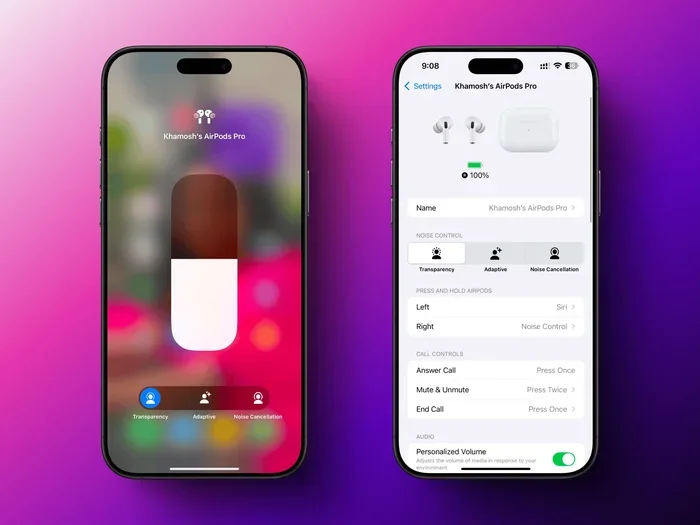
Visual guide about AirPods noise cancelling feature
Image source: lifehacker.com
AirPods Pro (1st Generation)
Released in October 2019, these were the first AirPods with active noise cancellation. They use two microphones—one facing outward and one facing inward—to detect and cancel noise. The silicone ear tips also create a much better seal than standard AirPods, which boosts the noise-blocking effect.
AirPods Pro (2nd Generation)
Launched in September 2022, these improved on the original in nearly every way. Apple claimed the noise cancellation was up to two times better than the first generation. They also introduced Touch controls on the stem and a new extra-small ear tip option for people with smaller ear canals.
AirPods Pro 3
The latest in the line, AirPods Pro 3 feature Apple’s most advanced ANC yet. They use the H3 chip for faster processing and even better real-time noise reduction. According to Apple, they cancel up to three times more noise than the original AirPods Pro.
AirPods Max
These over-ear headphones were released in December 2020. They have larger drivers and more microphones than the in-ear models, which allows them to block even more noise. They’re often considered the gold standard for Apple audio quality, though they come with a much higher price tag.
Standard AirPods (1st, 2nd, 3rd, and 4th Generation)
Here’s the part that surprises many people: regular AirPods do NOT have active noise cancellation. None of the standard models—1st gen (2016), 2nd gen (2019), 3rd gen (2021), or 4th gen (2024)—include ANC. They rely only on their shape to block a small amount of sound, but it’s minimal compared to what the Pro and Max models offer.
Did You Know? The AirPods 4 introduced a “transparent” listening experience with passive noise reduction, but Apple still doesn’t include true active noise cancellation in the base model to keep costs down.
How to Turn Noise Cancellation On and Off
Owning noise-cancelling AirPods is one thing. Knowing how to actually use the feature is another. The good news is that Apple makes it pretty simple. There are several ways to control ANC depending on your device.
On iPhone or iPad
If your AirPods are connected to your iPhone or iPad, you have a few easy options:
- Control Center method: Swipe down from the top-right corner of your screen. Press and hold the volume slider. You’ll see three options: Noise Cancellation, Transparency, and Off. Tap the one you want.
- Settings method: Open the Settings app, tap on your AirPods name, and look for the Noise Control section. From there, you can choose your preferred mode.
- Siri method: Just say “Hey Siri, turn on noise cancellation.” She’ll handle the rest while your phone stays in your pocket.
On Mac
If you’re using your AirPods with a Mac, click the AirPods icon in the menu bar at the top of your screen. You’ll see the same three noise control options appear. Select the one you want, and you’re set.
On Apple Watch
While listening to audio on your Apple Watch, tap the AirPlay icon (it looks like a triangle with circles). From there, you can switch between noise control modes without touching your phone.
Using the Force Sensor (AirPods Pro)
On AirPods Pro, you can press and hold the flat part of the stem (called the force sensor) to switch between noise control modes. By default, it cycles through Transparency and Noise Cancellation, but you can customize this in your iPhone settings.
Using the Digital Crown (AirPods Max)
On AirPods Max, press the noise control button located on the top of the right ear cup. This button cycles through the three modes. There’s also a small LED light that changes color to show which mode is active—green for transparency and no light for noise cancellation.
Noise Cancellation vs. Transparency Mode: What’s the Difference?
Many people confuse these two features, but they do opposite things. Knowing when to use each one can transform your daily listening experience.
Active Noise Cancellation blocks outside sounds. Use it when you want to focus, relax, or immerse yourself in music. It’s perfect for airplanes, trains, busy offices, or anywhere with constant background noise. Studies show that using ANC can reduce noise levels by up to 30 decibels, which is significant.
Transparency Mode does the opposite. It lets outside sounds in while still playing your audio. This is incredibly useful when you need to hear announcements at an airport, talk to a barista without removing your earbuds, or stay aware of traffic while walking. The microphones pick up external sounds and play them through the speakers naturally, almost as if you weren’t wearing earbuds at all.
Adaptive Audio (available on AirPods Pro 2 with the latest firmware and AirPods Pro 3) is the smartest of the three. It automatically blends noise cancellation and transparency based on your environment. If you step into a loud café, it turns up the noise cancellation. If a friend starts talking to you, it switches to transparency. You don’t have to lift a finger.
Did You Know? According to a 2023 survey by the Consumer Technology Association, 78% of wireless earbud owners said noise cancellation was the most important feature when purchasing new earbuds—more important than sound quality or battery life.
When to Use Each Mode
- Use Noise Cancellation: On flights, in noisy offices, while studying, during workouts in loud gyms, or anywhere you need to focus.
- Use Transparency Mode: While walking in cities, waiting for announcements, having quick conversations, or when you need to stay alert for safety reasons.
- Use Adaptive Audio: When your day involves switching between multiple environments, like commuting, working, and running errands.
Tips to Get the Most Out of Your AirPods Noise Cancellation
Just having noise-cancelling AirPods isn’t enough. How you use them makes a huge difference. Here are some pro tips to maximize the silence.
Choose the Right Ear Tip Size
This might be the most important tip of all. If your AirPods Pro don’t fit properly, noise cancellation won’t work well. Apple includes four ear tip sizes (XS, S, M, L) with AirPods Pro 2 and 3. Take a few minutes to try each one. The right size should feel snug without being uncomfortable. You can also use the Ear Tip Fit Test in your iPhone settings (Settings > Bluetooth > AirPods Pro > Ear Tip Fit Test) to find your perfect match.
Keep Your AirPods Clean
Dirt, earwax, and debris can block the microphones and speakers, reducing ANC effectiveness. Wipe your AirPods with a soft, dry, lint-free cloth regularly. For stubborn grime, slightly dampen the cloth with water. Never use soap or other cleaning products, as they can damage the mesh.
Update Your Firmware
Apple regularly releases firmware updates that can improve noise cancellation performance. To check for updates, make sure your AirPods are connected to your iPhone and in their charging case. Keep them near your phone and connected to Wi-Fi. Updates happen automatically, but you can speed things up by having your phone plugged in to power.
Manage Your Battery Wisely
Noise cancellation uses extra power because the microphones and processors are constantly working. If you’re running low on battery, you can turn off ANC to extend listening time. AirPods Pro typically last about 6 hours with ANC on and 7 hours with it off. AirPods Max last around 20 hours with ANC on and up to 20 hours with it off (Apple’s estimates vary slightly by generation).
Try Personalized Spatial Audio
While not directly related to noise cancellation, Personalized Spatial Audio on AirPods Pro 2 and 3 can make your music feel more immersive, which can complement the noise-cancelling experience. You can set it up using your iPhone’s TrueDepth camera to scan your ear shape.
Use One AirPod at a Time
If you need to save battery but still want some noise reduction, try using just one AirPod at a time. While ANC works best with both earbuds, using one can still block some noise and double your listening time.
Common Problems and Troubleshooting
Sometimes, noise cancellation doesn’t work as expected. Before you panic, try these simple fixes.
Noise Cancellation Is Weak or Not Working
If you feel like your AirPods aren’t blocking as much noise as they used to, here are some things to check:
- Check the ear tip seal: Try different sizes or make sure the tips are securely attached.
- Clean the microphones: Use a dry cotton swab to gently clean the small microphone openings.
- Restart your AirPods: Place them in the charging case, close the lid, wait 30 seconds, then try again.
- Reset your AirPods: Go to Settings > Bluetooth, tap the “i” next to your AirPods, and select “Forget This Device.” Then re-pair them.
- Check for obstructions: Make sure nothing is covering the microphones, like a hat or hood.
Audio Sounds Muffled
If your music sounds weird or distant, your AirPods might be stuck in Transparency Mode. Use one of the control methods mentioned earlier to switch back to Noise Cancellation or Adaptive Audio.
Pressure Feeling in Your Ears
Some people notice a slight pressure sensation when using ANC, especially when they’re not used to it. This is normal and usually goes away after a few minutes. If it bothers you, try Transparency Mode for a while, or take short breaks from ANC throughout the day.
Is Noise Cancellation Bad for Your Ears?
This is a question that comes up often, and the answer is reassuring. Noise cancellation itself is not harmful to your hearing. In fact, it can actually protect your ears in the long run.
Here’s why: when you’re in a noisy environment without noise cancellation, you tend to crank up the volume to drown out the background noise. This can lead to listening at unsafe levels. According to the World Health Organization, over 1 billion young people worldwide are at risk of hearing loss from unsafe listening practices.
With ANC, you don’t need to turn the volume up as high. You can enjoy your music at a comfortable level because the background noise is already reduced. This is one of the most underrated benefits of noise-cancelling earbuds.
That said, ANC can cause a small pressure sensation or mild dizziness in some people, especially when first using it. If you experience this, it’s not dangerous, but you may want to start with shorter listening sessions and build up gradually.
AirPods Noise Cancellation vs. Competitors
How do AirPods stack up against the competition? While brands like Sony, Bose, and Sennheiser have long been leaders in noise cancellation, Apple’s technology has caught up significantly.
The Sony WF-1000XM5 and Bose QuietComfort Ultra Earbuds are often considered the top performers in the industry, especially for airplane noise. However, AirPods Pro 3 have closed the gap considerably, especially for Apple device users. The seamless integration with iPhones, iPads, and Macs makes AirPods a more convenient choice for people deep in the Apple ecosystem.
Did You Know? A 2024 review by The Verge found that AirPods Pro 2 cancelled 85% of low-frequency noise in their tests, putting them within striking distance of the top-tier competitors from Sony and Bose.
The biggest advantage AirPods have is convenience. Switching between your iPhone, iPad, and Mac happens automatically. The Find My feature makes it easy to locate a lost AirPod. And Apple’s H2 and H3 chips allow for very efficient noise processing without killing your battery.
The Future of AirPods Noise Cancellation
Apple isn’t slowing down. Each new generation of AirPods brings better noise cancellation, smarter features, and longer battery life. Industry experts expect future AirPods to include even more advanced health features, like heart rate monitoring and body temperature sensing, alongside improved audio technology.
There’s also buzz about Apple’s work on a hearing aid mode that could be built into future AirPods. The FDA approved over-the-counter hearing aids in 2022, and Apple has been exploring this space. It’s possible that future AirPods could offer personalized hearing profiles that adjust noise cancellation based on your specific hearing needs.
Adaptive Audio, Conversation Awareness, and Personalized Volume are all features that have been added in recent years through software updates, showing that Apple is committed to making AirPods smarter over time, not just at launch.
Wrapping It All Up
So, can AirPods noise cancel? Yes—but only if you have the right model. AirPods Pro (all generations) and AirPods Max feature active noise cancellation, while standard AirPods do not. The technology uses tiny microphones and clever sound processing to silence the world around you, giving you a more immersive listening experience.
To get the most out of your AirPods’ noise cancellation, make sure you have the right ear tip size, keep your AirPods clean, and update the firmware regularly. Don’t forget to use Transparency Mode when you need to stay aware of your surroundings, and try Adaptive Audio for a hands-off experience that adjusts to your environment automatically.
Whether you’re a frequent flyer, a busy professional, or just someone who loves good audio, noise-cancelling AirPods can make a real difference in your daily life. They protect your hearing, help you focus, and let you enjoy your music the way it was meant to be heard. Now that you know everything about how AirPods noise cancelling works, you can make the most of this incredible technology every single day.
Frequently Asked Questions
Can all AirPods noise cancel?
No, only AirPods Pro (1st, 2nd, and 3rd generation) and AirPods Max have active noise cancellation. Standard AirPods (1st through 4th generation) do not have this feature and rely only on passive noise isolation from their fit.
Is noise cancellation on AirPods worth it?
Yes, especially if you often find yourself in noisy environments like airplanes, trains, or busy offices. Noise cancellation reduces background noise so you can enjoy your music at lower volumes, which can also help protect your hearing over time.
Does AirPods noise cancellation work without music playing?
Yes, you can use Active Noise Cancellation on AirPods Pro and AirPods Max even when no audio is playing. This is great for moments when you just want peace and quiet, like during a long flight or while working in a noisy café.
How long does the battery last with noise cancellation on?
AirPods Pro typically last around 6 hours with ANC turned on, while AirPods Max last approximately 20 hours. Turning off noise cancellation can extend battery life by about 20-30% depending on the model.
Can noise cancellation damage your hearing?
No, noise cancellation is safe and may actually protect your hearing. By reducing background noise, it allows you to listen to audio at lower volumes, which reduces the risk of long-term hearing damage caused by listening at high volumes.
Why does my AirPods noise cancellation sound weak?
Weak noise cancellation is usually caused by a poor ear tip seal, dirty microphones, or outdated firmware. Try different ear tip sizes, clean your AirPods carefully, and make sure your firmware is up to date for the best performance.