
Featured image for AirPods Max headphone jack
Image source: cdn.pickr.com.au
AirPods Max do not have a traditional 3.5mm headphone jack built into the headphones themselves. However, Apple designed them to support wired audio through a Lightning to 3.5mm audio cable, which is sold separately. This means you can enjoy high-quality wired listening, but you’ll need to purchase the adapter separately and understand a few important limitations about how it works.
Picture this: you just unboxed your shiny new AirPods Max, excited to dive into your favorite playlist. But then you realize there’s no little round hole where a headphone cable usually goes. Don’t panic. You’re not missing anything. AirPods Max simply work differently than traditional headphones. Let me walk you through everything you need to know about this topic, so you can make the most of your premium listening experience.
AirPods Max sit in a unique spot in the headphone world. They’re wireless-first headphones that Apple designed for people who want amazing sound without dealing with cables. But what happens when you want to plug them into something? Maybe you’re a musician who needs a zero-latency connection. Maybe your battery died mid-flight. Or maybe you just want to plug into an older device that doesn’t have Bluetooth. These are real situations, and Apple did think about them. The answer isn’t a simple yes or no, and that’s exactly why this guide exists.
Here’s the deal in plain English: AirPods Max do not have a built-in headphone jack, but they absolutely support wired audio. You just need the right cable. Think of it like a car that doesn’t come with a spare tire in the trunk, but has all the mounting hardware ready to go. You bring the tire, it works perfectly. That’s the AirPods Max approach to wired listening. Throughout this guide, I’ll explain how it works, what you need, what it costs, and answer every question you might have along the way.
Key Takeaways
- No Built-In Headphone Jack: AirPods Max don’t have a traditional 3.5mm port directly on the headphones.
- Wired Listening Is Possible: You can use wired audio with Apple’s Lightning to 3.5mm adapter cable.
- Adapter Sold Separately: The cable needed for wired listening isn’t included with AirPods Max.
- Lightning Connector Used: AirPods Max charge via Lightning, and this same port handles wired audio output.
- No Active Noise Cancellation in Wired Mode: Some features may behave differently when using a wired connection.
- Limited Compatibility: The wired connection works with most devices but may need extra adapters for some setups.
- Apple’s Design Philosophy: Apple prioritized wireless use but kept a wired option for audiophiles and professionals.
📑 Table of Contents
- The Short Answer: No Traditional Jack, But Wired Audio Works
- How Wired Listening Actually Works on AirPods Max
- The Real Differences Between Wired and Wireless Mode
- What You’ll Need: Adapters and Accessories
- Common Questions and Real-World Use Scenarios
- The Trade-offs: Why You Might Choose Wireless Instead
- What Happens When the Battery Dies?
- Making the Right Choice for Your Needs
- Final Thoughts: The Wired Option That Exists But Isn’t Emphasized
The Short Answer: No Traditional Jack, But Wired Audio Works
Let’s get the main question answered right away. AirPods Max don’t have a 3.5mm headphone jack built into the ear cups. If you’ve ever owned regular headphones, you’re used to seeing that small round port on the side or bottom. AirPods Max have a Lightning port instead. This is the same small port that Apple uses to charge iPhones (older models) and various other accessories.
But here’s the important part: that Lightning port isn’t just for charging. It’s a multi-purpose connection that also handles audio output. When you plug in the right cable, your AirPods Max transform into wired headphones. The catch? Apple doesn’t include that cable in the box. You need to buy it separately, and it costs around $35 in the Apple Store.
Why Apple Made This Choice
Apple is famous for making bold design decisions, and removing the headphone jack is one of their most talked-about moves. Remember when iPhone 7 launched back in 2016 without a headphone jack? People were upset at first, but most adapted. Apple believes wireless is the future, so they keep pushing that direction with their products. AirPods Max follow the same philosophy: wireless by default, but with a backup plan for those who need it.
This approach has some real benefits. For starters, the design stays cleaner and more minimalist. That smooth, seamless look Apple is known for? It wouldn’t be possible with a chunky headphone jack breaking up the lines. Plus, the internal components have more room to breathe, which can improve sound quality and battery life.
How Wired Listening Actually Works on AirPods Max
Okay, so let’s say you’ve decided you want to use your AirPods Max with a wired connection. How does it actually work? It’s pretty simple once you understand the pieces involved.
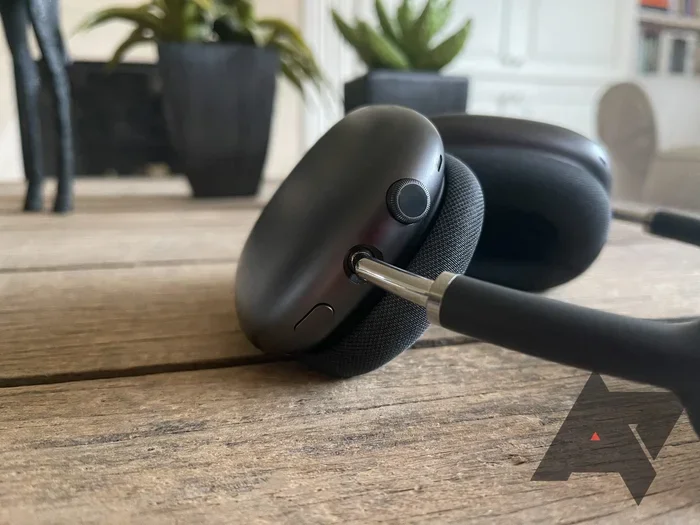
Visual guide about AirPods Max headphone jack
Image source: androidpolice.com
The Lightning to 3.5mm Cable
Apple sells an official cable called “Lightning to 3.5mm Audio Cable.” One end has a Lightning connector (the small flat plug that goes into your AirPods Max). The other end has a standard 3.5mm audio jack (the round plug that fits into most audio devices). The cable is about 1.2 meters long, which is roughly 4 feet. That’s a decent length for most situations, whether you’re sitting at a desk or moving around a studio.
Connecting to Your Devices
Once you have the cable, using it is straightforward. Plug the Lightning end into the port on the bottom of your AirPods Max (you’ll see it on the right ear cup). Plug the 3.5mm end into whatever device you want to listen to. This could be:
- An iPhone: But wait, newer iPhones don’t have headphone jacks. You’ll need another adapter or use Bluetooth instead.
- An older iPod or MP3 player: These often have headphone jacks built in. Just plug and play.
- A laptop or computer: Most have headphone ports. Plug in and you’re good to go.
- A professional audio interface: Musicians and producers love this option because it removes any audio delay.
- An airplane entertainment system: Many flights have seat-back screens with headphone jacks. Perfect for long trips.
- A gaming console controller: Most controllers have 3.5mm jacks for headsets.
What Happens to the Headphones When Plugged In
Here’s something interesting: AirPods Max still need power even when used wired. The Lightning port handles audio, but the headphones themselves need battery to function. Don’t worry though, they also charge while plugged in if your cable setup allows it. The battery lasts about 20 hours, so even a quick charge gives you plenty of listening time.
The Real Differences Between Wired and Wireless Mode
You might be wondering if wired audio sounds better or worse than wireless. This is where things get interesting. The answer depends on what you’re comparing and what matters most to you.
Audio Quality Comparison
In perfect conditions, wired audio technically offers slightly better sound quality because the signal travels directly without compression. Bluetooth compresses audio to send it wirelessly, which can lose tiny details. AirPods Max use advanced codecs (the language devices use to send audio) that minimize this loss. Most people can’t tell the difference, but trained ears or professional audio work might notice subtle changes.
Here’s a simple way to think about it. Imagine you’re mailing a photo. Bluetooth is like sending a compressed version through email. It looks great, but a professional photographer might notice slight differences. Wired is like handing over the original print. Both look good to most people, but the original has all the details intact.
Latency: The Delay Factor
Latency means how long it takes for audio to travel from your device to your ears. This matters a lot for gamers, musicians, and video editors. Wired connections have essentially zero latency. The sound arrives instantly. Bluetooth always has some delay, though modern versions have made it very small. For casual music listening, you won’t notice. For competitive gaming or music production, that tiny delay can be a big deal.
Active Noise Cancellation Behavior
One question that comes up a lot is whether noise cancellation works in wired mode. Yes, it does work, but with a small caveat. The headphones still need battery power to run active noise cancellation. If your battery dies, the headphones essentially become passthrough devices. They won’t process the audio at all. So keep them charged, especially for long listening sessions.
What You’ll Need: Adapters and Accessories
Let’s talk about the practical stuff: what cables and adapters you might need to make this work in different situations.
The Essential Cable
The Lightning to 3.5mm Audio Cable from Apple is your main purchase. As mentioned, it costs around $35. You can find third-party versions on Amazon for less, but be careful. Cheap cables sometimes have connection issues or don’t pass audio properly. Apple’s official cable is designed specifically for this purpose and tends to work flawlessly.
Adapters for Newer iPhones
If you want to connect your AirPods Max to a newer iPhone (iPhone 7 and later), things get tricky. These iPhones don’t have headphone jacks. You’d need to go from the iPhone’s Lightning port to the 3.5mm jack on your AirPods Max cable. This means using Apple’s Lightning to 3.5mm adapter, sold separately for about $9. So you’d need two adapters in total, which gets clunky. Honestly, in this situation, just using Bluetooth is way more practical.
USB-C Adapters for Modern Devices
Many modern laptops, tablets, and Android phones use USB-C instead of 3.5mm jacks. If you want to connect your AirPods Max to these devices, you’ll need a USB-C to 3.5mm adapter. These are widely available and usually inexpensive, often under $15. Quality varies, so look for reputable brands.
Pro Tip: The Lightning to Lightning Cable
Did you know Apple also makes a Lightning to Lightning cable? This isn’t for audio though. It’s for charging AirPods Max from a USB power adapter. The same port handles both jobs. It’s a nice design touch that keeps things simple.
Common Questions and Real-World Use Scenarios
Now let’s look at actual situations where this matters. Understanding these scenarios helps you decide if the wired option is worth it for your specific needs.
The Frequent Flyer Scenario
You’re on a long flight and want to use the seat-back entertainment system. Most airplanes have 3.5mm jacks built into the screen or the armrest. Just plug in your AirPods Max using the Lightning to 3.5mm cable, and you’re set. This actually works great because airplane Bluetooth is often unreliable or unavailable. You get better noise cancellation than most airplane headphones, plus you can watch movies without the audio being slightly out of sync.
The Musician or Producer Scenario
If you’re making music, every millisecond matters. Bluetooth audio can have delay, which makes recording or editing frustrating. Using AirPods Max wired eliminates this issue. Connect to your audio interface or mixer, and you get real-time monitoring with no lag. The sound quality is excellent for this purpose too, which is why many audio professionals consider AirPods Max a solid choice for studio work.
The Gamer’s Dilemma
Gamers face a real choice. Bluetooth is convenient, but that tiny audio lag can be the difference between winning and losing. Wired connections give you the competitive edge, but you’re tethered to your device. With AirPods Max, you can switch between modes depending on what you’re playing. Casual single-player games? Bluetooth is fine. Competitive online games? Plug in for the best experience.
The Audiophile’s Perspective
Did you know audiophiles (people who are really serious about sound quality) have strong opinions about wireless vs. wired? Some prefer the purity of a wired signal. Others argue that modern Bluetooth codecs are so good it doesn’t matter anymore. AirPods Max support AAC and SBC codecs, which handle audio compression well. For most listeners, the difference is negligible. But if you’re recording music or doing critical listening, wired still has a slight edge.
The Trade-offs: Why You Might Choose Wireless Instead
Let’s be fair and talk about why wireless mode is actually pretty great too. After all, AirPods Max are wireless headphones first and foremost.
Freedom of Movement
No cable means no restrictions. Walk around your house, work out, dance while cooking. You’re not tethered to your device. This sounds simple, but once you experience true wireless freedom, going back to cables feels limiting.
Multi-Device Magic
AirPods Max can switch between your Apple devices seamlessly. Listening to music on your iPad? A call comes in on your iPhone? They automatically switch over. Try doing that with a wired connection. You’d be unplugging and plugging constantly. This is one of those features that feels magical once you start using it.
Better iPhone Integration
If you use AirPods Max wirelessly with an iPhone, you get access to features like Spatial Audio. This creates a surround-sound effect that makes movies and shows feel more immersive. It tracks your head movement too, so the audio stays anchored to the screen. This feature doesn’t work over a wired connection, so if you love Spatial Audio, wireless is the way to go.
Battery Convenience
Think about it: when was the last time you actually wanted a wire? Most of us use Bluetooth without thinking about it. The battery on AirPods Max lasts about 20 hours with active noise cancellation on. That covers a full work day, a long flight, or multiple workout sessions. Just charge them overnight and you’re set.
What Happens When the Battery Dies?
Here’s an important question: can you use AirPods Max wired if the battery is dead? The honest answer is complicated.
The Passive Mode Myth
Many high-end headphones work even without power. The audio just passes through without active processing. AirPods Max are different. They’re entirely dependent on power for audio processing. If the battery dies completely, no sound comes out, even with a cable plugged in. This is because the digital signal processor and amplifiers need electricity to function.
Why Apple Designed It This Way
Apple prioritized audio quality and features over passive operation. The digital signal processor handles the active noise cancellation, transparency mode, and adaptive EQ. All these features need power. Apple decided that requiring a charged battery was worth the trade-off for superior sound processing. It’s a design philosophy choice, not a flaw.
How to Avoid This Problem
Simple: keep them charged. AirPods Max use Lightning charging, and a full charge takes around 1.5 to 2 hours. A quick 5-minute charge gives you about 1.5 hours of listening. Set a reminder to charge them regularly, or just plug them in whenever you’re not using them. With good habits, you’ll rarely face a dead battery situation.
Making the Right Choice for Your Needs
So what’s the verdict? Should you buy that Lightning to 3.5mm cable? The answer depends on how you plan to use your AirPods Max.
Buy the Cable If:
- You travel frequently and want to use airplane entertainment systems.
- You’re a musician, producer, or audio engineer.
- You’re a competitive gamer who needs zero latency.
- You often connect to older devices without Bluetooth.
- You want a backup option for situations where Bluetooth isn’t available.
Skip the Cable If:
- You primarily use Apple devices with modern Bluetooth support.
- You love features like Spatial Audio that work best wirelessly.
- You value convenience and seamless device switching.
- You mainly listen casually and don’t notice audio quality differences.
- You don’t want to carry extra accessories.
Final Thoughts: The Wired Option That Exists But Isn’t Emphasized
Here’s the big picture: AirPods Max are wireless headphones with a wired option available. Apple designed them for the wireless-first world we live in today, but they recognized that some users need or want wired connections. So they built the capability in, but they didn’t make it the default focus.
This approach makes sense when you think about it. Most people buying AirPods Max want premium wireless audio with active noise cancellation and all the smart features Apple packs in. The wired option is there for the minority who need it, and it works well when used properly. It’s like having a spare tire in your car. You don’t think about it most of the time, but you’re glad it’s there when you need it.
If you’re considering buying AirPods Max, don’t let the lack of a built-in headphone jack scare you away. Apple’s Lightning to 3.5mm cable works perfectly for wired listening, and most users will be happy using Bluetooth 99% of the time. Just understand what you’re getting into: premium wireless headphones with a wired backup option that requires a separate purchase. If that works for your lifestyle, AirPods Max are genuinely excellent headphones that deliver amazing sound quality and build quality that justifies their premium price tag.
Remember, the best headphones are the ones that fit your life. AirPods Max fit a wireless-first lifestyle beautifully, with just enough flexibility for those rare moments when you need to plug in. Whether that’s worth the investment is entirely up to you and how you plan to use them. Now you have all the information you need to make that decision confidently.