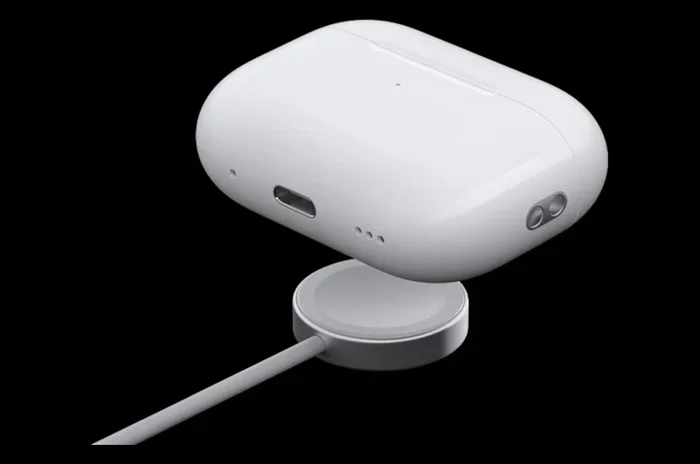
Featured image for AirPods Pro USB-C charging case
Image source: yankodesign.com
AirPod Pros do not use a USB-C charger by default. The original AirPods Pro (1st and 2nd generation) come with a Lightning cable for charging the case. However, Apple released the AirPods Pro 2 with a USB-C charging case in September 2023, which finally switched to the universal USB-C standard. Knowing which version you own is the key to using the right cable and getting the fastest, most compatible charge possible.
Let’s settle this once and for all: the answer depends on which AirPods Pro you own. If you bought your AirPods Pro before September 2023, the short answer is no, you can’t use a USB-C charger. But if you picked up the newer AirPods Pro 2 with the USB-C case, then yes, USB-C is exactly what you need.
Confusion makes total sense here. Apple took its sweet time switching from the old Lightning port to the modern USB-C standard. For years, iPhone users carried Lightning cables while the rest of the tech world moved on. The AirPods Pro followed that same confusing path, and many people still aren’t sure which cable goes where.
Here’s the good news: once you know which version you have, everything gets really simple. This guide will walk you through how to tell your AirPods Pro apart, what cable each one needs, and how to charge them quickly and safely. No tech jargon, no confusing specs, just straight answers.
Key Takeaways
- Original AirPods Pro use Lightning: The 1st and 2nd gen AirPods Pro (pre-2023) charge with Apple’s proprietary Lightning cable.
- AirPods Pro 2 (USB-C) uses USB-C: The September 2023 refresh includes a USB-C port and supports USB-C charging natively.
- USB-C is now the industry standard: In 2022, the EU passed a law requiring USB-C on most small electronics, pushing Apple to make the switch.
- Wireless charging still works: Both Lightning and USB-C cases support Qi and MagSafe wireless charging pads.
- You can use any USB-C cable: You don’t need Apple’s first-party cable; any certified USB-C to USB-C or USB-C to USB-A cable works fine.
- The case is the only part that plugs in: The earbuds themselves only charge when placed inside the case, never directly with a cable.
- Fast charging is identical: A 5-minute charge in the case gives roughly 1 hour of listening time, regardless of port type.
📑 Table of Contents
- AirPods Pro Charging Basics: What You Need to Know
- Lightning vs. USB-C: What’s the Real Difference?
- Which AirPods Pro Models Use Which Charger?
- How to Tell Which AirPods Pro You Have
- Can You Use a USB-C Charger on Lightning AirPods Pro?
- Charging Tips, Best Practices, and Common Mistakes
- The Future of AirPods Charging
- Final Thoughts: Which Charger Do You Actually Need?
AirPods Pro Charging Basics: What You Need to Know
Before we dive into the USB-C versus Lightning debate, let’s cover the basics. AirPods Pro don’t actually charge the earbuds themselves with a cable. Instead, the earbuds charge when you place them inside the case. The case is the only part that has a charging port.
Think of it like a tiny power bank made just for your earbuds. The case holds its own battery, and it transfers that energy to the earbuds whenever they’re sitting inside. So when people ask “how do you charge AirPods Pro,” the real answer is: you charge the case, and the case charges the earbuds.
How the Charging System Actually Works
Inside the AirPods Pro case, there are small metal contacts. When you put the earbuds in, those contacts line up with similar contacts on the earbuds. The case then sends a small, controlled amount of power to each earbud, topping them up while they’re safe and snug inside.
The case itself charges one of three ways: through a cable plugged into the port on the bottom, through a Qi or MagSafe wireless charging pad, or (on the latest USB-C model) through any USB-C power source.
Why This Design Actually Makes Sense
Putting the charging port only on the case is smart. Earbuds are tiny, and adding a port to each one would make them bulkier and less water-resistant. Plus, the case acts as a charger on the go, so you can top up your earbuds even when you’re nowhere near an outlet.
It’s a bit like carrying a little gas station in your pocket. The case fuels the earbuds, and you fuel the case.
Lightning vs. USB-C: What’s the Real Difference?
So what’s the big deal with Lightning versus USB-C? Why did Apple hold onto Lightning for so long, and why did they finally switch?
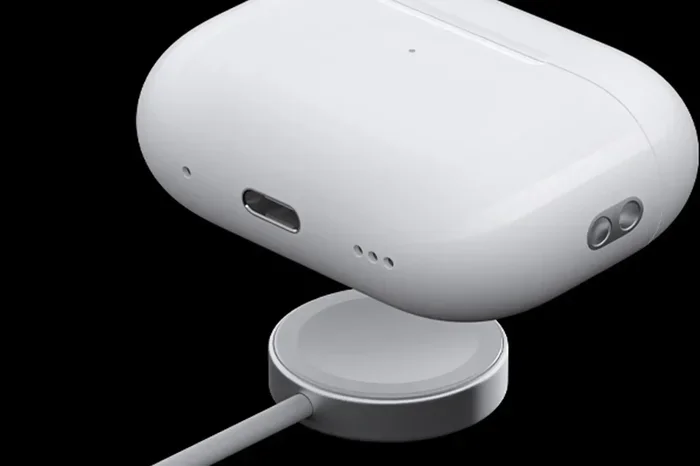
Visual guide about AirPods Pro USB-C charging case
Image source: macworld.com
Let’s break it down in plain English.
What Is Lightning?
Lightning is Apple’s proprietary charging port. It launched in 2012 with the iPhone 5. For over a decade, it was the connector on every iPhone, every standard AirPods case, and many other Apple accessories.
The problem? Lightning was Apple’s own design. That meant cables, chargers, and accessories had to be made specifically for Apple products. Other companies had to pay licensing fees to use it.
What Is USB-C?
USB-C is an industry-standard connector. It’s the same port you’ll find on Android phones, most modern laptops, tablets, game consoles, and tons of other gadgets. One cable can charge almost everything.
USB-C is also faster at transferring data and power than Lightning. It can carry more wattage, which means it can charge bigger devices like laptops, not just tiny earbuds.
Why Apple Finally Switched
In October 2022, the European Union passed a law requiring most small electronics to use USB-C by the end of 2024. The goal was simple: reduce electronic waste. According to the European Commission, the average consumer owns around three charging cables, and many of them are duplicates that end up in landfills.
Did you know? The EU estimated that switching to a universal charger could save consumers around 250 million euros per year on unnecessary cable purchases. That’s a lot of cash and a lot of cables kept out of the trash.
Apple, not wanting to make a special Lightning-only iPhone just for Europe, decided to switch globally. The AirPods Pro 2 with USB-C launched in September 2023, just ahead of the iPhone 15, which made the same switch that same month.
Which AirPods Pro Models Use Which Charger?
Now let’s get specific. Here’s exactly which AirPods Pro models use which charger, so you never have to guess again.
AirPods Pro 1st Generation (2019)
Released in October 2019, the original AirPods Pro came in a case with a Lightning port. They also supported wireless Qi charging, so you could charge them on a wireless pad if you preferred. But if you wanted to plug in, you needed a Lightning cable.
These do not work with a USB-C charger out of the box.
AirPods Pro 2nd Generation (2022) – Lightning Version
Apple released the second generation AirPods Pro in September 2022. This version also used a Lightning port on the case. It added new features like the H2 chip, better noise cancellation, and a built-in speaker on the case for Find My alerts.
But it still charged with Lightning, not USB-C.
AirPods Pro 2nd Generation (2023) – USB-C Version
One year later, in September 2023, Apple quietly refreshed the AirPods Pro 2 with a USB-C charging case. The earbuds themselves were almost identical, but the case got a major upgrade: a USB-C port.
Did you know? The AirPods Pro 2 USB-C version also added IP54 dust and sweat resistance, a step up from the IPX4 rating on the earlier models. So if you work out a lot, this is a nice bonus.
These are the first AirPods Pro that natively support USB-C charging.
How to Tell Which AirPods Pro You Have
If you’re staring at your AirPods Pro right now and have no idea which version they are, here are three quick ways to find out.
Check the Case Itself
Look at the bottom of the charging case. This is the easiest way.
- If you see a small, narrow oval-shaped port, that’s Lightning.
- If you see a slightly larger, rounded rectangular port, that’s USB-C.
No apps, no settings, no confusion. Just flip the case over and look.
Check the Model Number
On the back of the case, near the bottom, there’s tiny text with the model number. You can also find it in your iPhone’s Settings under Settings > Bluetooth > tap the “i” next to your AirPods.
The model numbers are:
- A2084, A2083: AirPods Pro 1st gen (Lightning)
- A2968: AirPods Pro 2nd gen, Lightning case (2022)
- A3047, A3048, A3049: AirPods Pro 2nd gen, USB-C case (2023)
Check the Charging Cable in the Box
If you still have the original box, look at the cable that came with it. Lightning cables are thinner with a small connector. USB-C cables have a bigger, symmetrical connector that looks the same no matter which way you plug it in.
This is one of those rare times the box actually helps you figure things out.
Can You Use a USB-C Charger on Lightning AirPods Pro?
This is a really common question, especially now that almost every new device uses USB-C. The short answer: not directly, no.
You cannot plug a USB-C cable into a Lightning port. The shapes are completely different, and they use different technology. Trying to force it would damage both the cable and the port.
However, you do have a couple of options if you want to streamline your cables.
Option 1: Use a Lightning to USB-C Adapter
Apple and third-party brands sell small adapters that let you plug a Lightning cable into a USB-C power source. Think of it as a tiny bridge between the two worlds.
It’s not the most elegant solution, but it works. You can charge your older AirPods Pro from a USB-C wall charger or laptop using one of these adapters.
Option 2: Switch to Wireless Charging
Both the Lightning and USB-C AirPods Pro cases support wireless charging. So if you have a Qi or MagSafe charger lying around, you can completely skip the cable question.
This is honestly the most convenient option if you already own a wireless pad. Just drop the case on it, and you’re good to go.
Option 3: Just Buy a New Case
Did you know Apple sells replacement charging cases? You can buy a USB-C MagSafe Charging Case separately and pair it with your existing AirPods Pro 2 earbuds. The earbuds themselves are identical, so the upgrade is just the case.
This costs around $99, which isn’t cheap, but it’s cheaper than buying a whole new set of AirPods Pro if you only need the new port.
Charging Tips, Best Practices, and Common Mistakes
Now that you know which cable you need, let’s talk about how to get the most out of your AirPods Pro battery. A few small habits can make a big difference over time.
Use Any Certified USB-C Cable
If you have the USB-C AirPods Pro, you don’t need to buy Apple’s cable. Any USB-C cable that’s been certified by the USB Implementers Forum will work just fine. Look for the little “Certified USB” logo or check the packaging.
Avoid super-cheap, no-name cables from gas stations or sketchy online sellers. They might work, but they can also deliver inconsistent power, which can shorten battery life over time.
Fast Charging Still Works the Same
No matter which port your case has, the fast-charging feature is identical. A 5-minute charge in the case gives you about 1 hour of listening time or around 1 hour of talk time. So if you’re running low and heading out the door, just 5 minutes makes a real difference.
Don’t Charge to 100% Every Time
Lithium-ion batteries, like the ones in your AirPods case, last longest when you keep them between 20% and 80% most of the time. You don’t have to be obsessive about it, but if you leave the case plugged in 24/7, the battery will slowly lose capacity over the years.
It’s kind of like how stretching a rubber band gently keeps it elastic, but pulling it tight all the time wears it out faster. Same idea with batteries.
Keep the Port Clean
Dust, lint, and pocket fuzz love to collect in charging ports. Every once in a while, take a look at the port on your case. If you see any debris, gently clean it out with a dry, soft-bristled brush or a wooden toothpick.
Just be gentle. The contacts inside the port are delicate, and you don’t want to bend or break them.
Avoid Extreme Temperatures
Apple says AirPods Pro work best in temperatures between 0°C and 35°C (32°F to 95°F). Charging in extreme cold or extreme heat can damage the battery. So don’t leave them in a hot car or outside in freezing weather for long stretches.
Update the Firmware
Apple occasionally releases firmware updates that improve battery management and charging efficiency. To make sure you’re on the latest version, just place your AirPods in the case, close the lid, and place them near your iPhone. The update happens automatically over Bluetooth.
It’s one of those “set it and forget it” features that just works in the background.
The Future of AirPods Charging
Here’s an interesting question: if Lightning was replaced by USB-C, what comes next?
Most tech experts believe USB-C will be the standard for at least the next 10 years. It’s now required by law in many countries, and the entire industry has invested billions in building around it.
But the long-term future might be completely wireless. Apple has been pushing MagSafe and Qi wireless charging for years. Some companies are even experimenting with over-the-air charging, where devices power up just by being in the same room as a special charger.
For now, though, USB-C is the king. And if you have the AirPods Pro 2 with USB-C, you’re set for the foreseeable future.
Did you know? Apple sells a special MagSafe Charger that snaps magnetically to the back of compatible iPhones. The same charger works with the AirPods Pro USB-C case, making wireless charging even easier than plugging in a cable.
Final Thoughts: Which Charger Do You Actually Need?
Let’s wrap this up with a simple cheat sheet you can come back to whenever you need it.
- AirPods Pro 1st gen (2019): Lightning cable only.
- AirPods Pro 2nd gen, Lightning case (2022): Lightning cable only.
- AirPods Pro 2nd gen, USB-C case (2023): USB-C cable.
- All models: Support Qi and MagSafe wireless charging.
So, do AirPod Pros take a C charger? If you have the 2023 model or newer, yes, absolutely. If you have an older model, you’ll need a Lightning cable (or a wireless charger).
The simplest way to check is to flip the case over and look at the port. Two seconds, done. No more guessing, no more digging through drawers trying every cable you own.
And if you ever decide to upgrade, just remember that the AirPods Pro 2 with USB-C also works beautifully with your iPhone 15, 16, or any modern Android phone, laptop, or tablet. One cable really does rule them all, and that’s the future Apple is finally embracing.
Happy listening, and may your battery never die mid-podcast.
Frequently Asked Questions
Do AirPods Pro 1st generation use USB-C?
No, the AirPods Pro 1st generation (2019) use a Lightning cable for wired charging. They do not have a USB-C port. You can also charge them wirelessly using any Qi or MagSafe-compatible charging pad.
Can I charge my AirPods Pro with my iPhone 15 charger?
It depends on which AirPods Pro you have. If you have the AirPods Pro 2 with a USB-C case (released September 2023), then yes, your iPhone 15 USB-C cable will charge them perfectly. Older AirPods Pro models with Lightning ports cannot use a USB-C cable directly.
Will Apple make a USB-C version of the original AirPods Pro?
No, Apple has not released a USB-C version of the 1st generation AirPods Pro. The only AirPods Pro with a built-in USB-C port is the AirPods Pro 2 (2023 refresh). The 1st gen has been discontinued.
Is the AirPods Pro 2 USB-C case worth buying separately?
If you already own AirPods Pro 2 with a Lightning case, the USB-C case upgrade is a nice-to-have but not essential, especially since both cases support wireless charging. It only makes sense if you really want to consolidate your cables to USB-C only.
Do AirPods Pro charge faster with USB-C versus Lightning?
No, the charging speed is essentially the same between the two. Both support a quick 5-minute charge for about 1 hour of listening time. The port type affects the cable you use, but not how fast the battery fills up.
Can I use any USB-C cable to charge my AirPods Pro 2?
Yes, any certified USB-C cable will work with the AirPods Pro 2 USB-C case. You don’t need to buy Apple’s first-party cable. Just make sure the cable is from a reputable brand and has been certified for safety and performance.