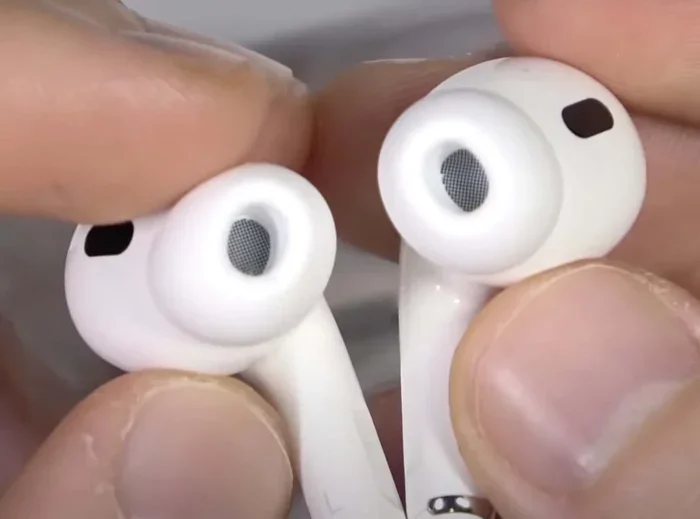
Featured image for Airpods microphone closeup
Image source: wiredclip.com
Yes, AirPods have noise-cancelling microphones that dramatically reduce background noise during calls. Apple uses a clever system of outward- and inward-facing mics along with advanced software to filter out wind, traffic, and chatter. However, this is different from the “Active Noise Cancellation” feature used for music playback, and only certain AirPods models include both technologies.
Imagine you’re standing on a busy street corner, trying to take an important phone call. Cars zoom by, people chat loudly, and a dog barks somewhere nearby. Yet somehow, the person on the other end hears your voice as if you’re sitting in a quiet library. That’s the magic of AirPods noise-cancelling microphones.
Many people wonder whether AirPods have noise-cancelling microphones, and the answer is a resounding yes. Apple has packed these tiny earbuds with sophisticated technology that goes far beyond simply playing music. The microphones in AirPods actively work to isolate your voice from everything else happening around you.
This comprehensive guide will walk you through everything you need to know about AirPods microphone technology. You’ll learn how it works, which models have the best systems, and practical tips for getting the clearest possible calls. Whether you’re a remote worker, frequent traveler, or just someone who takes calls on the go, understanding this technology will change how you use your AirPods forever.
Key Takeaways
- Noise-cancelling mics vs. ANC: AirPods use noise-cancelling microphones for calls, which is separate from Active Noise Cancellation (ANC) used for music.
- Beamforming technology: Dual mics focus on your voice while suppressing background sounds, making calls clear in noisy environments.
- Model differences matter: AirPods Pro and AirPods Max have the most advanced noise-cancelling mic systems, while standard AirPods still offer solid call quality.
- Transparency mode helps calls: This feature lets outside sound in so you can hear yourself talk, preventing you from shouting during calls.
- Wind noise reduction: Special mesh and algorithms in newer AirPods models actively combat wind interference on calls.
- Third-party apps are limited: Apple’s noise cancellation works automatically regardless of which calling app you use.
- Not perfect in all situations: Extremely loud environments (concerts, construction) may still cause challenges during use.
📑 Table of Contents
- How AirPods Noise-Cancelling Microphones Actually Work
- Which AirPods Models Have the Best Noise-Cancelling Microphones?
- Active Noise Cancellation vs. Microphone Noise Cancellation Explained
- Real-World Performance: How Well Do AirPods Mics Actually Work?
- Tips to Maximize Your AirPods Microphone Performance
- Common Myths About AirPods Microphone Noise Cancellation
- The Future of AirPods Microphone Technology
- Frequently Asked Questions About AirPods Microphone Noise Cancellation
- Final Thoughts: AirPods Microphone Technology Is Remarkable
How AirPods Noise-Cancelling Microphones Actually Work
Let’s break down the science behind AirPods microphone noise cancellation in plain English. Think of it like having a smart friend at a loud party who somehow only listens to what you say, completely ignoring everyone else in the room. That’s essentially what your AirPods microphones are doing every time you take a call.
The magic happens through a combination of hardware and software working together in perfect harmony.
The Dual-Mic Beamforming System
Each AirPod contains two microphones that work as a team. The first mic sits on the outside of your ear, picking up everything in your environment, including your voice. The second mic sits inside your ear canal, primarily picking up your voice and very little else.
Your AirPods chip processes both signals in real-time. It identifies what’s your voice and what’s background noise by comparing the two audio streams. The algorithm then subtracts the background noise, leaving only your crystal-clear speech. This technique is called “beamforming,” and it’s the same technology used in conference room microphones worth thousands of dollars.
Did You Know? Your brain does something similar! When you’re at a crowded restaurant, your brain focuses on your friend’s voice while ignoring nearby conversations. AirPods essentially give your calls this same superhuman hearing ability.
The Role of Computational Audio
Apple’s H1 and H2 chips (the tiny processors inside AirPods) perform billions of calculations per second. These calculations happen in the background, invisibly making your voice sound better without you ever noticing.
The chip uses machine learning models trained on thousands of hours of human speech. These models learned the difference between a human voice and noise like wind, traffic, or music. When you speak, the chip applies these learned patterns to isolate your voice in real-time. The whole process happens faster than the blink of an eye.
Wind Noise Reduction Technology
Wind is the arch-nemesis of any microphone. It creates turbulence that sounds like static or rumbling. Apple addressed this challenge with clever engineering in multiple ways.
First, the microphones have acoustic mesh covers that physically block some wind. Second, the software can detect the unique acoustic signature of wind and apply special filters to remove it. Third, AirPods Pro models use an additional inward-facing microphone to cross-reference sounds and identify wind even more accurately.
This three-layer defense means you can take calls while walking on a breezy day without your caller hearing roaring wind sounds. It’s not perfect in gale-force winds, but it’s remarkably effective in everyday situations.
Which AirPods Models Have the Best Noise-Cancelling Microphones?
Not all AirPods are created equal when it comes to microphone performance. The technology has evolved significantly across generations, with newer models offering dramatically better noise cancellation for calls.
Visual guide about Airpods microphone closeup
Image source: headphonesaddict.com
AirPods Pro (1st and 2nd Generation)
The AirPods Pro line represents Apple’s premium offering, and the microphones are exceptional. Both generations feature dual beamforming microphones plus an additional inward-facing mic for adaptive EQ and noise control. The 2nd generation, powered by the H2 chip, offers twice the noise cancellation of its predecessor.
For pure call quality, AirPods Pro are the gold standard in the AirPods lineup. The H2 chip in the 2nd generation can process environmental noise faster and more intelligently than ever before. People on the other end of your calls will be impressed by how clear you sound, even in challenging environments.
AirPods Max (Over-Ear Headphones)
AirPods Max are Apple’s over-ear headphones, and they pack an incredible eight microphones total. Three are used for voice pickup during calls, while the others handle the Active Noise Cancellation feature for music listening.
The larger size of AirPods Max allows for bigger, more sophisticated microphone arrays. This translates to arguably the best call quality of any AirPods product. If you frequently take calls from noisy environments and want the absolute best performance, AirPods Max deliver.
Standard AirPods (3rd Generation)
The 3rd generation standard AirPods include dual beamforming microphones and an inward-facing microphone. They don’t have the silicone ear tips of the Pro model, which means slightly less passive noise isolation. However, the microphone system itself is quite capable.
For most everyday calling situations, 3rd generation AirPods perform admirably. They handle coffee shop chatter, office noise, and outdoor environments very well. The difference compared to AirPods Pro is noticeable mainly in very loud environments.
Older AirPods Models
The original AirPods and AirPods 2 still have noise-cancelling microphones, but the technology is less advanced. They use dual beamforming mics without the sophisticated H1 chip processing found in newer models. If you have older AirPods, you’ll still get decent call quality, but upgrading provides meaningful improvements.
AirPods 4 and AirPods 4 with ANC
Released in late 2024, AirPods 4 brought significant improvements to call quality. The standard AirPods 4 feature the H2 chip, bringing advanced computational audio to a more affordable price point. The AirPods 4 with ANC adds Active Noise Cancellation for music plus enhanced microphone noise reduction for calls.
These newer models represent excellent value for people who prioritize call quality but don’t need the silicone tip design of AirPods Pro.
Active Noise Cancellation vs. Microphone Noise Cancellation Explained
Here’s where many people get confused. AirPods actually have two completely different “noise cancellation” features that work in opposite directions. Let’s clear up the confusion once and for all.
Active Noise Cancellation (ANC) for Listening
ANC is the feature most people think of when they hear “noise cancelling AirPods.” This technology plays anti-noise sound waves through the speakers to cancel out ambient noise before it reaches your ears. The result is a blissful quiet environment where you can focus on your music or podcast.
ANC helps you hear better by reducing environmental noise. It doesn’t affect what the person on the other end of your call hears at all. Think of it as noise reduction for your listening experience.
Microphone Noise Cancellation for Speaking
This is the feature we’ve been discussing throughout this article. It cleans up your voice so that callers hear you clearly. The microphones actively filter out background noise before transmitting your voice to the call.
Think of ANC as noise-cancelling headphones for your ears. Microphone noise cancellation is like giving your voice a bodyguard that fights off all the background noise trying to interfere with your call.
How Transparency Mode Ties It All Together
Transparency mode is the opposite of ANC, but it actually improves your call experience. When enabled, it lets outside sounds into your ears so you can hear yourself talk naturally. Without it, you might unconsciously shout because you can’t hear your own voice.
Modern AirPods can automatically enable Transparency mode during phone calls, then switch back to ANC when you hang up. This seamless transition makes calls feel natural and comfortable.
Real-World Performance: How Well Do AirPods Mics Actually Work?
Specifications and technical explanations are helpful, but what really matters is how AirPods perform in everyday life. Let’s look at real-world scenarios based on user experiences and testing.
In a Quiet Office or Home
AirPods microphones perform excellently in quiet environments. Your voice comes through clearly, with natural tone and good volume. Honestly, in these conditions, even older AirPods models deliver satisfying call quality.
Walking Down a Busy Street
This is where AirPods truly shine. Traffic noise, passing conversations, and street sounds are dramatically reduced. Callers report hearing your voice clearly with minimal background disturbance. The technology handles this scenario impressively well.
On Public Transportation
Buses, trains, and subway noise present a tougher challenge. The constant rumble and crowd chatter test the noise cancellation system heavily. AirPods Pro and Max handle this well; standard AirPods do adequately but you might notice some background noise creeping through.
In Windy Conditions
Wind noise reduction has improved dramatically across AirPods generations. Walking on a breezy day now produces much cleaner audio than older models. However, cycling at high speed or being in very strong winds will still cause some wind noise to affect your call.
In Extremely Loud Environments
AirPods struggle in truly loud places like concerts, construction sites, or sporting events. The noise is simply too overwhelming for the microphones to fully isolate your voice. In these situations, no consumer earbuds perform miracles.
Did You Know? Studies show that people spend an average of 3.1 hours per day on voice and video calls, up from just 1.5 hours before 2020. Quality microphones have never been more important for daily life.
Tips to Maximize Your AirPods Microphone Performance
Even with excellent built-in technology, you can take steps to ensure the best possible call quality. These simple tips will help you get the most out of your AirPods microphones.
Keep Your AirPods Clean
Dirt, earwax, and debris can clog microphone mesh and degrade performance. Gently clean your AirPods regularly with a soft, dry cloth. For stubborn buildup, use a dry cotton swab. Avoid water and harsh chemicals that could damage the electronics.
The microphone meshes are particularly delicate. If they get clogged, your voice will sound muffled to callers even if everything else is working perfectly. A quick clean often resolves mysterious “bad call quality” issues.
Position Matters More Than You Think
AirPods microphones are designed to work best when they’re properly seated in your ears. If an AirPod is loose or misaligned, the microphone positioning suffers. Take a moment to adjust your AirPods before important calls.
The stem of each AirPod should point downward toward your mouth. This positioning optimizes how the microphones pick up your voice while minimizing other sounds.
Update Your Software Regularly
Apple frequently improves microphone performance through software updates. These updates refine the noise cancellation algorithms and fix bugs. Keep your AirPods firmware, iPhone iOS, and Mac macOS updated for the best experience.
Choose the Right AirPod for Calls
When taking calls in your ear, both AirPods have microphones. Your device typically uses both microphones together for optimal noise cancellation. However, if you prefer single-ear use, put the AirPod in your dominant hand’s ear if possible.
Some people find that switching which AirPod they use for calls can help in specific situations. Experiment to find what works best for your environment and ear anatomy.
Avoid Extreme Conditions
Very hot or cold temperatures can affect microphone performance. In freezing weather, consider using AirPods indoors when possible. Extreme humidity can also cause condensation issues that affect the microphones temporarily.
Use One AirPod at a Time for Challenging Calls
This might sound counterintuitive, but using a single AirPod can sometimes improve call quality in certain situations. With one ear free, you can hold the AirPod’s microphone closer to your mouth if needed. This old-school technique still works in a pinch.
Common Myths About AirPods Microphone Noise Cancellation
Several myths about AirPods microphones persist online. Let’s separate fact from fiction so you can make informed decisions about your audio gear.
Myth: AirPods Only Cancel Noise for Music, Not Calls
Wrong. As we’ve covered extensively, AirPods have sophisticated microphone noise cancellation that works specifically for calls. The system has been improving since the original AirPods launched in 2016.
Myth: You Need AirPods Pro for Good Call Quality
Partially true. AirPods Pro offer the best call quality, but standard AirPods still perform well in most situations. If you primarily take calls in moderate noise, standard AirPods will serve you fine. For challenging environments, the Pro model is worth the investment.
Myth: AirPods Are Just as Good as Professional Headset Mics
Not quite. While AirPods microphones are excellent for consumer earbuds, professional headsets with boom microphones still offer superior voice isolation. However, AirPods are dramatically more convenient and portable, making them the practical choice for most people.
Myth: Third-Party Apps Can Improve AirPods Mic Quality
Generally no. Apple’s noise cancellation works at the system level, so third-party apps cannot enhance it. Some apps offer equalizer settings for outgoing audio, but these don’t improve the actual noise cancellation capabilities.
Myth: AirPods Work the Same on All Devices
Not entirely. When connected to Apple devices, AirPods can use advanced features like computational audio and seamless switching. On non-Apple devices, they work as standard Bluetooth headphones with somewhat reduced microphone processing.
The Future of AirPods Microphone Technology
Apple continues investing heavily in audio technology, and future AirPods will likely feature even better microphone performance. Here’s what we might see in coming years.
AI-Powered Voice Isolation
Future AirPods will likely use more advanced on-device AI to isolate voices. This could mean even better performance in extremely noisy environments. Apple’s silicon team is constantly improving neural processing capabilities.
Health Monitoring Integration
Beyond audio quality, future AirPods may include health sensors that measure breathing patterns or detect when you’re stressed. These features would use the same microphone technology that handles calls today.
Improved Battery Life for Longer Calls
Battery technology improvements will allow longer call times without sacrificing microphone performance. As batteries become more efficient, the processing power dedicated to noise cancellation can increase.
Better Integration with Vision Pro and Spatial Computing
As Apple develops spatial computing devices, AirPods microphones will need to handle voice pickup in three-dimensional audio environments. Future models may include directional audio capture that focuses on specific speakers in a room.
Did You Know? Apple has filed patents describing microphone arrays that could identify individual speakers in a crowd, isolate their voices, and even translate speech in real-time. The future of AirPods microphones is genuinely exciting.
Frequently Asked Questions About AirPods Microphone Noise Cancellation
Let’s address the most common questions people ask about AirPods microphone technology. These answers should clear up any remaining confusion.
Do all AirPods have noise-cancelling microphones?
Yes, every AirPods model has noise-cancelling microphones. Even the original AirPods from 2016 included dual beamforming microphones with noise reduction. However, the effectiveness varies significantly between models, with AirPods Pro and Max offering the best performance.
Can people hear me clearly on AirPods in noisy places?
In most everyday noisy environments like coffee shops, busy streets, and offices, yes. The noise-cancelling microphones effectively isolate your voice from background sounds. However, in extremely loud places like concerts, performance may degrade.
Why does my voice sound muffled to callers?
Common causes include dirty microphone meshes, poor AirPod fit, software bugs, or hardware damage. Try cleaning your AirPods, ensuring proper fit, and updating firmware. If problems persist, contact Apple Support.
Do AirPods microphones work with Android phones?
Yes, but with limitations. AirPods connect to Android devices via standard Bluetooth, and the microphones work for calls. However, advanced features like computational audio processing may be reduced compared to Apple device connections.
How long do AirPods microphones last before degrading?
With proper care, AirPods microphones should last the lifetime of the device (typically 2-3 years of regular use before battery degradation). Keeping them clean and dry extends their lifespan significantly.
Is there a way to test AirPods microphone quality?
Yes! Use the Voice Memos app on iPhone to record yourself speaking in different environments. Play back the recordings to assess how your voice sounds. You can also ask callers how you sound during regular phone calls in various locations.
Final Thoughts: AirPods Microphone Technology Is Remarkable
The answer to “Do AirPods have noise-cancelling microphones?” is definitively yes, and the technology is genuinely impressive. Apple’s combination of dual microphones, beamforming, computational audio, and machine learning creates a call experience that would have seemed like science fiction just a decade ago.
Whether you’re using AirPods Pro for important business calls, AirPods Max for studio-quality conversations, or standard AirPods for everyday chats, you’re benefiting from one of the most advanced consumer microphone systems available. The technology handles real-world noise surprisingly well, from coffee shop chatter to busy street traffic.
Remember that microphone noise cancellation is separate from Active Noise Cancellation for music. Both features work together to create an excellent audio experience, but they serve different purposes. Understanding this distinction helps you use your AirPods more effectively.
As you use your AirPods for calls going forward, pay attention to how your voice sounds to callers. Most people are genuinely impressed by the clarity, especially in environments where phone calls used to be impossible. Apple’s investment in microphone technology has paid off in a way that genuinely improves daily life for millions of users.
Keep your AirPods clean, updated, and properly fitted, and your callers will hear you clearly no matter where life takes you. The future of this technology is bright, and we can expect even more impressive capabilities in coming years as Apple continues pushing the boundaries of what’s possible with tiny, powerful earbuds.