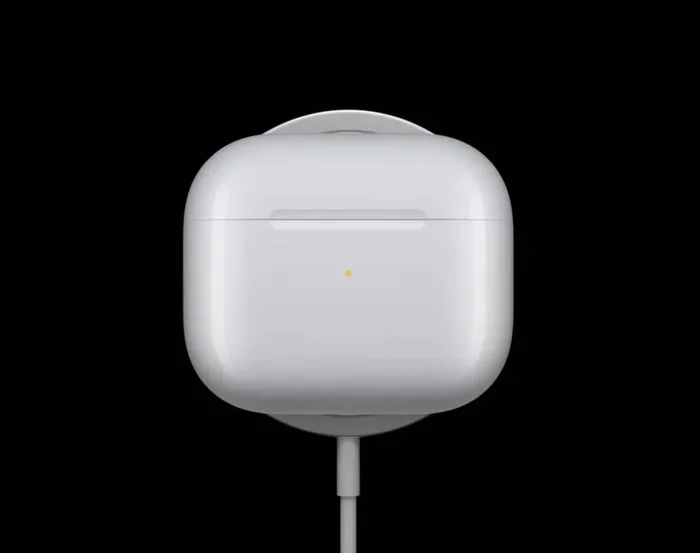
Featured image for AirPods USB-C charging case
Image source: cdn.wccftech.com
Yes, most newer AirPods models now feature USB-C charging. Apple began transitioning AirPods from the Lightning connector to USB-C starting in September 2023, aligning with EU regulations requiring a universal charging standard. Currently, AirPods Pro (2nd gen), AirPods 4, and AirPods Max (USB-C version) all support USB-C charging.
If you’ve been eyeing a new pair of AirPods or wondering whether your current ones will need an adapter, you’re not alone. The switch from Apple’s proprietary Lightning connector to the universal USB-C standard has left many users confused about which models have what. Think of it like the transition from old phone chargers to the ones we all use today. It happens gradually, and suddenly you realize half your drawer is filled with cables you don’t need anymore.
The short answer is: yes, most new AirPods now use USB-C. But the full picture is more nuanced. Some models have it, others don’t, and knowing the difference can save you money and frustration. Whether you’re shopping for your first pair or considering an upgrade, this guide will walk you through everything you need to know about AirPods and USB-C.
We’ll cover which AirPods have USB-C, why Apple made the switch, what it means for you, and how to tell what you’re getting before you buy. Let’s dive in and clear up the confusion once and for all.
Key Takeaways
- USB-C Transition Began in 2023: Apple announced the shift to USB-C for AirPods during the September 2023 “Wonderlust” event, driven largely by EU regulations mandating a universal charging port.
- Not All AirPods Have USB-C: Older models like AirPods (2nd and 3rd gen) and AirPods Pro (1st gen) still use the proprietary Lightning connector.
- Current USB-C Models Include: AirPods Pro (2nd gen with USB-C case), AirPods 4 (both versions), AirPods 4 with Active Noise Cancellation, and the updated AirPods Max.
- The Case Matters Most: The USB-C port is on the charging case, not the earbuds themselves. The earbuds charge via contact points inside the case.
- EU Regulation Forced the Change: The European Union’s Common Charger Directive required all small electronic devices to adopt USB-C by December 2024.
- Backwards Compatibility Exists: You can charge USB-C AirPods with any USB-C cable, including those from Android phones, laptops, and tablets.
- Future-Proof Investment: Buying USB-C AirPods ensures compatibility with the vast majority of modern devices and cables you’ll own for years to come.
📑 Table of Contents
- The Quick Answer: Which AirPods Use USB-C Right Now?
- Why Did Apple Switch AirPods to USB-C?
- A Complete History of AirPods Charging Ports
- How to Tell If Your AirPods Have USB-C or Lightning
- What This Means for Your Daily Life
- Buying Guide: Which AirPods Should You Choose?
- The Future of AirPods Charging
- Common Questions and Misconceptions
- Final Thoughts: The USB-C Era Is Here
The Quick Answer: Which AirPods Use USB-C Right Now?
Let’s get straight to the point. As of 2025, Apple sells four AirPods models, and three of them feature USB-C charging. Here’s the current lineup at a glance:
- AirPods Pro (2nd generation) with USB-C Case – Released September 2023, this is the premium option with active noise cancellation.
- AirPods 4 – Released September 2024, this is the basic model without noise cancellation.
- AirPods 4 with Active Noise Cancellation – Also released September 2024, this mid-tier option includes premium features.
- AirPods Max (USB-C version) – Released September 2024, this over-ear headphone now ships with USB-C instead of Lightning.
Still using Lightning? The AirPods (2nd generation), AirPods (3rd generation), and AirPods Pro (1st generation) all continue to use the older Lightning connector. You can still find some of these on sale through third-party retailers, but Apple no longer manufactures them.
Did You Know? Apple’s transition to USB-C across its product line has been remarkably fast. The iPhone 15, released in September 2023, was the first iPhone to feature USB-C. Just one year later, the entire AirPods lineup (except older stock) had followed suit.
Why Did Apple Switch AirPods to USB-C?
You might be wondering why Apple, a company famous for using its own proprietary connectors, suddenly embraced USB-C. The answer involves a mix of regulatory pressure, industry trends, and practical benefits.
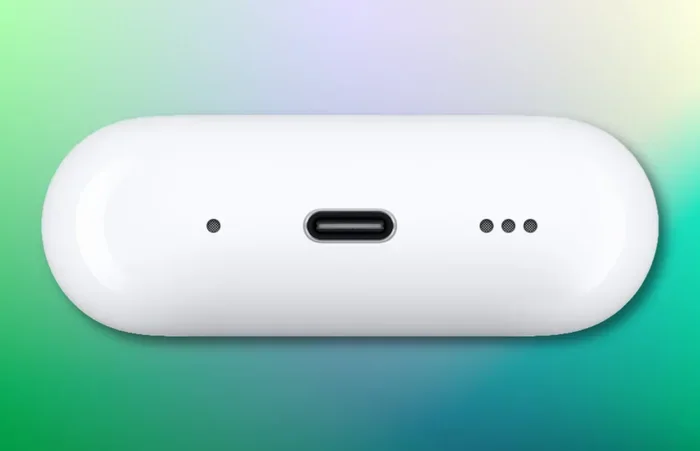
Visual guide about AirPods USB-C charging case
Image source: iphoned.nl
The EU Common Charger Directive
The biggest driver behind Apple’s switch is the European Union’s Common Charger Directive. This regulation, passed in 2022, required all smartphones, tablets, headphones, and other small electronic devices sold in the EU to use USB-C as a standard charging port by December 28, 2024.
Think of it like how every car in the United States runs on gasoline. If half the cars needed a special fuel that only worked at certain stations, it would be a huge inconvenience. The EU wanted to eliminate that hassle for consumers by standardizing on one cable type.
Apple had two choices: create separate Lightning versions just for certain markets, or switch everything globally. They chose the latter, which makes sense from a manufacturing and design perspective.
Consumer Convenience
Beyond regulations, USB-C simply makes life easier. One cable can charge your iPhone, iPad, MacBook, Nintendo Switch, Android phone, wireless earbuds, and countless other devices. This reduces cable clutter and means you’re less likely to be caught without the right charger.
Did You Know? The average household owns approximately 10 different charging cables, according to a 2022 survey by the Consumer Technology Association. Standardizing on USB-C helps reduce this number significantly.
Industry-Wide Momentum
USB-C has become the universal standard for modern electronics. Most new laptops, tablets, phones, and accessories released in the past five years use USB-C. Apple adopting this standard simply acknowledges what the rest of the industry has been doing.
A Complete History of AirPods Charging Ports
Understanding where we are now requires looking at where we’ve been. Apple’s AirPods charging journey has gone through several phases.
The Original AirPods Era: 2016-2019
When AirPods first launched in December 2016, they used the Lightning connector that Apple introduced with the iPhone 5 in 2012. The original AirPods and AirPods (2nd generation) both charged exclusively via Lightning.
Back then, Lightning was actually a forward-thinking design. It was smaller, reversible, and could carry both power and data. But technology moves forward, and Lightning began to show its age.
The Wireless Charging Era: 2019-2023
Apple introduced wireless charging cases with AirPods (2nd generation) in 2019, but the wired charging option remained Lightning. The AirPods Pro launched in October 2019 with a Lightning case that supported both wired and wireless charging.
The AirPods (3rd generation) launched in October 2021, still with Lightning. At this point, most of the tech world had moved to USB-C, but Apple held firm with Lightning for its mobile devices.
The USB-C Transition: 2023-Present
The shift happened quickly once Apple committed. In September 2023, alongside the iPhone 15 announcement, Apple released the AirPods Pro (2nd generation) with a USB-C charging case. The AirPods 4 lineup followed in September 2024, along with an updated AirPods Max featuring the new connector.
What About the iPhone?
The iPhone made the same journey. The iPhone 15 series, released in September 2023, was the first iPhone to feature USB-C. Every iPhone released since then (iPhone 16 series included) uses USB-C.
Did You Know? Apple had been including USB-C ports on MacBooks since 2015 and on iPads since 2018. The iPhone and AirPods were the last major holdouts.
How to Tell If Your AirPods Have USB-C or Lightning
Maybe you already own a pair of AirPods and aren’t sure which connector they use. Here’s how to find out without any guesswork.
Check the Charging Case
The simplest method is to look at the charging port on your AirPods case. Here’s what to look for:
- USB-C: The port is a small, oval-shaped slot with rounded edges. It looks the same as the charging port on modern MacBooks, iPads, and Android phones.
- Lightning: The port is smaller and more rectangular with sharp edges. It only fits Apple’s proprietary Lightning cable.
If you’re unsure, try inserting a USB-C cable. If it fits, you have the newer model. If not, you’re looking at the Lightning version.
Check the Model Number
Every AirPods case has a model number printed either inside the lid or on the bottom. You can also find it by going to Settings, General, About on your iPhone while your AirPods are connected.
Here are the model numbers for current AirPods cases:
- AirPods Pro (2nd gen) USB-C Case: A2968
- AirPods 4: A3053
- AirPods 4 with ANC: A3054
- AirPods Max USB-C: A3184
You can cross-reference these numbers on Apple’s website to confirm what you have.
Check the Packaging or Receipt
If you still have the original box or receipt, it will typically specify which connector the case uses. Look for “USB-C” or “Lightning” in the product description.
What This Means for Your Daily Life
So why does any of this matter? The shift to USB-C affects several practical aspects of using AirPods.
Travel Light with Fewer Cables
Before USB-C, traveling with Apple products meant packing multiple cables: Lightning for iPhone and AirPods, USB-C for MacBook and iPad. Now, a USB-C cable can charge everything. One cable in your bag handles your phone, earbuds, tablet, and laptop.
Imagine packing for a trip and only needing one type of cable. That’s the reality USB-C creates.
Charge Anywhere
USB-C is everywhere. You can charge your AirPods at a friend’s house using their Android phone charger. You can borrow a cable from a coworker. You can use the same cable that charges your laptop. This universal compatibility is genuinely useful.
Faster Charging Speeds
USB-C generally supports faster charging than Lightning. The AirPods Pro (2nd gen) with USB-C case can charge faster than the Lightning version, though the difference is modest given the small battery size. You’re looking at roughly an hour for a full case charge, compared to slightly longer with Lightning.
Better Compatibility with Non-Apple Devices
If you use a mix of Apple and non-Apple devices, USB-C makes everything work together. You can charge AirPods from a Samsung phone charger, a Dell laptop, or a Nintendo Switch dock. This cross-platform compatibility is one of USB-C’s biggest selling points.
Environmental Impact
Standardizing on one charger type reduces electronic waste. The European Commission estimated that the common charger rule could save consumers €250 million annually and reduce 11,000 tons of charger waste per year. While AirPods are a small part of this, they contribute to the broader trend.
Did You Know? The average consumer spends approximately $30-$50 on replacement cables over a device’s lifetime. Standardizing on USB-C could cut this cost significantly.
Buying Guide: Which AirPods Should You Choose?
If you’re shopping for new AirPods, here’s how to decide based on your needs and budget.
Budget Option: AirPods 4 ($129)
The basic AirPods 4 offer solid sound quality, the H2 chip, and USB-C charging at an accessible price point. You don’t get active noise cancellation, but you do get the essential AirPods experience. This is the best choice if you want AirPods without the premium features.
Mid-Range: AirPods 4 with ANC ($179)
This version adds active noise cancellation, transparency mode, and adaptive audio. It’s the sweet spot for many users, offering most of the AirPods Pro experience at a lower price. The USB-C case also supports wireless charging.
Premium: AirPods Pro (2nd gen) ($249)
The AirPods Pro remain the flagship option with silicone tips for a better seal, superior noise cancellation, conversation awareness, and the full feature set. If you want the best AirPods experience, this is it. The USB-C case also includes a built-in speaker for Find My and a lanyard loop.
Over-Ear Option: AirPods Max ($549)
The AirPods Max are Apple’s premium over-ear headphones, now featuring USB-C. They offer excellent sound quality and noise cancellation but at a significantly higher price than the in-ear options.
Should You Buy Older Lightning Models?
You might find older AirPods with Lightning connectors on sale through third-party retailers. While the savings can be tempting, we’d generally recommend buying USB-C models unless the discount is substantial. You’ll have the older AirPods for years, and USB-C ensures compatibility with your future devices.
Think of it like buying a car. A 2015 model might be cheaper, but it won’t have the features and connectivity of a newer one. The same principle applies here.
The Future of AirPods Charging
What’s next for AirPods? While USB-C is the standard now, the industry is already looking at what comes after.
Wireless Charging Is Growing
All current AirPods cases support Qi wireless charging, and Apple has been pushing MagSafe and now Qi2 standards. Wireless charging is becoming faster and more efficient. In a few years, the port might matter less as wireless charging becomes the norm.
The iPhone May Go Portless
There have been persistent rumors about Apple eventually removing ports from iPhones entirely, relying solely on wireless charging and data transfer. If this happens, AirPods will likely follow suit, though this transition is still years away.
USB-C Is Here to Stay
Regardless of long-term trends, USB-C will be the standard for the foreseeable future. Any AirPods you buy today will work with cables and chargers you’ll own for many years. This makes USB-C AirPods a safe, future-proof investment.
Did You Know? The USB Implementers Forum, the organization behind USB standards, reports that over 1 billion USB-C devices ship annually. This massive installed base ensures USB-C will remain relevant for at least the next decade.
Common Questions and Misconceptions
Let’s clear up a few common points of confusion about AirPods and USB-C.
Can I Use the Same Cable for My iPhone and AirPods?
Yes, absolutely. Once both your iPhone and AirPods use USB-C, a single cable works for both. This is one of the main benefits of Apple’s transition.
Do USB-C AirPods Work with Older iPhones?
Yes. The charging port on the case doesn’t affect Bluetooth compatibility. USB-C AirPods work with any iPhone running iOS 17 or later, including older Lightning-equipped iPhones. You just can’t charge the case with your old iPhone cable.
Will Lightning AirPods Stop Working?
No. Your Lightning AirPods will continue to function normally. Apple will support them with software updates for years to come. The only issue is finding Lightning cables when you need replacements.
Is the Sound Quality Different Between Lightning and USB-C Models?
No. The charging port has no effect on audio quality. Sound quality differences between AirPods models come from the drivers, chips, and design, not the charging connector.
Can I Charge USB-C AirPods with My MacBook?
Yes. Any USB-C cable and charger will work with USB-C AirPods. You can charge them from your MacBook, iPad, Android phone, or any USB-C power source.
Final Thoughts: The USB-C Era Is Here
The transition from Lightning to USB-C marks the end of an era for Apple’s mobile devices. While some users miss the simplicity of having one proprietary connector, the practical benefits of USB-C are undeniable. Fewer cables, wider compatibility, faster charging, and future-proof design make USB-C the clear winner.
For anyone shopping for AirPods today, USB-C models are the obvious choice. You’ll get a product that works with the cables you already own, charges faster, and will remain compatible with devices for years to come. The days of searching for a Lightning cable are numbered.
Whether you choose the basic AirPods 4, the noise-cancelling AirPods 4 with ANC, the premium AirPods Pro, or the over-ear AirPods Max, you’re getting a USB-C-equipped product ready for the modern tech landscape. That’s a win for convenience, compatibility, and your cable drawer.
The next time someone asks you, “Do AirPods have USB-C now?” you’ll know exactly what to tell them.