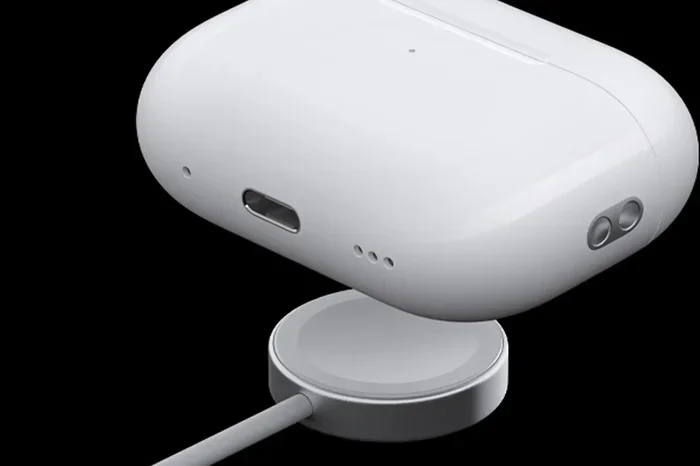
Featured image for AirPods USB-C charger
Image source: b2c-contenthub.com
Yes, modern AirPods do have USB-C charging. Apple made the switch from Lightning to USB-C starting with the AirPods Pro 2nd generation in 2023, and now most current AirPods models come with USB-C charging cases. The standard AirPods 4 also adopted USB-C, while older models like the AirPods 2 and 3 still use Lightning connectors.
Have you ever reached for a charging cable and found a tangled mess of different connectors? If so, you are not alone. For years, Apple users dealt with separate Lightning cables for their iPhones, iPads, and AirPods. But things have changed. Today, USB-C has become the new standard across Apple’s portable devices, including most AirPods models.
If you are wondering whether your AirPods use USB-C, the answer depends on which model you own. Newer AirPods released from 2023 onward now feature USB-C charging cases, making it easier than ever to charge your wireless earbuds using the same cable you use for your laptop, phone, or tablet. This guide will walk you through everything you need to know about AirPods and USB-C, including which models have it, which ones do not, and how to tell what you have.
By the end of this article, you will know exactly what type of charging port your AirPods use. You will also learn about the history behind this change, the practical benefits of USB-C, and what to do if you are still stuck with an older Lightning model. Let us dive in and clear up the confusion once and for all.
Key Takeaways
- AirPods Pro 2 (USB-C): Released in September 2023, this was Apple’s first AirPods model to feature a USB-C charging case instead of Lightning.
- AirPods 4 with USB-C: Both the standard and Active Noise Cancellation versions of AirPods 4 launched in 2024 with USB-C charging cases.
- AirPods Max: The premium over-ear headphones still use a Lightning connector, though a USB-C version was released in 2024.
- AirPods Pro 3: The latest AirPods Pro released in September 2025 feature USB-C charging cases.
- Older Models: AirPods 1, 2, and 3 (Lightning version) still use Apple’s proprietary Lightning connector for charging.
- Universal Charging: USB-C allows you to use the same cable for your iPhone 15/16, iPad, Mac, and AirPods.
- EU Regulation: Apple switched to USB-C partly due to European Union regulations requiring a common charging standard.
📑 Table of Contents
- The Short Answer: Yes, Most New AirPods Have USB-C
- A Complete Timeline of AirPods Charging Ports
- Which AirPods Models Have USB-C?
- Which AirPods Models Do NOT Have USB-C?
- How to Tell If Your AirPods Have USB-C or Lightning
- Benefits of USB-C Charging on AirPods
- What About Charging Without Wires?
- Common Questions and Practical Tips
- The Future of AirPods Charging
- Final Thoughts
The Short Answer: Yes, Most New AirPods Have USB-C
Let us start with the simplest answer to your question. Yes, most new AirPods do have USB-C. Since September 2023, Apple has been transitioning its AirPods lineup to use USB-C instead of the older Lightning connector. This shift was driven by a mix of new technology, customer convenience, and government regulations.
Think of USB-C as the universal remote control of charging cables. Just like a universal remote works with your TV, sound system, and streaming device, a USB-C cable works with your phone, laptop, tablet, game console, and now your AirPods. One cable to rule them all. That is the goal, anyway.
Here is a quick overview of which AirPods models currently use USB-C:
- AirPods Pro 2 (USB-C version): Released September 2023
- AirPods 4: Released September 2024 (both standard and ANC versions)
- AirPods Max (USB-C version): Released September 2024
- AirPods Pro 3: Released September 2025
If your AirPods were purchased before late 2023, there is a good chance they still use the older Lightning connector. But do not worry. We will help you figure out exactly what you have later in this article.
Why Did Apple Switch to USB-C?
You might be wondering why Apple made this change in the first place. After all, Apple stuck with the Lightning connector for nearly a decade after introducing it in 2012. There are three main reasons for the switch:
1. European Union Regulations. In 2022, the European Union passed a law requiring all smartphones, tablets, and headphones sold in EU countries to use USB-C charging by the end of 2024. Since Europe is a massive market for Apple, it made financial sense to switch globally rather than make two different versions.
2. Customer Convenience. Let us be honest. Carrying around multiple cables is annoying. Most people already had USB-C cables for their laptops, Android phones, or other devices. By switching AirPods to USB-C, Apple made life easier for its customers.
3. Industry Standard. USB-C is faster, more powerful, and more versatile than Lightning. It supports faster charging speeds, higher data transfer rates, and can even carry video signals. The industry as a whole has moved toward USB-C, and Apple decided to follow suit.
Did you know that the European Union estimates this common charger rule will save consumers around €250 million per year on unnecessary cable purchases? That is a lot of money no longer wasted on duplicate chargers.
A Complete Timeline of AirPods Charging Ports
To really answer the question “do AirPods have USB-C,” it helps to understand the history. Apple has released several different AirPods models since 2016, and not all of them use the same charging port. Let us walk through the timeline so you can see exactly when the switch happened.
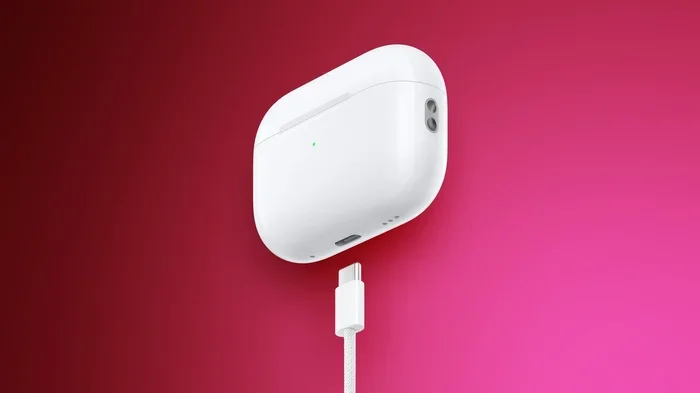
Visual guide about AirPods USB-C charger
Image source: images.macrumors.com
2016-2019: The Lightning Era Begins
The original AirPods launched in December 2016 with a charging case that used a Lightning connector. This made sense at the time because every iPhone and iPad also used Lightning. If you owned Apple products, you had plenty of Lightning cables lying around.
AirPods 1 and AirPods 2 both shipped with Lightning charging cases. The AirPods 2 also offered an optional wireless charging case, but even that case used Lightning for wired charging.
2019-2022: AirPods Pro and the Lightning Standard
In October 2019, Apple launched the AirPods Pro, which featured a Lightning charging case. In October 2021, the AirPods 3 launched with a Lightning case as well. During this period, Lightning was still the standard across Apple’s portable device lineup.
2023: The Big Switch Begins
September 2023 was a turning point. Apple quietly updated the AirPods Pro 2 to include a USB-C charging case instead of Lightning. This was the first AirPods model to officially support USB-C. At the same time, Apple released the iPhone 15, which also made the switch to USB-C.
This was a big deal because it meant iPhone users could finally charge their phone and their AirPods with the same cable. No more digging through drawers to find the right one.
2024-2025: USB-C Becomes Standard
In September 2024, Apple launched the AirPods 4 in two versions. Both the standard AirPods 4 and the AirPods 4 with Active Noise Cancellation came with USB-C charging cases. Apple also released a USB-C version of the AirPods Max over-ear headphones.
In September 2025, Apple released the AirPods Pro 3, continuing the USB-C trend. As of today, every new AirPods model Apple sells features USB-C charging.
Which AirPods Models Have USB-C?
Now let us get into the specifics. If you are shopping for new AirPods or trying to figure out what you already own, here is a complete breakdown of every current AirPods model and its charging port type.
AirPods Pro 3 (2025): Yes, USB-C
The newest AirPods Pro feature a USB-C case. Released in September 2025, this is Apple’s flagship earbuds model. The USB-C case supports both wired charging via cable and wireless charging via Qi or MagSafe-compatible chargers.
AirPods 4 (2024): Yes, USB-C
Both versions of the AirPods 4 use USB-C. This includes the basic AirPods 4 and the AirPods 4 with Active Noise Cancellation. The ANC version also supports wireless charging, but the wired connection is USB-C.
AirPods Max (2024 USB-C Version): Yes, USB-C
In September 2024, Apple released an updated AirPods Max that switched from Lightning to USB-C. However, the original AirPods Max released in 2020 still uses Lightning. If you have the older version, you are stuck with a Lightning cable for now.
AirPods Pro 2 (2023 USB-C Version): Yes, USB-C
The AirPods Pro 2 originally launched in 2022 with a Lightning case, but Apple released a USB-C version in September 2023. You can still find the Lightning version in some stores and warehouses, so check carefully before buying.
Which AirPods Models Do NOT Have USB-C?
Not every AirPods model has made the switch. If you bought your AirPods before 2023, chances are they still use the older Lightning connector. Here are the models that still use Lightning.
AirPods 1, 2, and 3: Lightning Only
The original AirPods and AirPods 2 both came with Lightning charging cases. The AirPods 3 also used Lightning. If you own any of these models, you will need a Lightning cable to charge them. The good news is that iPhone 14 and earlier still ship with Lightning cables, so you might already have one.
AirPods Pro 1: Lightning Only
The first-generation AirPods Pro, released in 2019, came with a Lightning charging case. There is no USB-C version of the original AirPods Pro.
AirPods Max (Original 2020 Version): Lightning Only
The original AirPods Max from 2020 uses a Lightning connector for charging. If you want USB-C on your AirPods Max, you will need to buy the 2024 version or newer.
AirPods Pro 2 (2022 Lightning Version): Lightning Only
Yes, this is confusing. The AirPods Pro 2 came in two versions. The original 2022 version uses Lightning, while the 2023 refresh uses USB-C. They look almost identical from the outside, but the ports are different. The only way to tell them apart is to look at the charging port on the bottom of the case.
Here is a simple analogy. Think of it like buying a new car. The 2022 and 2023 models might look the same on the outside, but one has a gas cap on the left side and the other has it on the right. You need to look at the small details to know which one you have.
How to Tell If Your AirPods Have USB-C or Lightning
Not sure which version you own? Do not worry. There are a few simple ways to find out.
Look at the Charging Port
This is the easiest method. Grab your AirPods case and look at the bottom where you plug in the charging cable.
- If the port is small, oval-shaped, and has 8 pins inside, you have a Lightning connector.
- If the port is larger, oval-shaped, and has a hollow center, you have a USB-C connector.
Another way to remember: Lightning is like a tiny rounded rectangle, while USB-C is a slightly larger rounded rectangle with no pins.
Check Your iPhone Settings
If you have paired your AirPods with your iPhone, you can check what model you have by following these steps:
- Open the Settings app on your iPhone.
- Tap on Bluetooth.
- Find your AirPods in the list and tap the “i” icon next to them.
- Look for the Model Number.
Here are the model numbers for AirPods with USB-C:
- A2968: AirPods Pro 2 (USB-C)
- A3053, A3054, A3055: AirPods 4 (USB-C)
- A3184: AirPods Pro 3
If you see a different model number, you likely have a Lightning version.
Check the Original Packaging
If you still have the box your AirPods came in, the model number is printed on the side. You can also look at the cable that came in the box. If it is a USB-C cable with a small oval connector, you have a USB-C model. If it is a Lightning cable with a tiny 8-pin connector, you have a Lightning model.
Benefits of USB-C Charging on AirPods
If you are still using an older Lightning model, you might be wondering whether it is worth upgrading. Here are some real benefits of having USB-C on your AirPods.
One Cable for Everything
This is the biggest benefit for most people. With USB-C, you can charge your iPhone 15 or 16, your iPad, your MacBook, your AirPods, and even your Nintendo Switch with the same cable. If you travel, this means packing fewer cables and adapters.
Imagine going on a trip and only needing to bring two cables instead of five. That is the freedom USB-C gives you.
Faster Charging Speeds
USB-C can deliver more power than Lightning, which means faster charging in many cases. While AirPods do not need a ton of power (their batteries are tiny), USB-C can still charge them slightly faster. For example, the AirPods Pro 2 with USB-C can deliver about an hour of listening time from just five minutes in the case.
Better Durability
USB-C connectors are designed to be more durable than Lightning. They can withstand more insertion and removal cycles. According to the USB Implementers Forum, USB-C connectors are rated for at least 10,000 connect-disconnect cycles. Lightning connectors are rated for fewer cycles.
Think of USB-C like a well-built door hinge. It is designed to swing open and closed thousands of times without wearing out.
Future-Proof Technology
USB-C is here to stay. It is the standard for nearly every new electronic device being made today. By switching to USB-C, Apple has made AirPods compatible with the next decade of technology. You will not have to worry about your charging cable becoming obsolete anytime soon.
Works With Non-Apple Devices
If you have friends or family with Android phones, Chromebooks, or Windows laptops, you can share your USB-C cable with them. Lightning cables only work with Apple products, which can be inconvenient in mixed-device households.
What About Charging Without Wires?
You might be wondering whether USB-C means you still need a cable. The answer is no. Most modern AirPods with USB-C also support wireless charging, so you have options.
MagSafe and Qi Wireless Charging
The AirPods Pro 2 (USB-C), AirPods Pro 3, and AirPods 4 with ANC all support wireless charging. You can place the case on any Qi-compatible wireless charger or a MagSafe charger. The case will start charging automatically.
This is like having two fuel pumps at a gas station. You can use either one, and both will fill up your tank.
Apple Watch Charger Compatibility
One fun fact: the AirPods Pro 2 (USB-C) and AirPods Pro 3 can also be charged using an Apple Watch charging puck. This is a neat little bonus if you already have an Apple Watch charger lying around.
Charging Speeds Compared
Wireless charging is generally slower than wired USB-C charging, but it is more convenient. If you are in a hurry, plug in a USB-C cable. If you are sitting at your desk, drop the case on a wireless pad. Either way, your AirPods will be ready to go.
Common Questions and Practical Tips
Let us wrap up with some practical advice and answers to questions you might still have.
Can I Use Any USB-C Cable?
Yes, any USB-C cable will work to charge your AirPods. You do not need a special Apple-branded cable. However, for the best charging speeds and safety, look for cables that are USB-IF certified. These cables have been tested to meet safety and performance requirements.
Avoid cheap, no-name cables from unknown sellers. They might not meet safety standards and could damage your device over time.
What If I Lose My USB-C Cable?
USB-C cables are everywhere these days. You can find them at electronics stores, pharmacies, airports, and even gas stations. If you have a friend with an Android phone, they almost certainly have a USB-C cable you can borrow.
Can I Charge AirPods Without the Case?
Unfortunately, no. AirPods cannot be charged without their case. The case acts as both a charger and a battery backup. If your case dies, your AirPods die too. Always make sure your case has some battery life before heading out.
How Long Does It Take to Charge AirPods via USB-C?
Charging times vary by model, but here are some general guidelines:
- 5 minutes in the case: About 1 hour of listening time
- 15 minutes in the case: About 3 hours of listening time
- Full charge: Around 1 hour for the earbuds and 1-2 hours for the case
Is It Worth Buying New AirPods Just for USB-C?
It depends on your situation. If your current AirPods work fine and you have plenty of Lightning cables, there is no urgent need to upgrade. However, if you are in the market for new earbuds anyway, choosing a USB-C model makes sense for the long term. You will be able to use the same cable for years to come.
Do AirPods Pro 3 Charge Faster Than AirPods Pro 2?
Charging speeds are similar between these two models. Both support fast charging via USB-C. The AirPods Pro 3 may have slightly better battery life, but charging times are roughly the same.
The Future of AirPods Charging
Looking ahead, it is clear that USB-C is the new standard for AirPods and most other consumer electronics. Apple has committed to USB-C across its product lineup, and there are no signs of going back to Lightning.
In fact, industry experts predict that wireless charging will become even more popular in the coming years. Future AirPods models might rely entirely on wireless charging, with the USB-C port becoming optional or removed entirely. For now, though, USB-C remains the primary charging method for most AirPods.
Did you know that over 3 billion USB-C devices are expected to be shipped worldwide in 2025? That makes USB-C one of the most widely adopted charging standards in history. Your AirPods are joining a massive global ecosystem.
Final Thoughts
So, do AirPods have USB-C? The answer is a clear yes for most models released from 2023 onward. The AirPods Pro 2 (USB-C version), AirPods 4, AirPods Max (2024 version), and AirPods Pro 3 all feature USB-C charging cases. Older models like the AirPods 1, 2, 3, original AirPods Pro, and original AirPods Max still use Lightning connectors.
The switch to USB-C is great news for consumers. It means fewer cables to keep track of, faster charging, and better compatibility with non-Apple devices. Whether you are buying new AirPods or trying to figure out what you already own, knowing whether your earbuds have USB-C or Lightning is important.
If you are still using an older AirPods model with Lightning, do not stress about it. Your earbuds still work perfectly fine, and Lightning cables are still available. But when it is time to upgrade, choosing a USB-C model will make your life a little simpler. One cable for your phone, your tablet, your laptop, and your AirPods. That is the future Apple is building, and it is a future worth getting excited about.
Thanks for reading! If you found this guide helpful, feel free to share it with friends who might be wondering the same thing about their AirPods.