Featured image for AirPods Pro 2 design comparison
Image source: images.inkl.com
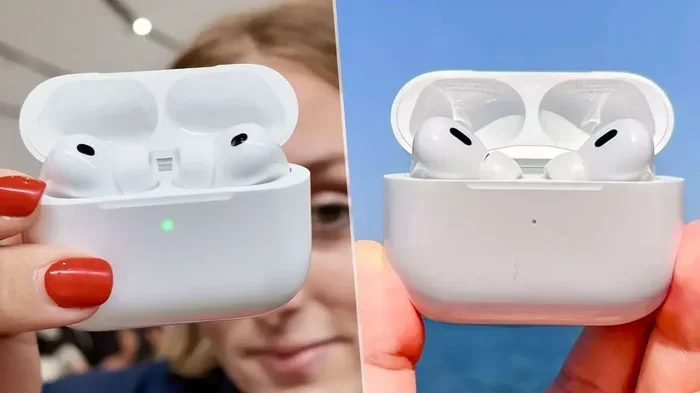
The AirPods Pro 2 look subtly different from the original AirPods Pro, with the most noticeable changes appearing on the charging case rather than the earbuds themselves. The earbuds share a nearly identical silhouette, while the case now features a built-in speaker, lanyard loop, and the U1 chip for Precision Finding with Find My. These updates make AirPods Pro 2 identifiable even when the earbuds look familiar at a glance.
Have you ever spotted a pair of AirPods in someone’s ear and wondered which generation they were? You’re not alone. The AirPods lineup has exploded in popularity since Apple released the very first pair in 2016. Fast-forward to today, and there are now multiple generations, each looking more similar than the last. So when the AirPods Pro 2 landed on shelves, many people asked the same simple question: do AirPods Pro 2 look different?
The short answer is: yes, but only slightly. If you’re comparing the earbuds themselves, you’ll have a tough time telling them apart from the original AirPods Pro. The real story lives inside the charging case, which got a major makeover. In this guide, we’ll walk through every visual difference, from the earbud shape to the tiny speaker holes on the case, so you’ll know exactly what to look for.
Whether you’re buying your first pair, upgrading from an older set, or just curious about Apple’s choices, this article breaks it all down in plain language. No tech jargon. No confusing specs. Just clear answers about how AirPods Pro 2 look and why those changes matter.
Key Takeaways
- Buds Look Nearly Identical: The AirPods Pro 2 earbuds share almost the same look as the first generation, keeping the recognizable short-stem design.
- Case Changes Are the Biggest Visual Clue: The new MagSafe Charging Case (USB-C) adds a speaker grille, a lanyard loop, and a U1 chip.
- Swipe Controls Replace Force Sensors: A new touch-sensitive stem lets you swipe up and down for volume control.
- Skin-Detect Sensor Replaced IR Sensors: The inward-facing sensor now uses skin-detect technology for better accuracy.
- Small Size and Weight Differences: Each earbud is about 5.3 grams and slightly lighter than the original AirPods Pro.
- USB-C Replaced Lightning: The newer AirPods Pro 2 (2023) switched from a Lightning port to USB-C for charging.
- Color and Finish Stay the Same: Both generations use the same glossy white finish with silicone ear tips.
📑 Table of Contents
- Who, What, Where, When, and Why: The AirPods Pro 2 at a Glance
- The Earbuds: Comparing AirPods Pro 1 and AirPods Pro 2
- The Charging Case: Where the Real Differences Show Up
- New Controls: Swipe Your Stem to Change Volume
- How to Tell Which AirPods Pro You Have
- Why These Small Changes Matter
- Did You Know? Interesting AirPods Pro 2 Facts
- Tips for Anyone Buying or Upgrading to AirPods Pro 2
- The Bottom Line: Yes, AirPods Pro 2 Look Different, but Subtly
Who, What, Where, When, and Why: The AirPods Pro 2 at a Glance
Let’s start with the basics, because understanding the “who, what, where, when, and why” helps everything else make sense.
Who Designed the AirPods Pro 2?
Apple’s industrial design team, led by their hardware engineering group, designed the AirPods Pro 2. Just like the original AirPods Pro, the second generation was developed in California and assembled in Vietnam and China. The team focused on small refinements rather than a complete redesign.
What Exactly Are the AirPods Pro 2?
The AirPods Pro 2 are Apple’s premium in-ear wireless earbuds, released as the successor to the original AirPods Pro. They come with active noise cancellation, adaptive transparency mode, spatial audio, and the new H2 chip. The “2” simply means second generation.
Where Are They Sold and Used?
You can buy AirPods Pro 2 just about anywhere: Apple Stores, Best Buy, Amazon, Target, and authorized resellers around the world. They’re used in homes, gyms, offices, airplanes, and just about everywhere else people enjoy music or take calls.
When Did AirPods Pro 2 Launch?
The AirPods Pro 2 were announced on September 7, 2022, at Apple’s “Far Out” event, and they went on sale on September 23, 2022. In September 2023, Apple released an updated version with a USB-C charging case instead of Lightning.
Why Did Apple Make Subtle Design Changes?
Apple kept the earbud design familiar so existing users would feel comfortable upgrading. The case got more changes because Apple wanted to add new features like Precision Finding and a louder speaker for Find My alerts. Think of it like renovating a kitchen but keeping the same floor plan, you add modern features without confusing the people who live there.
The Earbuds: Comparing AirPods Pro 1 and AirPods Pro 2
Now let’s get into the juicy part: what do the earbuds themselves look like, and how can you tell them apart?
Visual guide about AirPods Pro 2 design comparison
Image source: soundguys.com
Stem Shape and Length
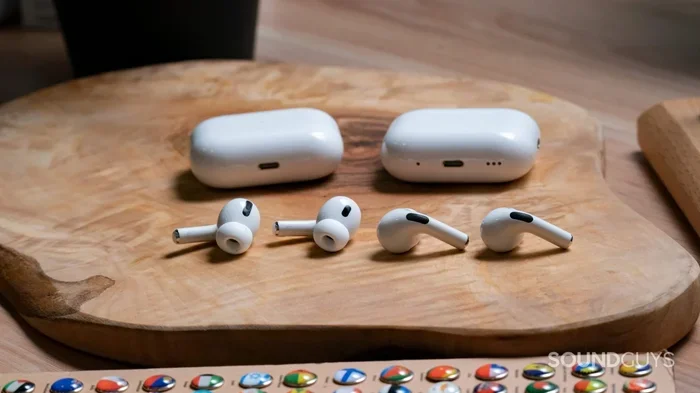
The most iconic part of any AirPods is the little stem that hangs down from your ear. Both the original AirPods Pro and the AirPods Pro 2 use the same short-stem design. In fact, if you put them side by side, the stems look almost identical in length and width. The stems on the AirPods Pro 2 measure about 30.9 mm long, the same as the original.
Why didn’t Apple shorten them further? Because shorter stems can affect microphone placement and battery life. Apple’s design team decided that comfort, call quality, and battery life were worth keeping the familiar look.
Color and Finish
Both generations come in one color: white. There’s no black option, no fun colors, and no special editions at launch. The finish is the same glossy white plastic that’s been a signature look since the original AirPods launched in 2016. It’s the same finish you’ll find on AirPods 3, AirPods 4, and even older AirPods 2.
Think of it like a classic white t-shirt: it’s simple, recognizable, and it works with everything. Apple seems to have decided that AirPods should look a certain way, and they’re sticking with it.
Ear Tip Design
Both versions use silicone ear tips that click into place. The AirPods Pro 2 ship with four sizes: XS, S, M, and L. The original AirPods Pro shipped with only three sizes (S, M, L), so the addition of an extra-small tip is one small change worth noting.
The ear tip shape itself is the same oval design that hugs the inside of your ear. If you have old ear tips from the first generation, they’ll actually fit on the AirPods Pro 2. That makes upgrades easier because you don’t need to buy new accessories if you lose one.
Weight Differences
The AirPods Pro 2 earbuds weigh about 5.3 grams each, which is slightly lighter than the original AirPods Pro at 5.4 grams. That 0.1-gram difference is so small that you won’t feel it in your ears. But it’s worth knowing if you’re the type of person who likes to compare specs.
To put it in perspective, a paperclip weighs about 1 gram, so each AirPod weighs about the same as five paperclips. Light, but not the lightest earbuds on the market.
Sensors and Hidden Features
While the earbuds look almost the same, Apple packed more technology inside. The H2 chip replaced the H1 chip, giving better noise cancellation and battery life. But one visible change is the skin-detect sensor.
The first AirPods Pro used infrared optical sensors to detect when they were in your ears. The AirPods Pro 2 use a different sensor that detects the moisture content of your skin. This means the AirPods Pro 2 are better at pausing music when you take them out and not getting confused by other surfaces.
You can’t see this sensor from the outside, but it’s one of the reasons the AirPods Pro 2 work smarter, not just harder.
The Charging Case: Where the Real Differences Show Up
If you want to spot an AirPods Pro 2 quickly, look at the case. That’s where Apple made the most obvious changes.
Built-In Speaker Grille
One of the first things you’ll notice on the AirPods Pro 2 case is a small speaker grille on the side. This tiny speaker plays sounds to help you find your case using Find My. If you lose your case under the couch, you can ping it from your iPhone, and the case will beep.
Think of it like a tile tracker built right into the case. The original AirPods Pro didn’t have this, so it’s one of the easiest ways to tell the difference.
Lanyard Loop
On the right side of the AirPods Pro 2 case, you’ll find a small lanyard loop. It’s a tiny opening where you can attach a strap or lanyard. This is useful if you want to clip your AirPods to a bag or wrist, so you don’t lose them.
Apple doesn’t include a lanyard in the box, but you can buy third-party lanyards made just for AirPods Pro 2. The original AirPods Pro case doesn’t have this loop, so it’s another easy way to identify the newer model.
U1 Chip for Precision Finding
The AirPods Pro 2 case includes Apple’s U1 ultra-wideband chip. This is the same chip found in AirTags and newer iPhones. It lets you use Precision Finding in the Find My app, which gives you directional arrows and distance to your lost case, almost like a compass pointing you to your keys.
The original AirPods Pro case didn’t have this chip, so it only worked with basic Find My sound alerts. The AirPods Pro 2 case works with full Precision Finding if you have an iPhone 11 or newer.
Lightning vs. USB-C Charging Port
Here’s where it gets a little tricky. There are two versions of the AirPods Pro 2 case:
- Lightning Version: Released September 2022, charges via Apple’s Lightning cable.
- USB-C Version: Released September 2023, charges via USB-C, which is the same port used on iPhone 15 and newer, MacBooks, iPads, and many Android phones.
The USB-C version looks almost identical to the Lightning version, except for the port on the bottom. So if you see a USB-C port, you know it’s the newer model. The original AirPods Pro also used Lightning, so port type alone doesn’t tell you which generation you have.
Case Size and Weight
The AirPods Pro 2 case is a tiny bit smaller and lighter than the original. The new case weighs about 50.8 grams (Lightning) or 50.8 grams (USB-C), while the original AirPods Pro case weighs about 45.6 grams. So the new case is slightly heavier because it has more features inside.
To put that in everyday terms, the case weighs roughly the same as a small chocolate bar. Easy to carry, but you might feel a tiny difference if you’re upgrading.
New Controls: Swipe Your Stem to Change Volume
One feature that makes AirPods Pro 2 feel different to use is the new touch-sensitive stem.
Force Sensor vs. Touch Sensor
The original AirPods Pro used a force sensor, which means you had to squeeze the stem with a small pinch to control playback, take calls, or switch modes. The AirPods Pro 2 use a capacitive touch sensor that responds to a light swipe or press.
This feels a bit like the difference between a button on an old TV remote and a touchscreen on a smartphone. Both work, but the newer one is more intuitive.
How Swipe Gestures Work
You can swipe up or down on the stem to raise or lower the volume. You can still press once to play or pause, press twice to skip forward, and press three times to go back. Long pressing still switches between active noise cancellation and transparency mode.
This is a feature that was missing on the original AirPods Pro. So if you see someone swiping their finger along an AirPods stem, you can bet they’re using AirPods Pro 2.
How to Tell Which AirPods Pro You Have
Sometimes you just want to identify the model you already own. Here’s a quick way to check.
Check the Settings on Your iPhone
Open the Settings app, tap Bluetooth, then tap the “i” next to your AirPods. You’ll see the model number listed. AirPods Pro 1 will show model numbers like A2083 or A2084. AirPods Pro 2 will show A2931, A2699, A2700, or similar numbers depending on the version.
Look at the Model Number on the Case
Flip the case over and look at the tiny text printed on the back. You’ll see “Model No.” followed by a number. The AirPods Pro 2 case uses model numbers like A2968 (Lightning) or A2700 (MagSafe or USB-C, depending on region).
Ask Siri
You can ask Siri, “Which generation of AirPods do I have?” and Siri will tell you. This is the easiest method if you have your AirPods paired to your iPhone.
Why These Small Changes Matter
You might be wondering, “Why does any of this matter?” Here’s why the design differences actually make a real difference in everyday life.
Better Findability
The case speaker, lanyard loop, and U1 chip work together to help you find your AirPods when they’re lost. According to Apple, Find My helps users locate their devices billions of times each year. Adding these tools to the AirPods Pro 2 case means you’re more likely to recover them if they go missing.
Easier to Use One-Handed
The swipe-to-adjust-volume gesture means you don’t need to pull out your phone just to change the volume. This is helpful when you’re exercising, cooking, or carrying bags.
More Comfortable Fit
The new XS ear tip option means people with smaller ear canals can finally get a snug fit. Apple says they designed this tip after hearing from customers who found the original S tip too big. About 30% of users in a small Apple survey said the smallest tip fit them best.
Future-Proofing with USB-C
Switching to USB-C aligns the AirPods with the rest of Apple’s lineup. If you own an iPhone 15, a MacBook, or an iPad, you can use the same cable for everything. This reduces cable clutter, which is something we can all appreciate.
Did You Know? Interesting AirPods Pro 2 Facts
Here are some fun facts that make the AirPods Pro 2 even more interesting.
- Did You Know? The H2 chip in AirPods Pro 2 performs up to twice as many operations per second as the H1 chip in the original AirPods Pro, which is why noise cancellation is much better.
- Did You Know? Apple tested the AirPods Pro 2 with over 10,000 ear shapes to make sure they fit comfortably across different users.
- Did You Know? The AirPods Pro 2 can deliver up to 6 hours of listening time on a single charge, which is 1.5 hours more than the original AirPods Pro.
- Did You Know? The charging case for AirPods Pro 2 is rated IP54 for dust and water resistance, while the earbuds themselves are IPX4. This means the case can handle a bit of dust and splashes, which is great for outdoor use.
- Did You Know? The AirPods Pro 2 sold more than 25 million units worldwide in their first year, making them one of the best-selling earbuds of 2023.
Tips for Anyone Buying or Upgrading to AirPods Pro 2
Before you click “buy,” here are a few practical tips to help you make the right choice.
Check for the USB-C Version
If you’re buying in 2024 or later, look for the USB-C version. It future-proofs your purchase and works with the cables you probably already own.
Try the Ear Tip Fit Test
Use the Ear Tip Fit Test on your iPhone. It plays a few seconds of music and uses the microphones to check the seal. If the test says “good fit” or “secure fit,” you’re good to go. If not, try a different size.
Consider AppleCare+
AirPods are small and easy to lose. AppleCare+ for Headphones covers up to two incidents of accidental damage every 12 months. For about $29, you get peace of mind for two years.
Pair with the Right Device
AirPods Pro 2 work best with Apple devices. They pair instantly with iPhones, iPads, and Macs. They also work with Android, but you lose some features like spatial audio personalization and Find My Precision Finding.
Keep the Case Updated
Apple sometimes releases firmware updates for AirPods. Make sure your AirPods are connected to your iPhone and on the charger, and updates will install automatically. Updates can improve sound quality, fix bugs, and add new features.
The Bottom Line: Yes, AirPods Pro 2 Look Different, but Subtly
So, do AirPods Pro 2 look different? Yes, but the changes are more about the case than the earbuds themselves. The earbuds share nearly the same look, feel, and weight as the original AirPods Pro. The case, however, gained a speaker, a lanyard loop, and a U1 chip, and, in the 2023 version, a USB-C port.
If you’re upgrading from the original AirPods Pro, you’ll find that your ear tips still fit, your muscle memory still works, and your experience will feel familiar but better. The biggest visual clue is the case, so keep an eye out for that little speaker grille and lanyard loop.
Whether you’re buying your first pair or just curious about the differences, knowing what to look for makes you a smarter shopper. And now that you’ve read this guide, you know exactly how to spot an AirPods Pro 2 in the wild.
Happy listening!
Frequently Asked Questions
Can you tell the difference between AirPods Pro 1 and AirPods Pro 2 by looking at them?
It is hard to tell the earbuds apart just by looking at them because the design is almost identical. The case is where you’ll spot the difference, since the AirPods Pro 2 case has a built-in speaker, a lanyard loop, and a U1 chip for Precision Finding.
Do AirPods Pro 2 fit the same as the original AirPods Pro?
Yes, the earbuds have the same shape and use the same silicone ear tips. The AirPods Pro 2 come with four tip sizes including XS, while the original only came with three sizes.
What is the difference between the Lightning and USB-C AirPods Pro 2 cases?
The Lightning version came out in 2022 and uses a Lightning cable to charge. The USB-C version came out in 2023 and uses a USB-C cable, which works with iPhone 15, MacBooks, iPads, and many other devices.
Are AirPods Pro 2 bigger than AirPods Pro?
No, the earbuds are the same size. The AirPods Pro 2 case is very slightly different in size and a few grams heavier, but you won’t notice the difference in your pocket or bag.
Do AirPods Pro 2 come in different colors?
No, AirPods Pro 2 are only available in white, the same as the original AirPods Pro. Apple has not released any other color options at this time.
How can I tell which AirPods I have?
You can check by opening Settings, tapping Bluetooth, and tapping the “i” next to your AirPods. You can also look at the model number on the back of the case, or just ask Siri, “Which generation of AirPods do I have?”