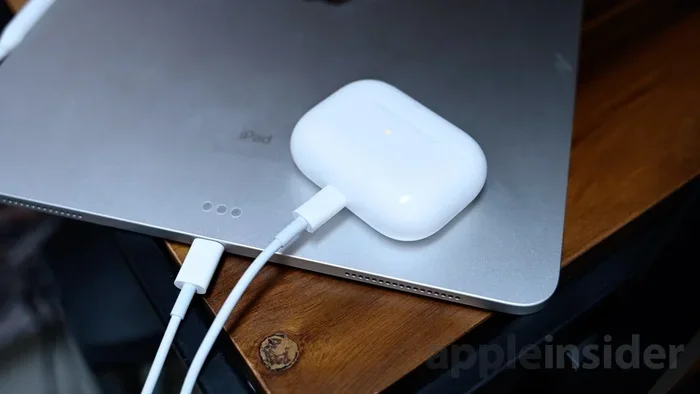
Featured image for AirPods Pro USB-A charging cable
Image source: photos5.appleinsider.com
Yes, you can absolutely charge your AirPods Pro with a USB-A cable, but you need the right setup. AirPods Pro cases come with a Lightning port (or USB-C on newer models), so you’ll need a USB-A to Lightning or USB-A to USB-C cable depending on your case version. As long as you use a quality cable and a reliable power source, charging via USB-A works just as well as any other method.
Picture this: you’re at a coffee shop, your AirPods Pro are blinking red, and the only charger available has that classic rectangular USB-A port. Panic sets in, right? Well, take a deep breath because you’re totally fine. The question of whether you can charge AirPods Pro with USB-A is one of the most common questions Apple users ask, especially those who haven’t upgraded to the latest USB-C accessories yet.
Here’s the thing: AirPods Pro charging isn’t as complicated as it sounds. Think of it like filling up a small water bottle. You can use any clean water source, whether it’s a kitchen tap, a filtered pitcher, or a water fountain. The bottle doesn’t care where the water comes from, as long as it’s clean and the flow isn’t too aggressive. Similarly, your AirPods Pro case doesn’t really care about the type of port, as long as the cable fits and the power output is safe.
In this guide, we’ll walk through everything you need to know about charging your AirPods Pro with USB-A. We’ll cover cable compatibility, charging speeds, safety tips, and even some troubleshooting advice. By the end, you’ll feel like a charging pro, ready to power up your earbuds anywhere, anytime. Let’s dive in!
Key Takeaways
- USB-A Charging Works: AirPods Pro can be charged using USB-A with the proper cable adapter, making it compatible with older chargers and ports.
- Cable Type Matters: Newer AirPods Pro (2nd gen) use USB-C, while older models use Lightning, so your cable must match your case port.
- Power Output Is Safe: USB-A ports typically deliver 5V/0.5A to 5V/2.4A, which is within the safe charging range for AirPods Pro.
- Slower Than USB-C: USB-A charging may be slightly slower than USB-C, but the difference is minimal for AirPods Pro due to their small battery.
- Quality Cables Are Key: Using MFi-certified (Made for iPhone) Lightning cables or certified USB-C cables prevents damage and ensures proper charging.
- Wireless Alternative: If you want to skip cables entirely, Qi or MagSafe wireless charging works with all AirPods Pro models.
- Travel-Friendly Option: USB-A is everywhere, from laptops to older wall chargers, making it a convenient choice when traveling.
📑 Table of Contents
- Understanding AirPods Pro Charging Basics
- Can You Actually Charge AirPods Pro with USB-A?
- USB-A vs. USB-C: What’s the Difference?
- Safety Tips for Charging AirPods Pro with USB-A
- Troubleshooting Common USB-A Charging Issues
- Alternative Charging Methods for AirPods Pro
- Travel Tips: Charging AirPods Pro with USB-A on the Go
- The Future of AirPods Pro Charging
- Final Thoughts
Understanding AirPods Pro Charging Basics
Before we get into the USB-A specifics, let’s cover the fundamentals. Understanding how your AirPods Pro charge will help you make smarter decisions about cables, chargers, and power sources.
How AirPods Pro Charging Works
Your AirPods Pro come with a charging case, and this case is the real hero. The earbuds themselves charge wirelessly inside the case using metal contacts. The case, on the other hand, charges via a physical port on the bottom or through Qi-compatible wireless charging pads. So when we talk about “charging AirPods Pro with USB-A,” we’re really talking about charging the case, which then charges the earbuds.
The process is simple. Electricity flows from your power source (wall charger, computer, power bank) through the cable into the case’s battery. The case stores this energy and uses it to top off your AirPods whenever they’re nestled inside. It’s like a tiny power bank for your earbuds!
The Two Types of Charging Cases
Did you know that there are actually two different types of AirPods Pro cases on the market? This is super important because it determines what kind of cable you need.
- Lightning Port Case: This is the original AirPods Pro case (1st generation) and the AirPods Pro 2 with Lightning port. It uses Apple’s proprietary Lightning connector.
- USB-C Port Case: This is the newer AirPods Pro 2 (released in September 2023) and the AirPods Pro 3 (if you have the latest model). It uses the universal USB-C standard.
To figure out which one you have, just flip your case over and look at the bottom. If you see a small Lightning port (similar to older iPhones), you have the Lightning version. If you see a small oval-shaped USB-C port, you have the USB-C version.
Why USB-A Still Matters in 2024 and Beyond
You might be thinking, “Why are we even talking about USB-A? Isn’t everything USB-C now?” Well, yes, USB-C is becoming the standard, but USB-A is still everywhere. According to industry estimates, there are over 10 billion USB-A devices in use worldwide. From older laptops to car chargers to power strips with built-in USB ports, USB-A remains a dominant force in the charging world.
Plus, many people still own perfectly good USB-A wall chargers from their older iPhones, Kindles, or Android phones. There’s no reason to throw them out when you can still use them effectively.
Can You Actually Charge AirPods Pro with USB-A?
Let’s cut right to the chase because that’s the main question you’re here to answer. The short answer is a resounding YES. You can charge your AirPods Pro with a USB-A connection, but you need the right cable.
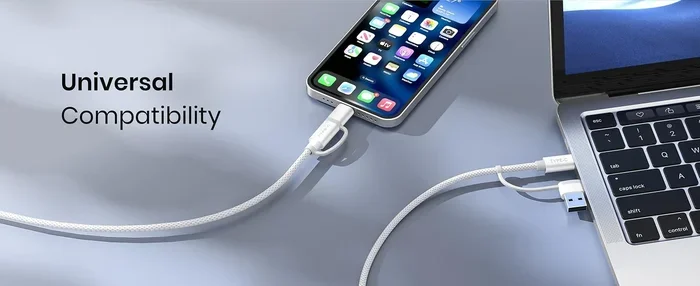
Visual guide about AirPods Pro USB-A charging cable
Image source: m.media-amazon.com
The Cable You Need
The cable you need depends entirely on which charging case you have. Here’s the breakdown:
For Lightning Port Cases: You’ll need a USB-A to Lightning cable. This cable has a rectangular USB-A connector on one end and a small Lightning connector on the other. Apple includes this type of cable with older iPhones, so you might already have one lying around. If not, you can purchase one from Apple or any third-party manufacturer that has MFi (Made for iPhone) certification.
For USB-C Port Cases: You’ll need a USB-A to USB-C cable. This cable has a USB-A connector on one end and a smaller, oval-shaped USB-C connector on the other. These cables are widely available and often used for Android phones, e-readers, and other modern devices.
Step-by-Step Charging Process
Charging your AirPods Pro with USB-A is as easy as 1-2-3:
- Grab your compatible cable (USB-A to Lightning or USB-A to USB-C, depending on your case).
- Plug the USB-A end into any available USB-A port. This could be a wall charger, computer, power bank, or even a TV.
- Plug the other end into your AirPods Pro charging case.
That’s it! You should see the status light on your case turn on. If it glows amber (orange), your case is charging. If it glows green, your case is fully charged. If you have AirPods in the case, the light indicates the charge status of the earbuds, not the case.
Real-World Examples
Let’s say you’re working at a coffee shop and forgot your fancy USB-C charger at home. No problem! Grab your USB-A to Lightning cable, plug it into the laptop on your table, and connect your AirPods Pro case. Within minutes, you’ll see the charging light come on, and you’re back in business.
Or maybe you’re on a road trip and your car’s USB port is the older USB-A type. You can still charge your AirPods Pro during the drive. Just plug in and go!
USB-A vs. USB-C: What’s the Difference?
You might be wondering if USB-A is somehow worse than USB-C. The answer is nuanced. Let’s break it down.
Speed Comparison
USB-C generally supports faster charging speeds than USB-A. Here’s why:
- USB-A 2.0 delivers up to 5V/0.5A (2.5 watts)
- USB-A 3.0 delivers up to 5V/0.9A (4.5 watts)
- USB-C can deliver up to 100W with USB Power Delivery, though standard chargers usually provide 20W or less
For AirPods Pro, this speed difference is negligible. Why? Because the AirPods Pro case has a tiny battery (around 523 mAh for the 2nd generation). It doesn’t need massive power to charge. Even with a basic USB-A 2.0 port, your AirPods Pro case will charge from 0 to 100% in roughly the same time as with USB-C. Typically, that’s about an hour.
Data Transfer Speeds
USB-A 2.0 transfers at 480 Mbps, while USB-C can transfer at 5 Gbps or 10 Gbps with USB 3.0/3.1. However, this doesn’t matter for charging AirPods Pro because you’re not transferring data. Charging and data transfer are two separate functions, and your AirPods case only uses the power pins.
Physical Differences
The main physical difference is the shape. USB-A is that flat, rectangular connector you’ve been using for decades. USB-C is that small, rounded, oval-shaped connector that’s reversible (you can plug it in either way). The reversible nature of USB-C is convenient, but it’s not a game-changer for charging.
Which Is Better for AirPods Pro?
Honestly, both work great. USB-C might be slightly more convenient because of its reversible design, but USB-A is more universally available, especially in older cars, airports, and hotels. The best choice is the one you have access to when you need it most.
Safety Tips for Charging AirPods Pro with USB-A
While charging your AirPods Pro with USB-A is generally safe, there are a few precautions you should take to protect your devices and yourself.
Use Quality Cables
This is the most important rule. Cheap, knockoff cables can be dangerous. They might not have proper insulation, voltage regulation, or safety certifications. This can lead to overheating, short circuits, or even battery damage.
When buying a Lightning cable, look for the “MFi Certified” label. This means Apple has approved the cable for use with their devices. For USB-C cables, look for USB-IF certification or reputable brands like Anker, Belkin, or Apple.
Avoid Damaged Cables or Ports
If your cable has exposed wires, bent connectors, or frayed insulation, throw it away. Similarly, if your USB-A port feels loose or wobbly, don’t use it. A poor connection can cause arcing, which generates heat and can damage your devices.
Don’t Charge in Extreme Temperatures
Lithium-ion batteries (like the one in your AirPods Pro case) are sensitive to temperature. Avoid charging your AirPods Pro in environments below 32°F (0°C) or above 95°F (35°C). Extreme temperatures can degrade battery health over time.
Unplug When Fully Charged
Modern devices have built-in charging controllers that prevent overcharging, but it’s still good practice to unplug your AirPods Pro once they’re fully charged. This reduces wear on the battery and saves a tiny bit of energy.
Keep the Charging Port Clean
Dust, lint, and debris can accumulate in your AirPods Pro charging port. Use a soft, dry brush (like a clean toothbrush) to gently clean it out every once in a while. A dirty port can prevent proper connection and slow down charging.
Troubleshooting Common USB-A Charging Issues
Sometimes things don’t work as expected. Here are some common problems and how to fix them.
Case Not Charging
If your AirPods Pro case isn’t charging when connected via USB-A, try these steps:
- Check the cable: Try a different cable to rule out a faulty one.
- Check the power source: Try a different USB-A port or wall charger.
- Clean the port: Use a soft brush to clean the charging port on the case.
- Restart the case: Forget the case in your Bluetooth settings, then re-pair it.
- Reset the case: Press and hold the setup button on the back of the case for about 15 seconds until the light flashes amber and then white.
Slow Charging
If your AirPods Pro are charging slowly via USB-A, it could be because:
- You’re using a low-power USB-A port (like the one on an old computer or a basic 5W charger).
- Your cable is damaged or of poor quality.
- Your case battery is very low and needs more time to charge.
Try using a higher-powered USB-A charger (5V/2.4A) for faster results.
Case Gets Warm
It’s normal for your AirPods Pro case to get slightly warm during charging. However, if it gets hot to the touch, unplug it immediately. This could indicate a problem with the cable, charger, or case itself.
Status Light Doesn’t Turn On
If the status light on your case doesn’t turn on when you plug it in, try a different cable and power source. If the light still doesn’t come on, your case might have a hardware issue, and you should contact Apple Support.
Alternative Charging Methods for AirPods Pro
While USB-A charging is convenient, it’s not the only option. Here are some other ways to charge your AirPods Pro.
Wireless Charging (Qi and MagSafe)
All AirPods Pro models support Qi wireless charging. Simply place your case (with the status light facing up) on any Qi-compatible wireless charging pad. AirPods Pro 2 and later also support MagSafe charging, which uses magnets to align your case perfectly on the charging pad.
Wireless charging is super convenient, especially on a nightstand or desk. Just drop your case on the pad and forget about it. However, wireless charging is generally slower than wired charging and generates more heat.
USB-C Wired Charging
If you have the USB-C version of AirPods Pro, you can use any USB-C to USB-C cable with a USB-C power source. This includes modern MacBooks, USB-C wall chargers, and USB-C power banks.
Lightning Wired Charging
If you have the Lightning version, you can use a Lightning to USB-C cable with a USB-C power source. This is actually the standard cable that comes with newer iPhones.
Charging from a Computer
You can charge your AirPods Pro by plugging them into your computer’s USB-A or USB-C port. This is handy when you’re working and don’t have a wall charger nearby. However, computer USB ports often provide less power than wall chargers, so charging might be slower.
Charging from a Power Bank
Power banks are lifesavers when you’re on the go. Most modern power banks include both USB-A and USB-C ports, so you can charge your AirPods Pro with either type of cable.
Travel Tips: Charging AirPods Pro with USB-A on the Go
Traveling with AirPods Pro is awesome, but keeping them charged can be a challenge. Here are some tips for using USB-A to charge while traveling.
Pack a Multi-Port Charger
If you’re traveling internationally or just want a compact charging solution, pack a multi-port wall charger that includes both USB-A and USB-C ports. This way, you can charge your AirPods Pro and other devices from a single outlet.
Carry a Short Cable
A 1-foot or 3-foot cable is much more travel-friendly than a 6-foot cable. It’s easier to pack, less likely to tangle, and perfect for hotel rooms or airport seats.
Use Car Chargers
Most car chargers still have USB-A ports. If you’re on a road trip, you can charge your AirPods Pro during the drive. Just plug in and enjoy your music or podcasts.
Airport and Hotel USB Ports
Many airports and hotels have built-in USB-A ports near seats or on nightstands. These are perfect for charging your AirPods Pro without needing a wall adapter.
Power Banks Are Your Best Friend
A good power bank can charge your AirPods Pro multiple times before needing to be recharged itself. Look for one with both USB-A and USB-C outputs for maximum compatibility.
The Future of AirPods Pro Charging
Let’s take a quick look at where AirPods Pro charging is headed.
USB-C Is Becoming Standard
Thanks to European Union regulations requiring USB-C on small electronic devices, Apple has transitioned to USB-C on the AirPods Pro. This is great news for consumers because USB-C is more universal and offers faster charging speeds.
Wireless Charging Improvements
Apple is continuously improving wireless charging technology. Future AirPods Pro models might support faster wireless charging or even reverse wireless charging (where you can charge your AirPods by placing them on the back of your iPhone).
Longer Battery Life
Each generation of AirPods Pro has improved battery life. The AirPods Pro 2 offers up to 6 hours of listening time on a single charge, compared to 4.5 hours on the original AirPods Pro. Future models will likely continue this trend.
Will USB-A Become Obsolete?
Eventually, yes. But not anytime soon. USB-A will remain relevant for at least another decade due to the massive number of existing devices. So don’t worry about your USB-A cables becoming useless.
Final Thoughts
So, can you charge AirPods Pro with USB-A? Absolutely, yes! It’s a reliable, safe, and convenient way to keep your earbuds powered up. Whether you’re using an old wall charger, a computer, or a car charger, USB-A gets the job done.
The key is to use the right cable for your case. If you have the Lightning version, grab a USB-A to Lightning cable. If you have the USB-C version, use a USB-A to USB-C cable. Make sure both are quality cables from reputable brands, and you’ll be set.
Remember, AirPods Pro charging is flexible. You can use USB-A, USB-C, wireless charging, or any combination thereof. The most important thing is that you have a charged case when you need it. So pack that cable, charge up, and enjoy your music, podcasts, and calls without worry!
Frequently Asked Questions
Can I charge AirPods Pro with a USB-A wall charger?
Yes, you can charge your AirPods Pro with a USB-A wall charger. Just use a USB-A to Lightning cable for older cases or a USB-A to USB-C cable for newer cases. Make sure the charger provides at least 5V/0.5A for safe charging.
Is USB-A charging slower than USB-C for AirPods Pro?
USB-A charging can be slightly slower than USB-C, but the difference is minimal because AirPods Pro have small batteries. A full charge takes about an hour either way. The speed depends more on your charger’s wattage than the port type.
What cable do I need to charge AirPods Pro with USB-A?
You need a USB-A to Lightning cable if your AirPods Pro case has a Lightning port. If your case has a USB-C port, you need a USB-A to USB-C cable. Check the bottom of your case to determine which type you have.
Can I charge AirPods Pro from my computer’s USB-A port?
Yes, you can charge your AirPods Pro from a computer’s USB-A port. Simply plug in the appropriate cable and connect it to your case. However, charging may be slower because computer USB ports typically provide less power than wall chargers.
Will using USB-A damage my AirPods Pro battery?
No, using USB-A will not damage your AirPods Pro battery as long as you use a quality cable and a reliable power source. AirPods Pro have built-in charging controllers that regulate power intake, protecting the battery from overcharging or overheating.
Can I charge AirPods Pro with USB-A and wireless at the same time?
No, you should not charge your AirPods Pro with both USB-A and wireless charging simultaneously. Doing so could potentially damage the battery or charging circuitry. Choose one method at a time for safe and efficient charging.