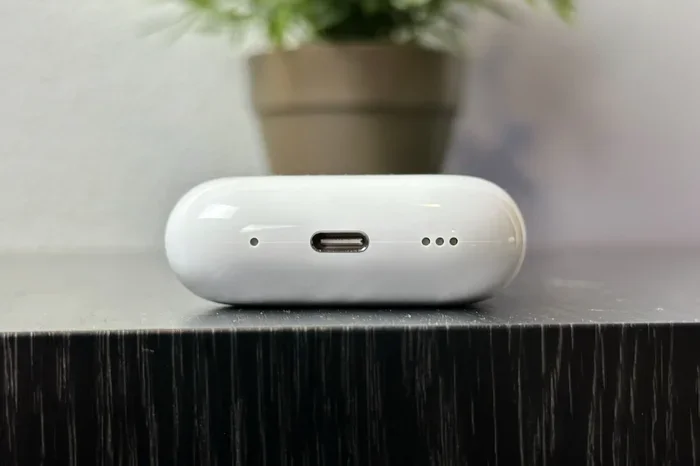
Featured image for Airpods Pro USB charging case
Image source: digitaltrends.com
Yes, you can absolutely charge AirPods Pro with a USB cable. All AirPods Pro models come with a Lightning or USB-C charging case that supports wired charging. Simply plug a compatible USB cable into the port on the bottom of the case and connect it to a power source. The process is simple, fast, and works the same whether you have the original AirPods Pro, AirPods Pro 2, or the newer USB-C version.
Imagine this: you’re about to head out for a run, you grab your AirPods Pro, and then you hear that dreaded low-battery chirp. Your wireless charger is somewhere in the house, but you have a USB cable right there on your desk. Can you charge AirPods Pro with USB? The short answer is a resounding yes, and most people are surprised at just how easy the process is.
Apple designed AirPods Pro cases to be versatile charging companions. Think of the charging case like a tiny power bank for your ears. It has its own battery that charges your AirPods on the go, and that case itself can be topped up using a USB cable. Whether you’re at home, in a hotel room, or sitting in your car, a USB cable is often the fastest and most reliable way to get your AirPods Pro back to full power.
This guide will walk you through everything you need to know. We’ll cover which cables work with which models, how long charging takes, practical tips to extend battery life, and what to do if your AirPods Pro suddenly refuses to charge. By the end, you’ll feel like an AirPods charging expert ready to tackle any low-battery emergency.
Key Takeaways
- All AirPods Pro models support USB charging: Whether you have AirPods Pro (1st gen), AirPods Pro 2 (Lightning), or AirPods Pro 2 (USB-C), each comes with a charging case that accepts a wired connection.
- The connector type depends on your model: Older AirPods Pro cases use Lightning cables, while the AirPods Pro 2 (USB-C) released in 2023 uses a standard USB-C cable.
- Charging takes about an hour: A full charge from empty typically takes 60 minutes for the case, with 5 minutes of charging giving roughly 1 hour of listening time.
- Any USB power source works: You can charge from a wall adapter, computer, power bank, or even a car charger, as long as it provides standard USB power.
- USB charging is faster than wireless: Wired charging consistently delivers faster, more reliable power compared to Qi or MagSafe wireless options.
- You can charge with or without the earbuds inside: The case charges independently, so you don’t need to have your AirPods inserted to top it up.
- Use MFi-certified cables for safety: Always choose Apple-certified or reputable third-party cables to avoid damaging your AirPods Pro battery.
📑 Table of Contents
- Understanding AirPods Pro Charging Basics
- Which AirPods Pro Models Support USB Charging?
- How to Charge AirPods Pro with USB: Step-by-Step
- Charging Times and Battery Life Expectations
- Tips and Best Practices for Charging AirPods Pro
- Troubleshooting USB Charging Problems
- Charging AirPods Pro with Different Power Sources
- Frequently Asked Questions About AirPods Pro USB Charging
- Final Thoughts: USB Charging Is Your Best Friend
Understanding AirPods Pro Charging Basics
Before we dive into the specifics of USB charging, let’s cover the fundamentals. AirPods Pro are tiny earbuds that rely on a charging case to keep them powered. The case itself contains a rechargeable battery, and you charge the case using either a cable or a wireless charging pad, depending on the model.
How AirPods Pro Charging Actually Works
Think of your AirPods Pro case as a miniature fuel station for your earbuds. When you place your AirPods inside the case, small metal contacts inside connect with contacts on the earbuds themselves. The case then transfers power from its internal battery to each AirPod, like filling up two tiny gas tanks at once.
The case itself needs to be recharged periodically, just like your phone. That’s where the USB cable comes in. On the bottom of every AirPods Pro case, you’ll find a small port that accepts a charging cable. Plug one end into the case, the other end into any USB power source, and electricity flows in to refill the case’s battery.
What Kind of USB Port Do AirPods Pro Cases Have?
Here’s where things get interesting because Apple has used two different types of USB ports over the years. It’s a bit like how some cars take regular gas while others require premium. You need to know which type your AirPods Pro uses so you can grab the right cable.
Lightning Port: If you own the original AirPods Pro (released in 2019) or the AirPods Pro 2 released in 2022, your case has a Lightning port. This is Apple’s proprietary connector that looks like a small, rounded rectangle. You’ll use a Lightning to USB cable to charge it.
USB-C Port: In September 2023, Apple released an updated AirPods Pro 2 with a USB-C charging case. This model has a small oval-shaped port that matches the one on modern MacBooks, iPads, and many Android phones. You charge it with a standard USB-C cable.
Which AirPods Pro Models Support USB Charging?
Every AirPods Pro model ever made supports USB charging through its case. The difference lies in which type of USB cable you need. Let’s break this down clearly.
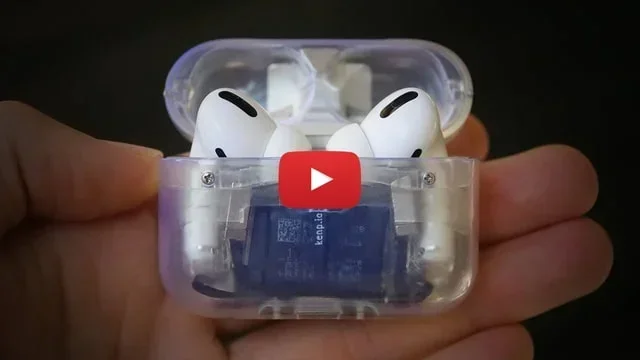
Visual guide about Airpods Pro USB charging case
Image source: iclarified.com
AirPods Pro 1st Generation (2019)
The original AirPods Pro came with a case that had a Lightning port on the bottom. To charge it, you connect a Lightning to USB-A or Lightning to USB-C cable to the case, then plug the other end into a power adapter or computer.
This case also supports wireless charging using any Qi-certified charging mat. So you had two options: plug it in with a USB cable or set it on a wireless pad. The USB option was usually faster.
AirPods Pro 2nd Generation – Lightning Version (2022)
The 2022 version of AirPods Pro 2 looked nearly identical to the original AirPods Pro but came with an upgraded H2 chip for better noise cancellation. The charging case used a Lightning port, just like the first generation.
Like its predecessor, this case supports both wired USB charging and wireless charging via Qi or MagSafe. The USB charging remains the most reliable and fastest method.
AirPods Pro 2nd Generation – USB-C Version (2023)
In 2023, Apple switched the AirPods Pro 2 to a USB-C charging case. This change aligned AirPods Pro with the rest of Apple’s product lineup, which had been transitioning to USB-C for several years due to European Union regulations requiring a common charging standard.
If you have this model, charging is wonderfully simple. You use any standard USB-C cable, the same kind that charges most modern laptops, tablets, and phones. Just plug it in and you’re good to go.
Fun Fact: The USB-C AirPods Pro case can also charge other devices. You can plug the AirPods Pro case into your iPhone 15 using a USB-C cable, and the iPhone will actually send power to the case. It’s a small detail, but it shows how versatile the USB-C standard has become.
How to Charge AirPods Pro with USB: Step-by-Step
Now let’s walk through the actual charging process. It’s so simple that you’ll wonder why you ever stressed about it.
What You’ll Need
- Your AirPods Pro case (with or without the earbuds inside)
- The correct USB cable: Lightning cable for older models, USB-C cable for the 2023 model
- A USB power source: Wall adapter, computer, power bank, or car charger
The Charging Process
Step 1: Locate the port. Flip your AirPods Pro case upside down and look at the bottom. You’ll see either a Lightning port or USB-C port, depending on your model.
Step 2: Connect the cable. Plug the appropriate end of your USB cable into the port on the case. It should slide in smoothly and feel secure when properly connected.
Step 3: Connect to power. Plug the other end of the cable into your power source. This could be a wall adapter plugged into an outlet, a USB port on your laptop, or a portable power bank.
Step 4: Check the status light. When charging begins, a small LED light on the front of the case will turn on. If you have AirPods Pro 2, the light may be on the front. On older models, it might be inside the case, between the earbuds.
Step 5: Wait for the charge. Let the case charge for at least an hour for a full top-up. The status light will change color or turn off once charging is complete.
Understanding the Status Light Colors
The little LED light on your AirPods Pro case communicates a lot. Think of it like a traffic signal, with different colors telling you different things.
- Amber (Orange): Your case is currently charging or has less than a full charge remaining.
- Green: Your case is fully charged (when plugged in) or has a substantial charge (when unplugged).
- White (flashing): Your case is ready to pair with a new device.
- No light: Either the case has no charge at all, or there’s a connection problem.
Charging Times and Battery Life Expectations
How long does it actually take to charge your AirPods Pro with USB? The answer might surprise you with how quick it is.
Full Charging Times
A completely empty AirPods Pro case takes about 60 minutes to fully charge using a USB cable. That’s roughly the time it takes to watch a sitcom or eat lunch.
For the earbuds themselves, placing them in a fully charged case for about 5 minutes gives you approximately 1 hour of listening time or 1 hour of talk time. This quick-charge feature is incredibly handy when you’re rushing out the door.
Battery Life Per Charge
Depending on which AirPods Pro model you have and how you use them, a single charge of the earbuds delivers:
- AirPods Pro 1st Generation: Up to 4.5 hours of listening time with Active Noise Cancellation enabled, or about 5 hours with it off.
- AirPods Pro 2 (Both Versions): Up to 6 hours of listening time with Active Noise Cancellation enabled, or up to 7 hours with it off.
The charging case provides multiple additional charges, extending total listening time to over 24 hours before you need to find an outlet.
Wired vs. Wireless Charging Speed
Did you know that USB charging is actually faster than wireless charging? It’s true. Wireless charging involves energy transfer through electromagnetic induction, which is less efficient than a direct cable connection. Some energy converts to heat during the wireless process, meaning less power reaches your battery.
If speed matters to you, USB charging wins every time. If convenience is your priority, wireless charging lets you just set the case down on a pad without fumbling with cables.
Tips and Best Practices for Charging AirPods Pro
Want to get the most out of your AirPods Pro battery? These tips will help you charge smarter and extend the overall lifespan of your device.
Use Quality Cables
Not all USB cables are created equal. Cheap, uncertified cables might charge your AirPods Pro slowly, or worse, deliver inconsistent power that can damage the battery over time. Look for cables marked “Made for iPhone” (MFi) for Lightning versions, or USB-IF certified cables for USB-C models.
Apple’s own cables are reliable, but reputable third-party brands like Anker, Belkin, and UGREEN also make excellent options that cost less.
Avoid Extreme Temperatures
Batteries don’t like extreme heat or cold. Charging your AirPods Pro case in direct sunlight, on a hot car dashboard, or in freezing temperatures can harm the battery’s long-term health. Room temperature is ideal.
Apple’s official guidance states that AirPods Pro work best in ambient temperatures between 0°C and 35°C (32°F to 95°F).
Don’t Always Drain to Zero
Modern lithium-ion batteries last longer when you don’t regularly let them drain completely. Try to top up your AirPods Pro case when it gets to about 20-30% rather than waiting for it to die entirely.
Think of it like this: your battery prefers small snacks throughout the day rather than one giant meal followed by a complete drain.
Keep the Charging Port Clean
The tiny Lightning or USB-C port on your AirPods Pro case can collect dust, lint, and debris over time, especially if you carry the case in your pocket. A dirty port can prevent proper connection with the cable.
Use a soft, dry brush (like a clean toothbrush) or a wooden toothpick to gently remove any debris from the port. Avoid using metal objects or anything wet.
Charge the Case Regularly
Even if you haven’t used your AirPods Pro in a while, charge the case at least once every few months. Letting the battery sit at 0% for extended periods can damage it permanently.
Troubleshooting USB Charging Problems
Sometimes things don’t work as expected. If your AirPods Pro case isn’t charging with a USB cable, here are some common issues and solutions.
The Case Won’t Charge At All
If you plug in the cable and nothing happens, try these steps:
- Try a different cable. Cables wear out and break internally, even if they look fine on the outside.
- Try a different power source. The issue might be with your wall adapter or computer, not your AirPods.
- Clean the charging port. Debris in the port can prevent the cable from making proper contact.
- Check for damage. Inspect both the cable and the port for any visible damage or bent pins.
- Reset your AirPods Pro. Press and hold the setup button on the back of the case for about 15 seconds until the light flashes amber, then white.
Charging Is Very Slow
If charging seems slower than usual, the issue is usually one of these:
- You’re using a low-power USB source, such as an older computer’s USB port.
- The cable is damaged or low-quality.
- The case is hot from extended use, and the battery is protecting itself by slowing down the charge.
The Status Light Doesn’t Turn On
No light usually means no power is reaching the case. Confirm the cable is fully inserted at both ends, try a different outlet, and consider whether the case might be completely dead and needs a few minutes before showing any sign of life.
Battery Drains Quickly After Charging
If your AirPods Pro battery seems to drain faster than it should, the battery itself might be aging. Lithium-ion batteries lose capacity over time, typically after 2-3 years of regular use. If your AirPods Pro are older, it might be time to consider a replacement or Apple battery service.
Charging AirPods Pro with Different Power Sources
One of the best things about USB charging is flexibility. You can power up your AirPods Pro almost anywhere.
Wall Adapters
The fastest and most reliable option. Apple recommends using at least a 5W adapter, though higher-wattage adapters work fine too because the AirPods Pro case only draws the power it needs. A 20W adapter won’t charge faster than a 5W adapter, but it won’t cause any harm either.
Computers and Laptops
You can plug your AirPods Pro case into any computer’s USB port to charge it. This is slower than a wall adapter but very convenient when you’re working at a desk. Newer USB-C ports charge faster than older USB-A ports.
Power Banks
Portable power banks are perfect for travel. Most modern power banks deliver standard USB output, so any quality power bank will charge your AirPods Pro case without issues. This is one of the best ways to keep your AirPods topped up during long flights or camping trips.
Car Chargers
Most car chargers provide standard USB output, making them perfectly suitable for AirPods Pro. Just plug in during your commute and arrive at your destination with extra battery life.
Your iPhone or iPad
Here’s a cool trick: if you have an iPhone 15 or newer (which has a USB-C port), you can actually use your phone to charge your AirPods Pro USB-C case. Just connect them with a USB-C cable, and the phone will share its power. This works in a pinch when no other power source is available.
Frequently Asked Questions About AirPods Pro USB Charging
Let’s wrap up by answering some of the most common questions people have about charging AirPods Pro with USB.
Can I use any USB cable to charge my AirPods Pro?
You can use any cable that matches the port on your case. For Lightning models, that means any Lightning to USB cable. For USB-C models, any USB-C cable will work. However, quality matters. Cheap, uncertified cables may charge slowly or cause long-term battery issues, so choose reputable brands.
How do I know if my AirPods Pro case has Lightning or USB-C?
Look at the bottom of the case. If you see a small, rounded rectangular port, that’s Lightning. If you see a small, oval-shaped port, that’s USB-C. You can also check the original packaging or go to Settings > Bluetooth on your iPhone, tap the “i” next to your AirPods, and view the model number.
Can I charge AirPods Pro with a fast charger?
Yes, but it won’t charge faster than with a standard 5W charger because the AirPods Pro case only accepts a limited amount of power. Fast chargers are safe to use; they simply won’t speed up the process beyond the case’s maximum input rate.
Is it okay to leave AirPods Pro charging overnight?
Absolutely. AirPods Pro cases have built-in charging management that stops drawing power once the battery reaches 100%. You can leave them plugged in overnight without damaging the battery.
Can I charge my AirPods Pro case without the earbuds inside?
Yes. The case charges independently of whether the earbuds are inside. Many people prefer to charge the case separately so they can use their AirPods while the case refills.
What if my AirPods Pro case gets wet?
If your AirPods Pro case gets wet, dry it thoroughly before attempting to charge it. Moisture in the charging port can cause short circuits or corrosion. AirPods Pro are water-resistant for the earbuds, but the case is not officially rated for water exposure.
How long do AirPods Pro batteries last before needing replacement?
With proper care, AirPods Pro batteries typically last 2-3 years before noticeable degradation. Heavy users might notice reduced battery life sooner. Apple offers battery service for AirPods Pro if they fall below 80% capacity during the warranty period or with AppleCare+ coverage.
Final Thoughts: USB Charging Is Your Best Friend
Charging your AirPods Pro with USB is one of those small conveniences that makes daily life easier. Whether you’re at home, at work, or traveling, a USB cable and any power source will keep your earbuds ready for music, calls, podcasts, or whatever audio adventure awaits.
The key things to remember are simple: know which cable type your case needs, use quality cables from trusted brands, keep the charging port clean, and don’t stress about overcharging because the case manages that automatically. With these habits, your AirPods Pro will deliver reliable battery life for years to come.
Now that you know everything about charging AirPods Pro with USB, you can confidently grab that cable whenever the battery gets low and get back to enjoying your favorite audio in no time.