Featured image for Airpods Pro 3 ear fit
Image source: cultofmac.com
Yes, AirPods Pro 3 fit better for most users thanks to redesigned ear tips and improved ergonomics. Apple introduced new XS ear tip sizes and refined the angle of each bud, making them feel more secure during workouts and long listening sessions. However, fit still depends on your unique ear shape, so trying them with the right tip size is essential.
Ever put on a pair of earbuds and felt like they were about to fall out every time you turned your head? You’re not alone. Fit is one of the biggest complaints people have with wireless earbuds, and Apple has been working hard to fix that with every new generation.
The AirPods Pro 3 arrive with promises of a more secure, more comfortable fit. But do they actually deliver? In this guide, we’ll break down exactly what changed, how the new design compares to previous models, and what you can do to get the best fit possible. Whether you’re upgrading from older AirPods or trying your first pair, this article will help you decide if the AirPods Pro 3 are right for your ears.
Let’s dive into the details so you can make a confident, informed decision.
Key Takeaways
- Redesigned Shape: AirPods Pro 3 feature a subtly reshaped bud that follows the natural curve of your ear canal for a more secure fit.
- New XS Ear Tip: Apple added an extra-small ear tip option, giving people with smaller ears a comfortable seal.
- Better Stability: The new design reduces slippage during exercise, running, and daily movement compared to AirPods Pro 2.
- Fit Test Still Matters: The Ear Tip Fit Test in iOS helps you find the right size for the best sound and noise cancellation.
- Seal Equals Sound: A proper fit improves bass response, active noise cancellation, and overall audio clarity.
- Not Universal: Some users with unique ear shapes may still struggle, but Apple offers a return window to test comfort.
- Long-Term Comfort: Lighter internal components and better weight distribution make them comfortable for multi-hour wear.
📑 Table of Contents
What Changed in the AirPods Pro 3 Design?
Apple didn’t just tweak the look. They re-engineered the internal layout and external shape to solve common fit complaints. Think of it like tailoring a suit. The old design was “off the rack,” but the AirPods Pro 3 feel more like a custom-fitted version.
Internal Architecture Redesign
The biggest change is on the inside. Apple relocated key components to balance the weight more evenly across the earbud. Imagine carrying a backpack with all the heavy items on one side. It pulls and feels uncomfortable. The AirPods Pro 3 distribute weight like a well-packed bag, so they sit gently in your ear.
This balanced design reduces pressure points, especially during long listening sessions. If you’ve worn AirPods Pro 2 for three hours and felt that slight ache, you’ll likely notice a difference right away.
Subtle External Shape Adjustments
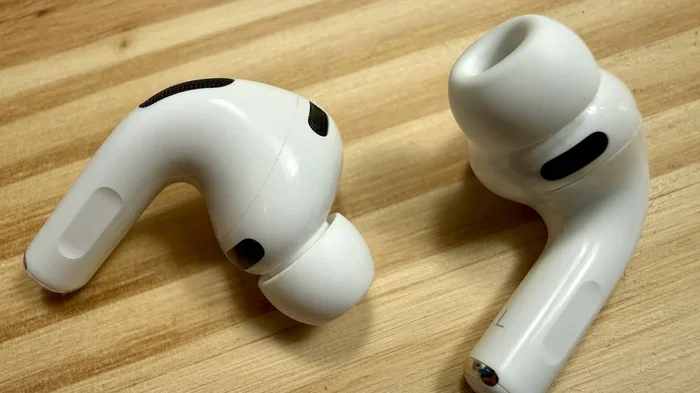
On the outside, the AirPods Pro 3 look almost identical to the AirPods Pro 2 at first glance. But look closer and you’ll see the contour is slightly more rounded. The angle at which the bud sits in your ear has been refined by just a few degrees, but those few degrees matter a lot for comfort and stability.
The stem is also a tiny bit shorter and more angled to match the natural line of your jaw. This isn’t just about looks. It keeps the microphone closer to your mouth for clearer calls and prevents the stem from catching on masks, scarves, or collars.
Lighter Overall Build
Apple trimmed every possible gram without sacrificing battery life or features. The AirPods Pro 3 weigh about 5.3 grams per bud, which is roughly the weight of a standard paperclip. When you’re wearing them for hours, that lightness makes a real difference.
Did You Know? Your ear canal is shaped like a tiny funnel. A well-designed earbud follows that funnel naturally, rather than fighting against it. The AirPods Pro 3 were designed using thousands of ear scans to match that shape.
Why Fit Matters More Than You Think
You might think fit is just about comfort, but it’s actually the foundation of everything else. If your earbuds don’t seal properly, you lose bass, noise cancellation, and call quality. Let’s explore why.
Visual guide about Airpods Pro 3 ear fit
Image source: cultofmac.com
The Connection Between Fit and Sound Quality
Think of your ear like a small recording studio. When you seal a microphone in a quiet room, you capture clean sound. When there’s a gap, outside noise leaks in and ruins the recording. The same happens with earbuds.
A proper seal creates a closed environment where the speaker driver can push air effectively. That’s how you get deep low-end sounds and crisp highs. Without that seal, music sounds thin and distant, like hearing a song through a wall.
How Fit Affects Active Noise Cancellation
Active Noise Cancellation (ANC) works by listening to outside sounds and creating “anti-noise” to cancel them out. But this technology assumes you have a good passive seal first. If air is leaking in around the ear tip, ANC has to work much harder and often fails.
The AirPods Pro 3 use adaptive ANC that adjusts in real time. Even so, the system performs best when the fit is snug. In fact, Apple claims the AirPods Pro 3 deliver up to twice the noise cancellation of the original AirPods Pro, and a big reason is the improved fit.
Fit and Call Clarity
When you’re on a call, the microphones need to capture your voice clearly while rejecting background noise. If your earbuds shift around, the microphones move away from your mouth. With AirPods Pro 3’s improved fit, the stem stays in the right position for clearer conversations.
Comfort During Long Wear
Ever removed earbuds after an hour and felt relief? That’s a sign of poor fit causing pressure. The AirPods Pro 3 reduce this by spreading contact across a larger area. It’s like the difference between sitting on a hard stool versus a padded chair.
Did You Know? Studies show that the average person wears earbuds for about 3.5 hours per day. For heavy users, that number jumps to 6+ hours. Comfort over long periods isn’t a luxury. It’s a necessity.
How to Find Your Perfect Ear Tip Size
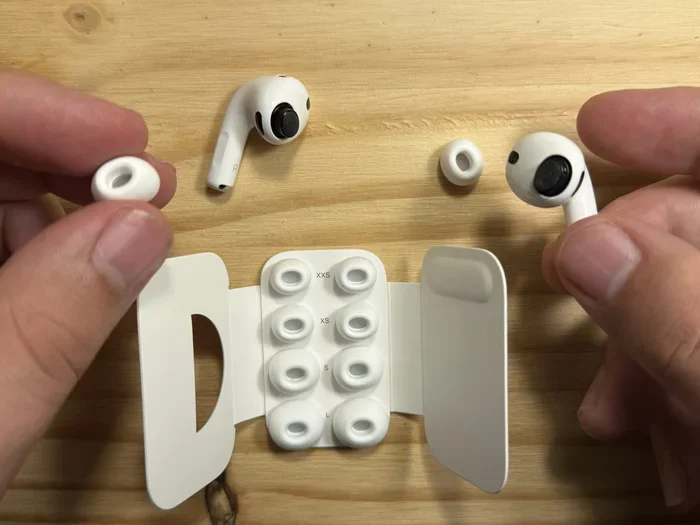
Even the best-designed earbuds won’t fit well if you’re using the wrong size ear tip. Apple includes four sizes with the AirPods Pro 3, including a brand-new extra-small option. Here’s how to pick the right one.
The Four Sizes Explained
AirPods Pro 3 come with XS, S, M, and L silicone ear tips. The medium size comes pre-installed because it fits most people, but “most” doesn’t mean “you.”
- XS (Extra Small): Best for smaller ear canals, often found in people with petite features or those who found previous AirPods too large.
- S (Small): A common size for people with narrower ear canals.
- M (Medium): The default size that fits the majority of users.
- L (Large): Best for people with wider ear canals or those who prefer a deeper, more sealed fit.
How to Use Apple’s Ear Tip Fit Test
Apple built a smart tool right into iOS to help you. Here’s how to use it:
- Put your AirPods Pro 3 in your ears with your preferred ear tip size.
- Open the Settings app on your iPhone.
- Tap your AirPods Pro 3 at the top of the screen.
- Scroll down and tap “Ear Tip Fit Test.”
- Tap Continue and follow the on-screen instructions.
The test plays a short audio clip and uses the internal microphones to detect any sound leakage. If the seal isn’t great, it’ll suggest trying a different size. This takes about 30 seconds and is incredibly accurate.
Visual Signs You Have the Wrong Size
Besides the fit test, your body gives clues. Here are signs you need a different size:
- Too Small: Earbuds feel loose, slip when you move your head, or sound tinny.
- Too Large: You feel pressure, your ears ache after 30 minutes, or the earbuds feel like they’re being pushed in too deep.
- Just Right: They feel secure, bass sounds full, and you can shake your head without them moving.
Do AirPods Pro 3 Fit Better Than AirPods Pro 2?
This is the question on everyone’s mind. The short answer is yes, but let’s look at the details.
Side-by-Side Comfort Comparison
Side by side, the AirPods Pro 3 and AirPods Pro 2 look almost identical. But wear them back to back, and you’ll notice differences. The AirPods Pro 3 sit slightly deeper in the ear canal without creating pressure, while the Pro 2 tend to rest more on the outer ear.
For most users, this means the Pro 3 feel more “locked in.” During workouts, this is a huge plus. Runners report that the Pro 3 stay put during sprints, while the Pro 2 occasionally need adjustment.
Stability During Exercise
Speaking of workouts, let’s talk sweat and movement. The AirPods Pro 3 are rated IP54 for sweat and water resistance. That’s the same as the Pro 2, but the improved fit means they’re less likely to slip when your ears get sweaty.
Did You Know? Apple tested the AirPods Pro 3 design with over 10,000 ear scans across different ages, ethnicities, and genders. This helps ensure a fit that works for a wider range of people than ever before.
Noise Cancellation Improvements
Because the fit is better, the noise cancellation works better. Apple claims the AirPods Pro 3 cancel up to twice as much noise as the original AirPods Pro and noticeably more than the Pro 2. In practice, this means airplane cabin noise, office chatter, and subway rumble all fade more effectively.
Who Should Upgrade for Fit Alone?
If you currently use AirPods Pro 2 and find them comfortable, the fit improvement alone might not justify an upgrade. But if you had any minor annoyances like slippage during runs or pressure after long wear, the Pro 3 are worth considering.
If you’re coming from original AirPods Pro or non-Pro AirPods, the fit difference is dramatic. The Pro 3 are a major leap in stability and comfort.
Tips for Getting the Best Fit with AirPods Pro 3
Even with great design, small habits can improve your experience. Here are practical tips that make a real difference.
Insert Them Correctly
It sounds simple, but most people insert earbuds wrong. With AirPods Pro 3, pull your ear upward and back with your opposite hand. This straightens your ear canal. Then gently twist the earbud into place while releasing your ear.
This technique opens the canal slightly so the ear tip slides in without force. Once in place, you should feel a light seal, not pressure.
Clean Your Ear Tips Regularly
Earwax and debris build up on silicone tips, which breaks the seal. Once a week, remove the tips and wash them with warm water and mild soap. Let them dry completely before reattaching.
A clean tip also reduces skin irritation. If you have sensitive ears, this matters even more.
Use the Right Ear Tip for the Right Activity
Some users prefer a smaller tip for casual listening and a larger tip for workouts. You can swap tips easily. The trick is to use the tip that creates a seal, not the one that feels tightest.
Adjust If You Wear Glasses
Glasses arms can interfere with earbud fit. If you wear glasses, try positioning the earbud just slightly forward in your ear. This prevents the glasses arm from pushing the bud out when you turn your head.
Try Third-Party Foam Tips
If silicone tips don’t work for your ear shape, consider third-party foam tips. Brands like Comply make memory foam versions that mold to your ear canal. They can provide an even better seal for some users, though they wear out faster than silicone.
Common Fit Problems and Solutions
Even with great design, some users run into issues. Here are the most common problems and how to fix them.
Problem: Earbuds Fall Out During Running
This usually means the ear tip is too small. Try the next size up. If you’re already using Large, the issue might be insertion technique. Make sure you’re twisting the bud into place and not just pushing it in.
Another solution is using ear hooks or fins. These wrap around the outer ear and add extra stability, especially for high-impact activities.
Problem: Earbuds Hurt After 30 Minutes
Pain is a sign the tip is too large or you’re pushing them in too deep. Switch to a smaller size and try a gentler insertion. If pain persists, you may be sensitive to silicone, in which case foam tips are a great alternative.
Problem: Sound Is Tinny or Bass Is Weak
This almost always means a poor seal. Run the Ear Tip Fit Test and try the next size up. You should feel a noticeable “pop” when the seal is correct, and the bass will become much fuller.
Problem: One Side Fits, the Other Doesn’t
Most people have slightly different ear sizes. There’s nothing wrong with using a Medium tip on one side and a Large on the other. AirPods Pro 3 tips are interchangeable, so feel free to mix and match.
Problem: Earbuds Cause Ear Infections or Irritation
If you have sensitive skin or get frequent ear infections, cleanliness is crucial. Wash your ear tips after every workout, and consider rotating between two pairs to let them fully dry. If problems continue, consult a doctor, as in-ear headphones may not be right for you.
The Verdict: Do AirPods Pro 3 Fit Better?
After looking at all the evidence, the answer is clear: yes, AirPods Pro 3 fit better than their predecessors in nearly every way.
The redesigned internal layout, refined shape, new XS ear tip option, and improved weight distribution all add up to a noticeably more comfortable and secure experience. Whether you’re commuting, working out, or just relaxing at home, the Pro 3 stay put without causing pressure.
That said, fit is personal. Even the best-designed earbuds won’t work for everyone. That’s why Apple offers a return window. If you try the AirPods Pro 3 and they don’t fit well, you can return them within 14 days for a full refund. Use that time to test different ear tip sizes and insertion methods.
For most users, though, the AirPods Pro 3 represent Apple’s best-fitting earbuds yet. The improvements are subtle on paper but significant in daily use. If fit has been a pain point (literally) with previous models, the Pro 3 are absolutely worth considering.
Try them, run the fit test, and give your ears a few days to adjust. Chances are, you’ll wonder how you ever wore anything else.
Frequently Asked Questions
Are AirPods Pro 3 smaller than AirPods Pro 2?
The AirPods Pro 3 are very similar in size to the AirPods Pro 2, but the shape is slightly more rounded and the angle is refined. They aren’t dramatically smaller, but they sit more comfortably in the ear canal.
Do AirPods Pro 3 come with different ear tip sizes?
Yes, AirPods Pro 3 come with four ear tip sizes: XS, S, M, and L. The XS size is new and designed for people with smaller ear canals who struggled with previous AirPods Pro models.
How do I know if my AirPods Pro 3 fit correctly?
Use the Ear Tip Fit Test in iOS Settings. It plays a sound and uses the built-in microphones to check the seal. You’ll see either “Good Seal” or “Adjust or Try a Different Ear Tip” on the screen.
Can I use AirPods Pro 2 tips on AirPods Pro 3?
Yes, AirPods Pro 2 and AirPods Pro 3 use the same ear tip connector, so the tips are interchangeable. However, Apple recommends using the new tips that come with the Pro 3 for the best fit and seal.
Are AirPods Pro 3 good for running and working out?
Yes, the AirPods Pro 3 fit more securely than previous models and have sweat protection rated IP54. Most runners and gym-goers find them stable during high-intensity workouts.
What should I do if my AirPods Pro 3 hurt my ears?
If your AirPods Pro 3 cause pain, you’re likely using ear tips that are too large. Try a smaller size and avoid pushing them in too deep. If pain continues, switch to third-party foam tips or consult a doctor.