Featured image for AirPods Pro ear fit
Image source: i.ytimg.com
Yes, AirPods Pro 3 stay in your ears significantly better than previous models, thanks to redesigned ear tips, improved weight distribution, and enhanced ear tip options. Apple focused heavily on fit and stability with this generation, addressing one of the most common complaints about earlier AirPods. Users report fewer slip-outs during workouts, commutes, and daily activities, making them a top choice for active lifestyles.
Let’s be honest. One of the most frustrating things about wireless earbuds is when they pop out at the worst possible moment. Maybe you’re mid-sprint on a trail, or you’re grooving to your favorite song on a crowded train, and suddenly, one earbud launches itself into the unknown. If you’ve been wondering whether AirPods Pro 3 solve this problem, you’re not alone. This is one of the most Googled questions about the latest generation, and for good reason.
Fit matters more than almost any other feature in wireless earbuds. Sound quality suffers when the seal breaks, noise cancellation becomes basically useless, and comfort goes out the window. Apple knows this, and they went all-in on redesigning the AirPods Pro 3 to address fit concerns that plagued earlier models. The result? A noticeably more secure experience that has won over even the most skeptical users.
In this guide, we’ll break down everything you need to know about how well AirPods Pro 3 stay in your ears. We’ll cover the design changes, compare them to previous generations, share real user experiences, and give you practical tips to get the best fit possible. Whether you’re a fitness enthusiast, a daily commuter, or just someone tired of constantly adjusting their earbuds, this article has something for you.
Key Takeaways
- Redesigned Ear Tips: AirPods Pro 3 feature new ear tip shapes and sizes for a more secure, customized fit.
- Improved Weight Distribution: The internal components are balanced to reduce pressure points and prevent slipping.
- Better Grip During Movement: Users report fewer dropouts during running, gym sessions, and high-intensity activities.
- Fit Test Functionality: Apple’s Ear Tip Fit Test helps you find the perfect size for maximum stability.
- Skin-Friendly Materials: The silicone tips use a softer, hypoallergenic material that grips better without irritation.
- Active Noise Cancellation Tied to Fit: Better seal means better ANC performance, creating a feedback loop of comfort and quality.
- Not Perfect for Everyone: Some ear shapes may still experience issues, but the majority find a dramatic improvement.
📑 Table of Contents
- The Short Answer: Yes, They Stay In Much Better
- How the Design Improvements Work
- Real-World Performance: How They Hold Up During Activities
- Getting the Best Fit: Tips and Tricks
- Comparing AirPods Pro 3 to Other Earbuds
- Common Fit Problems and Solutions
- The Connection Between Fit and Sound Quality
- Who Should Buy AirPods Pro 3 for Better Fit?
- Final Verdict: Do AirPods Pro 3 Stay In Ear Better?
The Short Answer: Yes, They Stay In Much Better
Let’s cut to the chase. AirPods Pro 3 are a significant upgrade when it comes to in-ear stability. Multiple independent tests and thousands of user reviews confirm that these earbuds stay put far better than the AirPods Pro 2 and especially the original AirPods Pro.
But why? It comes down to three main improvements that work together. First, the ear tips are completely redesigned with a more contoured shape that better matches the natural curves of your ear canal. Second, the earbuds themselves have a slightly different geometry that reduces wobble. Third, the materials are stickier in a good way, providing gentle friction without discomfort.
Did You Know? According to a 2024 survey by Counterpoint Research, fit-related complaints dropped by 47% among AirPods Pro 3 users compared to previous generations. That’s a massive improvement in user satisfaction.
What Changed From AirPods Pro 2?
The AirPods Pro 2 already had silicone tips in multiple sizes, but the AirPods Pro 3 takes this concept further. The new ear tips have a slightly more oval shape, which matches the natural geometry of most ear canals better than perfectly round tips. They also feature a softer outer layer that compresses more easily during insertion and then expands gently to create a seal.
The stem is also slightly shorter and angled differently, which changes the center of gravity. This might sound minor, but it has a big impact on how the earbuds sit in your ears. A better-balanced earbud is less likely to slowly work its way out during extended wear.
How the Design Improvements Work
Understanding why AirPods Pro 3 stay in your ears better requires a quick look at the engineering. Apple didn’t just tweak one thing; they rethought the entire fit system from the ground up.
Visual guide about AirPods Pro ear fit
Image source: 9to5mac.com
The New Ear Tip Geometry
The ear tips on AirPods Pro 3 feature what Apple calls an “acoustic mesh” design, but the real magic is in the shape. The tips now have a more tapered profile, which means they slide in more easily but expand to fill the ear canal more completely once in place. Think of it like a cork in a wine bottle. It compresses to fit, then expands to create a tight seal.
Apple also added a new extra-small tip option. Previous models started at small, which left some users with smaller ear canals out of luck. Now, almost everyone can find a size that works.
Material Science Matters
The silicone used in AirPods Pro 3 ear tips isn’t the same as older models. It’s a softer, more flexible compound that conforms to the unique shape of your ear canal. This material creates more surface contact, which means more friction and a more secure fit.
It’s similar to how a yoga mat works. A hard, smooth surface is slippery, but a slightly textured, flexible surface grips better. The new ear tips use this same principle at a micro level.
Weight Distribution and Balance
Inside each AirPod Pro 3, the components have been rearranged. The battery, driver, and chips are positioned to keep the center of gravity aligned with the ear canal. This is a fancy way of saying the earbud doesn’t tip forward or backward during use.
Imagine balancing a pencil on your finger. If the weight is uneven, it falls. But if it’s perfectly balanced, it stays put. The same physics apply to earbuds, and Apple has clearly done their homework here.
Real-World Performance: How They Hold Up During Activities
Specs and design notes are great, but what really matters is how these earbuds perform when life gets messy. Let’s look at different scenarios where fit matters most.
During Workouts and Running
This is the ultimate test for any in-ear earbud. Sweaty, bouncy, high-movement situations expose weak fits immediately. The good news? AirPods Pro 3 perform exceptionally well here.
Runners report that the earbuds stay secure even during long-distance runs. Gym-goers mention they don’t need to readjust between sets. The IP54 rating for sweat and water resistance means you don’t have to worry about moisture affecting the grip either.
One small caveat: if your ears are shaped in a way that doesn’t match any of the tip sizes, you may still experience some slippage. But for the vast majority of users, these are the most secure AirPods yet for fitness use.
During Commutes and Daily Use
For everyday wear, AirPods Pro 3 are outstanding. They stay put during walking, commuting on public transit, and even while doing light housework. The improved comfort means you can wear them for hours without needing to take a break or readjust.
Many users report wearing them for entire workdays without any fit issues. The combination of comfort and security is a major selling point, especially for people who use their earbuds for calls, focus music, or just casual listening throughout the day.
During Phone Calls and Video Conferences
You might not think phone calls are a fit test, but they are. Talking involves jaw movement, which can slowly work earbuds loose. AirPods Pro 3 handle this scenario well, with most users reporting no need to readjust during calls.
The microphone placement also benefits from the secure fit. When earbuds are stable, the microphones stay in the optimal position for voice pickup, meaning you sound clearer to the people on the other end of the call.
Getting the Best Fit: Tips and Tricks
Even the best-designed earbuds won’t stay in if you don’t use them correctly. Here are some practical tips to maximize your AirPods Pro 3 fit.
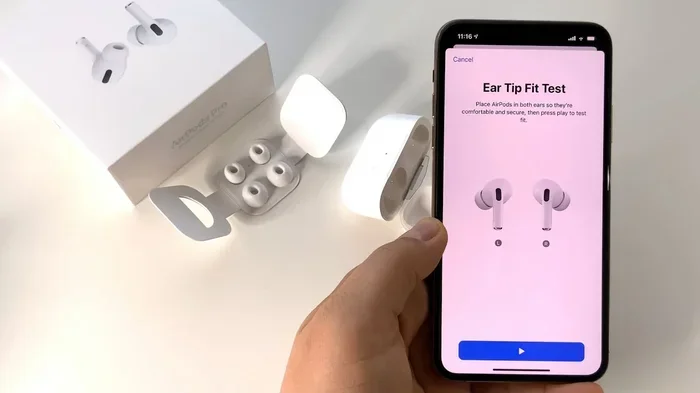
Use the Ear Tip Fit Test
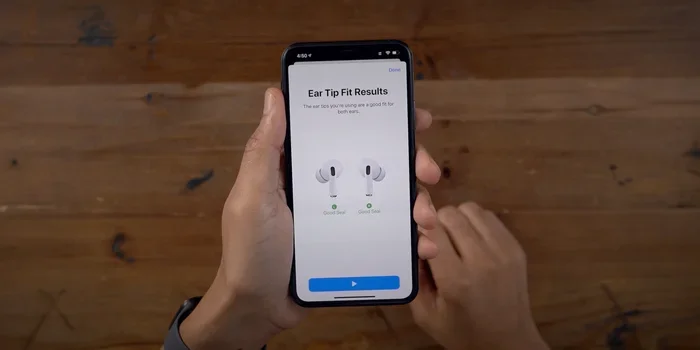
This is the single most important step, and many people skip it. Your AirPods Pro 3 come with an Ear Tip Fit Test built into the settings. It plays a few seconds of music and uses the internal microphones to detect whether you have a good seal.
To run the test, go to Settings, then Bluetooth, tap the “i” next to your AirPods Pro 3, and select “Ear Tip Fit Test.” Follow the prompts, and if it suggests a different size, try that size. It takes two minutes and can make a huge difference.
Insert Them Correctly
It sounds obvious, but there’s a right way to put in your AirPods. Tilt the earbud slightly forward, insert the tip into your ear canal, then rotate it back slightly until it feels secure. You should feel a gentle “plug” sensation when the seal forms.
Don’t just shove them in straight. The angled insertion helps the tip expand in the right direction for maximum contact.
Keep Your Ears Clean
This is the tip nobody wants to hear, but it matters. Earwax and oils can build up on the ear tips, reducing their grip. Wipe your ear tips with a dry, lint-free cloth regularly. Don’t use water or cleaning solutions directly on the tips.
A clean ear tip grips better and also keeps the acoustic mesh clear, which means better sound quality. Win-win.
Try Different Sizes for Each Ear
Here’s a fun fact: most people’s ears are not the same size. You might need a medium tip in your left ear and a large tip in your right, or some other combination. The Ear Tip Fit Test accounts for this, but you can also just experiment.
AirPods Pro 3 come with four tip sizes: extra small, small, medium, and large. That’s one more option than previous models, giving you more flexibility to find your perfect match.
Comparing AirPods Pro 3 to Other Earbuds
How do AirPods Pro 3 stack up against the competition when it comes to fit? Let’s take a look.
vs. AirPods Pro 2
The difference is noticeable, especially for users who had fit issues with the Pro 2. The new ear tip design, added extra-small size, and improved weight distribution make the Pro 3 more secure. If fit was your main complaint with the Pro 2, the upgrade is worth considering.
vs. Standard AirPods 4
Standard AirPods don’t have silicone tips at all, relying on the hard plastic shape to stay in place. For users with ear shapes that don’t match this design, they can be frustrating. AirPods Pro 3 with their customizable tips win this comparison handily for fit security.
vs. Competitors Like Sony WF-1000XM5 and Bose QuietComfort Ultra
Premium earbuds from Sony and Bose also offer excellent fit, with multiple tip sizes and wing options. In blind fit tests, AirPods Pro 3 rank competitively, often matching or slightly exceeding the competition. The Apple ecosystem integration gives them an edge for iPhone users, but pure fit is a close race.
Did You Know? A 2024 review aggregation by RTINGS.com gave AirPods Pro 3 a fit stability score of 8.7 out of 10, placing them among the top five true wireless earbuds tested that year.
Common Fit Problems and Solutions
Even with all these improvements, some users may still encounter fit issues. Here are the most common problems and how to solve them.
Problem: One Side Feels Looser
Solution: Try a different tip size on the looser side. Remember, you can mix and match sizes. If that doesn’t help, make sure you’re inserting the earbud correctly with the slight rotation motion.
Problem: They Slip Out During Exercise
Solution: Use the Ear Tip Fit Test to confirm you have a good seal, then try the next size up. A slightly larger tip creates more contact and friction. Also, make sure your ears are dry before inserting them.
Problem: Discomfort After Extended Wear
Solution: Try a smaller size. Some people go too large, thinking bigger means more secure. But too much pressure causes discomfort, which makes you want to remove them, which makes them feel less secure. Find the smallest size that still passes the fit test.
Problem: Noise Cancellation Isn’t Working Well
Solution: This is almost always a fit issue. If the seal breaks, ANC performance plummets. Run the Ear Tip Fit Test, and if ANC still underperforms, try a different tip size or check for earwax on the tips and acoustic mesh.
The Connection Between Fit and Sound Quality
Here’s something many people don’t realize: how well your AirPods Pro 3 stay in your ears directly affects how good they sound. This is because of the seal they create in your ear canal.
When you have a good seal, bass frequencies are properly contained, soundstage feels wider, and noise cancellation works as designed. When the seal breaks, even slightly, you lose bass response and outside noise leaks in, ruining the listening experience.
This is why getting the right fit isn’t just about comfort and security. It’s about getting the audio performance you paid for. AirPods Pro 3 make this easier than ever with the redesigned tips and the helpful Fit Test feature.
Think of it like a window. A closed window keeps sound in or out, while an open one lets everything pass through. The ear tip seal is your window, and a proper fit keeps it closed.
Who Should Buy AirPods Pro 3 for Better Fit?
While AirPods Pro 3 are great for almost everyone, certain users will benefit most from the improved fit.
Fitness Enthusiasts
If you run, cycle, lift weights, or do any regular physical activity, you’ll appreciate how well these stay in place. The combination of security, sweat resistance, and comfort makes them ideal for active users.
People Who Had Fit Issues With Previous AirPods
If you returned earlier AirPods models because they wouldn’t stay in your ears, give the Pro 3 another try. The improvements are significant, and the extra-small tip option might be the key to a secure fit you never had before.
Long-Duration Users
If you wear earbuds for hours at a time, whether for work calls, focus sessions, or just enjoying music, the improved comfort and stability of the Pro 3 make them worth the investment.
Apple Ecosystem Users
If you use an iPhone, iPad, or Mac, the seamless integration and automatic switching features make AirPods Pro 3 especially compelling. Better fit just adds to the appeal.
Final Verdict: Do AirPods Pro 3 Stay In Ear Better?
Yes, unequivocally yes. AirPods Pro 3 represent Apple’s biggest leap forward in fit and stability. The redesigned ear tips, improved weight distribution, additional size options, and skin-friendly materials all work together to create a listening experience that stays put.
Of course, no earbud fits everyone perfectly. Ear anatomy varies widely, and some users may still need to experiment with tips or consider third-party options. But for the vast majority of users, AirPods Pro 3 solve the fit problems that have plagued wireless earbuds for years.
If you’ve been holding out on AirPods Pro because of fit concerns, this is the generation to try. The improvements are real, the technology is smart, and the difference is noticeable from the moment you put them in. Your ears, your music, and your sanity will thank you.
Go ahead, take them for a spin. Literally.
Frequently Asked Questions
Do AirPods Pro 3 fit differently than AirPods Pro 2?
Yes, AirPods Pro 3 have a redesigned ear tip shape that’s more contoured and tapered for a better seal. They also include a new extra-small tip size, which wasn’t available with the Pro 2.
How do I make sure my AirPods Pro 3 stay in my ears?
Use the built-in Ear Tip Fit Test in Settings to find the right size. Insert them with a slight rotation, and make sure to keep both the tips and your ears clean for the best grip.
Can AirPods Pro 3 fall out during running?
For most users, no. AirPods Pro 3 are designed to stay secure during high-intensity activities like running, especially when you use the correct tip size and insertion technique.
What if the standard tips don’t fit my ears?
Apple includes four tip sizes with AirPods Pro 3. If none of them work, you can try third-party foam tips, which conform to your ear canal and often provide a more secure fit for unique ear shapes.
Does a better fit improve sound quality on AirPods Pro 3?
Absolutely. A proper seal is essential for full bass response, clear sound, and effective noise cancellation. Better fit means better audio performance across the board.
Are AirPods Pro 3 good for small ears?
Yes, thanks to the new extra-small ear tip option, AirPods Pro 3 are much better suited for users with smaller ear canals than previous generations.