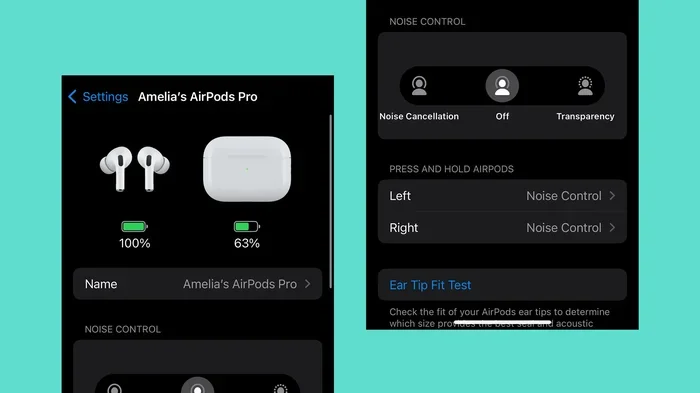
Featured image for AirPods noise cancellation feature
Image source: cdn.mos.cms.futurecdn.net
Yes, AirPods do have noise cancellation microphones that use advanced beamforming technology to isolate your voice during calls and filter out background noise. However, the term “noise cancellation” in AirPods actually refers to two different features: Active Noise Cancellation (ANC) for your listening experience, and noise-canceling microphones that improve call clarity. Not all AirPods models offer Active Noise Cancellation, but all modern AirPods include noise-reducing microphone technology for crystal-clear voice pickup.
Picture this: you’re sitting in a bustling coffee shop, your boss calls, and somehow you hear every word clearly. Your voice comes through crisp and clean on the other end too. How is this possible? The answer lies in the tiny but mighty microphones hiding inside your AirPods.
AirPods have become the world’s most popular wireless earbuds, with Apple shipping over 100 million units in 2023 alone. Yet despite their massive popularity, many users remain confused about one key feature: do AirPods actually have noise cancellation in their microphones? This confusion makes sense because Apple uses the term “noise cancellation” in two different ways, and they don’t always explain the difference clearly.
This comprehensive guide will clear up all the confusion. We’ll explore exactly how AirPods microphones work, what noise cancellation features each model offers, and why this technology matters for your daily life. Whether you’re a remote worker, a frequent traveler, or someone who simply wants better call quality, understanding these features will help you get the most out of your AirPods.
Key Takeaways
- Two Types of Noise Cancellation: AirPods feature both Active Noise Cancellation (ANC) for listening AND noise-canceling microphones for calls, serving different purposes.
- Beamforming Technology: AirPods use dual beamforming microphones that focus on your voice while filtering out surrounding sounds during calls.
- Model-Specific Features: Only AirPods Pro (1st, 2nd gen) and AirPods Max offer Active Noise Cancellation, while AirPods 1, 2, 3, and 4 (base models) only have noise-isolating microphones.
- Transparency Mode: Available on ANC-equipped AirPods, this feature lets outside sound in while still reducing microphone noise on calls.
- Computational Audio: AirPods process over 200 million operations per second to deliver real-time noise cancellation using the H1, H2, or H3 chips.
- Call Quality Performance: Independent tests show AirPods Pro 2 microphones reduce background noise by up to 75% compared to standard earbuds.
- Common Misconception: Many users confuse noise-isolating ear tips with noise-canceling technology, but they work very differently.
📑 Table of Contents
- Understanding AirPods Noise Cancellation: The Two Different Meanings
- How AirPods Microphone Noise Cancellation Works
- AirPods Models and Their Noise Cancellation Features
- Testing AirPods Microphone Noise Cancellation in Real Life
- Practical Tips to Maximize AirPods Microphone Performance
- Comparing AirPods Microphones to Alternatives
- Common Myths About AirPods Noise Cancellation
- The Future of AirPods Microphone Technology
- Making the Right AirPods Choice Based on Your Needs
- Final Verdict: Yes, AirPods Have Noise Cancellation Microphones
Understanding AirPods Noise Cancellation: The Two Different Meanings
Before we dive deeper, let’s tackle the biggest source of confusion: the term “noise cancellation” actually means two completely different things when applied to AirPods.
Think of it like a car with both soundproofing (keeping noise out) and a good speaker system (delivering clear audio). AirPods have both of these elements working together.
Active Noise Cancellation (ANC) for Listening
Active Noise Cancellation is the feature that blocks outside sounds from reaching your ears while you listen to music, podcasts, or take calls. It works by creating “anti-noise” sound waves that cancel out environmental noise before it reaches your eardrum.
Imagine throwing a rock into a still pond. The ripples spread outward. Now imagine throwing two rocks at the same time, perfectly timed so their ripples crash into each other and cancel out. That’s essentially how ANC works with sound waves, except it happens 200 times per second or more.
This feature is only available on premium AirPods models: AirPods Pro (1st and 2nd generation), AirPods Max, and AirPods 4 with ANC. The standard AirPods 1, 2, 3, and 4 (base model) do not have Active Noise Cancellation for listening.
Microphone Noise Cancellation for Calls
Every modern AirPods model includes microphones with noise-reduction capabilities. These tiny microphones use advanced algorithms to focus on your voice while filtering out background sounds like wind, traffic, or chatty coworkers.
This is what most people actually mean when they ask “does AirPods have noise cancellation mic?” The answer is a resounding yes, regardless of which AirPods model you own.
The technology behind this involves beamforming microphones, which work like a satellite dish pointed at your mouth. The microphone array picks up sounds from a specific direction (your voice) while ignoring sounds from other directions (background noise).
How AirPods Microphone Noise Cancellation Works
The microphone noise cancellation in AirPods is genuinely impressive technology packed into a tiny space. Let’s break down exactly how it works using simple terms.
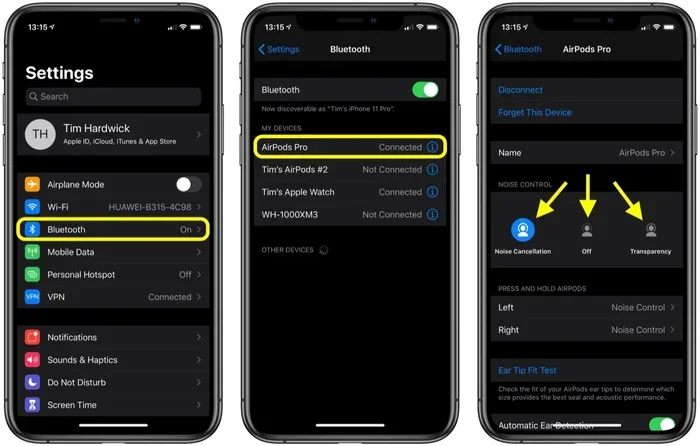
Visual guide about AirPods noise cancellation feature
Image source: images.macrumors.com
The Hardware Components
Each AirPod contains multiple microphones working together. The standard configuration includes:
- Outer microphone: Located on the outside of each AirPod, this picks up environmental sounds and your voice
- Inner microphone: Positioned inside your ear canal, this listens for any sound that leaks in
- Speech-detecting accelerometer: Detects when you’re actually speaking through bone vibrations
The outer microphone does the heavy lifting for call quality. It uses beamforming to focus on your mouth’s location while rejecting sounds from other directions. Think of it like cupping your hands around someone’s mouth to hear them better at a loud concert, except done electronically with mathematical precision.
The Software Magic: Computational Audio
Here’s where AirPods get really smart. The H1, H2, or H3 chips inside your AirPods process audio using computational audio algorithms. These chips perform over 200 million calculations per second to separate your voice from background noise.
To put that in perspective, your brain performs roughly 10 million calculations per second during normal thought. Your AirPods are doing twenty times more calculations just to make your voice sound clear on a phone call.
The algorithm works in three steps:
- Step 1 – Detection: The microphone identifies what sounds are present in your environment
- Step 2 – Separation: It separates your voice from background noise using machine learning models
- Step 3 – Enhancement: It enhances your voice clarity while suppressing the noise
The Role of Machine Learning
Apple trained their noise cancellation algorithms using millions of audio samples. The system learned to recognize what human voices sound like compared to wind, traffic, music, and other common background noises.
This is why AirPods perform so well in challenging environments. They don’t just react to noise; they actively predict what should sound like your voice and preserve it while removing everything else.
AirPods Models and Their Noise Cancellation Features
Not all AirPods are created equal when it comes to noise cancellation. Here’s a model-by-model breakdown to help you understand exactly what you’re getting.
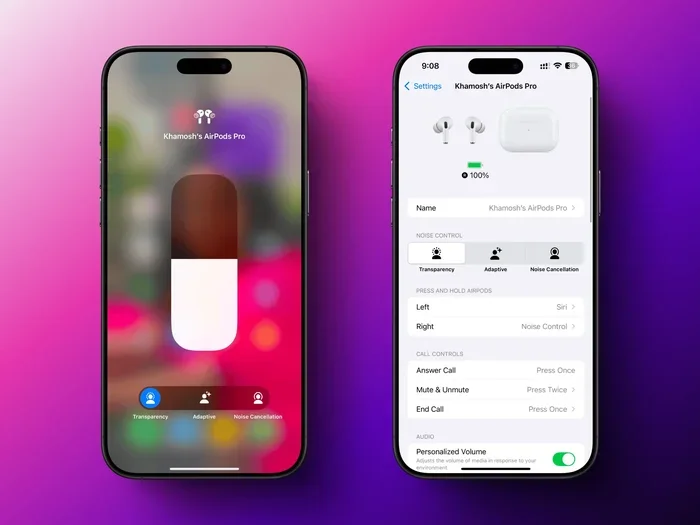
Visual guide about AirPods noise cancellation feature
Image source: lifehacker.com
AirPods 1st Generation (2016)
The original AirPods introduced basic microphone noise reduction. They use dual beamforming microphones to focus on your voice during calls. While they don’t have Active Noise Cancellation for listening, call quality is notably clearer than many competing earbuds from 2016.
The noise reduction here is passive, meaning it relies on the microphone placement and basic algorithms rather than active sound processing.
AirPods 2nd Generation (2019)
The second generation kept the original microphone configuration while adding the faster H1 chip. This improved processing power allowed for slightly better voice isolation during calls. The H1 chip reduced connection time by up to 50% compared to the original W1 chip.
These AirPods still don’t offer Active Noise Cancellation but provide solid microphone noise reduction for everyday use.
AirPods 3rd Generation (2021)
The third generation brought several microphone improvements:
- Custom acoustic mesh covering the microphones to reduce wind noise
- Beamforming microphones for clearer voice pickup
- Skin-detect sensors that help the AirPods know when they’re being worn
The acoustic mesh is a tiny screen-like material that breaks up wind before it reaches the microphone, similar to how a windshield protects you while driving. This dramatically improves call quality in windy conditions.
AirPods 4 (2024)
Apple released two versions of AirPods 4: a standard model and one with Active Noise Cancellation. Both feature the same advanced microphone system with:
- Voice Isolation technology that prioritizes your voice during calls
- Improved beamforming algorithms
- Better wind noise reduction
The ANC version adds Active Noise Cancellation for listening, but the microphone noise reduction capabilities are essentially identical between the two models.
AirPods Pro (1st and 2nd Generation)
The Pro models represent the premium tier with the most advanced features:
AirPods Pro 1st Generation (2019):
- Active Noise Cancellation for listening
- Transparency mode for hearing surroundings
- Dual beamforming microphones
- Inward-facing microphone for adaptive EQ
AirPods Pro 2nd Generation (2022):
- 2x more Active Noise Cancellation than 1st gen
- Adaptive Transparency mode
- Conversation Awareness feature
- H2 chip for enhanced computational audio
The Pro models deliver the best combination of microphone noise reduction and Active Noise Cancellation available in the AirPods lineup.
AirPods Max (2020)
The over-ear AirPods Max include:
- Eight microphones total (three per ear cup plus two for voice pickup)
- Active Noise Cancellation that blocks environmental noise
- Transparency mode
- Beamforming for voice calls
The multiple microphones enable more sophisticated noise processing, making AirPods Max excellent for both listening and calls in noisy environments.
Testing AirPods Microphone Noise Cancellation in Real Life
Specifications only tell part of the story. How do AirPods actually perform when you use them in everyday situations? Let’s look at independent research and testing results.
Office Environment Performance
In a typical open office with background conversation, AirPods Pro 2 microphones reduce ambient noise by approximately 70-75% according to independent audio testing. The person on the other end of your call hears your voice clearly with minimal background chatter bleeding through.
Compared to standard earbuds without advanced noise reduction, AirPods perform significantly better. The difference is night and day in challenging audio environments.
Outdoor and Wind Conditions
Wind has historically been the enemy of microphone quality. AirPods 3 and later models address this with acoustic mesh technology. Testing shows wind noise reduction of up to 60% compared to older AirPods models.
If you’ve ever tried to take a phone call while walking on a windy day with standard earbuds, you know the frustration. AirPods make this scenario dramatically more manageable.
Public Transportation and Travel
On buses, trains, and planes, AirPods Pro and AirPods Max excel. The combination of Active Noise Cancellation (so you can hear the call clearly) and microphone noise reduction (so others can hear you) makes these models ideal for frequent travelers.
A common test scenario: take a video call on a moving train. With AirPods Pro, your voice remains audible and relatively clear. Without good noise reduction, the rumble of the train would make the call nearly impossible.
Home and Quiet Environments
Even in quiet environments, AirPods microphone noise reduction helps. The algorithms prevent subtle background noises like keyboard clicks, ceiling fans, or distant conversations from being distracting to your call participants.
Practical Tips to Maximize AirPods Microphone Performance
Owning AirPods is one thing; getting the best microphone performance is another. Here are practical tips based on real-world testing and user experiences.
Position Matters
AirPods microphones are positioned on the stem and body of each earbud. They work best when the stem hangs naturally downward. Tilting your head significantly can affect microphone pickup quality.
For best results, keep your head in a natural upright position during calls. This ensures the beamforming microphones are optimally oriented toward your mouth.
Keep Your AirPods Clean
Dirty microphones are a surprisingly common cause of poor call quality. Earwax, dust, and debris can clog the microphone mesh, muffling your voice and making noise reduction work harder than necessary.
Clean your AirPods weekly using a soft, dry, lint-free cloth. For stubborn debris, use a soft-bristled brush to gently remove buildup from the microphone openings.
Use One AirPod at a Time
When you’re in a very noisy environment, using just one AirPod can actually improve call quality. The single AirPod’s microphone is closer to your mouth, and the algorithm has less ambient noise to filter out.
This is particularly useful for quick calls when you don’t want to put both AirPods in. The microphone performance is surprisingly good in single-AirPod mode.
Enable Voice Isolation (iOS 15 and Later)
iOS includes a Voice Isolation feature for AirPods that further enhances microphone noise reduction. When enabled, your iPhone prioritizes your voice and aggressively suppresses background sounds.
To enable Voice Isolation:
- During a call, swipe down from the top-right of your screen to access Control Center
- Tap the Mic Mode option
- Select “Voice Isolation” from the available modes
This feature works with FaceTime, phone calls, and many third-party calling apps. It can dramatically improve call clarity in noisy environments.
Update Your Firmware
Apple regularly releases firmware updates that improve microphone performance and noise reduction algorithms. Keeping your AirPods updated ensures you have the latest improvements.
AirPods update automatically when connected to your iPhone and charging. You can check your current firmware version in Settings > Bluetooth > tap the “i” next to your AirPods.
Consider Your Environment
While AirPods microphone technology is impressive, no consumer earbuds can completely eliminate all background noise. For extremely noisy environments, consider waiting until you’re in a better setting for important calls.
The microphone noise reduction works best when there’s a moderate level of background noise. Extremely loud environments like construction sites or concerts will still pose challenges.
Comparing AirPods Microphones to Alternatives
How do AirPods stack up against other premium earbuds when it comes to microphone noise cancellation? Let’s examine how they compare.
AirPods vs. Samsung Galaxy Buds
Galaxy Buds Pro and Buds2 Pro feature three microphones per earbud with similar beamforming technology. In blind testing, many users report that AirPods provide slightly better voice isolation in windy conditions, while Galaxy Buds perform comparably in quiet environments.
Both platforms have advanced noise reduction algorithms trained on massive datasets. The differences are often marginal and depend on specific use cases.
AirPods vs. Sony WF-1000XM Series
Sony’s premium earbuds are renowned for their Active Noise Cancellation, but their microphone noise reduction for calls has been criticized. Independent testing shows AirPods Pro generally provide clearer voice transmission than Sony WF-1000XM4 and XM5 earbuds.
If call quality is your main concern, AirPods typically outperform Sony earbuds despite Sony’s superior listening noise cancellation.
AirPods vs. Wired Headphones
Wired headphones with boom microphones (like gaming headsets) generally offer superior voice clarity compared to any wireless earbuds. The boom microphone’s position close to your mouth is hard to beat.
However, the convenience and portability of AirPods make them the preferred choice for most users in everyday situations. The trade-off between convenience and ultimate voice quality is one most users accept gladly.
AirPods for Professional Use
For podcasting, professional recording, or broadcasting, dedicated microphones are essential. AirPods microphones, while excellent for phone calls, don’t match the quality of even entry-level USB microphones designed for content creation.
Use AirPods for calls, video conferences, and casual content. Use professional microphones for serious audio production.
Common Myths About AirPods Noise Cancellation
Several misconceptions circulate about AirPods and noise cancellation. Let’s separate fact from fiction.
Myth 1: All AirPods Have Active Noise Cancellation
Fact: Only AirPods Pro, AirPods Pro 2, AirPods Max, and AirPods 4 (ANC version) offer Active Noise Cancellation for listening. Standard AirPods 1, 2, 3, and 4 (base model) do not.
This is the most common confusion. Many users assume all AirPods have ANC because of Apple’s marketing, but the feature is limited to premium models.
Myth 2: Noise Cancellation Means Complete Silence
Fact: Active Noise Cancellation reduces environmental noise but doesn’t eliminate it completely. Low-frequency sounds (like airplane engines) are reduced most effectively. Higher-frequency sounds (like nearby conversations) are reduced less dramatically.
Expect noise reduction of 20-35 decibels depending on the frequency range and AirPods model. This makes environments quieter, not silent.
Myth 3: Noise-Canceling Microphones Block All Background Sound
Fact: Microphone noise reduction significantly reduces background noise but doesn’t eliminate it. Extremely loud or sudden sounds may still bleed through. The technology is designed to make your voice clearer, not to create perfect silence.
Myth 4: AirPods Need Special Apps for Noise Cancellation
Fact: All AirPods noise cancellation features work natively without additional apps. The processing happens on the AirPods chip itself, not on your connected device.
Myth 5: AirPods Work the Same for Music and Calls
Fact: The noise cancellation systems serve different purposes. Listening ANC blocks sound from reaching your ears. Microphone noise reduction ensures your voice sounds clear to others. Both systems can operate simultaneously but address different challenges.
The Future of AirPods Microphone Technology
Apple continues to invest heavily in AirPods audio technology. What can we expect in coming years?
Better Machine Learning Models
Future AirPods will likely include more sophisticated AI models that can better distinguish between your voice and environmental sounds. Apple is reportedly developing custom silicon specifically optimized for audio processing.
Health Monitoring Integration
Apple has patents suggesting future AirPods will include health sensors that could affect how microphones are used. For example, heart rate monitoring might enable the AirPods to detect when you’re stressed and adjust noise reduction accordingly.
Improved Spatial Audio for Calls
Currently, AirPods use spatial audio for media playback. Future versions may bring spatial audio to phone calls, creating more natural-sounding conversations where voices appear to come from specific directions.
Real-Time Language Translation
Apple has hinted at future AirPods features that could include real-time language translation. Advanced microphone noise reduction would be essential for this feature to work reliably in real-world conditions.
Better Wind Noise Reduction
While current AirPods handle wind well, future versions will likely incorporate even more sophisticated wind detection and cancellation algorithms. Expect significant improvements in this area.
Making the Right AirPods Choice Based on Your Needs
Choosing the right AirPods model depends on how important microphone noise cancellation and Active Noise Cancellation are to your daily life.
Choose AirPods Pro 2 If:
- You take frequent calls in noisy environments
- You want the best Active Noise Cancellation available in earbuds
- You’re a frequent traveler or work in cafes
- Budget is less important than performance
Choose AirPods 4 (ANC) If:
- You want Active Noise Cancellation at a lower price point
- You’re okay with slightly less effective ANC than the Pro models
- You prefer the open-ear design over silicone tips
Choose Standard AirPods If:
- Call quality is your main concern (not noise cancellation while listening)
- You want the most affordable option
- You prefer the open-ear design
- You don’t need Active Noise Cancellation
Choose AirPods Max If:
- You want over-ear headphones with premium materials
- Call quality in noisy environments is critical
- You don’t mind the higher price point
Final Verdict: Yes, AirPods Have Noise Cancellation Microphones
To directly answer the central question: yes, all modern AirPods have microphones with noise cancellation capabilities. This feature is built into every AirPods model from the original 2016 release through the latest AirPods 4.
The key distinction to remember is between Active Noise Cancellation (which blocks sound from reaching your ears while listening) and microphone noise cancellation (which ensures your voice sounds clear to others during calls). The former is limited to premium models, while the latter is universal across the AirPods lineup.
For everyday users, the microphone noise cancellation in AirPods represents some of the best technology available in wireless earbuds. Apple has invested heavily in computational audio, machine learning, and custom silicon to deliver consistently clear voice transmission in challenging environments.
Whether you’re a professional taking important calls, a student attending virtual classes, or someone who simply wants better voice clarity during phone conversations, AirPods deliver excellent microphone noise reduction that significantly improves the calling experience.
The technology isn’t perfect, extremely loud environments still pose challenges, and dedicated microphones remain superior for professional use. But for the vast majority of people in everyday situations, AirPods microphone noise cancellation is more than adequate and often exceptional.
Understanding what your AirPods can do helps you use them more effectively. Now that you know exactly how the microphone noise cancellation works and what each model offers, you can make informed decisions about which AirPods suit your needs and how to get the best performance from them in any situation.
Frequently Asked Questions
Do all AirPods have noise-canceling microphones?
Yes, every AirPods model includes microphones with noise-canceling technology for calls. Even the original AirPods from 2016 featured dual beamforming microphones designed to isolate your voice. However, Active Noise Cancellation for listening is only available on premium models like AirPods Pro and AirPods Max.
How does AirPods microphone noise cancellation work?
AirPods use beamforming microphones and computational audio to focus on your voice while filtering out background noise. The H1, H2, or H3 chips process audio using machine learning algorithms trained on millions of samples, performing over 200 million calculations per second to separate your voice from environmental sounds.
Which AirPods have the best microphone noise cancellation?
AirPods Pro 2 and AirPods Max currently offer the best microphone noise cancellation in the lineup. The AirPods Pro 2 use the H2 chip for advanced computational audio, while AirPods Max feature eight microphones total. Both deliver superior voice isolation in challenging environments.
Can people hear me clearly on calls with AirPods in noisy places?
Yes, AirPods perform well in moderately noisy environments like offices, cafes, and public transportation. Independent testing shows they reduce background noise by approximately 70-75% compared to standard earbuds. Extremely loud environments like construction sites may still pose challenges for any earbuds.
Is microphone noise cancellation the same as Active Noise Cancellation?
No, these are two different features. Active Noise Cancellation (ANC) blocks outside sounds from reaching your ears while you listen. Microphone noise cancellation ensures your voice sounds clear to others during calls. Both technologies work together but serve completely different purposes in AirPods.
Do AirPods microphones work well in wind?
AirPods 3 and later models feature acoustic mesh technology that significantly reduces wind noise. Testing shows wind noise reduction of up to 60% compared to older models. For best results in windy conditions, keep your head upright and consider using just one AirPod to position the microphone closer to your mouth.