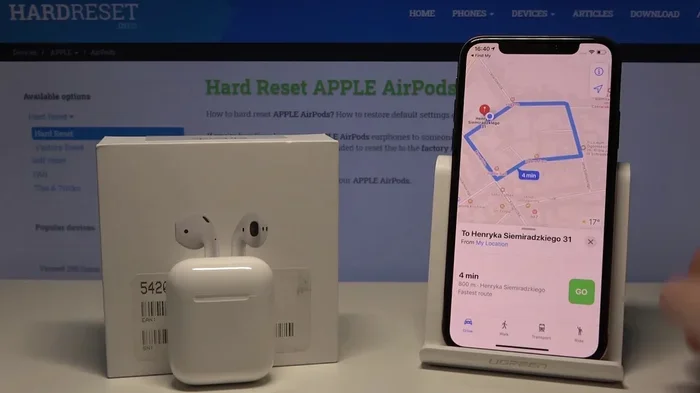
Featured image for AirPods Pro 2 navigation tracking
Image source: i.ytimg.com
No, AirPods Pro 2 do not have built-in GPS technology. Instead, they rely on your connected iPhone’s location services through the Find My network. This means your AirPods can be tracked only when they’re near a paired Apple device or other Apple devices in the Find My network. Understanding this distinction helps you set realistic expectations for tracking your earbuds.
Ever wondered if those tiny earbuds packed into your ears can pinpoint your location anywhere on Earth? You’re not alone. With smartphone GPS becoming as common as the air we breathe, it’s natural to assume our wireless earbuds have the same capability. But here’s a surprising truth that many Apple fans don’t realize.
AirPods Pro 2 are remarkable pieces of technology. They cancel noise, adapt to your ear shape, and even translate languages in real time. Yet despite all these smart features, they don’t have their own GPS chip. This might sound disappointing, but the way they handle location tracking is actually pretty clever.
In this guide, we’ll break down exactly how AirPods Pro 2 track their location, what technology powers this feature, and what you should realistically expect when trying to find a misplaced pair. We’ll also bust some common myths and give you practical tips to never lose your precious earbuds again.
Key Takeaways
- No Native GPS Chip: AirPods Pro 2 lack a built-in GPS receiver, relying entirely on your iPhone’s location data for tracking purposes.
- Find My Network Reliance: Tracking works through Bluetooth proximity to your devices and crowdsourced location data from other Apple devices.
- Charging Case Has Its Own Tracking: The AirPods Pro 2 case includes a U1 chip for Precision Finding, but this uses ultra-wideband technology, not GPS.
- Location Accuracy Varies: You can get precise directions to your case, but earbuds alone offer less accurate location information.
- Battery Limitations: AirPods can’t transmit location when their battery is dead, unlike devices with dedicated GPS trackers.
- Apple Ecosystem Required: Full tracking features only work when your AirPods are connected to Apple devices with Find My enabled.
- Alternative Trackers Exist: Third-party GPS trackers can be attached to your case if true GPS tracking is essential for you.
📑 Table of Contents
- The Straight Answer: AirPods Pro 2 and GPS Technology
- How AirPods Pro 2 Actually Track Location
- Understanding Find My App Capabilities for AirPods
- Common Myths and Misconceptions Debunked
- Practical Tips to Never Lose Your AirPods Pro 2
- Comparing AirPods Pro 2 Tracking to Other Devices
- The Future of AirPods Tracking Technology
- Conclusion
The Straight Answer: AirPods Pro 2 and GPS Technology
Let’s cut right to the chase. AirPods Pro 2 do not have GPS. Not even a little bit. There’s no satellite receiver tucked inside those tiny stems, and no standalone location chip humming away inside the charging case. This might shock you, especially considering how “smart” these devices feel in everyday use.
What GPS Actually Means in Electronics
GPS stands for Global Positioning System. It’s a network of about 30 satellites orbiting Earth that constantly broadcast signals. Your device receives these signals and triangulates its position based on how long the signals take to arrive. Think of it like trying to figure out where you are based on how far away fireworks are, except the fireworks are satellites and they’re 12,000 miles above your head.
For a device to have GPS, it needs dedicated hardware: an antenna to receive satellite signals, a processor to decode them, and enough battery power to keep everything running. This hardware takes up space and drains batteries quickly, which is why you’ll find GPS in phones, smartwatches, and dedicated navigation devices, but rarely in tiny accessories like earbuds.
Why Apple Made This Design Choice
Imagine trying to stuff a satellite dish into something smaller than a postage stamp. That’s essentially what adding GPS to AirPods would require. Apple engineers faced a simple trade-off: add GPS and sacrifice battery life, or skip GPS and deliver 6 hours of listening time on a single charge.
The choice was obvious. AirPods Pro 2 prioritize audio quality, noise cancellation, and battery life over standalone location tracking. Instead of GPS, Apple built a different kind of tracking system that piggybacks on your other devices.
Did you know that the average GPS chip consumes roughly 30-50 milliwatts of power when active? For AirPods that run on tiny batteries measured in milliamp-hours, that kind of drain would be catastrophic for battery life.
How AirPods Pro 2 Actually Track Location
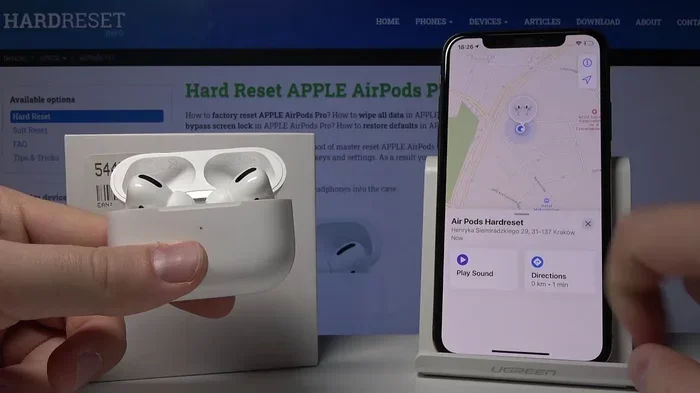
If AirPods Pro 2 don’t have GPS, then how does the Find My app locate them? This is where Apple’s cleverness shines. They built a multi-layered tracking system that uses several different technologies working together.
Visual guide about AirPods Pro 2 navigation tracking
Image source: i.ytimg.com
The Find My Network Explained Simply
Picture a giant neighborhood watch program, but for electronics. That’s basically what the Find My network is. When you mark your AirPods as lost in the Find My app, every nearby iPhone, iPad, and Mac becomes a helpful stranger looking for your stuff.
Here’s how it works in practice: Let’s say you left your AirPods at a coffee shop. When another Apple customer passes by, their device quietly detects your AirPods’ Bluetooth signal and reports the location back to Apple, completely anonymously. You then see this location update in your Find My app.
This crowdsourced approach means you’re leveraging hundreds of millions of Apple devices worldwide as a giant tracking network. It’s like having a search party that’s already deployed across the entire planet.
Bluetooth: The Foundation of Tracking
Bluetooth is the primary technology connecting your AirPods to your iPhone. It’s like a walkie-talkie conversation between devices, with your iPhone and AirPods constantly chatting about their connection status.
When your AirPods are connected to your iPhone, the Find My app shows their location based on where your phone is. Your iPhone knows its location through its own GPS, so it reports the AirPods’ location as being wherever your phone is. Simple, effective, and uses zero extra battery from your AirPods.
The practical range of Bluetooth is about 30-50 feet in open spaces, though walls and interference can reduce this significantly. So Bluetooth tracking works great in your home or office but becomes less reliable across longer distances.
Ultra-Wideband Technology in the Charging Case
Here’s where things get interesting. The AirPods Pro 2 charging case includes a U1 chip with ultra-wideband (UWB) technology. This isn’t GPS, but it offers some pretty amazing tracking capabilities.
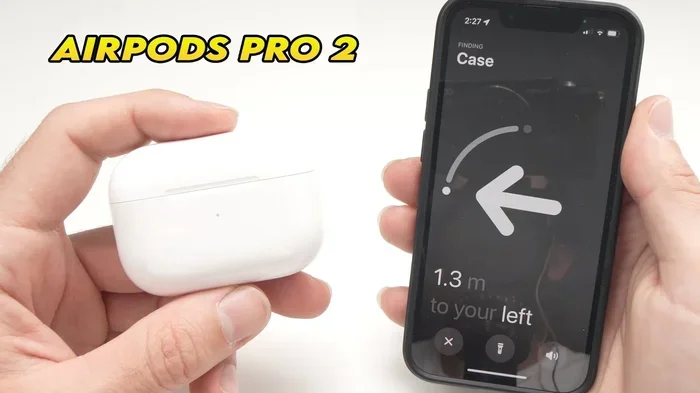
Think of ultra-wideband like sonar for the modern age. It sends out radio pulses and measures how long they take to bounce back, allowing incredibly precise distance and direction measurements. With UWB, your iPhone can point you toward your case with arrows and tell you exactly how far away it is, down to a few inches.
The precision finding feature works within about 30-50 feet of your case and guides you with on-screen directions, haptic feedback, and sound cues. It’s almost like playing a real-world video game where you’re searching for treasure.
Did you know that ultra-wideband technology can determine location with accuracy within 4-6 inches, compared to 10-30 feet for standard Bluetooth? That’s why Apple added it to the case specifically for Precision Finding.
Understanding Find My App Capabilities for AirPods
The Find My app is your command center for locating AirPods Pro 2. Understanding what it can and can’t do helps you set realistic expectations.
Visual guide about AirPods Pro 2 navigation tracking
Image source: i.ytimg.com
What You Can See in Find My
When you open the Find My app and select your AirPods Pro 2, you’ll see several pieces of information. The map shows the last known location where your AirPods were connected to a device. This is the most recent spot your iPhone, or any device in the Find My network, detected them.
You’ll also see status information like battery percentage for each earbud and the case separately. The app tells you whether they’re currently connected, disconnected but nearby, or out of range entirely.
If your AirPods are connected to your iPhone, you can play sounds through them to help locate them. This is incredibly helpful when they fall between couch cushions or get buried under papers on your desk.
The Difference Between Earbuds and Case Tracking
Here’s an important distinction many users miss: the charging case has its own location reporting capabilities, but the individual earbuds rely entirely on proximity to a connected device. This creates different tracking experiences.
If you’re searching for just an earbud, your options are limited. You can see the last location it was connected to your phone, and you can play a sound if it’s currently connected somewhere. But you won’t get Precision Finding directions to a single earbud.
The case, on the other hand, supports Precision Finding through ultra-wideband. This means finding your entire case is much easier than finding one stray earbud. If you tend to lose complete sets, this works in your favor. If you’re constantly losing individual earbuds, you might find tracking less helpful.
Last Known Location Limitations
The “last known location” feature only shows where your AirPods were, not where they currently are. If someone moved them after they disconnected, that information is gone. This is a fundamental limitation of any tracking system that relies on device connections.
Think of it like breadcrumbs. Your iPhone drops a crumb every time it connects to your AirPods. You can see the trail of crumbs, but you can’t see where your AirPods are right now if they’ve moved since the last crumb was dropped.
Common Myths and Misconceptions Debunked
Plenty of confusion surrounds AirPods Pro 2 tracking capabilities. Let’s clear up some widespread myths that might be leading you astray.
Myth 1: AirPods Have the Same Tracking as AirPods
Many people assume AirPods Pro 2 have GPS because their iPhone does. This seems logical, but it’s incorrect. Your iPhone has GPS because it has the battery capacity, processing power, and physical space for the necessary hardware. AirPods have none of these luxuries.
The confusion often comes from successful tracking experiences. When Find My works well, people assume sophisticated GPS is at work. In reality, it’s mostly Bluetooth proximity and the Find My network doing the heavy lifting.
Myth 2: You Can Track AirPods Anywhere in the World
Here’s another misconception: some users believe AirPods can be tracked globally, like a satellite phone. Unfortunately, this isn’t the case. AirPods can only be located when they’re within Bluetooth range of a device in the Find My network.
If your AirPods are in a remote area with no other Apple devices nearby, they essentially become invisible to Find My. This is fundamentally different from GPS, which works anywhere with clear sky views regardless of nearby devices.
Myth 3: AirPods Track Themselves Like AirPods
Some users expect AirPods to actively transmit their location like a dedicated GPS tracker. They imagine their earbuds constantly broadcasting coordinates to satellites. The reality is that AirPods are passive participants in the tracking process.
They don’t actively report their location. Instead, they simply broadcast a Bluetooth signal that other Apple devices can detect. The actual location reporting happens when another device detects them and reports back to Apple. This is a subtle but important distinction.
Myth 4: Lost AirPods Are Always Recoverable
The Find My system is impressive, but it’s not foolproof. Several scenarios make recovery impossible or unlikely. If your AirPods die before being located, they stop broadcasting entirely. If they’re in a location where no Apple devices pass by, they remain undetected.
The honest truth is that the Find My network is only as good as its coverage. In densely populated areas with many Apple users, tracking works wonderfully. In rural or less populated regions, tracking becomes much less reliable.
Practical Tips to Never Lose Your AirPods Pro 2
Understanding the tracking limitations is one thing. Preventing loss in the first place is another. Here are proven tips that real users swear by for keeping their AirPods safe.
Develop a Consistent Storage Habit
The single most effective way to avoid losing AirPods is to always put them back in their case when you’re not using them. This sounds obvious, but many people set them down casually and forget where they left them.
Create a designated spot for your AirPods at home and work. A specific drawer, shelf, or container works perfectly. Your brain forms a habit loop: when done using AirPods, they go to the spot. This simple practice prevents the vast majority of loss incidents.
Enable Separation Alerts
Your iPhone can notify you when you leave your AirPods behind. This feature, available in Settings under Find My, sends a ping to your phone when the connection between your devices stretches beyond a certain distance. It’s like having a digital leash that tugs when you walk too far away.
To enable this feature, open the Find My app, select your AirPods, and toggle on “Notify When Left Behind.” You can also designate safe locations like home and work where alerts won’t trigger, preventing annoying notifications during normal use.
Use a Tracking Accessory for Extra Security
If you frequently travel or worry about theft, consider attaching a third-party GPS tracker to your AirPods case. Devices like AirTags or other Bluetooth trackers can be attached to the case using adhesive mounts or special cases with built-in tracker slots.
AirTags are particularly useful here. They use the same Find My network but have louder speakers and longer battery life than AirPods. Plus, AirTags actively work even when you’re not nearby, giving you an extra layer of tracking capability.
Keep Your Software Updated
Apple regularly improves tracking capabilities through software updates. Keeping your iPhone, AirPods firmware, and Find My app updated ensures you have the latest tracking features and bug fixes.
Did you know that AirPods Pro 2 firmware updates happen automatically when they’re charging and connected to your iPhone? You don’t need to do anything special, just keep them in their case near your phone occasionally.
Comparing AirPods Pro 2 Tracking to Other Devices
Putting AirPods tracking in context helps you understand exactly what you’re getting. Let’s compare them to other common tracking scenarios.
AirPods Pro 2 vs. AirTags
AirTags are Apple’s dedicated tracking devices, and they represent a different category entirely. AirTags contain a U1 chip with ultra-wideband technology, a speaker for sound alerts, and a user-replaceable battery that lasts about a year.
AirTags use the Find My network just like AirPods, but they’re optimized for tracking. They have louder speakers, longer battery life, and a design specifically meant for tracking items. AirPods Pro 2 are primarily earbuds with tracking as a secondary feature.
If tracking is your primary concern, AirTags do it better. If you want earbuds that can also be tracked when lost, AirPods Pro 2 offer a decent compromise.
AirPods Pro 2 vs. Smartwatch GPS
Apple Watch and other smartwatches include true GPS functionality. They can track your runs, hikes, and bike rides independently of your phone. This requires more battery power and larger batteries than AirPods can accommodate.
Smartwatches balance size and functionality by using efficient GPS chips and optimized software. Even so, using GPS on a smartwatch typically reduces battery life by 50-70% during active tracking. AirPods simply can’t afford this kind of power drain given their tiny batteries.
AirPods Pro 2 vs. Phone GPS
Your iPhone has full GPS, GLONASS, Galileo, and QZSS satellite network support. It can pinpoint your location anywhere with accuracy of about 5-30 feet under good conditions. It also uses Wi-Fi and cellular triangulation to improve accuracy in challenging environments.
The iPhone’s GPS works because it has a large battery, dedicated processing power, and physical space for proper antennas. AirPods Pro 2 lack all three of these advantages, which is why they can’t include similar GPS capabilities.
The Future of AirPods Tracking Technology
Technology evolves rapidly, and AirPods tracking capabilities will likely improve in coming generations. Here’s what we might see in the future.
Potential Improvements in Future Models
Apple continuously works on miniaturizing components. As GPS chips become more efficient and batteries improve in energy density, we might eventually see true GPS in AirPods. However, this likely remains several years away given current technological constraints.
More likely near-term improvements include better ultra-wideband implementation, longer battery life for active tracking, and improved Find My network algorithms that provide more accurate last-seen locations.
Emerging Tracking Technologies
New tracking technologies are constantly emerging. Some companies are developing low-energy satellite communication chips that might eventually enable true global tracking in small devices. These technologies are still in early stages but show promise for future AirPods generations.
Wi-Fi RTT (Round-Trip Time) is another emerging technology that could improve indoor tracking accuracy. This approach uses Wi-Fi signals to determine distance, potentially offering better tracking without the power requirements of satellite-based systems.
Privacy Considerations Going Forward
Any expansion of tracking capabilities will likely come with enhanced privacy features. Apple has consistently emphasized user privacy, and future AirPods tracking will probably include more granular controls over location sharing and data transmission.
The current Find My system already uses end-to-end encryption and anonymous reporting. Future iterations will likely strengthen these protections while expanding functionality. Users should expect more control over their tracking data as the technology evolves.
Conclusion
AirPods Pro 2 don’t have GPS, and they don’t need it. Apple’s clever use of Bluetooth proximity, the Find My network, and ultra-wideband technology in the case creates a tracking system that works well for most situations without sacrificing battery life or adding bulk to the earbuds.
Understanding these limitations helps you use your AirPods more effectively. Enable separation alerts, develop good storage habits, and consider supplementary tracking accessories if you frequently misplace items. With these strategies, you’ll rarely need to track your AirPods because you’ll rarely lose them.
The technology will continue improving. Future AirPods generations will likely offer better tracking capabilities as battery technology advances and new tracking methods emerge. For now, the current system represents an excellent balance between functionality, battery life, and practicality. Just remember: when you can’t find your AirPods, the Find My app and the charging case’s Precision Finding feature are your best friends.
Frequently Asked Questions
Do AirPods Pro 2 have a GPS chip inside?
No, AirPods Pro 2 do not contain a GPS chip. They rely entirely on your connected iPhone’s location services and the Find My network for tracking purposes. The earbuds themselves cannot independently determine their location through satellites.
How does Find My locate my AirPods Pro 2 without GPS?
Find My uses Bluetooth connections to your devices, ultra-wideband technology in the case for Precision Finding, and crowdsourced location data from other Apple devices in the Find My network. This multi-layered approach works well in populated areas where many Apple users pass by.
Can I track my AirPods Pro 2 if they are lost far from home?
You can see the last location your AirPods were connected to a device, but live tracking only works when other Apple devices pass near them. In remote areas with minimal Apple device traffic, tracking becomes unreliable and may not provide current location information.
Why does the AirPods Pro 2 case have Precision Finding but the earbuds don’t?
The charging case contains a U1 chip with ultra-wideband technology that enables Precision Finding directions on your iPhone. The individual earbuds lack this chip due to size and battery constraints, making them harder to locate precisely when separated from the case.
What happens to AirPods tracking when the battery dies?
When AirPods batteries die completely, they stop broadcasting Bluetooth signals and become untraceable through Find My. This is a fundamental limitation compared to GPS trackers with multi-year batteries. Always try to locate your AirPods before the battery runs out completely.
Should I buy an AirTag to track my AirPods Pro 2 case?
Yes, attaching an AirTag to your AirPods case provides redundant tracking with louder sound alerts and longer battery life. This is especially useful for travelers or anyone prone to losing items, as AirTags add an extra layer of tracking capability that AirPods alone cannot provide.