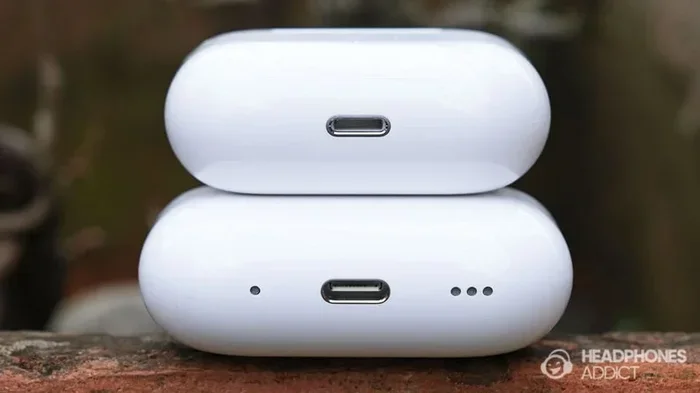
Featured image for AirPods Pro 2 Lightning port close-up
Image source: headphonesaddict.com
The AirPods Pro 2 originally came with a Lightning charging case when launched in September 2022, but Apple released a USB-C version in September 2023. If you bought AirPods Pro 2 after September 22, 2023, your case likely has a USB-C port instead of Lightning. The earbuds themselves are identical, but the charging case determines which port type you own. You can identify your port type by looking at the bottom of your charging case.
Let’s start with a true story. Imagine you just unboxed a shiny new pair of AirPods Pro 2. You flip the case over, ready to plug in a charger, and you pause. Is that a USB-C port or a Lightning port? It sounds like a tiny detail, but it can totally change which cable you grab from your drawer.
If you’ve been wondering whether the AirPods Pro 2 have a Lightning port, you’re not alone. This question confuses millions of people because Apple made a quiet switch in 2023. The answer isn’t a simple yes or no. It depends on when you bought your AirPods and which case version you own.
Here’s the short version: AirPods Pro 2 originally launched with a Lightning port in 2022. But in September 2023, Apple updated the charging case to use USB-C. Both versions still exist in the wild, and they look almost identical. In this guide, we’ll break down everything you need to know. You’ll learn how to tell which version you have, why Apple made the switch, and what it means for your daily use.
Key Takeaways
- Two versions exist: AirPods Pro 2 come in both Lightning (2022) and USB-C (2023) charging case variants.
- USB-C launched September 2023: Apple switched the AirPods Pro 2 case to USB-C alongside the iPhone 15 lineup.
- Earbuds are identical: Only the charging case port changed, not the actual AirPods themselves.
- Visual identification is easy: Lightning ports are small and oval-shaped; USB-C ports are wider and rounded.
- Same charging speed: The port type does not affect how fast your AirPods Pro 2 charge.
- Wireless charging still works: Both case versions support Qi and MagSafe wireless charging.
- Check your purchase date: Your receipt or serial number reveals which version you own.
📑 Table of Contents
- The Short Answer: It Depends on When You Bought Them
- Why Apple Made the Switch from Lightning to USB-C
- How to Tell Which AirPods Pro 2 Port You Have
- Does the Port Type Matter for Charging Speed?
- Can You Use AirPods Pro 2 With an iPhone That Has the Other Port?
- Should You Buy the Lightning or USB-C Version in 2024?
- Common Myths About AirPods Pro 2 Ports
- What to Do If You Have the Wrong Cable
- Fun Facts About AirPods Pro 2 Charging Cases
- The Bottom Line
The Short Answer: It Depends on When You Bought Them
Apple released the AirPods Pro 2 on September 23, 2022. The original version came in a charging case with a Lightning port at the bottom. That’s the same small, oval-shaped connector iPhone users had been plugging in for years.
Then, on September 22, 2023, Apple quietly released a new version of the AirPods Pro 2. This updated version came with a USB-C charging case instead. The change happened right when Apple launched the iPhone 15, which was the first iPhone to switch from Lightning to USB-C.
Think of it like this: Imagine if a car company released a 2022 model with one type of engine, then a 2023 model with a different engine. The outside looks the same, but under the hood, things changed. That’s exactly what happened with the AirPods Pro 2 charging case.
So if someone asks you, “Does AirPods Pro 2 have a Lightning port?” the honest answer is: it might, but it also might not. It all comes down to the manufacturing date of your charging case.
Two AirPods Pro 2 Models to Remember
- AirPods Pro 2 (Lightning): Released September 2022, case has a Lightning port
- AirPods Pro 2 (USB-C): Released September 2023, case has a USB-C port
Why Apple Made the Switch from Lightning to USB-C
The big reason comes down to European Union rules. In October 2022, the EU passed a law requiring all smartphones, tablets, and headphones to use USB-C charging by the end of 2024. The goal was to reduce electronic waste and make life easier for consumers.
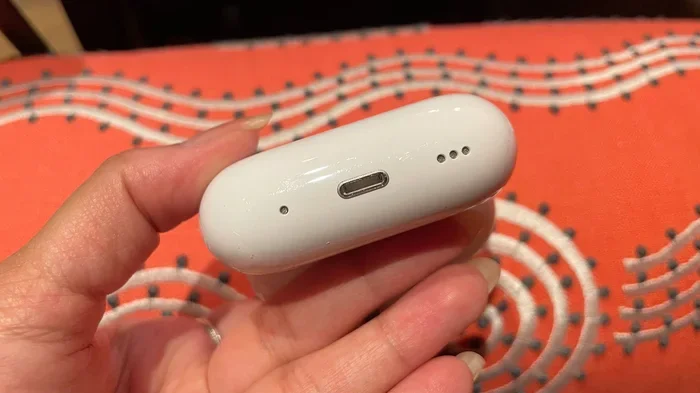
Visual guide about AirPods Pro 2 Lightning port close-up
Image source: cdn.mos.cms.futurecdn.net
Did you know that the average household has at least three different charging cables lying around? That’s a lot of clutter. The EU wanted to fix this by forcing companies to adopt one universal charger. Apple, which had been using its own Lightning connector since 2012, had to make a change.
Here’s a simple analogy. Imagine if every gas station only accepted one specific brand of gas. You’d need three different cars to fill up at three different stations. That’s how charging cables felt before USB-C became standard. Now, one cable can charge your phone, laptop, tablet, and earbuds. Pretty neat, right?
Apple didn’t want to lose access to the European market, so they started transitioning their products. The iPhone 15 was first in 2023. The AirPods Pro 2 case followed the same year. By late 2024, Apple had updated most of its products to USB-C, including the AirPods 4 and entry-level AirPods.
The Bigger Picture
The Lightning-to-USB-C switch wasn’t just about Apple. It affected every tech company selling products in Europe. According to the European Commission, this single rule could save consumers up to 250 million euros per year on unnecessary chargers. That’s a lot of money no longer spent on cables that end up in landfills.
How to Tell Which AirPods Pro 2 Port You Have
Good news: telling the two versions apart is super easy. You don’t need to be a tech expert or pull out a magnifying glass. Just flip your charging case over and look at the port at the bottom.
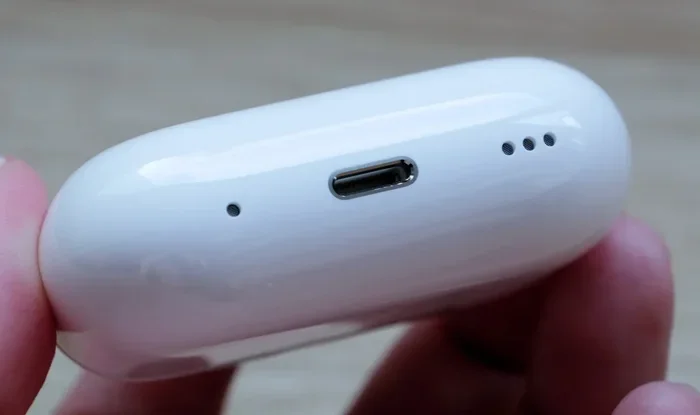
Visual guide about AirPods Pro 2 Lightning port close-up
Image source: assets.hardwarezone.com
The Lightning Port Look
A Lightning port is small, narrow, and oval-shaped. It’s about the size of a small fingernail. The inside has a tiny rectangle with rounded edges. If you’ve ever charged an older iPhone (iPhone 14 or earlier), you already know what this looks like.
The USB-C Port Look
A USB-C port is wider and more rounded. It’s a long oval shape, almost like a thin pill. The inside is a wider rectangle compared to Lightning. This is the same port you’ll find on most modern Android phones, newer iPads, MacBooks, and the iPhone 15 and later.
Here’s a simple trick: if the port looks tiny and skinny, it’s Lightning. If it looks chunkier and wider, it’s USB-C. You can also compare it to your phone’s charging port. If your phone uses the same cable as your AirPods case, you have a USB-C version.
Other Ways to Check Your Version
- Check the model number: The Lightning version is A2968. The USB-C version is A3040. You can find this on the underside of the case lid or in your iPhone’s settings under Settings > Bluetooth.
- Check your receipt: If you bought them after September 22, 2023, they’re almost certainly the USB-C version.
- Check the box: The original Lightning case box shows a Lightning cable inside. The USB-C box shows a USB-C cable.
Does the Port Type Matter for Charging Speed?
Here’s a bit of good news: the port type doesn’t really change how fast your AirPods Pro 2 charge. Both versions support the same charging features and speeds.
Let’s break it down with a simple analogy. Think of charging like filling a swimming pool with a garden hose. The hose might have a slightly different shape, but if the water pressure is the same, the pool fills at the same rate. That’s how charging works too. The shape of the port doesn’t change the speed of the juice flowing in.
Charging Features Both Versions Share
- Wired charging: Plug in for about 5 minutes to get around 1 hour of listening time
- Qi wireless charging: Works with any Qi-certified wireless charger
- MagSafe charging: Snaps magnetically to MagSafe chargers for easy alignment
- Apple Watch charger: The USB-C version can even charge on an Apple Watch puck charger
The USB-C version has one tiny extra trick up its sleeve. It supports charging from an Apple Watch charger, which the Lightning version doesn’t. But for most people, this is a minor bonus rather than a dealbreaker.
Battery Life Stays the Same
Both versions give you up to 6 hours of listening time on a single charge. The case provides up to 30 hours of total listening time. Charging the case from empty takes about an hour, no matter which port type you have.
Can You Use AirPods Pro 2 With an iPhone That Has the Other Port?
Yes! This is a common worry, but it’s totally unfounded. The charging case port doesn’t affect how your AirPods connect to your phone. All AirPods Pro 2 use Bluetooth to pair with your devices. You can use the Lightning case AirPods with a USB-C iPhone 15. You can also use the USB-C case AirPods with an older Lightning iPhone.
Think of it like a TV remote. The remote uses infrared or Bluetooth to talk to your TV, but the way you charge the remote doesn’t matter. Your TV doesn’t care if your remote charges via USB-C, Lightning, or even solar power. It just needs the remote to send a signal.
Pairing Works the Same
Pairing your AirPods Pro 2 with any iPhone, iPad, or Mac is identical regardless of case type. Just open the case near your device, tap connect, and you’re done. The earbuds themselves are exactly the same in both versions. The only difference is the port on the case.
What About Using Them With Non-Apple Devices?
AirPods Pro 2 work with any Bluetooth-enabled device. You can pair them with Android phones, Windows laptops, smart TVs, and gaming consoles. The charging case port has zero effect on Bluetooth performance. So if you’re an Android user, don’t worry about the port type on the case. It doesn’t impact how the earbuds connect to your phone.
Should You Buy the Lightning or USB-C Version in 2024?
If you’re shopping for AirPods Pro 2 today, you’ll almost certainly get the USB-C version. Apple stopped selling the Lightning version through its official store shortly after releasing the USB-C model. You might still find Lightning versions at clearance sales, refurbished outlets, or secondhand markets, but new stock is mostly USB-C.
Here’s a practical tip: if you already own a USB-C iPhone, iPad, or MacBook, the USB-C AirPods Pro 2 case makes life easier. You can charge everything with one cable. If you have older Lightning devices, it might not matter as much. You’ll still need a Lightning cable for your phone anyway.
Pros of the USB-C Version
- Future-proof: USB-C is the new standard for years to come
- One cable for all: Charge your phone, tablet, laptop, and earbuds with the same cable
- More accessories: USB-C cables are easier to find and often cheaper
- Apple Watch charging support: Charge the case on an Apple Watch charger
Pros of the Lightning Version
- Cheaper on resale: Lightning versions often sell for less secondhand
- Works fine with all devices: The earbuds still connect via Bluetooth
- Same sound quality: Audio performance is identical
Common Myths About AirPods Pro 2 Ports
Let’s clear up some confusion. There are a few myths floating around about AirPods Pro 2 charging ports. Here’s the truth behind each one.
Myth 1: AirPods Pro 2 Always Have Lightning Ports
False. This might have been correct when AirPods Pro 2 first launched, but it’s no longer accurate. Since September 2023, the standard version comes with USB-C. Saying they “always” have Lightning is outdated information.
Myth 2: USB-C AirPods Pro 2 Sound Better
False. Both versions sound identical. The audio drivers, processors, and tuning are the same. The only thing that changed is the charging port. Your music sounds exactly the same no matter which version you own.
Myth 3: You Need a Special Cable for Each Version
False. You can use any standard Lightning cable or USB-C cable. Apple doesn’t lock you into buying their expensive first-party cables. Any certified cable from a reputable brand works just fine.
Myth 4: The USB-C Version Has Better Battery Life
False. Battery life is identical between both versions. Apple didn’t change the battery or charging efficiency when switching ports. You get the same 6 hours per charge and 30 hours total with the case.
Myth 5: Lightning AirPods Pro 2 Will Stop Working Soon
False. Your Lightning AirPods Pro 2 will keep working for years. Bluetooth doesn’t care what port your charging case uses. As long as your case holds a charge, your earbuds will keep playing music.
What to Do If You Have the Wrong Cable
Don’t panic if you grab the wrong cable. Neither version will damage your AirPods if you use the wrong charger. The port is shaped to only accept the right cable, so you literally can’t plug in a Lightning cable into a USB-C port. They’re different shapes.
Think of it like a key and a lock. A Lightning key simply won’t fit into a USB-C lock. The shape stops you from forcing it in. This is called “polarization,” and it prevents accidental damage from using the wrong connector.
Where to Buy Replacement Cables
- Apple Store: Buy official cables if you want guaranteed quality
- Amazon: Find MFi (Made for iPhone) Lightning cables or USB-IF certified USB-C cables
- Best Buy: Browse in person and test before buying
- Third-party brands: Anker, Belkin, and UGREEN make excellent cables at fair prices
Tips for Picking a Good Cable
- Look for MFi certification: This means Apple has approved the Lightning cable for use with iPhones and AirPods
- Look for USB-IF certification: This means the USB-C cable has passed official compliance tests
- Avoid super-cheap cables: They might damage your battery or charge slowly
- Pick the right length: A 1-meter cable works for most situations
Fun Facts About AirPods Pro 2 Charging Cases
Let’s end with some interesting tidbits you might not know.
Did you know? Apple sold over 80 million AirPods worldwide in 2022 alone. That’s more than the entire population of Germany! With so many AirPods out there, it’s no wonder the port question confuses so many people.
Did you know? The USB-C version of the AirPods Pro 2 case has a slightly different IP54 rating for dust and water resistance compared to the Lightning version. Both are sweat and water-resistant, but the USB-C version handles dust a tiny bit better.
Did you know? You can charge your AirPods Pro 2 case using your iPhone. If your iPhone has a USB-C port (iPhone 15 or later), you can plug a USB-C cable into your phone and the other end into your AirPods case. The phone will share its battery with the case. Pretty cool, right?
Did you know? AirPods Pro 2 cases have a built-in speaker in the bottom. This helps you find them using Find My. The speaker plays a sound when you’re trying to locate the case. Both Lightning and USB-C versions have this feature.
Did you know? The AirPods Pro 2 USB-C case added support for lossless audio with the Apple Vision Pro headset. When paired with Vision Pro, the USB-C AirPods Pro 2 deliver a 20-bit, 48 kHz lossless listening experience. The Lightning case can do the same with a software update, but Apple focused the launch on the USB-C version.
The Bottom Line
So, does AirPods Pro 2 have a Lightning port? It depends on which version you own. The original 2022 AirPods Pro 2 came with a Lightning case. The 2023 update switched to USB-C. Both versions work great and sound identical. The only real difference is the shape of the port on the bottom of the charging case.
If you’re buying new today, you’ll get the USB-C version. If you have an older one with Lightning, don’t worry. It works just as well as the USB-C version for everyday listening. Your music will sound the same, your battery will last the same, and your earbuds will pair the same way.
The switch to USB-C was about more than just Apple. It was part of a global move toward one universal charging standard. Less clutter, less waste, and less confusion. Whether you have Lightning or USB-C, your AirPods Pro 2 are still one of the best wireless earbuds on the market. Enjoy the music!
Frequently Asked Questions
Does the AirPods Pro 2 have a Lightning port?
The original AirPods Pro 2 launched in September 2022 with a Lightning charging case. However, Apple released a USB-C version in September 2023. So whether your AirPods Pro 2 has a Lightning or USB-C port depends on when you bought them.
How can I tell if my AirPods Pro 2 case has Lightning or USB-C?
Flip the case over and look at the port on the bottom. Lightning ports are smaller and more oval-shaped, while USB-C ports are wider and more rounded. You can also check the model number in your iPhone’s Bluetooth settings: A2968 is Lightning, and A3040 is USB-C.
When did Apple switch the AirPods Pro 2 to USB-C?
Apple switched the AirPods Pro 2 charging case to USB-C on September 22, 2023. This change happened at the same time Apple launched the iPhone 15 lineup, which was the first iPhone to use USB-C instead of Lightning.
Can I use a Lightning AirPods Pro 2 case with a USB-C iPhone?
Yes, absolutely. The charging port on your AirPods case doesn’t affect how your earbuds pair with your phone. AirPods Pro 2 use Bluetooth to connect to all devices, regardless of whether the case uses Lightning or USB-C. You can even charge the Lightning case with a USB-C to Lightning cable.
Do AirPods Pro 2 charge faster with USB-C?
No, the port type doesn’t change charging speed. Both Lightning and USB-C versions of the AirPods Pro 2 case charge at the same rate. A 5-minute charge gives you about 1 hour of listening time, and a full case charge takes about an hour to complete.
Should I buy Lightning or USB-C AirPods Pro 2 in 2024?
In 2024, the USB-C version is the better choice for most people. It’s future-proof, works with all modern cables, and matches the new iPhone standard. Apple no longer sells the Lightning version through its official store, so you’ll mostly find USB-C versions available new.