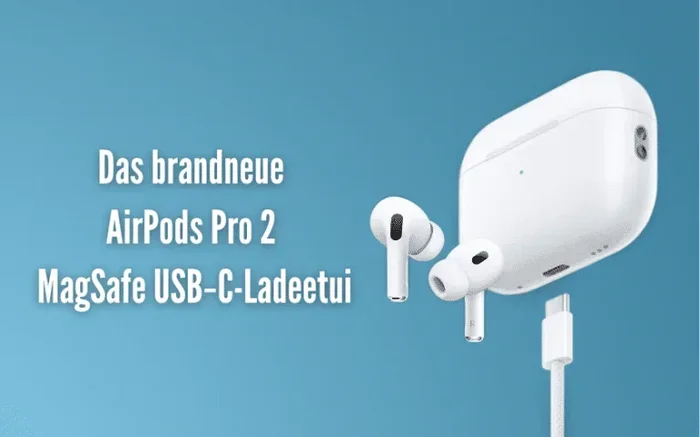
Featured image for AirPods Pro USB-C case
Image source: bloggink.de
Yes, the AirPods Pro 2 (released September 2023) features a USB-C charging case, replacing the older Lightning connector. However, the original AirPods Pro (2019) and AirPods Pro 2 (2022) still use Lightning. Apple made the switch to USB-C to comply with new EU regulations requiring a universal charging standard across all small electronic devices.
Apple’s AirPods Pro have become some of the most popular earbuds in the world. But one question keeps popping up: do they have USB-C? The answer is simple, yet a bit tricky depending on which model you own. Let’s break it down so you know exactly what you’re getting.
In September 2023, Apple finally made the switch. The AirPods Pro 2 now come with a USB-C charging case. This was a big deal for Apple fans who had been waiting for years. But here’s the catch: not every AirPods Pro has USB-C. If you bought your AirPods Pro before 2023, you likely still have the old Lightning connector.
This guide will answer all your questions about AirPods Pro and USB-C. We’ll cover which models have it, why Apple made the change, how to charge them, and much more. By the end, you’ll be an expert on the subject.
Key Takeaways
- Only AirPods Pro 2 (2023) has USB-C: The second-generation AirPods Pro released in September 2023 switched from Lightning to USB-C charging.
- Older models still use Lightning: AirPods Pro (1st gen, 2019) and AirPods Pro 2 (2022) both feature Lightning charging cases.
- EU regulations drove the change: Apple’s switch to USB-C was largely due to European Union rules requiring a common charging port.
- USB-C offers faster charging: The USB-C case can charge via any USB-C cable, iPhone 15 charger, or iPad.
- Same audio performance: The USB-C version has identical sound quality and features as the Lightning version.
- Identify your model easily: Check the model number (A2968 for USB-C) or the charging port on the case.
- Future-proof investment: Buying USB-C AirPods Pro means fewer cables and better compatibility with modern devices.
📑 Table of Contents
- The Short Answer: Which AirPods Pro Have USB-C?
- The History: Why Apple Switched to USB-C
- What Makes the USB-C AirPods Pro Different?
- Charging Your USB-C AirPods Pro: A Complete Guide
- Common Questions and Myths About AirPods Pro and USB-C
- Should You Buy USB-C AirPods Pro? Making the Right Choice
- The Future of AirPods and Charging
- Troubleshooting Common USB-C AirPods Pro Issues
- Final Thoughts: The USB-C AirPods Pro Verdict
The Short Answer: Which AirPods Pro Have USB-C?
Let’s get straight to the point. Only one AirPods Pro model has a USB-C charging case: the AirPods Pro 2 released in September 2023. This model is sometimes called the “AirPods Pro with USB-C” or “AirPods Pro (2nd generation) with USB-C case.” If you own this version, congratulations! You have the newest charging technology.
If you have any other AirPods Pro model, you have a Lightning connector. That includes:
- AirPods Pro (1st generation): Released in October 2019 with a Lightning charging case.
- AirPods Pro 2 (2022): Released in September 2022 with a Lightning charging case.
- AirPods Pro 2 (2023): Released in September 2023 with a USB-C charging case.
How to Tell Which Model You Have
Not sure which AirPods Pro you own? Here are three easy ways to find out:
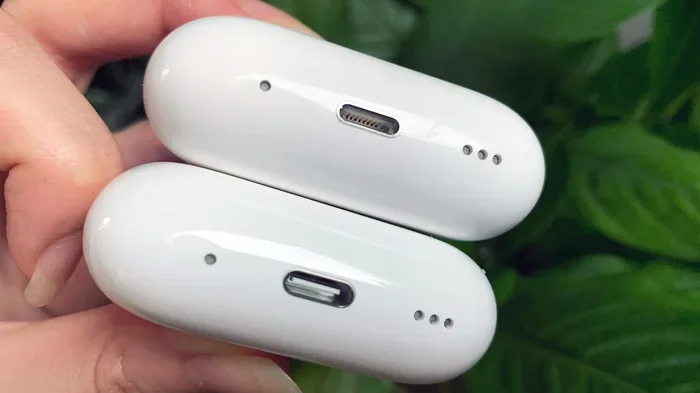
1. Check the charging case: Look at the bottom of the case. If you see a small oval port, that’s Lightning. If you see a wider, rounded rectangle port, that’s USB-C.
2. Look at the model number: Go to Settings > Bluetooth on your iPhone. Tap the “i” next to your AirPods Pro. The model number will appear. USB-C AirPods Pro 2 show “A2968” while the Lightning version shows “A2700.”
3. Check the box or receipt: If you still have the original packaging, the model number is printed on the side. USB-C versions also say “USB-C” on the box.
Think of it like checking if your phone charger is the old style or new style. The old style is thin and small. The new style is wider and looks like a thick pill shape. Easy, right?
The History: Why Apple Switched to USB-C
Now you know which models have it. But why did Apple switch to USB-C in the first place? The answer involves laws, technology, and a bit of stubbornness from Apple.
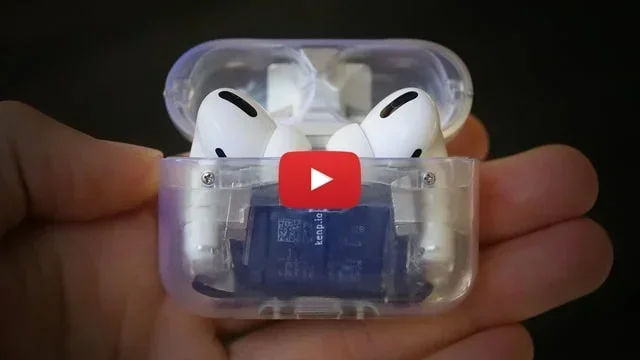
Visual guide about AirPods Pro USB-C case
Image source: iclarified.com
The EU Ruling That Changed Everything
In October 2022, the European Union passed a law that shook the tech world. The law required all smartphones, tablets, and earbuds sold in the EU to use USB-C charging by December 2024. The goal was simple: reduce electronic waste. Europeans throw away about 11,000 tons of chargers every year, according to EU estimates.
Apple had used the Lightning connector since 2012. The Lightning port was small, reversible, and proprietary. But it was also Apple’s own design. This meant Apple controlled the licensing and made money from every cable sold. Switching to USB-C meant giving up that control.
But Apple didn’t have a choice in Europe. If they wanted to keep selling iPhones and AirPods in EU countries, they needed USB-C. So in 2023, Apple started the transition. The iPhone 15 was the first iPhone with USB-C. The AirPods Pro 2 followed shortly after.
The Bigger Picture: One Cable for Everything
USB-C isn’t just about laws, though. It’s about convenience. Think of it this way: imagine if every appliance in your kitchen used a different plug. Your toaster has one plug, your microwave another, and your coffee maker a third. That would be annoying, right? That’s what the tech world was like before USB-C.
With USB-C, you can use the same charger for your:
- iPhone 15 and later
- iPad Pro, iPad Air, and iPad mini
- MacBook Air and MacBook Pro
- AirPods Pro 2 (USB-C version)
- Many Android phones
- Most modern headphones
- Game consoles like the Nintendo Switch
One cable to rule them all. That’s the dream, and USB-C is making it happen.
Did You Know? The USB-C connector was actually developed by the USB Implementers Forum and finalized in 2014. It took nearly a decade for it to become the universal standard!
What Makes the USB-C AirPods Pro Different?
You might be wondering: is the USB-C AirPods Pro any different from the Lightning version besides the charging port? The answer is mostly no, but there are a few small changes worth knowing.
Visual guide about AirPods Pro USB-C case
Image source: cdn.mos.cms.futurecdn.net
Same Great Sound and Performance
Here’s the good news: the USB-C AirPods Pro 2 have the exact same audio quality as the Lightning version. Apple’s H2 chip powers both. You get the same Active Noise Cancellation, Transparency mode, and Adaptive Audio features. The sound is identical because the internal components haven’t changed.
Think of it like buying a car. If you buy the same model in 2022 and 2023, but the 2023 version has a different gas cap, the car still drives the same. The gas cap is just how you fill it up. Same idea here.
The Small Upgrade to IP54 Rating
One tiny change: the USB-C AirPods Pro 2 have an IP54 rating for dust and sweat resistance. The Lightning version was IPX4. What does this mean in plain English?
The “5” in IP54 means it’s protected against dust. Not completely dust-proof, but better than before. The “4” means it can handle water splashes from any direction. So if you’re sweating at the gym or caught in light rain, your AirPods Pro will be fine.
Lossless Audio with Apple Vision Pro
Here’s a cool bonus feature. The USB-C AirPods Pro 2 support 20-bit, 48 kHz Lossless Audio when paired with the Apple Vision Pro headset. This means ultra-high-quality sound with zero compression. The Lightning version can’t do this because Lightning doesn’t have enough bandwidth.
Imagine listening to music through a straw versus drinking it from a glass. Lossless audio is like drinking from the glass. You get all the flavor, all the detail. But this only works with Vision Pro, which is a $3,500 device. So it’s a niche feature for most people.
Charging Your USB-C AirPods Pro: A Complete Guide
Got your USB-C AirPods Pro 2? Great! Let’s talk about how to charge them properly. This part is easy, but there are some tips that can help you get the most out of your battery.
What You Need to Charge Them
Here’s the simple list:
- A USB-C cable: Any USB-C to USB-C or USB-C to USB-A cable will work.
- A power source: This could be a wall adapter, your computer, or even another device.
- About 1 hour of time: For a full charge from zero.
That’s it. No special Apple cable required. Any USB-C cable lying around your house should work just fine.
Compatible Chargers
You can charge your USB-C AirPods Pro 2 with many different power sources. Here are the most popular options:
iPhone 15 or newer: Yes, you can use your iPhone’s USB-C cable to charge your AirPods Pro. Just plug the cable into a wall adapter or power bank.
iPad charger: All iPads made in the last few years use USB-C. You can use any iPad charger.
MacBook charger: Your MacBook USB-C charger will work, though it’s overkill for tiny AirPods. It won’t damage them, though.
Third-party chargers: Anker, Belkin, and other brands make great USB-C chargers. They often cost less than Apple’s own chargers.
Power banks: Portable chargers with USB-C ports are perfect for travel.
Car chargers: Most modern cars have USB-C ports. Just plug in and go.
Wireless Charging Still Works
Here’s something many folks don’t know: the USB-C AirPods Pro 2 case still supports wireless charging. You can use any Qi-compatible charger or a MagSafe charger. Just place the case on the charging pad and the LED will light up to confirm it’s charging.
This is great because it gives you options. At home, you might use wireless charging. On the go, you might use a USB-C cable. Best of both worlds.
Charging Speed and Battery Life
Let’s talk numbers. Apple says the USB-C AirPods Pro 2 offer:
- Up to 6 hours of listening time on a single charge (with Active Noise Cancellation off).
- Up to 5.5 hours with Active Noise Cancellation on.
- Up to 30 hours total with the charging case.
- 5 minutes in the case gives you about 1 hour of listening time.
These numbers are the same as the Lightning version. The charging speed hasn’t changed. It takes about 1 hour to fully charge the case from empty.
Pro Tip: Don’t leave your AirPods Pro case plugged in for days at a time. While modern batteries are smart, it’s still good practice to unplug once it’s fully charged. Think of it like not leaving your car running in the garage overnight.
Common Questions and Myths About AirPods Pro and USB-C
There are many rumors and questions floating around about AirPods Pro and USB-C. Let’s clear up the most common ones.
Myth 1: “All AirPods Have USB-C Now”
False. Only the AirPods Pro 2 (2023) has USB-C. The standard AirPods 2 still use Lightning. The AirPods 3 still use Lightning. The AirPods Max still use Lightning. Even older AirPods Pro models use Lightning. So don’t assume all AirPods have USB-C. Always check before you buy.
Myth 2: “USB-C AirPods Pro Sound Better”
False. As mentioned earlier, the sound quality is identical between Lightning and USB-C versions. The chip, drivers, and design are the same. The only audio difference is the Lossless Audio support with Apple Vision Pro, which only works on the USB-C version.
Myth 3: “You Need an Apple USB-C Cable”
False. Any USB-C cable will work. Apple doesn’t require you to buy their cables. Third-party cables from Amazon, Anker, or even the gas station will charge your AirPods Pro just fine. Just make sure it’s a proper USB-C cable and not a cheap knockoff.
Myth 4: “USB-C AirPods Pro Charge Faster”
Mostly false. The charging speed is nearly identical to the Lightning version. Both take about an hour for a full charge. The only minor difference is that some high-wattage USB-C chargers might charge slightly faster, but not enough to notice in real life.
Myth 5: “You Can’t Charge Them with an iPhone”
False (mostly). If you have an iPhone 15 or newer, you can absolutely use it to charge your USB-C AirPods Pro 2. Just connect them with a USB-C to USB-C cable. The iPhone will share its battery with the AirPods. You can’t do this with older iPhones that have Lightning ports.
Myth 6: “USB-C Will Break Your Old Lightning AirPods”
False. If you have Lightning AirPods Pro, they will continue to work perfectly. Apple isn’t disabling them. You can still use them with all your Apple devices. The Lightning connector isn’t going anywhere on those older models.
Should You Buy USB-C AirPods Pro? Making the Right Choice
Now comes the big question: should you buy the USB-C AirPods Pro 2? The answer depends on your situation. Let’s walk through the decision.
Buy USB-C AirPods Pro 2 If:
You have a recent iPhone with USB-C. If you own an iPhone 15 or newer, getting USB-C AirPods Pro makes perfect sense. You’ll use the same cable for both. Fewer cables, less hassle.
You want a future-proof purchase. USB-C is here to stay. Apple will use it for the next 10+ years. Buying USB-C AirPods Pro means you won’t need new ones when standards shift again.
You have other USB-C devices. If you have a MacBook, iPad, or modern Android phone, USB-C AirPods Pro fit right into your setup.
You care about the environment. Fewer cables in landfills. One charger for all your devices. It’s a small win, but it adds up.
Skip USB-C AirPods Pro If:
You already have Lightning AirPods Pro. If your current ones work great, don’t rush to upgrade. The audio quality is the same. Save your money.
You’re on a tight budget. Refurbished or used Lightning AirPods Pro are often cheaper. You can save $50 or more.
You only use older Apple devices. If you have an iPhone with Lightning and no plans to upgrade, Lightning AirPods Pro are fine.
The Price Factor
As of 2024, the USB-C AirPods Pro 2 retail for $249. Sometimes you can find them on sale for $199 or less. The Lightning AirPods Pro 2 (when available refurbished) can be found for around $150-$180. So you might save $50-$100 by going with Lightning.
But remember: the USB-C version is the future. If you plan to use your AirPods for 3-4 years, the extra cost is worth it.
A Real-World Example
Let’s say Sarah is buying her first pair of AirPods Pro. She has an iPhone 15 Pro. Her partner has a MacBook and iPad. She should absolutely buy the USB-C version. She can charge all her devices with the same cable. It’s the smart choice.
Now let’s say John has an iPhone 12 with a Lightning port. He has older AirPods that work fine. Should he upgrade? Probably not. He should wait until he’s ready to upgrade his iPhone, then buy USB-C AirPods Pro at the same time.
See how it depends on your situation?
The Future of AirPods and Charging
What does the future hold for AirPods and charging? Let’s take a peek at what’s coming.
All AirPods Will Eventually Go USB-C
Apple is slowly transitioning its entire lineup. The AirPods 4, released in September 2024, came in two versions. One has a Lightning case, and one has a USB-C case. The higher-end AirPods 4 with Active Noise Cancellation has USB-C. This trend will continue until all AirPods have USB-C.
By 2025 or 2026, we expect all new AirPods to have USB-C. The Lightning era is ending.
Could Wireless Charging Be the Future?
Some tech experts think Apple might one day remove the charging port entirely. Why? Because wireless charging is getting better. The USB-C AirPods Pro 2 already support MagSafe and Qi charging. In the future, Apple might rely solely on wireless charging.
Imagine never plugging in your AirPods again. Just place them on a pad and they charge. That future might not be far off.
What About the Next AirPods Pro?
The AirPods Pro 3 are rumored for 2025 or 2026. They’ll definitely have USB-C. They might also have new health features like heart rate monitoring or temperature sensing. But one thing is certain: they won’t have Lightning. That era is over.
Did You Know? Apple has sold over 100 million AirPods since 2017. That’s a lot of tiny charging cases!
Troubleshooting Common USB-C AirPods Pro Issues
Even the best products have hiccups sometimes. Here are solutions to common USB-C AirPods Pro problems.
Problem: AirPods Pro Not Charging
If your USB-C AirPods Pro aren’t charging, try these fixes:
- Check the cable: Make sure it’s a working USB-C cable. Try a different cable to test.
- Clean the port: Dust and lint can get stuck in the USB-C port. Use a soft, dry brush to gently clean it.
- Try a different charger: The power source might be the issue. Try another wall adapter or computer.
- Reset the AirPods: Press and hold the setup button on the back of the case for 15 seconds until the LED flashes amber, then white.
- Update your firmware: Make sure your AirPods have the latest firmware through your iPhone settings.
Think of it like a clogged drain. Sometimes you just need to clear out the gunk. A clean port often solves charging issues.
Problem: Slow Charging
If charging seems slow, it could be due to:
- A low-wattage charger: Use at least a 5W charger. Higher wattages are fine too.
- Charging while using: Using your AirPods while they charge can slow things down.
- Extreme temperatures: Very hot or cold environments slow charging. Room temperature is best.
Problem: Case Not Recognized by iPhone
If your iPhone doesn’t recognize your AirPods case, try:
- Closing and reopening the lid: Sometimes a simple reset works.
- Forgetting and re-pairing: Go to Settings > Bluetooth, tap the “i” next to your AirPods, and select “Forget This Device.” Then pair again.
- Restarting your iPhone: The classic “turn it off and on again” fix.
Pro Tip: Always keep your AirPods Pro firmware updated. Apple releases updates that fix bugs and improve performance. The updates happen automatically when your AirPods are connected to your iPhone and charging.
Final Thoughts: The USB-C AirPods Pro Verdict
So, do AirPods Pro have USB-C? Yes, but only the AirPods Pro 2 released in September 2023. If you own any other AirPods Pro model, you have a Lightning connector. It’s a simple distinction, but it matters when you’re buying new earbuds or trying to share cables with friends.
The switch to USB-C was a long time coming. Apple held onto Lightning for over a decade, but EU regulations and consumer demand finally won out. Now we have a universal standard that works across devices. One cable for your iPhone, iPad, MacBook, and AirPods. That’s progress.
If you’re buying AirPods Pro today, get the USB-C version. They’re future-proof, widely compatible, and use the same great technology as the Lightning version. Just make sure you have a USB-C cable handy, and you’re good to go.
The future of charging is USB-C, and Apple is finally on board. Welcome to the new standard.