Yes, AirPods Pro now uses USB-C, but only on specific models. The AirPods Pro 2, released in September 2023, switched from the Lightning connector to USB-C, aligning with Apple’s broader transition away from Lightning. However, older AirPods Pro models (2019 and 2022) still rely on Lightning cables. Knowing which model you own is key to using the right charging cable and accessories.
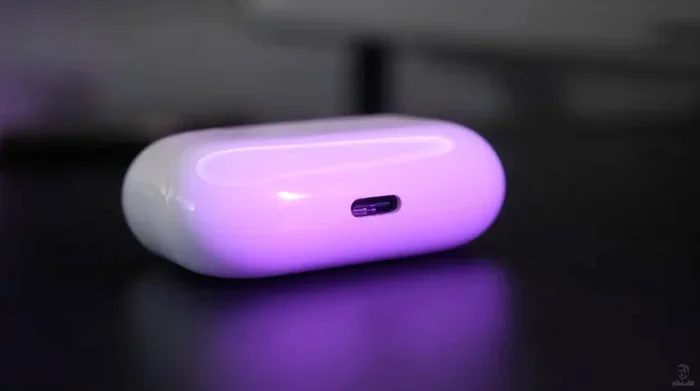
Featured image for AirPods Pro USB-C charging case
Image source: cultofmac.com
Imagine plugging in your phone, your tablet, your laptop, and now your earbuds, all with the same single cable. That future is already here for some people, but not for everyone. If you have ever grabbed the wrong charger before bed and realized your earbuds would be dead in the morning, you already know why this question matters.
The short answer is yes, but with a catch. Only certain AirPods Pro models use USB-C, and the older ones you might still own do not. That small detail can save you a frustrating return trip to the store or a wasted twenty dollars on the wrong cable. So before you toss that Lightning cable in a drawer “just in case,” let us walk through exactly what you need to know.
In this guide, we will break down which AirPods Pro models use USB-C, why Apple finally made the change, what it means for your daily charging routine, and what to expect in the future. We will also answer the most common questions people ask, so you never have to guess again.
Key Takeaways
- Only AirPods Pro 2 (2023) uses USB-C: This is the only AirPods Pro model with a USB-C charging case; all earlier versions use Lightning.
- Apple’s EU Mandate Drove the Change: A 2022 European Union rule required USB-C on small electronics, pushing Apple to make the switch.
- Charging Behavior Is Identical: USB-C doesn’t change how fast or how well your AirPods Pro charge, only the port shape.
- The AirPods Pro 1 (2019) and AirPods Pro 2 (2022) Still Use Lightning: If you bought AirPods Pro before September 2023, you have a Lightning case.
- USB-C Works With Most Cables: Any USB-C cable that supports power delivery can charge the new AirPods Pro 2 case.
- Wireless Charging Still Works: The USB-C AirPods Pro 2 case supports Qi, MagSafe, and Apple Watch chargers just like before.
- Future AirPods Will Likely Drop Lightning Entirely: Industry analysts expect every AirPods model to move to USB-C within a few years.
📑 Table of Contents
- What Changed: Apple’s Move From Lightning to USB-C
- Which AirPods Pro Models Use USB-C
- How USB-C Charging Works on AirPods Pro
- Why Apple Made the Switch: The Real Reasons
- How to Tell If Your AirPods Pro Use USB-C or Lightning
- What About AirPods Max and AirPods 4?
- Practical Tips for AirPods Pro USB-C Users
- The Future of AirPods Charging
- Common Misconceptions About AirPods Pro and USB-C
- Final Thoughts: Should You Care About USB-C on AirPods Pro?
What Changed: Apple’s Move From Lightning to USB-C
For more than a decade, Apple used its own proprietary Lightning connector on iPhones, iPads, and AirPods. Lightning was thin, reversible, and at the time, a real step up from the old 30-pin dock connector. But the world moved on, and so did the regulations.
The European Union Ruling That Started It All
In October 2022, the European Union passed a law requiring all small electronic devices to use USB-C as a universal charging port by the end of 2024. The goal was simple: reduce electronic waste and let consumers reuse chargers across brands.
Apple, which had long resisted moving away from Lightning, eventually agreed. In September 2023, alongside the launch of the iPhone 15, the company unveiled the AirPods Pro 2 with a USB-C charging case. It was a quiet but significant moment.
Did You Know? The EU estimates that universal USB-C charging could save consumers up to 250 million euros per year on unnecessary charger purchases and cut roughly 11,000 tonnes of charging cable e-waste annually.
Why Apple Did Not Switch Sooner
Apple argued for years that Lightning was a more compact and reliable standard. And to be fair, the company was right, Lightning is smaller than USB-C, and many accessories depended on it. Still, the writing was on the wall.
The tipping point was not just regulation. Consumers had been asking for a single cable to rule them all for years. By switching to USB-C, Apple made life easier for people who already owned MacBooks, iPads, and Android phones, all of which use the same port.
Which AirPods Pro Models Use USB-C
Here is where things get specific. Out of every AirPods Pro release so far, only one uses USB-C. Let us break it down clearly.
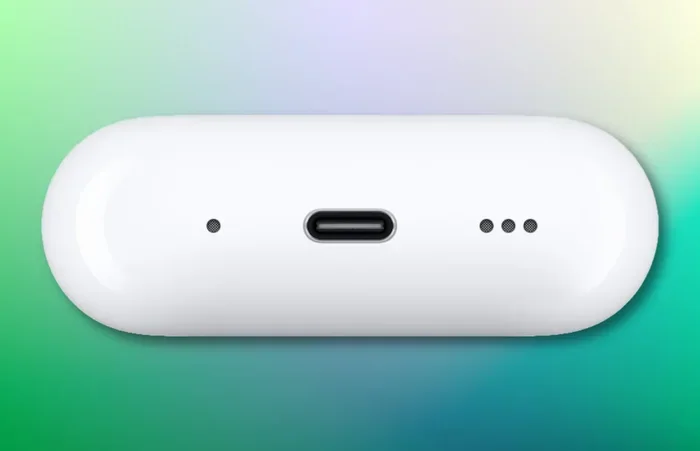
Visual guide about AirPods Pro USB-C charging case
Image source: iphoned.nl
AirPods Pro (1st Generation) – Released October 2019
The original AirPods Pro came in a charging case with a Lightning port on the bottom. There was also a wireless charging version released in 2021, but even that case still used Lightning for wired charging.
If you bought AirPods Pro before 2022, you have the Lightning case. There is no software update, no hidden trick, and no adapter that can change the port. It is physically Lightning.
AirPods Pro (2nd Generation) – Released September 2022
The first AirPods Pro 2 shipped with a Lightning charging case, even though the iPhone 14 lineup was still using Lightning at the time. This model introduced the new H2 chip, better noise cancellation, and a built-in speaker on the case, but the charging port remained the same.
If you bought AirPods Pro 2 right after launch in 2022, you have Lightning.
AirPods Pro (2nd Generation) USB-C – Released September 2023
This is the model everyone is asking about. When Apple refreshed the AirPods Pro 2 in September 2023, the only major change was the charging port. The switch to USB-C also brought a small upgrade: the case now supports charging via the Apple Watch charger, in addition to Qi and MagSafe.
Other than the port, the AirPods Pro 2 (USB-C) is functionally identical to the Lightning version. Same audio quality, same noise cancellation, same battery life.
AirPods Pro 3 – Rumors and Expected Release
As of late 2024 and into 2025, Apple has not officially released AirPods Pro 3. Most industry leaks suggest the next generation will adopt USB-C across all models, and may even remove the charging port entirely in favor of wireless-only charging someday. But for now, the 2023 AirPods Pro 2 (USB-C) is the only USB-C AirPods Pro you can buy new.
Quick Tip: To check which AirPods Pro you own, look at the model number on the inside of the charging case lid, or in your iPhone’s Settings under Bluetooth. The USB-C version has model number A2968, while the Lightning AirPods Pro 2 is A2700.
How USB-C Charging Works on AirPods Pro
Let us clear up a common misconception. Switching from Lightning to USB-C does not change how fast or how well your AirPods Pro charge. It only changes the shape of the plug. Here is what actually does when you plug in.
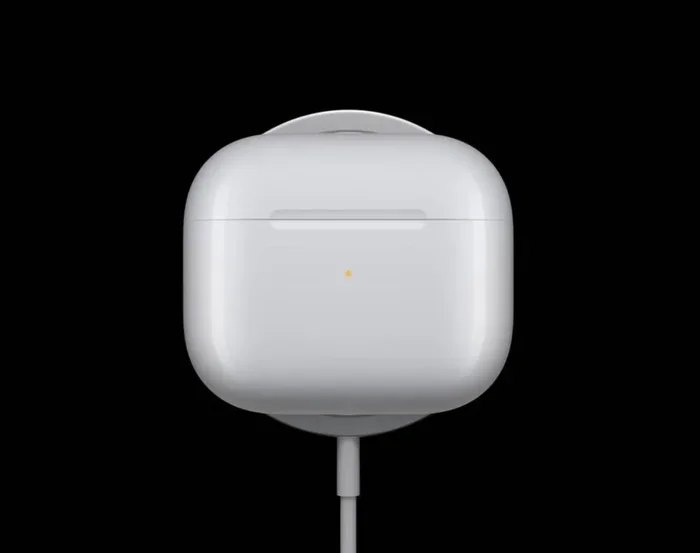
Visual guide about AirPods Pro USB-C charging case
Image source: cdn.wccftech.com
Charging Speed and Power
The AirPods Pro case charges at the same 5W rate whether you use Lightning or USB-C. A full charge takes about an hour, and a 5-minute top-up gives roughly an hour of listening time. Apple did not bump up the wattage just because the port changed.
Think of it like filling up a small cup of water. Whether you pour from a tall glass or a short one, the cup fills at the same speed. The port is the glass. The battery inside is the cup.
Cable Compatibility
Any USB-C cable that supports basic power delivery will charge your AirPods Pro. You can use the cable that came with your iPhone 15, your MacBook, your iPad, or even a third-party Anker or Belkin cable. There is no special “Apple-certified” requirement for charging speed.
That said, not all USB-C cables are created equal. Some cheap cables are designed only for data and do not carry power well. If your AirPods Pro case feels warm but the percentage is stuck, swap to a higher-rated one.
Wireless and Magnetic Charging
Here is a fun fact: the AirPods Pro 2 (USB-C) supports more wireless charging standards than any AirPods case before it. You can charge it on:
- Any Qi-certified wireless charger
- MagSafe chargers (with the magnetic alignment you would expect)
- An Apple Watch charging puck, which is brand new for this model
The Lightning version of AirPods Pro 2 supports Qi and MagSafe, but not the Apple Watch charger. That is a small but meaningful upgrade for anyone deep in the Apple ecosystem.
Charging With an iPhone
Another neat trick. If your iPhone has a USB-C port (iPhone 15 or newer), you can plug your AirPods Pro 2 (USB-C) case directly into the iPhone with a USB-C cable and share the phone’s battery. It is not the fastest way to charge, but in a pinch, it works perfectly.
Did You Know? The iPhone 15 and newer can reverse-charge other devices, including AirPods Pro 2 (USB-C), at up to 4.5W. It is a small feature, but a lifesaver when you are traveling light.
Why Apple Made the Switch: The Real Reasons
Regulation was the headline reason. But Apple had internal motivations too. Let us unpack them.
Cutting Down Cable Clutter
The average Apple household today might own an iPhone, an iPad, a MacBook, and AirPods, all of which now use USB-C. That means one cable can charge every device. It sounds simple, but in 2016, you would have needed three different cables to do the same thing.
Less clutter means fewer lost cables, fewer drawers full of old Lightning cords, and less stress when you travel.
Sustainability Goals
Apple has publicly committed to being carbon neutral across its entire supply chain by 2030. Standardizing on one cable type cuts down on packaging, accessories included in the box (which Apple already excludes), and electronic waste.
The EU estimates that universal chargers could prevent up to 11,000 tonnes of e-waste per year, and Apple wanted to get ahead of that curve.
Industry Pressure
Let us be honest. The writing was on the wall. Android phones switched years earlier. Laptops use USB-C. Even Apple’s own iPads use USB-C. Sticking with Lightning on AirPods looked stubborn, especially as Apple marketed seamless ecosystem experiences.
How to Tell If Your AirPods Pro Use USB-C or Lightning
Sometimes the box is long gone, the receipt is buried, and you cannot remember what you bought. Here are three quick ways to check.
Look at the Port
This one is obvious, but it works. Flip the case upside down and look at the charging port. USB-C ports are oval-shaped and slightly wider. Lightning ports are small, narrow rectangles with rounded corners.
Check the Model Number
On the underside of the case lid, you will see small text including a model number. Here is a quick cheat sheet:
- A2190: AirPods Pro 1 (Lightning)
- A2700 / A2967: AirPods Pro 2 Lightning (2022)
- A2968: AirPods Pro 2 USB-C (2023)
Ask Siri or Check Your iPhone
Open the Settings app on your iPhone, tap Bluetooth, and look at your connected AirPods. Tap the info icon (the small “i” next to the name), and you will see the model number listed.
What About AirPods Max and AirPods 4?
While this guide focuses on AirPods Pro, it is worth noting that the broader AirPods lineup is also moving toward USB-C, just at a slower pace.
AirPods Max
As of late 2024, AirPods Max still uses Lightning. Apple released a USB-C version in September 2024 alongside new color options, but only for the premium over-ear headphones. If you have an older AirPods Max, you are stuck with Lightning for now.
AirPods 4
The AirPods 4, released in September 2024, also moved to USB-C. Both the standard and noise-cancelling versions come in a USB-C charging case. This brings the entire AirPods lineup, except for the AirPods Max Lightning and AirPods Pro 1 and 2 Lightning, into the USB-C era.
AirPods Pro 1 and 2 (Lightning)
These models will continue to work fine. Apple still sells replacement Lightning cables, and your existing accessories will keep functioning. But if you ever replace them, you will be buying USB-C versions.
Practical Tips for AirPods Pro USB-C Users
Now that you know the basics, here are a few tips to make your life easier.
Buy One Good USB-C Cable and Stick With It
You do not need a fancy one. A basic 1-meter USB-C to USB-C cable from a reputable brand will charge your AirPods Pro 2 (USB-C) just as well as the one Apple sells for $20. Look for cables rated for at least 60W if you want one cable that also works for your laptop or iPad.
Keep a Small Cable in Your Bag
A short USB-C cable (under 30cm) takes up almost no space and is perfect for topping off your AirPods case from a power bank on the go.
Use Wireless Charging for Overnight Top-Ups
The AirPods Pro 2 (USB-C) supports MagSafe, so it will magnetically snap to a MagSafe charger. Drop it on the pad before bed and wake up to a full case, no cables needed.
Check for the IP54 Rating
Both the Lightning and USB-C versions of AirPods Pro 2 are rated IP54 for dust and water resistance. That means sweat and rain are fine, but do not take them swimming.
The Future of AirPods Charging
Where is this all going? Here is what experts expect in the next few years.
Full USB-C Standardization
By 2026, every AirPods model sold by Apple will likely use USB-C. The Lightning AirPods Pro 1 and 2 will continue to be supported but will gradually fade out of the lineup.
Wireless-Only Charging
Apple has hinted for years that a “portless iPhone” might be on the horizon. If that happens, AirPods will likely follow. We could see AirPods Pro 3 or 4 drop the charging port entirely, relying only on Qi2 or MagSafe wireless charging.
Faster Charging Speeds
Right now, AirPods charge slowly because the case has a tiny internal battery. But as battery technology improves, we could see AirPods that charge from 0 to 100% in 15 minutes. That would make USB-C fast charging actually meaningful.
Smart Charging Features
Future AirPods may include adaptive charging that pauses when the battery is full to extend battery lifespan. This is similar to what iPhones already do with Optimized Battery Charging.
Did You Know? AirPods batteries are rated for about 500 full charge cycles before they drop to 80% capacity. That is roughly two to three years of daily use for most people. After that, you may notice the case does not last as long on a single charge.
Common Misconceptions About AirPods Pro and USB-C
Let us clear up a few myths that pop up in forums and comment sections.
“All AirPods Pro Use USB-C Now”
False. Only the AirPods Pro 2 (2023 refresh) and any future models use USB-C. If you bought AirPods Pro before September 2023, you have Lightning.
“USB-C Means Faster Charging”
Mostly false. The AirPods Pro 2 (USB-C) charges at the same speed as the Lightning version. USB-C supports faster speeds, but Apple did not enable them for AirPods Pro.
“You Need an Apple USB-C Cable”
False. Any USB-C cable works, including the one that came with your Android phone, your iPad, or your MacBook.
“AirPods Pro Lightning and USB-C Sound Different”
False. The internal hardware is the same. The port does not affect audio quality in any way.
“You Can Convert a Lightning Case to USB-C With an Adapter”
False. The two ports are physically different shapes and use different internal wiring. There is no reliable adapter, and any third-party “converter” you see online will likely damage your case.
Final Thoughts: Should You Care About USB-C on AirPods Pro?
If you already own a Lightning AirPods Pro, there is no urgent need to upgrade. The audio quality, the noise cancellation, and the battery life are all the same. You will just need to keep one Lightning cable around for your case.
But if you are shopping for new AirPods Pro today, the USB-C version is the smarter buy. It future-proofs you for Apple’s ecosystem shift, lets you reuse cables you already own, and adds Apple Watch charging support as a bonus.
In the end, the USB-C transition is less about speed or features and more about simplicity. One cable, many devices, less waste. That is a future worth getting excited about.
And that is everything you need to know about whether AirPods Pro uses USB-C. Bookmark this guide for the next time someone asks, and feel free to share it with anyone still fumbling with the wrong cable at midnight.
Frequently Asked Questions
Does the original AirPods Pro (2019) use USB-C?
No, the original AirPods Pro released in 2019 uses Apple’s Lightning port for charging. Only the AirPods Pro 2 (2023 refresh) and newer models use USB-C. There is no adapter that can convert the port.
Can I charge AirPods Pro 2 USB-C with my iPhone 15 cable?
Yes, absolutely. The iPhone 15 cable is a standard USB-C to USB-C cable, and it works perfectly for charging the AirPods Pro 2 (USB-C) case. You can even reverse-charge the case by plugging it directly into your iPhone.
How do I know if my AirPods Pro case is USB-C or Lightning?
Look at the charging port on the bottom of the case. USB-C is oval-shaped, while Lightning is a small narrow rectangle. You can also check the model number: A2968 is the USB-C version, while A2700 is the Lightning AirPods Pro 2.
Does the AirPods Pro 2 USB-C charge faster than the Lightning version?
No, the charging speed is identical between the two versions. Both cases charge at roughly 5W and take about an hour for a full charge. The port shape is the only meaningful difference.
Will Apple release AirPods Pro 3 with USB-C?
Almost certainly yes. While Apple has not confirmed an AirPods Pro 3 release date, all leaks and industry trends point to USB-C being the standard. Future AirPods may even drop the port entirely in favor of wireless charging.
Can I use a wireless charger with AirPods Pro 2 USB-C?
Yes, the AirPods Pro 2 (USB-C) supports Qi wireless charging, MagSafe, and Apple Watch chargers. This is one of the upgrades over the Lightning version, which does not support Apple Watch chargers.