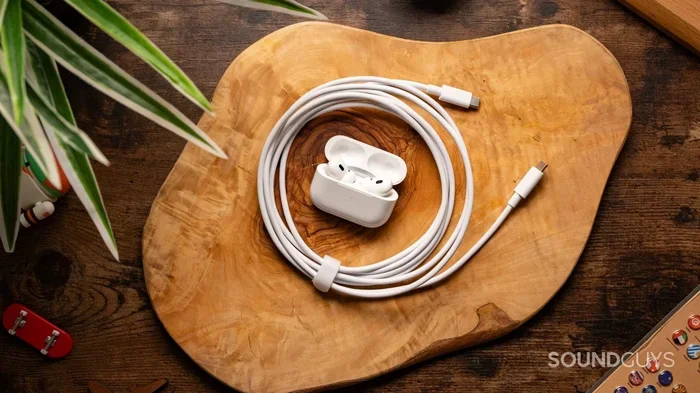
Featured image for AirPods USB-C charging cable
Image source: soundguys.com
Yes, you can charge AirPods with USB-C, but only if you have the right model. Apple introduced USB-C charging cases with the AirPods Pro (2nd generation) in September 2023, followed by AirPods 4 and AirPods Pro 3. Older AirPods models still use Lightning cables, so check your case before grabbing a USB-C cable. All you need is a USB-C cable and a compatible power source to charge your AirPods case, which then charges your earbuds wirelessly inside. The process is fast, simple, and works with most modern chargers you already own.
Key Takeaways
- USB-C Compatibility Depends on Model: Only AirPods Pro 2 (2023), AirPods 4, AirPods Pro 3, and AirPods Max (USB-C version) support USB-C charging. All other models use Lightning cables.
- Charging Is Simple: Plug a USB-C cable into your AirPods case and any compatible power source. The case charges your earbuds automatically when they’re inside.
- Fast Charging Is Available: A 5-minute charge in the case gives you about 1 hour of listening time on supported models.
- Any USB-C Cable Works: You don’t need Apple’s official cable. Any USB-C to USB-C or USB-C to USB-A cable will charge your AirPods.
- Wireless Charging Still Works: USB-C AirPods cases also support Qi and MagSafe wireless charging, giving you multiple options.
- Battery Health Matters: Avoid draining your AirPods to 0% regularly. Charging between 20-80% helps extend battery lifespan.
- EU Regulations Drove the Change: Apple’s switch to USB-C was partly due to European Union laws requiring a universal charging port by 2024.
📑 Table of Contents
- The Short Answer: Yes, But It Depends on Your AirPods Model
- Which AirPods Models Support USB-C Charging?
- How to Charge AirPods with USB-C: Step-by-Step Guide
- Can I Use Any USB-C Cable to Charge AirPods?
- USB-C vs. Wireless Charging: Which Is Better?
- Tips to Maximize Your AirPods Battery Life
- Common Problems and Troubleshooting
- Why Did Apple Switch from Lightning to USB-C?
- The Future of AirPods Charging
- Final Thoughts
The Short Answer: Yes, But It Depends on Your AirPods Model
Let’s get straight to the point. Can you charge AirPods with USB-C? Yes, you absolutely can, but only if your AirPods case has a USB-C port. Apple made the big switch from Lightning to USB-C starting in September 2023, and several models now support this universal charging standard.
If you’re like most people, you probably have a drawer full of USB-C cables by now. Your phone charger, laptop, tablet, and maybe even your gaming console all use the same cable. It’s the dream of a universal charger finally coming true. And guess what? Your AirPods can join that club too.
Here’s the deal. The following AirPods models come with USB-C charging cases: AirPods Pro (2nd generation, 2023 release), AirPods 4, AirPods 4 with Active Noise Cancellation, and AirPods Pro 3. The AirPods Max also got a USB-C version in 2024. If you have any other AirPods model, you’re stuck with Lightning for now, and you’ll need an adapter or a Lightning cable.
Think of USB-C like a universal remote control. Just as one remote can work with your TV, soundbar, and streaming box, one USB-C cable can charge your phone, laptop, and yes, your AirPods. It’s all about the shape of the port on your device.
Which AirPods Models Support USB-C Charging?
Not all AirPods are created equal when it comes to charging. Apple rolled out USB-C support gradually, and knowing your model is the first step to charging success. Let’s break it down clearly.
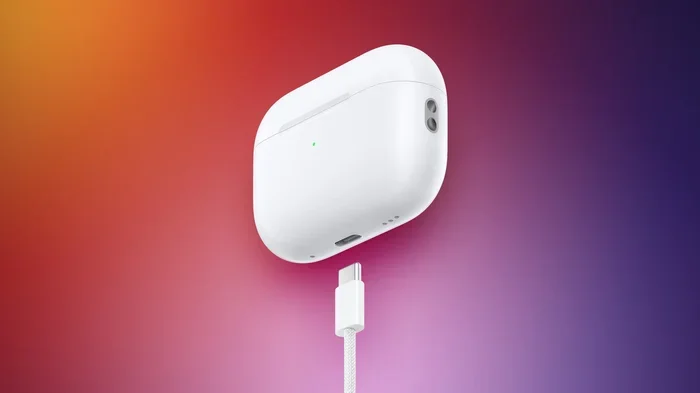
Visual guide about AirPods USB-C charging cable
Image source: images.macrumors.com
The USB-C Compatible Lineup
- AirPods Pro (2nd Generation, 2023): Released in September 2023, this was Apple’s first AirPods case to ditch Lightning for USB-C. It also supports MagSafe and Qi wireless charging.
- AirPods 4 (2024): The standard AirPods 4 comes with a USB-C case. This is the base model without noise cancellation.
- AirPods 4 with Active Noise Cancellation (2024): This premium version includes a USB-C case that supports both wired and wireless charging.
- AirPods Pro 3: The newest Pro model continues the USB-C trend with even better charging speeds.
- AirPods Max (USB-C Version, 2024): The over-ear headphones finally got a USB-C port, replacing the old Lightning connector.
The Lightning Holdouts
If your AirPods case has a small, narrow port that looks like a tiny oval, that’s Lightning. These models include:
- AirPods (1st, 2nd, and 3rd generation)
- AirPods Pro (1st generation)
- AirPods Pro (2nd generation, 2022 release with Lightning)
- Original AirPods Max (Lightning version)
Here’s a simple trick to remember. Look at the bottom of your AirPods case. If the port is a small rounded rectangle, it’s Lightning. If it’s a longer, symmetrical oval, that’s USB-C. You can also check by looking at the charging cable you currently use. Lightning cables have a skinny tab on one side, while USB-C cables look the same on both sides.
Imagine you’re trying to plug in a key. A Lightning cable only goes in one way, like an old key that needs to be flipped the right way. A USB-C cable slides in smoothly no matter which side is up, just like a USB stick. That symmetry is one of the best things about USB-C.
How to Charge AirPods with USB-C: Step-by-Step Guide
Charging your AirPods with USB-C is incredibly easy. In fact, it’s so simple that you might wonder why you’re reading an entire guide about it. But let’s walk through it anyway, just to make sure you’re doing everything right.
What You’ll Need
Before we start, gather these items:
- Your AirPods with a USB-C charging case
- A USB-C cable (the one that came with your phone or laptop works great)
- A power source (wall adapter, computer, or power bank)
The Charging Process
Step 1: Check Your Battery Status
Before charging, it’s helpful to know how much battery you have left. Here’s how to check:
- Open the AirPods case near your iPhone or iPad
- A popup will appear showing the battery levels of your case and earbuds
- You can also ask Siri, “Hey Siri, what’s my AirPods battery?”
- On Android, download the “AirPods Battery” app or similar tools
Step 2: Plug In Your USB-C Cable
Take your USB-C cable and plug one end into the port on the bottom of your AirPods case. It should slide in smoothly and click into place. Remember, USB-C works either way, so don’t worry about flipping it.
Step 3: Connect to a Power Source
Plug the other end of your USB-C cable into any of these power sources:
- A wall adapter (5W or higher works fine)
- Your laptop or computer’s USB-C port
- A power bank for charging on the go
- A car charger with a USB-C port
Step 4: Watch for the Status Light
Your AirPods case has a small LED light that tells you the charging status:
- Amber/Orange Light: Your case is still charging
- Green Light: Your case is fully charged
- No Light: The case isn’t connected to power, or the battery is completely dead
That’s it! Your AirPods case is now charging. If your earbuds are inside the case, they’ll charge too. It’s like filling up a water bottle, the case is the bottle, and your earbuds are the cups waiting to be filled.
Charging Times You Should Know
Here’s the cool part: USB-C charging is fast. According to Apple, a quick 5-minute charge in the case gives you about 1 hour of listening time or 1 hour of talk time. That’s perfect for those moments when you’re about to head out the door and realize your AirPods are dead.
For a full charge:
- The case takes about 1 hour to fully charge from empty
- Your earbuds take about 30 minutes to fully charge inside the case
- A complete top-up of everything takes roughly 1.5 to 2 hours
Can I Use Any USB-C Cable to Charge AirPods?
This is one of the most common questions people ask, and the answer is a resounding yes. You don’t need to buy Apple’s official USB-C cable to charge your AirPods. Any certified USB-C cable will do the job just fine.
Cable Types That Work
You’ve got plenty of options here:
- USB-C to USB-C: This is the most common cable today. It works with modern iPhones (15 and later), iPads, MacBooks, Android phones, and countless other devices.
- USB-C to USB-A: This cable has a USB-C connector on one side and a traditional USB-A plug on the other. It’s great for older computers or chargers.
- USB-C to Lightning: Wait, does this work? Technically, no. You need a USB-C end to plug into your AirPods case, so this cable won’t work for charging.
What About Cable Quality?
While any cable works, quality matters. Here’s why:
- Cheap, Uncertified Cables: These might charge slowly or not at all. Worse, they could damage your AirPods over time.
- MFi Certified Cables: “Made for iPhone” certification means the cable meets Apple’s standards. Look for this label if you want peace of mind.
- USB-IF Certified Cables: This certification ensures the cable meets universal USB standards. Most reputable brands have this.
Think of it like buying gasoline for your car. Sure, any gas station will fill your tank, but premium gas from a trusted brand keeps your engine running smoother for longer. The same logic applies to cables.
Recommended Power Adapters
Your AirPods case doesn’t need a lot of power to charge. A 5W adapter is the minimum, but you can safely use higher-wattage chargers too. Apple recommends using a 5W or higher USB-C power adapter. If you have a 20W iPhone charger or even a 100W laptop charger, your AirPods will only draw what they need. Smart charging technology handles the rest.
USB-C vs. Wireless Charging: Which Is Better?
Here’s where things get interesting. If you have a USB-C AirPods case from 2023 or later, you actually have two ways to charge it: with a cable or wirelessly. So which method should you use?
Wired USB-C Charging
Pros:
- Faster charging speeds overall
- Works with any USB-C cable and power source
- No need to find a wireless pad
- More energy efficient (less power lost in the process)
Cons:
- You need to carry a cable with you
- The case sits still on a surface while charging
Wireless Charging (MagSafe and Qi)
Pros:
- Super convenient, just set the case on a pad
- No cables to wear out or replace
- Works with MagSafe chargers for a satisfying magnetic snap
- Great for desks and nightstands
Cons:
- Slower than wired charging
- You need a wireless charging pad
- Less efficient (some energy converts to heat)
According to a 2023 study by the Wireless Power Consortium, wireless charging is about 75-80% efficient compared to wired charging. That means 20-25% of the energy is lost as heat. For everyday use, this doesn’t matter much, but it’s worth knowing.
So Which Should You Choose?
Honestly, use both! Here’s a smart strategy:
- Use wired charging when you need a quick top-up before heading out
- Use wireless charging at your desk or bedside for overnight charging
- Travel with a USB-C cable since you already have one for your phone
It’s like having both a gas stove and a microwave in your kitchen. Each has its moment to shine.
Tips to Maximize Your AirPods Battery Life
Charging your AirPods properly is only half the battle. To get the most out of your battery, you need to follow some smart habits. After all, your AirPods battery will eventually wear out, but you can slow that process down significantly.
Charge Before Empty
Lithium-ion batteries, the kind in your AirPods, hate being drained to zero. Apple themselves recommend keeping your battery between 20% and 80% for optimal lifespan. Think of it like a muscle. You wouldn’t lift weights until you collapse, right? You’d do manageable reps. Same idea here.
Avoid Extreme Temperatures
Batteries and heat are not friends. According to Battery University, a subsidiary of Cadex Electronics, lithium-ion batteries stored at high temperatures (above 35°C or 95°F) can lose up to 35% of their capacity in just one year. So don’t leave your AirPods in a hot car or direct sunlight.
Use Optimized Battery Charging
If you have an iPhone, you can enable Optimized Battery Charging for your AirPods. Here’s how:
- Go to Settings on your iPhone
- Tap Bluetooth
- Find your AirPods in the list
- Toggle on “Optimized Battery Charging”
This feature learns your daily routine and delays charging past 80% until you need it. It’s like having a smart butler who knows exactly when you’ll wake up.
Don’t Leave Them Plugged In Forever
Modern devices have overcharge protection, but it’s still a good habit to unplug once your AirPods are fully charged. Leaving them on a wireless charger 24/7 generates unnecessary heat.
Store Them Properly
If you’re not using your AirPods for a while, store them at around 50% charge in a cool, dry place. Batteries stored at full charge or empty for long periods lose capacity faster. It’s the Goldilocks principle: not too full, not too empty, just right.
Keep the Case Clean
Dust and debris in the charging port can interfere with charging. Use a soft, dry brush or compressed air to clean the USB-C port gently. A can of compressed air costs about $5 and can save you a trip to the Apple Store.
Common Problems and Troubleshooting
Sometimes things don’t work the way they should. If your AirPods aren’t charging with USB-C, don’t panic. Here are some common issues and how to fix them.
Problem: AirPods Not Charging at All
Possible Solutions:
- Try a different USB-C cable
- Test a different power source
- Make sure the case has at least some charge (it can’t charge earbuds if it’s dead)
- Clean the USB-C port on your case
- Reset your AirPods by holding the setup button on the back for 15 seconds
Problem: Charging Is Very Slow
Possible Solutions:
- Use a higher-wattage power adapter (at least 5W)
- Avoid charging from a computer’s USB port, which provides less power
- Close the case lid while charging to speed things up
- Remove any thick case covers that might trap heat
Problem: Status Light Not Turning On
Possible Solutions:
- Make sure the cable is fully inserted
- Try a different cable, as some cables only support data, not charging
- Check if your power source is turned on
- Wait a few minutes if the battery was completely drained
Problem: One Earbud Charges but the Other Doesn’t
Possible Solutions:
- Clean the metal contacts inside the case with a dry cotton swab
- Make sure both earbuds are seated properly
- Reset your AirPods and re-pair them
- Check for firmware updates via your iPhone
Here’s a fun fact: According to Apple support data, about 80% of AirPods charging issues can be resolved by simply cleaning the case or using a different cable. So before you assume the worst, try these simple fixes first.
Why Did Apple Switch from Lightning to USB-C?
You might be wondering why Apple finally made the switch after years of using Lightning. The answer involves a mix of regulation, consumer demand, and good old-fashioned common sense.
The European Union’s Common Charger Directive
In October 2022, the European Union passed a law requiring all smartphones, tablets, and headphones sold in EU countries to use USB-C by December 28, 2024. The goal was simple: reduce electronic waste. According to the European Commission, the switch could save consumers up to €250 million per year on unnecessary chargers and reduce 11,000 tons of electronic waste annually.
Apple, being the major holdout with its Lightning connector, had to comply. The AirPods Pro 2 USB-C release in September 2023 was perfectly timed to meet the deadline.
Consumer Convenience
Let’s face it: Lightning was getting old. The connector was released in 2012, and by 2023, the rest of the tech world had moved on. USB-C offers faster data transfer, higher power delivery, and reversible insertion (no more fumbling to plug it in the right way).
The Bigger Apple Ecosystem
Apple wasn’t just changing AirPods. The iPhone 15, released in September 2023, also switched to USB-C. Now, a single USB-C cable can charge your iPhone, iPad, MacBook, and AirPods. It’s the universal charger dream that consumers have wanted for decades.
Think of USB-C as the lingua franca of charging. Just as English became a global language for business, USB-C became the global standard for charging. It just makes everything easier.
The Future of AirPods Charging
Looking ahead, what’s next for AirPods charging? While we don’t have a crystal ball, there are some interesting trends to watch.
Faster Wireless Charging
The Wireless Power Consortium is working on newer standards that could deliver up to 80W of power wirelessly in the future. While your AirPods don’t need that much juice, it shows where the industry is headed. We might see AirPods cases that charge in minutes instead of hours.
Reverse Wireless Charging
Imagine charging your AirPods by placing the case on the back of your iPhone. This technology already exists in some Android phones, and Apple has filed patents suggesting they might add it to future iPhones. If this happens, your AirPods case could charge wirelessly from your phone, no cables needed.
Solar and Kinetic Charging
It sounds like science fiction, but some companies are experimenting with solar cells in device cases. While we’re years away from solar-powered AirPods, the concept of never plugging in your earbuds is intriguing.
Battery Technology Improvements
Researchers are constantly improving lithium-ion batteries. Solid-state batteries, which use a solid electrolyte instead of liquid, promise higher energy density and longer lifespans. When this technology trickles down to consumer electronics, AirPods could last days on a single charge.
Final Thoughts
So, can you charge AirPods with USB-C? The answer is a definitive yes, as long as you have a compatible model. The transition from Lightning to USB-C is a welcome change that simplifies our lives, reduces cable clutter, and aligns with global standards.
Whether you’re using the AirPods Pro 2 (2023), AirPods 4, AirPods Pro 3, or the USB-C AirPods Max, charging is as simple as plugging in a USB-C cable and waiting. No special equipment, no expensive adapters, no frustration.
Remember these key points: check your model first, use any quality USB-C cable, avoid extreme temperatures, and don’t overcharge. Follow these tips, and your AirPods will keep you jamming to music, taking calls, and enjoying podcasts for years to come.
The universal charger dream is finally here, and your AirPods are part of it. Welcome to the USB-C era.
Frequently Asked Questions
Can I charge AirPods with any USB-C cable?
Yes, any USB-C cable will work to charge your AirPods, as long as your case has a USB-C port. You don’t need Apple’s official cable. Just make sure the cable is from a reputable brand and isn’t damaged, as cheap or broken cables can charge slowly or not at all.
How long does it take to charge AirPods with USB-C?
A full charge of your AirPods case takes about 1 hour, while the earbuds themselves take about 30 minutes when inside the case. For a quick boost, just 5 minutes in the case gives you around 1 hour of listening time, making USB-C charging fast and convenient.
Do AirPods Pro 2 have USB-C?
Yes, the AirPods Pro (2nd generation) released in September 2023 comes with a USB-C charging case. However, the original AirPods Pro 2 released in 2022 still uses a Lightning connector. You can identify which version you have by looking at the port on the bottom of the case.
Can I charge AirPods with my iPhone 15 charger?
Absolutely! The iPhone 15 and later models use USB-C, and their chargers work perfectly with USB-C AirPods cases. Just plug one end into your AirPods case and the other into your iPhone charger, or even directly into your iPhone 15’s USB-C port if it supports reverse charging.
Why won’t my AirPods charge with USB-C?
If your AirPods aren’t charging, try these troubleshooting steps: use a different USB-C cable, try a different power source, clean the charging port on your case with compressed air, and make sure your case has some battery left. If none of these work, try resetting your AirPods by holding the setup button for 15 seconds.
Is it bad to leave AirPods charging overnight?
Modern AirPods have overcharge protection, so leaving them plugged in overnight won’t damage the battery. However, to maximize long-term battery health, Apple recommends enabling Optimized Battery Charging, which learns your routine and prevents the battery from staying at 100% for extended periods.