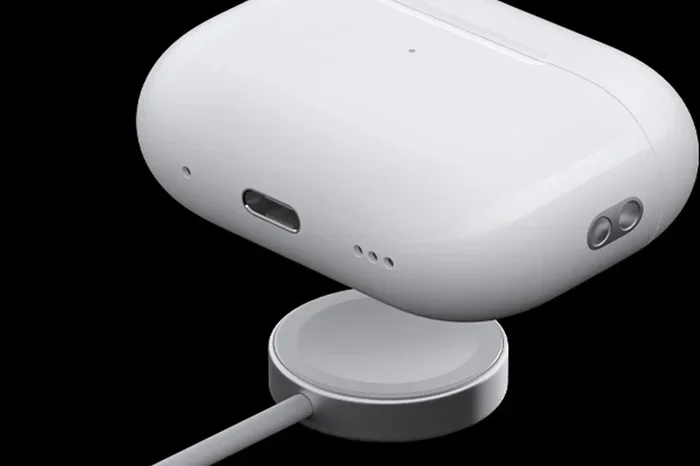
Featured image for AirPods USB-C charging
Image source: b2c-contenthub.com
Yes, you can charge AirPods with USB-C, but only if you have a compatible model. Apple introduced USB-C charging with AirPods Pro (2nd gen) in 2023, and the regular AirPods 4 followed in 2024. Older AirPods with Lightning ports need different cables or adapters.
Picture this: you’re packing for a trip, and you realize you forgot your AirPods charger. You grab the USB-C cable from your iPhone 15 and think, “Can I charge AirPods with USB-C?” The answer depends on which AirPods you own. If you have the latest models, you’re in luck. If you have older ones, you’ll need to do a little more work.
Apple made a big switch in 2023 when they started putting USB-C ports on their devices. This change came partly because of new laws in Europe that require phones and gadgets to use the same charging port. The good news? This shift makes life easier for most people because USB-C is becoming the universal standard.
In this guide, we’ll walk you through everything you need to know about charging your AirPods with USB-C. You’ll learn which models work, which don’t, what cables to use, and some handy tips to make charging simpler. Think of this as your one-stop resource for all things AirPods and USB-C.
Key Takeaways
- USB-C Compatibility: Only AirPods Pro 2 (2023), AirPods 4, and AirPods Pro 3 support USB-C charging out of the box.
- Cable Options: Any standard USB-C to USB-C cable will work, including the one that comes with your iPhone 15 or newer.
- Older Models: AirPods with Lightning ports (1st, 2nd, 3rd gen AirPods, and AirPods Pro 1) cannot charge directly with USB-C without an adapter.
- Case Matters: The charging case determines the port type, not the earbuds themselves.
- Charging Speed: USB-C charges AirPods at the same speed as Lightning since the case regulates power input.
- EU Regulation Impact: Apple’s switch to USB-C was partly driven by EU laws requiring a common charging standard by 2024.
- Travel Friendly: USB-C AirPods reduce cable clutter since you can use one cable for iPhone, iPad, Mac, and AirPods.
📑 Table of Contents
- Understanding AirPods Charging Ports: The Basics
- Which AirPods Models Support USB-C Charging?
- How to Charge AirPods with USB-C: Step-by-Step Guide
- Can You Charge Older AirPods with USB-C? Workarounds and Adapters
- USB-C Charging Speed: What to Expect
- Common Mistakes and Troubleshooting
- USB-C vs. Lightning: The Bigger Picture
- Travel Tips: Charging AirPods on the Go with USB-C
- The Future of AirPods Charging
- Quick Reference: USB-C AirPods Compatibility Chart
- Final Thoughts
Understanding AirPods Charging Ports: The Basics
Let’s start with the simple stuff. Your AirPods charge through a small port on the bottom of the charging case, not on the earbuds themselves. The earbuds slide into the case and charge through metal contacts inside. So when we talk about USB-C charging, we’re really talking about the case’s port.
Think of it like a car’s gas tank. The tank (your earbuds) gets filled up, but you pour the gas in through a specific nozzle (the port on the case). If the nozzle doesn’t match your gas pump, you can’t fill up. Same idea with charging cases.
Apple has used three types of ports on AirPods cases over the years:
- Lightning Port: Used on most AirPods from 2016 to 2023
- USB-C Port: Found on newer models from 2023 onward
- Wireless Only: Some cases charge only on Qi or MagSafe pads, with no port at all
Why Apple Switched to USB-C
Did you know that the European Union passed a law in 2022 that required all smartphones to use USB-C by the end of 2024? This rule also covers headphones, tablets, and many other gadgets. Apple, which had been using its own Lightning port for over a decade, had to make a change.
The switch wasn’t just about following rules. USB-C has some real benefits:
- Faster data transfer: USB-C can move data much quicker than Lightning
- More power: It can charge bigger devices like laptops
- One cable for everything: You can charge your phone, tablet, laptop, and earbuds with the same cord
It’s kind of like how most gas pumps in the US use the same nozzle size. It just makes life easier when everything fits together.
Which AirPods Models Support USB-C Charging?
Here’s the part you’ve been waiting for. Not all AirPods can charge with USB-C directly. Let’s break it down model by model so you know exactly where your AirPods stand.
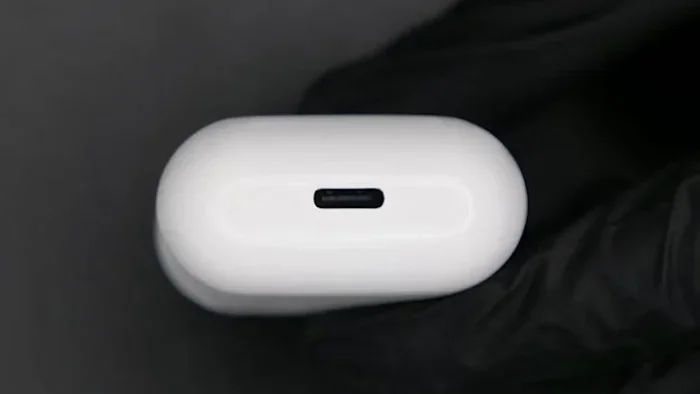
Visual guide about AirPods USB-C charging
Image source: i0.wp.com
AirPods with USB-C Built-In
These models have a USB-C port right on the case. You just plug in any USB-C cable and you’re good to go.
- AirPods Pro (2nd generation) USB-C version: Released September 2023. This was the first AirPods model with USB-C. It has the same great features as the Lightning version but with the new port.
- AirPods 4: Released September 2024. Comes in two versions: a standard model with USB-C and a higher-end version with USB-C and wireless charging.
- AirPods Pro 3: Released September 2025. The newest AirPods come with USB-C standard.
For all these models, charging is super simple. Just grab a USB-C cable, plug one end into the case, and the other end into any power source. That power source could be a wall adapter, your laptop, or even another device with USB-C.
AirPods with Lightning Ports (No USB-C Support)
These older models can’t charge with a USB-C cable directly. They need a Lightning cable instead.
- AirPods (1st generation): Released 2016, Lightning port only
- AirPods (2nd generation): Released 2019, Lightning port only
- AirPods (3rd generation): Released 2021, Lightning port only
- AirPods Pro (1st generation): Released 2019, Lightning port only
- AirPods Pro (2nd generation) Lightning version: Released 2022, Lightning port only
If you have any of these, you’ll need to stick with a Lightning cable or find a workaround (which we’ll talk about later).
How to Tell Which Port Your AirPods Have
Not sure which model you own? Here’s a quick trick. Look at the bottom of your AirPods case where you’d normally plug in a cable.
- If the port is small and rectangular with rounded edges, it’s Lightning.
- If the port is oval-shaped and a bit wider, it’s USB-C.
Another way is to check your iPhone. Go to Settings, then tap Bluetooth, find your AirPods, and check the model number. You can look up that number on Apple’s website to see exactly which version you have.
How to Charge AirPods with USB-C: Step-by-Step Guide
If you have a USB-C compatible model, charging is a breeze. Here’s exactly how to do it.
What You’ll Need
- Your AirPods (in the charging case)
- A USB-C cable (the one that came with your iPhone 15 or newer works perfectly)
- A power source (wall adapter, laptop, power bank, or any USB-C port)
The Charging Process
Step 1: Make sure your AirPods are inside the case. The case is what charges, not the earbuds directly.
Step 2: Grab your USB-C cable and plug the smaller end into the port on the bottom of your AirPods case.
Step 3: Plug the other end of the cable into your power source. This could be a wall outlet (with an adapter), your laptop, or a portable charger.
Step 4: Check the status light. If you see an amber or orange light, your AirPods are charging. If you see a green light, they’re fully charged.
That’s it! It really is that simple. No special cables or adapters required.
Where You Can Charge From
One of the best things about USB-C is flexibility. You can charge your AirPods from almost anywhere:
- Wall outlets: Use any USB-C wall adapter (Apple’s or any other brand)
- Laptop: Any MacBook or PC with USB-C ports
- iPad: Plug into your iPad to share power
- Power banks: Portable chargers with USB-C output work great
- Other phones: Some Android phones can share power through USB-C
- Car chargers: Most modern cars have USB-C ports
It’s like having a universal key that opens many doors. Wherever you go, chances are there’s a USB-C port nearby.
Can You Charge Older AirPods with USB-C? Workarounds and Adapters
What if you have older AirPods with a Lightning port? Are you stuck with Lightning cables forever? Not necessarily. Let’s look at your options.
Option 1: Use a Lightning Cable
The most obvious solution is to just keep using a Lightning cable. These are still available at Apple stores and other retailers. If you have an older iPhone, you probably already have one lying around.
Option 2: Lightning to USB-C Cable
Here’s a neat trick. Apple makes a Lightning to USB-C cable that has a Lightning connector on one end and USB-C on the other. You can plug the Lightning end into your AirPods case and the USB-C end into a power source.
This is super handy if you already use USB-C for everything else. You’re basically turning your USB-C charger into a universal power source.
Option 3: Adapters
You can buy small adapters that convert USB-C to Lightning. These are cheap and small enough to fit on a keychain. Just plug the adapter into your AirPods case, then connect a USB-C cable to the other side.
However, be careful here. Not all adapters are created equal. Cheap, no-name adapters might not charge properly or could even damage your AirPods over time. Stick with reputable brands or Apple-made accessories when possible.
Option 4: Wireless Charging
If your AirPods case supports wireless charging, you can skip cables entirely. Just place the case on any Qi-compatible charging pad or a MagSafe charger. This works regardless of whether your case has a Lightning or USB-C port.
Here’s a quick list of cases that support wireless charging:
- AirPods Pro (1st gen) wireless charging case
- AirPods Pro (2nd gen) MagSafe case (both Lightning and USB-C versions)
- AirPods 3 MagSafe case
- AirPods 4 (higher-end version)
Option 5: Upgrade Your Case
Here’s something you might not know: Apple sells replacement charging cases. If you lost your case or it’s damaged, you can buy a new USB-C version for AirPods Pro (2nd gen). This is cheaper than buying a whole new set of AirPods.
Think of it like replacing a phone case instead of buying a whole new phone. It’s a practical solution if you love your current earbuds but want to switch to USB-C.
USB-C Charging Speed: What to Expect
Now you might be wondering: does USB-C charge faster than Lightning? Let’s talk about that.
The Short Answer
Not really. AirPods cases are designed to take in a specific amount of power, and both Lightning and USB-C can deliver that power easily. The case has a built-in regulator that controls how fast the battery fills up. So even if you plug into a super powerful 100-watt USB-C charger, your AirPods will only take what they need.
It’s like filling a swimming pool with a garden hose versus a fire hose. The fire hose is more powerful, but the pool fills up at the same speed because the pool’s drain can only let water out so fast. Wait, that’s not the best analogy. Let me try again.
Think of it like this: your AirPods case is a cup with a small opening. You can pour from a water bottle or a pitcher, but the cup fills up at the same speed either way because the opening limits how much can flow in.
Actual Charging Times
Here’s what you can expect with a USB-C cable:
- 5 minutes of charging: Gives you about 1 hour of listening time
- 15 minutes of charging: Gives you about 2-3 hours of listening time
- Full charge: Takes about 1 hour from empty
These numbers are pretty similar to what you’d get with a Lightning cable. The difference is minimal.
What About the Battery Life?
Fully charged AirPods Pro (2nd gen USB-C) give you up to 6 hours of listening time on a single charge. The case provides an additional 24 hours of total listening time. AirPods 4 offers similar battery life.
Did you know that AirPods cases use lithium-ion batteries? These batteries actually last longer if you don’t let them drain to zero all the way. Charging them when they’re at 20-30% is better for long-term battery health than waiting until they’re completely dead.
Common Mistakes and Troubleshooting
Even though charging AirPods with USB-C is pretty simple, things can sometimes go wrong. Here are common issues and how to fix them.
Mistake 1: Using a Damaged Cable
If your AirPods aren’t charging, the first thing to check is your cable. Cables can wear out over time, especially at the connection points. Look for fraying, bends, or exposed wires. If you spot damage, replace the cable.
Mistake 2: Dirty Charging Port
Pocket lint, dust, and other gunk can get stuck in the charging port. This blocks the connection and prevents charging. Use a soft, dry toothbrush or a wooden toothpick to gently clean out the port. Don’t use anything metal, like a paperclip, as you could damage the contacts inside.
Think of it like cleaning a window. If the window is dirty, you can’t see through it. Same idea with a charging port. If it’s clogged, the electricity can’t flow through.
Mistake 3: Case Not Closed Properly
Sometimes the case lid isn’t fully closed, which prevents charging. Make sure you hear that satisfying click when you close it. If the lid feels loose or won’t stay closed, you might need a replacement case.
Mistake 4: Charging from a Low-Power Source
Some USB-C ports don’t provide enough power. For example, a USB-C port on an older laptop might only provide a small amount of power. Try a different power source if your AirPods aren’t charging.
Mistake 5: Battery Completely Drained
If your AirPods case battery has been dead for a long time, it might need a few minutes before it shows any signs of life. Leave it plugged in for 15-20 minutes and check again.
Issue: Status Light Not Turning On
No light at all? Try this:
- Try a different cable
- Try a different power source
- Reset your AirPods (hold the setup button on the back for 15 seconds)
- Clean the charging port
If none of these work, you might need to contact Apple Support or visit an Apple Store.
USB-C vs. Lightning: The Bigger Picture
Apple’s move to USB-C is part of a much bigger change happening across the entire tech industry. Let’s take a step back and look at the big picture.
Why USB-C Is Becoming Universal
USB-C, also known as USB Type-C, was introduced in 2014. It’s a small, reversible connector, meaning you can plug it in either way up. No more fumbling in the dark trying to figure out which side is up.
By 2024, USB-C became the standard charging port for most devices in Europe. This includes phones, tablets, headphones, e-readers, and more. The goal is to reduce electronic waste. Think about how many old chargers you have stuffed in a drawer somewhere. With a universal standard, that becomes a thing of the past.
The Environmental Impact
Did you know that the average person has at least three different types of chargers at home? That’s a lot of cables and a lot of waste when devices become obsolete. By standardizing on USB-C, the EU estimates it will save consumers around 250 million euros per year on unnecessary charger purchases.
It’s kind of like how power outlets are standardized in most countries. You don’t need a different plug for every device in your house. USB-C is doing the same thing for our portable electronics.
What This Means for AirPods Users
The good news is that once you have USB-C AirPods, your life gets simpler. Here’s why:
- One cable for everything: If you have a newer MacBook, iPad, and iPhone, they all use USB-C. Now your AirPods do too.
- Less clutter: You can throw away that old Lightning cable.
- Travel-friendly: Going on a trip? Pack one USB-C cable and charger for all your devices.
- Future-proof: USB-C will be around for many years, so your AirPods won’t feel outdated quickly.
Are There Any Downsides?
Honestly, not many. Some people miss the Lightning cable because they had invested in Lightning accessories over the years. But even those people can use adapters to bridge the gap. The long-term benefits far outweigh the short-term inconvenience.
One thing to watch out for: not all USB-C cables are the same. Cheap cables might not meet safety standards. Stick with Apple-branded cables or reputable third-party brands like Anker, Belkin, or UGreen.
Travel Tips: Charging AirPods on the Go with USB-C
If you travel a lot, USB-C AirPods are a game-changer. Here are some pro tips to make your life easier.
Tip 1: Pack One Charger for Everything
Bring a multi-port USB-C charger. These small adapters have 2-4 USB-C ports and let you charge your iPhone, iPad, MacBook, and AirPods all at once. Brands like Anker and Satechi make excellent travel-sized versions.
Tip 2: Use a Power Bank
A good power bank with USB-C output means you can charge your AirPods anywhere, even on a plane. Look for one with at least 10,000 mAh capacity for multiple charges.
Tip 3: Know Your Airports
Many airports have USB charging stations built into seats or gates. These usually have both USB-A and USB-C ports. Perfect for a quick top-up while waiting for your flight.
Tip 4: Hotel Rooms
Most modern hotels have USB-C ports next to the bed or on the desk. But it’s always smart to bring your own charger just in case.
Tip 5: Keep a Spare Cable
Stuff a small USB-C cable in your bag as a backup. They’re lightweight and take up almost no space. This way, if you forget your main cable, you’re never stuck with dead AirPods.
The Future of AirPods Charging
What’s next for AirPods charging? Let’s peek into the future.
Wireless Charging Improvements
Apple continues to improve wireless charging. The AirPods Pro (2nd gen) case works with Apple Watch chargers, MagSafe chargers, and any Qi pad. We might see even faster wireless charging in future models.
Could We See Portless AirPods?
There’s been talk about Apple making a completely portless iPhone, and the same could happen with AirPods eventually. Imagine AirPods that charge only through wireless methods. However, we’re not there yet. USB-C will be the standard for years to come.
USB-C Version Updates
USB-C itself is evolving. Newer versions like USB4 and Thunderbolt 4 offer even faster speeds and more power. But for AirPods, these upgrades don’t really matter because the case only needs a small amount of power.
Sustainability Focus
Apple has committed to becoming carbon neutral by 2030. Standardizing on USB-C reduces waste and supports this goal. Future AirPods might use even more recycled materials in their construction.
It’s a cool thought: the simple act of using one charger for all your devices actually helps the planet. Small changes add up to big impacts.
Quick Reference: USB-C AirPods Compatibility Chart
Here’s a handy summary you can come back to whenever you need it.
Models with USB-C (Charges directly with USB-C cable):
- AirPods Pro (2nd gen) – Released September 2023
- AirPods 4 – Released September 2024
- AirPods 4 with Active Noise Cancellation – Released September 2024
- AirPods Pro 3 – Released September 2025
Models with Lightning (Needs Lightning cable or adapter):
- AirPods (1st gen) – Released December 2016
- AirPods (2nd gen) – Released March 2019
- AirPods (3rd gen) – Released October 2021
- AirPods Pro (1st gen) – Released October 2019
- AirPods Pro (2nd gen) Lightning version – Released September 2022
Remember: You can identify your model by the port shape on the case or by checking the model number in your iPhone’s Bluetooth settings.
Final Thoughts
So, can you charge AirPods with USB-C? Yes, if you have one of the newer models. The AirPods Pro (2nd gen) from 2023 onward, AirPods 4, and AirPods Pro 3 all support USB-C charging right out of the box. Just plug in any USB-C cable and you’re good to go.
If you have older AirPods with a Lightning port, you’ll need to stick with Lightning cables, use a Lightning to USB-C cable, or grab an adapter. Wireless charging is another option if your case supports it.
The shift to USB-C is great news for most people. It means fewer cables, less clutter, and more convenience. Whether you’re at home, in the office, or traveling, USB-C lets you charge your AirPods from almost anywhere.
As you move forward and maybe upgrade to newer AirPods, you’ll find the transition smooth and simple. The future is USB-C, and Apple is fully on board. Now you have all the information you need to charge your AirPods confidently, no matter where life takes you.
Frequently Asked Questions
Can I charge AirPods with a USB-C cable?
Yes, you can charge AirPods with a USB-C cable if you have a compatible model. AirPods Pro (2nd gen) from 2023, AirPods 4, and AirPods Pro 3 all have USB-C ports built into their charging cases. Older AirPods with Lightning ports cannot use USB-C cables directly.
Do all AirPods support USB-C charging?
No, not all AirPods support USB-C charging. Only models released from September 2023 onward have USB-C ports. These include AirPods Pro (2nd gen USB-C version), AirPods 4, and AirPods Pro 3. Older models still use Lightning connectors.
Can I use my iPhone 15 charger to charge AirPods?
Yes, absolutely. The USB-C cable that comes with your iPhone 15 or newer will charge your USB-C AirPods case without any issues. You can also use any standard USB-C to USB-C cable from a reputable brand.
What if my AirPods have a Lightning port?
If your AirPods have a Lightning port, you need a Lightning cable to charge them. Alternatively, you can use a Lightning to USB-C cable, buy a USB-C to Lightning adapter, or use wireless charging if your case supports it.
Does USB-C charge AirPods faster than Lightning?
No, USB-C does not charge AirPods faster than Lightning. Both cables can deliver the power that AirPods cases need. The charging case has a built-in regulator that controls the charging speed, so the type of cable doesn’t really matter for speed.
Can I charge AirPods with USB-C from my MacBook?
Yes, you can charge your USB-C AirPods by plugging them into your MacBook’s USB-C port. This is one of the biggest benefits of USB-C: you can share one cable across multiple devices including laptops, tablets, phones, and earbuds.