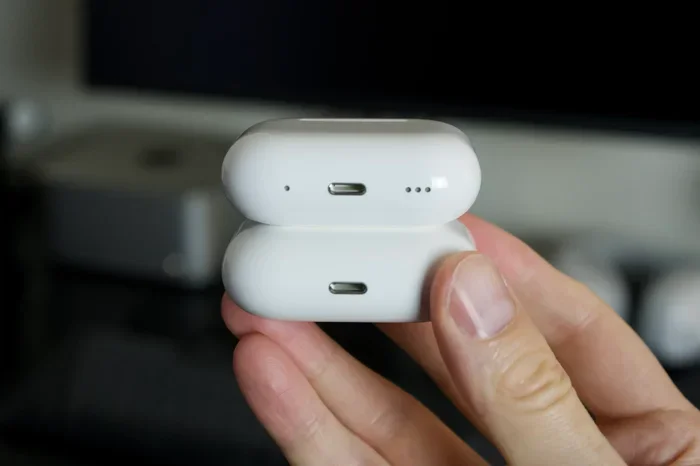
Featured image for AirPods USB-C charging
Image source: macworld.com
Yes, you can charge certain AirPods models with USB-C—but only if you have the right ones. AirPods Pro 2 (released in 2023), AirPods 4, and AirPods 4 with Active Noise Cancellation all come with USB-C charging cases. Older AirPods models still rely on Apple’s Lightning connector. To charge them, simply plug a USB-C cable into the case’s port and connect it to any compatible power source. This guide will walk you through everything you need to know about USB-C charging for AirPods, including compatibility, charging speeds, and helpful tips.
Imagine this: you’re about to head out the door, grab your AirPods, and realize they’re dead. You reach for a charger, but the only cable nearby is USB-C. You pause and wonder, “Can I charge AirPods with USB-C?” The good news is, the answer is yes—if you have the right model. The bad news? Not all AirPods support USB-C yet.
Apple has been slowly shifting its product lineup from Lightning to USB-C, mostly because of new rules in Europe that require a common charging standard. In 2023, Apple released the first USB-C AirPods case with the AirPods Pro 2. Since then, the company has expanded USB-C support to more models. But if you’re still using older AirPods, you’re probably stuck with Lightning for now.
This guide will answer every question you might have about charging AirPods with USB-C. We’ll cover which models work, how to charge them, how fast they charge, and what to do if your AirPods don’t have USB-C. By the end, you’ll be a USB-C AirPods expert.
Key Takeaways
- USB-C Compatibility: Only AirPods Pro 2 (2023), AirPods 4, and AirPods 4 with ANC support USB-C charging out of the box.
- Older Models: AirPods 1, 2, 3, AirPods Pro 1, and original AirPods Pro 2 use a Lightning cable.
- Charging Method: Plug a USB-C cable into the charging case and connect it to any USB-C power source.
- Charging Speed: A 5-minute charge gives roughly 1 hour of listening time on compatible models.
- No Adapters Needed: You don’t need a special adapter—just a standard USB-C cable.
- Wireless Charging Still Works: USB-C AirPods cases also support Qi and MagSafe wireless charging.
- Universal Cable: Using USB-C means one cable for your iPhone, Mac, iPad, and AirPods.
📑 Table of Contents
- Which AirPods Models Support USB-C Charging?
- How to Charge AirPods with USB-C
- How Fast Do AirPods Charge with USB-C?
- Can You Use USB-C to Charge Older AirPods?
- Can You Charge AirPods Wirelessly with USB-C?
- Benefits of USB-C Charging for AirPods
- Common Problems and Troubleshooting
- Tips for Getting the Most Out of Your USB-C AirPods
- Final Thoughts
Which AirPods Models Support USB-C Charging?
The first thing you need to know is whether your AirPods case even has a USB-C port. Here’s a quick breakdown.
AirPods That Use USB-C
- AirPods Pro 2 (USB-C version, released September 2023): This was the first AirPods model with a USB-C case. It looks identical to the Lightning version but has a small USB-C port on the bottom.
- AirPods 4 (released September 2024): The standard AirPods 4 come with a USB-C charging case.
- AirPods 4 with Active Noise Cancellation: This premium model also features a USB-C case, plus wireless charging support.
AirPods That Still Use Lightning
- AirPods 1st generation: Released in 2016, these use a Lightning case.
- AirPods 2nd generation: Released in 2019, still Lightning.
- AirPods 3rd generation: Released in 2021, also Lightning.
- AirPods Pro 1st generation: Released in 2019, Lightning case.
- AirPods Pro 2 (Lightning version): Released in September 2022, this older Pro 2 model uses Lightning.
Did You Know? There are two versions of AirPods Pro 2. The first launched in 2022 with a Lightning case. The second launched in 2023 with a USB-C case. They look almost identical, but the ports are different. Always check the bottom of the case to see which one you have.
How to Charge AirPods with USB-C
Charging your AirPods with USB-C is super easy. Think of it like filling up a water bottle. You just need the bottle (your AirPods case), the spout (the USB-C port), and a water source (a USB-C cable and power adapter).
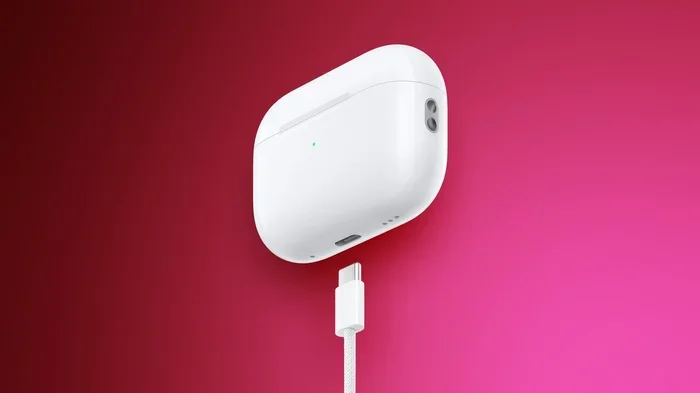
Visual guide about AirPods USB-C charging
Image source: images.macrumors.com
Step-by-Step Charging Instructions
- Grab a USB-C cable: Any standard USB-C to USB-C cable will work. The one that came with your iPhone 15 or newer works perfectly.
- Plug it into the case: Look at the bottom of your AirPods case. You’ll see a small oval-shaped port. Plug the smaller end of the USB-C cable into this port.
- Connect to power: Plug the other end of the cable into a USB-C power adapter, your computer, or even a power bank.
- Wait for the light: The status light on the front of the case will turn amber (orange) when charging and green when fully charged.
Did You Know? The AirPods Pro 2 USB-C case also supports charging from any USB-C power source, including your iPad, MacBook, or even a Nintendo Switch charger. As long as the cable fits, it will charge.
What Kind of USB-C Cable Do You Need?
You don’t need a special cable. A basic USB-C cable will do the job. However, for the fastest charging, use a cable that supports USB Power Delivery (USB-PD). These are usually marked with a small “PD” logo on the connector.
If you’re using a cheap or damaged cable, your AirPods might charge slowly or not at all. Stick with certified cables from trusted brands like Apple, Anker, or Belkin.
How Fast Do AirPods Charge with USB-C?
Nobody wants to wait around for their earbuds to charge. The good news is that USB-C AirPods charge pretty quickly.
Charging Speed for AirPods Pro 2 (USB-C)
- 5 minutes of charging: Gives you about 1 hour of listening time or around 1 hour of talk time.
- Full charge: Takes about 1 hour to fully charge the case.
- Battery life: The case provides up to 30 hours of total listening time when fully charged.
Charging Speed for AirPods 4 (USB-C)
- 5 minutes of charging: Gives you about 1 hour of listening time.
- Full charge: Takes about 1 hour to fully charge the case.
- Battery life: Up to 30 hours of total listening time with the case.
Did You Know? Apple claims that USB-C charging is just as fast as Lightning charging. The port type doesn’t change how fast your AirPods charge—it all depends on the wattage of your power adapter.
Best Power Adapters for Charging AirPods
AirPods don’t need a lot of power. A 5W adapter is enough, but you can use anything up to 20W without any issues. Here are some popular options:
- Apple 5W USB-C Power Adapter: The simplest choice.
- Apple 20W USB-C Power Adapter: Charges faster, but AirPods won’t actually use all that power.
- Anker Nano Pro: A compact third-party option.
- Your laptop or iPad: AirPods will charge slowly but safely when plugged into a computer.
Can You Use USB-C to Charge Older AirPods?
If you have older AirPods with a Lightning case, you might be wondering if there’s a workaround. Unfortunately, the answer is no—not directly.
Why You Can’t Use USB-C Directly on Lightning AirPods
The Lightning connector is a proprietary Apple technology. It looks similar to USB-C but is smaller and has different pins. A USB-C cable simply won’t fit into a Lightning port. So if you try to plug a USB-C cable into an older AirPods case, it won’t go in.
Workarounds for Older AirPods
If you want to use USB-C cables for your older AirPods, here are a few options:
- Buy a Lightning to USB-C cable: This is the simplest solution. Apple sells these, and they let you charge your Lightning AirPods using a USB-C power adapter.
- Use wireless charging: If your older AirPods case supports wireless charging (like AirPods 3 or AirPods Pro 1), you can place them on any Qi or MagSafe charger—no cables needed.
- Upgrade to a new case: Apple doesn’t sell replacement AirPods cases separately, but you can sometimes find them through third-party sellers. Just make sure the case matches your AirPods model.
Did You Know? Apple made the switch to USB-C partly because of a European Union law that required all smartphones, tablets, and earbuds to use the same charging port by 2024. This law aims to reduce electronic waste and make life easier for consumers.
Can You Charge AirPods Wirelessly with USB-C?
Yes, sort of. The USB-C AirPods cases still support wireless charging, but the USB-C port itself is for wired charging only. Think of it like a car that has both a gas tank and an electric charger. You use one or the other, not both at the same time.
Wireless Charging Options for USB-C AirPods
- AirPods Pro 2 (USB-C): Supports Qi, Qi2, and MagSafe wireless charging.
- AirPods 4 with ANC: Supports Qi and MagSafe wireless charging.
- Standard AirPods 4: Does NOT support wireless charging. Only the wired USB-C case.
How to Wirelessly Charge USB-C AirPods
- Place the AirPods case on a wireless charging pad with the status light facing up.
- Make sure the case is centered on the pad.
- The status light will turn on to indicate charging. It will turn off after a few seconds, but the case will still be charging.
Tip: If you’re using a MagSafe charger, you’ll feel a slight magnetic snap when the case is properly aligned. This is a quick way to know it’s charging.
Benefits of USB-C Charging for AirPods
Switching to USB-C isn’t just about following new rules. There are real benefits for users.
One Cable for Everything
Before USB-C, you might have needed a Lightning cable for your AirPods, a USB-C cable for your MacBook, and a micro-USB cable for other gadgets. With USB-C, you can use the same cable for your iPhone 15, iPad, Mac, and AirPods. Fewer cables mean less clutter in your bag.
Faster Data and Power
USB-C supports faster data transfer and power delivery compared to Lightning. While AirPods don’t take advantage of the data speeds, the power delivery is more efficient. This means slightly faster and more consistent charging.
Universal Compatibility
USB-C is used by Android phones, Windows laptops, game consoles, and more. If you have friends or family who use non-Apple devices, they can lend you a charger without worrying about compatibility.
Future-Proofing
Apple is committed to USB-C. The iPhone 15, iPhone 16, and all new iPads and Macs use USB-C. By switching your AirPods to USB-C now, you’re ready for the future.
Environmental Impact
According to the European Commission, the switch to a universal charger could save consumers up to €250 million per year and reduce electronic waste by about 11,000 tons annually. By using USB-C, you’re helping the planet.
Common Problems and Troubleshooting
Sometimes things don’t go as planned. Here are some common issues and how to fix them.
AirPods Not Charging with USB-C
- Check the cable: Make sure the USB-C cable isn’t damaged. Try a different cable to see if that fixes the problem.
- Check the port: Look inside the USB-C port on the case. If there’s lint or debris, gently clean it out using a dry, soft-bristled brush.
- Check the power source: Try a different power adapter or USB port on your computer.
- Reset the AirPods: If nothing works, try resetting your AirPods. Press and hold the setup button on the back of the case for about 15 seconds until the light flashes amber and then white.
Charging Is Slow
- Use a higher-wattage adapter: A 5W adapter will charge slowly. Try a 10W or 20W adapter for faster charging.
- Avoid using your computer: USB ports on computers usually deliver less power than wall adapters.
- Check for background activity: If your AirPods are connected to your iPhone while charging, they might charge slower due to active Bluetooth connections.
The Status Light Isn’t Turning On
- Make sure the case is charged: If the case battery is completely dead, it might take a minute before the light turns on.
- Check the connection: Unplug and replug the cable to make sure it’s seated properly.
Did You Know? According to Apple, AirPods cases are designed to retain up to 80% of their battery capacity after 500 full charge cycles. This means your USB-C AirPods case should last for several years before you notice any significant degradation.
Tips for Getting the Most Out of Your USB-C AirPods
Here are some practical tips to keep your AirPods in great shape.
Don’t Overcharge
Modern AirPods cases have smart charging circuits that stop charging once the battery is full. So you don’t need to worry about overcharging. However, it’s still a good idea to unplug the case once it’s fully charged to save energy.
Keep the Port Clean
Dust and lint can build up in the USB-C port over time. This can prevent the cable from making a proper connection. Clean the port gently every few months using a soft brush or compressed air.
Avoid Extreme Temperatures
Apple recommends using AirPods in environments between 0°C and 35°C (32°F to 95°F). Charging in very hot or very cold conditions can damage the battery.
Update the Firmware
Apple regularly releases firmware updates that improve battery life and charging performance. Make sure your AirPods are connected to your iPhone and placed in the case to receive updates automatically.
Use the Right Case
If you use a protective case for your AirPods, make sure it doesn’t block the USB-C port. Some thick cases can make it hard to plug in the cable.
Final Thoughts
So, can you charge AirPods with USB-C? Yes, but only if you have AirPods Pro 2 (2023), AirPods 4, or AirPods 4 with Active Noise Cancellation. These models come with a USB-C charging case that works with any standard USB-C cable.
If you have older AirPods with a Lightning port, you’ll need to stick with a Lightning cable—or upgrade to a newer model. The switch to USB-C is part of a bigger move toward a universal charging standard, which is great news for anyone tired of carrying multiple cables.
USB-C charging is fast, convenient, and future-proof. Whether you’re topping off your AirPods before a workout or charging them overnight, USB-C makes the process easier than ever. Just plug in, wait for the light, and you’re good to go.
Got more questions about AirPods and USB-C? Check out the FAQ section below for quick answers to the most common questions.
Frequently Asked Questions
Can I charge AirPods Pro with a USB-C cable?
Yes, but only if you have the AirPods Pro 2 (USB-C version) released in September 2023. The original AirPods Pro and AirPods Pro 2 (Lightning version) use a Lightning cable. The USB-C version looks nearly identical but has a USB-C port on the bottom of the case.
Do all AirPods 4 have USB-C?
Yes, both versions of AirPods 4—the standard model and the one with Active Noise Cancellation—come with USB-C charging cases. The standard AirPods 4 only supports wired USB-C charging, while the ANC version also supports wireless charging.
Can I use my iPhone charger to charge AirPods with USB-C?
Yes, any USB-C power adapter will work. If you have an iPhone 15 or newer, the USB-C cable that came with it can charge your AirPods. Older iPhone chargers with Lightning cables won’t work directly, but you can use a Lightning to USB-C cable as a workaround.
How long does it take to fully charge AirPods with USB-C?
A full charge takes about 1 hour for the case. A quick 5-minute charge will give you roughly 1 hour of listening time, which is great for last-minute top-ups before heading out.
Can I charge AirPods with USB-C from a power bank?
Absolutely. Any USB-C power bank will charge your AirPods case. This is perfect for travel or long days when you’re away from a wall outlet. Just make sure the power bank has enough charge left to power your AirPods.
Is USB-C charging faster than Lightning for AirPods?
The charging speed is similar because the bottleneck is the AirPods’ internal charging circuit, not the cable type. However, USB-C is more efficient at delivering power, so you might notice slightly more consistent charging speeds.