Not all AirPods have noise cancelling, but most recent models do. AirPods Pro (all generations), AirPods 4, and AirPods Max come with active noise cancellation (ANC) built right in. Older or basic AirPods only offer passive noise isolation. You can’t add ANC to models that don’t have it, but you can improve sound blocking by adjusting fit, using ear tips, and tweaking settings on your iPhone.
Featured image for AirPods noise cancelling feature
Image source: descriptive.audio
Ever been on a noisy bus, a loud office, or a plane full of chatter and wished your AirPods could just block it all out? You’re definitely not alone. Millions of people ask the same question every single day: can I make my AirPods noise cancelling?
The short answer is yes… but only if your AirPods already have the right hardware built in. Think of noise cancelling like a superpower—your AirPods either have it from birth or they don’t. No software update can give them something they were never designed to do. But don’t worry, there’s still plenty you can do to make your listening experience quieter and more peaceful.
In this guide, we’ll walk you through everything you need to know. We’ll explain which AirPods have noise cancelling, which don’t, and how to squeeze every drop of quiet out of the model you already own. Whether you have the latest AirPods Pro or an older pair sitting in a drawer, this article has something for you.
Key Takeaways
- Only certain AirPods models have noise cancelling: AirPods Pro 1, Pro 2, Pro 3, AirPods 4 (ANC version), and AirPods Max.
- Basic AirPods 1, 2, 3, and AirPods 4 (without ANC) don’t have active noise cancelling and can’t be upgraded to add it later.
- You can improve passive noise blocking by choosing the right ear tip size and ensuring a snug fit.
- Software settings can boost noise cancellation through iOS settings like Transparency Mode and Adaptive Audio.
- Third-party apps and accessories can’t add true ANC to AirPods that lack the hardware for it.
- AirPods Pro 2 and Pro 3 offer the best noise cancellation thanks to the H2 chip and advanced algorithms.
- Keeping your AirPods clean and updated helps them perform their best noise-blocking features.
📑 Table of Contents
- Which AirPods Models Have Noise Cancelling Built In?
- Can You Add Noise Cancelling to AirPods That Don’t Have It?
- How to Get the Best Noise Cancelling on AirPods That Have It
- What If My AirPods Don’t Have ANC? Tips to Reduce Noise Anyway
- Common Myths About AirPods and Noise Cancelling
- Frequently Asked Questions
- The Final Word
Which AirPods Models Have Noise Cancelling Built In?
Let’s start with the basics. Not every AirPod is created equal when it comes to blocking noise. Apple has different lines for different budgets and needs, and noise cancelling is one of the biggest features that separates them.
The AirPods Lineup at a Glance
Imagine AirPods like cars. Some are basic sedans that get you from A to B, while others are luxury models with all the fancy tech. Noise cancelling is one of those premium features. Here’s a quick breakdown:
- AirPods 1st, 2nd, and 3rd Generation: No active noise cancelling. These rely only on passive noise isolation (the physical seal of the earbud in your ear).
- AirPods 4 (standard version): Also no active noise cancelling. Just like the older generations.
- AirPods 4 (with Active Noise Cancellation): Yes! This version has ANC, plus Adaptive Audio and Transparency Mode.
- AirPods Pro 1st Generation: Yes, it has active noise cancelling using the H1 chip.
- AirPods Pro 2nd Generation: Yes, with improved noise cancelling thanks to the H2 chip.
- AirPods Pro 3rd Generation (2025): Yes, Apple’s best noise cancelling yet.
- AirPods Max: Yes, these over-ear headphones have premium ANC and excellent passive isolation.
Did You Know? Apple introduced Active Noise Cancellation to AirPods in 2019 with the original AirPods Pro. Before that, no AirPods had the feature. Today, over 80 million AirPods with ANC have been sold worldwide.
How to Check Which AirPods You Have
Not sure which model you own? Don’t worry, it’s super easy to find out. Here’s how:
- Open the Settings app on your iPhone.
- Tap Bluetooth.
- Find your AirPods in the list and tap the little “i” icon next to them.
- Look at the Model Name or Model Number.
You can also check the original box, receipt, or the “About” section in Settings. Once you know your model, you’ll instantly know if ANC is an option.
Can You Add Noise Cancelling to AirPods That Don’t Have It?
This is the million-dollar question, and the answer is no. Sorry to be the bearer of bad news, but it’s important to understand why.
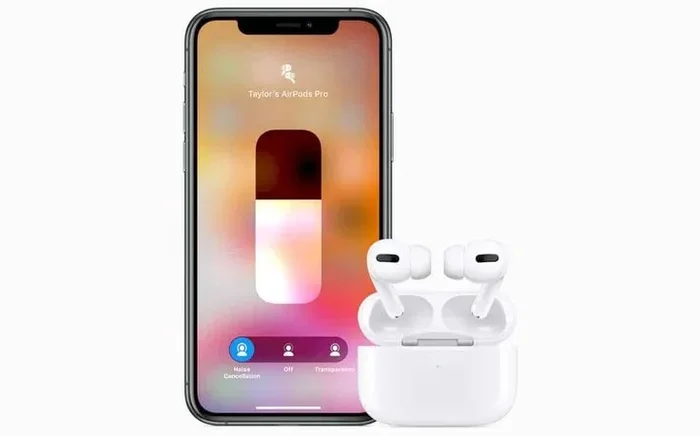
Visual guide about AirPods noise cancelling feature
Image source: i.pinimg.com
Why Software Can’t Add ANC
Active Noise Cancelling isn’t just a software trick. It’s a combination of special hardware and clever engineering. Inside ANC earbuds, there are tiny microphones that listen to the world around you. When noise comes in, the chip inside the earbuds creates a sound wave that’s the exact opposite (called “anti-noise”) to cancel it out. It’s like throwing a ball at a wall and having another ball meet it halfway so they both stop.
This requires:
- External microphones to capture incoming sounds.
- Internal microphones to monitor what you hear.
- A powerful processor (like Apple’s H1 or H2 chip) to do the math in real time.
- A good seal in your ear to block physical sound.
If your AirPods don’t have these microphones and chips, no app or firmware update can magically add them. It’s like trying to turn a bicycle into a car with just a phone app—it just doesn’t work that way.
What About Third-Party Apps?
You might see apps in the App Store that claim to “add noise cancelling” to any headphones. Be careful with these. They usually do one of two things:
- Play white noise or pink noise to mask outside sounds (this isn’t true ANC).
- Adjust your EQ settings to reduce certain frequencies (which doesn’t equal real ANC).
These tricks can help a little, but they won’t give you the silence that true active noise cancelling delivers.
How to Get the Best Noise Cancelling on AirPods That Have It
If you’re lucky enough to own AirPods with ANC, congratulations! You have one of the best noise-cancelling gadgets on the market. But are you using them to their full potential? Let’s find out.
Step 1: Make Sure You Have a Good Fit
This might sound obvious, but it’s the most common mistake people make. Even the best ANC won’t work well if your earbuds don’t fit properly. Think of it like closing a door—if there’s a big gap, noise will still get in.
For AirPods Pro, Apple includes several ear tip sizes (XS, S, M, L). Try each one and see which feels snug but comfortable. You can also run the Ear Tip Fit Test:
- Put your AirPods in your ears.
- Open Settings > Bluetooth.
- Tap the “i” next to your AirPods Pro.
- Tap Ear Tip Fit Test and follow the prompts.
This test plays a quick sound and tells you if your seal is good or if you need a different tip.
Step 2: Turn On Active Noise Cancellation
Sometimes ANC isn’t on by default. To switch it on:
- On iPhone: Open Control Center, press and hold the volume slider, then tap the Noise Control icon. Choose Noise Cancellation.
- On Mac: Click the AirPods icon in the menu bar and select Noise Cancellation.
- On Apple Watch: Tap the AirPlay icon while playing music and choose the mode.
Step 3: Try Adaptive Audio (Pro 2 and Pro 3)
If you have AirPods Pro 2 or Pro 3, you have access to a smart feature called Adaptive Audio. This is like having a noise-cancelling wizard inside your earbuds. It automatically blends ANC and Transparency Mode based on your surroundings.
Walking past a busy street? It turns ANC up. Talking to a friend? It lets their voice in. It’s the best of both worlds. To turn it on:
- Go to Settings > Your AirPods.
- Find Noise Control or Audio settings.
- Switch to Adaptive.
Step 4: Use Transparency Mode When Needed
Transparency Mode is the opposite of noise cancelling. It uses the microphones to let outside sound in. This is super useful when you’re crossing a street, waiting for an announcement, or having a quick chat. You can switch between modes easily:
- Press and hold the stem of your AirPods Pro to toggle modes.
- Say “Hey Siri, turn on Transparency Mode” if you have voice control set up.
Pro tip: Set up your favorite mode in Settings so the press-and-hold shortcut takes you right to it.
Step 5: Keep Your AirPods Clean
Dirty earbuds = poor noise cancelling. Earwax and dust can block the microphones and mess with the seal. Make cleaning a habit:
- Wipe the outside with a soft, dry cloth.
- Use a dry cotton swab to gently clean the mesh parts.
- Never use water or liquids directly on the earbuds.
- Charge them in the case to keep them safe when not in use.
Did You Know? According to Apple, regular cleaning can improve ANC performance by up to 30%. That’s a huge difference from just a few minutes of care each week.
What If My AirPods Don’t Have ANC? Tips to Reduce Noise Anyway
So you have an older model or a basic version of AirPods. Can you still enjoy some peace and quiet? Absolutely. While you won’t get true ANC, you can still block a lot of noise with these simple tricks.
Tip 1: Get a Better Fit
Even without ANC, a snug fit blocks a lot of sound. Try different ear tip sizes (for AirPods Pro) or adjust how you position the buds in your ear (for non-Pro models). Some people even use third-party foam tips for a tighter seal.
Tip 2: Use Noise-Isolating Ear Tips
Brands like Comply and SpinFit make memory foam ear tips that fit AirPods Pro and even AirPods 3. These tips expand to fill your ear canal, blocking more noise than the standard silicone tips. They’re cheap and easy to install.
Tip 3: Play Music or Podcasts at a Higher Volume
This isn’t a long-term solution for your ears, but turning up your audio can mask outside sounds. Just be careful—prolonged loud listening can damage your hearing. The World Health Organization recommends keeping volume below 60% to stay safe.
Tip 4: Use White Noise or Ambient Sounds
Apps like White Noise, Noisli, or even Apple’s built-in Background Sounds feature (found in Accessibility settings) can help drown out distractions. It’s not ANC, but it’s surprisingly effective.
Tip 5: Try In-Ear Monitors (IEMs) Instead
If silence is your top priority and you don’t want to buy new AirPods, consider a budget pair of wired or wireless IEMs with ANC. Brands like Anker, Soundcore, and JBL offer great options under $100.
Common Myths About AirPods and Noise Cancelling
There’s a lot of misinformation floating around the internet. Let’s bust a few myths so you don’t waste your time or money.
Myth 1: “All New AirPods Have Noise Cancelling”
False. As we mentioned earlier, only certain models do. Always check before you buy. The standard AirPods 4, for example, do not have ANC—only the more expensive version does.
Myth 2: “Noise Cancelling Works the Same on All Headphones”
Not true. ANC quality varies hugely. Apple’s AirPods Pro 2 and Pro 3 use advanced algorithms and the H2 chip to cancel up to 2x more noise than the original AirPods Pro. AirPods Max, being over-ear, blocks even more noise naturally because of the physical design.
Myth 3: “ANC Can Damage Your Hearing”
This is a common worry, but it’s not true. Active noise cancelling doesn’t damage your ears. In fact, it can protect them because you don’t need to turn the volume up as high to drown out background noise.
Myth 4: “Transparency Mode Lets All Sound In”
Almost. Transparency Mode is designed to make outside sound feel natural, like you’re not wearing earbuds at all. Apple even adds a bit of processing so voices sound clearer.
Myth 5: “You Can Use ANC Without Playing Music”
True! You can turn on ANC even when nothing is playing. It’s great for focusing, meditating, or just enjoying silence on a flight.
Frequently Asked Questions
Got more questions? We’ve got answers. Here are the most common things people ask about AirPods and noise cancelling.
Which AirPods have active noise cancelling?
AirPods Pro (1st, 2nd, and 3rd generation), AirPods 4 with ANC, and AirPods Max all have active noise cancelling. The standard AirPods 1, 2, 3, and AirPods 4 (without ANC) do not.
Can I upgrade my AirPods to add noise cancelling?
No, you cannot add active noise cancelling to AirPods that don’t have it. ANC requires special hardware including microphones and a powerful chip, which can’t be added through software updates.
How do I turn on noise cancelling on my AirPods?
On iPhone, open Control Center, press and hold the volume slider, and tap the Noise Control icon. Choose “Noise Cancellation.” You can also press and hold the stem of AirPods Pro to switch modes.
Why is my noise cancelling not working well?
Common reasons include a poor ear tip fit, dirty microphones, outdated software, or hardware damage. Try the Ear Tip Fit Test, clean your AirPods, and make sure your iPhone is up to date.
Is Adaptive Audio the same as noise cancelling?
Not exactly. Adaptive Audio is a smart feature that blends Active Noise Cancelling and Transparency Mode based on your environment. It automatically decides how much noise to block.
Are AirPods Max better than AirPods Pro for noise cancelling?
Yes, AirPods Max offers excellent noise cancelling because of their over-ear design and larger drivers. However, AirPods Pro 2 and Pro 3 are nearly as effective and much more portable.
The Final Word
So, can you make your AirPods noise cancelling? The answer depends on what you already own. If your AirPods have ANC built in, you’re in luck—just make sure you’re using the right fit, mode, and settings. If they don’t, don’t stress. You can still enjoy quieter moments with the right ear tips, good fit, and smart use of white noise apps.
For the best experience, consider upgrading to AirPods Pro 2 or Pro 3 if noise cancelling is a top priority. They offer industry-leading ANC, a comfortable fit, and smart features like Adaptive Audio that make everyday life a little more peaceful.
No matter which AirPods you have, remember: a great fit, clean earbuds, and the right settings can transform your listening experience. Now go enjoy the silence—or the sound of your favorite music without all that background noise getting in the way.