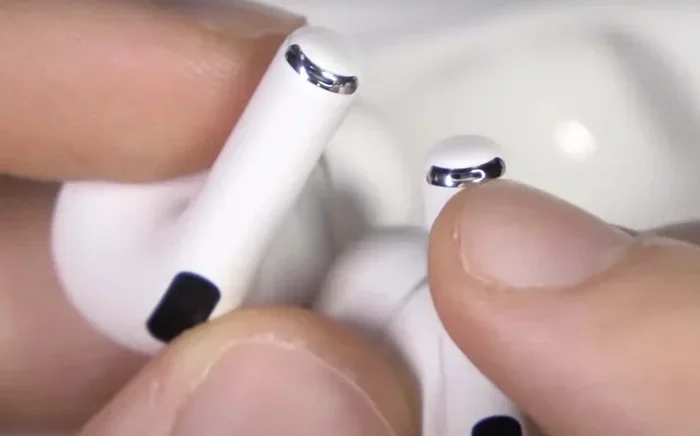
Featured image for Airpods Pro 2 microphone closeup
Image source: wiredclip.com
Yes, AirPods Pro 2 have built-in microphones—in fact, they have multiple high-quality microphones built into each earbud. Apple designed them with advanced beamforming technology that isolates your voice while blocking background noise, making them excellent for phone calls, video chats, voice recordings, and Siri commands.
Picture this: you’re walking down a busy street, wind rushing past your ears, cars honking in the distance, and somehow the person on the other end of your phone call hears you as clearly as if you were sitting in a quiet library. Sounds like magic, right? Well, it’s not magic—it’s the incredible microphone technology packed inside your AirPods Pro 2. These tiny earbuds are way more than just music accessories. They’re miniature communication powerhouses hiding in your ears.
If you’ve ever wondered whether AirPods Pro 2 can handle your phone calls, Zoom meetings, or voice recordings, you’re in the right place. Many people buy AirPods thinking they’re just fancy headphones, only to discover later that the microphone situation is actually one of their strongest features. Apple has been quietly perfecting this technology for years, and the second-generation AirPods Pro represent some of the best wireless microphone engineering on the consumer market today.
Throughout this guide, we’ll break down everything you need to know about the microphones in your AirPods Pro 2. We’ll cover where they’re located, how they work, what they can do, and even share some tips to get the most out of them. By the end, you’ll understand exactly why these little white stems are dominating the wireless earbud world—not just for sound, but for voice clarity too.
Key Takeaways
- Multiple Microphones: Each AirPods Pro 2 earbud contains two microphones—one inward-facing and one outward-facing—for superior voice pickup.
- Beamforming Technology: The microphones use directional audio processing to focus on your voice and reduce background noise during calls.
- Conversation Boost & Voice Isolation: iOS updates introduced features that enhance microphone clarity for face-to-face conversations and noisy environments.
- Siri and Voice Commands: The “Hey Siri” feature relies entirely on the built-in microphones, allowing hands-free voice control.
- Studio-Quality Recording: AirPods Pro 2 can record spatial audio and serve as wireless microphones for video recording on iPhone.
- Microphone Location: The mics are positioned on the stem and inner side of each earbud for optimal voice capture.
- Battery Impact: Heavy microphone use (calls, recordings) drains the battery faster than simple music playback.
📑 Table of Contents
- The Short Answer: Yes, AirPods Pro 2 Absolutely Have Microphones
- Where Exactly Are the Microphones Located?
- What Can You Do With AirPods Pro 2 Microphones?
- How Does Active Noise Cancellation Use the Microphones?
- Tips for Getting the Best Microphone Performance
- Common Myths About AirPods Pro 2 Microphones
- Microphone Specifications and Technical Details
- Comparing AirPods Pro 2 Microphones to Other Devices
- Battery Life and Microphone Usage
- Privacy and Microphone Concerns
- Troubleshooting Common Microphone Problems
- Final Thoughts on AirPods Pro 2 Microphones
The Short Answer: Yes, AirPods Pro 2 Absolutely Have Microphones
Let’s get the obvious question out of the way first. Yes, AirPods Pro 2 have microphones—and not just one, but multiple microphones per earbud. If you’re the type who likes to know the exact numbers, each AirPods Pro 2 earbud houses two dedicated microphones, which means you’re working with a total of four microphones when both are worn.
Think of it like having a tiny news broadcasting studio right inside your earbuds. Professional broadcasters use multiple microphones to capture sound from different angles and reduce unwanted noise. Apple applied the same principle to AirPods Pro 2, just shrunk down to fit inside something the size of a fingernail.
These microphones aren’t basic, run-of-the-mill components either. They’re precision-engineered to handle voice pickup, noise cancellation, and even sophisticated audio processing that would have required expensive equipment just a decade ago. When you factor in the H2 chip that powers them, you’re looking at some seriously impressive technology.
How Many Microphones Are in Each AirPod?
Each AirPods Pro 2 earbud contains exactly two microphones. One faces outward (away from your ear) to monitor ambient sound, while the other faces inward (toward your ear canal) to detect any unwanted noise that might leak through the silicone tips. Together, they create a system that Apple calls “dual beamforming microphones.”
What Makes Them Special?
The microphones in AirPods Pro 2 work alongside Apple’s H2 chip to perform real-time audio processing. This means they don’t just capture your voice—they actively clean it up, remove background noise, and adapt to your environment on the fly. It’s like having a sound engineer in your pocket making constant adjustments to keep your voice sounding perfect.
Where Exactly Are the Microphones Located?
Now that you know AirPods Pro 2 have microphones, the next logical question is: where are they? Apple tucked these tiny mics into two strategic locations on each earbud, and understanding their placement helps explain why your calls sound so good.
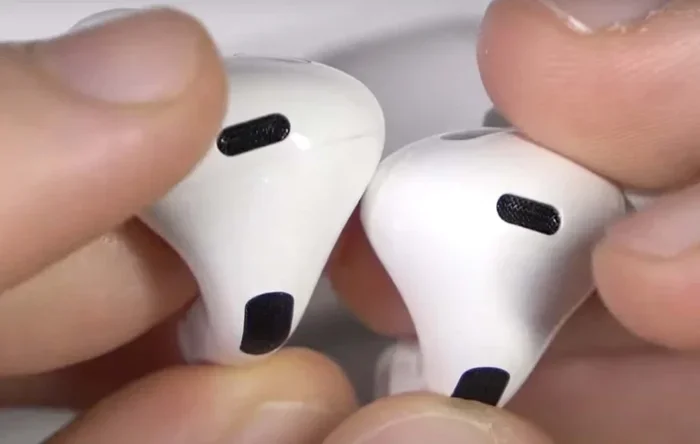
Visual guide about Airpods Pro 2 microphone closeup
Image source: wiredclip.com
The Stem Microphone
Remember that little stem hanging down from each AirPod? That’s not just for looks or touch controls. The primary voice microphone sits at the bottom of the stem, positioned close to your mouth. This is the same general concept as the microphone on a headset or lavalier clip—the closer the mic is to your mouth, the clearer your voice sounds.
When you’re on a phone call, this bottom stem microphone does most of the heavy lifting. It’s the one that captures your actual voice and sends it to the person on the other end. Even though it’s only about an inch or two from your mouth, Apple has engineered it to pick up your voice accurately while rejecting surrounding sounds.
Fun fact: the stem design wasn’t just an aesthetic choice. Apple specifically extended the stem downward to create better microphone positioning. It’s a perfect blend of form and function—looking sleek while also serving a critical purpose.
The Inward-Facing Microphone
The second microphone lives on the inner part of the earbud, facing into your ear canal. This one’s job is different—it’s not primarily for capturing your voice. Instead, it listens to what’s happening inside your ear to help with noise cancellation and sound quality adjustments.
Think of it like a quality control inspector. While the outer microphone listens to the world, the inner microphone listens to what you actually hear. If extra noise is sneaking through the ear tips, this microphone detects it and tells the H2 chip to generate an opposite sound wave to cancel it out.
Why Dual Microphones Matter
Having two microphones per earbud means AirPods Pro 2 can perform something called “beamforming.” Imagine a flashlight beam—instead of spreading light everywhere, it focuses the light in one direction. Beamforming microphones do the same thing with sound. They focus on picking up your voice (which comes from one direction—your mouth) while ignoring sounds coming from other directions (background noise).
This dual-microphone system is why AirPods Pro 2 perform so well in noisy environments like coffee shops, airports, or busy streets. They’re constantly analyzing sound from multiple angles and making smart decisions about what to amplify.
What Can You Do With AirPods Pro 2 Microphones?
Okay, so we know the microphones exist and where they’re located. But what can you realistically accomplish with them? The answer might surprise you—these little earbuds can handle way more than just phone calls.
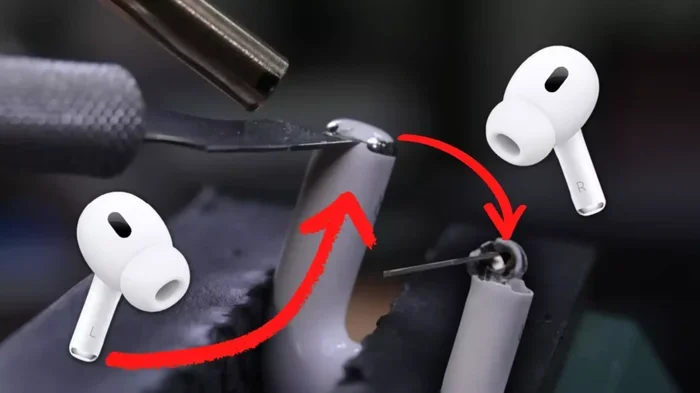
Visual guide about Airpods Pro 2 microphone closeup
Image source: milaaj.ae
Phone Calls and FaceTime
The most obvious use case is phone calls. Whether you’re using the standard Phone app, FaceTime, WhatsApp, Zoom, Microsoft Teams, or any other calling service, AirPods Pro 2 microphones deliver crystal-clear voice quality. The beamforming technology shines here, especially when you’re walking outside or sitting in a moderately loud environment.
People on the other end of your calls will often comment on how clear you sound, even in situations where other wireless earbuds struggle. This is the microphone system earning its keep and proving its worth every single day.
Voice Memos and Audio Recording
Need to record a quick voice memo, lecture, or interview? AirPods Pro 2 can serve as wireless microphones for the Voice Memos app or even third-party recording apps. While they won’t replace professional studio microphones, they’re more than adequate for casual recordings, note-taking, and capturing ideas on the go.
Some podcasters even use AirPods Pro 2 as backup recording equipment when they’re traveling light. The sound is that impressive, and the convenience factor is unmatched. You literally have a recording studio in your pocket that fits in a small charging case.
Siri and Voice Commands
Siri relies entirely on the built-in microphones to hear your commands. With AirPods Pro 2, you can simply say “Hey Siri” hands-free, and your voice assistant will spring to life. No tapping required—just speak naturally.
This hands-free functionality extends beyond simple commands. You can dictate messages, set reminders, control your music, get directions, and ask questions all without lifting a finger. The microphones are always listening for that “Hey Siri” trigger, waiting patiently for you to need them.
Video Recording and Content Creation
Here’s a feature many people overlook: AirPods Pro 2 can function as wireless microphones when recording video on your iPhone. If you’re a content creator shooting videos with your iPhone, you can wear AirPods Pro 2 and capture audio directly without needing to hold a separate microphone or stay close to the phone.
This is huge for vloggers, social media creators, and anyone who films videos on the go. You get good audio quality, freedom of movement, and a setup that looks clean on camera. While dedicated lavalier mics might still edge out AirPods in pure quality, the difference is small enough that many creators prefer the convenience of AirPods.
Live Listen Accessibility Feature
iOS includes an accessibility feature called “Live Listen” that turns your AirPods Pro 2 into a remote microphone system. Place your iPhone near someone speaking (like a professor at the front of a classroom), and the sound gets streamed directly to your AirPods. It’s a game-changer for people with hearing difficulties, and it’s all powered by those tiny built-in microphones.
How Does Active Noise Cancellation Use the Microphones?
Here’s something really cool: the microphones in AirPods Pro 2 don’t just capture your voice. They’re also the eyes and ears of the active noise cancellation (ANC) system. Without microphones, ANC simply wouldn’t work—it’s the mics that make the magic happen.
The Science of Noise Cancellation
Active noise cancellation works on a beautifully simple principle. The outward-facing microphone listens to ambient noise around you—airplane engines, traffic hum, air conditioners, etc. The H2 chip then generates an “anti-noise” sound wave that’s exactly opposite to the unwanted noise. When these two waves meet, they cancel each other out.
Imagine throwing a rock into a pond and watching the ripples spread out. Now imagine throwing a second rock at just the right time so its ripples fill in the gaps of the first rock’s ripples. That’s essentially how noise-canceling works, but with sound waves instead of water.
The Role of the Inward Microphone
While the outward mic handles external noise, the inward microphone handles noise that sneaks through the ear tips. Even the best silicone ear tips can’t create a perfect seal, so some sound leaks through. The inward microphone detects this leaked sound and helps the system generate anti-noise to cancel it too.
This dual-microphone approach is what separates premium noise-canceling earbuds from budget options. Budget earbuds might have only one microphone, which means they can only cancel noise from one direction. AirPods Pro 2 cancel noise from both directions, which is why their noise cancellation feels so complete and immersive.
Adaptive Transparency Mode
The microphones also power AirPods Pro 2’s Adaptive Transparency mode, which lets you hear the world around you while still reducing harsh sounds like sirens or construction noise. The microphones continuously monitor your environment and adjust in real-time. It’s like having a smart filter that lets the good sounds in and keeps the harmful sounds out.
Tips for Getting the Best Microphone Performance
Even with all this advanced technology, you can take a few simple steps to make sure you’re getting the most out of your AirPods Pro 2 microphones. These tips will help you sound clearer on calls, improve recording quality, and extend battery life.
Keep Your AirPods Clean
Microphones hate dirt and debris. If you notice your voice sounding muffled or quiet, the microphone mesh might be clogged with earwax, dust, or other gunk. Use a soft, dry cloth or a clean toothbrush to gently brush the microphone openings. Don’t use water directly on the AirPods—moisture can damage the internal components.
A quick weekly cleaning routine can keep your microphones performing at their best. Think of it like washing your car—regular maintenance keeps everything running smoothly.
Position Them Properly
For the best voice pickup during calls, make sure both AirPods are securely in your ears with the microphones positioned correctly. The stem should point downward toward your mouth. If an AirPod is loose or twisted, voice quality can drop significantly.
Use One AirPod at a Time for Calls
When you’re in a quiet place and want to save battery, try using just one AirPod for calls. With two microphones on each earbud, even a single AirPod delivers excellent voice quality. This is also helpful if you need to keep one ear free to hear your surroundings.
Update Your iOS and AirPods Firmware
Apple regularly releases firmware updates that improve microphone performance and add new features. Make sure your iPhone, iPad, or Mac is running the latest software, and your AirPods firmware is current. These updates often include subtle improvements to voice processing that you might not notice immediately but definitely add up over time.
Manage Your Environment
Even the most advanced microphones struggle in extreme noise. If you’re about to take an important call, try to find a quieter spot if possible. Wind is particularly challenging for microphones, so on very windy days, consider covering one ear with your hand or stepping behind a building to block the gusts.
Common Myths About AirPods Pro 2 Microphones
With any popular product, myths and misconceptions are bound to spread. Let’s debunk some of the most common ones about AirPods Pro 2 microphones.
Myth: AirPods Pro 2 Use Your Phone’s Microphone During Calls
This is a persistent rumor that simply isn’t true. AirPods Pro 2 use their own built-in microphones during calls and audio recording. Your iPhone’s microphone is not involved. You can prove it yourself by putting your iPhone in your pocket or another room—the person on your call will still hear you clearly.
Myth: The Microphones Are Bad for Recording Music
While AirPods Pro 2 microphones aren’t studio-quality, they’re perfectly fine for casual music recording, voice memos, and even rough demos. Many musicians use them to capture song ideas on the go. Just don’t expect them to replace your $1,000 condenser microphone for professional recordings.
Myth: Microphone Quality Drops with Noise Cancellation On
Some people believe that turning on noise cancellation reduces microphone quality. In reality, the opposite is often true. The microphone system is designed to work alongside noise cancellation, and both systems cooperate to deliver better voice clarity in noisy environments.
Myth: Only One Microphone Works at a Time
Both microphones in each earbud work simultaneously. They perform different roles—one captures your voice while the other monitors your environment—but they’re both active and constantly processing audio.
Microphone Specifications and Technical Details
For the tech enthusiasts who love diving deep into specifications, let’s explore some of the technical aspects of AirPods Pro 2 microphones.
Frequency Response
The microphones in AirPods Pro 2 are optimized for the human voice frequency range, which typically falls between 85 Hz and 255 Hz for fundamental tones, extending up to 8,000 Hz for harmonics and clarity. This optimization is why voices sound so natural and full when captured by AirPods Pro 2.
Sample Rate and Bit Depth
When recording audio, AirPods Pro 2 support high-quality sample rates that capture detailed sound information. This is particularly important for voice memos, where you want every nuance of your voice preserved. The higher the sample rate, the more accurate the digital representation of your voice.
Noise Reduction Algorithms
Apple uses sophisticated computational audio algorithms to process microphone input in real-time. These algorithms handle background noise reduction, echo cancellation, and voice enhancement. They run on the H2 chip, which has dedicated processing power for audio tasks.
Bluetooth Codec Support
When transmitting your voice over Bluetooth to your phone, the microphones encode the audio using codecs that balance quality and bandwidth. AirPods Pro 2 use advanced Bluetooth technology to minimize latency and maintain voice quality during transmission.
Comparing AirPods Pro 2 Microphones to Other Devices
How do AirPods Pro 2 microphones stack up against the competition? Let’s take a look at how they compare to other popular devices.
Compared to Regular AirPods Pro (1st Generation)
The original AirPods Pro also had dual microphones per earbud, but the H2 chip in the second generation provides significantly better processing power. This means improved noise cancellation during calls, better voice isolation, and overall clearer sound. If you’re upgrading from first-gen to second-gen, you’ll definitely notice the microphone improvements.
Compared to AirPods 3
AirPods 3 also have microphones, but they lack the silicone ear tips and noise cancellation features of the Pro models. This means they don’t have the same inward-facing microphone setup or noise-canceling capabilities. However, they still deliver solid call quality for everyday use.
Compared to AirPods Max
The over-ear AirPods Max headphones have more space for larger microphones and additional beamforming technology. They offer slightly better voice pickup in extreme noise situations, but for most everyday situations, AirPods Pro 2 microphones perform comparably.
Compared to Other Wireless Earbuds
In the broader wireless earbud market, AirPods Pro 2 microphones rank among the very best. Competitors like Sony WF-1000XM5, Bose QuietComfort Earbuds, and Samsung Galaxy Buds all offer excellent microphone quality, but Apple’s integration with iOS gives AirPods a slight edge in call clarity and Siri performance.
Battery Life and Microphone Usage
One important consideration when relying on AirPods Pro 2 for calls and recordings is battery life. Using the microphones actively—especially during long phone calls or voice recordings—drains the battery faster than just listening to music.
Apple rates AirPods Pro 2 for up to 6 hours of listening time on a single charge, but this drops to about 4.5 hours of talk time when the mics are constantly active. The charging case provides additional charges, extending total talk time to around 24 hours before you need to find an outlet.
Tips to Extend Battery During Heavy Mic Use
- Use one AirPod at a time: This effectively doubles your talk time since each AirPod has its own battery and microphone.
- Keep the case charged: Pop your AirPods back in the case between calls to top them off.
- Disable unnecessary features: If you don’t need noise cancellation, turning it off can save battery.
- Lower the volume: The microphones work less hard at lower volumes, which can slightly extend battery life.
Privacy and Microphone Concerns
In an age where privacy is paramount, many people wonder about the privacy implications of always-on microphones. AirPods Pro 2 microphones are designed with privacy in mind, but it’s worth understanding how they work.
When Are They Listening?
The “Hey Siri” feature requires the microphones to be always listening for the trigger phrase. However, this listening happens entirely on-device. Your voice recordings are not sent to Apple until after Siri is activated. Apple has designed this system to minimize data collection and protect user privacy.
Indicator Lights
When your AirPods are actively using the microphone during a call or recording, there are no visible indicators on the earbuds themselves. However, on your iPhone, a green or orange dot appears in the status bar to indicate when any app is using the microphone. This visual cue helps you stay aware of when your mics are active.
Apple’s Privacy Stance
Apple has consistently emphasized privacy as a core feature of their products. AirPods Pro 2 microphone data is processed on-device whenever possible, and voice recordings sent to their servers are encrypted and anonymized. You can also disable “Hey Siri” entirely if you prefer not to have always-listening microphones.
Troubleshooting Common Microphone Problems
Sometimes things don’t work perfectly. If you’re experiencing microphone issues with your AirPods Pro 2, here are some common problems and solutions.
Problem: People Can’t Hear You on Calls
If callers can’t hear you clearly, try these steps:
- Make sure your AirPods are selected as the audio device in your phone’s settings.
- Check for debris blocking the microphone openings and clean them gently.
- Reset your AirPods by holding the setup button on the case for 15 seconds.
- Test the microphone in the Voice Memos app to confirm it’s working.
Problem: Voice Sounds Muffled or Distorted
Muffled audio usually indicates a physical obstruction or a poor seal. Clean the microphones, make sure the silicone tips are properly fitted, and check that no debris is blocking the mesh openings.
Problem: Microphone Works on One Side Only
Each AirPod has its own independent microphone system. If only one side is working, try resetting your AirPods, updating the firmware, or testing each one individually to identify which might have a hardware issue.
Problem: Siri Doesn’t Respond
If Siri isn’t responding to your voice, make sure “Hey Siri” is enabled in your settings, the microphones are clean, and your AirPods are properly connected. Sometimes simply re-pairing your AirPods with your iPhone resolves the issue.
Final Thoughts on AirPods Pro 2 Microphones
AirPods Pro 2 are absolutely packed with microphone technology that punches well above its weight class. With dual microphones per earbud, advanced beamforming capabilities, and the powerful H2 chip working behind the scenes, these earbuds deliver voice quality that rivals much more expensive professional equipment.
Whether you’re taking business calls on the go, recording voice memos, creating content for social media, or simply asking Siri for directions, the microphones in AirPods Pro 2 handle it all with impressive clarity and reliability. They’re a testament to how far consumer audio technology has come and a reminder that great things really do come in small packages.
So the next time someone asks you, “Do AirPods Pro 2 have microphones?” you’ll know the answer goes far beyond a simple yes. You’ll know they have multiple sophisticated microphones, what they’re capable of, and how to get the most out of them. These tiny white stems are far more than just wireless earbuds—they’re your portable communication command center.
Frequently Asked Questions
How many microphones do AirPods Pro 2 have?
Each AirPods Pro 2 earbud contains two microphones, giving you a total of four microphones when both are worn. These work together using beamforming technology to capture your voice clearly while reducing background noise.
Where is the microphone on AirPods Pro 2?
The microphones are located in two places on each earbud: one at the bottom of the stem (closest to your mouth) for voice pickup, and one on the inner side facing your ear canal for noise detection and active noise cancellation.
Can AirPods Pro 2 be used for phone calls?
Yes, AirPods Pro 2 are excellent for phone calls. The dual microphone system with beamforming technology isolates your voice and reduces background noise, making them ideal for calls in various environments including noisy streets and busy offices.
Do AirPods Pro 2 microphones work with Android phones?
Yes, AirPods Pro 2 microphones work with Android devices via standard Bluetooth connection. However, some advanced features like Siri and certain iOS-specific optimizations are only available when connected to Apple devices.
Can I use AirPods Pro 2 as a microphone for recording video?
Absolutely! You can wear AirPods Pro 2 while recording video on your iPhone, and they will capture high-quality audio wirelessly. This is a popular feature among vloggers and content creators who want clean audio without complicated equipment setups.
How do I clean the microphones on my AirPods Pro 2?
Use a soft, dry cloth or a clean, soft-bristled brush to gently remove debris from the microphone openings. Avoid using water or liquids directly on the AirPods, as moisture can damage the internal components and microphone mesh.