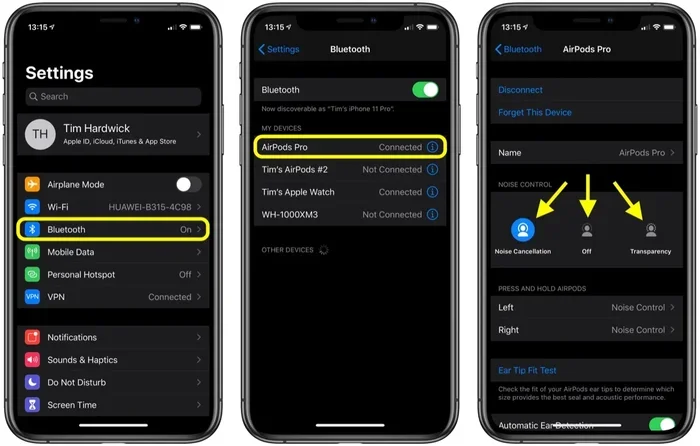
Featured image for AirPods noise cancellation feature
Image source: images.macrumors.com
Yes, many AirPods models cancel out background noise—but only those equipped with Active Noise Cancellation (ANC) technology. Standard AirPods rely on physical ear seal to block some sound, while premium models like AirPods Pro and AirPods Max use advanced microphones and algorithms to actively neutralize ambient noise. Understanding your specific model is key to knowing exactly what level of quiet you can expect.
Imagine you’re sitting on a noisy airplane, the engine roaring like a freight train beside your head. You pop in a pair of earbuds and—suddenly—silence. Just you and your music. That’s the magic of noise cancellation, and it’s a feature many people expect from their wireless earbuds. But here’s the thing: not every pair delivers this experience equally.
If you’re an Apple fan (or even if you’re not), you’ve probably wondered: do AirPods cancel out background noise? The short answer is yes—but with a few important asterisks. Apple offers multiple AirPods models, and only some of them actively fight against the chaos of the outside world. The cheaper, standard AirPods rely mostly on a physical seal in your ear, which helps a little but doesn’t truly “cancel” noise.
This guide will walk you through exactly how AirPods handle background noise, which models do it best, the science behind the silence, and practical tips to get the most out of your listening experience. By the end, you’ll know whether your current AirPods are doing the job—or whether it’s time to upgrade.
Key Takeaways
- Not All AirPods Cancel Noise Equally: Only AirPods Pro (1st, 2nd, and 3rd gen), AirPods 4 (ANC version), and AirPods Max feature Active Noise Cancellation; standard AirPods only provide passive noise isolation.
- ANC Uses Science, Not Magic: Tiny microphones listen to outside sound, and the AirPods generate an “anti-noise” wave to cancel it out before you hear it.
- Transparency Mode Is the Opposite: When you want to hear the world, Transparency Mode lets outside sound in naturally—no need to remove your earbuds.
- Fit Matters More Than You Think: Even the best ANC won’t work well if your AirPods don’t seal properly in your ears.
- Battery Drain Is Real: Active Noise Cancellation uses extra power, so expect roughly 20–30% less battery life when ANC is turned on.
- ANC Has Limits: AirPods excel at reducing consistent low-frequency sounds (airplanes, fans) but struggle with sudden, sharp noises (screams, clattering dishes).
- Adaptive Audio Adjusts Automatically: On newer models, your AirPods can blend ANC and Transparency Mode based on your environment, saving you from constant toggling.
📑 Table of Contents
- How Does Noise Cancellation Actually Work?
- Which AirPods Models Actually Cancel Background Noise?
- AirPods Noise Cancellation vs. Transparency Mode vs. Adaptive Audio
- Tips to Maximize Noise Cancellation on Your AirPods
- Common Myths About AirPods Noise Cancellation
- The Future of Noise Cancellation in AirPods
How Does Noise Cancellation Actually Work?
Before we dive into AirPods specifically, let’s pull back the curtain on the technology itself. It’s easier than you might think—and once you get it, you’ll never listen to music the same way again.
The Two Main Types of Noise Blocking
Think of noise blocking like keeping rain out of a tent. You have two options: build thicker walls (passive) or actively fight the raindrops with an invisible force field (active). Headphones use both methods:
- Passive Noise Isolation: This is simply the physical barrier created by the earbuds sitting in (or over) your ears. Like stuffing cotton in your ears, it blocks some sound from entering. Standard AirPods use this method.
- Active Noise Cancellation (ANC): This is the “force field” approach. Tiny microphones on the earbuds listen to the world around you, and the earbuds generate a special sound wave that is the exact opposite (or “anti-noise”) of the unwanted noise. When these two waves meet, they cancel each other out. The result? Silence.
The Science in Plain English
Sound travels in waves, kind of like ripples in a pond when you toss in a pebble. Now imagine tossing in two pebbles at the same time, exactly opposite each other. The ripples would crash together and flatten out. That’s essentially what ANC does with sound. It creates an inverse wave that neutralizes incoming noise.
Did You Know? Active Noise Cancellation was first developed in the 1930s for airplane cockpit headsets. Pilots needed a way to protect their hearing from loud engine noise, and the same technology eventually made its way into consumer headphones decades later.
Which AirPods Models Actually Cancel Background Noise?
This is the big question—and the answer depends entirely on which AirPods you own (or plan to buy). Apple currently sells several models, and they are not created equal when it comes to quiet.
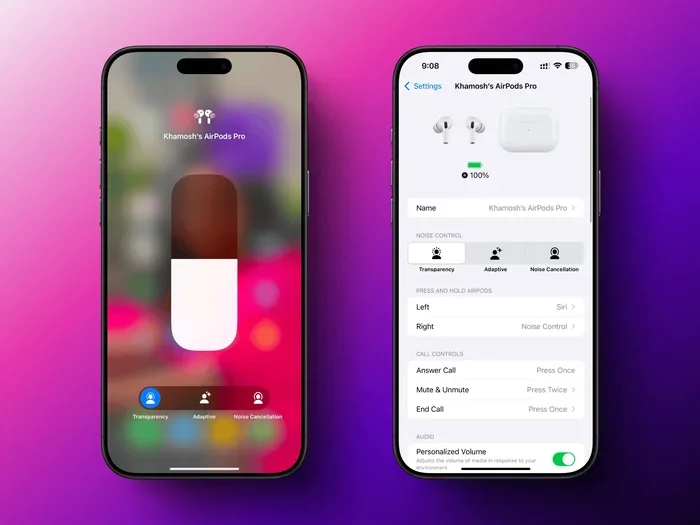
Visual guide about AirPods noise cancellation feature
Image source: lifehacker.com
AirPods Pro (1st, 2nd, and 3rd Generation)
The “Pro” lineup is Apple’s flagship for noise cancellation. All three generations feature Active Noise Cancellation, Transparency Mode, and—on the newest 2nd and 3rd gen models—Adaptive Audio. If you want the best noise-cancelling AirPods, this is the family to look at.
The 2nd generation AirPods Pro, released in 2022, brought a major upgrade with the H2 chip. This chip processes noise faster and more efficiently than ever before. Apple claims it cancels up to twice as much noise as the original AirPods Pro.
AirPods 4 (with ANC)
In late 2024, Apple introduced the AirPods 4 in two versions: a standard model and one with Active Noise Cancellation. This is the first time ANC has come to the non-Pro, non-Max AirPods line, making noise cancellation more affordable than ever.
Even without silicone ear tips, the ANC version uses the H2 chip and an open-ear design to reduce background noise. It’s not quite as powerful as the Pro models, but it’s impressive for the price.
AirPods Max
The over-ear AirPods Max are the heavyweights of the lineup. They use larger drivers, more microphones, and the powerful H1 chip (in the original version) or H2 chip (in the updated USB-C version released in 2024) to deliver premium noise cancellation.
Because they cover your entire ear, AirPods Max combine strong passive isolation with powerful ANC for some of the best noise cancellation Apple offers.
Standard AirPods (1st, 2nd, and 3rd Generation) and AirPods 4 (without ANC)
Here’s the catch: the original AirPods, AirPods 2, AirPods 3, and the non-ANC AirPods 4 do not feature Active Noise Cancellation. They use only passive noise isolation, which means they block some sound simply by sitting in your ears—but they won’t actively cancel engine hum, office chatter, or air conditioning drone.
Did You Know? According to Apple’s own product pages, the standard AirPods can reduce some environmental noise, but Apple never claims they “cancel” it. The wording matters—and now you know why.
AirPods Noise Cancellation vs. Transparency Mode vs. Adaptive Audio
Apple gives you several listening modes to choose from, and understanding the difference can totally change how you use your AirPods every day.
Active Noise Cancellation (ANC)
ANC is for when you want to disappear into your music, podcast, or audiobook. It’s perfect for:
- Flights and train rides
- Busy offices or cafés
- Studying in noisy dorms or libraries
- Working out in loud gyms
It works best against steady, low-frequency sounds—things like air conditioners, airplane engines, traffic hum, or the drone of an office ventilation system. It is less effective against sudden, sharp noises like someone slamming a door or a dog barking.
Transparency Mode
Think of Transparency Mode as the opposite of ANC. Instead of blocking the world, it lets the world in—almost as if you weren’t wearing earbuds at all. Tiny microphones pick up outside sounds and play them through your AirPods in real time.
This is great for:
- Walking through busy streets where you need to hear traffic
- Having a quick conversation without removing your AirPods
- Listening for announcements at airports or train stations
- Ordering coffee at a café without taking your earbuds out
Adaptive Audio
Available on AirPods Pro 2nd gen, AirPods Pro 3rd gen, and AirPods 4 (ANC), Adaptive Audio is like having a smart assistant for your ears. It automatically blends ANC and Transparency Mode based on your surroundings.
Imagine walking outside on a quiet street: Adaptive Audio lets you hear the world (Transparency Mode). You step into a noisy subway: it switches to ANC automatically. You start chatting with a friend: it lowers your music and lets their voice in. You never have to fiddle with settings.
Did You Know? Apple introduced Adaptive Audio with iOS 17, and a 2023 survey by Statista showed that over 60% of wireless earbud users wanted “smart” features that adjust automatically—making Adaptive Audio one of the most-requested updates in recent years.
Tips to Maximize Noise Cancellation on Your AirPods
Even the best technology needs a little help to perform at its peak. If your AirPods aren’t canceling noise as well as you’d like, here are some practical fixes.
Get the Right Fit
This is the single most important factor. If your AirPods don’t seal properly in your ears, ANC has to work twice as hard—and it still won’t do as well.
- For AirPods Pro: Try all sizes of silicone ear tips (XS, S, M, L) that come in the box. Your ears are probably not the same size, so use a different size in each ear if needed.
- For AirPods Max: Adjust the headband so the ear cups fully cover your ears without gaps.
Apple even built an Ear Tip Fit Test into iOS. Go to Settings > Bluetooth > AirPods Pro > Ear Tip Fit Test. It plays a few seconds of sound and tells you whether your current tips create a good seal.
Keep Your AirPods Clean
Dirt, earwax, and debris can block the microphones that power ANC. If those tiny mics are clogged, your AirPods can’t “hear” the outside world properly—and can’t cancel it.
Use a dry cotton swab or a soft, dry brush to gently clean the microphone grilles and speaker meshes. Never use water or sharp objects.
Update Your Firmware
Apple regularly improves ANC performance through software updates. Make sure your AirPods are charged and placed near your iPhone to install the latest firmware automatically.
Turn Off Unnecessary Audio Processing
Sometimes other iOS settings interfere with how ANC feels. Try these tweaks:
- Turn off “Spatial Audio” if you find it uncomfortable.
- Disable “Headphone Accommodations” if you have custom audio settings enabled.
- Make sure your iPhone is running the latest version of iOS.
Manage Battery Expectations
ANC uses extra processing power, which drains the battery faster. On AirPods Pro, you get about 6 hours of listening time with ANC on, versus about 7 hours with it off. On AirPods Max, expect roughly 20 hours with ANC on.
If you want to save battery, use ANC only when you really need it—like on a flight—and switch to Transparency Mode (or turn off both) at other times.
Common Myths About AirPods Noise Cancellation
There’s a lot of misinformation floating around. Let’s bust some of the most common myths.
Myth 1: All AirPods Cancel Background Noise
False. Only specific models—AirPods Pro (all generations), AirPods 4 with ANC, and AirPods Max—feature Active Noise Cancellation. Standard AirPods do not.
Myth 2: AirPods Noise Cancellation Works for Phone Calls
Partially true. While ANC helps you hear the caller better, the person on the other end still hears your background noise—unless you’re also using a model with advanced voice isolation features. AirPods Pro 2nd gen and AirPods Pro 3rd gen do offer better voice clarity during calls.
Myth 3: ANC Blocks All Sound Completely
False. ANC reduces noise—it doesn’t eliminate it. You’ll still hear sudden, sharp sounds and very loud noises. It’s designed to make your environment more comfortable, not to create a sensory deprivation chamber.
Myth 4: ANC Damages Your Hearing
False. ANC actually protects your hearing because you don’t need to crank up the volume to drown out background noise. Listening at lower volumes for longer periods is much safer for your ears.
Myth 5: AirPods Max Are Better Than AirPods Pro at ANC
Mostly true—but with nuance. AirPods Max have larger drivers and more microphones, so they cancel slightly more noise overall. However, AirPods Pro 3rd gen come surprisingly close—and they’re far more portable.
The Future of Noise Cancellation in AirPods
Apple isn’t slowing down. With each generation, ANC gets smarter, faster, and more efficient. Here’s what to expect in the coming years:
- Better Adaptive Audio: Future updates may include personalized ANC profiles based on your specific ear shape and hearing.
- Health Monitoring: Apple has filed patents suggesting future AirPods could monitor heart rate, body temperature, and even posture—all while improving ANC.
- Improved Voice Isolation: Expect clearer calls in noisy environments, with AI-powered background noise removal on both ends of the conversation.
- Longer Battery Life: As chips become more efficient, expect ANC to use less power, giving you more listening time per charge.
Did You Know? The global market for noise-cancelling headphones is expected to reach $50 billion by 2030, according to Grand View Research. Apple is one of the dominant players, holding a significant share of the premium segment.
The bottom line? AirPods do cancel out background noise—but only if you have the right model. Whether you’re commuting, traveling, working, or just trying to find a moment of peace at home, there’s an AirPods model designed to give you that much-needed quiet.
If you’re still using standard AirPods and craving silence, it might be time to consider an upgrade. Your ears—and your sanity—will thank you.
Frequently Asked Questions
Do all AirPods cancel background noise?
No, only AirPods Pro (all generations), AirPods 4 with ANC, and AirPods Max feature Active Noise Cancellation. Standard AirPods rely on passive noise isolation, which blocks some sound but does not actively cancel it.
How do I turn on noise cancellation on my AirPods?
On iOS, open Control Center, press and hold the volume slider while wearing your AirPods, then tap “Noise Cancellation.” You can also set it up under Settings > Bluetooth > Your AirPods. On Mac, click the AirPods icon in the menu bar.
Does Active Noise Cancellation drain the AirPods battery faster?
Yes. ANC requires extra processing power, which uses more battery. You can expect roughly 20–30% less listening time per charge when ANC is enabled compared to when it’s off.
Can AirPods noise cancellation damage my hearing?
No. In fact, ANC can protect your hearing because you don’t need to raise the volume to overpower background noise. Just be sure to keep your volume at safe levels.
What’s the difference between Transparency Mode and Adaptive Audio?
Transparency Mode lets outside sound in all the time. Adaptive Audio automatically switches between Transparency Mode and Active Noise Cancellation based on your environment, so you don’t have to adjust settings manually.
Do AirPods cancel noise without music playing?
Yes. ANC works independently of music playback. You can use AirPods Pro or AirPods Max in silence just to enjoy a quieter environment—great for focus, meditation, or sleeping on a plane.