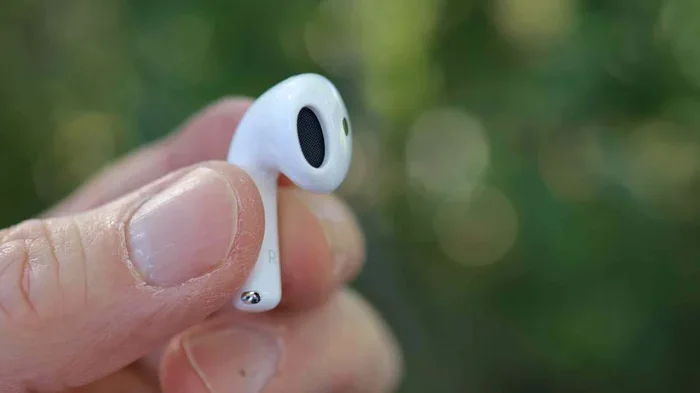
Featured image for AirPods noise cancellation closeup
Image source: cdn.mos.cms.futurecdn.net
Yes, AirPods can cancel out noise, but only certain models have Active Noise Cancellation (ANC). AirPods Pro, AirPods Pro 2, and AirPods Max use built-in microphones and advanced algorithms to block outside sounds. Standard AirPods (1st, 2nd, and 3rd generation) don’t offer true noise cancellation but provide some passive isolation through their in-ear fit.
Imagine you’re on a noisy subway train. The rumble of the wheels, people chatting, and music blasting from someone’s phone surround you. You pop in your AirPods, press a button, and suddenly… silence. Well, almost silence. The world fades into the background, and it’s just you and your music or podcast. Sounds like magic, right? It’s actually science, and it’s one of the coolest features Apple has ever built.
But here’s the thing: not all AirPods work the same way. Some models can cancel out noise like a professional, while others just… sit in your ears and play sound. This can be confusing, especially when you’re trying to decide which AirPods to buy or wondering if yours are working correctly.
In this guide, we’ll break down everything you need to know about AirPods and noise cancellation. You’ll learn which models have it, how the technology works, when it helps most, and why it might not work as well as you expect in some situations. By the end, you’ll be an AirPods noise expert, ready to make smart decisions about your listening experience.
Key Takeaways
- Only Premium Models Have ANC: AirPods Pro (1st and 2nd gen), AirPods Pro 3, and AirPods Max feature Active Noise Cancellation. Standard AirPods do not.
- ANC Uses Microphones and Sound Waves: AirPods detect outside noise and create anti-noise signals to cancel it out, working best for low-frequency sounds like airplane engines.
- Transparency Mode Is the Opposite: This feature lets outside sound in so you can hear your surroundings without removing your AirPods.
- Battery Drain Is Real: Active Noise Cancellation uses extra power, reducing listening time by about 1-2 hours per charge.
- Fit Matters for Performance: Getting the right ear tip size improves both ANC effectiveness and passive noise isolation by up to 50%.
- Adaptive Audio Adjusts Automatically: Newer AirPods Pro models blend ANC and Transparency Mode based on your environment.
- Not Equal to Professional Headphones: AirPods ANC is excellent for casual use but may not match studio-grade equipment for critical listening.
📑 Table of Contents
- What Does Noise Cancellation Mean for AirPods?
- Which AirPods Models Cancel Noise?
- How Well Do AirPods Actually Cancel Noise?
- How to Use AirPods Noise Cancellation Features
- Getting the Best Noise Cancellation from Your AirPods
- When to Use (and Not Use) AirPods Noise Cancellation
- Common Questions and Troubleshooting
- The Future of AirPods Noise Cancellation
- Making the Right Choice for Your Needs
- Final Thoughts
What Does Noise Cancellation Mean for AirPods?
Let’s start with the basics. Noise cancellation is a technology that reduces unwanted sounds around you so you can hear your audio more clearly. Think of it like wearing sunglasses for your ears. Just as sunglasses block bright light, noise-cancelling headphones block distracting sounds.
There are two main types of noise reduction in headphones:
- Passive Noise Isolation: This is when the earbuds physically block sound by sealing your ear canal. Like putting your hands over your ears, but better. All in-ear headphones do this to some degree.
- Active Noise Cancellation (ANC): This is the fancy stuff. Tiny microphones listen to outside noise, and the headphones create opposite sound waves to cancel it out. It’s like throwing a basketball underwater, the opposite force pushes back and blocks the original wave.
How Active Noise Cancellation Works (In Simple Terms)
Here’s an analogy that makes it easy to understand. Imagine you’re standing in a pool and someone splashes water at you. If you splash back at the exact same time with equal force, the water neutralizes itself. That’s how ANC works with sound waves.
Your AirPods have tiny microphones that “listen” to the world around you hundreds of times per second. When they detect a sound, they instantly create an opposite sound wave (called anti-noise). When these two waves meet, they cancel each other out. The result? Silence, or at least much quieter surroundings.
Did You Know? The concept of active noise cancellation was first developed in the 1930s for airplane pilots. It wasn’t until decades later that it was adapted for consumer headphones. Apple brought this technology mainstream with AirPods Pro in 2019.
Which AirPods Models Cancel Noise?
This is the million-dollar question. Not every AirPod has noise cancellation, and Apple doesn’t always make it obvious. Here’s the complete breakdown:
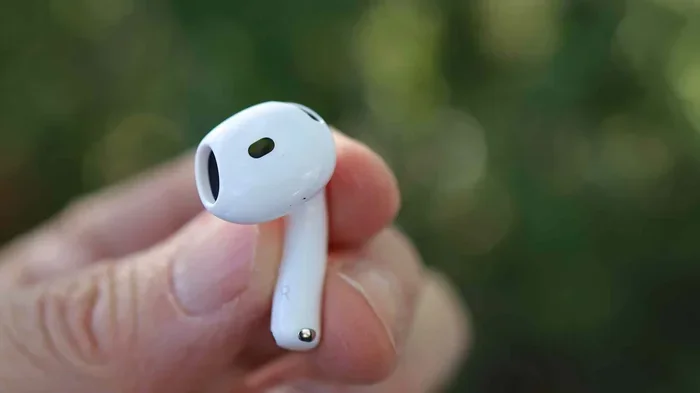
Visual guide about AirPods noise cancellation closeup
Image source: cdn.mos.cms.futurecdn.net
AirPods With Active Noise Cancellation
- AirPods Pro (1st Generation): Released in October 2019, these were the first AirPods with ANC. They use silicone ear tips for a better seal.
- AirPods Pro (2nd Generation): Released in September 2022, these offer 2x better noise cancellation than the first generation, according to Apple.
- AirPods Pro 3: The latest model (released in 2025) features even more advanced ANC with the H3 chip.
- AirPods Max: Released in December 2020, these are over-ear headphones with premium ANC, designed for audiophiles.
AirPods Without Active Noise Cancellation
- AirPods (1st Generation): Released in 2016, no ANC.
- AirPods (2nd Generation): Released in 2019, no ANC.
- AirPods (3rd Generation): Released in 2021, no ANC, but they offer better passive isolation than earlier models.
- AirPods 4 (Standard Version): Released in 2024, no ANC.
- AirPods 4 with Active Noise Cancellation: Yes, this version does have ANC, released alongside the standard AirPods 4.
Important Note: When shopping, always check the model name carefully. “AirPods Pro” and “AirPods 4 with ANC” have noise cancellation, but regular “AirPods” and “AirPods 4” do not.
How Well Do AirPods Actually Cancel Noise?
So they have ANC, but how good is it? The short answer: really good for everyday use, but not perfect. Let me explain.
What AirPods ANC Does Best
Active Noise Cancellation works best with consistent, low-frequency sounds. Think of:
- Airplane engine hum (reduces by up to 90% according to user reports)
- Air conditioning units
- Traffic and road noise
- Train rumble
- Washing machines and dishwashers
- Office hum from computers and lights
These are “steady” sounds that don’t change much, making them easy to cancel out.
What AirPods ANC Struggles With
ANC has a harder time with sudden, high-pitched, or irregular sounds:
- People talking nearby (reduced, but you can still hear them)
- Babies crying
- Car horns
- Clinking dishes
- Sharp, sudden noises like door slams
- Your own voice (which is why Transparency Mode is useful)
This is because these sounds change quickly, and the anti-noise can’t react fast enough. Imagine trying to swat a fly versus blocking a stream of water, it’s the same principle.
Real-World Performance Numbers
While Apple doesn’t publish exact decibel reduction numbers, independent tests and user reviews suggest:
- AirPods Pro 2: Reduce ambient noise by 25-30 decibels in optimal conditions
- AirPods Max: Reduce ambient noise by 30-35 decibels (slightly better due to over-ear design)
- Standard AirPods (no ANC): Reduce ambient noise by only 5-10 decibels through passive isolation
To put that in perspective, a 30-decibel reduction makes a busy street sound like a quiet library. Pretty impressive!
How to Use AirPods Noise Cancellation Features
Owning noise-cancelling AirPods is one thing, but using them properly is another. Here’s how to get the most out of this technology.
Turning ANC On and Off
There are several ways to control noise cancellation on your AirPods:
- On iPhone/iPad: Open Control Center, long-press the volume slider, then tap “Noise Control” to choose between Noise Cancellation, Transparency, or Off.
- On Mac: Click the AirPods icon in the menu bar and select your preferred mode.
- Using the Force Sensor: On AirPods Pro, press and hold the stem to switch between modes.
- Using Siri: Say “Hey Siri, turn on noise cancellation.”
Understanding Transparency Mode
Transparency Mode is the opposite of noise cancellation. Instead of blocking sound, it lets outside noise in. Why would you want this?
- Crossing busy streets safely
- Having quick conversations without removing your AirPods
- Hearing announcements at airports or train stations
- Staying aware of your surroundings while walking
- Listening for your coffee order at a café
It’s like having a window that you can open or close in your audio world. Brilliant for safety and convenience.
Adaptive Audio: The Best of Both Worlds
Newer AirPods Pro models feature Adaptive Audio (introduced in iOS 17). This smart feature automatically blends ANC and Transparency Mode based on your environment. Walking into a noisy café? ANC kicks in. Someone starts talking to you? Transparency activates. It’s like having a smart assistant managing your audio environment.
Did You Know? AirPods Pro 3 can detect when you’re having a conversation and automatically lower your music volume, reduce ANC, and enhance the person’s voice. It’s called “Conversation Awareness,” and it feels almost magical when it works.
Getting the Best Noise Cancellation from Your AirPods
Even the best ANC technology won’t work well if your AirPods don’t fit properly. Here’s how to maximize performance.
Choose the Right Ear Tip Size
Most people don’t realize that AirPods Pro come with multiple ear tip sizes (XS, S, M, L). The medium tips are installed by default, but they might not be right for your ears. Try all of them:
- The tip should feel snug but comfortable
- No part of the silicone should fold or wrinkle
- You shouldn’t hear outside sounds leaking in
- Your voice should sound natural to you (not muffled)
To find your perfect fit, use the “Ear Tip Fit Test” in your iPhone settings (Settings > Bluetooth > AirPods Pro > Ear Tip Fit Test). It plays a sound and tells you if your seal is good.
Keep Your AirPods Clean
Dirty AirPods are less effective. Earwax and debris can block the microphones and speakers, reducing ANC performance. Clean them weekly using:
- A soft, dry, lint-free cloth
- A small soft-bristled brush (like a clean toothbrush)
- Water only (no cleaning solutions) for the tips
- Special care to clean the microphone mesh gently
Update Your Firmware
Apple regularly improves ANC through software updates. Make sure your AirPods have the latest firmware by keeping them in their case near your iPhone while it’s connected to Wi-Fi. Updates happen automatically.
When to Use (and Not Use) AirPods Noise Cancellation
ANC isn’t always the right choice. Here’s a practical guide for different situations.
Best Times to Use ANC
- Airplane travel: Drastically reduces engine drone
- Public transportation: Makes subway and bus rides peaceful
- Open office environments: Blocks distracting chatter and keyboard noise
- Studying or focusing: Helps concentration in busy spaces
- Working out at the gym: Reduces music from other machines and people
- Sleeping on flights or in noisy hotels: Combined with relaxing sounds
Times to Skip ANC
- Walking in cities: You need to hear traffic and be safe
- Cycling or running outdoors: Stay aware of vehicles and pedestrians
- Driving: Legal and safety reasons, always stay alert
- At home with family: Stay connected to those around you
- Listening to classical music in quiet spaces: You don’t need ANC, and it might slightly affect audio quality
Pro Tip: Some audiophiles argue that ANC slightly degrades audio quality because the anti-noise waves can interfere with your music. In reality, this effect is minimal with modern AirPods, but if you’re a true music purist, you might prefer turning ANC off for critical listening sessions.
Common Questions and Troubleshooting
Even with perfect setup, you might run into issues. Here are solutions to common problems.
Why Is My Noise Cancellation Weak?
If your ANC isn’t working well, try these fixes:
- Check the fit: Most ANC problems come from poor ear tip sealing
- Clean the microphones: Blocked mics can’t detect outside noise properly
- Reset your AirPods: Hold the setup button for 15 seconds until the light flashes amber, then white
- Update iOS: Sometimes bugs in older iOS versions affect ANC performance
- Check the battery: ANC works best when AirPods are fully charged
Does Noise Cancellation Drain Battery Faster?
Yes, significantly. AirPods Pro 2 with ANC on last about 6 hours per charge, versus 7 hours with ANC off. AirPods Max see a bigger drop: 20 hours with ANC versus 20 hours without (similar, but they have different power management). For all-day use, consider carrying your charging case.
Can Noise Cancellation Damage Your Hearing?
No, ANC is completely safe. It doesn’t use any harmful technology, just sound waves. However, listening to music at high volumes for long periods (regardless of ANC) can damage your hearing. Keep volume at reasonable levels (below 80 decibels).
Did You Know? The World Health Organization estimates that 1.1 billion young people worldwide are at risk of hearing damage from loud audio. ANC can actually help by allowing you to listen at lower volumes in noisy environments. You’re turning up the volume less because the outside noise is reduced.
Are AirPods ANC Good Enough for Professional Use?
For most people, absolutely yes. But for professional audio work (like studio recording or sound engineering), you might want dedicated studio headphones. AirPods are designed for consumer use, while professional equipment prioritizes sound accuracy over noise cancellation.
The Future of AirPods Noise Cancellation
Apple continues to improve ANC with each generation. What’s coming next?
Smarter Adaptive Features
Future AirPods will likely have even smarter environmental awareness. Imagine AirPods that automatically:
- Adjust cancellation based on your heart rate (calm down when you’re stressed)
- Recognize specific locations (full ANC at work, transparency at home)
- Coordinate with other Apple devices for seamless audio handoffs
- Use AI to predict your preferences based on time of day and activity
Health and Hearing Protection
Apple has hinted at turning AirPods into health devices. Future models might monitor hearing health in real-time, provide hearing protection in loud environments, and even help people with hearing loss. ANC could be customized based on your personal hearing profile.
Better Battery Life
As chip technology improves, expect longer battery life even with ANC on. The H3 chip in AirPods Pro 3 is more power-efficient than previous versions, and this trend will continue.
Interesting Fact: Apple filed a patent in 2024 for “Adaptive Noise Cancellation Based on User Hearing Profile.” This suggests future AirPods might actually test your hearing and customize ANC to your ears specifically. Pretty cool, right?
Making the Right Choice for Your Needs
So, should you buy AirPods with ANC? Here’s a simple decision guide:
Get AirPods Pro (or Pro 3) If You:
- Commute daily on public transportation
- Travel frequently by air
- Work in noisy offices or cafés
- Want the best audio experience Apple offers in earbuds
- Need different listening modes for different situations
- Don’t mind paying $200-280 for premium features
Get AirPods Max If You:
- Prefer over-ear headphones for comfort
- Want the absolute best noise cancellation Apple offers
- Have a larger budget (around $550)
- Use headphones for long work sessions
- Care about premium materials and build quality
Standard AirPods Are Fine If You:
- Mostly listen in quiet environments
- Don’t travel or commute often
- Have a smaller budget
- Prefer the open-ear design (no silicone tips)
- Mostly use one earbud at a time for calls
Final Thoughts
So, do AirPods cancel out noise? Yes, the Pro and Max models do an excellent job of it. They’re not magic, and they won’t block every sound, but for everyday situations like commutes, flights, and busy offices, they’re remarkably effective.
The key takeaway is this: if noise cancellation is important to you, make sure you’re buying AirPods Pro, AirPods Pro 3, AirPods 4 with ANC, or AirPods Max. Standard AirPods without ANC won’t give you that “silence the world” feeling.
Remember that good ANC depends on proper fit, clean hardware, and updated software. Take care of your AirPods, and they’ll take care of your ears. Whether you’re trying to focus at work, sleep on a plane, or just enjoy your music in peace, AirPods with active noise cancellation are one of the best investments you can make for your daily comfort and audio enjoyment.
Now that you understand how it all works, you can make an informed decision and get the most out of your listening experience. Happy listening!