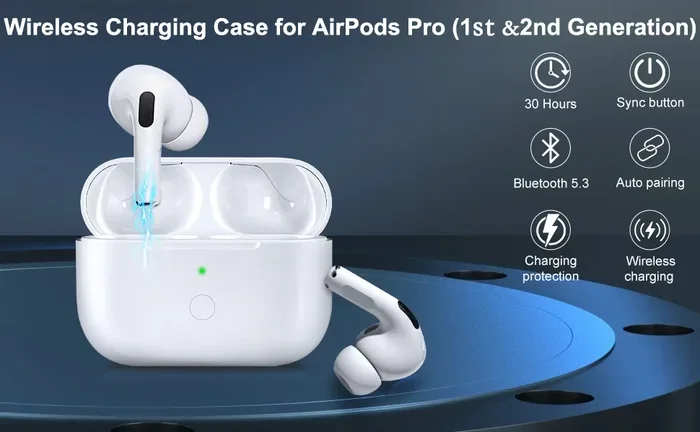
Featured image for AirPods Pro 2 charging case
Image source: m.media-amazon.com
AirPods Pro 2 do not have a user-controlled charge limit, meaning they charge to 100% by default. However, Apple has built-in battery optimization features that learn your charging habits and may delay charging past 80% until you need them. Unlike iPhones with the 80% Limit feature, AirPods Pro 2 rely on adaptive algorithms rather than manual charge caps. Understanding how this system works can help you maximize the longevity of your earbuds’ battery health over months and years of use.
Picture this: you pop your AirPods Pro 2 back into their little white case at the end of a long day. The light turns amber, then green. You grab your phone and think, “Wait, do these things actually stop charging at some point? Is there a limit?” You’re not alone. This is one of the most common questions AirPods owners ask, especially folks who care about battery health and want their expensive earbuds to last.
Here’s the short answer: AirPods Pro 2 do charge above 90%—in fact, they charge all the way to 100% by default. But before you panic about your battery dying in a year, there’s more to the story. Apple has built some pretty clever software into these tiny devices that helps protect them. Think of it like a smart thermostat for your earbuds.
In this guide, we’ll break down exactly how AirPods Pro 2 charging works, what Apple does behind the scenes, why your battery degrades over time anyway, and what you can actually do to keep your AirPods healthy for as long as possible. No jargon, no fluff, just the facts.
Key Takeaways
- No Manual Charge Limit: AirPods Pro 2 don’t offer a user-selectable 80% or 90% charge limit like iPhones do.
- Adaptive Charging Exists: Apple’s Optimized Battery Charging feature learns your routine and may pause charging near 80% until needed.
- Charging Goes to 100%: By default, AirPods Pro 2 will charge fully to 100% unless adaptive features intervene.
- Heat Is the Real Enemy: Battery degradation is primarily caused by heat and full charge cycles, not by reaching 100% alone.
- No Settings Toggle: There is no “Charge Limit” toggle in AirPods settings, unlike iOS 18’s iPhone battery options.
- Firmware Plays a Role: Updates have improved charging behavior, but core limits remain unchanged from launch.
- Case Matters Too: The MagSafe case itself manages charging to preserve its own longevity alongside the earbuds.
📑 Table of Contents
How AirPods Pro 2 Charging Actually Works
Let’s start with the basics. When you place your AirPods Pro 2 in their case, a few things happen almost instantly. The case detects them, begins charging, and the LED indicator shows the status. Amber means charging, green means full. Simple enough, right? But under the hood, there’s a tiny computer managing everything.
The Charging Flow From Case to Earbuds
The AirPods Pro 2 case acts like a mini charging station. It has its own battery, and when you place the earbuds inside, power flows from the case to the earbuds. Each one charges independently, so if one is at 50% and the other is at 20%, they’ll both charge to full at their own pace.
Think of it like filling two different cups of water from the same pitcher. The pitcher (case) gives water to each cup (earbud) until it’s full, then stops. The case itself can be charged via Lightning, MagSafe, Qi wireless, or even an Apple Watch charger on the newer USB-C model.
What Happens at 100%?
Once your AirPods hit 100%, they technically stop drawing power. The charging circuit inside each earbud cuts off the flow. This is called a “full charge cutoff,” and it prevents overcharging. So no, your AirPods won’t explode if you forget them in the case overnight. The hardware is designed to handle this safely.
But here’s the thing: lithium-ion batteries don’t love sitting at 100% for extended periods. It’s a bit like keeping a rubber band stretched tight for hours—eventually, it loses elasticity. The same concept applies to battery chemistry.
The Truth About “Trickle Charging”
You might have heard the term “trickle charging” before. Some people think AirPods slowly drip power in even at 100%. That’s mostly a myth. Modern lithium-ion batteries stop accepting charge once full. They may top off slightly if the voltage drops, but this is minimal and controlled by the battery management system (BMS) inside each earbud.
Does Apple Offer a Charge Limit Feature?
Here’s where things get interesting. If you own an iPhone 15 or newer, you might know about the 80% charging limit feature added in iOS 18. This lets you cap your iPhone’s charge at 80% to preserve battery health. It’s a great feature. So naturally, people wonder if the same exists for AirPods Pro 2.

Visual guide about AirPods Pro 2 charging case
Image source: m.media-amazon.com
The Short Answer: No
There is no user-controlled charge limit setting for AirPods Pro 2. You can’t open the Settings app, navigate to your AirPods, and choose to stop charging at 80% or 90%. That option simply doesn’t exist. Apple’s AirPods firmware doesn’t include manual charge limit toggles like iOS 18 does for iPhones.
Why? A few reasons. First, AirPods have much smaller batteries, so the absolute impact of full charges is less dramatic. Second, Apple’s algorithms already manage charging intelligently. And third, the user interface for tiny earbuds would be clunky. Apple likes to keep things simple.
What About Optimized Battery Charging?
Okay, so there’s no manual limit. But there is something called Optimized Battery Charging. This is Apple’s adaptive feature that learns your routine. If you charge your AirPods at the same time every day (like overnight), the AirPods will pause charging at around 80% and wait until they predict you’ll need them to finish the job.
Imagine you’re a baker. You know your customer picks up bread at 8 AM every day. You don’t bake at midnight—you bake at 6 AM so the bread is fresh. Apple does the same thing. It learns when you’ll use your AirPods and times the final charge accordingly.
This feature is on by default, but you can disable it if you want. To do so:
- Open the Settings app on your iPhone
- Tap on your AirPods Pro 2
- Scroll down and find “Optimized Battery Charging”
- Toggle it off if you want your AirPods to charge straight to 100%
Firmware Updates and Charging Behavior
Apple has pushed several firmware updates to the AirPods Pro 2 since launch. While these updates don’t add new charge limit features, they do tweak the algorithms that manage battery health. For example, some firmware versions improved how the case communicates with the earbuds to reduce heat during the final 20% of charging.
If you’re running an older firmware, it’s worth updating. You can check your current firmware version in Settings > [Your AirPods] > Version. Apple doesn’t let you manually trigger updates, but keeping your AirPods connected to your iPhone and in their case near a charger usually triggers updates automatically.
Why Charging to 100% Isn’t As Bad As You Think
Battery anxiety is real. Social media is full of tips warning you to never charge past 80% or your battery will die in months. While there’s some truth to this, the reality is more nuanced. Let’s break it down.
Understanding Lithium-Ion Battery Degradation
Lithium-ion batteries degrade through two main mechanisms: cycle aging and calendar aging. Cycle aging happens each time you charge and discharge the battery. Calendar aging happens just from the passage of time, regardless of use. You can’t avoid either one entirely. Even a battery sitting on a shelf will slowly lose capacity over years.
Did you know that a typical lithium-ion battery loses about 20% of its capacity after 500 full charge cycles? That’s according to research published in the Journal of Power Sources. AirPods Pro 2 batteries are rated for around 500 cycles before hitting 80% capacity. So if you charge them daily, that’s roughly a year and a half of use before you might notice shorter battery life.
The Role of Heat in Battery Health
Heat is actually the biggest enemy of battery longevity. Charging generates heat, and the faster you charge, the more heat you produce. This is why wireless charging produces more heat than wired charging. It’s also why Apple limits fast charging speeds when the battery is hot.
Think of battery health like a candle. Cold environments keep it solid, but heat melts it quickly. The same goes for lithium-ion chemistry. If you charge your AirPods in a hot car or direct sunlight, you’re accelerating degradation far more than charging to 100% would.
Depth of Discharge Matters More Than Charge Ceiling
Here’s a fun fact that surprises most people: draining your battery to 0% regularly is worse than charging to 100%. Deep discharges stress the battery more than shallow cycles. This is why experts recommend keeping your battery between 20% and 80% when possible.
AirPods Pro 2 have small batteries, so most people don’t think about this much. But if you want to maximize lifespan, try not to let them die completely before charging. Topping them off throughout the day is actually better than full cycle drains.
How to Maximize AirPods Pro 2 Battery Health
Now that you understand the science, let’s talk about practical steps you can take to keep your AirPods Pro 2 in great shape for years to come.
Tip 1: Enable Optimized Battery Charging
This is the easiest win. If you have a consistent charging routine, let Apple handle the optimization. The feature is already on by default, so you likely don’t need to do anything. Just make sure you charge your AirPods at roughly the same time each day, and the algorithm will learn your pattern within a week or two.
Tip 2: Avoid Extreme Temperatures
Never leave your AirPods in a hot car, direct sunlight, or near a heater. The operating temperature range for AirPods is 32° to 95°F (0° to 35°C). Exceeding this can cause permanent damage to the battery. If your AirPods feel hot to the touch after charging, take them out of the case for a few minutes.
Tip 3: Don’t Store Them Dead
If you’re putting your AirPods away for a long time (like a month-long trip), don’t store them at 0% or 100%. Apple recommends storing lithium-ion batteries at around 50% for long-term storage. If you don’t plan to use your AirPods for weeks, charge them to about half first.
Tip 4: Use Wired Charging When Possible
Wireless charging is convenient, but it generates more heat. If you want to maximize battery health, use a Lightning or USB-C cable instead. The difference is small, but over years, it adds up. Save MagSafe and Qi for quick top-ups when convenience matters more than longevity.
Tip 5: Keep the Case Charged Too
Don’t forget that the case itself has a battery that degrades. The same principles apply. Keep the case out of heat, top it off regularly, and avoid letting it drain completely. The case battery is actually user-replaceable on newer AirPods Pro 2 models (USB-C version), which is a nice touch for sustainability.
Tip 6: Update Firmware Regularly
Apple occasionally releases firmware updates that improve battery management. While these updates don’t add flashy new features, they do refine the algorithms that protect your battery. Keep your AirPods connected to your iPhone and they’ll update automatically when improvements are available.
Common Misconceptions About AirPods Charging
The web is full of battery advice, and not all of it is accurate. Let’s clear up some common myths.
Myth 1: You Should Never Charge Above 80%
This advice applies to EVs and some laptops, but it’s overkill for AirPods. The inconvenience of stopping at 80% every day isn’t worth the marginal battery life gain. Apple’s adaptive charging handles this automatically for you. Trust the algorithm.
Myth 2: Overnight Charging Damages Batteries
Modern devices, including AirPods Pro 2, have charging circuits that stop accepting power at 100%. Overnight charging is safe and won’t damage your battery. The only concern is heat buildup, which is rare with the small batteries in AirPods.
Myth 3: You Should Fully Drain Before Charging
This advice comes from old nickel-cadmium batteries, which had a “memory effect.” Lithium-ion batteries don’t have this issue. In fact, fully draining them is harmful. Charge whenever you want.
Myth 4: Third-Party Chargers Will Ruin Your AirPods
Certified third-party chargers are fine. Apple uses standard USB and Qi protocols. The only risk is from cheap, uncertified chargers that might deliver inconsistent power. Look for “Made for iPhone” (MFi) certification if you’re buying third-party accessories.
Myth 5: Battery Health Percentage Is Accurate
You can check your AirPods battery health in Settings, but the percentage is an estimate. It uses cycle counts and voltage measurements to predict capacity. It may not perfectly match a laboratory test, but it gives you a reasonable idea of where your battery stands.
The Future of AirPods Battery Management
Looking ahead, it’s likely Apple will add more battery management features to AirPods. The iPhone’s 80% limit feature, introduced in iOS 18, might eventually make its way to AirPods Pro 3 or AirPods 4. There are also rumors of always-on display features that could give users more visibility into battery status.
What Users Want
Based on user feedback, here are features people commonly request:
- A manual charge limit toggle (like iPhone)
- Battery health percentage in the widget
- Notifications when battery health degrades significantly
- Lower power mode for extended listening
- Better case battery indicators
Apple has a history of adding features based on user demand, so it’s possible we’ll see some of these in future updates or AirPods models.
The Sustainability Angle
Battery longevity is also a sustainability issue. The longer your AirPods last, the less e-waste you generate. Apple has been pushing repairability with the USB-C AirPods Pro 2 case, which has a user-replaceable battery. This is a step in the right direction for both consumers and the environment.
Did you know that the USB-C AirPods Pro 2 case is one of the first Apple products designed with a swappable cell? It uses standard battery technology and can be replaced with basic tools. This is a big deal for repair culture and product longevity.
Final Thoughts
So, do AirPods Pro 2 charge above 90%? Absolutely. They charge to 100% by default, just like most modern electronics. But that doesn’t mean your battery is doomed. Apple’s Optimized Battery Charging feature intelligently manages when and how your AirPods charge, reducing the time they spend sitting at full capacity.
The key takeaways are simple. Don’t stress about charging to 100%—the hardware and software are designed to handle it. Focus instead on keeping them cool, updating firmware, and avoiding full discharges. Follow these tips, and your AirPods Pro 2 should easily last you three to four years of regular use before you notice any significant battery degradation.
Batteries are consumable components. They will wear out eventually, no matter what you do. But with smart charging habits and a little knowledge about how the system works, you can slow down that process significantly. Now you know exactly how AirPods Pro 2 charging works, what Apple does behind the scenes, and how to get the most life out of your investment.
Frequently Asked Questions
Do AirPods Pro 2 have a charge limit setting?
No, AirPods Pro 2 do not have a user-selectable charge limit feature like iPhones do. They charge to 100% by default, though Apple’s Optimized Battery Charging feature may pause charging near 80% based on your routine.
Can I stop my AirPods from charging past 90%?
Unfortunately, there’s no built-in way to set a 90% charge limit on AirPods Pro 2. The only available optimization is Optimized Battery Charging, which adapts to your habits automatically rather than letting you set a specific percentage.
Will charging to 100% damage my AirPods Pro 2 battery?
Charging to 100% occasionally won’t significantly damage your battery. Modern lithium-ion batteries have built-in protection circuits. However, consistently exposing the battery to heat or keeping it at 100% for long periods can accelerate degradation over time.
How long do AirPods Pro 2 batteries last?
AirPods Pro 2 batteries are rated for approximately 500 full charge cycles before reaching 80% capacity. With typical daily use, this translates to roughly 2-3 years before you might notice shorter listening times.
Is Optimized Battery Charging good for AirPods?
Yes, Optimized Battery Charging is beneficial for AirPods. It reduces the time your earbuds spend at a full charge by learning your routine and delaying the final 20% until just before you need them. This helps preserve long-term battery health.
Should I use wireless or wired charging for AirPods Pro 2?
Wired charging is slightly better for battery longevity because it generates less heat than wireless charging. However, both methods are safe and won’t cause significant damage. Use whichever is more convenient for your daily routine.