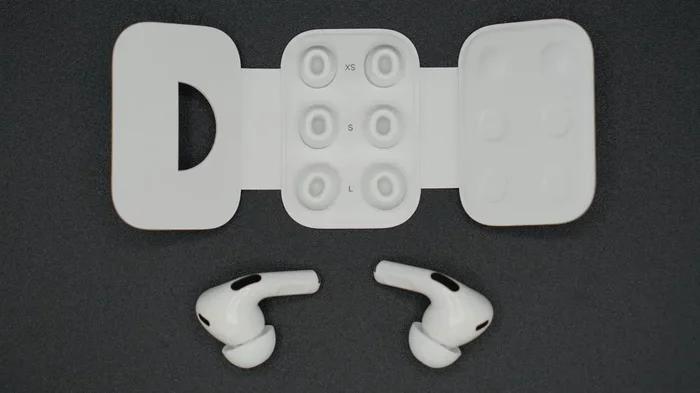
Featured image for AirPods Pro 2 in ear fit
Image source: photos5.appleinsider.com
Yes, AirPods Pro 2 stay in your ears remarkably well for most activities, thanks to their redesigned shape, silicone ear tips, and improved fit technology. The second-generation AirPods Pro feature customizable ear tips in four sizes (XS, S, M, L) and an Ear Tip Fit Test that ensures a snug, secure seal. For most users during daily activities, workouts, and even running, they remain stable—though individual ear shapes matter. Understanding proper insertion technique is the key to unlocking their best-in-class fit performance.
Picture this: you’re halfway through your morning run, music is pumping, and suddenly—pop—there goes your left AirPod, bouncing off the sidewalk. It’s a frustrating experience that has plagued wireless earbud users for years. So the real question is: do AirPods Pro 2 stay in ear during everyday activities and workouts?
The short answer is yes, the AirPods Pro 2 are specifically engineered to stay in your ears far better than their predecessors. Apple overhauled the design with shorter stems, a contoured body, and—most importantly—silicone ear tips that create a gentle seal inside your ear canal. Think of it like a tiny suction cup that holds the earbud in place without feeling uncomfortable.
But here’s the thing: no earbud is perfect for every ear. Your unique ear canal shape, how you insert them, and even what you’re doing (sitting at a desk versus doing burpees) all affect whether they stay put. In this guide, we’ll dive deep into everything you need to know about AirPods Pro 2 fit—from the technology behind them to practical tips that make all the difference.
Key Takeaways
- Yes, They Generally Stay In: AirPods Pro 2 are engineered with silicone ear tips and a contoured design that creates a secure seal, keeping them in place for most activities including running and workouts.
- Ear Tip Size Is Critical: Choosing the right ear tip size (XS, S, M, or L) is the single most important factor—using the wrong size is the leading cause of AirPods falling out.
- Ear Tip Fit Test Helps: Built into iOS, this feature uses the microphone to test your seal and recommends the best ear tip size for your unique ear canal shape.
- Insertion Technique Matters: Twisting and pushing gently while placing them creates the best seal; simply jamming them in rarely works well.
- Activity Level Affects Fit: Light daily use and moderate exercise are fine, but high-impact activities like basketball or intense CrossFit may challenge any earbud.
- Ear Shape Varies: No two ears are identical—even great-fitting earbuds can struggle in unusually small, large, or uniquely shaped ear canals.
- Accessories Can Help: Third-party ear hooks, wings, and foam tips add extra security for users who need additional stability.
📑 Table of Contents
- Understanding AirPods Pro 2 Design and Fit Technology
- Does Ear Tip Size Affect Whether AirPods Pro 2 Stay In?
- Proper Insertion: The Secret Sauce for Staying Power
- Real-World Performance: Activities and Workouts
- Troubleshooting: When AirPods Pro 2 Won’t Stay In
- Maximizing Comfort During Long Wear Sessions
- Conclusion: The Final Verdict on AirPods Pro 2 Fit
Understanding AirPods Pro 2 Design and Fit Technology
To answer whether AirPods Pro 2 stay in your ear, you first need to understand why they’re designed the way they are. Apple didn’t just shrink the original AirPods and call it a day—they rebuilt the entire fit philosophy from the ground up.
The Role of Silicone Ear Tips
Unlike the original AirPods, which simply rested in the outer ear (like a small pebble balanced in a bowl), the AirPods Pro 2 use soft silicone tips that actually insert slightly into your ear canal. This is similar to how earplugs for swimming or sleeping work—they create a gentle seal that holds them in place.
The silicone material is soft enough to be comfortable but firm enough to maintain its shape. When you insert them correctly, the tip expands slightly to fill the unique contours of your ear canal. This creates what audio engineers call a “good seal”—and it’s essential for both fit and sound quality.
The Importance of a Proper Seal
Here’s something most people don’t realize: a good seal does double duty. First, it physically holds the earbud in place (the gentle suction effect). Second, it blocks outside noise, which allows Active Noise Cancellation to work properly. If your AirPods don’t have a good seal, you’ll notice three problems:
- They feel loose and might fall out
- Sound quality suffers—bass especially becomes weak
- Noise cancellation doesn’t work as effectively
Did You Know? Apple includes four different ear tip sizes in the box—Extra Small (XS), Small (S), Medium (M), and Large (L). The original AirPods Pro only came with three sizes. The addition of XS was a direct response to user feedback that some people had smaller ear canals.
Contoured Shape and Weight Distribution
Beyond the ear tips, the AirPods Pro 2 body itself is shaped to nestle into the curves of your outer ear (called the concha). The weight is distributed so that gravity doesn’t pull them straight down—they’re designed to “rest” in your ear rather than hang from it.
The stem is also shorter than the original AirPods, which reduces the leverage effect that can cause earbuds to be pulled out when you brush against them with your hair or clothing.
Does Ear Tip Size Affect Whether AirPods Pro 2 Stay In?
If there’s one section you read carefully, make it this one. Ear tip size is the #1 factor in determining whether your AirPods Pro 2 stay in your ears.
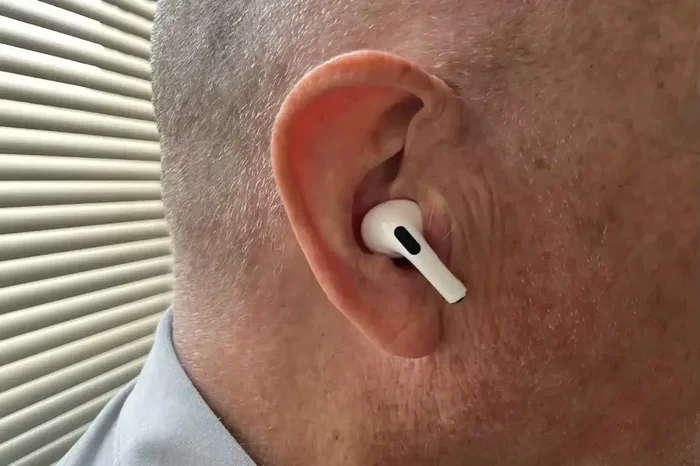
Visual guide about AirPods Pro 2 in ear fit
Image source: b2c-contenthub.com
Why One Size Doesn’t Fit All
Human ear canals vary dramatically. Some people have narrow, small canals—others have wider ones. A medium tip might be perfect for your right ear but too large for your left. (Yes, ears can be asymmetrical!)
Think of it like shoes: you wouldn’t wear the same size in every brand, and you definitely wouldn’t wear the same size if your feet were slightly different sizes. The same logic applies to ear tips.
How to Use Apple’s Ear Tip Fit Test
Apple built a brilliant tool right into iOS to take the guesswork out of choosing ear tips. Here’s how to use it:
- Connect your AirPods Pro 2 to your iPhone or iPad
- Go to Settings > Bluetooth
- Tap the “i” icon next to your AirPods
- Select Ear Tip Fit Test
- Follow the on-screen instructions
The test plays a brief audio sample and uses the inward-facing microphones to determine whether you’ve achieved a good seal. It’s like having a tiny audio engineer check your fit!
The results will tell you if your current ear tips create a good seal or if you should try a different size. Many users discover they need different sizes for each ear—and that’s completely normal.
Common Mistakes When Choosing Ear Tips
Most people make one of these errors:
- Assuming bigger is better: A larger tip doesn’t equal more security. If it’s too big, it will actually push the AirPod out.
- Using the same size forever: Your ears can change slightly over time due to weight fluctuations, aging, or even weather (tissues expand in heat).
- Not testing all sizes: You might think medium works fine, but a small might give you an even better seal.
Proper Insertion: The Secret Sauce for Staying Power
Even with the perfect ear tip size, you can still have AirPods that fall out if you don’t insert them correctly. This is honestly where most people go wrong.
The Correct Insertion Technique
Here’s the step-by-step method that works best:
- Pull your ear up and back with your opposite hand—this straightens your ear canal slightly
- Insert the AirPod with the stem pointing downward at a slight angle
- Gently push and twist the AirPod until it feels secure (a slight clockwise twist works for most people)
- Release your ear and let the canal return to its natural shape
- Test the seal by gently tugging—the AirPod should feel snug, not loose
Think of it like putting a key into a lock—you need to angle it just right and apply gentle pressure. Forcing it straight in usually results in a poor fit and discomfort.
What NOT to Do
Just as important is what to avoid:
- Don’t jam them straight in without angling
- Don’t push too hard—you’re not trying to create a vacuum
- Don’t insert them with dry hands (the silicone can stick slightly)
- Don’t wear them upside down (the stem should point down)
How to Tell If They’re Inserted Correctly
Once inserted properly, you should notice:
- Noise from the outside world sounds noticeably muffled
- Bass in your music sounds full and rich, not tinny
- The AirPods feel secure when you shake your head gently
- There’s no pressure or pain (a snug fit isn’t the same as a painful fit)
Did You Know? A properly sealed AirPod produces up to 50% better bass response compared to a poorly sealed one. So if your music sounds weak, the fit is likely the culprit—not a defective AirPod.
Real-World Performance: Activities and Workouts
Let’s get practical. How do AirPods Pro 2 actually perform during real activities? We can break this down by activity level, because the answer to “do AirPods Pro 2 stay in ear” really depends on what you’re doing.
Everyday Activities (Walking, Commuting, Working)
For everyday activities, AirPods Pro 2 excel. Whether you’re walking to work, riding the train, typing at your desk, or running errands, they stay put beautifully. The combination of the seal and the contoured shape means they barely move even when you’re constantly in motion.
Many users report they forget they’re wearing them during these activities—that’s the hallmark of a good fit.
Running and Cardio
Running is where things get more interesting. The repetitive up-and-down motion of running can shake loose even well-fitted earbuds. However, AirPods Pro 2 generally handle running very well, especially if:
- You have the correct ear tip size
- You’ve inserted them properly
- You’re not wearing a hat that brushes them (this can catch the stem)
For most runners, AirPods Pro 2 stay securely in place for the duration of a run. If they do start slipping, it’s usually because sweat has reduced the friction between the silicone tip and your ear canal—a quick wipe and reinsert usually fixes it.
High-Impact Workouts (HIIT, CrossFit, Basketball)
Here’s where you’ll find the AirPods Pro 2 challenged. Activities involving jumping, sudden direction changes, or vigorous head movement can dislodge even well-fitted earbuds. The AirPods Pro 2 do better than most, but they’re not infallible in these scenarios.
If you’re doing CrossFit or playing basketball regularly, you might want to consider:
- Third-party ear hooks that wrap around the AirPod
- Foam ear tips (like Comply brand) that expand for a tighter fit
- Ear wings that attach to the AirPod for extra stability
Sleeping and Side-Sleeping
Surprisingly, many people use AirPods Pro 2 for sleep. They’re small enough that side-sleepers often find them comfortable. The fit here is usually fine because there’s no significant movement—just the gentle pressure of a pillow. The silicone tips actually help by distributing pressure evenly.
That said, they’re not designed specifically for sleep, and the battery will only last one sleep session (about 6 hours with ANC on).
Troubleshooting: When AirPods Pro 2 Won’t Stay In
Sometimes, despite your best efforts, the AirPods just won’t stay put. Here’s a troubleshooting checklist that solves 95% of fit problems.
Check #1: Ear Tip Size
We’ve said it before, but it bears repeating: the wrong ear tip size is the cause of most fit issues. If they’re falling out:
- Constantly sliding out? You likely need a larger size
- Falling out when you talk or chew? You might need a smaller size (counterintuitive, but true)
- One keeps falling out? Your ears might be asymmetrical—use different sizes for each
Check #2: Earwax and Debris
Your AirPods need a clean surface to grip your ear canal. If the silicone tips are coated in earwax or debris, they won’t seal properly. Clean your AirPods weekly using a soft, dry, lint-free cloth. For the ear tips themselves, you can remove them and wash them with mild soap and water (just make sure they’re completely dry before reattaching).
Check #3: Moisture Issues
Sweat can create a slippery film that reduces friction. If you’re working out, take a moment every 20-30 minutes to:
- Remove the AirPods
- Wipe them with a dry cloth
- Reinsert them
This simple habit solves many “falling out during workouts” complaints.
Check #4: Software Updates
Did You Know? Apple occasionally releases firmware updates that can affect how AirPods behave. Make sure your AirPods Pro 2 are running the latest firmware by keeping them connected to your iPhone and placed in their case near a charger.
When to Consider Alternatives
If you’ve tried everything and they still won’t stay in your ears, you might be one of the rare people whose ear anatomy isn’t compatible with the AirPods Pro 2 design. In that case, consider:
- Beats Fit Pro: Same Apple ecosystem, but with ear hooks built in
- Powerbeats Pro: Over-ear hooks for maximum stability
- Third-party ear tip brands: Companies like Comply make foam tips that conform to any ear canal
Maximizing Comfort During Long Wear Sessions
Fit isn’t just about staying in—it’s also about comfort over time. The AirPods Pro 2 are designed to be worn for extended periods, but here are some tips to maximize comfort.
The 60-Minute Rule
Even with a perfect fit, it’s a good idea to give your ears a break every hour or so. Just remove the AirPods for a minute or two to let your ear canals “breathe.” This prevents the slight moisture buildup that can cause irritation.
Adjusting Pressure Sensitivity
Some people are more sensitive to pressure changes in their ears (the same sensation you get when an airplane descends). If the AirPods Pro 2 feel uncomfortable, try:
- Using a smaller ear tip size (less contact = less pressure sensation)
- Turning off Active Noise Cancellation temporarily
- Switching to Transparency Mode for short periods
Alternating Sides During Long Calls
If you’re on long conference calls, consider using a single AirPod and switching sides every hour. This prevents fatigue in either ear and is actually a habit many professionals adopt.
Keeping Ears Healthy
Wearing earbuds for hours can sometimes lead to ear canal irritation or “swimmer’s ear”-like symptoms. To prevent this:
- Don’t share your earbuds with others (this seems obvious but happens)
- Clean your AirPods regularly
- Let your ears dry out completely between long sessions
- Avoid using them when you have an ear infection
Conclusion: The Final Verdict on AirPods Pro 2 Fit
So, do AirPods Pro 2 stay in your ear? For the vast majority of users, the answer is a resounding yes. Apple engineered these earbuds with fit as a primary concern, and the combination of silicone ear tips, contoured shape, and proper insertion technique creates a remarkably secure experience.
The keys to success are simple: choose the right ear tip size (using the Ear Tip Fit Test), insert them correctly with a slight twist, and keep them clean. Follow these three steps, and you’ll likely enjoy hours of secure, comfortable listening—whether you’re working, exercising, or just relaxing.
Of course, no earbud works perfectly for everyone. If you find that AirPods Pro 2 consistently slip out despite your best efforts, don’t beat yourself up. Human ears come in all shapes and sizes, and there’s a perfect pair of earbuds out there for you—whether that’s the AirPods Pro 2 with accessories, the Beats Fit Pro, or another option entirely.
The bottom line? AirPods Pro 2 represent one of the best-fitting wireless earbuds Apple has ever made. Give them a fair shot with the right technique, and chances are you’ll be pleasantly surprised by how well they stay in your ears throughout your day.
Frequently Asked Questions
Do AirPods Pro 2 stay in ear during running?
Yes, AirPods Pro 2 generally stay in your ears very well during running, especially when you’ve selected the correct ear tip size using the Ear Tip Fit Test. Most runners report no issues for the duration of their run, though heavy sweating can occasionally reduce grip and require a quick wipe and reinsert.
How do I stop my AirPods Pro 2 from falling out?
The most common solution is to use the Ear Tip Fit Test in iOS settings to ensure you have the correct ear tip size. Many people also benefit from the proper insertion technique: pulling your ear up and back, inserting at a slight angle, and gently twisting the AirPod to create a seal. Cleaning the silicone tips regularly also helps maintain grip.
Which AirPods Pro 2 ear tip size should I use?
There’s no universal answer—it depends on your unique ear canal size. Many people find medium works for one ear and large for the other. Use the Ear Tip Fit Test in Settings > Bluetooth > [Your AirPods] > Ear Tip Fit Test to determine the best size. Don’t assume bigger is better; the right size creates a seal without pressure.
Are AirPods Pro 2 good for small ears?
Yes, Apple specifically addressed small ears by adding an Extra Small (XS) ear tip size to the AirPods Pro 2. If you have smaller ear canals, the XS or S size typically provides the best fit. Combined with the shorter stem and lighter design, they’re among the most small-ear-friendly premium earbuds available.
Can you wear AirPods Pro 2 in the shower?
While AirPods Pro 2 have an IP54 rating for water and sweat resistance, they are not designed for shower use. The water resistance protects against splashes and sweat, not direct streams of water. Additionally, soap and shampoo can degrade the silicone ear tips and affect the seal, so it’s best to remove them before showering.
Do AirPods Pro 2 fall out when talking or chewing?
Properly fitted AirPods Pro 2 should not fall out during talking or chewing, as long as you have the correct ear tip size. If they do fall out during these activities, you likely need a smaller size—counterintuitively, a too-large tip gets dislodged by jaw movement more easily than a properly fitted smaller one.