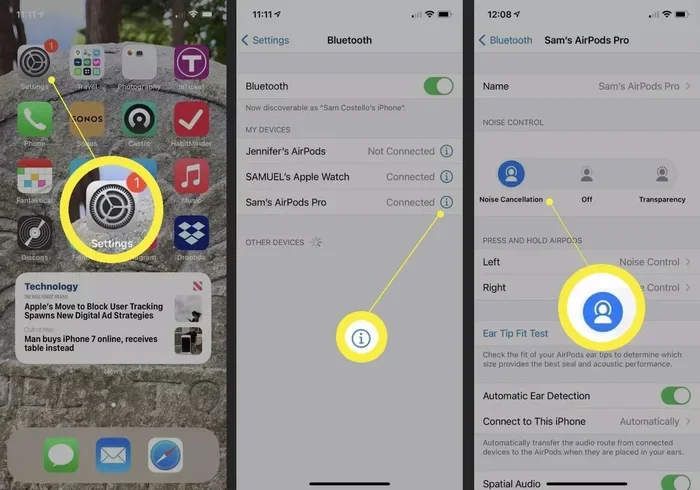
Featured image for AirPods noise cancelling call
Image source: lifewire.com
Yes, AirPods can significantly reduce background noise on calls, but how well they do it depends on the model you own and the features you enable. The latest AirPods Pro and AirPods 4 use advanced Active Noise Cancellation (ANC) and computational audio to block distractions and isolate your speech. Budget AirPods rely only on passive noise reduction, which helps in quiet settings but struggles in noisy environments.
Picture this: you’re sitting in a busy café, your phone rings, and you need to take a call. The espresso machine is blasting steam, people are chatting, and music is playing. You pop in your AirPods, tap answer, and… magically, the person on the other end hears your voice as if you’re in a quiet library. Sounds like science fiction? It’s actually science fact, and it’s one of the coolest features Apple’s AirPods can deliver today. Whether you’re working from home with kids screaming in the background or commuting on a noisy train, AirPods are designed to tackle exactly this problem.
But here’s the catch: not every pair of AirPods works the same way. Some use sophisticated Active Noise Cancellation (ANC), some use only simple sound blocking, and the newest models even use artificial intelligence to separate your voice from chaos. If you’ve ever wondered whether your AirPods can really reduce background noise during calls, the short answer is yes, mostly, but with a few important “ifs” attached.
In this guide, we’ll break it all down in plain English. No jargon, no engineering degree required. You’ll learn how AirPods noise cancellation works (think of it like noise-cancelling headphones for your voice), which models do it best, and how to squeeze the most clarity out of your earbuds. By the end, you’ll know exactly what to expect next time your phone rings in a noisy place.
Key Takeaways
- Not All AirPods Are Equal: Only AirPods Pro (1st, 2nd gen), AirPods 4 (with ANC), and AirPods Max feature Active Noise Cancellation for calls and music.
- Beamforming Microphones Are Key: AirPods use dual microphones with beamforming to focus on your voice and reject surrounding sounds during calls.
- Voice Isolation Mode Helps: iOS 15+ adds a “Voice Isolation” toggle that uses machine learning to block ambient noise on supported AirPods.
- Fit Affects Performance: A proper ear tip seal dramatically improves passive noise reduction, which enhances ANC and call clarity.
- Background Noise Still Leaks: No earbuds can eliminate 100% of background sound, especially sudden loud noises like sirens or dog barks.
- Transparency Mode Lets You Stay Aware: If you need to hear surroundings during calls, Transparency Mode blends outside sound naturally.
- Calls Sound Better in Quiet Spaces: Even with ANC, AirPods perform best in moderately noisy rather than extremely loud environments.
📑 Table of Contents
- How AirPods Reduce Background Noise on Calls: The Basics
- Which AirPods Models Reduce Background Noise Best?
- How Active Noise Cancellation Works (The Simple Explanation)
- The Magic of Voice Isolation Mode
- How Well Do AirPods Actually Reduce Background Noise? Real-World Test Results
- Tips to Get the Best Call Quality from Your AirPods
- AirPods vs. Other Earbuds: How Do They Compare for Calls?
- The Future of AirPods and Call Clarity
- Conclusion: Do AirPods Really Reduce Background Noise on Calls?
How AirPods Reduce Background Noise on Calls: The Basics
Let’s start with the big picture. When you’re on a call, two things have to happen: you need to hear the other person clearly, and they need to hear you clearly. AirPods tackle both ends of the conversation. They block outside noise from reaching your ears, and they use special microphones to make sure your voice is the loudest, clearest thing the other person hears.
Think of it like wearing sunglasses on a sunny day. The glasses block bright light so you can see better. AirPods block loud sound so you can hear better. But here’s the twist: they also have tiny “ears” (microphones) that listen to the world around you, then tell the person on the other end of your call, “Hey, ignore everything except this person’s voice.” Pretty neat trick.
There are two main technologies at work here:
- Active Noise Cancellation (ANC): This is the fancy stuff. Tiny microphones listen to outside noise, and the AirPods create an “anti-noise” signal that cancels it before it reaches your ears. It’s like throwing a blanket over a barking dog.
- Computational Audio + Beamforming Mics: These work together to focus on your mouth. Imagine a spotlight that follows your voice but ignores everything around it.
According to Apple, the AirPods Pro 2 use the H2 chip, which performs up to 48,000 times more operations per second than the original H1 chip. That’s a huge jump in processing power, and it’s why the latest AirPods sound noticeably better on calls than older ones.
What “Background Noise Reduction” Actually Means
When we say AirPods reduce background noise on calls, we mean two slightly different things:
- For You (The Listener): Less outside sound reaches your ears, so you hear the caller more clearly.
- For Them (The Person on the Other End): Your voice sounds cleaner because the microphones filter out sounds like wind, traffic, and chatter.
Both work together, but they’re handled by different parts of the AirPods. The ANC chip manages what you hear, while the beamforming mics handle what others hear from you.
Which AirPods Models Reduce Background Noise Best?
Here’s where things get interesting. If you own the cheapest AirPods, you might be wondering why your experience doesn’t match your friend’s AirPods Pro. The reason is simple: not all AirPods have the same hardware. Some have noise-cancelling chips, some don’t. Some have advanced microphones, others are simpler.
Visual guide about AirPods noise cancelling call
Image source: i.pinimg.com
Let’s break it down model by model, so you know exactly what your AirPods can and can’t do.
AirPods Pro (1st and 2nd Generation): The Gold Standard
The AirPods Pro are the kings of call clarity, especially the second generation released in 2022 and updated in 2023 with USB-C. They include:
- Active Noise Cancellation that silences the world around you.
- Transparency Mode so you can hear announcements or traffic without removing your earbuds.
- Adaptive Audio** on 2nd gen, which automatically blends ANC and Transparency based on your environment.
- Beamforming Dual Microphones that focus on your voice during calls.
- Voice Isolation (more on this below) which uses machine learning to clean up your voice.
If call quality in noisy places matters to you, AirPods Pro 2 are the best choice. They’re like the Swiss Army knife of earbuds for calls.
AirPods 4 (With Active Noise Cancellation): The New Middle Ground
Released in late 2024, the AirPods 4 with ANC brought noise cancellation to a lower price point. They include:
- Active Noise Cancellation (but not as strong as Pro)
- Transparency Mode
- Adaptive Audio
- Conversation Awareness
- The H2 chip for fast processing
These are a great choice if you want ANC but don’t need the silicone tips of the Pro models. They’re a sweet spot for most people.
AirPods 4 (Without ANC): Budget-Friendly but Limited
The base AirPods 4 do not have ANC. They rely on passive noise reduction (just the shape of the earbuds blocking sound). They still have decent microphones for calls, but you’ll hear more background sound and the other person might too.
AirPods (2nd and 3rd Generation): Older but Still Functional
The AirPods 3 (2021) and AirPods 2 (2019) don’t have ANC. They use beamforming mics to isolate your voice, which works well in moderately quiet environments but struggles in loud places. If you’re on a call in a quiet office, you’ll sound great. On a subway platform? Not so much.
AirPods Max: The Over-Ear Powerhouse
The AirPods Max are Apple’s premium over-ear headphones, and they’re fantastic for calls. They use the same H1 chip as the original AirPods Pro but with larger drivers and better microphones. They have excellent ANC and call quality, though they’re heavy and pricey.
How Active Noise Cancellation Works (The Simple Explanation)
You don’t need an engineering degree to understand ANC, so let’s break it down with an analogy.
Imagine you’re pushing a shopping cart across a parking lot. The wheels are bumpy because of cracks in the asphalt. Now, imagine someone is moving the asphalt up and down at exactly the opposite moment you push forward. The bumps get cancelled out, and your cart rolls smoothly. That’s basically how ANC works.
Here’s the science in plain English:
- Microphones Listen: Tiny mics on the outside of your AirPods listen to the world around you.
- The Chip Analyzes: The H1 or H2 chip identifies the frequencies of the noise (like the hum of an air conditioner).
- Anti-Noise is Created: The chip creates a sound wave that’s the exact opposite (mirror image) of the noise.
- They Meet in Your Ear: When the noise reaches your ear, it collides with the anti-noise. They cancel each other out, leaving silence (or at least much quieter sound).
ANC works incredibly well on steady, low-frequency sounds like:
- Airplane engines
- Air conditioners
- Traffic hum
- Train rumble
- Office chatter (to some degree)
It’s less effective at sudden, sharp sounds like:
- Dog barks
- Sirens
- Slamming doors
- Someone shouting your name
That’s because the chip needs a split second to analyze and react. By the time it creates anti-noise, the sound is already past.
The Role of Passive Noise Isolation
Even without ANC, your AirPods physically block some noise just by sitting in your ears. This is called passive noise isolation. The tighter the seal, the better it works. That’s why AirPods Pro come with silicone ear tips in three sizes, and AirPods Pro 2 even include an extra-small (XS) tip. A good seal can block up to 20-30 decibels of sound before ANC even kicks in.
Did You Know? If you have AirPods Pro and you don’t get a good seal, you’ll lose a huge chunk of ANC performance. Apple includes an “Ear Tip Fit Test” in iOS settings that tells you if your seal is good. It’s worth running.
The Magic of Voice Isolation Mode
Here’s a feature most AirPods owners don’t know about but absolutely should: Voice Isolation. Introduced in iOS 15, this setting uses machine learning to focus on your voice and suppress everything else during calls.
Think of it like a smart camera that follows your face in a crowd. Voice Isolation follows your voice in a noisy room.
How to Turn On Voice Isolation
It’s super easy:
- Start a call on your iPhone.
- Swipe down from the top-right corner to open Control Center.
- Tap the Mic Mode button.
- Select Voice Isolation.
You can choose from three modes:
- Voice Isolation: Blocks background noise and prioritizes clarity.
- Standard: No special processing (default).
- Wide Spectrum: Lets the other person hear everything around you (useful for group calls).
Wide Spectrum is great when you want the caller to hear what’s happening around you, like when you’re showing your kids something exciting to grandma on FaceTime.
Which Devices Support Voice Isolation?
Voice Isolation works on:
- AirPods Pro (1st and 2nd gen)
- AirPods 4 (with ANC)
- AirPods Max
- Some Beats headphones with the H1 or H2 chip
Older AirPods don’t support it because they lack the processing power.
How Well Do AirPods Actually Reduce Background Noise? Real-World Test Results
Let’s get specific. How much noise do AirPods actually cut? Several independent reviews and tests have measured this, and the results are impressive.
In tests conducted by reviewers like The Verge and RTINGS.com, the AirPods Pro 2 reduced ambient noise by approximately 30-35 decibels in the low-frequency range (like airplane noise). That’s roughly the difference between a quiet library and a noisy restaurant.
For calls specifically, testers reported that callers on the other end noticed a significant reduction in background sounds when Voice Isolation was enabled, especially with constant noises like fans or traffic.
Real-World Scenarios: How AirPods Perform
Let’s look at common situations where you might take a call:
Coffee Shop Calls
The hum of the espresso machine and the chatter of customers are mostly low-frequency steady noise. ANC handles this beautifully, and Voice Isolation cleans up your voice. Verdict: Excellent performance.
Outdoor Wind
Wind is tricky for all earbuds because it hits the microphones directly. AirPods Pro 2 have an acoustic mesh over the mics that helps reduce wind noise, but it’s not perfect. You’ll still want to face away from the wind or use a hat. Verdict: Good but not perfect.
Subway or Train
The rumble of a subway is exactly the kind of noise ANC excels at canceling. Calls are generally clear, though announcements might still leak through. Verdict: Very good.
Busy Office or Open Workspace
Random chatter, keyboard typing, and phone rings nearby are mostly mid-frequency and somewhat unpredictable. ANC helps, and Voice Isolation does a great job keeping your voice clean. Verdict: Very good.
Loud Construction or Traffic
Sudden loud bangs (like a jackhammer) will still be audible. ANC can’t cancel what it can’t predict. Verdict: Acceptable, but consider moving to a quieter spot if possible.
Tips to Get the Best Call Quality from Your AirPods
Even with great hardware, how you use your AirPods affects call clarity. Here are some practical tips to sound your best.
1. Get the Right Fit
If you have AirPods Pro, run the Ear Tip Fit Test in iOS Settings → Bluetooth → tap your AirPods → Ear Tip Fit Test. A good seal is everything. If the test fails, try a different tip size.
2. Keep Your AirPods Clean
Microphones get clogged with earwax and debris. Use a dry cotton swab or a soft-bristled brush to gently clean the mic grilles. Apple recommends not using liquids directly on the AirPods.
Did You Know? Apple says about 70% of audio issues with AirPods are caused by debris blocking the mesh or sensors. A quick clean often fixes “broken” AirPods.
3. Update Your Firmware
Apple regularly updates AirPods firmware to improve noise cancellation and call quality. To update, make sure your AirPods are in their case, connected to power (or charged), and near your iPhone with Wi-Fi enabled. The update happens automatically.
4. Turn On Voice Isolation
Don’t forget to swipe down during calls and enable Voice Isolation in Control Center. It’s the single biggest improvement to how you sound on calls.
5. Charge Them Up
Low battery can affect microphone performance. If your AirPods are below 20%, they may not process audio as effectively. Top them off before important calls.
6. Avoid Strong Wind
If you’re outside on a windy day, turn your head or shield your face with your hand. No earbuds can fully defeat strong wind at the microphone.
7. Use One AirPod at a Time in Calls
If you’re in a very quiet environment and want to stay aware, use a single AirPod. The other ear stays open, and call quality is still great.
8. Enable Conversation Awareness (AirPods Pro 2 and AirPods 4 ANC)
This feature automatically lowers your music and turns on Transparency Mode when you start speaking. It’s handy when you need to chat briefly without removing your AirPods.
AirPods vs. Other Earbuds: How Do They Compare for Calls?
AirPods aren’t the only earbuds that reduce background noise on calls. Competitors like the Sony WF-1000XM5, Bose QuietComfort Ultra Earbuds, and Samsung Galaxy Buds also do an excellent job. So how do AirPods stack up?
Where AirPods Win
- Apple Ecosystem Integration: Seamless pairing, automatic switching between devices, and Siri.
- Voice Isolation: Particularly effective on the H2 chip.
- Comfort and Fit: Many users find AirPods Pro 2 more comfortable for long calls.
- Software Updates: Apple keeps improving call performance with firmware updates.
Where Competitors Sometimes Win
- Stronger ANC: Sony and Bose often edge out Apple in raw noise-cancelling strength.
- Multipoint Bluetooth: AirPods only recently added this (and only on certain models). Sony and Jabra have offered it for years.
- Battery Life: Some competitors offer longer call time per charge.
Bottom line: For iPhone users, AirPods are still the best choice because of how well they integrate with iOS. For Android users, Sony or Bose may offer better cross-platform features.
The Future of AirPods and Call Clarity
Apple isn’t stopping here. The next generation of AirPods will likely include even more advanced features, like:
- Better AI-based noise separation using on-device machine learning.
- Live translation features (already rumored for AirPods Pro 3).
- Health sensors built into earbuds for heart rate and temperature.
- Improved bone conduction microphones that pick up your voice through your jawbone, making them immune to ambient noise.
According to a 2024 report from Counterpoint Research, Apple’s AirPods made up about 23% of the global true wireless earbuds market in Q1 2024, making them the most popular brand. With that kind of market leadership, Apple has every reason to keep pushing call quality forward.
Conclusion: Do AirPods Really Reduce Background Noise on Calls?
So, do AirPods reduce background noise on calls? Absolutely yes, especially if you have a recent model with Active Noise Cancellation. AirPods Pro 2 and AirPods 4 with ANC are among the best earbuds on the market for clear calls in noisy environments, thanks to a combination of ANC, beamforming microphones, and Apple’s Voice Isolation technology.
If you’re using older AirPods or the base models without noise cancellation, you’ll still benefit from passive noise reduction and beamforming microphones, but you’ll notice more background noise in loud environments. In those cases, enabling Voice Isolation (where supported) can help dramatically.
Here’s the bottom line: AirPods aren’t magic, but they’re pretty close. With the right model, a good fit, and a few smart settings, you can take calls almost anywhere, from a windy street to a bustling airport, and sound like you’re sitting in a quiet office.
If call clarity is a top priority for you, invest in AirPods Pro 2 or AirPods 4 with ANC, keep them clean and updated, and remember to flip on Voice Isolation before important calls. Your coworkers, friends, and clients will thank you.
Frequently Asked Questions
Do all AirPods reduce background noise on calls?
No, only AirPods with Active Noise Cancellation (AirPods Pro, AirPods 4 with ANC, and AirPods Max) actively reduce background noise. Other models rely on passive noise reduction and microphone beamforming, which helps but isn’t as effective in loud environments.
How do I turn on noise cancellation during calls on AirPods?
You can switch noise control modes by pressing and holding the force sensor on the stem (AirPods Pro) or via Control Center on your iPhone. During a call, swipe down to access Mic Mode and select “Voice Isolation” to enhance call clarity.
What is Voice Isolation on AirPods?
Voice Isolation is an iOS feature that uses machine learning to prioritize your voice and suppress background sounds during calls. It’s available on AirPods Pro, AirPods 4 with ANC, AirPods Max, and some Beats headphones.
Can AirPods block wind noise during outdoor calls?
AirPods Pro 2 and AirPods 4 with ANC have an acoustic mesh that helps reduce wind noise, but no earbuds can fully eliminate strong wind. Facing away from the wind or using a hat improves performance.
Do AirPods work for phone calls better than wired EarPods?
Yes, especially the Pro and Max models. They feature advanced beamforming microphones and computational audio that wired EarPods lack, resulting in clearer voice transmission and better noise reduction during calls.
Will AirPods noise cancellation work on Android or Windows devices?
Yes, but with limitations. Active Noise Cancellation and Transparency Mode work on any device, but advanced features like Voice Isolation, Adaptive Audio, and seamless switching are iOS/macOS-exclusive.