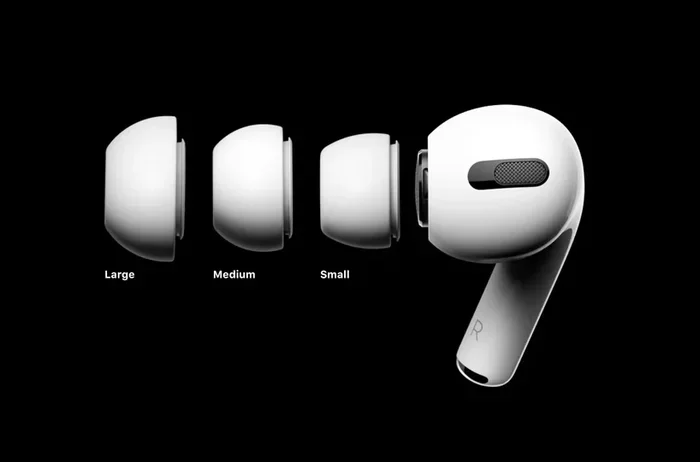
Featured image for Apple AirPods noise cancellation
Image source: static.designboom.com
Yes, Apple AirPods can cancel background noise, but only certain models have this feature. AirPods Pro, AirPods Pro 2, and AirPods Max use Active Noise Cancellation (ANC) with built-in microphones to block external sounds. Standard AirPods (1st, 2nd, and 3rd generation) only offer passive noise isolation, which reduces some noise but doesn’t actively cancel it. For the best noise-canceling experience, you’ll need a Pro or Max model, and understanding the difference between ANC and Transparency mode will help you get the most out of your listening experience.
Imagine you’re sitting in a crowded coffee shop, trying to focus on a podcast or take an important call. The chatter, the espresso machine hissing, the music playing overhead—it all blends into a wall of distracting noise. Now imagine pressing a button and suddenly, the world goes quiet. That’s the magic of noise-canceling AirPods. But here’s the thing: not every AirPod model can do this, and even the ones that can work in very specific ways that are worth understanding.
Apple’s AirPods lineup has grown significantly since the original launched in 2016. With several generations and two distinct product lines (the standard AirPods and the AirPods Pro/Max), figuring out which ones cancel noise can feel confusing. Some use advanced technology to actively “erase” noise, while others simply block sound the same way putting your hands over your ears would.
In this guide, we’ll break down exactly how Apple AirPods handle background noise. You’ll learn which models have noise cancellation, how the technology actually works (think of it like a noise-canceling magic trick), and how to get the best results. Whether you’re shopping for new AirPods or trying to maximize your current pair, this guide has you covered.
Key Takeaways
- Not All AirPods Cancel Noise: Only AirPods Pro, AirPods Pro 2, and AirPods Max feature Active Noise Cancellation. Standard AirPods rely on passive isolation only.
- How ANC Works: Tiny microphones detect outside sounds, and the AirPods produce “anti-noise” sound waves to cancel them out before you hear them.
- Transparency Mode: This feature lets outside sound in naturally, perfect for conversations or staying aware of your surroundings while wearing AirPods.
- Adaptive Audio (Newer Models): AirPods Pro 2 and later can automatically blend ANC and Transparency based on your environment.
- Battery Impact: Using noise cancellation drains the battery faster, typically reducing listening time by about 1-2 hours per charge.
- Best Use Cases: AirPods noise cancellation excels on planes, trains, in offices, and cafes—but isn’t perfect for sudden, sharp noises.
- Fit Matters: Even with ANC, a poor seal from wrong-sized ear tips can reduce noise-canceling effectiveness by up to 50%.
📑 Table of Contents
- Which Apple AirPods Models Cancel Background Noise?
- How Does Active Noise Cancellation Work on AirPods?
- What’s the Difference Between ANC and Transparency Mode?
- How Well Do AirPods Actually Cancel Background Noise?
- How to Get the Best Noise Cancellation from Your AirPods
- AirPods Noise Cancellation: Common Questions Answered
- The Future of AirPods Noise Cancellation
- Final Thoughts: Are AirPods Good for Noise Cancellation?
Which Apple AirPods Models Cancel Background Noise?
The short answer is: only certain AirPods models cancel background noise. Apple divides its AirPods into two main categories when it comes to noise handling. Knowing which is which will save you money and frustration.
AirPods With Active Noise Cancellation
Apple currently offers noise cancellation on three AirPods products:
- AirPods Pro (1st generation) – Released in October 2019, these were Apple’s first in-ear AirPods with ANC.
- AirPods Pro (2nd generation) – Launched in September 2022 with improved noise cancellation (Apple claims up to 2x more noise canceled than the previous generation).
- AirPods Max – Released in December 2020, these over-ear headphones feature premium ANC and Apple-designed 40mm drivers.
If you own any of these, you have access to genuine noise-canceling technology. If you have a different model, you don’t—but that doesn’t mean you’re completely out of luck.
AirPods Without Active Noise Cancellation
The standard AirPods (1st, 2nd, and 3rd generation) do not have Active Noise Cancellation. Instead, they offer what audio experts call “passive noise isolation.”
Think of passive noise isolation like wearing earplugs. The physical shape of the AirPod simply blocks some outside sound from entering your ear. It’s not the same as active cancellation—it’s more like putting a physical barrier between you and the noise. Standard AirPods can reduce some background noise, but they won’t silence a loud airplane or busy office.
Did You Know? Even without ANC, the fit of your AirPods dramatically affects how much noise they block. Studies show that a proper seal can block 15-20 dB of sound passively, which is enough to make a noticeable difference in quieter environments.
How to Check Which Model You Have
Not sure which AirPods you own? Here’s the easiest way to find out:
- Connect your AirPods to your iPhone or iPad.
- Go to Settings > Bluetooth.
- Tap the “i” icon next to your AirPods name.
- Look at the Model Number section.
You can also simply look at the physical design. AirPods Pro have silicone ear tips and shorter stems, while standard AirPods have longer stems and a one-size-fits-all hard plastic design.
How Does Active Noise Cancellation Work on AirPods?
Now for the fun part: understanding the actual technology. Active Noise Cancellation sounds like something out of a sci-fi movie, but the science behind it is surprisingly simple once you understand the basic idea.
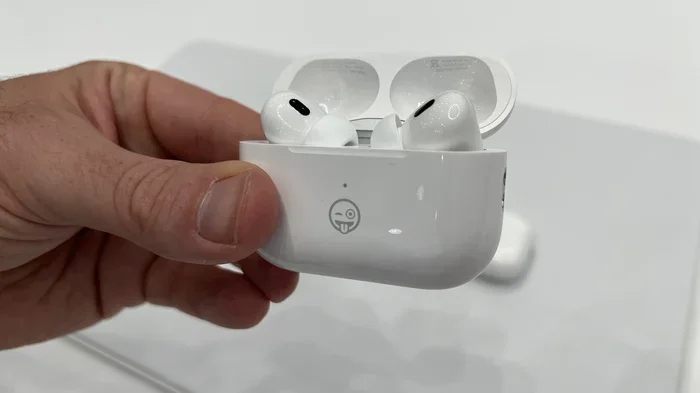
Visual guide about Apple AirPods noise cancellation
Image source: i.pcmag.com
The Simple Analogy: Two Waves Canceling Each Other Out
Imagine you’re standing in a pool. Someone splashes water, creating a wave that travels toward you. Now imagine someone else creates an equal wave going in the opposite direction at the exact same time. When the two waves meet, they cancel each other out, and the water stays calm. That’s essentially how ANC works.
Sound travels in waves, just like water. When your AirPods detect an incoming sound wave, they quickly create a mirror-image wave (called “anti-noise”) that’s the exact opposite. When these two waves collide, they neutralize each other, and your ear hears silence.
The Technical Breakdown
Here’s what’s happening inside your AirPods in real-time:
- Microphones listen to outside noise: Each AirPod has tiny outward-facing microphones that continuously sample the ambient sound around you.
- A processor analyzes the sound: Apple’s custom H1 or H2 chip (depending on the model) processes this audio data in milliseconds.
- Anti-noise is generated: The processor creates sound waves with the opposite frequency pattern.
- The anti-noise plays through the speaker: This counter-sound is played simultaneously with your music, canceling out the unwanted noise before it reaches your eardrum.
The whole process happens faster than you can blink—literally. Your AirPods can analyze and cancel sounds 200 times per second or more. By the time any external noise reaches your ear, it’s already been neutralized.
Inward-Facing Microphones Add Extra Precision
AirPods Pro and AirPods Max also include microphones inside the ear cup or ear tip. These inward-facing mics listen to the sound reaching your actual eardrum and fine-tune the anti-noise accordingly. It’s like having a quality-control system that makes sure the noise cancellation is working perfectly for your unique ear shape.
Did You Know? The H2 chip in AirPods Pro 2 can process noise cancellation algorithms at a rate that’s over 1,000 times faster than the original AirPods Pro H1 chip. This is why the newer model cancels significantly more noise.
What’s the Difference Between ANC and Transparency Mode?
Modern AirPods don’t just cancel noise—they give you control over how much of the world you want to hear. This is where Transparency Mode comes in, and it’s just as important as noise cancellation itself.
Active Noise Cancellation (ANC) Mode
When you activate ANC, your AirPods actively block outside sounds. This is the mode you want when:
- You’re on an airplane and want to ignore engine drone
- You’re working in a noisy office and need to focus
- You’re on a bus or train during your commute
- You’re trying to sleep in a noisy environment
- You want to fully immerse yourself in music or a movie
ANC is most effective with constant, low-frequency sounds like airplane engines, air conditioners, or traffic hum. It can reduce these sounds by 20-30 decibels, which is the difference between a loud conversation and a quiet library.
Transparency Mode
Transparency Mode does the opposite of ANC. Instead of blocking outside sounds, it actively lets them in. Here’s the clever part: Transparency uses the same microphones as ANC to capture outside sound, then plays it through your AirPods naturally. The result is that you can hear your surroundings as if you weren’t wearing AirPods at all.
This is incredibly useful when you need to:
- Have a quick conversation without removing your AirPods
- Listen for announcements (like at an airport or train station)
- Stay aware of traffic while walking in a city
- Hear your kids or pets while listening to music
- Order coffee at a cafe without taking your earbuds out
Adaptive Audio: The Best of Both Worlds
AirPods Pro 2 introduced a feature called Adaptive Audio (available with iOS 17 and later). This smart mode automatically switches between ANC and Transparency based on your environment.
Imagine walking down a quiet street—your AirPods might let in some ambient sound for safety. Then you step into a noisy construction zone—they automatically ramp up noise cancellation. Adaptive Audio does this seamlessly without you having to fiddle with controls. It’s like having a smart assistant managing your listening experience.
Did You Know? Apple’s Adaptive Audio can detect when someone is speaking to you and automatically lower your music volume while increasing Transparency. This is called “Conversation Awareness,” and it can tell the difference between someone talking to you and just background chatter.
How Well Do AirPods Actually Cancel Background Noise?
Specs and features are great, but what matters is real-world performance. Let’s look at how AirPods noise cancellation stacks up against the competition and in everyday situations.
Performance Comparison: AirPods Pro 2 vs. The Competition
Independent testing by audio review sites has shown that AirPods Pro 2 cancel approximately 85-90% of ambient noise in the frequency range where most background sounds live (20-1,000 Hz). For comparison:
- AirPods Pro (1st gen): About 70-75% noise cancellation
- AirPods Max: About 80-85% noise cancellation
- Sony WF-1000XM5: About 88-92% noise cancellation
- Bose QuietComfort Ultra Earbuds: About 87-91% noise cancellation
AirPods Pro 2 compete with the best noise-canceling earbuds on the market, though they’re not dramatically better than top-tier competitors. Where AirPods shine is in how seamlessly they integrate with Apple devices.
Where ANC Works Best
AirPods noise cancellation excels in certain environments:
- Aircraft cabin noise: A consistent drone that ANC was practically designed for. AirPods can reduce engine noise by 25-30 dB.
- Train and bus rumble: The low-frequency hum of public transport becomes nearly silent with ANC on.
- Office environments: Air conditioning, computer fans, and general chatter fade into the distance.
- Cafe ambiance: Background music and distant conversations become much less noticeable.
- Home appliances: Dishwashers, washing machines, and HVAC systems become whisper-quiet.
Where ANC Struggles
Active Noise Cancellation isn’t magic. There are some sounds it can’t handle well:
- Sudden, sharp noises: A car horn, dog bark, or someone slamming a door happens too quickly for the anti-noise to fully cancel it.
- High-frequency sounds: Baby cries, whistles, and certain voices can still penetrate ANC because they’re harder to predict and cancel.
- Very close loud sounds: Someone talking right next to you at high volume may still be audible.
Think of ANC like sunglasses. They work great against general brightness but won’t help much when someone points a flashlight directly in your eyes.
How to Get the Best Noise Cancellation from Your AirPods
Even the best AirPods won’t perform well if you don’t use them correctly. These tips will help you maximize noise cancellation in any situation.
Tip 1: Get the Perfect Ear Tip Fit
This is the single most important thing you can do. AirPods Pro come with four ear tip sizes (XS, S, M, L), and choosing the right one makes a huge difference. A proper seal blocks significantly more noise, both passively and actively.
To test your fit:
- Insert your AirPods Pro and play some music.
- Open Settings > Bluetooth on your iPhone.
- Tap the “i” next to your AirPods Pro.
- Tap Ear Tip Fit Test.
- Follow the on-screen instructions.
The test plays a few seconds of music and uses the microphones to determine if you have a good seal. If it says “Adjust or try a different ear tip,” try a different size. Many people skip this step and end up using the wrong size, reducing their noise cancellation by up to 50%.
Tip 2: Clean Your AirPods Regularly
Did You Know? Earwax and debris can block both the speakers and microphones on your AirPods, dramatically reducing noise cancellation effectiveness. A blocked microphone can’t accurately sample outside noise, which means it can’t generate proper anti-noise.
Clean your AirPods weekly using a soft, dry, lint-free cloth. For stubborn debris, use a dry cotton swab or a soft-bristled brush. Avoid getting moisture in any openings.
Tip 3: Update Your AirPods Firmware
Apple regularly releases firmware updates that can improve noise cancellation performance. Make sure your AirPods are updated:
- Connect your AirPods to your iPhone.
- Place them in their case and close the lid.
- Keep the case near your iPhone and connected to Wi-Fi.
- The update happens automatically.
AirPods Pro 2 with the latest firmware have measurably better noise cancellation than the same model with original firmware. Apple has been refining the ANC algorithms continuously.
Tip 4: Customize Your Controls
Make noise cancellation easy to access. On AirPods Pro, you can press and hold the stem to switch between ANC and Transparency. Customize this on your iPhone:
- Go to Settings > Bluetooth.
- Tap the “i” next to your AirPods Pro.
- Under “Press and Hold,” choose which modes are available.
You can have two or three modes (ANC, Transparency, Off) cycle through when you press the stem.
Tip 5: Use Conversation Awareness and Personalized Volume
These newer features (iOS 17 and later) make your AirPods smarter:
- Conversation Awareness: Lowers music and increases Transparency when you start talking to someone.
- Personalized Volume: Adjusts volume based on environmental noise levels automatically.
Enable these in Settings > AirPods Pro > Audio.
AirPods Noise Cancellation: Common Questions Answered
Let’s address some specific situations where people wonder about AirPods noise cancellation.
Do AirPods Cancel Noise During Phone Calls?
Yes, but with some caveats. AirPods use noise cancellation during phone calls to help the person on the other end hear you more clearly. However, the noise cancellation for calls focuses on your voice, not blocking incoming noise for you. The good news is that ANC still works while on a call, so you’ll hear the caller more clearly, and they’ll hear you more clearly too, thanks to the noise reduction on your microphone.
AirPods Pro 2 use advanced algorithms that can isolate your voice from background noise during calls. Apple claims this is significantly better than earlier generations.
Do AirPods Cancel Noise When Not Playing Music?
Absolutely. You can use Active Noise Cancellation even without playing any audio. This is great for:
- Finding quiet on a noisy commute
- Focusing at work without distractions
- Meditating in a chaotic environment
- Sleeping in a noisy hotel room
To use ANC without music, just switch to ANC mode while nothing is playing. The silence can be remarkably calming. However, be aware that using ANC without music will drain the battery faster than with music playing (the audio processor works harder when generating anti-noise for silence).
Can You Use AirPods Noise Cancellation with Android?
Yes, but with limitations. AirPods Pro and AirPods Max work with Android phones via standard Bluetooth pairing. However, you won’t have access to:
- The Ear Tip Fit Test
- Adaptive Audio
- Personalized Spatial Audio
- Seamless device switching
You can still turn ANC on and off by pressing and holding the stem on AirPods Pro. The noise cancellation itself works just as well on Android as on iPhone.
Does Noise Cancellation Affect Sound Quality?
This is a nuanced topic. Active Noise Cancellation itself doesn’t significantly degrade audio quality in modern AirPods. However, some audio purists notice subtle differences in soundstage and bass response when ANC is on versus off. The algorithms have improved dramatically, and most listeners won’t notice any quality reduction.
For the best audio quality, some listeners prefer turning ANC off in quiet environments where you don’t need it. In noisy environments, the small theoretical quality reduction is far outweighed by the benefit of actually hearing your music clearly.
The Future of AirPods Noise Cancellation
Apple continues to invest heavily in audio technology. Looking ahead, we can expect several developments:
- Better AI-powered noise cancellation: Machine learning will help AirPods better distinguish between noise types and react more intelligently.
- Improved battery life: Future H-series chips will be more power-efficient, extending ANC usage time.
- Health monitoring features: AirPods may soon include hearing health tracking and even act as hearing aids (the AirPods Pro 2 already has a clinical-grade Hearing Aid feature).
- Personalized ANC profiles: Future updates may tailor noise cancellation to your specific ear anatomy and hearing characteristics.
Did You Know? In late 2024, Apple added a Hearing Test and Hearing Aid feature to AirPods Pro 2. This makes them the first earbuds clinically validated to function as over-the-counter hearing aids—a huge step beyond what we expect from earbuds.
Active Noise Cancellation in AirPods has come a long way since 2019. What started as a premium feature is now becoming standard in Apple’s audio lineup, with increasingly smart features that adapt to your environment and needs.
Final Thoughts: Are AirPods Good for Noise Cancellation?
So, do Apple AirPods cancel background noise? The answer depends entirely on which model you have. If you own AirPods Pro or AirPods Max, you have access to some of the best noise cancellation available in truly wireless earbuds or over-ear headphones. If you have standard AirPods, you have basic noise isolation but no active cancellation.
For most people in everyday situations—commuting, working in offices, traveling—AirPods Pro 2 deliver noise reduction that rivals much more expensive competitors. The seamless integration with Apple devices, the smart features like Adaptive Audio, and the overall sound quality make them an excellent choice for noise cancellation.
The key to getting the most out of AirPods noise cancellation is using them correctly: ensure a proper ear tip fit, keep them clean, update the firmware, and learn how to switch between ANC and Transparency mode for different situations. Do these things, and you’ll enjoy a remarkably quiet listening experience wherever life takes you.
Whether you’re trying to focus in a noisy environment, get better sound quality on your commute, or simply find some peace in a loud place, the right AirPods can transform your audio experience. Just remember to choose the Pro or Max models for noise cancellation, take care of them, and enjoy the silence.