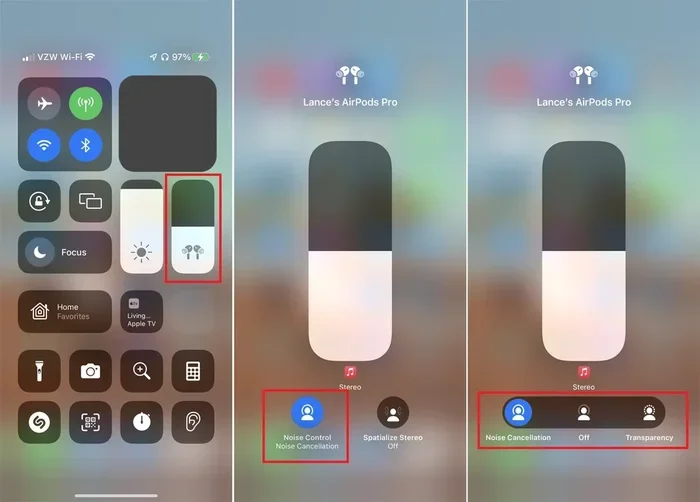
Featured image for Apple AirPods noise cancellation demonstration
Image source: cdn.shopify.com
Apple AirPods do block out noise—but how well they do it depends on the model you choose. AirPods Pro and AirPods Max feature Active Noise Cancellation (ANC) that uses microphones and smart algorithms to cancel external sound. Standard AirPods rely on Passive Noise Isolation, which physically blocks some noise but isn’t as effective as ANC. Understanding the difference helps you pick the right pair for your needs.
Imagine sitting on a noisy subway, the rumble of the train, chatter from other passengers, and the screech of brakes filling the air. Now imagine pressing a tiny earbud into your ear and—instantly—the world goes quiet. That’s the promise of noise-canceling headphones, and it’s exactly what many people hope Apple AirPods will deliver. But do Apple AirPods actually block out noise? The short answer is yes, but with some important details that depend on which AirPods you own and how you use them.
Apple has built a range of AirPods models over the years, from the basic AirPods to the premium AirPods Max. Each one handles noise differently. Some use clever technology to actively cancel sound, while others simply rely on how well they fit in your ears. If you’ve ever wondered why your friend swears by their AirPods Pro while another person says their regular AirPods “don’t block anything,” this guide is for you.
In this article, we’ll break down exactly how AirPods handle noise, the difference between active and passive noise control, and tips to get the most out of your listening experience. By the end, you’ll know precisely what to expect from your AirPods—whether you’re trying to focus at a coffee shop, drown out an airplane engine, or simply enjoy your favorite playlist without distractions.
Key Takeaways
- Not All AirPods Block Noise Equally: AirPods Pro and AirPods Max offer Active Noise Cancellation (ANC), while standard AirPods only provide passive noise isolation.
- ANC Works Through Microphones and Algorithms: Tiny microphones detect outside sounds, and the AirPods produce “anti-noise” waves to cancel them out before you hear them.
- Transparency Mode Lets Sound In: When you want to hear your surroundings, Transparency Mode uses the same microphones to let outside sound pass through naturally.
- Fit and Seal Matter a Lot: Even the best ANC won’t work well if your AirPods don’t fit properly, especially in-ear models that rely on a tight seal.
- Battery Drain Is Real: Using Active Noise Cancellation uses more battery power, so expect shorter listening times when ANC is on.
- AirPods Aren’t Perfect for Total Silence: They reduce most environmental noise but can’t block everything—especially sudden, sharp sounds or very loud environments.
- Software Updates Improve Performance: Apple regularly updates AirPods firmware, which can improve noise cancellation and overall sound quality over time.
📑 Table of Contents
- How Do AirPods Block Out Noise? The Simple Explanation
- Which AirPods Models Block Noise the Best?
- How Effective Is AirPods Noise Cancellation in Real Life?
- Tips to Maximize Noise Blocking on Your AirPods
- Active Noise Cancellation vs. Passive Isolation: What’s the Difference?
- Common Questions About AirPods and Noise Blocking
- The Science Behind AirPods Noise Cancellation
- Final Thoughts: Are AirPods Good for Blocking Noise?
How Do AirPods Block Out Noise? The Simple Explanation
Let’s start with the basics. AirPods block noise in two main ways: passive noise isolation and active noise cancellation (ANC). Think of it like closing a window versus using a fancy air filter. Closing the window (passive) keeps out a lot of the noise. But using a filter (active) actually cleans the air before it reaches you.
What Is Passive Noise Isolation?
Passive noise isolation is the simpler of the two. It’s just the physical barrier your AirPods create by sitting in or on your ears. Standard AirPods (the kind without silicone ear pieces) sit loosely in your ear, which only provides minimal sound blocking. They might muffle some background noise, but they’re not designed to truly “block” sound.
AirPods Pro and AirPods Max are better at passive isolation because of their design. The Pro models use silicone tips that create a seal inside your ear canal, similar to how earplugs work. AirPods Max have padded ear cups that cover your entire ear, forming a snug seal around the outside.
What Is Active Noise Cancellation (ANC)?
Active Noise Cancellation is where the real magic happens. ANC uses tiny microphones built into the AirPods to listen to the world around you. When they detect unwanted sounds—like the hum of an airplane or the buzz of an air conditioner—they create an “anti-noise” signal that cancels out the original sound before it reaches your ears.
Think of it like this: if someone throws a rock into a still pond, the ripples spread across the surface. Now imagine someone throwing a rock that creates the exact opposite ripples at the same time. The two sets of ripples cancel each other out, leaving the water still. ANC does the same thing with sound waves.
The Role of Transparency Mode
Apple also includes a feature called Transparency Mode, which does the opposite of noise cancellation. Instead of blocking outside sound, it uses the microphones to let outside sound in naturally. This is great for situations where you want to hear announcements, have a quick conversation, or stay aware of traffic while walking.
Did You Know? Transparency Mode processes external sounds in real time, so they sound natural—not amplified or robotic like older “hear-through” technologies.
Which AirPods Models Block Noise the Best?
Not all AirPods are created equal when it comes to noise blocking. Here’s a breakdown of each model and what you can expect.
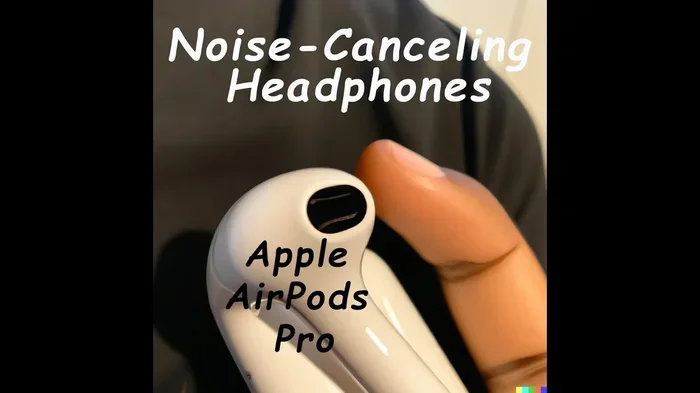
Visual guide about Apple AirPods noise cancellation demonstration
Image source: i.ytimg.com
AirPods (1st, 2nd, 3rd, and 4th Generation)
The standard AirPods—the ones without silicone ear tips—offer minimal noise isolation. They sit loosely in your ear, leaving gaps where sound can sneak in. They’re great for casual listening, but if you’re in a loud environment, you’ll still hear a lot of background noise.
The latest AirPods 4 do include a feature called Adaptive Audio, which adjusts sound based on your environment. However, they still don’t have Active Noise Cancellation like the Pro models.
AirPods Pro (1st and 2nd Generation)
The AirPods Pro are where Active Noise Cancellation really shines. Both the 1st and 2nd generation Pro models feature ANC, along with Transparency Mode and Adaptive EQ. According to Apple, the AirPods Pro 2 offer up to 2x more noise cancellation than the previous generation, thanks to the new H2 chip.
The in-ear design with silicone tips creates a strong seal, which works hand-in-hand with ANC for maximum noise blocking. If noise cancellation is your top priority, the AirPods Pro are a fantastic choice.
AirPods Max
The AirPods Max are Apple’s premium option—an over-ear design that physically covers them entirely. With large padded cushions, the AirPods Max provide excellent passive noise isolation on their own. When you add ANC to the mix, they deliver some of the best noise cancellation available in any headphones.
A study by RTINGS.com gave the AirPods Max high marks for noise isolation, especially in the low and mid-frequency ranges (like airplane rumble or office chatter).
How Effective Is AirPods Noise Cancellation in Real Life?
Now that you know how the technology works, let’s talk about what it’s actually like to use. Does ANC really make a difference, or is it just a marketing gimmick? In short—yes, it makes a huge difference.
Best Environments for AirPods Noise Cancellation
- Airplanes: The constant low-frequency hum of jet engines is exactly the kind of sound ANC excels at canceling. AirPods Pro and Max are popular picks for travelers.
- Public Transit: Buses, trains, and subways produce steady background noise that ANC handles beautifully.
- Open Offices: The low hum of computers, air conditioning, and distant conversations fade away with ANC turned on.
- Coffee Shops: Background chatter and the hiss of espresso machines become barely noticeable.
- Home Use: ANC works well for blocking out street noise, neighbors, or household sounds like washing machines.
Where Noise Cancellation Has Limits
ANC isn’t perfect. It struggles with certain types of sounds:
- Sudden, Sharp Sounds: Things like a dog barking, a car horn, or a door slamming are harder to cancel because they’re quick and unpredictable.
- Very High-Frequency Sounds: Whistles, squeals, and some speech sounds (like “s” and “t”) can slip through, though the silicone seal helps block these.
- Very Loud Environments: At a rock concert or a construction site, even ANC can’t fully protect your ears—though it does help.
Did You Know? The H2 chip in AirPods Pro 2 processes noise cancellation at 48,000 times per second, making it incredibly responsive to changes in your environment.
Tips to Maximize Noise Blocking on Your AirPods
Even the best noise-canceling technology won’t work well if your AirPods aren’t used properly. Here are some practical tips to get the most out of your noise cancellation.
1. Get the Right Fit
If you’re using AirPods Pro, the fit is everything. The silicone ear tips need to create a tight seal inside your ear canal. If they don’t, noise will leak in, and ANC will be less effective.
Apple includes an Ear Tip Fit Test in the AirPods settings (Settings > Bluetooth > AirPods Pro > Ear Tip Fit Test). This test plays a quick sound and tells you if the tips you’re using are the right size. Try each size—many people are surprised to find they need a different size for each ear.
2. Keep Your AirPods Clean
Dirt, earwax, and debris can block the microphones or mess up the seal on your silicone ear pieces. This reduces effectiveness. Use a soft, dry cloth to wipe your AirPods regularly. For the silicone tips, remove them and rinse with water (no soap), then let them dry completely before reattaching.
3. Update Your Firmware
Apple frequently releases firmware updates for AirPods that can improve noise cancellation, sound quality, and battery life. Make sure your AirPods are updated by connecting them to your iPhone and keeping them near your device while it’s connected to Wi-Fi.
4. Use Adaptive Audio (AirPods Pro 2 and AirPods 4)
Adaptive Audio is a newer feature that automatically blends Active Noise Cancellation and Transparency Mode based on your environment. It can also lower loud sounds (like a siren) to protect your hearing while still letting you hear your music. It’s like having a smart assistant managing your noise levels for you.
5. Manage Battery Life
Active Noise Cancellation uses more battery than listening without it. If you’re running low on battery, you can turn off ANC to extend listening time. On AirPods Pro, you can do this by pressing and holding the force sensor on the stem, or by using the Control Center on your iPhone.
6. Pair with the Right Device
While AirPods work with non-Apple devices, some features—like ANC, Transparency Mode, and Adaptive Audio—work best when paired with an Apple device running the latest iOS, iPadOS, or macOS. Make sure your devices are up to date to get the full noise-canceling experience.
Active Noise Cancellation vs. Passive Isolation: What’s the Difference?
Understanding the difference between ANC and passive isolation is key to making a smart buying decision. Here’s a quick comparison.
Passive Noise Isolation
- Uses physical barriers (ear cups or ear tips) to block sound
- Works for all frequencies but is best at blocking high-frequency sounds
- Doesn’t require power or batteries
- Effectiveness depends on fit and design
- Less expensive to implement
Active Noise Cancellation (ANC)
- Uses microphones and digital processing to cancel sound
- Best at canceling low-frequency, steady sounds (engines, hums, fans)
- Requires battery power to function
- Can adapt to changes in your environment in real time
- More expensive and complex to design
For the best noise blocking, you want both. That’s why AirPods Pro and AirPods Max are so effective—they combine a tight physical seal with advanced ANC technology.
Common Questions About AirPods and Noise Blocking
Let’s address some of the most common questions people have about AirPods and noise cancellation.
Do AirPods Block Out Noise Without Playing Music?
Yes, you can use AirPods Pro or AirPods Max with Active Noise Cancellation turned on without playing any music. This is great if you just want peace and quiet, like on a long flight when you want to sleep.
Can AirPods Replace Earplugs?
Not entirely. While AirPods Pro do a great job at reducing noise, they aren’t designed as hearing protection. In very loud settings—like concerts or construction sites—you should still use proper earplugs or earmuffs.
Do AirPods Block Out Snoring?
AirPods Pro can help reduce the sound of snoring, but they won’t completely eliminate it, especially if the snoring is loud or your partner is nearby. For light to moderate snoring, though, ANC can make a noticeable difference.
Why Don’t My AirPods Cancel Noise Well?
If your AirPods Pro or Max aren’t canceling noise effectively, check these things:
- Make sure ANC is actually turned on (check Control Center or press the force sensor)
- Try different ear tip sizes and run the Ear Tip Fit Test
- Clean your AirPods, especially the microphones and ear tips
- Update your firmware
- Reset your AirPods if problems persist
The Science Behind AirPods Noise Cancellation
Let’s geek out a little. How does ANC actually work? It’s based on a simple physics principle: wave interference. When two sound waves of equal amplitude but opposite phase meet, they cancel each other out.
Here’s how it works step-by-step:
- The microphones on your AirPods pick up external noise.
- The H1 or H2 chip analyzes the sound and creates an “anti-noise” wave that’s the exact opposite of the incoming sound.
- This anti-noise is played through the AirPods’ speaker at the same time as the original noise reaches your ear.
- The two sound waves meet and cancel each other out, leaving you with silence (or greatly reduced noise).
This happens for each ear independently, which is why AirPods have multiple microphones. The H2 chip in AirPods Pro 2 can process all of this in real time—up to 48,000 times per second—adjusting instantly to your environment.
Did You Know? The concept of active noise cancellation was first developed in the 1930s for use in airplane cockpits. It wasn’t until the 1980s that it became available to consumers through headphones.
Final Thoughts: Are AirPods Good for Blocking Noise?
So, do Apple AirPods block out noise? Absolutely—but with a few caveats. If you own standard AirPods (1st through 4th gen), you’ll get minimal noise isolation, which might not be enough in loud environments. If you own AirPods Pro or AirPods Max, you’ll enjoy some of the best noise cancellation available today, especially when paired with the right fit and updated firmware.
Here’s the bottom line:
- Choose AirPods Pro if you want portable, in-ear noise cancellation for travel, work, or daily commutes.
- Choose AirPods Max if you want premium over-ear noise cancellation for home, office, or long listening sessions.
- Choose standard AirPods if noise blocking isn’t a priority and you mainly want a convenient, easy-to-use option for casual listening.
Noise cancellation isn’t just a luxury—it’s a quality-of-life feature. Whether you’re trying to focus, relax, sleep on a plane, or simply enjoy your music without distractions, the right AirPods can transform your experience. And with Apple’s continued software updates and hardware improvements, today’s noise cancellation is better than ever. If you’re still using old earbuds that let in every sound around you, upgrading to AirPods Pro or AirPods Max might be the best decision you make all year.