Yes, the AirPods Pro 2nd Generation do have USB-C charging—but only if you bought them after September 2023. Apple quietly switched from the Lightning port to USB-C on this model, making it the first AirPods Pro version to support the universal standard. The original 2022 version still uses Lightning, so checking your model number and case design is essential. All AirPods Pro 2 with USB-C also support Lossless Audio with the Apple Vision Pro.
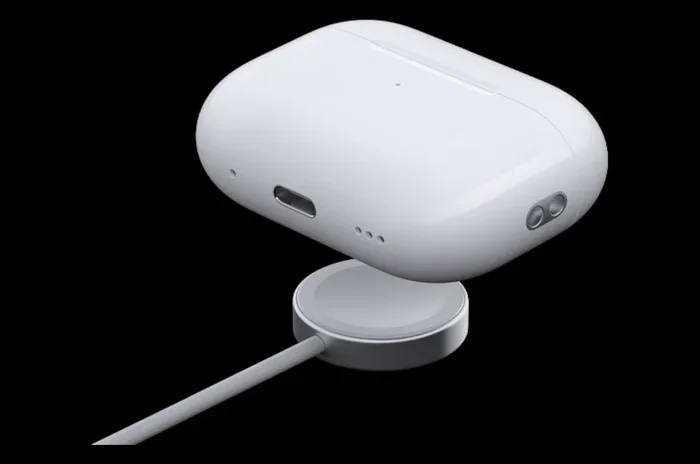
Featured image for AirPods Pro 2 USB-C charging case
Image source: yankodesign.com
If you’ve been wondering whether the AirPods Pro 2nd Generation uses USB-C charging, you’re not alone. This is one of the most common questions Apple fans ask, and the answer has a small twist that trips up many people.
The short answer is yes—but only for some of them. Apple released the AirPods Pro 2 in September 2022 with a Lightning charging port, just like older iPhones. Then, one year later in September 2023, Apple quietly switched the port to USB-C. Both versions are technically called “AirPods Pro 2nd Generation,” which causes a lot of confusion at stores and online.
This guide will clear up the confusion once and for all. You’ll learn exactly how to tell which version you have, what changed between the two models, and why USB-C matters more than you might think. Think of this as your friendly cheat sheet to everything USB-C and AirPods Pro.
Key Takeaways
- USB-C Was Added in September 2023: Apple updated the AirPods Pro 2nd Gen to USB-C during its “Wonderlust” iPhone 15 event, replacing the older Lightning connector.
- You Can Tell by Looking: The USB-C model has an oval-shaped port at the bottom of the case, while the Lightning version has a small, narrow slot.
- Charging Speed Is Identical: Both versions charge at the same speed, but the USB-C version is more convenient because you likely already own a compatible cable.
- Extra Features Included: The USB-C AirPods Pro 2 are IP54-rated for dust and water resistance, and they support Lossless Audio with the Apple Vision Pro.
- Wireless Charging Still Works: You can still charge the USB-C case on any Qi or MagSafe wireless charger, just like before.
- One Cable for Everything: The biggest benefit is reducing cable clutter—your iPhone 15, iPad, MacBook, and AirPods Pro 2 can all share one USB-C cable.
- Verify Before You Buy: Check the model number (A2968) or the charging port shape to confirm you’re getting the USB-C version.
📑 Table of Contents
- The Big USB-C Switch: What Apple Did and Why
- How to Tell If Your AirPods Pro 2 Have USB-C or Lightning
- Charging Speed: USB-C vs. Lightning on AirPods Pro 2
- What You Can Do With USB-C That You Couldn’t With Lightning
- Compatibility: Will USB-C AirPods Pro 2 Work With Older Devices?
- Common Questions and Myths About AirPods Pro 2 USB-C Charging
- The Final Verdict: Is USB-C Worth It?
The Big USB-C Switch: What Apple Did and Why
In September 2023, Apple held its annual fall event and unveiled the iPhone 15 lineup. The biggest news? Every iPhone 15 model finally switched from Lightning to USB-C. But Apple also slipped in a quieter update: the AirPods Pro 2nd Generation got a USB-C charging case too.
This was a huge deal because Apple had been holding onto its proprietary Lightning port for over a decade. The European Union actually passed a law in 2022 that forced all electronics companies—including Apple—to use USB-C as a common charging standard by the end of 2024. Did you know? The EU estimated this single law could save consumers around €250 million a year on unnecessary chargers and cables.
Instead of waiting for the deadline, Apple got ahead of it. The new AirPods Pro 2 with USB-C launched alongside the iPhone 15, and Apple kept selling both versions for a while. Eventually, the Lightning version was phased out completely by late 2024.
Why USB-C Is the New Default
USB-C stands for “Universal Serial Bus Type-C.” Think of it like the Swiss Army knife of cables—it can charge your phone, transfer data, send video to a monitor, and even power a laptop. It’s a single port that does it all.
Here’s a simple analogy. Imagine if every appliance in your kitchen used a different plug shape. Your toaster has one plug, your microwave has another, and your coffee maker has yet another. You’d need a drawer full of adapters, right? That’s what life was like with Lightning cables, Micro-USB, and USB-C all competing. The move to USB-C is like everyone finally agreeing to use the same outlet shape.
The Lightning Version Is Officially Discontinued
As of late 2024, Apple no longer sells the Lightning version of the AirPods Pro 2 on its official website. You can still find them at some third-party retailers, clearance sales, or used markets, but new production has stopped. If you’re buying AirPods Pro 2 today, you’re almost certainly getting the USB-C version.
How to Tell If Your AirPods Pro 2 Have USB-C or Lightning
Here’s the tricky part: both versions look almost identical at first glance. The earbuds themselves are the same shape, color, and size. The charging cases are also nearly identical. So how can you tell them apart?
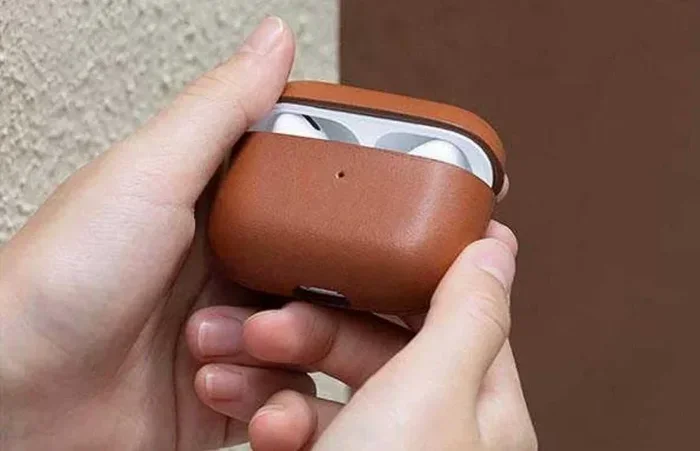
Visual guide about AirPods Pro 2 USB-C charging case
Image source: iaqaba.com
Look at the Charging Port
This is the easiest and most reliable method. Turn the charging case upside down and look at the port on the bottom.
- USB-C version: You’ll see a small oval or rounded-rectangle shape. It’s the same port you’d find on a modern Android phone, iPad, or MacBook.
- Lightning version: You’ll see a narrow, pill-shaped slot. It’s smaller and more rectangular than USB-C.
If you’ve ever charged a newer laptop, phone, or Nintendo Switch, you’ve seen a USB-C port. If you remember the older iPhone cables (the ones with the small, flat connector), that was Lightning.
Check the Model Number
Every Apple product has a model number printed somewhere. For the AirPods Pro 2, here’s what to look for:
- A2968: This is the USB-C version of the AirPods Pro 2.
- A2707: This is the original Lightning version of the AirPods Pro 2.
You can find this number in two places. First, check the settings on your iPhone by going to Settings > Bluetooth, tap the “i” next to your AirPods, and look for the model number. Second, look at the tiny text printed inside the charging case lid or on the bottom of the case.
Check the Original Packaging
If you still have the box, take a look. The USB-C version’s packaging has a small USB-C cable icon on the side, along with the words “USB-C Charging Case.” The Lightning version says “Lightning Charging Case” instead.
Look for the IP54 Rating
The USB-C version has an IP54 rating, meaning it’s resistant to small dust particles and water splashes. The original Lightning version only has an IPX4 rating, which covers water but not dust. You can check by looking at the case itself—it should have “IP54” printed in tiny letters somewhere on the case. Did you know? The “5” in IP54 means dust won’t break the case, and the “4” means it can handle splashing water from any direction.
Charging Speed: USB-C vs. Lightning on AirPods Pro 2
Here’s some good news: both versions of the AirPods Pro 2 charge at exactly the same speed. The charging case has a small battery, so even a slow charger fills it up pretty quickly.
Visual guide about AirPods Pro 2 USB-C charging case
Image source: p.turbosquid.com
How Fast Does It Charge?
According to Apple, five minutes in the case gives you about one hour of listening time or one hour of talk time. A full charge from zero takes around one hour, and the case itself takes about the same time when plugged in. So whether you have Lightning or USB-C, your wait times are identical.
The reason is simple: the charging speed isn’t limited by the cable type. It’s limited by the battery inside the case, which can only handle so much power safely.
What About Wireless Charging?
Both versions support wireless charging on any Qi-certified pad or Apple’s MagSafe charger. This hasn’t changed. If you have a wireless charging pad on your desk or nightstand, just plop the case down and it’ll start charging—no cable needed.
The MagSafe charger is especially nice because it magnetically snaps into place, so you don’t have to worry about the case sliding around. It’s like the case and the charger are little magnets that just want to be together.
What You Can Do With USB-C That You Couldn’t With Lightning
You might be thinking, “If charging speed is the same, why does the port type even matter?” Great question! The real magic of USB-C isn’t speed—it’s convenience and a few bonus features.
Charge Everything With One Cable
This is the biggest win. If you own a modern iPhone (15 or newer), an iPad, a MacBook, or even a Nintendo Switch, you already have USB-C cables lying around. With the Lightning AirPods Pro 2, you needed a special cable. Now, you can use the same cable that charges your laptop to charge your earbuds.
Think about your backpack right now. How many different cables are in there? Probably a Lightning cable, a USB-C cable, maybe a Micro-USB one for an old speaker, and perhaps another for a different gadget. USB-C is like a universal remote for cables—one cable can do the job of five.
Lossless Audio With Vision Pro
Here’s a cool feature that only works with the USB-C version: 20-bit, 48 kHz Lossless Audio when paired with the Apple Vision Pro headset. This is a fancy way of saying the sound quality is slightly better and there’s no compression happening.
Now, will you actually notice this difference? For most people, probably not. But for music lovers and audiophiles, it’s a nice bonus that wasn’t possible with the Lightning version. The USB-C port allows for faster data transfer, which is needed to send that high-quality audio signal.
Use Your iPhone to Charge Your AirPods
Here’s a neat trick. If your iPhone 15 (or newer) has a USB-C port, you can actually plug your AirPods Pro 2 case directly into your phone with a USB-C cable. Your phone will share its battery power with the AirPods. It’s like a little charging friendship.
This is super handy when you’re traveling and your AirPods case dies, but your phone still has plenty of battery left. Just plug them in for a few minutes and you’re back in action.
Better for the Environment
Fewer cable types means less electronic waste. The EU estimated that,统一充电标准 could reduce around 11,000 tonnes of electronic waste every year. While your personal impact is small, every cable that doesn’t end up in a landfill helps.
Compatibility: Will USB-C AirPods Pro 2 Work With Older Devices?
Yes! Just because the case has a USB-C port doesn’t mean the AirPods only work with new gadgets. They’re fully compatible with any device that supports Bluetooth audio.
Works With iPhones (Any Model)
The AirPods Pro 2 with USB-C work with any iPhone running iOS 17 or later, including older iPhones that have Lightning ports. The AirPods connect wirelessly via Bluetooth, so the port on your phone doesn’t matter at all.
You get all the same features, including quick pairing, automatic device switching (if you’re signed into the same Apple ID), and Find My tracking.
Works With Android and Other Devices
The AirPods Pro 2 work with Android phones, Windows laptops, smart TVs, and any other Bluetooth-enabled device. You won’t get all the fancy Apple-specific features like spatial audio with head tracking or seamless switching, but the basic listening and calling functions work perfectly.
Setting them up with an Android phone is simple. Just open the case near your phone, press the button on the back until the light flashes white, and select “AirPods Pro” from your Bluetooth menu.
Works With All Chargers and Power Banks
You can charge the USB-C case with any USB-C cable and any USB-C power source. That includes:
- Wall chargers from your iPhone, iPad, or MacBook
- Portable power banks
- Your laptop’s USB-C port
- Car chargers with USB-C ports
- Wireless charging pads (Qi or MagSafe)
Basically, if it’s a modern charging setup, it’ll work with the USB-C AirPods Pro 2.
Common Questions and Myths About AirPods Pro 2 USB-C Charging
Let’s clear up some of the most common questions and misconceptions floating around the internet.
Myth: USB-C Charges Faster Than Lightning
As we covered, charging speed is the same for both versions. The bottleneck is the battery, not the cable. Don’t expect faster charging just because the port shape changed.
Myth: You Need a Special Cable to Charge USB-C AirPods
Nope. Any USB-C cable will work, whether it’s the one that came with your iPhone 15, your MacBook, or a third-party cable from Amazon. There’s no special “Apple-certified” version needed for basic charging.
Myth: USB-C AirPods Pro 2 Are Waterproof
They’re water-resistant, not waterproof. The IP54 rating means they can handle sweat, rain, and the occasional splash, but you shouldn’t submerge them in water or wear them in the shower. Did you know? Even Apple’s newest AirPods Pro can be damaged by chlorine, so leave them in the locker next time you hit the pool.
Can I Use My Old Lightning Cable?
Only if you have the Lightning version of the AirPods Pro 2. The USB-C version won’t accept a Lightning cable because the port shapes are different. They simply won’t fit.
Do USB-C AirPods Pro 2 Come With a Cable in the Box?
Yes, Apple includes a USB-C to USB-C cable in the box. It’s a short cable, just long enough to charge from a laptop or wall adapter. If you want a longer one, you’ll need to buy it separately or use one you already own.
The Final Verdict: Is USB-C Worth It?
So, do the AirPods Pro 2nd Generation have USB-C charging? The answer is a clear yes for any model bought after September 2023. The USB-C version is the new standard, and Apple has fully transitioned away from Lightning for this product line.
Is it worth getting excited about? Absolutely, even if the charging speed itself hasn’t changed. The real benefit is having one less wire to keep track of. If you own other USB-C gadgets, the AirPods Pro 2 will fit right into your charging setup seamlessly.
If you’re shopping for AirPods Pro 2 today, you’ll almost certainly get the USB-C version, and you can charge them with the same cable that powers your iPhone, iPad, and laptop. That’s a small change that makes a big difference in everyday convenience.
Just remember to check the model number or look at the port if you’re buying used or from a third-party seller. You don’t want to accidentally end up with the older Lightning version when you expected USB-C. Now that you know the difference, you’re all set to make a smart choice. Happy listening!